Apps

See All Stories

Learn about the latest news for iOS, Mac, Apple Watch, and Apple TV apps

Apps for iOS, macOS, tvOS, and watchOS power our modern world. 9to5Mac will update you on the latest news, review, and updates for all types of apps. “There’s an App for that”.

The term came became part of our vocabulary when Steve Jobs announced The App Store as part of the iPhone 2.0 software update in 2008.

Over the years, the term has become as common as kleenex for describing applications on all of our devices. Apple’s platforms have apps for just about anything from finance, banking, sports, social media, podcasting, music, and more. We have a guide for helping you discover the best ones as well. Apps are now on everything from our TV, to our smartphones, on our laptops, and all the way down to our wrists.

As new ones are released or existing ones have major updates, the team here at 9to5Mac will bring you the latest news and reviews. If you want to follow along with video footage, be sure to follow 9to5Mac on YouTube. Scroll down below our latest updates on all things relating to applications on iPhone, iPad, Mac, Apple TV, and Apple Watch.


Review: Moment is a huge improvement on Facebook sharing for OS X

Site default logo image

When Mountain Lion launched last year, Apple introduced some basic Facebook sharing options to OS X. You can post a status update from Notification Center or upload a photo from Finder, Preview, iPhoto, or other Mac applications. While those functions are useful, Apple has yet to really embrace all of Facebook’s features. For example, you can’t tag a friend in a status update or create a new photo album, and the notification integration, while nice, is a bit unreliable.

Today, Tapmates released Moment, a new app that bridges the gap between OS X’s Facebook integration and the features you’re already used to on the Facebook website. Keep reading for our full review.

Site default logo image

Tango launches SDK to become the social layer of apps and games

.

Tango, a mobile messaging and video calling app, has announced that it will open its platform to third-party developers in order to expand the service. The company, which now serves over 120 million members worldwide, plans to partner with third party developers in order to integrate its newly crafted software development kit (SDK) into its apps.

Tango states that by allowing third party apps to take advantage of their unique messaging and calling service, it can better serve as a unifying social layer amongst games and other apps. The company hopes that by doing so it can better reflect users’ real-world connections with friends and family and create gaming experiences akin to participating in the cliched family board game night than blankly staring down at a smartphone.

According to Tango CEO Eric Setton, users have been playing a massive amount of games within the app every month. “But we found that we can’t do everything we want to inside the app, in terms of putting out the most compelling content out there and presenting it to our members,” Setton explains. Much as Tango’s actual service, the SDK allows the third-party apps to connect with its network, retrieve a list of friends, and then allow those users to message each other using text, picture, and video. The SDK also includes support for social leaderboards, which show how users’ scores compare with friends and allow for both competitive and collaborative in-game mechanics.

Game developers have given the SDK a warm reception so far says Setton, because of its potential for increased app discovery. Gameloft will soon be releasing an app in called “Candy Block Breaker for Tango” on iOS, and that will be then followed by “JetPack Jinx for Tango,” developed by Bubble Gum Interactive. Developers like Gameloft and Bubble Gum Interactive who utilize Tango’s SDK will split revenues amongst the participating companies.

While  initial partnerships with Tango were specifically focused on mobile gaming, Tango’s SDK will be open to developers looking to to add the functionality to another app genre.

Building and opening an SDK is a massive step for Tango in its steady transformation from a simple video calling app to a mobile social network. If executed correctly, Tango’s SDK may be able to push the company into a position that could rival existing networks like Skype and Fringe. Time will tell if Tango’s investment into third party apps is the key to its own success.

Developers interested in Tango’s service can apply for access to the Tango SDK from the company’s homepage.

Site default logo image

Gameloft releases first trailer for upcoming Modern Combat 5 title [Video]

With each instalment of the popular FPS Modern Combat series on iOS and Android, Gameloft seems to be getting a little closer to matching the quality of gameplay we expect from the top of the line console games in the genre such as Call of Duty.  While it’s no secret the Modern Combat series has borrowed a lot from COD (as have many other FPS games), the latest trailer for the upcoming Modern Combat 5 title looks to be the closet thing to an immersive, action-packed COD-like shooter that we’ll have on mobile devices. Note: On top of the gameplay, the logo towards the end of the video (including the animations) is little too close to the Call of Duty Modern Warfare series for my liking. Gameloft has been accused several times of knocking off games from big developers in the console world, most notably with its Gangstar (aka GTA clone) and NOVA (aka HALO clone) series.

We don’t learn a whole lot from the trailer itself, but it does appear much of the action will be taking place in Venice, Italy this time around. Despite the shameless similarities to other big franchises, those excited for the upcoming Modern Combat 5 will seemingly have to wait until E3 to hear more about when and for how much it will be coming to iPhone, iPad, and Android.

Kamcord adds voice overlay feature, announces 500M iOS gameplay videos recorded in last 6 months

Site default logo image

Kamcord, the startup offering a free SDK that makes it easy for iOS devs to offer in-game recording functionality to their users, today is announcing some pretty big updates to the service. Since grabbing $1.5 million in seed funding from some notable investors back in December (Andreessen Horowitz, Google Ventures, Yahoo! CEO Marissa Mayer, and others), the Y Combinator-backed service has experienced some significant traction and the team is adding plenty of new features to stay ahead of the competition.

The big new feature being announced is voice overlay functionality that will allow users to narrate their videos while they play, as demoed by the team in the video above. CEO Matt Zitzmann also provided us with some other updates the team has added in the last month, including: Video trimming, a custom UI / white-label solution, and a new “Gameplay of the week” notifications feature.

Also being announced today: Kamcord has recorded over 500 million gameplay videos in the last 6 months alone across the 100 apps its currently deployed in. One those games includes the latest from Chillingo and Zitzmann says the company is talking to all the other big mobile game developers too.
Expand
Expanding
Close

Site default logo image

Experimental Dropbox build introduces easy screenshot sharing and more

Dropbox released version 2.3.12 as an “experiemental” build today, adding a few interesting new features that will hopefully make it through the beta process into the shipping version of the app. The new features, as noted by MacStories, include the option to have screenshots automatically added to your dropbox with the link copied to your clipboard for easy sharing, much like the automatic sharing features found in CloudApp and Droplr.

New in 2.3.12

  • Screenshot to Dropbox
  • Move to Dropbox
  • Import from iPhoto
  • Much faster upload/download speeds for large files
Site default logo image

Snapchat releases v5 ‘Banquo’ with updated GUI, new ways to snap and more snappiness™

Snapchat 5.0 [Free, iTunes] just hit the App Store with some fresh new features and a totally redesigned interface. Version 5, codenamed Banquo, adds snap navigation, doubletap to reply, new ways to add friends, in-app profiles and the ability to send snaps directly from your address book. As with all updates, this one includes the requisite speed enhancements and design improvements…making it, dare we say, snappier™?

Site default logo image

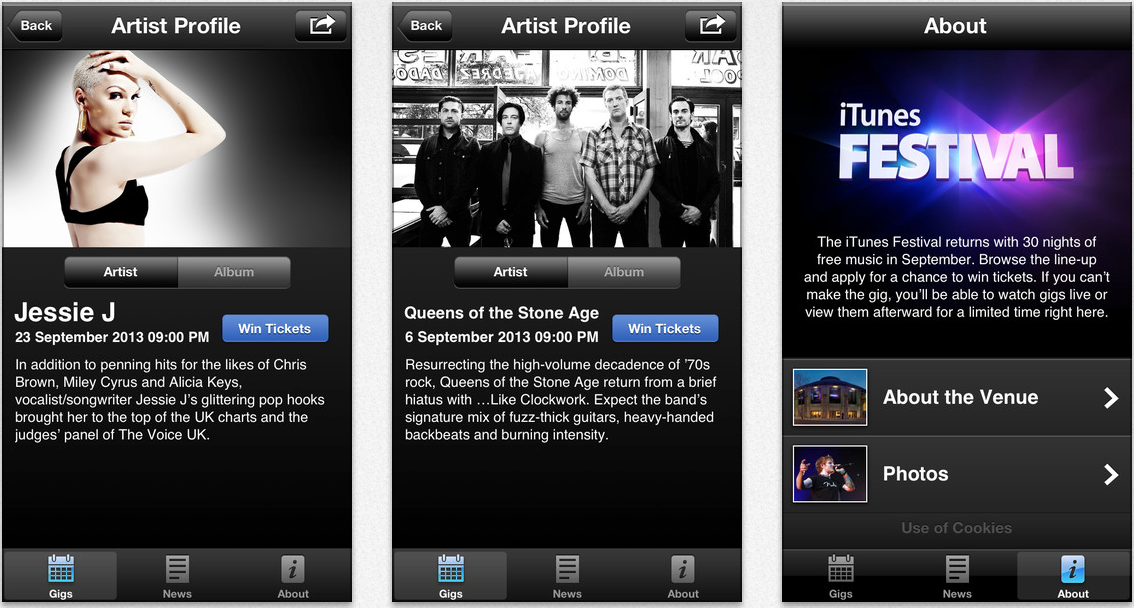
Apple adds Passbook support to its iTunes Festival London 2013 iPhone app

Apple has added Passbook functionality to its app for the iTunes Festival London 2013 app. Additionally, today’s update brings support for image viewing in an iOS device’s landscape orientation. The app was updated late last month to list the line-up of artists for the September Apple-run music festival. Apple announced this year’s festival last week, noting that artists such as Jack Johnson, Justin Timberlake, and Thirty Seconds to Mars would highlight the events. The app is currently not available in the United States iTunes Store. 


Expand
Expanding
Close

Site default logo image

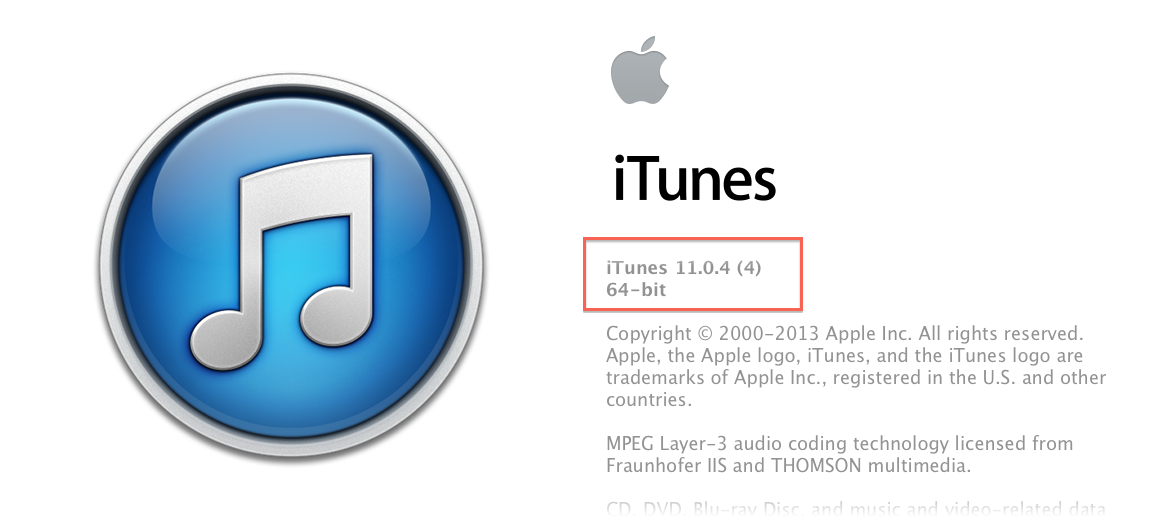
Apple releases iTunes 11.0.4 with fixes for syncing, iTunes Store bugs

This morning, Apple has released iTunes 11.0.4 with a focus on bug fixes. Notably, according to the release notes, a bug that would force iTunes to quit when syncing moves between wired and wireless states has been fixed.

Additionally, a bug that forces users to repeatedly sign-in to the iTunes Store has also been squashed. The update is available via the Mac App Store’s Software Update function.

Last month, Apple updated iTunes with a new Mini-Player design and other improved music sorting and playback views. A bug fix release for Aperture for Mac has also been issued.


Expand
Expanding
Close

Site default logo image

Kindle for iOS adds line spacing, multipage highlights, accessibility improvements, more

Line Spacing

Amazon updated its Kindle iOS app today with a number of notable improvements. Included in version 3.8 of the app is the ability to adjust line spacing to loose, normal or tight, and multipage highlights allowing you to “highlight long passages that span multiple pages for added convenience.”

Amazon also noted that it added accessibility improvements in today’s update including the ability to set a higher maximum font size.

What’s New in Version 3.8

• Line Spacing – loose, normal, and tight line spacing options change the page layout to suit your reading preference
• Multipage Highlights – highlight long passages that span multiple pages for added convenience
• Accessibility Improvements – select a higher maximum font size, bug fixes
• Bug Fixes/Stability Improvements

Site default logo image

British Airways adds Passbook support for digital boarding passes to iPhone app

We knew from a previous announcement last year that British Airways has been working on integrating Passbook integration for its digital boarding passes, much like American Airlines and a long list of other major airlines have done already. Today the airline has officially rolled out an update to its iPhone app that adds the ability to add digital boarding passes to Passbook.

It also confirmed that it will be enhancing the feature further my mid-June with direct links to the Passbook boarding passes on the iPhone’s lock screen:

By mid June we’ll be enhancing Passbook boarding passes by adding direct links to them from your iPhone’s lock screen as you’re ready to fly. This will make it even easier for you to access your boarding pass on the move. We’ll send you a message via the app as soon as these are enabled.

On top of the convenience of having your BA boarding pass alongside your other Passbook passes and cards, Passbook also allows users to sync boarding passes across devices via iCloud and receive time and location-based reminders that display the boarding pass at the time of your flight or upon arriving at the terminal.

BA notes that, “From now on, all new boarding passes will be presented in Passbook.”

The updated British Airways app with Passbook support is available from the App Store now.

Site default logo image

Analog for Mac receives Analog Camera filters, on sale through Sunday

<a href="http://click.linksynergy.com/fs-bin/click?id=jZ6GP8Fu9UU&subid=&offerid=146261.1&type=10&tmpid=3909&RD_PARM1=https%3A%2F%2Fitunes.apple.com%2Fus%2Fapp%2Fanalog%2Fid418343177%3Fmt%3D12%23" target="_blank">Analog</a> allows you to easily crop photos, add filters and borders, and share from your Mac.

Analog for Mac received an update today that includes the eight beautiful filters from Analog Camera for iPhone which we reviewed at launch last week.

If you haven’t already tried Analog for Mac, it allows you to edit and add filters with varying intensity, frame and crop, and share photos on your Mac to Facebook, Flickr, CloudApp, and other services. It’s a great time to try Analog for Mac as it adds new filters and drops its price in half for the next few days.
Expand
Expanding
Close

Site default logo image

Chatology for Mac, Flexbits’ answer to the comical search bugs in the Mac’s Messages app

.

Flexibits, makers of the popular calendar app Fantastical for Mac and iPhone, have just announced their next product for the Mac. Their new app, Chatology, seeks to ease the pain of searching through conversations using Apple’s buggy Messages app.

If you haven’t tried this yourself, don’t. But often when searching on messages, the application locks up for an indeterminate amount of time. Apple doesn’t seem to be getting all of our crash/bug reports and hasn’t fixed it since its release with Mountain Lion.

https://twitter.com/stroughtonsmith/status/341979376935649281

A new page on the Flexbits website shows the above image and option to signup for their mailing list, which will include updates on Flexibit’s suite of apps as well details on when you can download Chatology.

Gmail for iOS updated with new inbox grouped by category & improvements to notifications

Site default logo image

As expected, Google just started rolling out its brand new inbox to iOS users after first introducing us to the new category-based design last week. While its not a tabbed design like on the desktop, much like the Android app that just started rolling out iOS users can now access the new feature that groups emails into separate inboxes by selecting categories from the app’s side navigation bar.

 Meet the new inbox: If you’ve enabled the new inbox, your mail is now grouped into categories so that you can see what’s new at a glance and decide which emails you want to read when. Primary mail is shown first and it’s easy to access and keep track of email in other categories by opening the menu. Configure this feature by going to Gmail.com on your computer.

Today’s Gmail update also brings improved notifications allowing you to customize what emails you receive notifications for:
Expand
Expanding
Close

Site default logo image

“Draw Something” creator OMGPOP closes down

Just 16 months after being acquired by Zynga for a reported $200 million, the OMGPOP team, creators of the once-popular “Draw Something” app, has been laid off along with many other Zynga employees. To top it off, it looks like employees weren’t properly notified of their new employment status.

Zynga has been struggling to turn a profit, so the mass lay-offs may come as no surprise. However, it doesn’t look like they were provided with great post-Zynga assistance.


Expand
Expanding
Close

Google updates Chrome for iOS with conversational voice search, improved voice recognition & performance enhancements

Site default logo image

As expected, Google updated its Chrome for iOS app to version 27 today after releasing updates for both desktop and Android late last month. The update includes a number of new improvements, the most notable of which is voice search that allows users to take advantage of the conversational voice search features Google already rolled out to Mac. Google previously announced the feature (pictured above), would be arriving on iOS, but today the updated app is officially available to all on the App Store.

With today’s update you will not only be able to search with your voice right within Chrome (a feature already available to users through the Google Search iOS app), you’ll also get “answers spoken back to you” for specific search results. Google first showed off the new conversational search features at its I/O event last month.

Other improvements in today’s update include faster voice recognition “with text streamed on the fly,” faster page reloads even on slow networks, and the usual stability and security enhancements.
Expand
Expanding
Close

Site default logo image

WordPress for iOS updated with redesigned user interface, faster posting, more

WordPress received an overhauled user interface for its iOS app today. The update allows users to post content much faster via a shortcut on its sidebar now as well. Notifications received performance improvements in the new version.

What’s New in Version 3.6

• A completely redesigned new user experience
• A faster way to post: added a shortcut on the sidebar
– Fixed a problem with Tumblr imported blogs
– Emoticons now appear correctly on notifications
– Performance improvements for notifications
– Updated translations: now also in Russian, Danish, and Korean

You can grab the new WordPress 3.6 on the App Store today.

Site default logo image

Google Drive for iOS updated with comments for Google Docs files & swipeable images

Google today updated its Drive app for iOS with a couple new features including the ability to access comments for Google Docs and improvements to viewing images stored in Drive.

Version 1.4.0 of Google Drive for iPhone and iPad introduces the ability to “view, create, reply, and resolve comments in Google Docs files,” something users could not previously access from the mobile app for iOS.

While it’s not the full blown card-style redesign the Android app received a couple weeks ago, Google is also making easier to quickly view photos on iOS by allowing users to swipe through images while viewing in fullscreen.

What’s New in Version 1.4.0

*Swipe through your images stored in Drive

*View, create, reply, and resolve comments in Google Docs files

Site default logo image

Plants vs Zombies 2 launches as free-to-play iOS title on July 18 [video]

We already knew that the highly anticipated second instalment of PopCap’s popular Plants vs Zombies franchise was on its way, but today the developer has posted a new launch trailer for the game and officially announced a release date.

From PopCap’s press release it sounds like Plants vs Zombies 2 is only coming to iOS, at least initially, while the company also plans an invitation only beta that will launch next week during E3. For everyone else, the game will be available on July 18 for iPhone, iPad, and iPod touch.

Unlike the original title, which is currently available for 99 cents on the App Store, PopCap is making the new game entirely free to play with some in-app purchases available, but not necessary to enjoy the full game:

Free to download, Plants vs. Zombies 2 will expand and extend the classic gameplay of the original and provide players with dozens of all-new levels, plants and zombies across multiple worlds at no cost. While the vast majority of the game will be entirely free to play (players can face every zombie and access every level in every world at no cost), Plants vs. Zombies 2 players will also be able to purchase upgrades and other in-game items.

PopCap adds that “New worlds with new levels, plants, zombies and new ways to play will be released on an ongoing basis.”

Designed from the ground up as a live service, the ever-expanding universe of Plants vs. Zombies 2continues the epic struggle of plants defending your brainz against zombies from your backyard through the vast reaches of time, both past and future. New worlds with new levels, plants, zombies and new ways to play will be released on an ongoing basis. Leveraging the touch interface of Apple’s popular mobile devices, Plants vs. Zombies 2 includes all-new touch-screen power-ups that enable players to “break the fourth wall” and interact with zombies directly, as well as via plant defenses.

Apple debuts WWDC 2013 app for iOS, will feature session videos, Passbook support, more

Site default logo image

Apple has rolled out its WWDC 2013 app for iPhone, iPad, and iPod touch (via MacRumors) this morning as WWDC quickly approaches. Apple has promised to push out session videos much quicker this year and will be available online as well as via its WWDC 2013 app for iOS.

Apple’s Worldwide Developer Conference kicks off a week from today in San Francisco where we’ll be covering the event.

Apple is set to preview new versions of its iOS and OS X operating systems at its keynote, which we’ll be live blogging from location, and has already promised to deliver beta releases of both operating systems to developers so they can prepare their apps for the new operating systems:

“We look forward to gathering at WWDC 2013 with the incredible community of iOS and OS X developers,” said Philip Schiller, Apple’s senior vice president of Worldwide Marketing. “Our developers have had the most prolific and profitable year ever, and we’re excited to show them the latest advances in software technologies and developer tools to help them create innovative new apps. We can’t wait to get new versions of iOS and OS X into their hands at WWDC.”

WWDC attendees can use the app to organize their session priorities, navigate around Moscone West, and save their registration information in Passbook.

Check out the details below:
Expand
Expanding
Close

Site default logo image

Konami releases ‘Contra: Evolution’ for iPhone & iPad, a remixed version of the classic shooting game

Update (6/26): A US-optimized version of Contra: Evolution has been re-released this morning on the App Store and is available for download now.  This re-issued version of Contra also includes new levels, an improved control system and in-game weapon shop.

Update (6/3):  We have been told that the release of ‘Contra Evolution’ on the US App Store was a mistake.  Konami is currently developing a US version of this game that will be released later this year.  Please stay tuned for more information as it becomes available.

Today Konami released a brand new iteration in the Contra series, although it should look pretty familiar.  Contra Evolution is basically a remix of the original Contra most gamers fell in love with a long time ago in a classic arcade.  At first glance, this title appears to include enough familiarity to embrace nostalgia, while mixing in some new features and characters to keep the gameplay fresh.

https://twitter.com/gmanagent32/status/340628590146252800

Gamers can choose to play as all the original characters plus two brand new female players.  Konami boasts that the updated HD graphics and weapon system “will provide a whole new experience in the world of Contra!”

If you’re feeling nostalgic for some traditional Run n’ Gun gameplay, it’s safe to say Contra Evolution won’t disappoint.  Available as an iPhone or iPad download for $.99 each.

Site default logo image

Star Wars: Knights of the Old Republic now available on iPad

Originally released back in 2003, one of the most popular Star Wars titles ever is today making its way to iPad thanks to our friends at Aspyr. The company already brought the game to Mac a few years back, and today it’s released a port specifically optimized for the iPad.

Earlier this year we talked with Aspyr execs who hinted at plans to bring more of their titles to iOS in the future.

The game will run you $9.99 and take up around 2.5GB of space on your iPad, but early reviews on the classic BioWare RPG seem to be quite positive.

• An epic Star Wars™ role-playing experience with unique characters, creatures, vehicles and planets.
• Learn to use the Force with over 40 different powers, plus build your own lightsaber.
• Adventure through iconic Star Wars locations, including Tatooine and the Wookiee homeworld Kashyyyk.
• Choose your party from nine customizable characters, including Twi’leks, droids and Wookiees.
• Travel to eight enormous worlds in your own starship, the Ebon Hawk.
• A streamlined user interface custom-made for the iPad’s touch screen helps immerse you in the action.

Star Wars: Knights of the Old Republic for iPad is available now on the App Store.

New Adobe Kuler iPhone app allows you to capture color themes anytime using the iPhone camera

Site default logo image

We talked about the free Kuler app and website during our live Adobe MAX 2013 coverage but today the app is officially out for iPhone (and other iOS devices with a camera)…

Adobe announced the app’s availability [iTunes, Free] in a blog post with the palettes created with the iPhone’s camera synching via the Creative Cloud to your  Illustrator and Ideas CC applications.

The new Kuler iPhone app allows you to capture inspiring color themes anytime, using the iPhone camera. You can then sync those color themes to the Kuler website, which allows you to create and edit color themes and browse thousands of themes created by other users. All the themes you create with Kuler will be accessible in Adobe Illustrator CC and Ideas.


Expand
Expanding
Close

Site default logo image

Popular ‘Dots’ iPhone game updated with iPad support, new multiplayer mode, more

The extremely popular ‘Dots: A Game About Connecting’ title for iPhone, which happen to hit around 100 million games played in just a couple weeks after its launch last month, today received an update that brings the title to the larger screen with support for iPad.

Not only is Dots coming to iPad users today, developer Betaworks One is also rolling out a new multiplayer mode that allows users to pass their “iOS device between friends to compete on the same board.”

The iTunes release notes also mention that “Shrinkers now 5 / 500 dots to balance gameplay.” One thing to keep in mind: One commenter warns that on iPad dots are “so tiny now you can barely see the dots never mind connect them.”

A future update to the app will also include a new “Timeless mode.”

The update includes a couple other performance improvements as well:

What’s New in Version 1.7

What’s New
· iPad Support!
· Multiplayer mode! Pass your iOS device between friends to compete on the same board.
· High-contrast color options for color blind players

Heads Up
· Shrinkers now 5 / 500 dots to balance gameplay

Bug Fixes
· No more repeating colors dropping
· Fixes to the high score system
· Ability to disconnect from Twitter/Facebook