Google

See All Stories
Site default logo image

One area that Moto X beats out new iPhones: Durability

http://www.youtube.com/watch?feature=player_embedded&v=dLuwkrbhmYU

From 9to5Google:

We’ve enjoyed seeing the new iPhones get smashed to pieces in the inevitable drop tests that followed the launch of Apple’s two new smartphones this month, but what we really want to know is how it holds up against some of its Android competition. SquareTrade has just completed a durability test (via AllThingsD), and found that not only are the new iPhones not performing as well as last year’s models, the new 5s and plastic-backed 5c were both beat by Motorola’s new flagship Moto X:

“We were expecting that at least one of the new iPhone models would up its game but surprisingly, it was the Moto X that proved most forgiving of accidents,” SquareTrade marketing chief Ty Shay said in a statement. “This is the first time we’ve tested the breakability on a Motorola phone, the only phone we’ve ever tested that’s made in the USA. We were pleased to find that it withstood our drop, slide and dunk test with only the slightest dent. It looks like Google is giving Apple and Samsung a run for their money.”

The new iPhones did, however, beat out Samsung’s Galaxy S4, which was also included in the durability test.

Site default logo image

Google Translate for iOS adds new UI, handwriting input, & translations in 7 new languages

Google has updated its Google Translate app for iPhone and iPad today with a few new features that were previously only available to Android users. The app also receives a brand new UI that makes it fit more in with iOS 7 and the rest of Google’s apps.

Version 2.0.0 of Google Translate includes support for handwriting input, allowing users to write words using their finger for 49 different languages. The app also adds translations for seven additional languages, including: Bosnian, Cebuano, Hmong, Javanese, Khmer, Lao, Marathi.

The updated Google Translate app is available on the App Store now.

What’s New in Version 2.0.0

• Translation is now available for 7 new languages: Bosnian, Cebuano, Hmong, Javanese, Khmer, Lao, Marathi
• A sleek and modern user interface
• Handwriting input – write words with your finger to enter text for 49 languages

iOS 7 adoption hits 30 percent in first 16 hours (9to5Mac readers are at 80% though)

Site default logo image

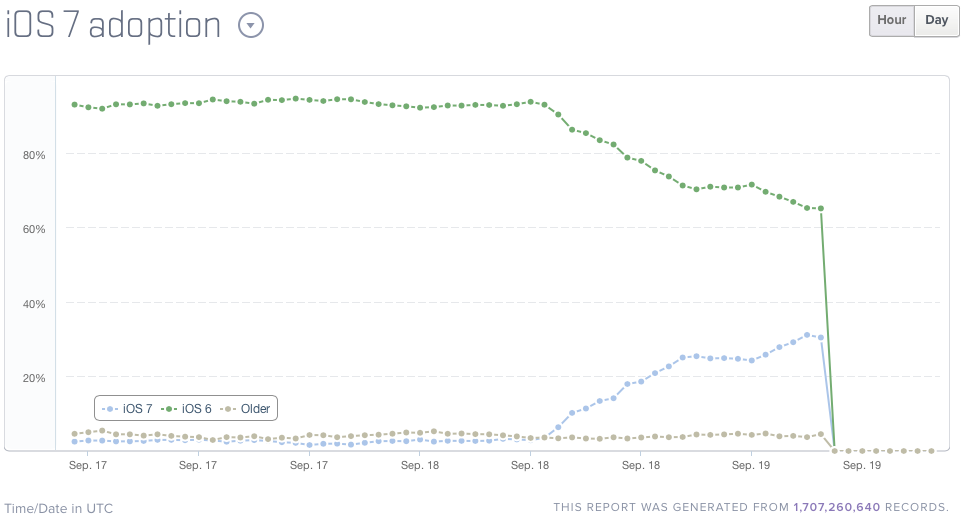
30 percent of iOS users upgraded to iOS 7 in the first 16 hours, according to data from tracking company Mixpanel. As we fanboys love to do, compare with the Carrier-controlled Android ecosystem where you have to go back to last year’s Android 4.1 to find numbers close to that:

9to5Mac readers were of course way ahead of the game … 
Expand
Expanding
Close

Site default logo image

Gmail iOS app gets new icon, full-screen mode for large images & better integration w/ Google apps

A ton of apps are getting updated today, many of which include support, new features and revamped looks for iOS 7. Google isn’t listing iOS 7 related features in its update of the Gmail iOS apps today, but it has refreshed its icon and added some new features.

On top of the new icon, Version 2.4.1 of the app includes an “enhanced attachment experience,” which really means that a larger image attached to an email will now open in a new full screen viewing mode when tapping its thumbnail.

The update also includes improved integration with other Google apps:

Better integration with Google apps – Google Drive and Google+ links go directly to the app, if installed. You can turn this off using the in-app settings.

Gmail version 2.4.1 for iPhone and iPad is available on the App Store now.

Site default logo image

Chrome on iOS reduces mobile data by up to half – but only for invited users

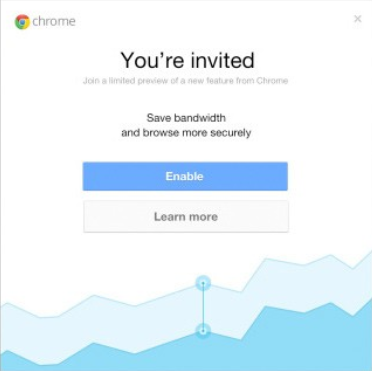
If you use Chrome on your iPhone or iPad, and you’re not running the latest version, you may want to update it. Google has started inviting selected users to enable the data-compression feature it first launched on Android back in March.

For an average web page, over 60% of the transferred bytes are images. The proxy optimizes and transcodes all images to the WebP format, which requires fewer bytes than other popular formats, such as JPEG and PNG. The proxy also performs intelligent compression and minification of HTML, JavaScript and CSS resources, which removes unnecessary whitespace, comments, and other metadata which are not essential to render the page. These optimizations, combined with mandatory gzip compression for all resources, can result in substantial bandwidth savings.

Or, in less technical terms, Chrome strips out everything not needed to display webpages properly, so you get the same experience but with up to 50% less data usage. For those who do a lot of browsing on 3G/4G, that can make a big difference to your monthly data bill.

So far, only a relatively small number of users appear to have been invited to participate, but that number is likely to grow over the next few weeks.

Via TechCrunch

Site default logo image

Google Play Books for iOS updated with Single Sign-On support

Google has been adding Single Sign-On support to lots of its iOS apps in recent months, making it easier to sign into Google apps on their iPhone or iPad. With Single Sign-On, users can sign in once in any Google app supporting the feature and will automatically be signed into all the other apps. The idea is to eliminate having to sign-in multiple times to the same Google account for different apps. The latest app to get the update is Google Play Books, which was updated today to version 1.6.1 with support for Single Sign-On and copying selected text.

Google also recently added Single Sign-On support for its Chrome, YouTube, and AdSense iOS apps.

What’s New in Version 1.6.1

Added support for Google Single Sign-On, so that you only need to sign in once to access all of the Google apps on your device.
Added support for copying selected text, if copyright allows.
Stability improvements.

A look at what some high-profile apps will look like when iOS 7 hits

Site default logo image

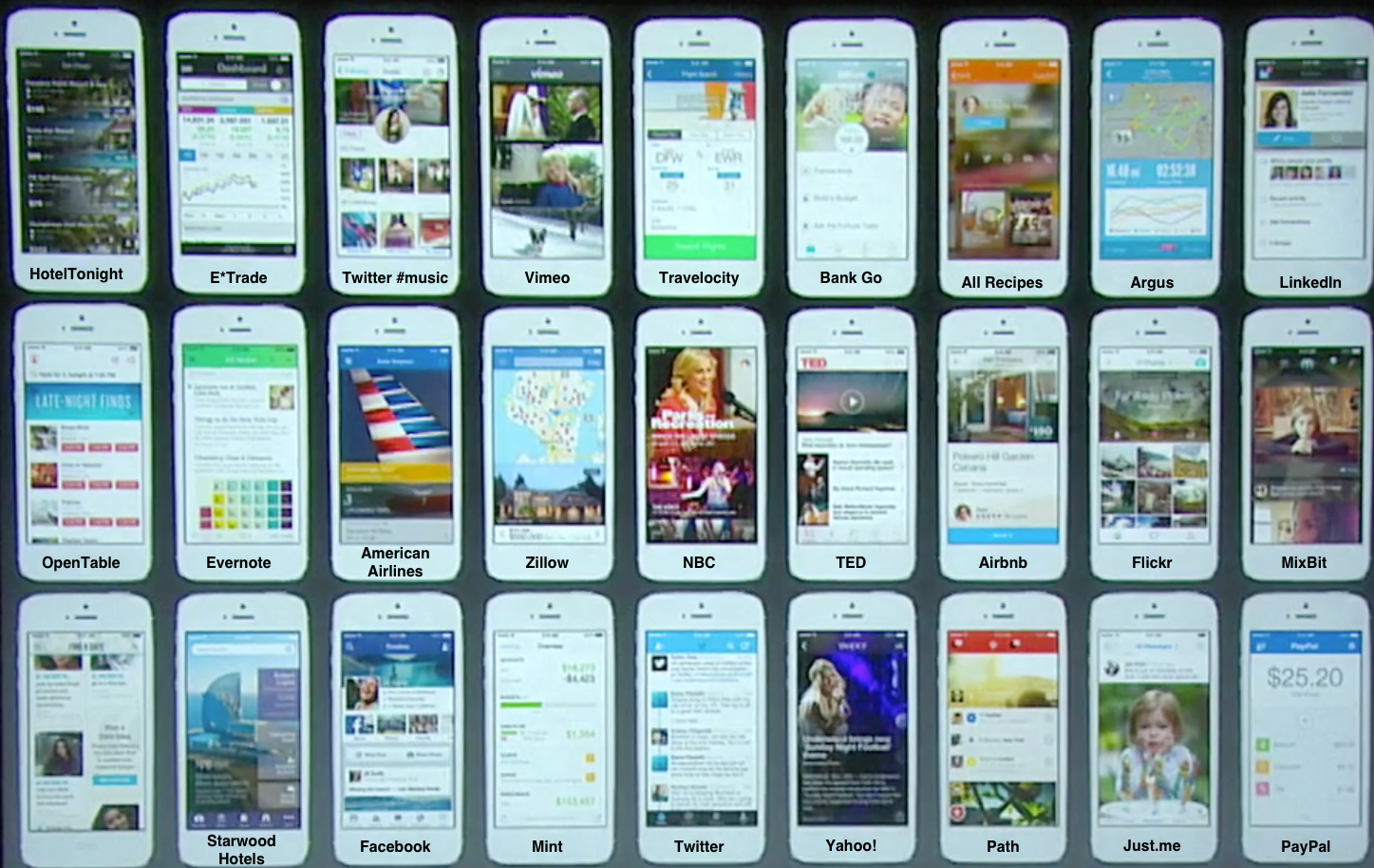
Click for a larger view.

Apple announced on Tuesday that iOS 7 will be publicly available on September 18th. The revamped OS moves completely away from the realistic designs of the past six generations, dropping almost all “artificial shadows” (as Apple SVP Craig Federighi called them), gloss, and even button borders. Instead, the Jony Ive-inspired interface features an entirely rethought design language that focuses heavily on large icons, lightweight fonts, whitespace, transparency, and conservative use of color.

We previously took a look at what some of Apple’s own in-house apps could look like when redesigned for iOS 7. During Apple’s September 10th event, Federighi flashed up a slide displaying the upcoming iOS 7 updates for many third-party applications. None of the apps were labeled, but we’ve tracked down names for most of them.

The apps featured are:


Expand
Expanding
Close

Site default logo image

Chrome for iOS adds faster search results, data cost savings features & voice search pronoun support

Google is rolling out an updated version of its iOS app for iPhone and iPad today that brings a few new features including faster search results. Google says after clicking back in Chrome to return to a search results page results will now “instantly appear, ready for you to choose the next one.”

The update also adds data cost savings features, rolling out to all users shortly, that provides a view of data savings in Bandwidth Management settings. Also new is voice search pronounce support:

Try queries like: “Who is the president of the United States?” followed by “Who is his wife?”

The updated version of Chrome for iOS also includes improvements to Single Sign On for other Google Apps, bug fixes, and other performance and security improvements.

Apple TV will get more Chromecast-y in an iOS 7 update next week

Site default logo image

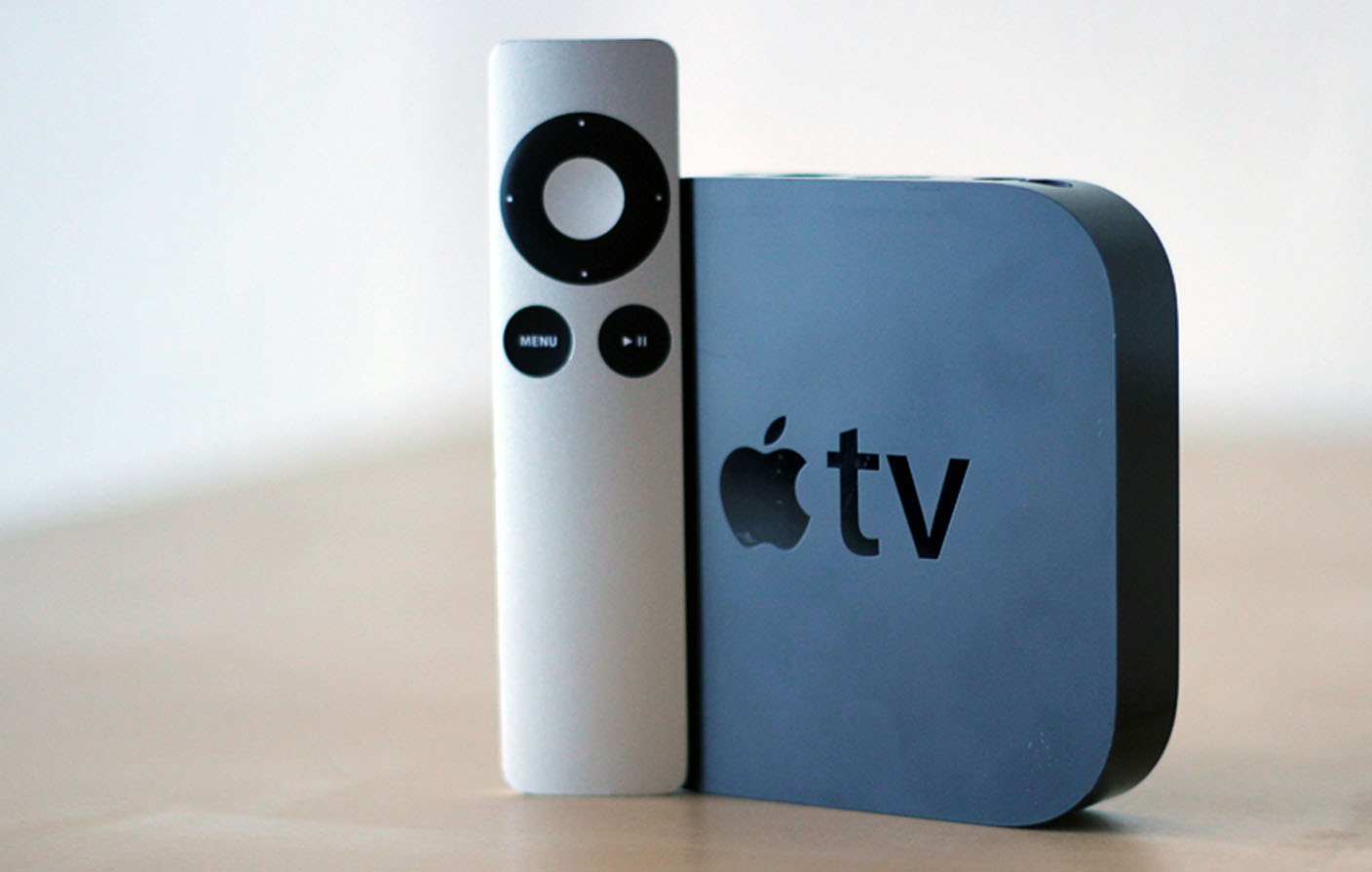
Photo: cnet.com

We mentioned last week that an Apple TV software update would allow owners to stream content from a friend’s Apple TV box elsewhere, and AllThingsD now has a little more info on how this will work.

The new software will allow people who have purchased content from Apple’s iTunes store to play that stuff on other people’s TVs, via its Airplay system.

The key part is that they will be able to tell an Apple TV box they don’t own to stream the media they do own, directly from the cloud. That’s a change from the current system, which requires users to  download stuff to their iPhones and iPads and fling it to the TV from there. It also echoes the way Google’s new Chromecast device works … 
Expand
Expanding
Close

Apple iPhone 2013 Event Liveblog, iPhone 5S and 5C on tap

Site default logo image

We’ll be live-blogging Apple’s media event today below, and we’ll be providing text and photo updates from before, during, and after the show. Simultaneously, we’ll be holding a Google Hangout. You can read our expectations for the event, and check back for the start at 1 PM Eastern/ 10 AM Pacific. Live blog starts below:


Expand
Expanding
Close

Join us for a live Hangout during today’s keynote

Site default logo image

[youtube http://www.youtube.com/watch?v=T14HAvdtX8A]

Despite our best hopes and wishes, it appears Apple won’t be providing a livestream for today’s event. While you’re keeping tabs right here for our liveblog and tweets, we’ll also be hosting a live Google Hangout starting about 15 minutes before the 10 am PST event and extending through the duration of the keynote.

Check it out here.
Expand
Expanding
Close

Flickr eyes Instagram with updated iOS app offering live filters and powerful editing

Site default logo image

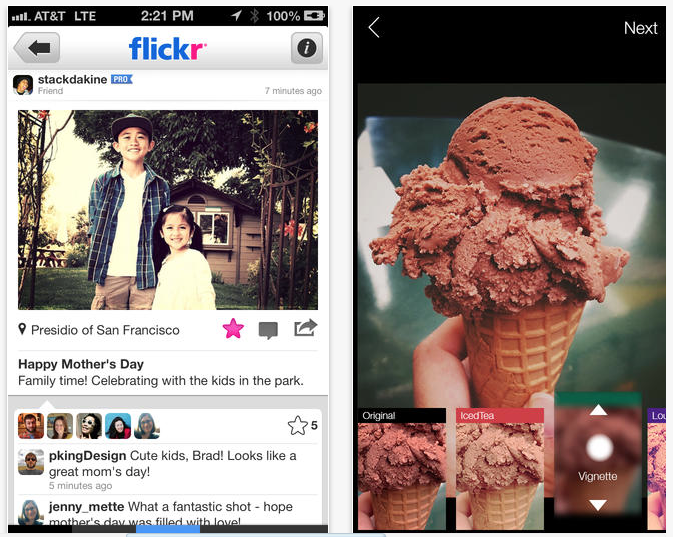
Flickr appears to be making a play for the Instagram market with the latest update to its free iOS app adding new filters with live previews and instant editing tools which include the ability to crop photos, adjust colors and add vignettes.

It’s a little late to the party, with Instagram having already expanded into video in a big way after witnessing the popularity of Vine, and of course filters and square crops are built into the revamped Camera app in iOS 7 … 
Expand
Expanding
Close

Site default logo image

Google Maps for iOS adds ability to share locations to Google+

Google updated its Google Maps app today for iPhone and iPad with one new feature on top of the usual bug fixes. With version 2.2.0, users can now share their locations directly to Google+ from within the Google Maps iOS app. Tapping the the share button will now provide a “Google +” option and users can also select specific circles to share with before posting. Previously users could only mail, message, or copy a location to the clipboard.

What’s New in Version 2.2.0

● Share your favorite places with friends via Google+
● Bug fixes

Site default logo image

Gmail for iOS app updated with bigger image thumbnails, better integration with Google Drive & Google+

Google has updated its Gmail for iOS app to version 2.4, offering larger image thumbnails, better photo handling and better integration with both Google Drive and Google+.

You can now tap a photo to view it full-size, and both Google Drive and Google+ links now take you direct to the apps if you have them installed. Dealing with Google Docs attachments is now a much slicker experience.

The app is available for download from iTunes.

Apple buys data compression, mobile imaging and video firm AlgoTrim

Site default logo image

According to Rapidus.se (via TechCrunch), Apple has purchased a Swedish firm called AlgoTrim for an undisclosed price. The small company specializes in image and video, specifically JPEG, compression techniques on mobile devices which allow faster processing of images on power-constrained mobile devices.

AlgoTrim™ develops advanced solutions for mobile devices within the fields of data compression, mobile imaging and video, and computer graphics.

These solutions are designed to excel in terms of high performance and small memory requirements, making them ideal for mobile devices. Many solutions offered by AlgoTrim are codecs that are the fastest on the market, for example, the lossless codec for general data compression and the imaging codecs.

Apple could use these codecs in its camera and image viewing and manipulation apps on iOS. It is probable that the cost of picking up the company and owning the technology outweighed the cost of licensing the technology over its hundreds of millions of devices. This also could be an “aquihire”.

Apple is no stranger to the Swedish technology market. It picked up Polar Rose in 2010, a face recognition company and C3 a Swedish 3D mapping company in the run up to its Maps product launch. Cupertino has been on a bit of a startup binge lately buying such companies as Embark and Matcha.tv.

Last year, AlgoTrim reported a revenue of 3.0 million USD, with an net income before taxes of EUR -1.1 million.  Until now, AloTrim has been focused mostly on Android development.

Update: The acquisition has been confirmed to TechCrunch:

Apple buys smaller technology companies from time to time, and we generally do not discuss our purpose or plans.

Site default logo image

Google launches app for iOS to set up Chromecast, manage settings

Google has released a new application for the iPhone, iPad, and iPod touch to make it easier for users to setup and manage the Chromecast TV device.

• Set up your Chromecast to work with your Wi-Fi network
• Manage your Chromecast settings (such as changing your device name, Wi-Fi password, etc.)

The application is free on the App Store. The Google Chromecast is a device that plugs into a TV set via an HDMI port and allows users to stream content, such as YouTube and Netflix, from devices like computers, tablets, and smartphones.

Update: Chromecast is currently available at Best Buy for $35 including the 3 months of Netflix (value $27)


Expand
Expanding
Close

Site default logo image

Google brings unified account sign-in to YouTube & AdSense iOS apps

Following an update to version 2.0 for the YouTube iOS app yesterday, users have noticed that Google appears to have turned on shared account logins for at least YouTube and the recently released AdSense app. That means logging into one app will automatically log you into the other without having to re-enter your account and password. Although the majority of Google’s iOS apps require users to sign into a single Google account used across its services, up until now each app required users to enter their account info when when launching for the first time.

Google didn’t list the new feature when it updated the YouTube app or in the release notes for the new AdSense app, but the support page for YouTube does note, “If you’ve signed in with another Google app on your iOS device, you may see this account listed.” Removing an account in either the AdSense or YouTube app will also remove it from the other app if installed on your device, but Google doesn’t offer users any control over the feature as of yet. Google doesn’t mention support for any specific apps, but we’d imagine this is likely a feature that will make its way to other Google iOS apps in the near future.

Google Maps for iOS adds real-time incident reporting from Waze

Site default logo image

Google announced today on its Google Maps blog that it’s finally tapping into the talent and technology it picked up with its acquisition of Waze back in June by integrating real time incident reports from Waze into Google Maps. The new integration means that when Waze users report incidents for everything from accidents to road closures, Google Maps users on both iOS and Android will now be able to benefit:

Users of Google Maps for Mobile will now benefit from real time incident reports from Waze users. This means when Wazers report accidents, construction, road closures and more on Waze, the updates will also appear on the Google Maps app for Android and iOS.

The features will initially be limited to users in certain locations, including: Argentina, Brazil, Chile, Colombia, Ecuador, France, Germany, Mexico, Panama, Peru, Switzerland, UK and the US. In addition, as Google first hinted back in June, the company will also be integrating Google Search into the Waze apps on iOS and Android, while the Waze Map Editor now has access to Google Street View imagery:
Expand
Expanding
Close

Site default logo image

Google introduces new local ads experience in Google Maps on iOS & Android

Google today announced on its blog that it’s introducing an “updated ad experience” for Google Maps on iPhone, iPad, and Android that will display a small banner at the bottom of the screen when a user performs a search. Google used to display smaller banner ads that would pop up as an overlay on the map after searching for a location, but the new experience brings ads into the new bottom bar that Google introduced in its recent redesign of the Google Maps mobile apps. 

Relevant ads on the Google Maps app can now appear at the bottom of the screen after a user performs a search. They include a title, ad text, and a link to get directions. Users can tap or swipe upward to see more information — this is a new click type known as “Get location details” and results in a standard CPC charge.

Just like the previous ads, tapping or swiping up on the new ads placed at the bottom of the screen will pull up details about businesses including images, reviews, phone numbers and addresses. Google’s recent update to the Google Maps mobile apps also brought Zagat ratings and Google Offers into the local business search results displayed on the new bottom navigation bar.

Google provides more information for advertisers interested in display local ads in Maps in its blog post here. 

Site default logo image

Google copies Find my iPhone with new ‘Android Device Manager’

Android-Device-Manager

Google today announced on its Official Android Blog that it’s launching a brand new tool called ‘Android Device Manager’ that will let users easily locate and remotely wipe misplaced or stolen devices. Anyone familiar with the Find My iPhone feature that Apple has made available to iOS device users will already be quite familiar with how the software works.

Much like Apple’s service, Android Device Manager will let users locate their device on a Map in real-time, as well as remotely wipe the device of all data if happens to get into the wrong hands. You’ll also be able to make your device ring at maximum volume if you happen to misplace it in a nearby location.

If you ended up dropping your phone between those couch cushions, Android Device Manager lets you quickly ring your phone at maximum volume so you can find it, even it’s been silenced. And in the event that your phone or tablet is out of earshot (say, at that restaurant you left it at last night), you can locate it on a map in real time

Google’s announcement comes at a time when government officials are pressuring Apple, Google, and other smartphone manufacturers to implement new theft deterrent features. While Google’s new tool would be one step in the right direction, it doesn’t appear to go beyond what Apple has already had in place since back in 2010.

Recently, Apple announced a new Activation Lock feature that requires an Apple ID and password to reactivate a stolen phone after being remotely erased/wiped by the owner through the Apple Find my iPhone feature. The login information will also now be required to turn off Find My iPhone. If a user’s device is stolen, wiping the device clean will essentially leave the thief with a device that is inoperable without the user’s Apple ID and password. It doesn’t appear that Google’s new tool includes a similar feature.

Google said the new Android Device Manager service will available later this month for devices running Android 2.2 and up, and an Android app will also be available to help users manage their devices.

Site default logo image

Motorola announces its new Moto X smartphone, arrives next month for $199

Motorola today launched its new flagship “Moto X” smartphone, the first device Google has launched under the brand after acquiring the company and taking it in a new direction. We already knew a lot about the device leading up to today’s event, but now we have all the details on specs and the many customization options that Motorola is hoping will help differentiate the device. With all the rumors of a next-gen iPhone possibly landing in multiple colors, it will be interesting to see if Google has any success with the Moto X customization strategy– Motorola is providing up to 32 color combinations (2 on the front, and 16 on the back) and around 2000 total customization options through a new online tool called “Moto Maker.” Moto X also includes some pretty respectable hardware for the $199 price point, but that of course puts it in direct competition with the iPhone. Get all the details on the device over on our sister site 9to5Google.com:

Motorola officially announces the Moto X, coming late August/early September

Moto X coming to AT&T for $199/$249 with exclusive colors & customization options

New ads show off Moto X ‘Quick Capture’ & always-on voice command features

http://www.youtube.com/watch?v=xXyCbrdQEyA

http://www.youtube.com/watch?v=vpU1mW0Mjm8

Site default logo image

Graphic: The $35 Chromecast dongle is no replacement for the $99 Apple TV (not yet, anyway)

The Verge snapped together the chart below illustrating the feature set of the Chromecast dongle as compared to the Apple TV’s Airplay functionality.

In reality, we are looking at two different ways of looking at place-shifting content. Apple’s is directly from an iOS device or a recent Mac’s display. The Chromecast is sending instructions to the dongle to start playing content from the cloud (meaning you need a pretty healthy Internet connection).

In its present state, the $35 Amazon/Best Buy (in stock) Chromecast is a convenient way to show Netflix, YouTube and Google Play content on a TV. But a lot of the good programming lies outside of this sphere.  Sure you can ‘Chromecast’ videos from your Chrome browser as you watch Hulu, Amazon Instant Video, or just about anything else that works in a browser including .MKV, MP4, AVI files, etc, but that’s not elegant (and Chrome/Android chief Pachai says websites, like Hulu, could turn off the functionality at any time)! Also, you get no dedicated remote with the Chromecast (though Android devices can be found pretty absurdly cheap) like with the AppleTV.

You can’t help but wonder if the Apple TV could be put in the Dongle format and perhaps given some more content sharing options. Google reached across the aisle and built Chromecast to provide Apple Mac and iOS users the same compatibility as Chrome and Android users. Sure Chromecast needs external power such as that provided by a USB port, but the form factor and, more importantly, the price, seem very compelling. If Apple could squeeze its current format Apple TV into a dongle and cut the price in half, why shouldn’t it?

Update: Search Engine Land simplifies and throws in Roku for good measure


Google+ Photos app for Chromebooks coming soon to Mac?

Site default logo image

Google-Plus-Photos-App-Mac

Back in June, Google released a new Google+ Photos app for the Chromebook Pixel and noted that the slick app would also be coming to other Chrome OS devices. However, today we received some proof that the Chrome app might be soon making its way to other platforms including Mac and Windows. The Google Operating System blog notes that the app has recently made its way to the Chrome Web Store with the app’s description describing auto-upload features for Mac, PC, and Linux:
Expand
Expanding
Close