iPad (2021)

See All Stories

Apple's tablet debuted in 2010. Since the original version, it's expanded into multiple screen sizes and Pro and non-Pro options.

The iPad is Apple’s base tablet model. In its ninth generation, the iPad focuses on being the perfect tool for education and people who seek a bigger screen to read and surface the web compared to the iPhone. With Apple Pencil and Smart Keyboard support, the iPad has never been better.

History

Site default logo image

The iPad is a line of tablets designed and developed by Apple. It was originally announced in 2010, three years after the first iPhone was introduced. With a 9.7-inch screen and with iPhone OS 3.2 the iPad was a success, hitting 1 million tablets sold in over three months, half the time the first iPhone took to reach this mark.

Steve Jobs then unveiled the iPad 2 in March of 2011. About 33% thinner than its predecessor and 15% lighter, the second generation used the A5 chip, twice as faster as its predecessor. The iPad 2 also introduced front and back cameras that supported FaceTime video calls.

The successor of the iPad 2 wasn’t a success at all. The third generation was introduced in March of 2012 with a Retina display and the A5X processor. The problem with this tablet it was too heavy and the battery didn’t last long enough. In October of the same year, Apple announced the fourth generation with the A6X processor, HD FaceTime camera, improved LTE capabilities, and the Lightning connector.

At this October event, Apple also introduced the first iPad mini. In 2013, Apple went with the first iPad Air and the iPad mini 2. In 2015, the company introduced the first Pro model, with two different sizes.

Site default logo image

In March of 2017, Apple announced the fifth-generation iPad with the A9 processor. It was a budget option compared to the other tablets. It was in 2018 that the company brought expressive news to the base iPad line. The sixth-generation had the A10 Fusion processor and fully supports the first-generation Apple Pencil.

A year later, the seventh generation was announced with a larger 10.2-inch display and support for the Smart Keyboard as well. It retained most of the specs of the previous model.

In September of 2020, the eighth generation was introduced alongside the fourth-generation iPad Air model. The eighth generation received an upgraded processor, now with the A12 Bionic, while keeping the same storage options: 32GB and 128GB.

In September of 2021, the ninth generation was introduced alongside a redesigned iPad mini. This iPad now features the A13 Bionic processor, True Tone support, and new storage options: 64GB and 256GB while keeping the same price.

iPad 9 Specs

Site default logo image

The ninth-generation iPad launched in September of 2021. Available in two colors, Silver and Space Gray, this tablet is made of 100% recyclable aluminum, and supports the first-generation Apple Pencil and Smart Keyboard.

With thinner bezels, the product comes with a 10.2-inch Retina display with a fingerprint-resistant oleophobic coating, and True Tone support for the first time, which adjusts screen content to the color temperature of a room.

This tablet uses the A13 Bionic chip, the same available on the iPhone 11, 11 Pro, and 11 Pro Max. It has an “all-day” battery with up to 10 hours of surfing the web on Wi-Fi or watching videos.

The iPad also comes in 64GB and 256GB storage options and Wi-Fi and Wi-Fi + Cellular versions.

Revamped cameras

Site default logo image

For the first time, this iPad shares the same FaceTime camera as the M1 iPad Pro with the Center Stage experience. With a new 12MP Ultra Wide front camera and Neural Engine, users can enjoy even more engaging video calls.

As users move around, Center Stage automatically pans the camera to keep them in view. When others join in, the camera detects them too, and smoothly zooms out to include them in the conversation. Center Stage makes video calls more natural in FaceTime as well as third-party video-calling apps.

Its main camera is the same: 8MP, f/2.4 aperture, and digital zoom up to 5x.

iPadOS 15

Site default logo image

The ninth-generation iPad comes with the iPadOS 15. Previewed during the WWDC21 keynote, the new operating system brings a redesigned Home Screen with widgets and App Library support.

On iPadOS 15, FaceTime group calls can finally appear in a grid, so it’s easier to see everyone. It’s also possible to share your screen, listen to Apple Music songs together, or watch Apple TV+, HBO Max, Disney+, and others while in a call.

In the productivity section, Apple, unfortunately, didn’t bring all the features pro users wanted to take full advantage of their new M1 iPad Pro, even though Apple made it easier to rely on multitasking features.

There’s a new multitasking menu on the top of the screen. When you click there, it’s possible to see what configurations you can use on Split View or just go to Slide Over with just a tap.

The experience with an external keyboard allows users to get more done with all-new keyboard shortcuts and a redesign of the menu bar.

With the Quick Note feature, users can use the Apple Pencil to add a quick note. They just need to slide the pencil through the bottom right corner to the center of the screen and start writing.

iPadOS 15 launched on September 20. Learn more about it here.

iPadOS 15.1 features

One month after releasing iPadOS 15, Apple released iPadOS 15.1 More notable, the company finally brought SharePlay support for the iPhone, iPad, and Apple TV. Unfortunately, Universal Control wasn’t one of the features added with this new version. Here’s what else is new:

Translate

  • Mandarin Chinese (Taiwan) support in the Translate app and for system-wide translation

Home

  • New automation triggers based on the current reading of a HomeKit-enabled humidity, air quality, or light level sensor

Shortcuts

  • New pre-built actions let you overlay text on images or gifs, plus a new collection of games lets you pass the time with Siri

iPadOS 15.2 features

apple-music-hey-siri-plays-voice-plan-9to5mac-2

Five weeks after releasing iPadOS 15.1, Apple is releasing iPadOS 15.2. It brings more features that were expected to launch alongside iPadOS 15 but, unfortunately, Universal Control is still nowhere to be seen. Here are the top features of this version:

  • Apple Music Voice Plan is a new subscription tier that gives you access to all songs, playlists, and stations in Apple Music using Siri
  • App Privacy Report in Settings lets you see how often apps have accessed your location, photos, camera, microphone, contacts, and more during the last seven days, as well as their network activity
  • Communication safety setting gives parents the ability to enable warnings for children when they receive or send photos that contain nudity
  • Digital Legacy allows you to designate people as Legacy Contacts so they can access your iCloud account and personal information in the event of your death
  • Apple TV app: Store tab lets you browse, buy, and rent movies and TV Shows all in one place

iPadOS 15.3 features

Six weeks after releasing iPadOS 15.2, Apple is releasing iPadOS 15.3. This update foregoes new features in favor of under-the-hood bug fixes and improvements. One of the most notable changes here is a fix for a Safari vulnerability that may have been leaking your browsing history and Google ID data to the websites you visited.

iPadOS 15.4 features

iPadOS 15.4 finally brings one of the most important features expected from iPadOS 15 and that got delayed: Universal Control. Here’s everything new with iPadOS 15.4:

  • Universal Control: This feature allows you to control your Mac and iPad using the same keyboard and mouse/trackpad. Universal Control needs iPadOS 15.4 and macOS Monterey 12.3;
  • New Siri voice: Siri has a fifth American voice. Apple says a member of the LGBTQ+ community recorded the voice and it’s non-binary;
  • More emoji: iPadOS 15.4 also brings new emojis. You can discover all of the new characters here;
  • Shortcuts automation: Adds support for running Personal Automations in the background without requiring a pesky banner notification.

You can learn everything new with this update here.

iPadOS 15.5 features

Different from other software updates, iPadOS 15.5 only improves the Podcast app experience, as Apple focused on Wallet changes for the iPhone this time:

  • Apple Podcasts includes a new setting to limit episodes stored on your iPhone and automatically delete older ones

iPadOS 15.6 features

iPadOS 15.6 is yet another small update for iPad users. Here’s what’s news:

  • TV app adds the option to restart a live sports game already in progress and pause, rewind, or fast-forward.
  • Fixes an issue where Settings may continue to display that device storage is full even if it is available.
  • Fixes an issue that may cause Braille devices to slow down or stop responding when navigating text in Mail.
  • Fixes an issue in Safari where a tab may revert to a previous page.

iPadOS 15.7 features

iPadOS 15.7 only brings bug fixes and some security improvements as the company readies the iPadOS 16 release.

Education

Site default logo image

Apple describes this iPad as the go-to tablet for education. For several years the company discounts this tablet up to 10%.

Apple is always promoting ways students can use the iPad to learn new things: using Augmented Reality, the Apple Pencil, and how to code with Playgrounds.

The company says the “App Store is the best place to discover apps” for education purposes:

Let your curiosity run wild with iPad. The App Store is the best place to discover apps that let you get a leg up in geometry, learn a new language, and attend virtual classes. You can even use augmented reality to learn something exciting, like watching the history of spaceflight unfold in your living room or making characters from your favorite book literally leap off the page.

Release date: When Apple will launch the ninth-generation iPad?

Apple launched the iPad 9 on September 24, 2021.

Pricing

iPad (2021) pricing starts at $329 for the 32GB storage option with Wi-Fi only. The prices can go up to $559 with the 128GB storage option and WI-Fi + Cellular. Here are the full prices of the ninth-generation tablet:

  • 32GB with Wi-Fi: $329
  • 32GB with Wi-Fi + Cellular: $459
  • 128GB with Wi-Fi: $429
  • 128GB with Wi-Fi + Cellular: $559
  • Apple Pencil (1st generation): $99
  • Smart Keyboard: $159

Lower prices may be available from Apple’s official Amazon store.

iPad (2021) Review

Site default logo image

Soon, we’ll review the ninth-generation iPad. As for now, you can watch our video review of the eighth-generation iPad, as we described it as the “best value tablet you can buy:”

“The iPad 8 was never meant to be a huge update. But even still, I think this is easily the best value tablet you can buy. For $329, this tablet has so much to offer: The performance, the great battery life, and the Apple pencil functionality. I’d highly recommend you pick up this tablet if you simply need an inexpensive tablet today that’s going to last you for three to four years with no trouble.”

iPad Deals

Over at 9to5Toys, you can find the best deals on the iPad and other Apple products. Download the 9to5Toys iPhone app to receive push notifications for new deals as well.

Rumors

As of now, Bloomberg‘s Mark Gurman said in his Power On newsletter by the end of 2021 that Apple plans a new entry-level iPad for 2022. In June 2022, 9to5Mac exclusively reported the details of the tenth-generation iPad model.

According to Filipe Espósito, this new entry-level tablet will pack the A14 Bionic chip, 5G compatibility, and, for the first time, USB-C connectivity, unlocking new experiences with the second-generation Apple Pencil. Its display will also increase, although it’s unclear whether it will have the same design as the M1 iPad Air.

This iPad could be released in October of 2022.

Amazon’s Kindle Fire vs. Apple’s iPad 2

Site default logo image

[youtube=http://www.youtube.com/?v=NnSmENvbY8I#!]
With the $199 Kindle Fire out of the gate, the inevitable questions pops into mind: Which is faster overall, the Amazon or Apple tablet?

The comparison isn’t really fair because Amazon skimped on internal components, which was key to its breakthrough $199 price point. An iFixit teardown reveals Texas Instruments’ OMAP 4430 chip inside the device, also  found inside Research In Motion’s BlackBerry PlayBook tablet.

For starters, iPad 2 boots much quicker than the Amazon tablet – again, due to its more efficient dual-core processor and optimized software. Browsing the web? No surprises here either, Safari on iPad 2 stormed ahead, performing noticeably faster than Amazon’s Silk browser which offloads page rendering to the Amazon cloud. One thing to remember: In this test, Kindle Fire was loading Flash content which of course is not supported on Apple’s device.

The iPad 2’s graphics unit, praised for its nine times performance jump, helps with scrolling, which is pretty choppy most of the time on Amazon’s device. One surprising finding is that Kindle Fire streams Netflix smoother than iPad 2, most likely due to the new version of their Android client which is not yet available for Apple’s platform.

This is not the most scientific test in the world, mind you. Again, as 9to5Google noted in its quick review, there’s really no comparing Kindle Fire to iPad 2, be it on the price, overall polish, performance or shininess. As for the speed, mainstream buyers may not be interested in raw specs anymore and Amazon has priced this thing out of the range of the Samsungs and BlackBerrys of this world so it’s more of a competitor to Android tablets than to Apple.


Expand
Expanding
Close

Qualcomm’s 4G LTE Gobi 4000 chips shipping to OEMs, likely to land in next-gen iPad

Site default logo image

Qualcomm has just issued a press release announcing the commercial availability of their Gobi 4000 chips for 4G LTE and HSPA+ capable devices, a variant of which could very well ship in a next-generation LTE-capable iPad. In August we discovered Apple had possibly begun field testing a next-gen LTE iPads with LTE code floating around the iOS builds, and it’s likely Apple would go with Qualcomm’s chip, as almost every 3G iOS device since the Verizon iPhone has used their Gobi platform, the exception being the the AT&T iPad which uses an older Infineon chip.

“The Gobi 4000 platform allows customers to offer both LTE/HSPA+ and LTE/EV-DO designs to meet the growing demand for embedded 3G/4G connectivity in mobile devices worldwide… System designers now have the flexibility to choose an embedded Gobi 4000 platform for high-speed 4G LTE support, or an embedded Gobi 3000 platform for worldwide 3G connectivity.”

The new chips, now shipping to OEMs with modules available through Novatel Wireless and Sierra Wireless, are based on Qualcomm’s MDM9600 and MDM 9200 3G/4G wireless modems, and as the company notes, have been specially designed for deployment in devices utilizing Snapdragon dual-core and quad-core processors. In addition to HSPA+, dual-carrier HSPA+, and LTE support, the Gobi 4000 platform is also backwards compatible with HSPA and EV-DO. On top of a possible variant of the chip coming to a future 4G LTE iPad, the Gobi 4000 platform will also be included in Lenovo’s ThinkPad laptops, and Dell’s Latitude E6420 laptops, in addition to other Windows and Android powered mobile devices.

Qualcomm’s senior vice president of produdct management for CDMA Technologies, Cristiano Amon, had this to say about the announcement:

Expand
Expanding
Close

Steve Jobs wanted Apple to become a carrier prior to iPhone release

Site default logo image

[youtube=http://www.youtube.com/watch?v=0nOdc5knf-M]

Computerworld/IDG reports that wireless industry pioneer John Stanton (founder of of Western Wireless, VoiceStream wireless and former CTIA chairman) worked with Steve Jobs prior to the launch of the iPhone on becoming a carrier using unlicensed spectrum…

Stanton, chairman of venture capital firm Trilogy Partners, said he spent a fair amount of time with Jobs between 2005 and 2007. “He wanted to replace carriers,” Stanton said of Jobs, the Apple founder and CEO who died Oct. 5 after a battle with cancer. “He and I spent a lot of time talking about whether synthetically you could create a carrier using Wi-Fi spectrum. That was part of his vision.”

The one that got away…
Expand
Expanding
Close

Netflix promises revamped iPad app “in a few weeks”

Site default logo image

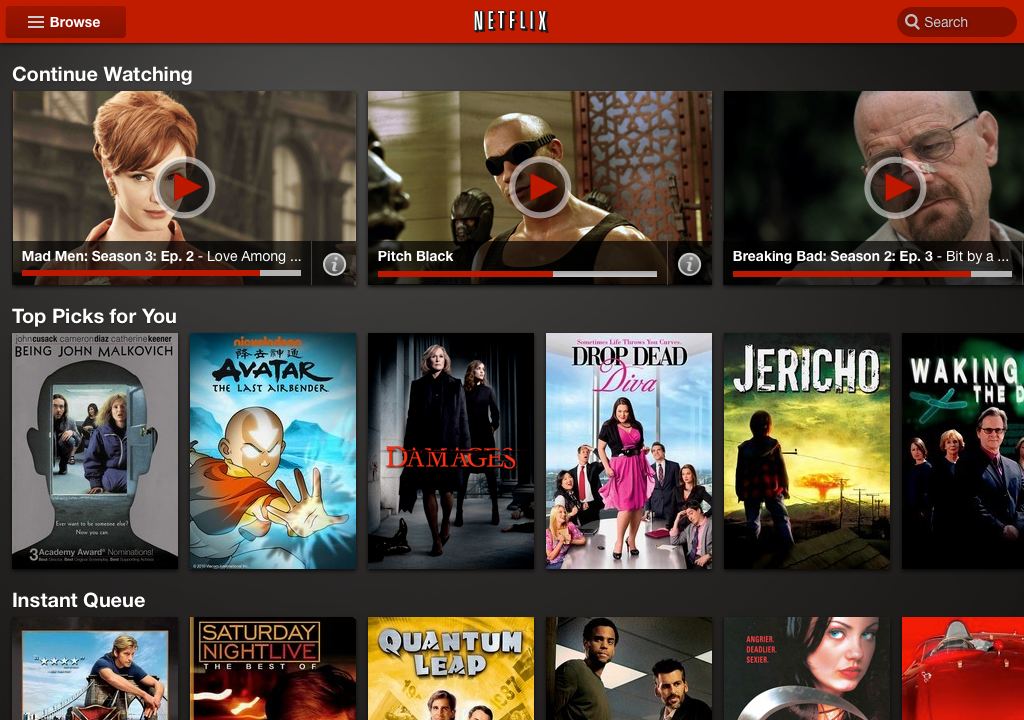
In addition to a revamped Android version, Netflix said today that a “new tablet experience should be available for members with iPads in a few weeks”. What’s the new tablet experience like? According to a press release and a blog post, Netflix aims to consolidate the app’s user interface across iOS and Android tablets with a “much more immersive” design that manages to cram up twice as many movies and television shows as before without looking cluttered. Neil Hunt, chief product officer at Netflix, says:

In the last 12 months we have seen a threefold increase in how long Netflix members are watching on their tablets. We’re happy to debut a new user experience coinciding with the release of the next generation of devices from industry leaders. The new Netflix interface offers a significant improvement in browsing and searching for TV shows and movies to instantly watch.

Each item in the new interface sports a larger artwork than before and you can swipe between the individual rows of titles. If this sounds familiar, you’re right – a similar experience is built into supported set-top boxes, gaming consoles and other Netflix-ready devices.

Interestingly, the new Netflix software is also available for the Kindle Fire and Nook Tablet. Netflix also offers a free trail, here.


Expand
Expanding
Close

Condition One: first-person immersive video iPad app lands on App Store

Site default logo image

[youtube=http://www.youtube.com/watch?v=k7YOSDLOW2k]

We told you about Condition One before, a first-person immersive video app that combines “the power of the still image, the narrative of films and the emotional engagement of tactile experiences”. In recognition of Veterans Day, developer Danfung Dennis has finally brought the unique, interactive video experience, which as of yet features mostly video shot in war-torn regions, to the App Store with a free app for iPad…
Expand
Expanding
Close

Apple gets ready for the holidays early with the new Holiday Gift Guide

Site default logo image

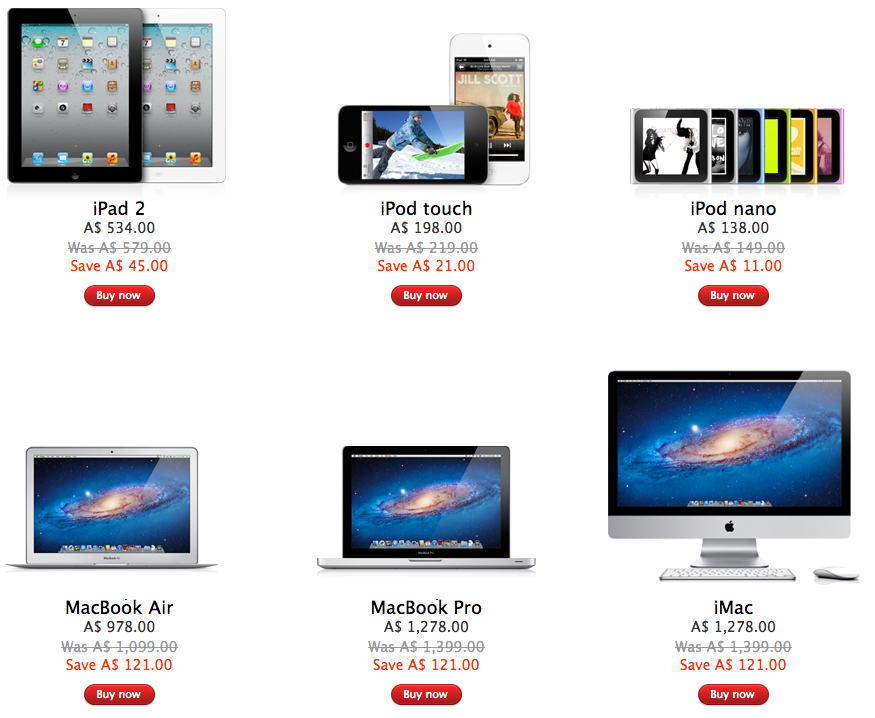
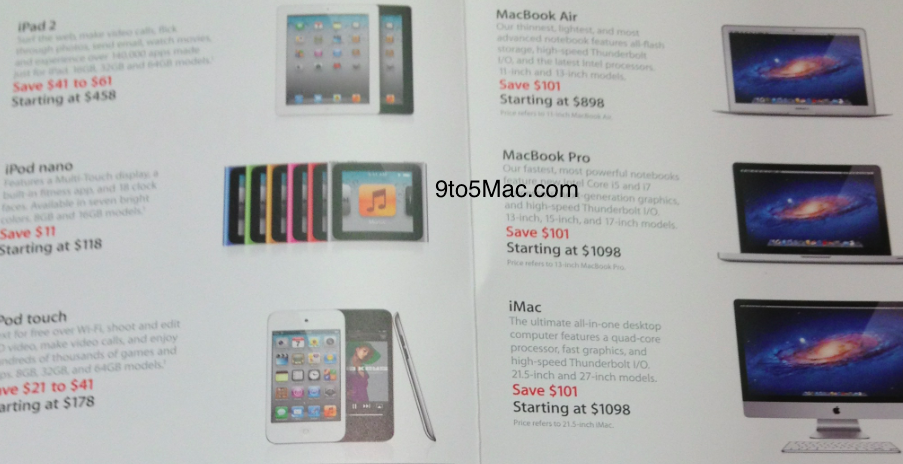
With this year’s holiday season looming, the online Apple Store is ready with the new Holiday Gift Guide section. Holiday gift ideas include Apple’s most popular mobile devices and computers as well as a hand-picked selection of third-party products, add-ons, device accessories and even fashion cases to carry your products around in style.

The gadget maker teases:

All kinds of gifts for all kinds of lists. Shop the season’s finest accessories for iPad, iPod, iPhone, and Mac.

All products on offer in the Holiday Gift Guide come with free shipping, Apple notes. And with gift wrapping and free personal laser engraving, plus in-store pickup, it gets even better. If you were planning on making anyone’s season bright, including your own, shop the Holiday Gift Guide section over at the online Apple Store. Or just use the updated Apple Store app to shop from the palm of your hand or use the self-checkout option in-store.


Expand
Expanding
Close

Apple patent roundup: Dual OLED backlit iPad 3, speakers for iPod nano, and swipe and hold iOS gestures

Site default logo image

There has been no shortage of Apple patent applications published by the US Patent & Trademark Office today (via PatentlyApple). Three of the most interesting with potential to be implemented in upcoming products include a dual OLED backlighting system for future iPads, integrated speaker clip for iPod nano, and new hold and swipe gestures for iOS devices.

First up we have a patent application that backs up a report from DigiTimes claiming Apple is considering alternative backlighting systems with a dual-LED light bar design for iPad 3. PatentlyApple outlines the application which details use of multiple OLED backlights not only in a future iPad, but also potentially in a next-gen iPhone, Cinema Display, MacBook, and iMac.

The report also claims Apple mentions “television in passing” within the application, while quoting an announcement from DuPont regarding new AMOLED processing technology, PatentlyApple says that tech is already being supplied to Asian AMOLED manufacturers. Apple’s alternative backlight solutions could also lead to an overall thinner design:

“The bonding of the OLED backlight in the LCD may also increase the mechanical rigidity of the LCD, which may enable the use of thinner glass substrates and possibly reduce the thickness of the overall device. Further, an OLED backlight may generally be thinner than a typical LED backlight, and may also provide improved light uniformity without the use of light guides or additional brightness enhancing films.”

Details on iPod nano speaker patent and swipe and hold iOS gestures below the fold.


Expand
Expanding
Close

iOS 5.0.1 is out, how’s your battery life now?

Site default logo image

Apple just released iOS 5.0.1 build number 9A405, a minor update to its mobile operating system fixing (hopefully) the iPhone 4S battery woes. The software arrives just a day following the iOS 5.0.1 release to certain end-users for testing and a week following a developers-only version.

In addition to battery fixes, iOS 5.0.1 also enables multitasking gestures on the original iPad (go to Settings > General > Multitasking Gestures), fixes the Smart Cover security flaw, resolves bugs with Documents in the Cloud and improves voice recognition for Australian users using dictation.

You can update by connecting to iTunes and hitting the Check for Updates button in the Info pane or download an over-the-air update directly on the device (Settings > General > Software Update). Note that OTA update may not be available for everyone right away. If not, wait a little as these things take some time to propagate.

Full release notes and direct download links right below:


Expand
Expanding
Close

Apple Retail to construct “Express Lanes” during overnight tonight

Site default logo image

We have just learned that Apple retail stores are having an “overnight” tonight to setup new Express Lanes.  Apple has used these express lanes in the past to provide holiday shoppers a fast track to purchase Apple products and accessories.  The zone are typically staffed with several Apple Specialists and stock popular laptop models, every iPad and iPod model.

The fact that Apple is using the express lane again this year is a bit interesting because the new Apple Store app was released today, which adds self-checkout and in store pickup.

Alternatively, the brand new Hong Kong Apple store is so busy that it has a year-round express counter (above). Several tipsters have confirmed the overnight and hinted that there may be more in the coming weeks. Don’t get too excited though, this doesn’t mean new Apple products are on the horizon.  Subsequent overnights will probably used to install holiday marketing materials; large banners, easel poster, and device screen-savers.  Two more Express Lane images below…
Expand
Expanding
Close

Yep, it is here: Oregon lets citizens vote for U.S. House by iPad

Site default logo image

In tomorrow’s election, disabled voters in five counties across Oregon will now be able to vote from an iPad. Election officials will be equipped with an iPad to visit disabled voters in nursing homes, parks, and various other places so they can cast their votes easier. The preloaded app on the iPad will allow the user to tap the screen to select a candidate, and then the ballot will be printed out by an Election official.

For the disabled that can’t do it themselves, Election officials will touch the iPad for them. And for the voters with poor vision, the app allows them to change the font size and color to their satisfaction.

Apple has donated five iPads to Oregon to test out the program, but the Oregon state government had to spend $72,000 on the software that runs on the iPads. To deploy the iPad statewide, if the pilot program is successful, the state would need to buy 72 iPads (2 per county) for a total of $36,000. If successful, this program will most likely spread country wide. (via Yahoo/AP).

This is just the first step…

Barnes and Noble release Nook Tablet iPod touch competitor

Site default logo image

[youtube=http://www.youtube.com/watch?feature=player_embedded&v=fR7ZtiHoTEE]

Barnes and Noble announced their Nook Tablet today, a successor to their now $199 Nook Color.  The $249 dual core tablet is aimed squarely at the $199 Kindle Fire but has 10GB more (16GB total) storage and the ability to add up to 32GB via micro SD card.  It also has a superior screen to the Kindle and the popular Hulu Plus and of course Neflix for watching videos.  The app library is a much smaller  subset of the Android market, however it is curated much better so only quality apps are allowed in.

Although we hear it a lot, the Nook Tablet or the Kindle Fire aren’t really competitors to the iPad.  Realistically, if you have a budget for a $500-$830 iPad, you aren’t considering a $200 alternative … and vice versa.  Sure all are “tablets” but it is like comparing a netbook to a MacBook Pro.

If anything, these cheap 7-inch tablets are competition for the $188 iPod touch (though with increased portability, superior app and content ecosystem and cameras -that too is a stretch).  Price, being one of the biggest purchase considerations, puts these things more in line with the lower priced iPods.  For people who want a bigger screen and don’t consider the many other advantages to being in the Apple ecosystem a plus, these might make sense.

If you had a choice between the two, would you choose a $199/$249 Nook or a $199 Kindle Fire?


Expand
Expanding
Close

Apple issues iOS 5.0.1 Beta 2

Just two days following the release of iOS 5.0.1 Beta 1 (which fixed bugs affecting battery life, enabled multitasking gestures on the original iPad and fixed the Smart Cover security flaw, among other things), and on the heels of yesterday’s release of iTunes 10.5.1 Beta 2, Apple today seeded its developer community with another point release, the iOS 5.0.1 Beta 2 software build 9A404 (the previous beta carries a build number of 9A402).

Developers should be able to download a standalone iOS 5.0.1. Beta 2 build through the iOS Dev Center, but we were having issues downloading the files at post time. Alternatively, registered developers can apply an over-the-air update directly on devices running iOS 5.0.1 Beta 1 by opening the Settings app, tapping General and then Software Update. Changelog is not available yet, but count on us to update the post accordingly.


Expand
Expanding
Close

Kevin Rose’s Oink app now available on the iTunes App Store

Site default logo image

[youtube=http://www.youtube.com/watch?feature=player_embedded&v=5xADESocujo]

The first app to come out of Kevin Rose’s newly founded app development company Milk has hit the iTunes App Store for free. The app is called Oink and is available for both the iPhone and iPad and allows you to ‘rate and rank things around you’. The app takes a Foursquare check-in approach, but focuses on ranking a product inside of a business rather than checking into the actual business.

Oink has a social aspect to it allowing you to build “cred” as you check-in more. Your check-ins are sent out to all of your Twitter, Facebook, and Foursquare friends.

What’s really cool about the app is that it will help users find not only the best places in town, but the best items in the places. Oink gives you the ability to rank those items. We’re checking it out right now.  (via TechCrunch)

Check out a few screenshots after the break:

Expand
Expanding
Close

Square Card Case update brings hands-free payments with iOS 5 geofencing

Site default logo image

Square just pushed out quite an interesting update to their Square Card Case that we told you about back in August when it was first released. Taking full advantage of iOS 5’s geofencing capabilities, the updated app can now establish a tab at your favorite retailers when within a virtual boundary of 100 meters, essentially allowing for a frictionless, hands-free payment experience.

Imagine walking by your favorite retail shop and a tab with your name is automatically opened on the merchant’s Square app for iPad, just in case you happen to stop in and make a purchase. If you do stop in to make a purchase, the merchant can authorize the payment using a credit card or debit card already linked to the Card Case app on your iPhone. If you don’t stop at the shop, the tab will automatically be closed once outside of the 100 meter range.

This obviously allows you to bypass the need of removing your phone from your pocket and interacting with the Square card case app to establish a connection with a merchant. You’ll only have to confirm your name, while merchants will use the same authorization methods as before, confirming the user with an image of their face within the Square iPad app. You’ll of course have to authorize which retailers you wants tabs to automatically be opened for first.

Square director of product Megan Quinn had this to say about the new update in an interview (via Wired):

Expand
Expanding
Close

Hulu Plus app is ready for Apple TV, decision to update is “political not technical”

Site default logo image

We’ve gotten word that inside Apple there are Apple TVs running the Hulu Plus app natively. The app is feature complete and ready to roll out to Apple TV users on current builds. In fact, it has been ready for at least a month and development is now on hold.

While there are no technical issues standing in the way of the Hulu Plus release on Apple TV, there appear to be some political ones. At some level at Apple, there appears to be some consideration that the Hulu Plus app could eat into iTunes TV sales on the Apple TV. Where Netflix tends to run older programming, iTunes is the Apple TV’s only outlet for current TV programming.

Hulu Plus is available on the iPad and other iOS devices but unlike many other content apps, you can’t AirPlay them to an Apple TV like Apple’s own iTunes videos. Additionally, you can use an HDMI cable to watch the iOS Hulu Plus through an iPad on your HDTV, but mysteriously only in Standard definition, not the native HD Hulu or iTunes quality. Plus, who needs an HDMI-tethered solution?

Adding to the political troubles, Hulu was recently trying to sell itself to players including Apple competitor Google (and Apple itself) but no bidders were willing to bid high enough. Perhaps Apple wanted to make sure that Hulu Plus didn’t turn into a Trojan Horse for one of its competitors?

Hulu Plus was originally barred from all TV platforms, but giving hope to Apple TV users, it recently appeared in HD on the $59 Roku (above) and even a few smaller platforms like the very capable Western Digital’s TV Live (pictured below).


Expand
Expanding
Close

Is this the geekiest-freakiest Halloween costume yet?

Site default logo image

[youtube=http://www.youtube.com/?v=V6p5mbp_M98]

I don’t know about you, but this is one freakily awesome Halloween costume. If you have a pair of iPad 2s lying around, you could put them to work and create an illusion of a huge hole in your torso. How? Dead simple, says one Mark Rober, a NASA employee. Just strap one iPad to your front and the other to your back and start a FaceTime chat between them.

The front iPad will display live video feed recorded by the back camera of the device strapped to your back and vice versa. The effect is totally believable, as if someone shot a hole through your body. Spray a little red paint around cutouts in your T-shirt and paint some gruesome flesh parts and you could easily become the star of this year’s Halloween amongst your geek friends.

via Gizmodo


Expand
Expanding
Close

Walmart offers free Smart Covers/$50 iTunes with iPad 2 (also Target)

Site default logo image

From 9to5Toys.com:

Walmart today lists the iPad 2 in all sizes and varieties with a “Starter Accessory” which include previous generation Smart Covers or USB wall chargers (or $50 iTunes Gift Cards when ordered and picked up site-to-store).

If your shopping tastes take you to Target, you can get a $40 Target GiftCard with iPad 2 purchase (or $450 iPad 1 32GB 3G/GPS). They also have various other iTunes/Apple device offers via circular including this 10% off printable coupon, below:


Expand
Expanding
Close

Apple looking to bring AirPlay Mirroring, iMessage application to Mac OS X

Site default logo image

AirPlay Mirroring shown with an iPad 2 and an Apple TV

Sources familiar with the future of Mac OS X say that AirPlay Mirroring and an iMessage application are currently in development. Although neither project may see the light of day, they are definitely on the table for release in future versions of OS X Lion. AirPlay Mirroring for the Mac will allow a user to wirelessly mirror exactly what is shown on their Mac’s display to an Apple TV connected to a projector, television, or external monitor. AirPlay video streaming is also being integrated into QuickTime X.

This would be a fantastic addition to the conference room for corporate presentations and would sell a few more Apple TVs we would imagine.

iMessage for Mac info after the break:


Expand
Expanding
Close

Codify brings visual touch programing to the iPad

Site default logo image

[youtube=http://www.youtube.com/watch?feature=player_embedded&v=jaIhEXZ7WW4]

Another nail in the PC coffin? So this year Adobe CS apps are starting to make their way to the iPad, Office docs are headed toward the Cloud and now Visual Programming tools are becoming a real possibility with the release today of ‘Codify’:

Codify for iPad lets you create games and simulations — or just about any visual idea you have. Turn your thoughts into interactive creations that make use of iPad features like Multi-Touch and the accelerometer.

We think Codify is the most beautiful code editor you’ll use, and it’s easy. Codify is designed to let you touch your code. Want to change a number? Just tap and drag it. How about a color, or an image? Tapping will bring up visual editors that let you choose exactly what you want.

Codify is built on the Lua programming language. A simple, elegant language that doesn’t rely too much on symbols — a perfect match for iPad.

You can’t export your creations to the App Store or even share them as executables yet (though they are making attempts to enable sharing if Apple lets them). But it looks like a lot of fun for now and maybe it nudges Apple to build a touch version of XCode down the road. 8 Bucks.

Two Lives Left via Daring Fireball.


Expand
Expanding
Close

More details on the iPad 3’s 2048×1536 resolution display

Site default logo image

CNET’s Brooke Crothers has heard some information about the iPad 3’s upcoming 264PPI display. As we’ve heard a lot in the past, it will be a 2048×1536 resolution display as long as the Korean display manufacturers, Samsung and LG, can produce them in large numbers. According to his source, there could be some problems building it in the monstrous quantities that Apple demands.

The closest that iPad display manufacturers like LG Display and Samsung can get is 2048×1536 resolution display, according to the source. That’s a PPI of 264, twice the 132 PPI on the iPad 2.

But whether manufacturers can make them in volumes that Apple demands is the question. “They have production plans for 2,048×1,536 displays. Starting in November. But those are only plans at this point,” said the source, referring to LG and Samsung.

“It’s not a question of making just one. That, of course, can be done. The challenge is making lots of them,” the source said. “This is a quantum leap in pixel density. This hasn’t been done before.”

If manufacturers are not able to hit the volumes necessary for the higher resolution, there is an interim option of 1,600×1,200, according to the source.

The display is also expected to have a brightness of 550 nits. That’s pretty bright, as the typical laptop display panel tops out at about 350 nits.

I don’t think it is as easy as dropping the resolution down to 1600×1200. Apps don’t scale that easily even if the aspect ratio is the same. If for some reason, they can’t pump out the 2048×1536 in sufficient numbers (and Samsung is already testing better ones), Apple will continue with the same resolution….or wait until they can produce enough high resolution displays.


Expand
Expanding
Close

DirectTV now lets you stream video from your home, as long as you aren’t Jailbroken

Site default logo image

DirectTV users can now do what Comcast, Time Warner and Optimum users can do – stream video in their homes to their iPads. The new 1.3.1 app (Free, iTunes) allows users to stream 40 channels of content…

Turn your iPad into a portable TV and watch your favorite shows in any room of your home.
– Quickly scroll through a list of channels available to watch on your iPad with a dedicated “Live TV Streaming” Module.
– Get tips in the help section to guide you through features in the app.
– Set parental controls to block live TV channels viewed on the iPad.
– Change start and end times to add padding to a program when setting a recording.

There is one caveat however. The new DirectTV doesn’t appreciate Jailbreakers and shuts down if it detects that it is being used on a Jailbroken device (below). Fix is here.


Thanks reader Ladis

Channels that work with iPad below:


Expand
Expanding
Close

Apple’s 10-K report: Ad spending grows to $1B, Employee growth over 20%, R&D up 36%

Site default logo image

Apple issues its 10-K report with the SEC at the end of every fiscal year and this year’s (via MacRumors, TNW) is full of growth. Numbers grew across the board from the end of fiscal 2010 to 2011:

  1. Full time employees went from 49,400 to 60,400. Retail was the bulk of that which went from 25.6K to 36K.
  2. Retail Stores up 40: 317 to 357.
  3. Ad spending up 35% from $691 million to $933 million.
  4. R&D spending up 36% to $2.4B.
  5. Leases 7 million square feet of building space 3 million of those are for retail.
  6. Apple owns 584 acres of land in various locations (including a future solar farm in North Carolina).
  7. Finally, Apple ended the year with $81.6B in cash, marketable securities and cash equivalents.
Much more here.