MacBook Pro: The biggest and baddest Mac laptops

See All Stories

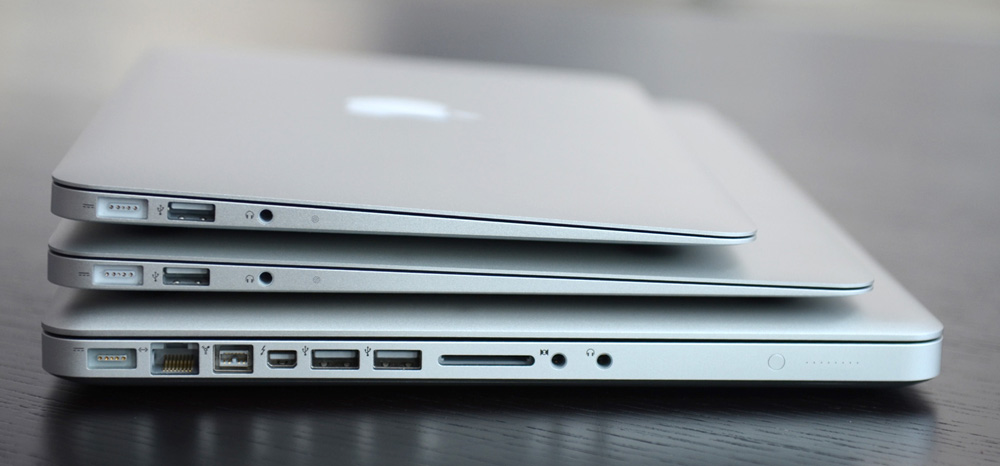
Apple's premium laptop comes in 13- and 16-inch screen sizes. Each model includes 2-4 USB-C ports for charging, accessories, and data transfer. Higher-end models also include the Touch Bar.
2021 MacBook Pro

MacBook Pro has been the product name for Apple’s high-end laptop since early 2006 when the transition to Intel processors began. Now, that Pro naming has carried forth as Apple has moved to its own silicon. The latest fourth and fifth-generation Pro Apple notebooks bring dramatically more power with lower heat generation and better battery life thanks to the ARM-based Apple silicon. Keep reading for a brief history of the line and a breakdown of the current lineup.

MacBook Pro history

The first generation MacBook Pro followed in the style of the PowerBook G4 that came before it, but used Intel processors rather than PowerPC chips.

The second generation of the MacBook Pro was the first to really separate itself from the products before, with a unibody enclosure. The third-generation MacBook Pro introduced the retina display as well as MagSafe 2.

Perhaps the most controversial version of the MacBook Pro is the fourth generation. While the third generation received some backlash for the removal of ethernet and the optical drive, the fourth generation was a complete rethinking of the device peripherals. No more MagSafe, no more USB-A ports, and only the 13-inch model kept the function keys. Instead, this redesigned MacBook Pro opted for all Thunderbolt 3 ports and headphone jack. In place of function keys, the MacBook Pro gained an OLED Touch Bar. In late-2020, Apple introduced the M1 chip and updated the 13-inch MacBook Pro. The ARM-based processor brought down power consumption and increased performance.

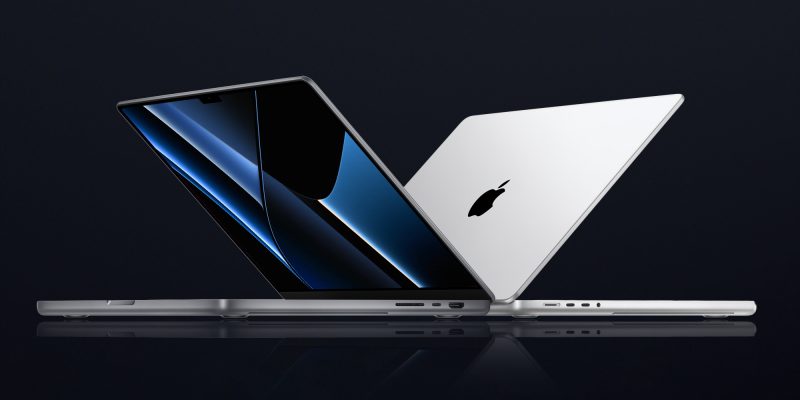
In October of 2021, Apple introduced the fifth-generation MacBook Pro with not one but two updated versions of the M1 chip, the M1 Pro and M1 Max. The move walked back some of the decisions from the previous generation, adding back an HDMI Port, MagSafe charger, and SD card reader while removing the Touch Bar.

The 2020 13-Inch MacBook Pro

In late 2020, Apple introduced the 13-inch M1 MacBook Pro as the latest update to the fourth-generation MacBook. The MacBook features the same look as previous MacBooks, but like the MacBook Air and Mac Mini, switched to Apple silicon.

Apple’s M1 chip brought ARM architecture to the MacBook line, and this was the first MacBook without an Intel processor.

The M1 chip is a unified design with an 8-core CPU and an 8-core CPU. The processor integrated memory on board, limiting the device to either 8GB or 16GB of unified memory. The 13-inch M1 MacBook Pro is configurable with between 256GB and 2TB of storage and features a Magic Keyboard, rather than the problematic butterfly keyboard.

13-inch MacBook Pro specs

Base Configuration$1,299.00

  • Apple M1 chip with 8‑core CPU, 8‑core GPU, and 16‑core Neural Engine
  • 8GB unified memory
  • 256GB SSD storage
  • 13-inch Retina display with True Tone
  • Backlit Magic Keyboard – US English
  • Touch Bar and Touch ID
  • Two Thunderbolt / USB 4 ports

Max Configuration$2,299.00

  • Apple M1 chip with 8‑core CPU, 8‑core GPU, and 16‑core Neural Engine
  • 16GB unified memory
  • 2TB SSD storage
  • 13-inch Retina display with True Tone
  • Backlit Magic Keyboard – US English
  • Touch Bar and Touch ID
  • Two Thunderbolt / USB 4 ports

13-inch MacBook Pro pricing

The price for the 13-inch M1 MacBook Pro starts at $1,299. Upgrading this base configuration to 16GB of memory adds $200 to the price. Likewise, each step above 256GB of storage – 512GB, 1TB, and 2TB – will add $200 to the price. A fully specced out 13-inch MacBook Pro will run you $2,299.

You can configure your own 13-inch MacBook Pro on Apple’s website.

Current 14-inch and 16-inch MacBook Pro

In October 2021, Apple brought a brand new design to the MacBook Pro line. Apple increased the screen size on the 13-inch, making it a 14-inch, and shrunk the bezels on the 16-inch. This fifth-generation notebook addressed many complaints of the last generation. MagSafe returned, in the form of an improved MagSafe 3, while the MacBook also regained an HDMI port and an SD-card slot.

Also gone is the Touch Bar. Instead, the standard row of function keys return. The latest MacBooks also bring a ProMotion display that was first introduced on the iPad Pro, with a variable refresh rate and mini-LED backlight.

The 2021 MacBooks aren’t without a controversial feature, as while the display has been made larger there is now a large notch for the 1080P FaceTime camera. While FaceID would have been a nice addition in exchange for this small chunk of the screen, there are some reasons this is not totally practical.

14-inch MacBook Pro specs

Base Configuration$1,999.00

  • Apple M1 Pro with 8-core CPU, 14-core GPU, 16-core Neural Engine
  • 16GB unified memory
  • 512GB SSD storage
  • 67W USB-C Power Adapter
  • 14-inch Liquid Retina XDR display
  • Three Thunderbolt 4 ports, HDMI port, SDXC card slot, MagSafe 3 port
  • Backlit Magic Keyboard with Touch ID – US English

Maximum Configuration$5,899.00

  • Apple M1 Max with 10-core CPU, 32-core GPU, 16-core Neural Engine
  • 64GB unified memory
  • 8TB SSD storage
  • 96W USB-C Power Adapter
  • 14-inch Liquid Retina XDR display
  • Three Thunderbolt 4 ports, HDMI port, SDXC card slot, MagSafe 3 port
  • Backlit Magic Keyboard with Touch ID – US English

14-inch MacBook Pro pricing

The 14-inch MacBook Pro starts at $1,999. The base model includes 16GB of memory, 512GB of storage, and an M1 Pro processor with an 8-core CPU and 14-core GPU. There are multiple versions of the M1 Pro processor available, while jumping to an M1 Max processor will cost $500 more, and requires you to jump up to 32GB of memory – a $400 upgrade. Going with the M1 Max processor means you can configure up to the full 64GB of memory, an $800 upgrade.

You can configure up to 8TB of storage in the 2021 14-inch MacBook Pro. Upgrade costs are as follows:

  • 1TB SSD Storage – $200
  • 2TB SSD Storage – $600
  • 4TB SSD Storage – $1,200
  • 8TB SSD Storage – $2,400

You can configure your own 14-inch MacBook Pro on Apple’s website.

16-inch MacBook Pro specs

Base Configuration$2,499.00

  • Apple M1 Pro with 10-core CPU, 16-core GPU, 16-core Neural Engine
  • 16GB unified memory
  • 512GB SSD storage
  • 16-inch Liquid Retina XDR display
  • Three Thunderbolt 4 ports, HDMI port, SDXC card slot, MagSafe 3 port
  • 140W USB-C Power Adapter
  • Backlit Magic Keyboard with Touch ID – US English

Maximum Configuration$6,099.00

  • Apple M1 Max with 10-core CPU, 32-core GPU, 16-core Neural Engine
  • 64GB unified memory
  • 8TB SSD storage
  • 16-inch Liquid Retina XDR display
  • Three Thunderbolt 4 ports, HDMI port, SDXC card slot, MagSafe 3 port
  • 140W USB-C Power Adapter
  • Backlit Magic Keyboard with Touch ID – US English

16-inch MacBook Pro pricing

The 16-inch MacBook Pro starts at $2,499. There is only one M1 Pro processor available on the 16-inch MacBook, and that’s the highest version 10-core CPU, 16-core GPU version of the M1 Pro processor that is a $300 upgrade on the 14-inch MacBook Pro. Of course, you can also step up to the M1 Max processor with either a 24-core or 32-core GPU, a $200 and $400 upgrade respectively (which also requires the $400 upgrade to 32GB of memory). The memory and storage options are all the same as the 14-inch MacBook Pro.

You can configure your own 16-inch MacBook Pro on Apple’s website.

Differences between 13-inch,14-inch, and 16-inch models

The 2021 MacBook Pro lineup is a refreshing change. The return of ports and physical keys make the laptops more versatile, while additions like an XDR display and hardware acceleration for ProRes improves the experience but is harder to quantify for the average user.

13-inch14-inch16-inch
ProcessorM1M1 Pro / M1 MaxM1 Pro / M1 Max
Memory8GB / 16GB16GB / 32GB / 64GB16GB / 32GB / 64GB
Storage512GB, 1TB, 2TB512GB, 1TB, 2TB, 4TB, 8TB512GB, 1TB, 2TB, 4TB, 8TB
Screen2560×1600 pixels 3024×1964 pixels; ProMotion3456×2234 pixels; ProMotion
Weight3.0 pounds (1.4 kg)3.5 pounds (1.6 kg)M1 Pro: 4.7 pounds (2.1 kg)
M1 Max: 4.8 pounds (2.2 kg)
Size (Width x Depth)11.97 x 8.36 inches (30.41 x 21.24 cm)12.31 x 8.71 inches (31.26 x 22.12 cm)14.01 x 9.77 inches (35.57 x 24.81 cm)
Height0.61 inch (1.56 cm)0.61 inch (1.55 cm)0.66 inch (1.68 cm)
Base Price$1,299.00$1,999.00$2,499.00

The $1,999 starting price for Apple latest computer is a harder pill to swallow than the $1,300 13-inch Pro from last year. For an average user, the superb M1 MacBook Air will likely suffice (and that sub-$1,000 price is hard to pass up).

But the 2021 14-inch and 16-inch MacBook Pro are exactly what they need to be, a return to function-over-form that will truly meet the needs of professional users.


Review: Studio Credence leather & felt book-style iPad case (and iPhone sleeve)

Site default logo image

While I may be known for my addiction to all things anodised aluminum, I also have a love of natural materials, wood and leather especially. My MacBook Pro and MacBook Air both travel in BookBook leather cases (reviewed here by Jordan), so when Studio Credence announced a book-style case for the iPad, I decided to take a look.

First impressions

Studio Credence is clearly going for a bit of a rustic look. The packaging is undyed cardboard, with the case itself in a muslin-type drawstring bag. Open this, and what you have inside is a very similar approach to the BookBook range … 
Expand
Expanding
Close

Apple fixes 13-inch Retina MacBook Pro trackpad/keyboard issues, graphics bug on 15-inch

Site default logo image

With the new 13-inch Retina MacBook Pro launch last month, many users have noticed and complained about issues relating to the computer’s keyboard and trackpad becoming unresponsive.

In line with Apple’s promise, a fix has been delivered:

This update is recommended for MacBook Pro (Retina, 13-inch, late 2013) models.    This update addresses an issue where the built-in keyboard and Multi-Touch trackpad may become unresponsive.

The solution comes in the form of the MacBook Pro Retina EFI Update 1.3, and this update is available via Software Update in the Mac App Store. Apple has also released an update for the 15-inch Retina MacBook Pro to fix issues relating to NVIDIA Graphics chips:


Expand
Expanding
Close

Unlock your Mac by knocking on your iPhone with the new ‘Knock’ app

http://www.youtube.com/watch?v=CyX8FfSKg04

Knock uses a combination of an iPhone app (currently offered at an introductory price of $3.99)  and a Mac app (available for free at Knock’s website) to enable unlocking of your Mac, wirelessly, by just knocking the back of your iPhone.

It’s a surreal experience. After a couple of minutes of initial setup, you lock your Mac and rap the back of your paired iPhone twice. Your Mac unlocks. The app doesn’t even have to be forefront on your phone, although it does have to be ‘open’ in the multitasking tray. In fact, your phone doesn’t even have to be unlocked. When it senses the Mac is near, a notification appears on the lock screen instructing you to knock. There are some nice UI touches too. For instance, echoes of the ‘sound wave’ appear on OS X’s lock screen in real time as you knock. It’s a subtle visual indicator that the system is actually working.


Expand
Expanding
Close

Latest MacBook Pro 15 gets blazing SSD performance thanks to 4-channel PCIe (updated)

Site default logo image

Update: It appears this may be a function of the 1TB drives fitted to both 13- and 15-inch models. The reason for this isn’t yet clear: it may be the drives used offer greater bandwidth.

Benchmark tests by French site Mac4Ever show that the latest MacBook Pro 15 is delivering SSD read and write speeds in excess of 1GB per second. The site repeatedly achieved these speeds when Apple claims only “up to 775MB per second.”

The MBP 15 is able to achieve these speeds because it has a 4-channel PCIe connection to the SSD, in contrast to the 2-channel link on the MBP 13 and MacBook Air models, though from some reader reports this may be the case only on models fitted with 1TB drives …


Expand
Expanding
Close

Apple says fix incoming for 13-inch Retina MacBook Pro trackpad & keyboard issues, offers interim solution

Site default logo image

Apple has published a new support article detailing an issue with some new 13-inch Retina MacBook Pros that debuted alongside the iPad Air earlier this month. The issue can lead to the computer’s keyboard or trackpad becoming unresponsive.

There have been numerous reports of the issue in a 67-page thread on the Apple support forums. Apple’s statement:


Expand
Expanding
Close

Thinner, lighter, FASTER: Early benchmarks show 50-65% improvement in MacBook Pro’s Iris graphics

Site default logo image

Macworld’s benchmarks

…less expensive, better battery life too

Apple’s relentless improvement iterations continue unabated. Macworld’s early benchmarks on Apple’s new base model 13″MacBook Pro with built in Intel Iris Graphics are in and show huge speed gains in graphics performance:

The most impressive improvements in the new laptops came courtesy of the new Iris graphics. Compared to the HD 4000 graphics in the early 2013 13-inch Retina MacBook Pro, the Iris graphics posted between 45 and 50 percent higher frame rates in Cinebench r15’s OpenGL tests and the Unigine Valley Benchmark. Unigen’s Heaven benchmark showed the new systems with about 65 percent improvement in frame rates over the earlier model.

Iris Graphics also support displays up to 4K at 24Hz, a first for Apple’s entry level Pro laptops.

CPU performance improvement is slight but the Intel Haswell architecture adds a few hours of (Apple’s estimated) battery life while the machine actually got thinner and lighter. Meanwhile, Apple loaded up faster 802.11ac Wifi and speedy Samsung PCIe SSDs up to 1TB and Thunderbolt 2.0.

Price? Dropped $100  to $1299. (we are already seeing discounts/tax advantages in our Products section).
Expand
Expanding
Close

New Haswell MacBook Pro teardowns beautiful but prove almost non-repairable by mortals

Site default logo image

MacBook Pro 13

Teardowns of the new  13-inch and 15-inch MacBook Pro models reveal lots of shiny technology, but with the machines following the construction lead of the MacBook Air, it’s no surprise to see IFixIt giving both models low scores for repairability. The extreme difficulty in removing both battery and trackpad mean both models get even worse scores than the Air, at just 1 out of 10.

As with the Air, RAM is soldered directly to the logic board, so if you think you may need more in the future, take a deep breath and pay Apple’s price for the 16GB upgrade as there is no way to upgrade it later. IFixIt also draws particular attention to the difficulty of replacing the battery,

The lithium-polymer battery is glued rather than screwed into the case, which increases the chances that it’ll break during disassembly. The battery also covers the trackpad cable, which tremendously increases the chance that the user will shear the cable in the battery removal process.

More details and photos below the fold … 
Expand
Expanding
Close

Pixelmator 3.0 FX released: adds layer styles, ‘Liquify’ warping tools, Mac Pro and Mavericks optimizations

Today, the team behind Pixelmator has released the latest version of their app, version 3.0 FX. As before, the app is available on the Mac App Store for $29.99. The update brings a slew of changes to the already popular image editor, especially considering version 2.2 was only released a few weeks ago. 9to5Mac has had access to a preview copy of the update for a few days … so read on for a full walkthrough of the changes.

The headline feature for Pixelmator 3.0 is the addition of layer styles. Layer styles apply effects such as strokes, fills, shadows and reflections to the entire layer in very few clicks. More importantly, these changes are non-destructive — they affect the layer, not the canvas pixels themselves. This means layer effects can be undone and manipulated without changing the underlying image data. In fact, layer styles can even be copied to the clipboard and duplicated across layers.


Expand
Expanding
Close

Apple Store goes down for updates in run-up to launch event (Update: iWork on iCloud goes down as well)

Site default logo image

As always in the run up to a launch event, the Apple Store has been taken offline for updates ahead of today’s iPad-focused event. Apple has also taken down iWork for iCloud, promising that it will be back in a few hours with “great new features.”

Additionally, Apple has updated its homepage with a promo for the event … 
Expand
Expanding
Close

Apple will be live-streaming today’s launch event on web & Apple TV

Site default logo image

Apple will be live streaming today’s launch event, first revealed by the Apple Events channel returning to Apple TV, the icon displaying the theme for the event and a message saying “tune in at 10 am for the live stream.”

The event will also be streamed on the web when it begins at 10am Pacific/1pm Eastern. As usual, live streaming requires Safari 4 or later on OS X v10.6 or later; Safari on iOS 4.2 or later. Streaming via Apple TV requires second- or third-generation Apple TV with software 5.0.2 or later.

Details below of what we’re expecting to see … 
Expand
Expanding
Close

Tune in Oct. 22 for new iPads, Mac Pro details, MacBook Pros, and Mavericks

Site default logo image

Apple’s next event is upon us, and it’s likely to be action-packed. As Apple says: it has “a lot to cover.” So besides the speculation that rings in from the word cover (new Smart Covers, anyone?), Apple has some new tablets, computers, and software to discuss. Read our full roundup of what to expect (and not expect) on Tuesday, October 22nd, from Apple:


Expand
Expanding
Close

Report: New MacBook Pros on sale Oct 24/25, iPads Oct 30/31, Mac Pro Nov 15

Site default logo image

Image: techbeat.com

French site MacG, which has an imperfect track-record, claims to have been given the dates on which the new MacBook Pros, iPads and Mac Pro will go on sale. The claimed dates are:

With Apple’s media event scheduled for 22nd October, this would put the MacBook Pros on sale very quickly indeed, just two or three days later.

However, the iPad and Mac Pro dates do not make as much sense. Apple has typically launched its new iPad models on Fridays (or Saturday for the original version), making it unlikely that the new tablets would hit store shelves on a Wednesday or Thursday (as the MacGeneration report claims).

As for the Mac Pro, that machine is a built-to-order computer, so perhaps it would be difficult to pinpoint an actual launch date for that product. MacG also happened to have claimed that Apple’s event would occur today, so that does not add much credibility to these new claims.

Below is what we’re expecting to see for each product … 
Expand
Expanding
Close

Like iPad 3, new iPad mini could be technically thicker to fit Retina Display

Site default logo image

Space Gray iPad mini 2 casing (via <a href="http://sonnydickson.com/2013/09/27/hands-on-with-the-ipad-mini-2-in-space-gray/">Sonny Dickson</a>)

One of the most exciting new features of the upcoming iPad mini successor is perhaps the long-rumored Retina display. Apple has been developing a Retina-version (Apple’s term for the crisper display found on iPhones, the larger iPads, and some MacBook Pros), but the company has been reluctant to ship it due to cost, hardware size, and battery-life concerns. Though for October 22nd, it sounds like Apple has an iPad mini with Retina display ready to go.

But, it could potentially have a very minor trade-off: some extra thickness and width that will likely not be noticeable to the human eye. Just like the the full-sized iPad went thicker (and heavier in that case) to accommodate the much higher-resolution Retina display, the iPad mini could slightly bulk up to fit the new display, according to Macotakara. At a conference in China, the website went hands-on with some purported cases for the next-generation iPad mini. These cases fit a device with a thickness of 7.5mm and width of of about 0.2mm wider than the current iPad mini…


Expand
Expanding
Close

How-to: Mark up and caption images using Preview on OS X

Site default logo image

Preview is a built-in Mac application that has many features that doesn’t get a lot of press. One of them is the ability to place a caption inside the body of the image. Another is to mark up images to remove confidential information. If you double click on an image outside of a photo editor like iPhoto or Aperture, it opens in Preview and can be edited.


Expand
Expanding
Close

Apple to hold fiscal Q4 earnings conference call on Monday, October 28th

Update: Live webcast will be at www.apple.com/quicktime/qtv/earningsq413

Apple will hold its quarterly earnings call to announce results on October 28th, as noted on Apple’s investor website. Typically, Apple’s CEO Tim Cook and CFO Peter Oppenheimer will read prepared statements about the company’s performance, before opening the call to a question and answer session for analysts. The call will begin at 2PM Pacific / 5PM Eastern time. Apple will publish a press release reporting their results about half an hour before the call is due to begin.


Expand
Expanding
Close

Major update to VLC for Mac adds 4K support, improved MKV support, interface improvements and more

VideoLAN has released version 2.1 of its popular open source video player, VLC. The update — codenamed “Ricewind” — brings new audio processing to the app, to improve both processing performance and audio fidelity. There is full support for surround sound outputs in addition to new effects and many new supported metadata formats for audio.

On the video side, the app has ported the OpenGL output to OpenGL ES, making ports to iOS and Android much easier. Notably, VideoLAN says that VLC is now ready for Ultra-HD content (otherwise known as 4K). The app update has also focused heavily on improving MKV compatibility, including better seek performance and subtitle metadata support.


Expand
Expanding
Close

Pixelmator pushes 2.2.1 update, modernizes file format for significant performance gains

Pixelmator has pushed a point update to the Mac App Store. Despite its minor bump in version number, the update brings a lot of helpful changes. The timing is ‘intriguing’, as it coincides with Adobe’s announcement of a new version of Photoshop Elements from this morning.

Pixelmator quotes a 2x performance improvement when saving documents, as a result of a move to a new file format. For instance, when saving to iCloud, Pixelmator can now push small deltas of what has changed between saves, rather than saving the entire image every time. This speed up is noticeable in use, with projects saving nearly instantaneously on a Retina Macbook Pro.


Expand
Expanding
Close

Site default logo image

9to5Toys Last Call: Save up to $300 on a new Retina MacBook Pro, $50 off iPad 2 / iPad 4, external power banks, games/apps, more

From 9to5Toys.com:

A large majority of the deals we cover each day come from a variety of ‘Daily Deal’ websites or are so popular that they don’t even last 24 hours. We know you can’t be at your computer every second, so we’re going to round up the best deals each day to make sure you have a fair shot at the deals you want. Be sure to follow 9to5Toys.com so you never miss a deal... Twitter, RSS Feed, Facebook, Google+.

Apple Deals:

External Power Bank Deals: RAVPower 7800mAH pack + USB car charger $27, Vaas 5200mAh pack $18more

Other great deals we love:

Freebies:

Glui review: Screenshotting for OS X made a delight, not a chore

Put plainly, Glui is a screenshot and annotation tool; a utilitarian application. It does not evoke charm, but it doesn’t really need to. What Glui does need to offer is a functional yet efficient workflow and, on this front, it delivers. In use, I never feel like the app is getting in my way.

The activation shortcuts are bound to Shift+Cmd+5 and Shift+Cmd+6 by default to match OS X’s native screenshot shortcuts. These actions select either a rectangular screen region or one window, respectively. With the region mode, the screen cursor changes to a crosshair (which shows x,y pixel coordinates) and the region is chosen by dragging your mouse to create a rectangle. With the window mode, the cursor changes to a camera icon and you simply click on the window you wish to capture.

Although the process is very similar to how OS X’s built-in screenshot features work, it is not identical. For instance, in Glui, window screen grabs do not include the accompanying drop shadow as they do in OS X’s implementation.


Expand
Expanding
Close

Site default logo image

9to5Toys Last Call: Save up to $400 off 15″ Retina MacBook Pro + Free Apple TV, app deals galore, Hulu Plus / Amazon Prime free trial offers, more

From 9to5Toys.com:

A large majority of the deals we cover each day come from a variety of ‘Daily Deal’ websites or are so popular that they don’t even last 24 hours. We know you can’t be at your computer every second, so we’re going to round up the best deals each day to make sure you have a fair shot at the deals you want. Be sure to follow 9to5Toys.com so you never miss a deal... Twitter, RSS Feed, Facebook, Google+.

Also check out the latest 9to5Mac Happy Hour to hear the latest 9to5Toys segment. During the show, there’s a mention of $50 video conversion software currently available for free and the VPN service proXPN.com available at a 20% discount.

Today’s Featured deals:

Save up to $400 off 15″ Retina MacBook Pros + Free Apple TV at Best Buy

iOS App Deals:

Bad Piggies: FREE, XCOM Enemy Unknown: $15, freebies, more

Readdle iOS Apps up to 70% off: Calendars+: $2, PDF Expert: $5, Printer Pro: $2, more

Trial Offers:

Free 2 month
Hulu Plus trial for new customers

Get a free $10 gift card when you sign-up for an Amazon Prime membership

Other great deals we love:

Site default logo image

Want more battery-life from your MacBook? Close some tabs

Gizmodo pointed us to some research carried out by someone who must be the poster child for having too much time on your hands: he decided to measure the amount of power a MacBook Pro uses for each tab open in a browser. The answer, in case you were curious, is 0.19 watts per tab in Safari or Chrome.

There is some point to it, though: the experiment showed that having 100 tabs open reduces battery-life by around an hour. While I doubt that many of us have quite that many tabs open at any one time, it does suggest that when you’re trying to eke out as much usage as you can from a battery, closing unnecessary tabs will buy you at least a little more time.

Best Buy slashes new Mac prices w/extra savings for students; Haswell Airs start at $849

Site default logo image

From 9to5toys.com:

Best Buy is having a significant College Student sale this week on MacBook Airs, Retina/Pros and iMacs and Students or anyone with a .edu email address get another $100 off the sale prices signing up here. For instance, the entry level Haswell MacBook Air is now $949 and another $100 drops it down to $849, the lowest price we’ve seen by $100.

Haswell MacBook Air prices:

  • MacBook Air – 11.6″ Display/4GB Memory/128GB Flash Storage:$949.99-$100 students=$849.99 ($150 off)
  • MacBook Air – 11.6″ Display/4GB Memory/256GB Flash Storage:$1139.99-$100 students=$1039.99 ($170 off)
  • MacBook Air – 13.3″ Display/4GB Memory/128GB Flash Storage:$1,044.99-$100 students=$944.99 ($155 off)
  • MacBook Air – 13.3″ Display/4GB Memory/256GB Flash Storage:$1,234.99-$100 students=$1134.99 ($165 off)

Retina MacBook Pro prices:

iMac Prices save $100 across the board and another $100 for students = $200 savings starting at $1100

The MacBook Student $100 off promotion starts today, and will end July 27.
Expand
Expanding
Close

Site default logo image

9to5Toys Last Call: Free Klipsch Earbuds (After rebate), Budget Office Toys, $60 Toshiba 1TB USB 3.0 Portable HD

From 9to5Toys.com:

A large majority of the deals we cover each day come from a variety of ‘Daily Deal’ websites or are so popular that they don’t even last 24 hours. We know you can’t be at your computer every second, so we’re going to roundup the best deals each day to make sure you have a fair shot at the deals you want. Be sure to follow 9to5Toys.com so you never miss a deal... Twitter, RSS Feed, Facebook

Today’s Featured deals:

Klipsch E1 In-Ear Headphones: FREE after $25 rebate

Budget office ‘productivity-killing’ gadgets:

Toshiba Canvio 1TB USB 3.0 Portable Hard Drive $60 Shipped (Reg. $120)


Other great deals we love: