MacBook

See All Stories

Light. Years ahead.

Check out our top stories on MacBook:

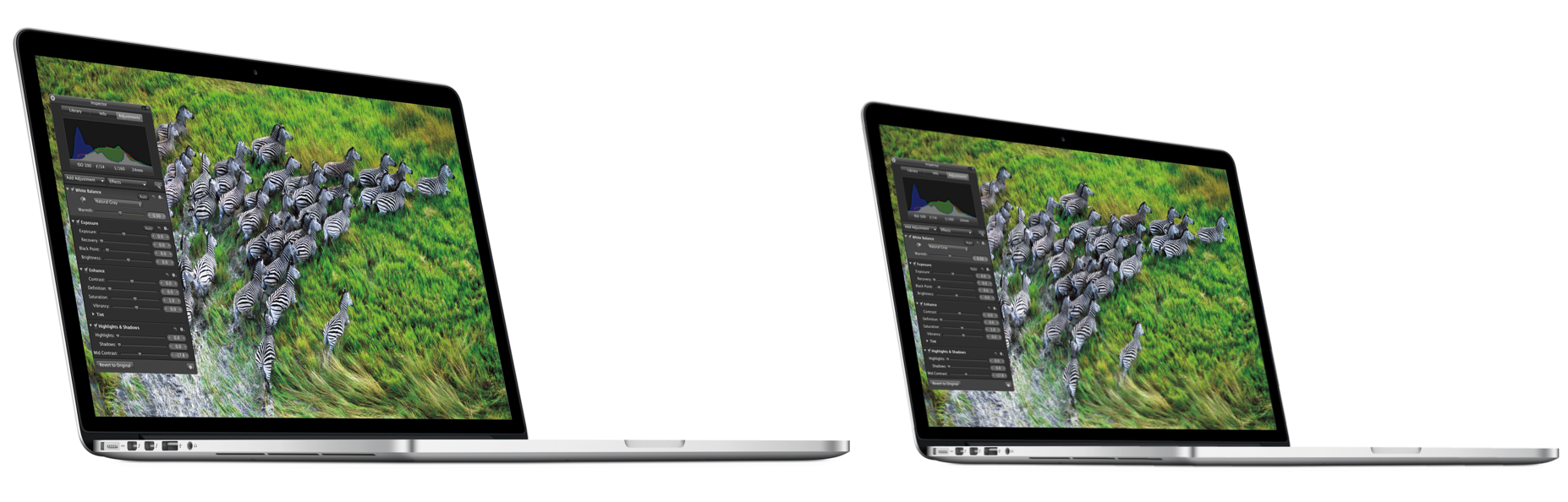
Originally released April 10, 2015 and last refreshed April 19, 2016, the all-new MacBook ($1,299 and up from the Apple Store) is the thinnest and lightest Mac laptop ever made. It’s also the first MacBook to be offered in four color options: classic silver, space gray, gold and rose gold.

Currently offered only with a 12″ screen, it represents the future of Apple laptops. Following a refresh in April 2016, it now includes a 2304×1440 (226ppi) Retina display, 8GB of RAM and up to 512GB of SSD storage, coupled with ultra-low-power Intel Core M processors. The base model includes a 1.1GHz dual-core Intel Core M chip with an Intel HD Graphics 515 GPU; and upgraded models offer to 1.2GHz dual-core Intel Core m5 or 1.3GHz dual-core Intel Core m7 processor with Turbo Boost up to 3.1GHz.

With a redesigned chassis that’s only slightly wider than the keyboard, the new MacBook’s 0.14″–0.52″ thickness was achieved in part by dropping all external connectivity ports save for a 3.5mm headphone port and a new reversible USB-C port, which can be used for power, data connectivity, and video output. Most of the MacBook’s connectivity is handled wirelessly with 802.11ac and Bluetooth 4 support. It promises 9-10 hours of battery life depending on how the computer is being used.

A redesigned Force Touch trackpad now can sense multiple levels of pressure rather than just one, using four pressure sensors and a haptic feedback pad to replicate the clickiness of a traditional trackpad. Additionally, the keyboard has been completely redesigned to retain the expected clicks, precision, and travel of conventional keys, while cutting their depth and width to fit the chassis. An ultra-thin top lid has only enough depth for a 640×480 FaceTime camera, a compromise for the smaller size.

Just like the first-generation MacBook Air, the new MacBook is aimed at users whose computing needs don’t demand incredible horsepower, yet benefit from a slim, light chassis with a really nice screen. Though you’ll do better in raw dollar terms and power by buying a comparably priced 13″ Retina MacBook Pro, you’ll have nearly twice the weight to carry around (2.03 pounds versus 3.48 pounds) and a larger footprint to manage. The choice of which is best for your needs will be highly personal.

Current Lineup:

  • MacBook (12-inch, Early 2016)

Related Guides:

 

Site default logo image

Woot! has 2011 Dual-Core i5 MacBook Air – New in box (Update: $749)

From 9toToys.com:

.

Update: MacMall has it for $748.99 with free shipping and the current 4GB USB 3 version for $948.99

Today only, Woot! has the base model 2011 MacBook Air new in box for $759.99+$5 shipping and tax where applicable (Apple charges roughly the same for a refurbished unit). That’s the lowest price we’ve seen for this MacBook Air that was replaced at WWDC in June.

Bonus: Get this Transcend 64GB USB 2.0 Flash Drive for $29.99 with free shipping at Amazon.

Specs include:

  • Eligible for OS X Mountain Lion Up-to-Date Program
  • Originally released July 2011
  • 11.6-inch (diagonal) high-resolution LED-backlit glossy widescreen display
  • 2GB memory
  • 64GB flash storage
  • Thunderbolt port with support for up to 2560-by-1600 resolution
  • FaceTime camera
  • Intel HD Graphics 3000

Product Details

Processor 1.6 GHz dual-core Intel Core i5
L3 Cache 3MB shared
Memory 2GB of 1333MHz DDR3 SDRAM; supports up to 4GB
Hard drive 64GB flash storage1
Graphics Intel HD Graphics 3000 processor with 256MB of DDR3 SDRAM shared with main memory2
Ports Thunderbolt port, two USB 2.0 ports
Audio Stereo speakers, Omnidirectional microphone, headphone port, support for Apple Earphones with Remote and Mic
Wireless 802.11n Wi-Fi wireless networking; IEEE 802.11a/b/g compatible; Bluetooth 4.0 wireless technology3
Size and weight Height: 0.11-0.68 inch (0.3-1.7 cm)
Width: 11.8 inches (30 cm)
Depth: 7.59 inches (19.2 cm)
Weight: 2.38 pounds (1.08 kg)4

All-Flash Storage

“Wow, that was fast.” With MacBook Air, you’ll find yourself saying that a lot. Because flash storage is up to two times faster than a conventional hard drive,5 everything you do is more responsive and immediate — starting up, browsing a large photo library, launching applications, and opening files, for instance. When you combine the speed of flash storage with a fast dual-core processor and power-efficient graphics, your entire MacBook Air experience feels turbocharged. And flash storage doesn’t have any moving parts, which means it’s more reliable and quiet. Lightning fast, durable, silent — qualities that make sense in a notebook tasked with keeping up with you.

High-Speed Thunderbolt I/O

The breakthrough I/O technology pioneered on MacBook Pro and iMac now comes to MacBook Air, letting you connect multiple high-performance devices — such as external hard drives — through a single port. With two 10-Gbps data channels, Thunderbolt lets you transfer data at rates up to 12 times faster than FireWire 800 and up to 20 times faster than USB 2.0. Thunderbolt technology gives MacBook Air capabilities it’s never had before. Like attaching FireWire peripherals or connecting to Ethernet networks at gigabit speeds — two big gains from one tiny port.6

Long-lasting battery. Instant on. Even after a month off.

Since space-saving flash storage leaves room for a bigger battery, you can devote more time to the things you enjoy most. Things like browsing the web, editing photos, and watching videos. Get up to 5 hours of battery life on a single charge on the 11-inch model. Put MacBook Air to sleep, and it enters standby mode to conserve battery life for up to 30 days.7 When you come back to your MacBook Air and open it up, it’s on in an instant.

DVD or CD Sharing

With the Mac App Store, getting the apps you want on your Mac has never been easier. No more boxes, no more discs, no more time-consuming installation. Click once to download and install any app on your Mac. But if an app you need isn’t available from the Mac App Store, you can use DVD or CD Sharing. This convenient feature of OS X lets you wirelessly “borrow” the optical drive of a nearby Mac or PC. So you can install applications from a DVD or CD and have full access to an optical drive without having to carry one around.

Backlit keyboard

As incredibly compact as MacBook Air is, it still manages to fit a full-size keyboard that makes typing as natural as it is comfortable. And now the keyboard is backlit, so you can type with ease in even the dimmest light. A built-in ambient light sensor detects changes in lighting conditions and adjusts the display and keyboard brightness automatically. From a seat in a sunny café to a seat on a cross-country red-eye, you’ll always have the perfect lighting for any environment.

Site default logo image

Parallels 8 is a clear winner vs. VMware Fusion 5 in Ars shootout

.

Ars put Parallels 8 against VMware Fusion this week and found there is not much of a contest between the two virtualization powerhouses. Parallels 8 out-gunned VMware across the board (as previous benchmarks have shown) performance-wise and adds full support for Retina displays and dictation among other features.

Neither Parallels Desktop 8 or VMWare Fusion 5 are loaded to the gills with new features, so the PD8 update from version 7 is only a must-have if you are looking for Windows 8 or retina MacBook support in Windows 7 or 8. If you need retina support, this is your best option since Parallels did the extra work and made it a better retina experience than in VMWare Fusion 5. The Mountain Lion dictation and experimental DirectX 10 support show that, while Parallels tends to have more frequent paid updates and a higher price-tag, they try to earn the extra value with well thought out features and engineering. Apart from the bugs I saw in Mountain Lion 8, I think Parallels Desktop 8 earns that extra cost with its solid performance, far superior Linux OpenGL support, and existing feature set. But if your needs are more big-business-oriented, VMWare Fusion 5 Pro might be more your thing.

VMware Fusion might fit better into cross-platform installations or for folks with legacy VMware images.

Parallels 8 is available for download or trial here for $79. VMware starts at $49.
Expand
Expanding
Close

Site default logo image

Microsoft Office for Mac 2011 updated with support for Retina MacBook Pros

Following a ton of complaints from new Retina MacBook Pro users about the Microsoft Office 2011 experience in August, Microsoft finally updated the app to version 14.2.4 today to bring support for Retina displays and a number of other fixes.

We’re happy to announce that Office for Mac 2011 (version 14.2.4) now supports Retina display for Word, Excel, PowerPoint, and Outlook. Text everywhere is incredibly crisp and all key areas of the interface are now sharper than ever. We hope you enjoy this fantastic software experience!…As long as you have Microsoft AutoUpdate set to check for software updates automatically, you’ll be notified when this update is available.

(via MacRumors)

Site default logo image

Amazon gets new iPods as Best Buy throws a MacBook Sale

From 9to5Toys.com:

Amazon just launched pre-order pages for the new iPod Touch, Nanos and Shuffles. They will ship probably right after Apple starts with sales tax in only some states.

Meanwhile. Best Buy is having a MacBook Sale this weekend with up to $200 off MacBooks. The new Airs with 4GB of RAM start out at $949 and many 13″ Airs/Pros are $100 off, which are the lowest prices we could find.


Expand
Expanding
Close

Review: Logitech Solar Keyboard Folio for iPad

Site default logo image

We recently reviewed one of our favorite keyboard solutions for the iPad, Logitech’s Ultrathin iPad Keyboard Cover. However, we have seen a few new competitors since then. Most notably: ZAGG’s new KeysPRO line, which we were able to get our hands on at IFA last month. The ZAGGKeys PRO caught our eye with its backlit keys, rugged build quality and battery life of up to three weeks at eight hours a day. It has potential to become the go-to iPad keyboard when it goes on sale at the end of the month (full review on the way), but one keyboard recently released already has it beat, at the very least, on battery life…

Logitech’s new Solar Keyboard Folio for iPad 2 and 3 comes with one impressive claim: the ability to type for two hours a day for two years on a full charge…even in the dark. That claim combined with a solid Logitech keyboard similar to what we’re used to from the company’s past iPad products, we essentially get solar power and a folio-style case added to the Ultrathin Keyboard cover for an extra $30.

I have had long enough since its release to put it to the test and have a couple of thoughts:


Expand
Expanding
Close

Site default logo image

Price Drop: MacBook Airs at the Apple Store now start at $679

From 9to5Toys.com:

.

Apple quietly dropped the prices on refurbished MacBook Airs last night by up to $120. Notables above are 2010 releases of the 11.6″ MacBook Air model with options of 128GB SSD or 4GB of RAM. Apple refurbished items are virtually indistinguishable from new items and come with the same 1 year AppleCare warranty. All refurbished Macs purchased at Apple are also eligible for the OS X Mountain Lion Up-to-Date Program.

These typically run out of stock very quickly.

Update: All gone. You snooze, you lose.
Expand
Expanding
Close

Site default logo image

Awesome cartoon-like gadget bags now shipping, prices start at $79 [Gallery]

This is not a cartoon bag. Seriously.

JumpFromPaper (perfect name, eh?) offers a line of handbags, profile bags, carrying pouches, etc., which look colorful and two-dimensional, and will hold an iPad, MacBook or just about anything else.

So, where did the idea come from?:

JumpFromPaper™ is a playful and innovative line of bags created by Taipei-based design duo, Chay Su and Rika Lin.

One cozy afternoon, the two girls were chatting, when they got to sketching their dream designer bag. A surprising idea popped up – “How amazing it would be if a two-dimensional hand-drawn illustration could come to life as a real bag!” They explored every possibility, rendering fantasy handbags in perspective, and giving birth to JumpFromPaper™.

Each bag boasts a cartoon-like outline and vivid colors that are sure to mess with folks’ eyes. Prices range from $79 to $129, and the Tropical Fish bag (top), in particular, is a gadget-targeted carrier sporting a slim, striped design with polyester fabric for just $79:

Topical Fish is your new protector for your gadgets. This carry pouch perfectly holds your netbook, iPad/tablet, or whatever other accessories you need for a day in the office or fun in the sun. Are they real? Yes they’re real. Although slim in appearance, each JumpFromPaper™ bag has a roomy interior to accommodate an iPad/tablet, book, magazines, and your everyday accessories. A zipper bottom expands the bag for extra room.

Pre-ordered Tropical Fish bags began shipping Aug. 27, and we hope to get our hands on a review unit soon. Check out JumpFromPaper to see what else the brand offers.

The full press release is below.


Expand
Expanding
Close

Summer peripheral review and gift guide: All the..small things…

Site default logo image

[slideshow]

We often get review items that do not merit their own review for a variety of reasons. Some might have gotten to us late after we have already read reviews, while others might be smaller niche items or some bigger ticket items that might not have blown us away, but they are still interesting nonetheless. Still, we think these guys are all noteworthy…


Expand
Expanding
Close

Dallas newspaper identifies ‘Evil Genius’ Apple Store, corroborates Gizmodo story

Site default logo image

Yesterday, Gizmodo posted a harrowing piece about one of the most corrupt Apple Stores in the United States. The story profiled many unethical tactics done by the store managers and employees. In one instance, a regional manager actually gave away a free Apple product in exchange for a weight loss surgery, and also leant Apple products out for months at a time. In another case, Apple Store Geniuses would actually take iPhones at their leisure, often breaking them and replacing them. But perhaps the most disconcerting bit from the Gizmodo piece is what Geniuses did to customer’s products. In one instance, a Genius actually  “just erased people’s hard drives that are —holes.” Certainly shocking out of the company that’s already had 300 million visitors in its stores this year.

We weren’t sure how accurate the story was or if the sources had perhaps been embellishing at best and fabricating at worst.  However a separate second source has come forward with a separate but similar story and has named the store in question.
Expand
Expanding
Close

Site default logo image

Toys: Get $50 worth of InCase stuff for $25

From 9to5Toys.com:

StackSocial today offers $50 worth of InCase credit for $25 with free shipping on orders. The credit expires December 20 (deal ends August 18) so you can use the credit to buy products for upcoming iOS devices and/or gifts for the holidays.

Enhance The Design in Your Life With $50 Worth of Incase Accessories For Only $25.

Have you been searching for unique iPhone & iPad accessories that will get people looking?

Who are we kidding, you can never have enough Apple accessories that’s why we’ve worked day and night to bring you $50 worth of Incase accessories for ONLY $25! That includes shipping to contiguous USA customers only.

Who is Incase?

Incase creates products to protect and enhance the technology that is essential to our lives. Their designs meet the needs of individuals across all interests, professions, and passions – so there is a product for you.

As you browse around Incase’s online shop you’ll notice their products promote design simplicity and offer intuitive functionality keeping you connected and protected anywhere you go.

You can spend your $50 on InCase products which include: 

  • iPhone, iPad, MacBook, & iPod cases
  • Stylish bags for your everyday essentials
  • Sleek headphones
  • And much more

iFixit posts repair guide for Retina MacBook Pro, estimates battery replacement at $500

Site default logo image

You might remember a couple months ago when our friends at iFixit tore down the new Retina MacBook Pro. Unfortunately, the device received its lowest repairability score with the company calling it “the least repairable laptop”. While the new MacBooks provide possibly Apple’s least accessible and upgradeable design out of the box, iFixit updated its website today with its official 2012 MacBook Pro Retina repair guide to make it as easy as possible. Fifteen separate installation guides for the AirPort Board, battery, fans, logic board, speakers, SSD, trackpad, etc., are included in the repair guide with one maintenance guide for reapplying thermal paste to the CPU and GPU.

Many components within the laptop can be removed without much fuss, provided folks use the correct tools. Pentalobe screws hold the lower case in place and Torx screws secure everything else. Spudgers and plastic opening tools are absolutely necessary, as many of the components are designed with such tight tolerances that using fingertips is simply not an option.

Fair warning: working on the laptop is no easy task. Some repairs are simply infeasible. For example, there is no way to replace the trackpad without removing the battery. And while it’s possible to remove the battery, chances are high that it will be punctured in the process. Puncturing Lithium-polymer batteries releases noxious fumes and can cause fires. Additionally, removing the LCD glass from the aluminum frame will almost certainly break the glass. So components residing under the LCD — such as the FaceTime camera — will have to be replaced with the entire assembly… Finding replacements for the machine’s proprietary components is currently difficult. We’re working to source parts, but it may take some time.

iFixit also estimated that third-party battery replacements —if done correctly— could cost over $500:


Expand
Expanding
Close

LaCie announces re-engineered USB 3.0 products for new MacBooks including ruggedized USB stick

Site default logo image

[youtube=http://www.youtube.com/watch?v=ZC2YUZPxFOE]

LaCie introduced the RuggedKey this week. It is an IP-54 water and dust resistant USB 3.0 key that provides speeds up to 150 MB/s and a bumper that offers protection from “heat, cold, and 100-meter drops.” The RuggedKey is now available in Apple stores or from the company directly starting at $40 for 16 GB, but LaCie also announced today that it updated its entire USB 3.0 portfolio with optimizations specifically for Apple’s latest lineup of MacBooks. LaCie said it re-engineered its USB 3.0 products for Lion and Mountain Lion by taking advantage of USB-attached SCSI Protocol support in Ivy Bridge Macs:

Thanks to UAS (USB Attached SCSI Protocol), people with the latest Macbook Air, Macbook Pro and Macbook Pro with Retina Display will experience maximum USB 3.0 performance… Everything from cables and USB keys, to professional RAID storage solutions have been re-engineered for advanced performances. LaCie’s recently announced RuggedKey achieves top speeds up to 150MB/s in 32GB of flash memory – making it one of the fastest USB keys on the market. LaCie’s popular Rugged Triple, and Porsche Design P’9223 and P’9233 have also been optimized for Mac and are available in Apple retail.

On top of Apple stores, the redesigned lineup of LaCie USB 3.0 products is available through LaCie stores. The company’s full press release is below:

Expand
Expanding
Close

Report: Apple to sell 30-pin adapter for new iPhone’s smaller 19-pin dock connector

Site default logo image

According to a report from iMore’s Rene Ritchie, Apple plans to release an adapter alongside the new iPhone that will allow users to connect accessories using the old 30-pin dock connector to the device’s new 19-pin connector:

iMore reached out to the original sources that gave us the new Dock connector story way back in February just to make doubly sure — and yes, there will be an adapter for the iPhone 5’s smaller Dock connector that will let it work with many of the accessories designed for the old 30-pin Dock connector.

The report noted there is no word on whether Apple plans to include the adapter in the box with the new iPhone or make it a separate purchase. Earlier today, a report from Reuters backed up the rumors and earlier reports that Apple plans to include the smaller, 19-pin dock connector on the new iPhone expected to launch in October. iMore originally reported the new iPhone would include the smaller connector in February, and several reports since followed up with similar predictions.

In May, we posted images of the next-gen iPhone‘s metal back (above) that clearly show the smaller connector.


Expand
Expanding
Close

Reminder: Mountain Lion will be free for 30 days for new Mac owners

Site default logo image

Update 2: After a brief time online, Apple appears to have taken down the form to request a copy of Mountain Lion. You’ll still be able to request a copy at Apple’s original link following Mountain Lion’s official release.

Update: As noted by MacRumors, Apple’s form to request a free copy of Mountain Lion for new Mac owners is already live on the company’s website. After entering details about your purchase, personal details, and the serial numbers of your new Mac, Apple sends two emails —one with a password protected redemption code and another containing the password— to open it. The redemption code is not yet working in the Mac App Store.

Apple previously confirmed, when it unveiled the new Retina MacBook Pros and refreshed Mac lineups, that Mountain Lion would be available for free to those who purchased a Mac after June 11 through the Up-to-Date program. Since then, Apple has updated its website to confirm the free copy will be available to new Mac owners for 30 days from the release date, which will likely be sometime after tomorrow’s Q3 earnings call. Those who purchase a new Mac following Mountain Lion’s release will also have 30 days to claim their copy on Apple’s website.


Expand
Expanding
Close

Retina MacBook Pro shows up in EPEAT Registry

Site default logo image

[tweet https://twitter.com/mayoredlee/status/223853950112247808]

Apple’s products are back on the EPEAT’s registry with a Gold standard, but the Retina MacBook pro notably was at question.

The Cupertino, Calif.-based Company announced earlier this week that it planned to forgo the environmental rating system. The decision allegedly came after the EPEAT took up an issue with the new MacBook Pro’s Retina display and repairability factor, which iFixit detailed in a widely reported analysis last month.

After Apple dropped the EPEAT standard, the city of San Francisco said it planned to stop purchases of some Apple products, and then Politico revealed federal officials were also thinking twice before procuring Apple’s computers.

The hullabaloo apparently caused the folks in Cupertino to second guess their plan of action, as Senior Vice President of Hardware Bob Mansfield suddenly issued a statement on Apple’s environmental page today regarding the contention. He said the company made a mistake and would concede by returning to EPEAT.

Now, a few hours later, the EPEAT’s registry has 40 Apple products listed, including the Retina MacBook Pro. However, its IEEE 1680-2009 Criteria Category Summary (screenshot below) is a bit perplexing, especially considering the reasons reported as to why Apple pulled its products in the first place.


Expand
Expanding
Close

Parallels Desktop 7 for Mac and Parallels Mobile now support Retina Display [Video]

Site default logo image

[youtube=http://www.youtube.com/watch?v=LJnEguWBYUk&feature=player_embedded]

Parallels announced that its Parallels Desktop 7 for Mac and Parallels Mobile now support Apple’s Retina display.

“We are proud to announce that both Parallels Desktop 7 for Mac and Parallels Mobile have been updated to support Apple’s Retina display and its over 5 million megapixels on the newly released MacBooks and latest iPad,” explained the software firm, which delivers an integrated Windows-on-a-Mac experience, so users can reap the full advantages of Apple’s offering across all their devices.

Parallels Desktop 7 for Mac is able to run multiple operating systems, including Windows 8 Release Preview, Windows 7, Chrome, and Ubuntu, and it will soon provide support for the final versions of Mountain Lion and Windows 8 after their release, while Parallels Mobile allows users to remotely control a computer from an iOS device.


Expand
Expanding
Close

Apple’s new designs force it to abandon EPEAT Green standard, potentially cutting off big customers

Site default logo image

The Electronic Product Environmental Assessment Tool (EPEAT) is a program that ranks computers and displays based on environmental attributes in accordance with IEEE 1680.1-2009.

A clear and consistent set of environmental performance criteria for the design of personal computer products including notebook computers, desktop computers, and computer displays is provided, thereby providing an opportunity to secure market recognition for efforts to reduce the environmental impact of electronic products. This standard is intended to provide a tool for government, institutional, and corporate purchasers. Product manufacturers may also use this tool to earn recognition in the consumer market, recognizing that certain criteria may not be applicable to all types of purchasers.

According to Robert Frisbee, CEO of EPEAT, Apple asked the organization last month to pull its 39 certified desktop computers, monitors and laptops, which included past versions of the MacBook Pro and MacBook Air. The likely reason is the new Retina MacBook Pro. Its glass display is fused with the top of the case, while the batteries are glued to the bottom, making it extremely difficult to repair or recycle.

According to iFixit’s EPEAT contacts:

Apple’s mobile design direction is in conflict with the intended direction of the standard. Specifically, the standard lays out particular requirements for product “disassemble-ability,” a very important consideration for recycling: “External enclosures, chassis, and electronic subassemblies shall be removable with commonly available tools or by hand.” Electronics recyclers need to take out hazardous components such as batteries before sending computers through their shredders, because batteries can catch fire when punctured.

Beyond its environmental impact and its inability to be repaired, the decision to pull out EPEAT may have some economic ramifications as well…
Expand
Expanding
Close

Chinese rumor roundup: Retina iMac coming in October, 7.85-inch iPad to use Sharp IGZO panel

Site default logo image

A few reports have floated around today that we are filing under rumor. The first comes from a Digitimes report that claimed Apple suppliers are prepping for mass production of a new Retina iMac scheduled for July with a possible October unveiling. We told you in May that Retina iMacs were likely on the way when higher-resolution iMac display panels were spotted in Apple’s supply chain before the unveiling of the new Retina MacBook Pro at WWDC in June. Apple quietly updated the Mac Pro lineup after the event, and then it confirmed a redesigned Mac Pro was in the works for 2013, but we have heard nothing official from Apple on future iMacs.

We heard a lot about a possible 7-inch or 7.85-inch iPad, and today there are more roughly translated reports, coming from Chinese publication MyDrivers.com (via UnwiredView), that claim Apple has a 7.85-inch iPad using a Sharp IGZO panel. There have been several reports in recent months claiming Apple is working on the device, and the The Wall Street Journal reported in February that Apple was testing displays roughly 8-inches in size. Apple looks to be at least testing these screen sizes, but we have no solid proof that anything is planned as of yet. Previous reports indicated a possible October launch for a 7-inch iPad under $250.
Expand
Expanding
Close

Review: Logitech Ultrathin iPad Keyboard Cover will kickstart your transition from consumption to creation

The one standout feature of the Microsoft Surface Tablet in our eyes was the keyboard cover. But is it that great? No one outside Redmond knows because Microsoft did not let anyone touch it at the press event.

But, if you can handle a paltry extra 4mm of thickness with the addition of real keys, an iPad aluminum-matched protective cover, and a built in stand, Logitech already has Microsoft beat in my eyes.

Enter the $99 Logitech Ultrathin iPad Keyboard Cover for iPad 2 and the new iPad. It uses the same magnets as Apple’s “smart” accessories to clip on and activate the iPad, but it is a rigid enclosure that matches the back of the iPad and turns it into the proverbial Apple netbook. It offers screen protection, but the back and sides are not protected.› So, you will not want to drop test this setup.

[youtube=http://www.youtube.com/watch?v=zsIJUiTlrGI]

This is not just a repurposed PC/Mac keyboard either. It has dedicated iPad keys across the top including the very useful home button, volume keys, editing keys, and play/pause.

I have been using it since it unveiled two months ago. Here is my take:


Expand
Expanding
Close

Modbook Pro: Pen-based OS X tablet returns as a converted 13-inch MacBook Pro running Mountain Lion

Site default logo image

Almost three years before Apple launched the original iPad in 2010, a company by the name of Axiotron unveiled the first “Mac tablet” with the launch of the Modbook—a stylus-based tablet running OS X that is made from a converted MacBook Pro. Today, the Modbook is officially returning thanks to one of its original developers and designers. Former co-founder of the now-defunct Axiotron, Andreas Haas, and his new company LA-based Modbook Inc., today announced the new Modbook Pro- “the world’s most powerful and largest-screen tablet computer.”

Like past generations of the Modbook, the Modbook Pro uses the guts of one of Apple’s new MacBook Pros. The company will offer two configurations, both with a 13.3-inch, 1,280-by-800 flush-mounted display, based off the specs for the recently refreshed non-Retina MBPs running Mountain Lion:

The Modbook Pro’s configurable base system includes a 2.5GHz dual core Intel® Core™ i5 processor or 2.9GHz dual core Intel Core i7 processor, up to 16GB of RAM, a 2.5–inch SATA drive (up to 1TB HDD or up to 960GB SSD), an 8X SuperDrive® DVD burner, an Intel HD Graphics 4000 chipset, 802.11n Wi-Fi and Bluetooth 4.0 wireless connectivity capability

The company is promising seven hours on a full charge from a built-in 63.5-watt-hour lithium-polymer battery (Modbook will also utilize a 60W MagSafe adapter). As for the digitizer and included stylus, Modbook will once again use Wacom tech:


Expand
Expanding
Close

Retina MacBook Pros run three external displays, refreshed Airs get dual external display support

Site default logo image

Picture by Gabor Cselle

While Apple already recognized in its support documents for Thunderbolt that the new Retina MacBook Pro supports up to three external displays (as pictured above from Other World Computing’s recent tests of the setup), it has yet to confirm official support for the refreshed Ivy Bridge MacBook Airs. Today, we get word that the new MacBook Airs indeed support two external Thunderbolt displays thanks to the recent “Mac OS X Lion Update (Mid-2012 MacBook Air)” update that “improves external display support.” Apple has not updated the device’s specs page to reflect support for dual external Thunderbolt monitors.

The image below from OWC shows two iMacs running at 2,560-by-1,440 as Thunderbolt displays, and it shows an LG monitor at 1,920-by-1,200 via HDMI. The post noted “moving images and media didn’t create any lag and we were able to play video on all four displays simultaneously.” This makes the new MacBooks the first to support up to four displays at their native resolution. Note: You could theoretically add even more space with AOC DisplayLink displays.

The refreshed MacBook Air with dual external Thunderbolt displays is pictured above, while the MacBook Pro with three displays is below:

Expand
Expanding
Close

Site default logo image

iFixit tears down the refreshed MacBook Pro, compares repairability to Retina MBP

Since the introduction of Apple’s refreshed Mac lineup earlier this month, iFixit has torn apart the new machines one at a time starting with the new 13-inch MacBook Air, then the Retina MacBook Pro, and finally the Retina display itself (which it later confirmed is made by Philips). Today, it is venturing inside the refreshed MacBook Pro and comparing it to the Retina model:

As for the tear down itself, iFixit found the refreshed MacBook Pro lineup, which has the same overall design and is largely unchanged on the inside too. More interesting is how the Retina MBP (1/10 repairability score) and refreshed last-gen MBP (7/10 repairability score) compare:

The regular MacBook Pro is always cited first, compared to the MacBook Pro with Retina Display:

* Use of regular vs. proprietary screws. This is a no-brainer in our books — there’s absolutely no benefit from using a proprietary pentalobe screw type in any electronic device, aside from keeping users out of it.

* The battery is exactly the same capacity as last year’s model: 77.5 Wh at 10.95 V. It’s the same size as well, a solid 13.8 mm in thickness. The MacBook Pro with Retina Display’s battery varies in thickness from 5.25 mm to 8.60 mm depending on which cell you measure, and it has a plastic frame around some of the cells. Although the discrepancy is large between the two battery thicknesses, the Retina MacBook Pro’s battery (seen here http://bit.ly/retina_battery) is spread out over a much larger surface area. It would’ve taken some engineering, but Apple could expand the frame in the Retina MacBook Pro to encompass the whole battery, and allow it to come out as a singular, non-glued unit.

* Here’s a big difference: the regular MacBook Pro 2.5″ SATA hard drive is 9.45 mm thick, compared to 3.16 mm for the SSD found in the Retina Display MacBook Pro. But the SSD is one of the few things that is actually removable from the Retina version, and Apple *could* use a non-proprietary mSATA connector so folks could replace the drive with an off-the-shelf unit.

* While the individual RAM modules are thin (~3.15 mm), the “stacked” RAM slots in the regular MacBook Pro are a whopping 9.15 mm thick. Yet the entire Retina MacBook Pro is only 18 mm thick, and allocating half of that dimension to RAM slots would be a big sacrifice. But, an individual RAM slot is only 4.27 mm thick; if the design of the logic board featured the RAM slots side by side (like older MacBooks), folks could still replace their RAM for years to come.

* While the regular MacBook Pro display may not be Retinalicious, a cracked LCD will still be the most expensive repair (aside from the logic board) on this machine. Thankfully, users can replace just the LCD instead of the entire assembly. Incorporating a removable LCD into the MacBook Pro with Retina display would increase the thickness by less than a millimeter, while still preserving the awesome Retina resolution.

* We love the optical drive in the regular MacBook Pro because we appreciate the additional space given by adding a second hard drive (using one of our SATA enclosures: http://bit.ly/sata_enclosure). A significant portion of the weight savings in the Retina MacBook Pro comes from Apple’s removal of the optical drive. While the lack of an optical drive won’t be major imposition for many, the inability to inexpensively add a secondary, high capacity spinning drive is definitely a significant loss in terms of upgradability.

iFixit: MacBook Pro’s amazing Retina Display is made by LG Philips

Site default logo image

[Image credit: iFixit]

We covered iFixit’s Retina Display teardown this morning, but the report left out one very important detail: Who makes the display? There had been some discussion by DisplayMate’s Raymond Soneira on whether Sharp’s IGZO display technology was used:

An IGZO Retina Display? Traditional high PPI displays (with amorphous Silicon) are inefficient with both brightness and power. As a result, the new iPad 3 with a Retina Display needs a 70 percent larger battery than the non-Retina Display iPad 2, but the MacBook Pro with Retina Display has only a 23 percent larger battery with the same 7 hour running time as the non-Retina Display MacBook Pro. How can this be? You may recall that IGZO technology has been making headlines for months, first rumored to be the technology used in the Retina Display for the new iPad 3. IGZO is significantly more efficient than amorphous Silicon. It wasn’t ready in time for the new iPad 3, but Sharp announced that production of IGZO LCDs with up to 300 PPI started in March of 2012… Just in time for the MacBook Pro… These facts lead me to speculate that the MacBook Pro is using a Sharp IGZO Retina Display…

Apple, Sharp, and Foxconn are rumored to be working together on something bigger as well.

Nope…
Expand
Expanding
Close

iFixit tears down the new MacBook Pro’s Retina display, an ‘engineering marvel’

Site default logo image

They first took apart the new Retina MacBook Pro and called it the “least repairable laptop” ever, but today our friends at iFixit took apart the device’s most impressive new component: its Retina Display. Here is what they found:

The Retina display is an engineering marvel. Its LCD is essentially the entire display assembly. Rather than sandwich an LCD panel between a back case and a piece of glass in front, Apple used the aluminum case itself as the frame for the LCD panel and used the LCD as the front glass. They’ve managed to pack five times as many pixels as the last model in a display that’s actually a fraction of a millimeter thinner. And since there’s no front glass, glare is much less of an issue.

The major downside to the design noted in the report: the LCD is not replaceable. It is attached to the entire assembly, so this means you will likely have to replace the entire assembly if something goes wrong. It also noted that getting into the display is quite difficult, claiming, “Obliterating the front panel of the display was the only way to get it out.” Some highlights:


Expand
Expanding
Close