9to5Mac Reviews
All the products that the 9to5Mac team has reviewed.

All the products that the 9to5Mac team has reviewed.
All the products that the 9to5Mac team has reviewed.
All the products that the 9to5Mac team has reviewed.



I don’t know when it happened, but I recently became obsessed with accessorizing natural elements with the electronics I use in my day to day life. The idea of mixing something new and then something in its natural state just feels very compelling. My eye was eventually drawn to MIKOL’s marble iPhone cases, and I decided to take a look and see if this really was a line I could continue down. Can a sophisticated take on a natural material really give the iPhone a more appealing aesthetic? More than that, is this niche desire worth it?


With smart thermostats like Nest and Tado, it’s easy to set a temperature for your home and let the technology take care of it. We’re also starting to see the introduction of individual smart thermostats for each room – at a price, of course.
But if you just want a low-cost way to monitor the temperature of a particular room, getting iPhone alerts if it falls outside your chosen range, the $30 Sense ThermoPeanut may be for you …

Back in August I reviewed the Raumfeld One M Wireless Speaker and I was thoroughly impressed by the sound emanating from such a compact speaker. The One M featured a 5-driver 2-way stereo speaker solution that came bundled with its own built-in down-firing subwoofer. The result was nothing less than impressive.
Yet, single speaker solutions have inherent limitations when it comes to things like stereo separation. That’s where the step-up Raumfeld Stereo Cubes make their presence felt. The Stereo Cubes, which generally sell for around $699, are much pricier than the Raumfeld One M, but delivers noticeably richer sound with great stereo separation.
Expand
Expanding
Close

Nomad is the maker of clever tech accessories for travelers like the Key and Carabiner charging cables, and the recent partnership with Chicago’s Horween Leather Company has disguised battery packs inside good-looking wallets. Nomad’s effort with Horween extends to their new iPhone 7 leather cases and Apple Watch leather bands which we’ve been testing. Read on for our hands-on experience…
Backpacks have always been a source of frustration for me when carrying around my laptop and the various tools I need with me throughout my day. I don’t carry a ton with me at any given moment, but finding a bag that can carry and handle everything has been difficult.
Enter Tylt’s new Energi Pro Backpack. While not only being incredibly spacious, Tylt’s new backpack’s attention grabber is the fact that it includes an impressively large battery in the bag. Carrying everything you lug around is not only a breeze with the Energi Pro Backpack, but charging everything while you do so is god-send.
I’ve long-admired the smell of new Apple hardware. I understand that not everyone gets it, but for those who do, it’s a distinct smell that can be instantly recognized.
I first encountered this smell upon purchasing my first ever Apple product – a mid-2000’s Mac mini – and I’ve been hooked ever since. It’s not that I go around smelling Apple boxes, but the scent evokes fond memories of my first Mac experience.
So when the Apple accessory makers over Twelve South introduced a new Mac-inspired candle, I was intrigued, as those of you who are reading this no doubt are as well. Does Twelve South’s New Mac candle really smell like a freshly opened piece of “Designed by Apple in California?”
Expand
Expanding
Close
Eight years since the App Store’s initial release, we’ve seen quite the influx of Twitter apps on the market. Over time, the situation settled down and the best competitors stood on top. I’ve come to find my one or two main Twitter clients, but that still hasn’t stopped me from looking for any new contenders. While there are the few Twitter apps that everyone knows, it’s refreshing to see a new take on the familiar experience.
Enter Leaf, a new Twitter client available in the App Store today that takes a few creative approaches to the experiences we have come to know and love.


One of the bigger features with the iPhone 7 and 7 Plus is definitely the improved optics and camera quality, but exactly what does this boil down to for video enthusiasts? There’s no doubt that the iPhone 7 takes some amazing photography, but its video capabilities are far superior in my opinion. Don’t believe me? With 4K video recording, optical and digital image stabilization, and an f1.8 aperture, these new iPhones are pretty incredible…
Today we’re taking a look at the new Apple Watch Edition. This year, Apple switched it up and ditched the all gold models in favor of ceramic. Why ceramic you might ask? Well first off, it’s a heck of a lot cheaper than solid gold, but it’s also four times stronger than stainless steel, which makes it the most scratch resistant Apple Watch available…
Apple’s true wireless earbuds called AirPods release later next month, but that hasn’t stopped me from testing what you can buy on the market today. Today we’ll take a deep-dive into what has become my daily driver in the true wireless earbud world. Earin M-1 true wireless earbuds really feel like the perfect package, if only they had included two more things…
When Razer first announced its Mechanical Keyboard Case for the 12.9″ iPad Pro, I had mixed feelings about the idea. On one hand, the thought of using a true mechanical keyboard with decent key travel, real actuation, and reset points sounded glorious. On the other hand, just how good could a mechanical keyboard case for an iPad possibly be?
Expand
Expanding
Close
I’ve been using Final Cut Pro X on a regular basis since it debuted back in June of 2011. With five years under my belt, I feel pretty comfortable navigating around the interface, utilizing custom keyboard shortcuts, and all of the other benefits that come with being intimately familiar with a piece of software.
If you’ve read any of my previous posts about Final Cut Pro X, you’ve probably concluded that I have a strong affinity for the app, despite some of the hate that it receives.
I’m also someone who likes to recommend Final Cut Pro X to new editors. I think that it’s easier to grasp and much more friendlier to work with on a Mac than competing apps like Adobe Premiere Pro.
So when EditorsKeys, a company that produces a keyboard specifically designed for Final Cut Pro X, asked me to do a review, I was intrigued.
Expand
Expanding
Close
Back in May I published a post highlighting my voiceover and podcasting setup. In that post, I noted that I had recently switched from the KEF Egg Wireless Digital Music System to the Kanto YU5. While that may seem like an odd choice given how ridiculously good KEF’s drivers sound, I noted that the added flexibility made possible by the YU5’s connectivity options is what convinced me to make the switch.
The Kanto YU5 offers Bluetooth connectivity along with auxiliary input and stereo RCA inputs. The speakers also offer dual optical inputs, a subwoofer output, and traditional non-proprietary speaker connections. There’s even a USB-port to be found on the back of the cabinet, although it’s used for charging only.
Needless to say, the amount of versatility offered by these speakers is a big reason as to why I considered them in the first place. In this area, the Kanto YU5 delivers well.
As someone who’s been involved in IT for the last 15 years, sitting while working comes with the territory. Since transitioning from IT to full-time blogging, it’s just been more of the same.
Shooting video tends to get me out of my chair on most days, but I still find myself sitting for inordinate amounts of time. Having a good exercise routine is crucial, as many of my colleagues will attest to, but even with regular exercise, it can still be fatiguing to sit for most of the working day.
This is why I ended up researching, and ultimately acquired, a standing desk. Standing desks are great as I noted in my full review of the UpDesk Power Up, but after a month or so of regularly standing for portions of my work day, I craved something more.
Enter the Under Desk Treadmill from LifeSpan. It’s a device that helps transition a standing-while-working routine into to a moving-while-working routine. Can an under desk treadmill really allow you to maintain productivity while in motion?
The folks over at Monowear sent over one of its bands for me to try, and I shot a brief video showcasing the band in action. Monowear makes several band styles from leather, mesh, nylon and metal. The band it sent over is a brown leather band featuring a handy deployant clasp. The deployant clasp creates a perpetual look that makes the leather band super-easy to put on and take off. Have a look at our video review inside to see it in action.
Expand
Expanding
Close
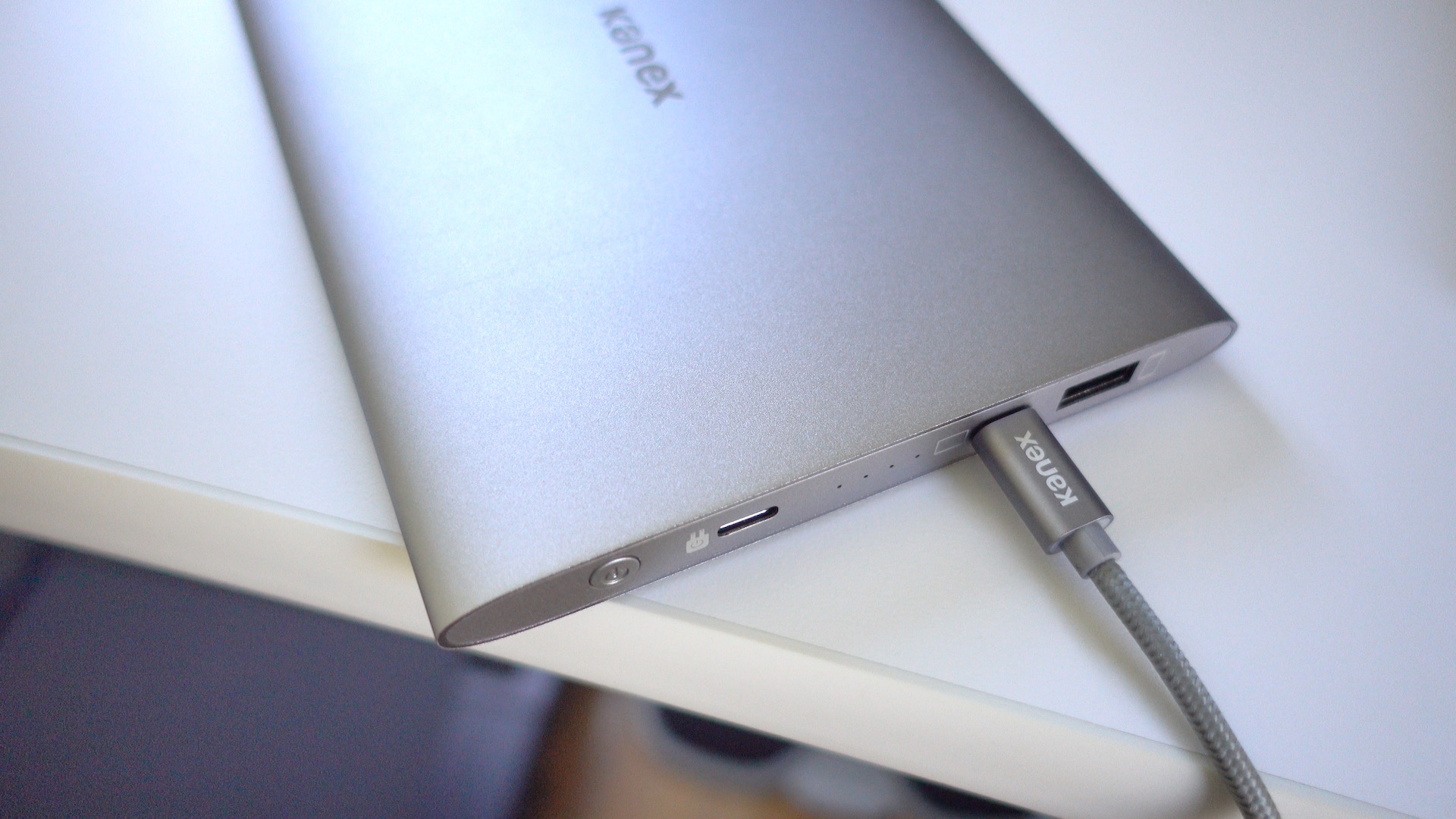
I wouldn’t normally describe a portable battery as being beautiful, but Kanex’s just-released $99 GoPower USB-C Portable Battery fits that description. Its aluminum body is like a mix of Apple’s space gray and silver colors, but it’ll look good when paired with any 12″ MacBook.
Good looks are nice, but the real world performance of a battery pack is crucial. How does Kanex’s offering stack up? Check out our hands-on impressions.
Expand
Expanding
Close


In my continuing quest to find a great iPad Pro case, I’ve been testing out the new BookBook case for iPad Pro 12.9-inch ($99) … and I really like it. Don’t judge a book by its cover; the cute design hides a lot of utility. There’s a display mode for watching movies, an integrated kickstand perfect for typing and sketching as well as a fantastic Apple Pencil holder hidden in the ‘spine’. (Check the Twelve South website if sold out on Amazon.)
As the whole thing zips up, it’s one of few cases that completely protects the iPad whilst in transit. Read on for my full review of the BookBook for iPad Pro after the jump …
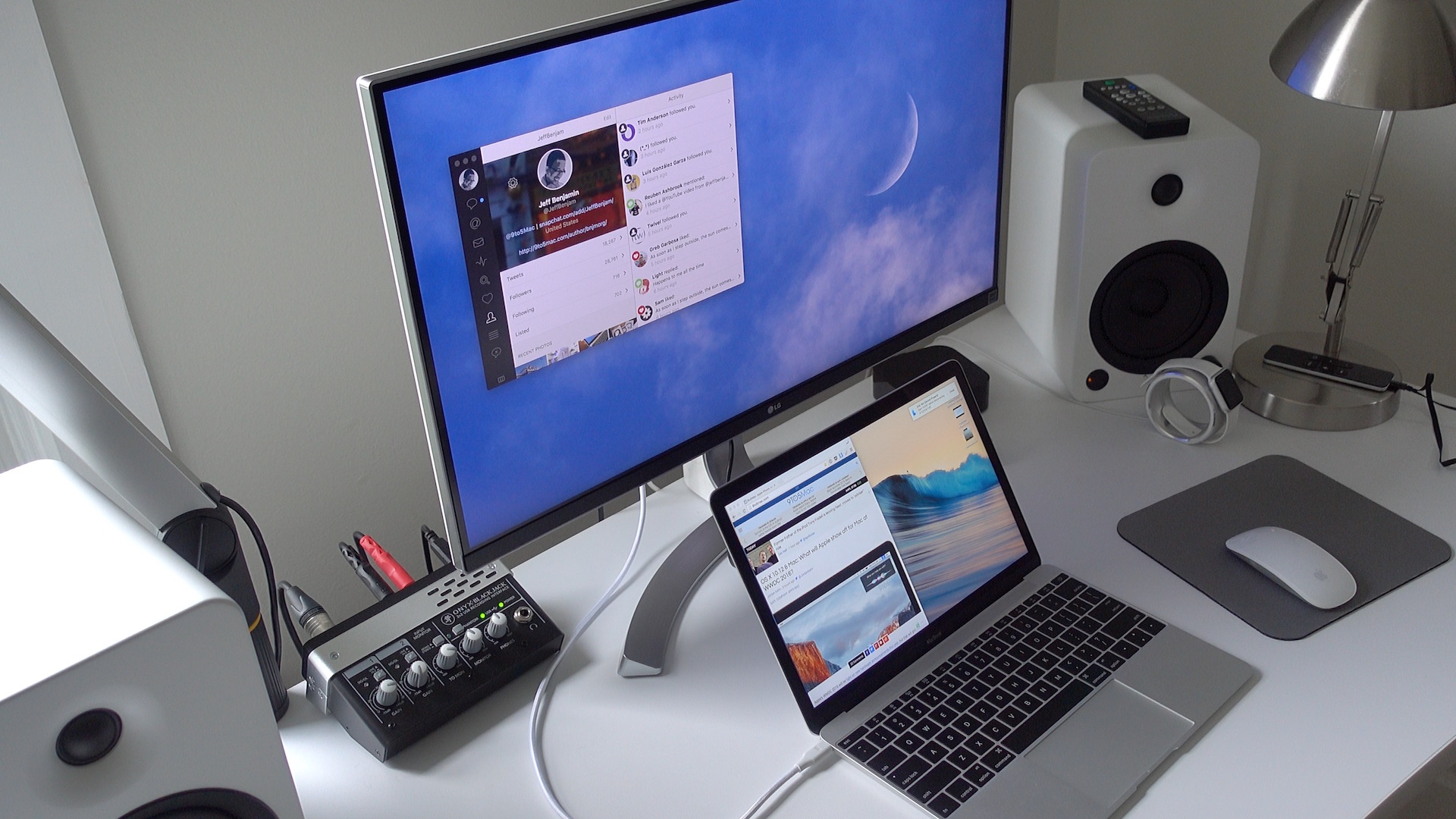
If you’re looking for a 4K display that can be paired with your 12″ MacBook via a single USB-C cable, then your options are fairly limited. It seems that LG is one of the few display makers that has such a monitor available for sale.
LG’s 27UD88-W is a 27″ USB-C-enabled display. Its USB-C port allows MacBook owners to connect a single cable to drive the display, charge the machine, and facilitate data transfer.
As I alluded to in my recent 2016 MacBook post, the 27UD88-W isn’t perfect, but it’s one of the only games in town if you desire a 4K monitor with USB-C connectivity in tow.
If you’re a MacBook owner, should you consider purchasing one? Have a look inside for the details.
Expand
Expanding
Close
It happens all the time. Parents upgrade old iPads with new ones and lucky kids inherit magical (and expensive) tablets. But kids aren’t nearly as careful with pricey pieces of glass and somehow always messy hands. That’s what happened in our house late last year, and Speck’s iGuy case for iPad has made a world of difference.
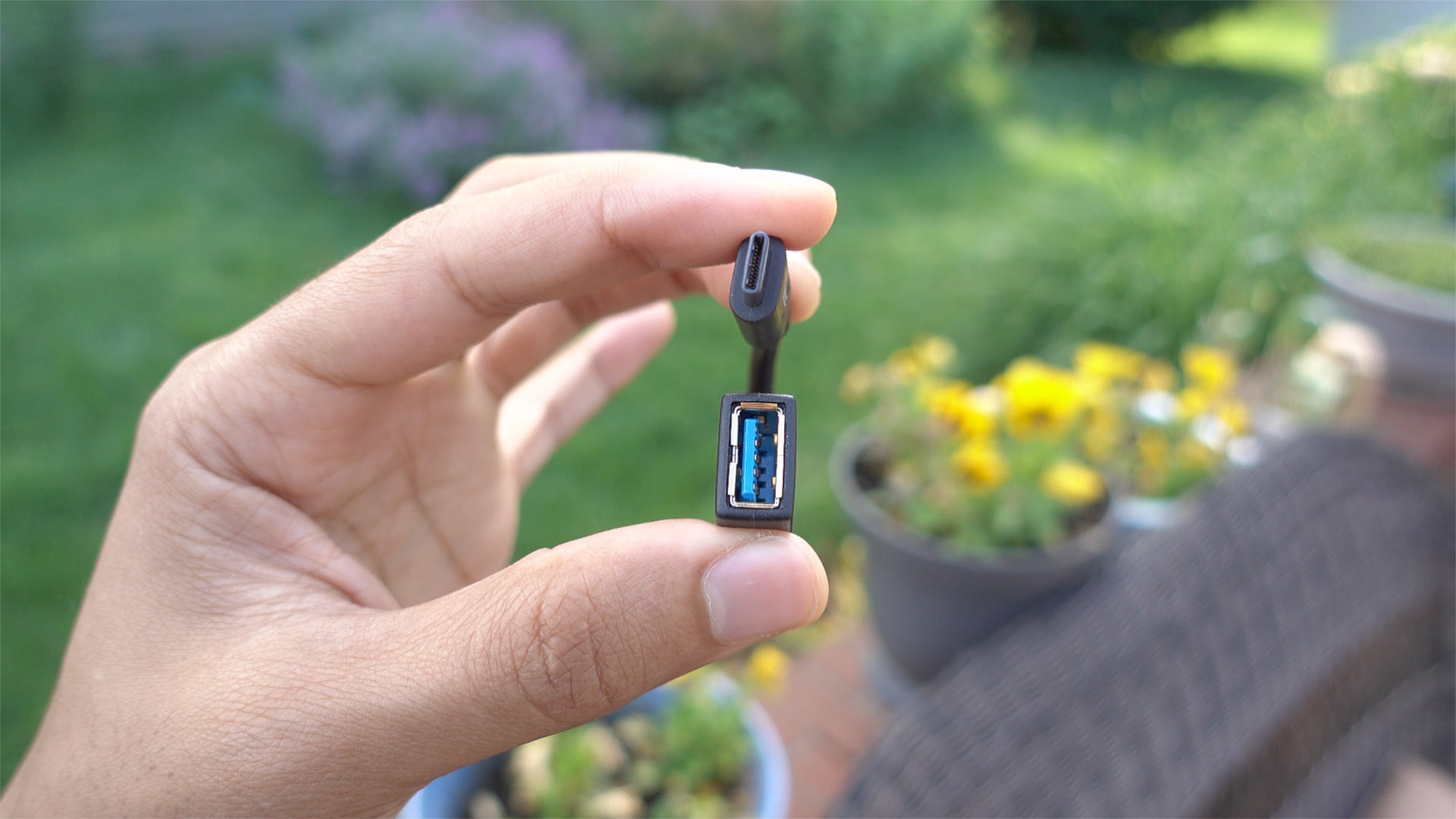
If you own a MacBook and you wish to interface with legacy USB-A connections, you have several options. Apple itself produces a USB-C to USB Adapter, and it’s available for around $19. There’s also no shortage of third-party options available on Amazon and other resellers.
One such option, IXCC’s USB 3.0 to Type-C Convertor Cable, is a cheap and easy way to garner legacy USB device support on USB-C only MacBooks. Have a look at our brief hands-on video to witness the adapter in action.
Expand
Expanding
Close
I’m not normally one for hiding Apple’s gorgeous designs away inside cases, but my 11-inch MacBook Air is used almost exclusively when I’m out and about, so it does normally live in a TwelveSouth BookBook case to keep it safe on its travels. I adore that case, so persuading me to set it aside for an alternative would not be an easy task.
But I was very taken with the leather iPhone and iPad cases I recently reviewed from NY-based Burkley, so I decided to give one of the company’s snap-on leather MacBook Air covers a try. It currently offers these for the MacBook Air only (both 11- and 13-inch) – though it does also have a non-snap-on variation for the 12-inch MacBook.
Burkley likes to mix up its leather offerings for each product, with the Antique Camel Leather I liked last time not available for the MacBook, so I tried the Special Burned Tan Leather. This is a fairly standard tan color in the center, with darker burned-in edges …
If you read our review of the ATH-M50x closed-back headphones, I made it pretty clear that I was a fan of what Audio-Technica was offering. The ATH-M50x’s are well-known for giving Beats By Dre headphones a run for their money, and at a much more affordable price.
I also had the opportunity to go hands-on with one of Audio-Technica’s newest offerings, the ATH-MSR7NC. These noise-cancelling cans differ in many ways from the company’s mainstream offering, and at more than double the price of the M50x’s, venture into more premium territory. Should you consider them?
Expand
Expanding
Close
I’m not a major believer that Apple’s iOS devices can quite fully replace the PC and Mac in most scenarios, at least not for me, and not quite yet. I’m a keyboard fiend, using shortcuts on the keyboard almost more often than I use my mouse. These doubts were ready to be tested when I saw the progress that iOS 9 brought for third-party developers within the iOS ecosystem. With the new SDK, developers were getting the chance to integrate keyboard shortcuts into their iOS apps just like a Mac app. It was then that I knew it was time to start looking for a portable keyboard to take around with me.
This presented a new problem for me. There’s a vast amount of Bluetooth keyboards out there, and I didn’t want to just carry Apple’s bulky Bluetooth Keyboard around. I needed something with a full keyboard size, good battery life, and durability. After a few months of searching, and reluctance on spending money on what I considered an unknown, I gave up my hunt.
I nearly forgot about my keyboard journey until a few months when iClever reached out to me asking if I wanted to take a look at their iOS compatible Bluetooth accessories. I gladly accepted the offer, and began by taking a look at their Tri-Folding Bluetooth Keyboard. Everything I read online from the listing on Amazon made it seem like it could fit neatly into everything I had been previously searching for, so I was excited to get my hands on it.
Pictured here with my iPhone SE for scale
When a well-respected audiophile brand known for an amplifier costing a cool $150k launches an AirPlay speaker system, you can be sure of two things. One, it’s going to be pretty special. Two, it’s not going to be cheap.
Sure enough, Naim’s first wireless offering – the Mu-so which I reviewed earlier this year – came in at $1500. I did, though, consider it worth every penny. It’s a true replacement for a hifi system, delivering room-filling sound that I couldn’t fault. The design is fantastic, build-quality first-rate and it offers every input source you could ever want: AirPlay, Bluetooth, UPnP, Spotify Connect, Tidal, wired Ethernet, USB, optical and 3.5mm analog.
If you liked the sound of it but thought that $1500 was pushing things a little, there’s good news and bad …