Latest

Site default logo image

Apple’s Podcasts iOS app updated w/ pull to refresh for subscriptions, fixes


Podcasts-iconApple has released an update to its Podcasts app on the App Store today that introduces a few new features and fixes. The update brings a pull to refresh function for subscriptions in the My Podcasts section, improvements to overall stability, and a few fixes for bugs related to playback and subscriptions:

• You can now pull to refresh subscriptions in My Podcasts
• Resolved an issue that may cause playback to stop unexpectedly
• Fixed a problem where subscriptions may stop updating with new episodes
• Includes additional improvements to overall stability

Version 2.0.1 is the first update since Apple introduced a redesigned Podcasts 2.0 back in October.


Apple begins flat redesign of iWork for iCloud, adds shared password protected docs & new editing features

Site default logo image

Update: Some users are reporting that after opening a document in iWork for iCloud, that document is unable to be opened in the Mac or iOS versions of iWork.

Apple has just pushed out an update to its iWork for iCloud web apps that brings a redesign for some elements of the three apps and a long list of new features and improvements. Apple has added a new iOS 7-style UI for each app’s template chooser and document library (the first thing you see when launching the apps, pictured above), but when editing a document you’ll still get the old black and grey editor UI for now.

All three apps— Pages, Numbers, and Keynote— get the ability to add passwords and share password protected documents, spreadsheets, or presentations, as well as “improved voice over support for body text and document manager.” You can also now view a list of your documents, spreadsheets, or presentations that others have recently shared with you from a clock icon at the top of each app.

Other improvements in today’s update include new keyboard shortcuts and some highly requested editing features such as rich formatting of text in table cells. A full list of what’s new in each app is below.
Expand
Expanding
Close

Site default logo image

SwiftKey bringing its predictive gesture typing from Android to iOS w/ ‘Note’ app

SwiftKey-Note-iOS

SwitfKey, the popular Android app that replaces the stock on-screen keyboard with a gesture-based, predictive typing system, will soon arrive in an official iOS app from the same developers. While details are slim, the screenshot above from @evleaks comes with the caption “SwitfKey Note,” which we assume is a note taking app of sorts by looking at the image. Since Apple doesn’t allow users to change the system-wide on-screen keyboard to third-party alternatives like on Android, we assume that the gesture and predictive typing features will be accessible only within the new Note app. 
Expand
Expanding
Close

Pixelmator 3.1 brings 16-bit image support for Mac Pro, integrated photo printing and more

Pixelmator 3.1 Marble

Pixelmator have released the latest version of their app today, version 3.1. As usual, it is available exclusively in the Mac App Store for $29.99. Codenamed Marble, this update brings several enhancements to the image editor including specific Mac Pro optimizations such as 16-bit image support.

Primarily, Pixelmator 3.1 optimises for the new Mac Pro’s hardware. Apple has used Pixelmator before to tout the Mac Pro’s performance benefits, and the developers are clearly keen to push this further still.

The “exclusive” support for the new Mac Pro enables the simultaneous use of both GPU’s  for even faster composition and rendering. In fact, the app can compute the autosave data whilst the image is being rendered. This translates to significant speed improvements across the app.


Expand
Expanding
Close

Site default logo image

Twitterrific 5 updated with streaming support, list management, more

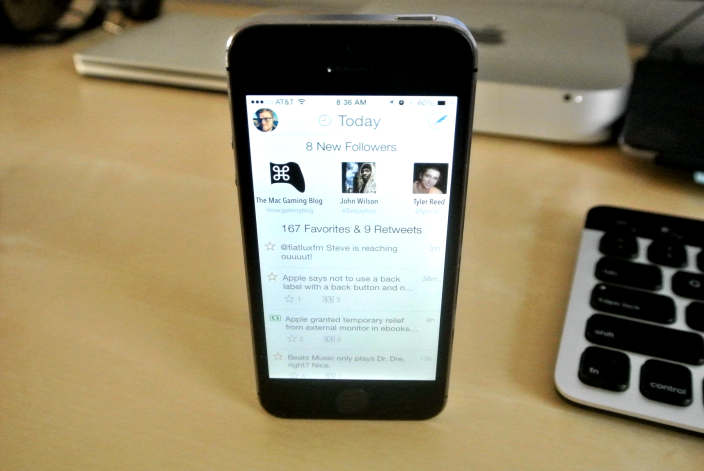
Twitterrific Today view on iPhone

The Iconfactory released a significant update to Twitterrific 5 today bringing support for a highly requested feature: streaming.

Just like Twitter for Mac and Tweetbot for Mac and iOS, Twitterrific will now present new tweets to you as they’re loaded alleviating the need to pull-to-refresh when you’re caught up on your timeline. You will need to enable it in the settings for it to work, and it requires WiFi of course.

The update also features a number of other improvements including list management.
Expand
Expanding
Close

Site default logo image

SnapTax by TurboTax lets you e-file your taxes with your iPhone camera

TuboTax SnapTax

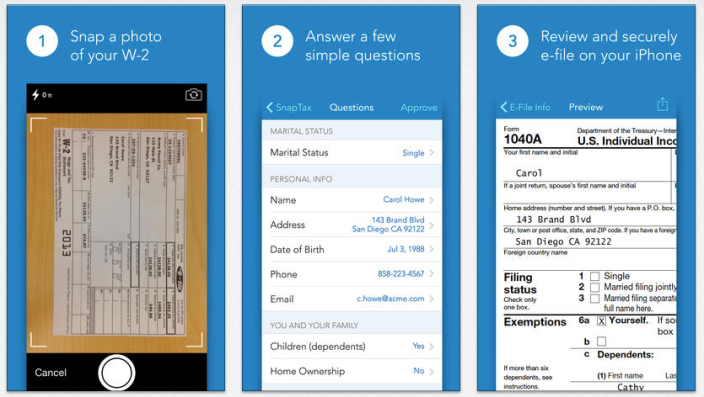
Gearing up for tax season and looking for the easiest way to get it over with? TurboTax is making tax filing in 2014 as easy snapping a photo with your iPhone. Seriously.

Similar to many banking apps that allow you to take a photo of a physical check to make a deposit, SnapTax app by TurboTax allows you to focus your camera at your W-2 (1040EZ/A) to quickly input most of the important information required for filing your taxes.

After you capture the photo, the app uses optical character recognition to parse out the important information and asks you a few remaining questions and you’re on your way.

This year, TurboTax notes its app is the first of its kind to allow you to e-file your taxes on a mobile device in Spanish making it easier for everyone to take advantage of the app.


Expand
Expanding
Close

Site default logo image

Snapchat comes to the Mac with unofficial “Snapped” beta client, but don’t expect a complete experience just yet

Screen Shot 2014-01-21 at 2.41.35 PM

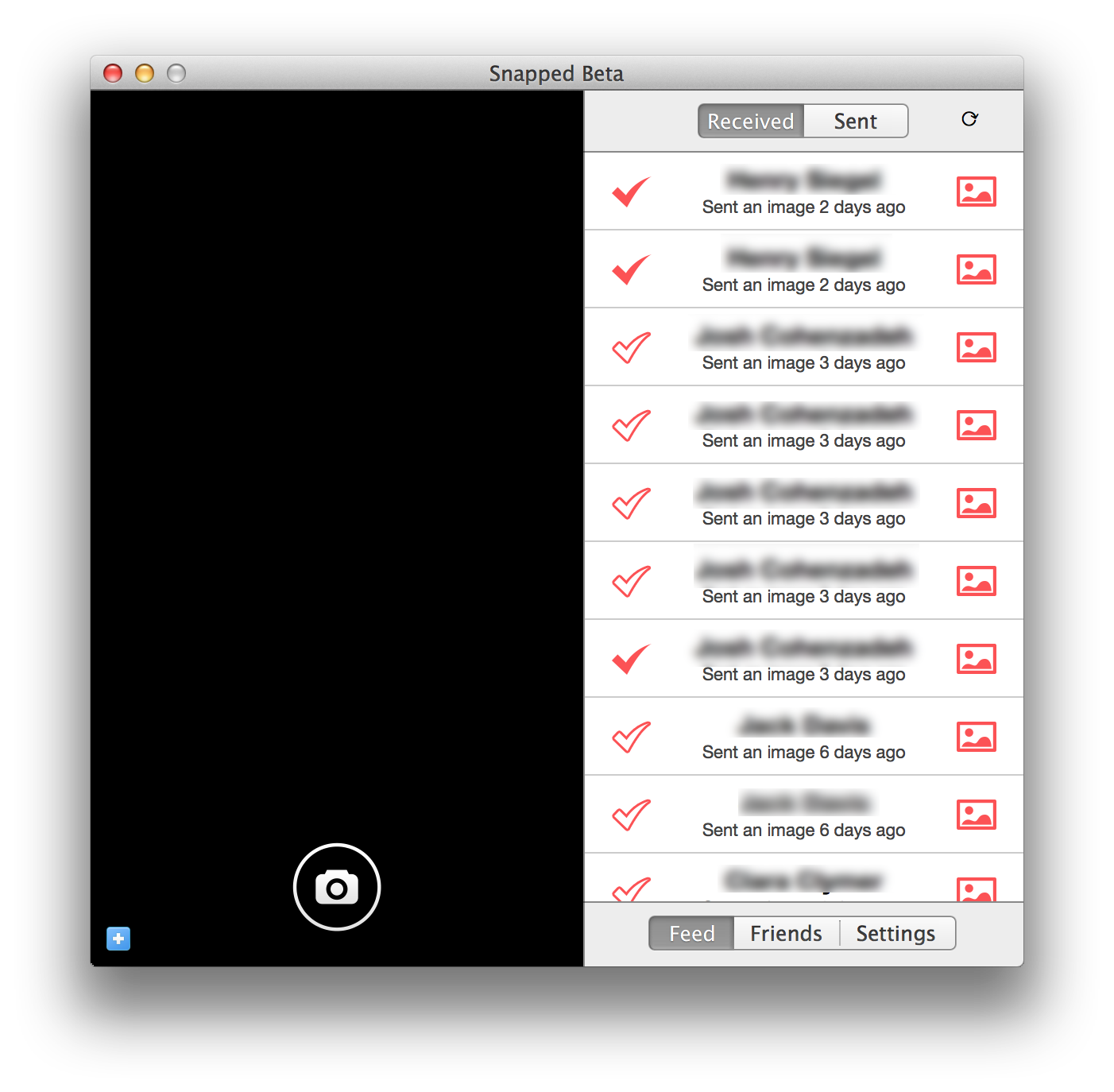
Since the app’s release, Snapchat has only been available for smartphones. An official desktop client has never been created, and due to the nature of the app, it doesn’t seem like one ever will. That’s not to say you’ll never be able to send snaps from your Mac, though

A new app called Snapped was released to the public as a private beta today. It’s a Snapchat client for the Mac, but as a third-party client, the app is subject to certain restrictions and limitations that the official mobile client doesn’t have to deal with.

So what’s in the beta? Keep reading for a full breakdown. Just keep in mind that since this is a beta, it could undergo substantial changes as the development progresses.


Expand
Expanding
Close

Beats Music streaming service launches on iPhone for $9.99 a month

Beats Music is now available for iPhone on the App Store, after being originally announced back in October. The app is a very stylised adaption of a typical music streaming service app, with Beats heavily pushing the idea of customisation and curation to distance it from its many competitors.


Expand
Expanding
Close

Site default logo image

VLC for iOS redesigned for iOS 7, now features Google Drive & Dropbox streaming, more

Screen Shot 2014-01-20 at 9.32.18 AM

VLC released an update to its iOS app today introducing an iOS 7-friendly user interface as well as several handy features.

Users will welcome support for streaming media from both Dropbox and Google Drive; previously, VLC required content to be downloaded locally in its entirety before it could be viewed. This will greatly speed up media viewing. The update also features a list of other improvements including new gestures and more.

VLC for iOS is available for free on the App Store.

Site default logo image

Feedly for iOS updated w/ speed reading feature, redesigned iPad UI, night theme, more

Feedly has just updated its iOS app to version 18.0.5 with a handful of new features. For those unfamiliar, Feedly is a service that aggregates conent from a variety of sources, including news sites, YouTube, RSS feeds, and more. The biggest feature in this update according to the developers is a new speed reading functionality. The feature allows users to quickly move from one inlined article to the next by simply tapping on the edge of the interface.

Also new in this update is a redesigned iPad interface, focused on speed and stability, as well as a new night theme that essentially changes all the white interfaces to a darker color. The full change log is below:

Spotlight feature:

  • Speed reading

Other new features:

  • New iPad design
  • New night theme
  • Faster image processing
  • New mark all as read card with reading stats.
  • Crash fixes

The Feedly update is available now on the App Store.

Starbucks quickly adds additional ‘safeguards’ to its app in response to public furore over application security

Screen Shot 2014-01-17 at 10.56.13

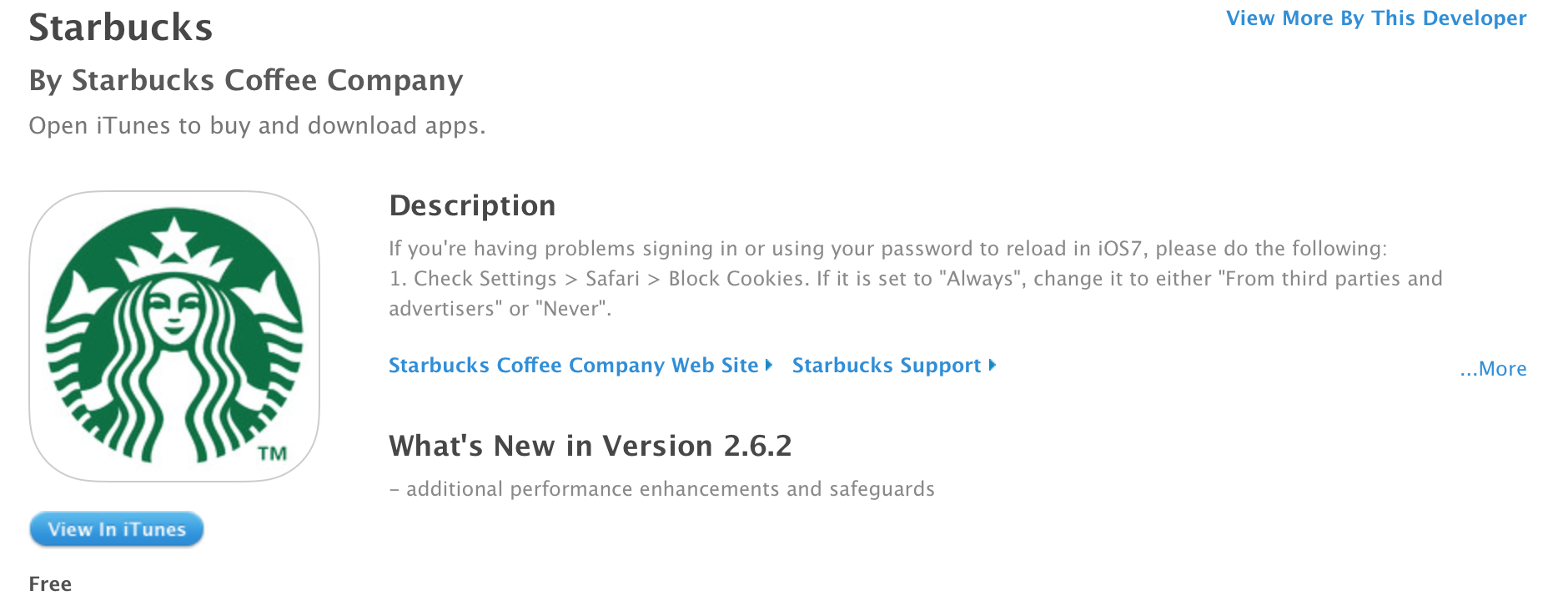
Starbucks has quickly pushed a bug fix update for its app to the store to help address the security flaws found in its iPhone application earlier this week. Researchers originally found that the app stored passwords in plain text. Earlier, Starbucks’ CIO promised in an open letter that an update would follow in response to these findings.


Expand
Expanding
Close

Site default logo image

Imgur MemeGen app launches on iOS, lets you make your own memes

Photo sharing site Imgur has added its popular MemeGen tool to iOS via a new app on the App Store. The app actually launched late last year, but Imgur has only begun promoting it today. The application has three main tabs across the bottom: Browse, Create, and Recents. Browse allows fans of meme photos to browse new or popular images. Create allows you to harness the power of your iOS Device’s camera and photo library to create your own memes. The interface for doing so is simple. Recents allows you to keep all of your created memes at your fingertips. The app is free on the App Store.


Expand
Expanding
Close

Upcoming app will allow you to stream all 24 seasons of The Simpsons, but only through certain cable providers

Site default logo image

simpsons1920

Last year, FX sister site FXX landed the exclusive cable and video-on-demand rights to The Simpsons, and it looks like fans of the show will finally see a payoff soon. While the nearly $1 billion deal includes cable distribution rights, the big news is that FX will be launching a dedicated app that allows subscribers to stream the entire series (all 24 seasons and counting) legally from mobile devices and the web … 
Expand
Expanding
Close

Site default logo image

Apple updates WWDC 2013 app with fix for video playback problems

Apple has just released an update for last year’s WWDC app to address an issue that has prevented developers from being able to watch session videos through the app for quite some time time. All of the videos are also available on the iOS developer portal, so the bug fix probably wasn’t very high on Apple’s priority list.

If you still want to use the WWDC app for some reason, it’s available for free on the App Store, but requires a paid developer login to view the videos.

[tweet https://twitter.com/PiersonBro/status/423640348804407297 align=’center’]

What’s New in Version 1.0.3

This release addresses an issue where developers were unable to log into the app to watch videos. Thank you for your bug reports and feedback.

Google Play app arrives on iOS to stream movies and shows over WiFi

Site default logo image

Screen Shot 2014-01-15 at 4.55.10 PM

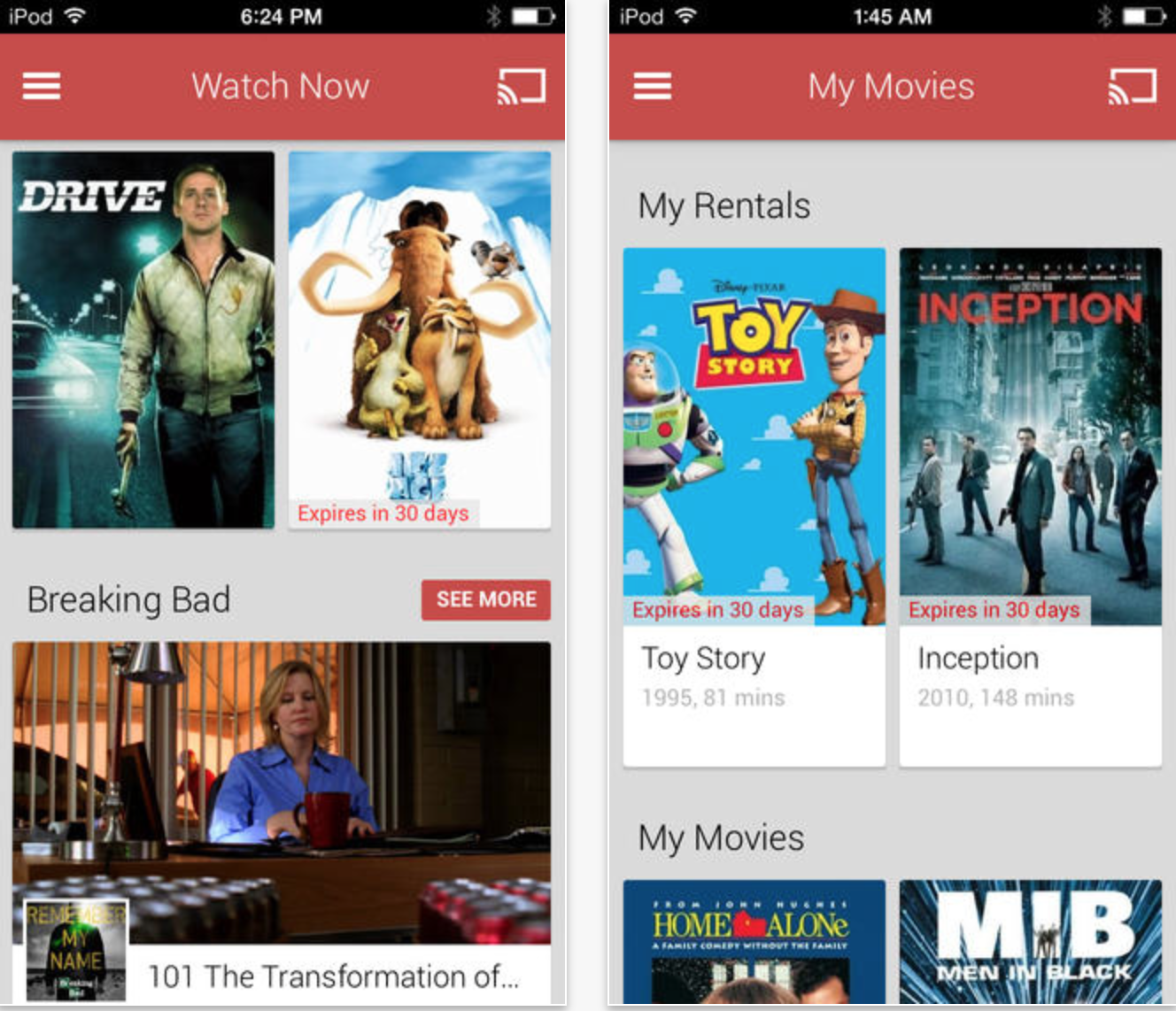
Today, Google has released a new application for iPhone, iPad, and iPod touch to allow Google Play users to stream purchased movies and TV shows. You cannot rent or purchase content via this application: you must download it from Google Play on Android or the web and then the purchased titles will be available to stream via this app. The application is only supported in the United States, Japan, and the United Kingdom. WiFi is currently required for streaming. The app also allows streaming to the ChromeCast.


Expand
Expanding
Close

Site default logo image

Box brings 50GB of cloud storage to iOS with new design, search improvements, more

Cloud-storage service Box released version 3.0 of its iPhone and iPad app today to its users. While the app features new navigation and a fresh user interface, Box also says its app has been rewritten in version 3.

New features include faster search within the app and better previewing for documents and media. The service offers users 50 GB of free cloud storage so there’s plenty of room to store content.

Box for iPhone and iPad is available for free on the App Store.

Chrome for iOS updated w/ data compression, Google Translate, & Safe Browsing (Update: It’s live)

Site default logo image

Update: Following its announcement earlier this month, Google has released its updated version of Chrome for iOS.

Google just announced it’s releasing a new version of Chrome for iOS that introduces a new data compression feature alongside translation tools and Safe Browsing malware protection:

In the U.S. alone, more than a fifth of adult smartphone users now do most of their online browsing on their mobile device.1 Around the world, we’re seeing a similar trend towards more mobile browsing. That’s why we’ll be rolling out a new feature on Chrome for Mobile to help you reduce data usage and save money on your mobile plan. When enabled, Chrome’s data compression and bandwidth management can reduce data usage by up to 50% while browsing the web on Chrome for Android and iOS.

Google noted the update will also enable the Safe Browsing technology it uses in the desktop version of Chrome to protect users from malicious websites. You’ll be able to turn on the new data compression feature and track usage from Settings” > “Bandwidth management” > “Reduce data usage in the updated app.

Also rolling out in the latest version is Google Translate built right into Chrome for iOS for webpage translations:
Expand
Expanding
Close

Horizon for iPhone always records landscape video, independent of device orientation

Horizon is a new app for the iPhone (currently on sale for just $1) making the rounds today that attempts to eliminate a major annoyance of modern society — portrait videos.

Horizon uses the iPhone’s motion sensors (the accelerometer and gyroscope) to automatically scale and rotate input from the camera to generate videos that are always in landscape, no matter how the phone is actually being held.


Expand
Expanding
Close

Site default logo image

Apple Store app starts the new year by giving away fitness app

As we have previously noted, Apple began giving away selected paid apps, music and books in the Apple Store app as an incentive for users to download and check out the app. For the new year, Apple’s first free app through the Apple Store App is the 7 Minute Workout Challenge.


Expand
Expanding
Close

Site default logo image

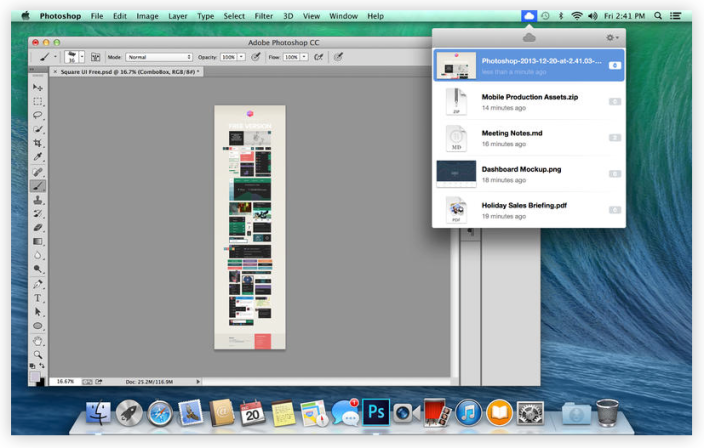
CloudApp, Droplr both updated with new design, features on Mac

Popular (and competing) cloud sharing services CloudApp and Droplr both announced big updates to their Mac apps this week with new features and designs.

CloudApp 2.0 (seen above) now features thumbnail previews, the ability to share links before an upload is complete, Notification Center support, hot key support to open the menu bar popover, and a lot more. 
Expand
Expanding
Close

Site default logo image

PSA: Snapchat update offers phone number opt out after API abuse

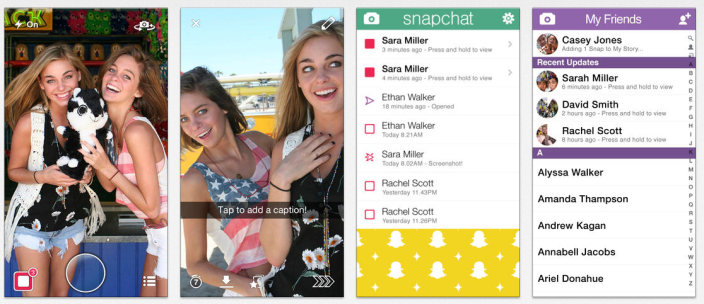
Following recent API abuse that lead to phone numbers and usernames being exposed, Snapchat, the social photo sharing app, has updated its iPhone app with the option to opt out of linking your phone number with your username. The feature was intended to increase social discoverability among mutual contacts, but was recently abused leading to the following update and apology:

Find Friends Improvements

This morning we released a Snapchat update for Android and iOS that improves Find Friends functionality and allows Snapchatters to opt-out of linking their phone number with their username. This option is available in Settings > Mobile #.

This update also requires new Snapchatters to verify their phone number before using the Find Friends service.

Our team continues to make improvements to the Snapchat service to prevent future attempts to abuse our API. We are sorry for any problems this issue may have caused you and we really appreciate your patience and support.

Love,

Team Snapchat

The update is available now on for iPhone and iPod touch on the App Store.

Site default logo image

Spotify for iOS updated w/ previously announced free option for mobile and tablet users

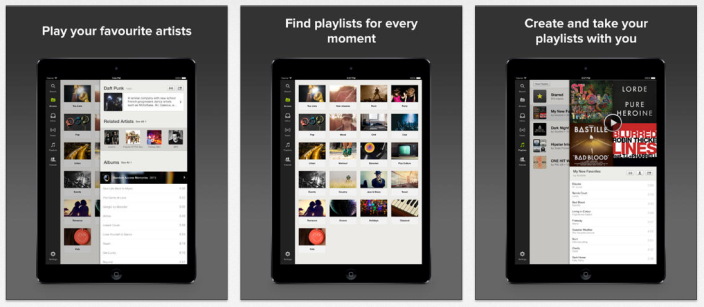
Last month Spotify announced new ad-supported streaming options for mobile and tablet users without paid subscriptions, and today that update has rolled out for iPhone, iPad, and iPod touch users.

To recap, iPhone users can now play a particular playlist they create or their friends share, but the tracks will be shuffled. iPad users have an experience like desktop users where you can build specific playlists and list to music on demand.

The update is available now for iPhone, iPad, and iPod touch in the App Store.
Expand
Expanding
Close

Site default logo image

Google updates YouTube for iOS 7 with improved search results and captions

The YouTube app for iOS has been updated with a new design for iOS 7, including the new keyboard and status bar, and a blurred sidebar design like that found in other apps.

The update also includes improved search results that include videos, playlists, and channels all on one screen. Finally, the new version introduces new settings for closed captioning and subtitles.

You can grab the free YouTube app on the iOS App Store.