Mac

See All Stories

Apple’s Mac lineup consists of MacBook, MacBook Air, MacBook Pro, iMac, Mac Pro, and Mac Mini. The Mac runs macOS for its operating system.

Mac lineup

History

The Mac is Apple’s lineup of computers, and it can be considered the company’s oldest product. The name “Mac” comes from the original Macintosh, which was introduced in 1984 and is also considered the first personal computer for the masses to have a graphical user interface. The first Macintosh hit the stores on January 24, 1984, costing $2,945.

Among all these years, Apple has introduced many different Mac models, ranging from desktops to laptops to professional tower machines. The current lineup consists of the MacBook Air, MacBook Pro, Mac mini, iMac, and Mac Pro. However, there have been other Mac models were discontinued, such as the eMac, MacBook, and iMac Pro.

The history of modern Macs began in 1998, a year after Steve Jobs returned to Apple. Apple had dozens of Macintosh computers at that time, but Steve decided to rethink the entire lineup. In 1998, Apple announced the iMac G3, which ditched the floppy disk and serial ports in favor of USB connectors.

Macintosh and iMac G3.

Unlike the Macintosh, the first iMac was considered a huge success — not only for its technology, but also for its unique design with colorful translucent plastic. Apple quickly expanded the Mac lineup with other models, which included the iBook and PowerBook (which became the MacBook and MacBook Pro) and the PowerMac, which is now the Mac Pro.

macOS

What makes a Mac the Mac is the macOS operating system, which has also had a long history since the introduction of the first Macintosh. Initially called Mac OS, the operating system was rebuilt when Steve Jobs returned to Apple.

The first version of Mac OS X was released on March 24, 2001 with a new interface that is still present in some ways in current versions of macOS. Apple’s desktop operating system comes with many free applications such as Pages, Keynote, Numbers, iMovie, and GarageBand.

With macOS, users also have access to deep integrations with other Apple devices. For instance, you can answer calls and send SMS from your iPhone using your Mac. Handoff lets you switch from one device to the other and pick up where you left off. Apple Watch users can unlock their computer without entering a password, and you can even copy and paste between devices.

macOS Sonoma

Apple’s desktop operating system is also integrated with services offered by the company, such as iCloud, Apple Music, and Apple TV+.

The current version of macOS is Sonoma (version 14), which features new slow-motion screen savers, widgets on desktop, camera effects on FaceTime and other apps, web apps, passkey sharing, improved PDF support, and Game Mode. The update also comes with a new API that lets developers easily port Windows games to macOS.

Architecture Transitions

The Mac has had three major architecture transitions in its history. Apple’s first computers ran on Motorola processors, but the company decided to migrate to the new PowerPC platform in 1994. While this brought benefits at the time, the PowerPC processors were not delivering what Apple expected.

It was in 2005 that Apple confirmed the transition from PowerPC to Intel. Intel processors had become faster and more efficient than PowerPC, which enabled the development of new Mac computers that were more powerful and also more compact. Developers have been given access to a Developer Transition Kit running Mac OS X Tiger with Intel Pentium 4 to update their apps before the transition begins.

Power PC, Mac OS X, and Intel processor.

Apple said that the transition would begin in June 2006 and be finished by the end of 2007. However, the transition to Intel was fully completed in August 2006 when the company replaced the PowerMac with the new Intel Mac Pro.

As the years went by, Apple once again felt the need to have more powerful and efficient processors for its computers. This time, the company was already working on its own chips for the iPhone and iPad. In June 2020, Apple confirmed that it was changing the architecture of the Mac, now from Intel to ARM chips, which are called Apple Silicon.

Apple offered a Mac mini DTK running on the same A12Z Bionic chip as the 2020 iPad Pro. This way developers could once again update their apps ahead of the transition. In addition to being more powerful and energy efficient, the ARM architecture of Apple Silicon chips has enabled Macs to run iOS apps for the first time.

Apple M1 chip | Mac

The first Apple Silicon Macs were released in November 2020 with the M1 chip. The company later introduced more powerful variants of the M1 chip, called M1 Pro, M1 Max, and M1 Ultra. Macs with Apple Silicon have become known for being more powerful while consuming much less power, which has resulted in MacBooks with extended battery life.

In June 2022, Apple introduced the M2 chip, which is around 20% faster than the M1 and also supports more RAM. M2 also has more powerful variants: M2 Pro, M2 Max, and M2 Ultra.

Apple unveiled the M3, M3 Pro, and M3 Max chips in October 2023. The main highlight of this generation is the 3 nanometer technology, the same as the A17 Pro chip. The M3 family also features better GPUs with support for hardware-accelerated ray-tracing.

Current Mac lineup

Apple currently sells a variety of Mac computers, which includes MacBooks, Mac mini, iMac, and Mac Pro. While some of the Macs have already been updated with an Apple Silicon chip, others remain with Intel processors.

MacBook Air

The MacBook Air is Apple’s most affordable laptop and it has become popular for its light, compact design. The 2022 version is powered by the M2 chip and is offered with 8GB, 16GB, or 24GB of RAM. Plus, it has a new, edge-to edge 13.6-inch Retina display.

The laptop features Touch ID and has two Thunderbolt 3 compatible USB-C ports, a MagSafe connector for charging, and a headphone jack. Prices start at $1099 in the US. It’s offered in silver, space gray, starlight, and midnight.

M2 MacBook Air.

A year later, Apple introduced the first 15-inch MacBook Air. It has essentially the same hardware as the smaller version with a similar design, but with a larger display. Prices start at $1299 in the US.Apple is still selling the M1 MacBook Air for prices starting at $999.

MacBook Pro

The 2023 MacBook Pro is available in multiple versions, and customers can choose between 14-inch and 16-inch screen sizes. For the first time, Apple has introduced a less expensive version of the 14-inch MacBook Pro with the base M3 chip. This version has the same design and display as the high-end versions, except that it only has two USB-C ports instead of three.

M3 MacBook Pro

The most expensive versions of the MacBook Pro are equipped with the more powerful M3 Pro and M3 Max chips. The laptop can be configured with up to 128GB of RAM and 8TB SSD. These versions also come in a new Space Black color.

Unlike the MacBook Air, the MacBook Pro comes with an HDMI port and an SD card reader. It also features MagSafe and Touch ID on the keyboard. Apple no longer sells MacBooks with the Touch Bar. Prices start at $1,599 in the US.

Mac mini

Mac mini is the cheapest Mac currently available since it’s basically a desktop without a built-in display or other peripherals. The base model with the M2 chip features one Ethernet port, two USB-C/Thunderbolt 4 ports, HDMI 2.0, two USB-A ports, and a headphone jack.

Apple sells a more powerful version of the Mac mini with the M2 Pro chip, which also comes with four USB-C ports instead of two. Mac mini can be configured with up to 32GB of RAM and up to 8TB of storage. Customers can also opt for a 10 Gigabit Ethernet port. The Apple Silicon Mac mini is only available in silver, while the now discontinued Intel model was available in space gray.

Apple Silicon Mac mini.

Prices for the Mac mini start at $599 in the US. Again, it’s worth noting that it doesn’t come with a keyboard or mouse in the box – you need to buy them separately or use your current ones.

Mac Studio

Mac Studio represents a new category between Mac mini and Mac Pro. It features a design based on the Mac mini, but with a taller body to support the more powerful hardware and also a better cooling system.

The new Mac Studio is targeted at professional users who work with demanding tasks such as video editing, 3D rendering, and machine learning. 

Embraced by creative pros everywhere, Mac Studio now delivers next-generation power in the form of the lightning-fast M2 Max and the boundary-breaking M2 Ultra. It packs outrageous performance and extensive connectivity in an unbelievably compact form, putting everything you need within easy reach and transforming any space into a studio.

By default, Mac Studio already comes with the M2 Max chip, 32GB of RAM, and 512GB SSD storage. A more expensive option lets users customize Mac Studio with M2 Ultra. While M2 Max has a 12-core CPU and a 30-core GPU, M2 Ultra doubles all of those specs. The new chip has a 24-core CPU and a 60-core GPU.

Mac Studio can also be configured with up to 192GB of RAM and 8TB of SSD storage. The machine offers up to six Thunderbolt ports, 10 Gigabit Ethernet, headphone jack, two USB-A ports, and one HDMI port.

Mac Studio

Apple has been rumored to be working on new versions of this machine with the M3 Max and M3 Ultra chips. However, these versions may not be ready until 2025. Bloomberg’s Mark Gurman said in November last year that the M3 Ultra chip “hasn’t yet gone into broad testing” inside Apple.

In the US, prices for the Mac Studio with M2 Max chip start at $1999. The M2 Ultra chip version starts at $3999. Just like the Mac mini, Mac Studio doesn’t come with a keyboard and mouse in the box. You can find accessories for your Mac Studio here.

iMac

iMac is Apple’s most popular desktop computer with an all-in-one construction. It features a 4.5K display in its 24-inch version and a 5K display in the 27-inch version. At the same time, Apple still sells an entry-level iMac with a regular 1080p display.

The 24-inch iMac is the first to feature the M1 chip, the same as in the Mac mini, MacBook Air, and MacBook Pro. This allowed Apple to introduce a completely redesigned model with a slimmer design, which is also offered in seven new colors. Customers can customize the new 24-inch iMac with up to 16GB of RAM and 2TB of storage.

Site default logo image

The company ships the 24-inch iMac with Magic Mouse and Magic Keyboard, plus a Lightning cable for recharging accessories. Prices in the US start at $1299. Apple has discontinued its old 21.5-inch iMac and the 27-inch iMac 5K.

Mac Pro

Mac Pro is a computer built for professional users who depend on extremely powerful hardware. Available in tower and rack versions, it has a completely modular design. That means users can replace RAM, SSD, GPU, and other internal components.

By default, it features four USB-C/Thunderbolt 3 ports, two USB-A ports, and two 10Gb Ethernet ports. However, the ports can be expanded using the PCI Express slots. Apple also ships the computer with a Magic Mouse and Magic Keyboard, but it does not come with an external monitor included.

All models feature Intel Xeon W processors, which are the most powerful processors offered by Intel. Consumers can configure Mac Pro with up to 28-core processor, 1.5TB RAM, and 8TB of SSD storage. In addition to supporting multiple dedicated GPUs, Apple also offers the Afterburner card — which accelerates the decoding of ProRes videos.

The company recently updated the Mac Pro with new graphics card modules, which include Radeon Pro W6800X and Radeon Pro W6900X.

Site default logo image

Mac Pro prices start at $5999 in the US.

Rumors about upcoming Macs

Top stories about the Mac

Site default logo image

WSJ: Analysts now agree we’re going to see new Retina Macs in June

A newly redesigned 15-inch MacBook Pro was all but rumor until we reported earlier this month that Apple indeed has a slimmed down, all-new MacBook Pro sporting a Retina display, Ivy Bridge, and speedy USB 3. We followed that up with a report revealing Apple’s new MacBook Airs and iMacs will both likely include super-high resolution Retina displays. At the time, we reported Apple’s WWDC in June would be expected for at least the unveiling of the new slim MacBook Pro; although, a gradual roll out of Retina iMacs and Airs following the Pros would not be much of a surprise. Apple typically rolls out new Mac features such as higher-res displays gradually.

Following those reports, The Wall Street Journal published a story today quoting analysts who now all seem to agree that we will see upgraded Macs this summer. Ben Reitzes of Barclays Capital claimed the new Retina Mac lineup would debut at WWDC in June:

Reitzes said it is likely the Mac line will feature the retina-display technology used in the iPad, as well as the new Ivy Bridge quad-core processors from Intel Corp. (INTC) He also estimates that Apple’s new operating-system upgrade, called Mountain Lion, and the new MacBook Airs should be on the market before the first Ultrabook laptops with Microsoft Corp.’s (MSFT) Windows 8 operating system hit the shelves in the fall… “We believe recent data reflect a pause ahead of new products, which we believe will be released this quarter in June,” according to Reitzes, who has an overweight rating and $750 target price on Apple’s stock.

Site default logo image

Coda 2 and Diet Coda for iPad bring a new level of web development to Apple developers (May 24)

Update: Coda 2 is $49.99 at the Mac App Store now (half off today only) and Diet Coda is now available as an iPad App for $9.99. [iTunes]

Panic, the makers of Coda, a popular development platform for web developers, just announced a new $9.99 iPad version and a second version of its Mac software. The demo videos (here and here) look delish.

The software will land May 24 and be available through the App Store for both platforms.

[Via]
Site default logo image

Kaspersky analyzing Mac OS X security at Apple’s request

Following a breakout of malware on Mac OS X that some experts estimated could have infected up to 600,000 Macs, research firm Kaspersky made claims late last month that Apple was 10 years behind Microsoft in terms of security, while claiming roughly 140,000 Macs were still infected. Today, Kaspersky CTO Nikolai Grebennikov confirmed with Computing that the company has begun researching the security of OS X at Apple’s request:

“Mac OS is really vulnerable… and Apple recently invited us to improve its security. We’ve begun an analysis of its vulnerabilities, and the malware targeting it… Our first investigations show Apple doesn’t pay enough attention to security. For example, Oracle closed a vulnerability in Java, which was a target for a major botnet several months ago… Apple blocked Oracle from updating Java on Mac OS, and they perform all the updates themselves. They only released the patch a few weeks ago – two or three months after the Oracle patch. That’s far too long… This botnet, which the security community identified, is a huge sign that Apple’s security model isn’t perfect…  

Grebennikov continued by claiming he expects to see similar issues with malware making its way to iOS devices over the coming year; although, none has been discovered:

“Our experience tells us that in the near future, perhaps in a year or so, we will see the first malware targeting iOS.”

Apple readies revamped 15-inch MacBook Pro: Retina Display, ultra-thin design, and super-fast USB 3

Site default logo image

Mockup: New, thinner MacBook Pro on the left. Current model on the right. 

Apple is putting the finishing touches on an entirely new 15-inch MacBook Pro that is the outcome of years of research and development in ultra-thin mobile computing and super-high-resolution displays. According to trusted sources in Apple’s supply chain, who have handled prototype components and casings for the new Apple notebook, the computer is currently undergoing test production rounds. The new 15-inch MacBook Pro is coming this summer, and it features an ultra-thin design, a “jaw-dropping” Retina Display, and super-fast USB 3.

Read on for all of the details! 
Expand
Expanding
Close

Site default logo image

LeviSync is an industrial strength, elevated iPad dock for iMac

Just launched on Kickstarter, the LeviSync iPad cradle arm for iMac is not the most elegant solution to have an iPad float next to your Mac’s display, but its industrial strength aluminium and steel design certainly looks made to last.

The LeviSync’s arm swings to position on either side of your of your iMac, builds in a four-port USB hub, and is compatible with every generation of iPad and iMacs starting from the late 2007 model. It also works in landscape or portrait mode and makes it easy to hook up to your iMac’s audio output source. Another great feature is the stand. It requires no screws or additional parts for installation and simply slides onto your iMac’s existing stand. This is perhaps most useful for those taking advantage of solutions such as AirDisplay for using iPad as a second monitor.

You will have to pledge at least $199 to get your hands on the LeviSync when it lands in production, but it will eventually retail for $249. The inventors will first have to reach their $60,000 funding goal…

Introducing LeviSync, the Missing iPad Dock for iMac

Pipestone, MN—May 10, 2012—LevTech, Inc is pleased to introduce LeviSync, a new way to sync and charge any iPad with an iMac. LeviSync, the only premium iPad accessory for your iMac, is an iPad docking arm that mounts on the back of an iMac computer. It doesn’t take up desk space and helps you to charge and sync your iPad with your iMac. LeviSync’s unique design supports iPads in a new way.

“I was tired of my iPad just lying on the desktop when it wasn’t in use. I figured it needed its own place” said Ryan Christensen, President and Co-Founder of LevTech, Inc.

LeviSync connects seamlessly to all current iMac models. Simply slide LeviSync onto the back of an iMac, plug in the USB cables, and start enjoying the best iPad dock on the market. This will allow you to keep your desk free and clear of cables while keeping your iPad at eye level, charged, and synced.

Featuring an aluminum and steel design, zero configuration installation, zero footprint, built-in USB hub, and a secure elevated iPad dock connection, LeviSync is launching from kickstarter.com* now with an introductory price of $199.

Along with a sleek design, LeviSync provides four USB ports, allowing for even more accessories to be connected to your iMac. The iPad dock allows you to position the iPad on either the right or left side of the iMac to suit your preference. Best of all, LeviSync eliminates interaction with charge and sync cables.

Now you can enjoy a clutter free desk and simultaneously use your iPad all with an exceptional build quality and smooth user experience.

Site default logo image

Only 9 hours left! Mac SuperBundle: Roxio Toast 11 Titanium + 8 other apps – $49

From 9to5Toys.com:

The Spring 2012 Mac SuperBundle is one of the better Mac Software bundles we’ve seen.  If you want to burn DVDs or even Blu-rays on your Mac, you are getting Toast Titanium 11 for half its $99 list price and get 9 other solid apps to boot.

.

The Spring 2012 Mac SuperBundle includes:
Expand
Expanding
Close

Site default logo image

Blizzard posts Diablo III ‘Evil is Back’ TV spot

[youtube=http://www.youtube.com/watch?feature=player_embedded&v=K-ZA7NLSRhg]

Blizzard recently wrapped up a Diablo III open beta weekend to stress test the game’s servers, and today they are once again building anticipation for the upcoming title with a new TV spot. Diablo III is headed to Macs next month on May 15, and preorders are already open here.

The Lord of Terror has begun his demonic crusade to shackle YouTube viewers into unholy slavery. Watch our new TV spot now, and prepare for your journey into the depths of Sanctuary on 05.15.12.

OWC Mercury Accelsior PCI-SSD benchmarked

Site default logo image

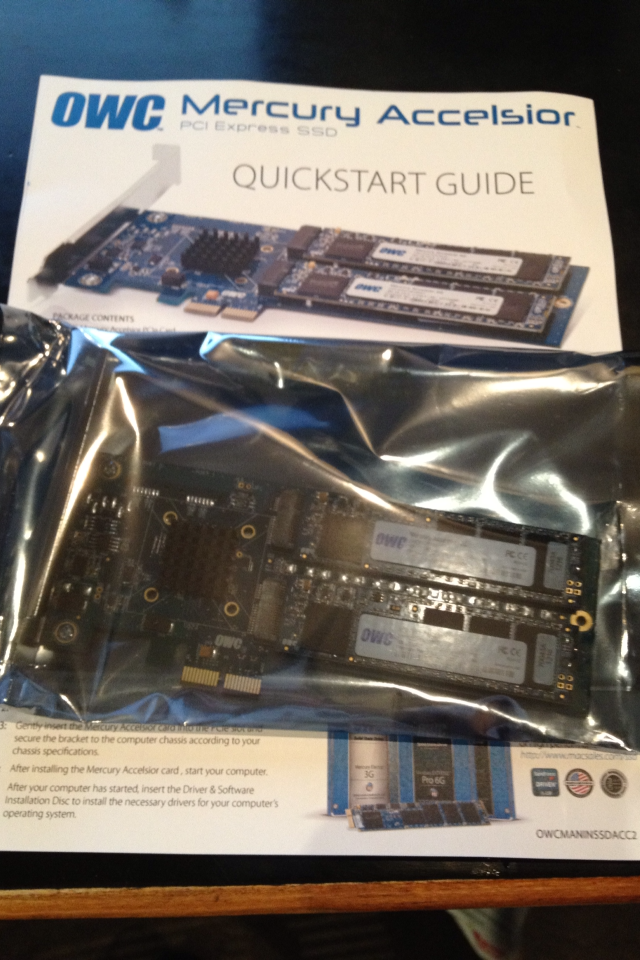
For those of us still with pre-Thunderbolt Mac Pros or Xserves (or Hackintoshes), there are not a lot of inexpensive choices for getting super fast data access onto our machines. Sure, you can buy a SATA 3 hard drive like my favorite Samsung 830 series, but the built in SATA 2 on these old machines is a bottleneck that will “only” yield 250 MB/second read speeds.

Along comes OWC last month with its first-ever Mercury Accelsior Mac-bootable PCI SSD card that is actually a PCI-to-striped RAID SATA array. The two SATA3 cards you see above actually look like (but aren’t – don’t try it) the same super high-speed Sandforce 3 drives that OWC sells as MacBook Air updates.

By the way, the cards are a snap to install and configure. If you have ever added a PCI video card, this is the same thing. Even better, there are no drivers to install, and the drive automatically shows up as a mounted disk that can (and should!) be booted from.

How did they compare to the single MacBook Air SSDs?


Expand
Expanding
Close

Site default logo image

Kaspersky: Apple is 10 years behind Microsoft on security

The last time security researchers at Kaspersky checked the state of Macs infected with the Flashback malware outbreak, it estimated roughly 140,000 were still infected. At the recent Info Security Europe 2012 conference, CBR quoted CEO and co-founder Eugene Kaspersky as claiming Apple is 10 years behind Microsoft when it comes to security:

“I think they are ten years behind Microsoft in terms of security,” Kaspersky told CBR. “For many years I’ve been saying that from a security point of view there is no big difference between Mac and Windows. It’s always been possible to develop Mac malware, but this one was a bit different. For example it was asking questions about being installed on the system and, using vulnerabilities, it was able to get to the user mode without any alarms…. 

Cyber criminals have now recognised that Mac is an interesting area. Now we have more, it’s not just Flashback or Flashfake. Welcome to Microsoft’s world, Mac. It’s full of malware….Apple is now entering the same world as Microsoft has been in for more than 10 years: updates, security patches and so on,” he added. “We now expect to see more and more because cyber criminals learn from success and this was the first successful one…. They will understand very soon that they have the same problems Microsoft had ten or 12 years ago”

Apple WWDC 2012 announced for June 11— sold out in under 2 hours

Site default logo image

Update: Within two hours, Apple has now confirmed that all tickets to WWDC 2012 are sold out.

Apple just announced the June 11 kickoff date for its Worldwide Developer Conference at the Moscone Convention Center. Developers should buy their tickets as soon as possible here. ($1,599 each—Hope your app is doing well!) (Also, do not forget to book your hotel.)

Apple is also offering a scholarship program this year for young developers ages 13 and older:

.

“We have a great WWDC planned this year and can’t wait to share the latest news about iOS and OS X Mountain Lion with developers,” said Philip Schiller, Apple’s senior vice president of Worldwide Marketing. “The iOS platform has created an entirely new industry with fantastic opportunities for developers across the country and around the world.”

Activities at Apple’s WWDC 2012 include:

  • more than 100 technical sessions presented by Apple engineers on a wide range of technology-specific topics for developing, deploying and integrating the latest iOS and OS X technologies;
  • 100 hands-on labs staffed by more than 1,000 Apple engineers providing developers with code-level assistance, insight into optimal development techniques and guidance on how they can make the most of iOS and OS X technologies in their apps;
  • the opportunity to connect with thousands of fellow iOS and OS X developers from around the world—last year more than 60 countries were represented;
  • engaging and inspirational lunchtime sessions with leading minds and influencers from the worlds of technology, science and entertainment; and
  • Apple Design Awards which recognize iPhone®, iPad® and Mac® apps that demonstrate technical excellence, innovation and outstanding design.

Press release follows:
Expand
Expanding
Close

Intel officially launches 22nm Ivy Bridge processors, will likely add improved A/V, USB 3.0, more to future Macs

Site default logo image

After months of talking about its features, Intel officially launches its new Ivy Bridge processor today. As we previously reported, this processor is undoubtedly headed to the next line of Macs, and it will help provide some significant feature updates. The processor is a 22-nanometer 3D transistor chip that will be more efficient than the bigger Sandy Bridge processors it replaces. It is initially available in 13 quad-core models in both the i5 and i7 versions. According to Intel, lower-end i3 and i5 models will launch later this spring.

One big aspect to note is that the Ivy Bridge also features on-chip USB 3.0 – a technology Apple is long-rumored to adopt. While may Apple not choose to take that route, the likelihood of it using the now built-in USB 3.0 tech has grown exponentially.

Intel’s Vice President and General Manager of the PC Client Group Kirk Skaugen told the crowd at the Intel Developer Forum earlier this month that the Ivy Bridge Processor is built for Retina display computers, “if OEMs choose to use it.” This is especially interesting, because Apple is rumored to include a Retina-like display thanks to a slue of hints in the developer preview of Mountain Lion. Retina would be a game changer on the displays of Apple’s Pro/Air. Intel’s new 4000 chipset supports up to 4K resolutions natively, and it supports improved audio and security functions that Apple may or may not choose to take advantage of.

With the official launch of the Ivy Bridge processor, the launch of new Macs does not seem to be that far off. The new processor will most likely be found throughout the Mac line, including the MacBook Air, iMac, Mini, and MacBook Pro.


Expand
Expanding
Close

Kaspersky: 30,000 Mac users left infected with Flashback, more Mac malware on the way

Site default logo image

As of yesterday, security company Symantec released a statement claiming there were still 140,000 Macs infected from the recent Flashback malware outbreak that originally infected an estimated 600,000 Mac users. That was despite Apple issuing a Java security update to remove the malware. Today, security researchers from Kaspersky said during a press conference (via Ars Technica) that it estimated infections dropped to 30,000, while still warning more “mass-malware” on OS X is on the way:

“Market share brings attacker motivation… Expect more drive-by downloads, more Mac OS X mass-malware. Expect cross-platform exploit kits with Mac-specific exploits.”

Kaspersky also clarified that much of the Flashback infections were spread through trusted WordPress websites that have been hijacked rather than through malicious downloaded files as many assume. Ars explained:

Expand
Expanding
Close

Spring 2012 Mac SuperBundle: Roxio Toast 11 Titanium + 8 other apps – $49

Site default logo image

From 9to5Toys.com:

The Spring 2012 Mac SuperBundle is one of the better Mac Software bundles we’ve seen.  If you want to burn DVDs or even Blu-rays on your Mac, you are getting Toast Titanium 11 for half its $99 list price and get 9 other solid apps to boot.

.

The Spring 2012 Mac SuperBundle includes:
Expand
Expanding
Close

Intel VP: Ivy Bridge processor is built for ‘Retina display’ computers

Site default logo image

At the Intel Developer Forum that took place yesterday, Intel’s Vice President and General Manager of the PC Client Group Kirk Skaugen revealed (14:30 mark) that Intel’s upcoming Ivy Bridge Processor is built for Retina display computers, “if OEMs choose to use it.”

“Retina display” is a marketing term coined by Apple to describe a screen where one cannot discern pixels at an average usage distance with 20/20 vision. It is curious that Intel’s VP used an Apple term to describe high-density computer displays for the broader market.

Apple is set to use Intel’s Ivy Bridge processor in its next line Macs, making it an opportune time to introduce its Retina display technology into the Mac line. The Ivy Bridge processor, without help from discrete graphics processors, can power 2560-by-1600 displays (as Skaugen said), which is four times the current resolution found in the 13-inch MacBook Pro. That would look pretty good on 13-inch displays of Apple’s Pro/Air.

Apple’s bigger, high-end notebooks have typically had help from discrete graphics processors. To make bigger displays “Retina,” Apple would likely need to add more GPU processing power.


Expand
Expanding
Close

Free app checks for the Flashback trojan infecting 600,000 Macs

Site default logo image

Over the past few weeks, security experts have warned Mac users of a new virus making its rounds called the “Flashback” trojan. Flashback is allegedly on over 600,000 Macs, which is roughly 1-percent of the 45 million out there. Flashback exploits a pair of vulnerabilities in older versions of Java. Apple may have patched it, but it is still out there and running on many machines.

How do you know if you are infected? F-Secure has a few Terminal commands to check your machine. For the many who are not adept at keeping their Java updates fresh, terminal commands are going to be even more foreign. Luckily, ArsTechnica points us to a free Flashback checker available on github. The app runs the same checks as you would in Terminal, but automates it for you.

We ran the test ourselves and were clean, but one of our readers found that he had the virus last week. It is definitely worth checking out. If your Mac does have Flashback, F-secure offers a great guide on how to remove it.


Expand
Expanding
Close

LaCie announces availability of $199 Thunderbolt to eSATA Hub: Connect up to 12 eSATA drives

Site default logo image

[slideshow]

At the 2012 Consumer Electronics Show in January, LaCie announced a new product for Thunderbolt users. The eSATA Hub Thunderbolt™ Series is a $199 Thunderbolt pass-through that allows you to connect 2 eSATA drives to your Mac via the speedy Thunderbolt port.  By Daisy chaining six of the devices, you could add 12 eSATA drives to your Mac setup.

Today, those devices are now available.

eSATA speeds are up to 3Gb/s or equivalent to SATA II, so you will not be making full use of the Thunderbolt bus speed. However, you will still be much faster than either USB2 (480Mbps) or Firewire 800 (800Mbps). Apple’s Thunderbolt cables are sold separately at $50 a pop.

eSATA docking stations start at around $30, so if you have some eSATA or SATA drives laying around and want to get them on Thunderbolt, this might be a good—though slightly expensive–solution.

Seagate makes a $99 Thunderbolt to SATA drive adapter, but it is having trouble keeping stock (and it lacks a Thunderbolt pass-through) and reviewers note erratic results.

The full specs and press release follows:


Expand
Expanding
Close

Are 600,000 infected Macs, including hundreds in Cupertino, part of a global botnet?

Site default logo image

ArsTechnica quotes a Russian antivirus company called “Dr. Web” that claims hundreds of thousands of Macs are infected with the Flashback Trojan detailed earlier this week. The attack takes advantage of an old Java vulnerability that Apple just patched this week.

Variations of the Flashback trojan have reportedly infected more than half a million Macs around the globe, according to Russian antivirus company Dr. Web. The company made an announcement on Wednesday—first in Russian and later in English—about the growing Mac botnet, first claiming 550,000 infected Macs. Later in the day, however, Dr. Web malware analyst Sorokin Ivan posted to Twitter that the count had gone up to 600,000, with 274 bots even checking in from Cupertino, CA, where Apple’s headquarters are located.

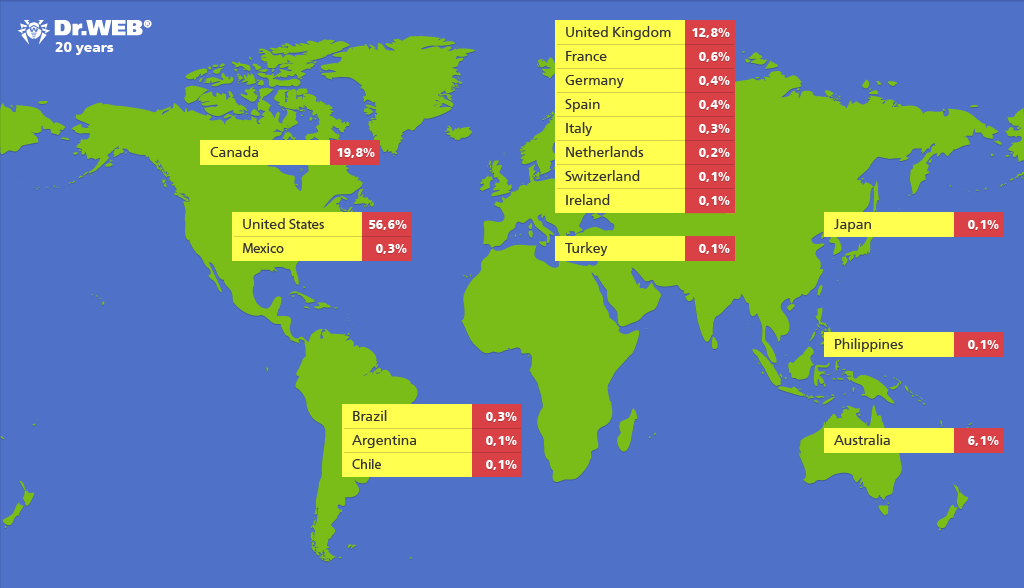
Dr. Web said over half of the infected computers were in the United States (including 274 in Cupertino), and 20 percent were in Canada. The malware self-installs after you visit a compromised or malicious webpage. Obviously, it would be a good idea to update any Macs in your control.

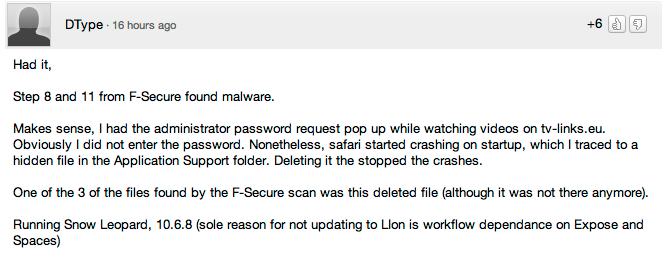
If you think one of your machines may be infected, F-Secure has instructions on how to use the Terminal to find out. If these numbers are true, chances are some 9to5Mac readers are infected. Update: A reader comments that he was infected (599,999 more to go):

Check out HiDPI mode on your Mac right now with AirDisplay (and a new iPad)

Site default logo image

AirDisplay, a $10 application that lets your iPad function as a second (or third, fourth, etc.) display for your Mac/PC, was just updated to allow it to push HiDPI pixels to the new iPad. We explained it all here.

Developer Avatron announced its “Air Display” app, which allows iPhones, iPads and Macs to act as a second or third monitor, would be implementing support for the 2048-by-1536 resolution of the new iPad’s 264-DPI Retina display. That means you will soon be able to use your third-generation iPad as a 2048-by-1536 computer monitor.

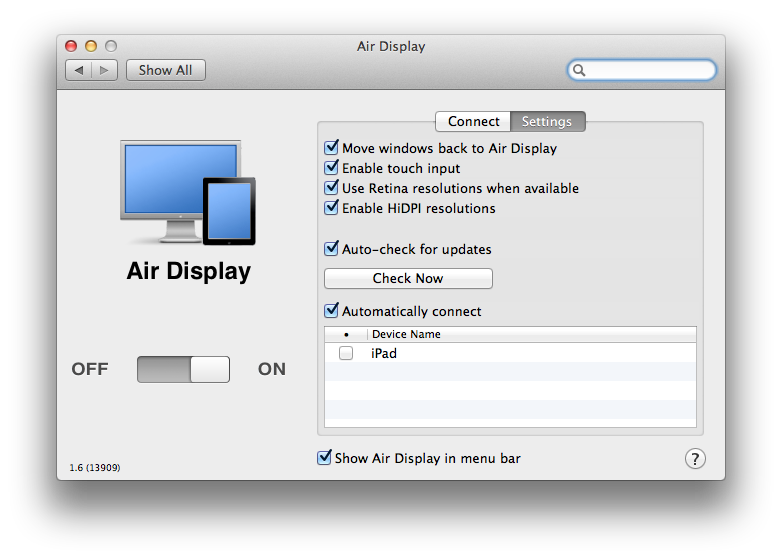
To turn on HiDPI, you just go to the Displays Preferences and select 1024×768 (HiDPI)…HiDPI has been shipping with Mac OS X for some time. But it isn’t enabled in the System Preferences, because until now there hasn’t been a mass-produced computer display with high enough resolution to do it justice. That’s where Air Display and the new iPad come in.

As noted by MacStories (image above), the update is live. The release notes follow:


Expand
Expanding
Close

Survey: Majority of US households now own Apple products

Site default logo image

According to a study from CNBC’s All-America Economic Survey, 50 percent of all households in the United States are home to at least one Apple product. To put that in perspective, over 55 million homes have at least one iPod, iPhone, iPad, or Mac, with an average of 1.6 Apple products per household. Of those 50 percent, close to one-quarter plan to buy another Apple device in the coming year, while 1-in-10 households that do not currently own an Apple product will make the leap during 2012…

Expand
Expanding
Close

Ending Bundles: MacUpdate’s VMware, Drive Genius, PDFPen 5, Forklift, more: $49. iTuneUp for iTunes $30

Site default logo image

From 9to5Toys.com:

Ending Saturday, StackSocial offers the $30 The TuneUp Bundle which offers to “Cleanup your iTunes Music Collection. Automagically.” The TuneUp Bundle (Lifetime License) includes:

• Clean — Accurately fixes mislabeled or missing song information (like “Track 01” or “Unknown Artist”) using cutting-edge waveform recognition

• Cover Art — Scans your entire music collection in seconds and automagically™ fills in missing album artwork

• DeDuper— Intelligently finds and removes duplicate music files from your music library using waveform recognition

• Tuniverse — Delivers music videos, artist bios, concert alerts, social network integration and more

[youtube=http://www.youtube.com/watch?v=UjgeG_fbxus&feature=youtu.be&hd=1]

Ending today, MacUpdate has one of the best bundles we have ever seen on a wide-ranging set of Mac software. You are breaking even with the VMware Fusion 4 headliner, but there are great apps up and down the lineup including Drive Genius disk utility, PDFPen 5 PDF editor, Snapheal photo editing, Forklift FTP/Finder Utility, Typinator 5. These are all great apps….
Expand
Expanding
Close

Poll: Would you enjoy a MicroSD Card slot in your iOS device?

Site default logo image

Apple is unlikely to ever do such a thing (among other things, it would kill its pricing matrix), but sometimes I wish my iPhone or iPad had a built-in MicroSD card slot for easy access to lots of cheap storage. The 16GB cards routinely sell for $10 and new cards go as high as 64GB. However, it is not just about the storage being inexpensive and extremely portable. The SD cards easily swap with Macs, PCs, Cameras, photo frames, video players, Blu-ray players, and other phones.

You can currently connect MicroSD cards with the unwieldy iPad Apple Digital AV Adapter (this) and a Micro to SD Card adapter, but what say you? Should Apple build a MicroSD card slot into upcoming iOS devices?


Expand
Expanding
Close

Air Display update makes iPad a Retina monitor for Mac, enables HiDPI mode

Site default logo image

Developer Avatron announced its “Air Display” app, which allows iPhones, iPads and Macs to act as a second or third monitor, would be implementing support for the 2048-by-1536 resolution of the new iPad’s 264-DPI Retina display. That means you will soon be able to use your third-generation iPad as a 2048-by-1536 computer monitor.

The update will also benefit the iPad 2 and iPhone 4S with “dramatically better frame rates.” In addition, the upcoming update will allow you to enable HiDPI mode in Lion or Mountain Lion, a “feature in Mac OS X that renders with double-resolution on a double-resolution screen.” The results of turning on HiDPI mode in OS X is viewable in the image to the right. Avatron explained on its blog:


Expand
Expanding
Close

MacUpdate Bundle: VMware, Drive Genius, PDFPen 5, Forklift, Snapheal, Typinator 5, more: $49.99

From 9to5Toys.com:

[youtube=http://www.youtube.com/watch?v=UjgeG_fbxus&feature=youtu.be&hd=1]

MacUpdate has one of the best bundles we have ever seen on a wide-ranging set of Mac software. You are breaking even with the VMware Fusion 4 headliner, but there are great apps up and down the lineup including Drive Genius disk utility, PDFPen 5 PDF editor, Snapheal photo editing, Forklift FTP/Finder Utility, Typinator 5. These are all great apps.

* 1. VMware Fusion 4 ($49.99)
* 2. Drive Genius 3 ($99.00)
* 3. PDFpen 5 ($59.95)
4. ForkLift 2.5 ($29.95)
* 5. Typinator 5 ($33.00)
* 6. DesktopShelves 2 ($14.99)
* 7. Snapheal ($14.99)
8. Boom [2-Mac Home Pack] ($10.99)
* 9. Phone to Mac ($24.95)
* 10. Star Wars: The Force Unleashed: Ultimate Sith Edition ($29.99)
* 11. Worms Special Edition ($9.99)

* = has never been in a bundle before

The total value is $377.79 — 78% off = $49.99, as always.

Full release follows:


Expand
Expanding
Close