9to5Mac Reviews
All the products that the 9to5Mac team has reviewed.

All the products that the 9to5Mac team has reviewed.
All the products that the 9to5Mac team has reviewed.
All the products that the 9to5Mac team has reviewed.


Last month, budget charging accessory maker Aukey released PB-N30, the first external battery with a female Lightning recharging port. For only $15, PB-N30 seemed like a steal given its 3,600mAh capacity — just right for use with any iPhone — but wasn’t capacious enough for power-hungrier iPads. So Aukey has released PB-N28 ($25) as a solution for tablet users, remarkably equipping it with over three times the power for only $10 more.
PB-N30 is an upgraded sequel to the company’s older PB-18, which stuffed a 12,000mAh battery into an iPhone 5-shaped enclosure. While the new model’s capacity is the same, PB-N30’s USB ports jump from 2.1-Amp/1-Amp charging to 2.4-Amp/1-Amp support, and it has a more neutral design that neither sticks out nor knocks off an Apple product. Not surprisingly, it cuts a corner or two to achieve its super-low price…



With the release of the first developer beta of iOS 8.4 this evening, Apple gave us the first look at the oft-rumored redesign of the Music app. With the expected announcement of Apple’s streaming music service happening in June, the Music app redesign has been expected for several months now. The newly introduced Music app offers a handful of new features in the first beta of iOS 8.4, as well as a redesigned interface that’s similar to iTunes on the Mac. Let’s take a brief look…
Unless you pick the matte black versions, which look like most of the other iPhone 6 and 6 Plus battery cases I’ve tested, you’ll quickly be wowed by how premium Mophie’s newest Juice Packs feel in your hand. Glossy white plastic Apple accessories may have become passe years ago, but Mophie somehow got the look and feel just right — better, even, than the “unapologetically plastic” iPhone 5c.
The reason for that luxe feel? Mophie needs it, as the new Juice Pack Plus for iPhone 6 ($120) and Juice Pack for iPhone 6 Plus ($100) are currently the most expensive battery cases currently available for their respective iPhones. Though the company has never been shy about charging more for top quality cases, this year’s Juice Packs are hitting shelves well after numerous solid and aggressively priced competitors.
Below, I’ll discuss how Mophie’s price to performance equations actually play out for these Juice Packs, and whether they’re worth buying in light of other options…
Craft cocktails are in the midst of a renaissance, buoyed by rediscovered classic recipes, higher-quality ingredients, and increasingly talented bartenders. Pre-made mixes and artificially-flavored spirits are declining in popularity, as freshly-assembled natural flavors are ascending. But once you’ve had a truly great cocktail at a restaurant or bar, making one by yourself at home may seem challenging. The latest version of Perfect Drink ($40), Brookstone’s (and developer Pure Imagination’s) “app-controlled smart bartending” solution for iOS users, is here to help.
Perfect Drink has been through a few hardware and software revisions, but the latest-generation accessory and just-released version 3.0 app elevate it to greatness. The core of the product is a precise digital scale — recently upgraded from the original hardware — that works in tandem with your iPad or iPhone to eliminate the need for measuring cups. You call up a recipe in the Perfect Drink app and just add liquids until the scale and app tell you to stop, dynamically adjusting the recipe if you overpour. A just-released update enables the app to store a list of all the spirits, fruit, and mixers you have on hand, helping you quickly choose from recipes you’re capable of making…
Now that the Apple Watch is officially in the wild, it’s clear that stands and docks make sense for two reasons: they keep metal and metal-accented bands from getting scuffed up, and guarantee a stable charging connection all night long. Some stands also serve as beautiful displays for your Watch, as well. That’s why we’ve put together this guide to the best Apple Watch stands and docks to help you choose one that’s great for your needs. Every solution relies upon the Apple Watch Magnetic Charging Cable includes in each Apple Watch box, so what you’re getting is a stand with the ability to manage the Watch and charger.
Inside, I’ll show you a large collection of stands that range in price from $20 to $135, with considerably different levels of sophistication. Some are just basic plastic holders for Apple’s charger, while others have really nice designs made from metal, leather, and wood. Updated with new Apple Watch options on October 22, 2015!
We originally reported that Apple was preparing to release a redesigned 12-inch MacBook in January and the company made the device official during its Spring Forward event. The 12-inch MacBook doesn’t go on sale until tomorrow, April 10th, but reviews have already started pouring in today.
The all-new 12-inch MacBook has been completely redesigned and is the thinnest MacBook Apple offers. The laptop sports a 2304×1440 resolution display and is just 13.1mm thick at its thickest point. To get the laptop this thin, Apple made compromises and those compromises have made many potential buyers worry. The new MacBook only features a single USB-C port, with Apple encouraging users to use adapters to fulfill their other needs. Performance concerns also arose when benchmarks allegedly emerged from the laptop showing performance on-par with that of a 2011 MacBook Air. You can read our roundup of all the 12-inch MacBook reviews below:
Just so there’s no ambiguity on this point, I’m definitely an Apple TV fan. The first-generation model was a (literally) hot mess, but Apple did a much better job with the streamlined second- and third-generation versions, which I use every day and have strongly recommended for years. If you have an iPad, iPhone, or iPod touch, the Apple TV is one of the top three accessories you can buy for under $100, and nearly a no-brainer at Apple’s recently announced $69 price point.
Even as a fan, though, I give Apple TV’s chief competitor Roku great credit for developing compelling alternatives. According to reports, Roku is the number one seller of media streamers, and has been outselling the Apple TV for some time now. While it’s true that sales don’t necessarily reflect quality, Roku has earned its numbers by frequently iterating on its products — ironically unlike Apple, which has spent years letting an old Apple TV design chug along as a “hobby.” The difference in Roku’s and Apple’s approaches became starker yesterday when Roku released the new Roku 3 with Voice Search ($100) and new Roku 2 ($70), updates to two of its already-successful devices. These media streamers include several of the key features Apple should be adding to the Apple TV, including voice search, downloadable apps, games, and more…

LaCie announced its new 4TB Thunderbolt/USB 3 Rugged RAID portable hard drive ($420 list, $399 Amazon) today, and I’ve had some time to take it for a little ‘spin.’ There are two speedy 7200RPM 2TB portable hard drives RAID-ed together inside to give the device very impressive, almost SSD-like speeds but with the cost savings and huge storage of portable hard drives. At the same time, the package isn’t much bigger than a regular portable hard drive and better yet, it can take a serious beating…
Apple currently sells more “laptop” than “desktop” Macs, but in reality, most Macs will be used substantially on flat surfaces — desks, tables, and sometimes nightstands. iPads are more lap-friendly, but also tend to get used upright, particularly for watching videos and access in the kitchen. Since I’ve spent a lot of time testing Apple device stands and mounts, I wanted to share what I’ve learned with you, so you can choose the solution that best suits your Mac, iPad, or both at the same time.
Below, I’ve hand-picked options for different types of users, starting with passive MacBook stands such as Twelve South’s BookArc for MacBook Pro ($50). Made from Mac-matching aluminum with gray rubber inserts, BookArc is designed to safely hold a MacBook Pro upright so that its ports and SD card reader are easily accessible. Twelve South also sells a smaller version of BookArc for the MacBook Air, a bigger BookArc for the Mac Pro, and an earthy version called BookArc mod for fans of wood. That’s a rarity, as most Mac and iPad stands are designed to match Apple’s products, as you’ll see inside…
Up until last year, digital styluses — ones with electronic parts inside — worked pretty well across multiple iPad models. Developers including Adonit took over two years to develop electronic iPad writing tools that were thinner-tipped than fingers and rubber-domed styluses, but they succeeded, enabling iPads to serve as notepads and sophisticated canvases for artwork. Then the iPad Air 2 came out, subtly changing the touch-sensing technology that digital styluses relied upon, breaking some and reducing the accuracy of others. Stylus developers quietly acknowledged that new hardware would be needed.
Adonit’s new Jot Script 2 ($75, aka Jot Script 2 Evernote Edition) is the first digital stylus I’ve tested with full iPad Air 2 compatibility. As the sequel to Adonit’s 2013-vintage Jot Script Evernote Edition, it borrows a lot of its predecessor’s design and functionality, but also improves upon it in several ways. Beyond adding iPad Air 2 support, it has a thinner body, and a rechargeable battery rather than a disposable one, all at the same price as last year’s model…


iPad mini sleeves and bags are nearly a commodity today, with a huge selection of styles and options available for purchase online and offline. Even though the iPad mini is light weight and durable, a carrying case is still essential for any kind of travel for many people. I’ve been using Inateck’s felt sleeve for the iPad mini for the past few weeks and it is a functional light way to protect the 7.9-inch iPad.
Anker specializes in accessories that deliver uncommon value. Like gigantic batteries that cost as little as small ones. Six-port USB chargers that are less expensive than two Apple one-port chargers. And iPhone battery cases that outperform rivals sold for twice the price. So it’s only natural that the company would leverage its power expertise to go beyond resuscitating little Apple devices and assist with real emergencies. With roughly the same footprint as its Astro E7 — a battery capable of fully recharging any iPad Air twice — the same-priced Jump Starter Portable Charger ($80) goes in a slightly different direction. You still get a pretty big 10,000mAh battery that can charge two Apple devices at once, but instead of E7’s third USB port, Anker includes jumper cables that can bring dead cars back to life.
Like all of the Anker products I’ve covered, Jump Starter is thoughtfully designed, efficiently packaged, and aggressively priced relative to competing products. Moreover, unlike some of the cobbled-together 3-in-1 accessories I’ve tested, its feature set actually addresses a related collection of problems a driver may have. But it’s not as much of an iPad-charging powerhouse as Astro E7; it’s best-suited to iPhone users. So is it the right battery pack for you? Read on…
Apple’s lack of interest in releasing official iPhone 6 docks has created an opportunity for third-party product developers, notably including HiRise maker Twelve South and battery case maker Mophie, which is rolling out iPhone 6 and iPhone 6 Plus versions of its Juice Pack Dock. Incipio has decided to join the pack with its own options: the offGRID Dock ($40) and several new offGRID battery cases, starting with offGRID Shine ($90, available online for $81). The pitch: pay a little more than the excellent offGRID Express (review) and you get a fancier case with support for dockable recharging. Later, you can purchase the dock separately if you want it.
Is the premium worth it? That depends on your personal needs, but if you want an iPhone 6 dock, you’ll find that the offGRID system is more aggressively priced than Mophie’s alternatives. Read on for the details.
Twelve years have passed since Griffin released its first iTrip, a breakthrough FM transmitter that enabled iPods to send music wirelessly to car and home stereos. The original model, a glossy white housing that sat atop early iPods like a tube of Chapstick, effectively defined iPod accessories for an entire generation of early adopters. And it was fun, too: using an radio antenna and brilliant software, iTrip could flood an empty FM radio channel with iPod music, acting like a pocket-sized pirate radio station.
Everything changed when the FCC cracked down on FM transmitters, forcing reductions in broadcasting power that made iTrips (and numerous competitors) sound staticky, reducing their appeal. Around the same time, Apple and car companies transitioned to better-sounding solutions — Bluetooth and aux-in audio ports, respectively — leaving FM transmitters with fewer customers. But Griffin is rejuvenating the iTrip family with iTrip Bluetooth, aka iTrip Aux Bluetooth, which provides a different type of dead-simple wireless solution for cars. Priced at $50 but available online for $38, it has one purpose: to receive Bluetooth audio sent by your iPhone, iPad, or iPod, conveying it through an included 3.5mm audio cable to your car’s aux-in port…
[Ed. Note: My wife liked this one so much she insisted she review it]
In many ways, my work is old school: unlike my other half, I work in an archive and write about the past. You might call my professional aesthetic “19th century schoolhouse.” Or at most “1920s Paris bookshop.” In other words, Pad&Quill. So when the Minnesota-based makers of the luxurious, leather notebook-style iPhone wallet case sent a new top-shelf work bag to our house, I claimed it. Over the past month I’ve been filling it with my MacBook, iPad, iPhone, papers, pens and books. Voilà the Attaché…
As I’ve said before, Thunderbolt 2 docks are a really great idea for MacBook users. Before now, there were three major options: Belkin’s $300 Thunderbolt 2 Express HD Dock, Elgato’s $220 Thunderbolt 2 Dock (review), and CalDigit’s $226 Thunderbolt Station 2 (review). All three are designed for the same purpose — to connect a bunch of peripherals (including hard drives, a monitor, and audio cables) to your Mac with one Thunderbolt 2 cable — and they all have the same core peripheral ports, with small differences to set them apart from one another.
This month, Kanex is entering the fray with the Thunderbolt 2 Express Dock ($250), which looks a lot like Belkin’s dock but is closer in price to Elgato’s and CalDigit’s. Aluminum on the top and bottom with a black plastic core, it has a front-mounted USB 3.0 port with two more on the back, and comes bundled with a power adapter and 3.3-foot Thunderbolt cable. While it doesn’t stand out in any major way from its earlier rivals, it’s competently executed and attractively designed, with some modest feature tweaks that prospective buyers should know about…

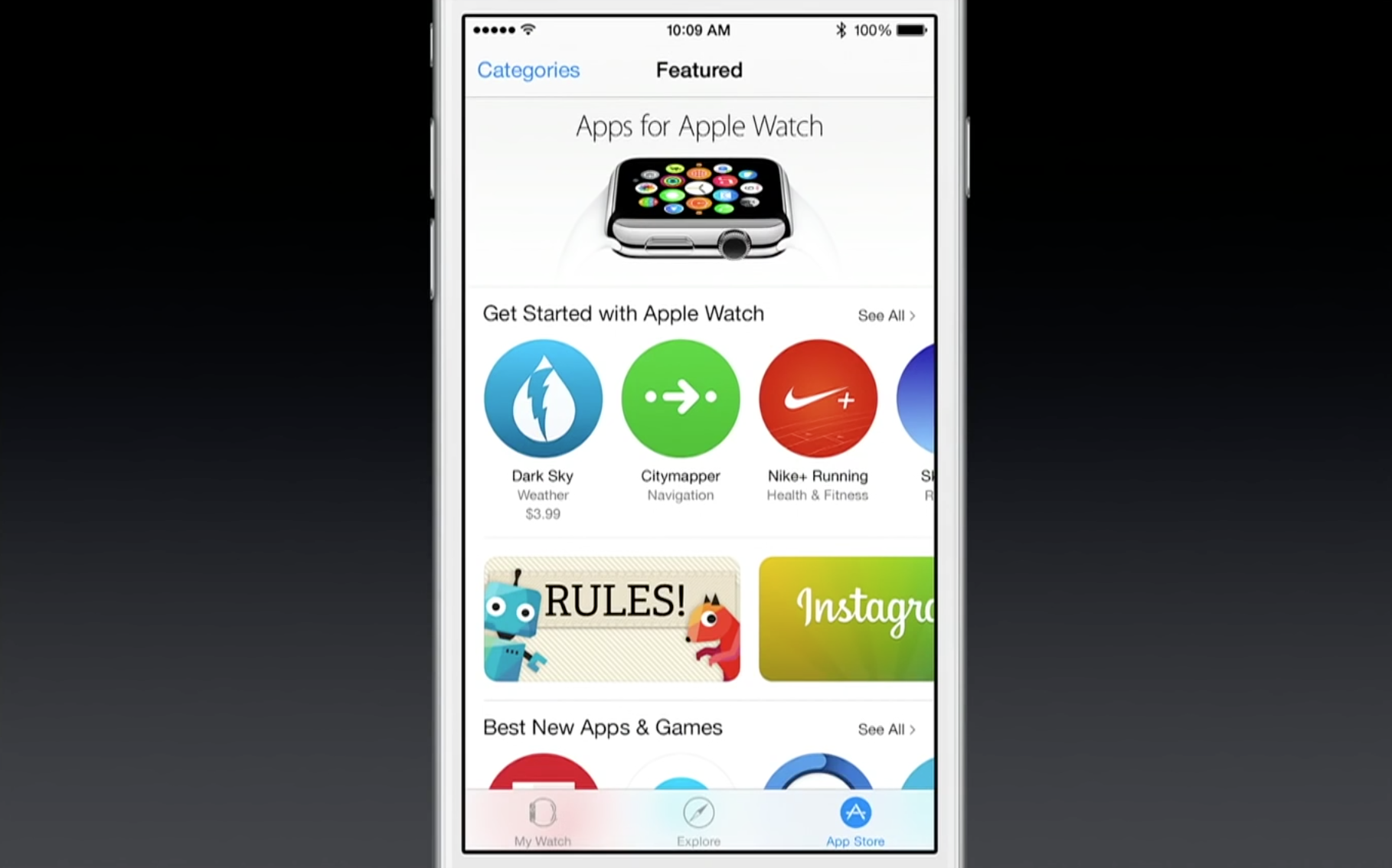
Apple has now opened the floodgates and is letting all developers submit Watch apps to the App Store. This means any of the 1.2 million apps can now submit updates including Watch apps (using the WatchKit framework), beyond the select partners Apple rolled out last week.
As a reminder, Watch apps come bundled as extensions inside normal iOS apps. This means customers can update the apps in the iPhone ready for the Watch’s release on the 24th. Apple is pointing developers to the submission reference guidelines for more information on this process.
Yesterday, I reviewed PowerSkin’s Spare, a semi-protective battery case designed specifically for the iPhone 6. While Spare didn’t strike me as a great value for its asking price, PowerSkin also sells a more powerful alternative called PoP’n 3 that can work with multiple iPhones, including the iPhone 6, iPhone 6 Plus, and earlier iPhone 5 models. And despite having nearly twice as much power as Spare — enough power to fully recharge any iPhone — it sells for only $50-$55, depending on the color you prefer.
PoP’n 3 isn’t a typical USB battery pack, even though it looks like one. Made mostly from metallic plastic that matches the space gray, silver, or gold colors of recent iPhones, it has a Lightning cable built into the bottom for easy connection to bare or encased devices. Suction cups on one side let it attach or detach from your iPhone on an as-desired basis, and unlike iPhone-specific battery cases, enable it to function as a just-in-case power source for iPads, too…
Since late last year, the best iPhone 6 battery cases have generally included two things that iPhone 6 users now take for granted: enough spare power for at least one complete recharge, plus adequate coverage for the iPhone’s top, bottom, and back, if not its sides. PowerSkin has gone in a somewhat different direction with Spare for iPhone 6 ($80), a battery sled that caters to iPhone users who want less of everything. With a small 2200mAh cell inside, it’s the lowest-capacity battery case I’ve seen for the iPhone 6, and also offers the least body coverage, but sells for about the same price as more capacious and protective rivals.
Lightweight and marginally easier to pack in some bags than some rival battery cases, Spare is here for users who want a partial iPhone 6 recharge and anti-drop protection, but no anti-scratch safety. It’s offered in silver, gold, or space gray, currently ranging from $70-$72 based on your color preference. PowerSkin claims that it will deliver a 100% iPhone 6 recharge, but our testing found otherwise…
Expand
Expanding
Close
Thanks to Apple’s patent on the MagSafe connectors used in MacBook Airs and Pros, the list of third-party external batteries for MacBooks previously began with Hyper’s HyperJuice/HyperJuice 2 and ended with Lenmar’s ChugPlug — not much of a variety. Apple’s legal department chased Hyper for attaching harvested MagSafe connectors to its batteries, and Lenmar chose a workaround, sending ChugPlug’s power indirectly though an Apple wall adapter. Neither solution was ideal. It took until now for a completely different third solution to appear: BatteryBox ($220) from Gbatteries Energy.
BatteryBox is the first MacBook power option I’ve tested that doesn’t require either MagSafe or an Apple wall adapter to function. Since the developers went out of their way to create something that won’t run afoul of Apple’s legal team, there’s absolutely nothing Mac-like about its brick-like rectangular design. And it’s not cheap, priced between the two HyperJuices and higher than ChugPlug, which can now be had for only $100. But it works, adding a 60-watt-hour additional battery to the 38-95-watt-hour cells already inside MacBook Airs and Pros. So if you’re on the road without access to a power outlet and need to add hours of additional runtime to your Apple laptop, this is a viable alternative….

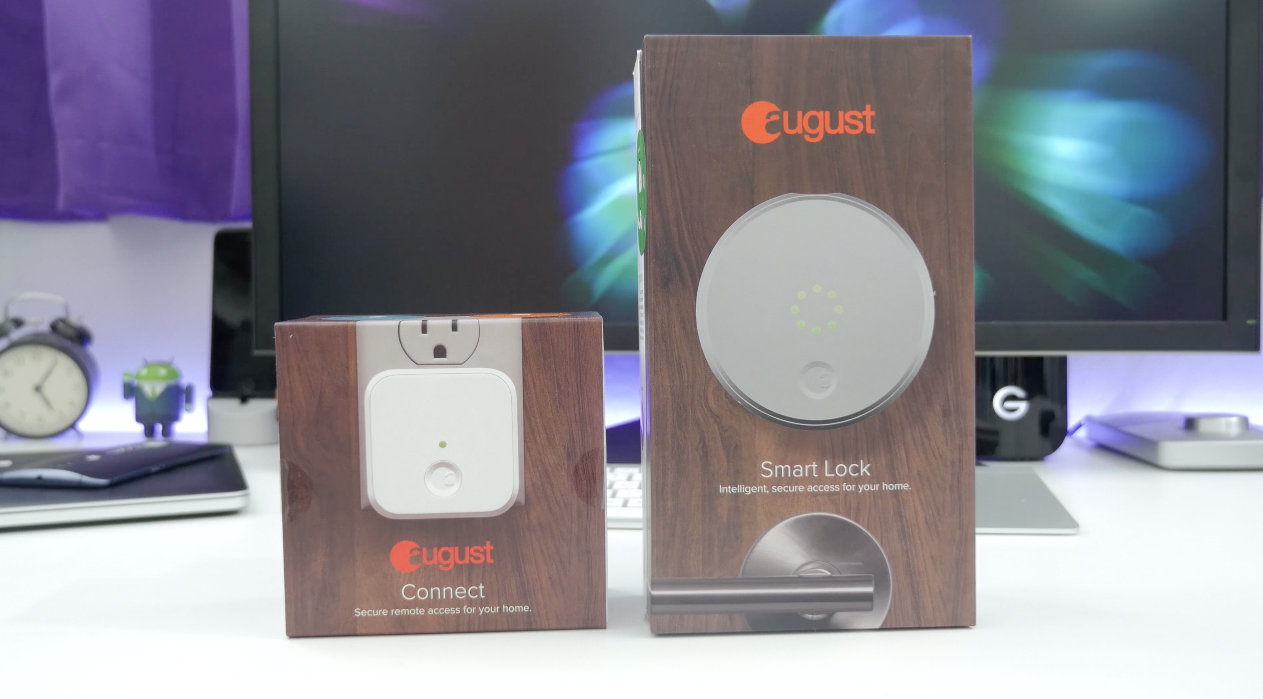
I’m always in the market for new smart home stuff. Just about every room in my house has some gadget or accessory to make things a bit easier. Recently, I moved this smart home mission outside with the addition of Ring Video Doorbell, but now I’m tackling the front door with the August Smart Lock…

http://www.youtube.com/watch?v=dCwIycCsNiE
Mike Rundle, an independent designer and developer, is today releasing Filters for iPhone ($0.99), a visual effects photo editor. Rundle’s integrated development workflow, both writing the code and designing the interface, shows through in his work. This is how Filters describes itself.
You don’t take photos with Filters. You transform them. Filters has over 800 ways to transform your photographs including fully adjustable authentic vintage film recreations, hand-painted textures, vibrant colored gel overlays, special multi-effect adjustments (Shine, Luna, Color Boost, Intimidate and Smart Fade) as well as standard image adjustment tools like brightness, contrast, color temperature, exposure and more. All features are included with nothing extra to purchase.

As someone who uses his iPad for email and writing as much as for media consumption, I’m a big fan of physical keyboards. My current favorites are the ClamCase Pro and Brydge, each of which offers a near-Macbook quality moving keyboard.
But if you’ve ever been deterred by the bulk or weight of a full moving keyboard, the Libre – a new iPad Air/2 keyboard case that launched yesterday on Kickstarter – may be worth a look. The keyboard itself is just 5mm thick and weighs only 200g, yet manages to squeeze in a backlight and the ability to switch between up to three devices. I’ve been using a prototype version for the past few days …
Expand
Expanding
Close

Fantastical’s ability to parse natural language input and create detailed appointment entries on your calendar has always been the primary reason to use it instead of or in addition to Apple’s own Calendar app on the Mac. Apple Calendar has picked up some language parsing smarts in recent updates, too, but it still doesn’t match Fantastical’s control and real-time appointment preview.
Still, I say in addition to because Fantastical for Mac has lived in the menu bar next to your clock, WiFi status, and other utilities where you can quickly access it for reference or adding an appointment from anywhere in the OS. The menu bar app includes a compact month view calendar above a streamlined, scrollable list view of appointments and reminders, but sometimes it’s nice to stretch out and view your schedule in a different context.
So when Fantastical first debuted on iPad almost a year ago putting the efficient list view next to a larger full calendar, I wrote optimistically that “the iPad’s app design could spill over into a future version of the Mac app (maybe as a dock app rather than a menu bar app).”
What Fantastical 2 for Mac actually became is even better: the same menu bar calendar users know and love (but new and improved!), and a full-sized calendar app with an optional dock icon. Both have been designed with the aesthetics of OS X Yosemite in mind and loads of under-the-hood features and improvements including the ability to actually change which calendars you see based on your location.
Expand
Expanding
Close