PSA: USB-C on Apple’s new MacBook is a circus



Shopping for USB-C accessories for your new MacBook? Beware that the USB-C landscape as far as accessories and compatibility with your Mac is an absolute mess.
Shopping for USB-C accessories for your new MacBook? Beware that the USB-C landscape as far as accessories and compatibility with your Mac is an absolute mess.


[Update: Apple’s system status board has been updated to acknowledge the blip and note the issue is over.]
If you’re having issues getting started with Apple Music this morning, you’re not alone. The iOS app started the day by asking subscribers to sign up and join Apple Music (a force quit fixed for me but the problem persists) and iTunes on the Mac is also serving up error messages for a great number of users.

Following an announcement last week from Apple that it was delaying support for iOS 9’s App Thinning feature due to a bug with iCloud backups, Apple today released Xcode version 7.0.1 to developers to fix related bugs.
Expand
Expanding
Close
Many have praised Apple Music’s launch this week, although the focus has largely been on the free component of the service, a 24/7 streaming radio station called Beats 1. But how are users reacting to the rest of the Apple Music service? It received a lot of positive reviews in the media, but users have noticed some user experience issues and technical hiccups with Apple Music that might keep them from making a switch from the competition when the service’s free three month trial is up. Since the issues aren’t getting a lot of attention from the main stream media, I wanted to share everything we hate about Apple Music so far and what Apple needs to fix before converting potential switchers:
Expand
Expanding
Close

Apple has confirmed reports of problems using the Apple Watch on tattooed wrists. The company has quietly updated a support page on the heart-rate functionality.
Permanent or temporary changes to your skin, such as some tattoos, can also impact heart rate sensor performance. The ink, pattern, and saturation of some tattoos can block light from the sensor, making it difficult to get reliable readings.
Apple Watch owners on Reddit and Twitter have been posting conflicting reports and video, some showing that the heart-rate functionality works fine with their tattoos, others showing either no reading at all or erratic readings …
Expand
Expanding
Close

The Information has published a report that claims “deep organizational issues” within Apple are holding up iCloud development and complicating products. The cloud-based service, which helps keep data in sync between iPhones, iPads, iPods and Macs, reportedly lacks from a centralized iCloud team at the Cupertino-based company.
Expand
Expanding
Close

Since the launch of OS X Mavericks last week, many users have been reporting widespread, various, consistent issues within Apple’s bundled Mail application.
Many of the issues have mainly affected users of Google’s Gmail email service, and some of the issues have to do with receiving messages, sorting messages into folders, and deleting messages.
Apple is aware of the issue and is testing a fix for the problem…

Apple has opened up one of its rare replacement programs for the graphics card in some mid-2011 iMac configurations, according to a notice issued to Apple Support employees. The iMac in question is the model released in May 2011 with Sandy Bridge processors and Thunderbolt ports. This iMac was sold between that month and October 2012 when Apple launched thinner models with new internals. Apple says that AMD Radeon HD 6970M cards (both 1GB and 2GB configurations) in select versions of these 2011 iMacs could fail:
In the days following the launch of Google’s predictive ‘Now’ feature now baked into its Google Search iOS app, some users complained of experiencing noticeable battery drain due the app’s process of accessing location data. Today, Google has weighed in with an official response to LifeHacker calling reports of battery drain “incorrect”:
Reports that Google Now drains battery life are incorrect. We understand people’s concern about seeing the Location Services icon stay on when they use Google Now. Many apps that keep the icon on actually do drain the phone’s battery because they require very accurate location. (For example a navigation app has to run your GPS all the time to keep you from missing your turn.)
Google explained that Now is “built very differently” than other apps that utilize Location Services by using “cell towers and wifi hot spots for much lower battery impact.”
Google’s response continues by noting it didn’t receive any reports of battery drain during its extensive month of testing the feature on iOS and encouraged users to contact them if they continue to see a problem:
Expand
Expanding
Close

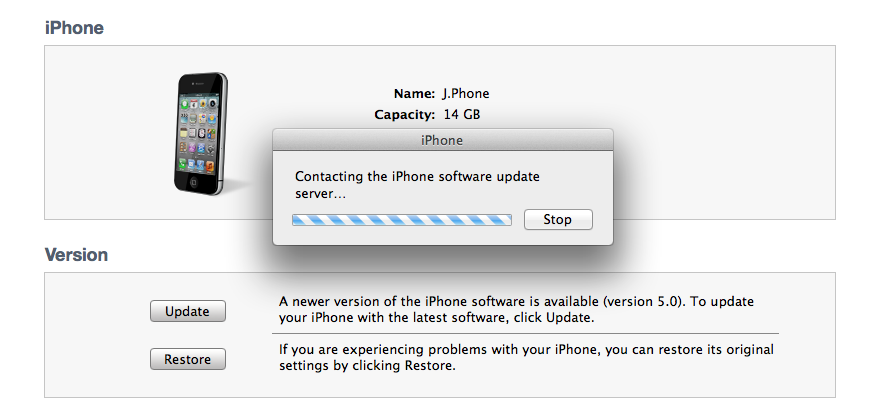
Users on Apple’s help forums have begun reporting that they’re not able to activate iOS 5, noting that Apple’s activation servers are beginning to go down. Users are left with a 3200 error code, and unable to finish the activation. This isn’t a good situation by any means leaving users, in some cases, with almost bricked devices until Apple can get things back up to speed. Many users on the forums have reported that they’re able to get their devices activated after trying a few more times. You’ll recall Apple had similar outages during the iPhone 3G release.
It was undoubtedly a smart move by Apple to release the iPhone 4S two days after iOS 5. All of these activations of both iOS 5 and 4S together would have just been a mess. Also looking through the support forums you’ll find reports of OS X 10.7.2 and iCloud issues probably related to Apple’s overcrowded servers.
Update: GDGT has noted how to bypass this error by installing iOS 5 manually. Simply hold down option + click “Check for update” in iTunes, and navigate to the IPSW file. The links are after the break (directly from Apple):