Latest

Site default logo image

Mailbox email app for iPhone updated with improved swipes, smarter snoozes

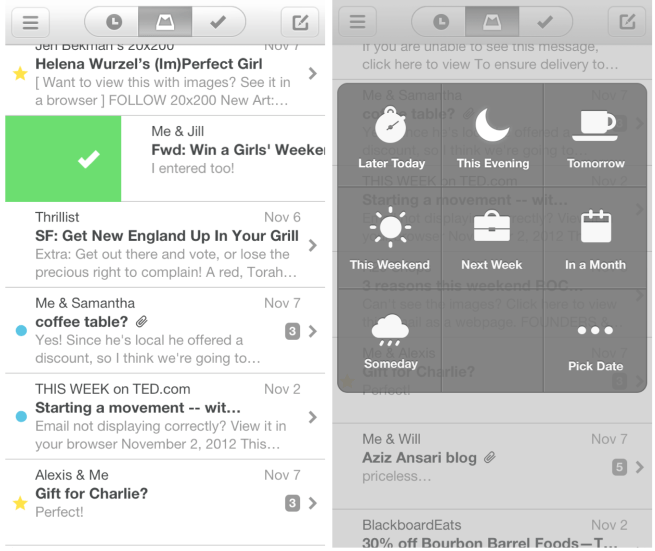
Mailbox for iPhone and iPod touch, the popular Gmail application recently acquired by Dropbox, has been updated with a couple neat enhancements. Adjustments for snooze times are now more specific, swipes are faster, and the UI has been updated with various tweaks. Additionally, bug and performance fixes are also present.

What’s New in Version 1.2.0

– smarter snoozes (adjust based on time of day and week)
– faster swipes (swipe as many items at one time as you want)
– UI improvements (e.g. double-tap a name bubble to see email address)
– bug fixes (including swipe-to-open bug) and performance improvements


Expand
Expanding
Close

Site default logo image

Bump for iPhone loses the ability to share iTunes tracks between devices

The popular peer-to-peer file sharing app Bump was updated to version 3.5.8 today, and according to the change notes one of the features has been removed. Apparently at Apple’s request, the developers have disabled the ability to share music from your iTunes library to another Bump user or your computer.

New in 3.5.8:
+ Bug fixes and performance improvements.
+ We’re sorry, but we are no longer permitted access to iTunes audio files on the device. Removing access to iTunes audio files in the file sharing section.

If you want to keep this feature, be sure to save a copy of the old version of the app in case you accidentally update. You can just drag the Bump icon out of the Apps section of your iTunes library and drop it in a folder to keep it there. If you ever accidentally update to the new version, you can just delete the app from your phone and iTunes library, then drag the old version into iTunes and reinstall it on your device from there.

If you’re jailbroken and want to avoid an accidental update, the free tweak Update Hider can hide the update from the App Store entirely.

Site default logo image

Showtime Anytime iOS app updated with support for Comcast XFINITY subscribers, iPhone 5 & iOS 6

The app that provides access to full-length TV shows for Showtime subscribers was initially only available to AT&T U-verse and Verizon FiOS customers. Showtime Networks later added support for DIRECTV and Optimum subscribers, but today updated its universal iPhone/iPad app to provide support for Comcast XFINITY.

Also included in version 1.4 of the app is support for iPhone 5, optimized video playback for iOS 6 and a few welcomed performance enhancements:

What’s New in Version 1.4

– Available to Showtime subscribers with AT&T U-verse, Comcast XFINITY, DIRECTV, Optimum and Verizon FiOS!
– Support for iPhone 5
– Optimized video playback for iOS 6
– Improved tap targets for controls in video player
– Improved performance and stability
– Minor bug fixes

Site default logo image

Real Racing 3 iOS app updated with vehicles from Chevy, 100+ new events, cloud save, much more

Chevy-Real-racing-3-updateWhile the highly anticipated Real Racing 3 from EA received a lot of press when it first launched back in February, much of it was negative attention due to developer Firemonkey’s decision opt for an in-app purchase, freemium model. Despite that, Real Racing 3 is considered one of the top racing games for iOS devices, and today it receives a massive update bringing new vehicles, events, and game modes to the title.

Version 1.1.0 of Real Racing 3 includes the return of vehicles from Chevrolet such as the Chevrolet Cobalt SS and the Camaro ZL1, 100+ new events bringing the total up to over 1,000, and the ability to save to the cloud and transfer saves between devices. The update also brings a new event type called “Hunter!”:

What’s New in Version 1.1.0

Ladies and gentlemen, start your engines. American fan favorite Chevrolet makes its return to Real Racing! This update features the Chevrolet Cobalt SS and the Camaro ZL1, an all-new Hunter mode, Cloud Save functionality, and 100+ new events! Plus, compare and compete using the new friends leaderboard.

• New manufacturer – Chevrolet! The Cobalt SS and the Camaro ZL1 join the lineup
• New event type – Hunter! Chase down the hunted car and overtake within one lap
• 100+ new events! Total number of events now exceeds 1,000!
• Cloud Save functionality! Transfer your save data between devices
• New social features! See who is online and compare how your friends are doing with the statistics leaderboard
• Check your TSM mailbox for the latest friend notifications
• Improved tutorial and main menu
• Numerous additional improvements, fixes, and performance optimizations

EA announces SimCity for Mac lands on June 11 with cross-platform support

Site default logo image

simcity-2013

EA confirmed today on its website that the latest SimCity instalment will be headed to Mac this summer with an official release scheduled for June 11. The title will be available exclusively through EA’s Origin platform (in addition to “other online retailers”), but those who have already purchased the PC version of the game will be able to grab the Mac download for free on Origin:

SimCity“SimCity is coming to Mac on June 11 and one purchase will give you both the Mac and PC versions. You only need to buy SimCity once to play together across the same servers, regardless of which version you’re playing,” said Lucy Bradshaw, Senior Vice President and General Manager of EA’s Maxis Label. “We didn’t want to make any compromises when it came to the Mac so we created a native version that is optimised for the hardware and OSX.”

Good news if you plan on picking up the Mac version this summer: right now you can get SimCity for the lowest price we’ve seen ever, $32 on 9to5Toys, and then download the Mac version free in June.

EA made a point of noting that the game is not your average port but rather runs natively on OS X with “its entire software renderer was rewritten for OpenGL, ensuring the best performance for the platform.” SimCity will allow players to play online across platforms on the same servers as PC users when it launches and Origin account holders will be able to use the same account on both copies. The game originally got off to a bit of a rough start, with players experiencing major server issues that eventually lead to EA offering refunds and free games to disgruntled users.
Expand
Expanding
Close

Site default logo image

‘Burner – Disposable Phone Numbers’ iPhone app goes free, gets referral program, improved call history, custom voicemail, more

Burner-iOS-appWe’ve told you about the Burner iOS app from Ad Hoc Labs in the past, an iOS app that received a lot of attention for its ability to provide temporary numbers for receiving SMS and calls on the iPhone. Today the developers are announcing a major update to the app that introduces a number of new features such a referral program and custom voicemail messages. While temporary Burner numbers aren’t free, Ad Hoc Labs is also dropping the $1.99 price tag and making Burner available as a free download starting today.

Not only can you download the app now for free, Burner is also providing a “Sample Burner” to get you started:

Once a user downloads the free iOS or Android app, he or she can create a “Sample Burner” for free. Additional numbers can be purchased via credit packages starting at $1.99. There are also extension options available for purchase.

Among the major new features for the app is a referral program that will allow users to earn credits by recommending other users to the app, the ability to reactive disabled numbers, improved notifications, and much more:

What’s New in Version 1.6.5

Burner 1.6.5 includes additional features and polishes on 1.6. Enjoy!

1.6 is a significant update with major new features and enhancements including:

★ REFERRAL PROGRAM to award credits to you and your friends for sharing Burner

★ NO PREMATURE BURNING. If you run out of minutes/messages, your number will be disabled but can be reloaded to reactivate (until the expiration date)

★ BETTER NOTIFICATIONS that deep link to texts, missed calls, and voicemails, and include the name of your caller if you’ve edited the number to include a name

★ CALL HISTORY MANAGEMENT. Star, rename, or archive conversations.

★ CUSTOM VOICEMAIL GREETINGS

And much more!

Site default logo image

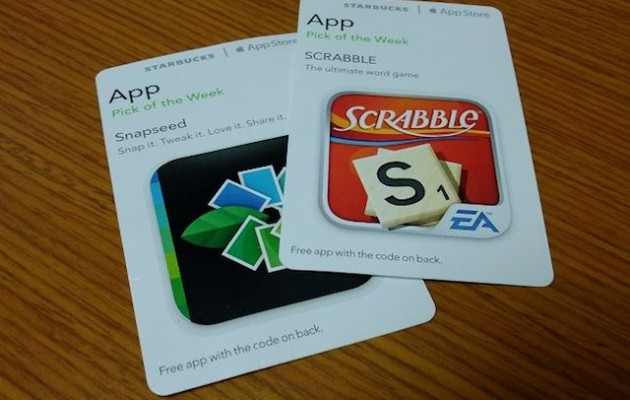
Starbucks launches digital in-app Pick of the Week cards

via macgasm.net

via macgasm.net

Starbucks today launched the next iteration of its iconic Pick of the Week promotion.

Previously, customers could pick up a physical card featuring a promo code to redeem the Pick of the Week app, but starting today customers have the additional option to make a free Starbucks account and redeem the app directly from the free Starbucks for iPhone app, circumventing a trip to a physical location.

The promotion showcases and gives away a paid app from the App Store, much like Apple’s own App of the Week campaign.

Check out 9to5Toys for the latest App of the Week, Angry Birds Star Wars.

Foursquare’s updated iPhone app brings Explore recommendations to the front page

Site default logo image

Foursquare for iPhone was updated version 6.0 today. The update brings the Explore functionality to the forefront of the app. Explore is Foursquare’s recommendation engine, which suggests attactions that users may find interesting based on their previous check-ins.

The new update brings the Explore search box to the top of the navigation bar, enabling quick access to the feature, which now serves up results faster than ever.

With the new Foursquare 6.0, we’ve crunched our billions of check-ins to instantly show you the most interesting things nearby. They’re insights that only Foursquare can deliver, the moment you open up the app. We also put search front-and-center, so you can find whatever you’re craving fast.

✓ Instantly see the best of what’s nearby. In Paris for the first time? We’ll show you the top sights and attractions, approved by local check-ins. In a familiar neighborhood? We can tell you about an up and coming restaurant that just opened up a few blocks away. Whether you’re near familiar stomping grounds or a tourist fresh off the plane, we show you the most interesting things nearby when you open Foursquare.

✓ Search is front-and-center! You can search Explore from the top of the app as soon as you open it up, so you can find what you’re craving even faster. Type what you’re looking for (like “dessert” or “park”), browse a type of place (like “Nightlife”), or tap “Best Nearby” to see our top picks in the area.

The update is avaiable for free on the App Store.

Review: Panic’s Status Board – the ultimate information dashboard for your iPad

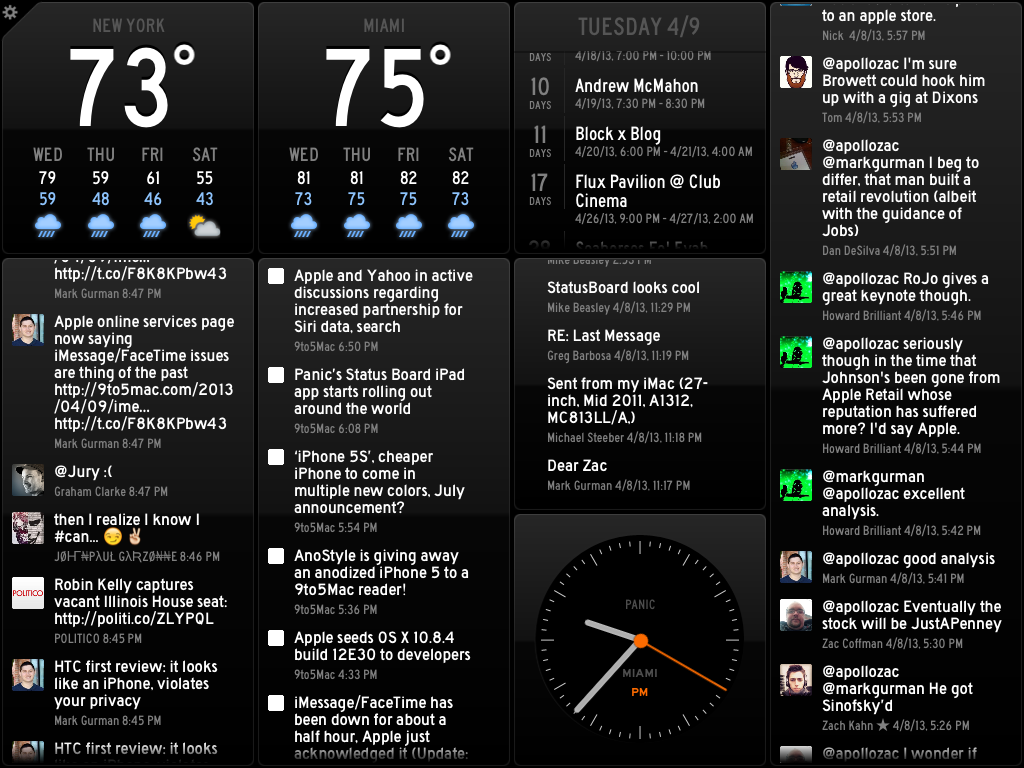
The team over at Panic Inc. have been teasing their new iPad app on their blog and Twitter all week, and today the app known as Status Board hits the App Store.

The Oregon-based software company is largely known for their OS X FTP client Transmit, but entered the iOS space in April 2011 with the launch of Prompt, their SSH client for iPhone and iPad, followed by their affectionately named web editor Diet Coda this past May. This marks the third year in a row that Panic has released an entirely new app on the iOS platform.

Let’s jump right on board:

Expand Expanding Close
Site default logo image

HBO Go iOS app updated with AirPlay multitasking & new interactive features for Game of Thrones

HBO-GO-Game-of-ThronesHBO has pushed out an update to its HBO Go app in at least the US today. Version 2.1 brings AirPlay multitasking support, allowing videos from the HBO Go app to continue playing while users navigate to other apps. Also included in this release is enhancements to the interactive features experience for the network’s popular Game of Thrones series and the usual performance enhancements:

– Includes AirPlay multitasking capability — other apps can be used while video continues to stream via AirPlay.
– Enhancements to the interactive features experience for Game of Thrones
– General performance enhancements

HBO Go version 2.1 for iPhone and iPad is available from the App Store now.

Site default logo image

Twitter iOS app updated with ability to install and launch apps from tweets, performance enhancements

blog-image_1

Twitter has updated its iOS app today with new features that allow users to “discover, install and launch” apps from within tweets. The feature won’t support all apps at first, but Twitter explained in a blog post how developers could implement the feature using its newly unveiled “Twitter Cards” app linking features. So, eventually, you’ll likely see more apps offering the ability to install or launch (depending on if you’ve install the app already) directly from a tweet:

One of the most important features in the new Cards is the ability to allow users to download your app (if the user doesn’t already have it installed), or deep-link into your own app (if the app is already installed on the user’s mobile device). The ability to enable app installs and deep-linking is globally available across all Twitter Card types – you’ll just need to add a new set of markup tags as detailed below.

Quicker launch times, performance enhancements, and the ability to tap “Retweeted by” within Tweet details are also included in version 5.5 of the iPhone and iPad app. The updated app even added bug fixes:

What’s New in Version 5.5

Twitter for iPhone now helps you discover, install and launch your favorite apps from Tweets. This update also includes the following improvements:
• Faster launch times and general performance upgrades
• “Retweeted by” in Tweet detail is now tappable
• Fix for reply-to-self in conversations
• Fix for bug that prevented undoing retweets in some cases

Apple allows Microsoft SkyDrive 3.0 update into App Store following delays

Site default logo image

SkyDrive-for-iOS_0DEB6697Update: Microsoft provided us with the following comment noting that “people interested in buying additional storage will do so via the web versus in the app.” In other words, it doesn’t look like Apple will be getting a cut of additional storage purchased, but users won’t be able to do so via the iOS app:


We worked with Apple to create a solution that benefited our mutual customers. The SkyDrive app for iOS is slightly different than other SkyDrive apps in that people interested in buying additional storage will do so via the web versus in the app.

Back in December we heard reports, later confirmed by Microsoft, that Apple was delaying updates to its SkyDrive iOS app. The delays were apparently over a dispute regarding whether or not Apple should receive its usual 30% cut for additional storage that users purchased through the app.

While there is no word yet on exactly how Microsoft and Apple resolved the issue, Microsoft announced today on its Windows SkyDrive blog that a new update is available for the iOS app via iTunes starting today.

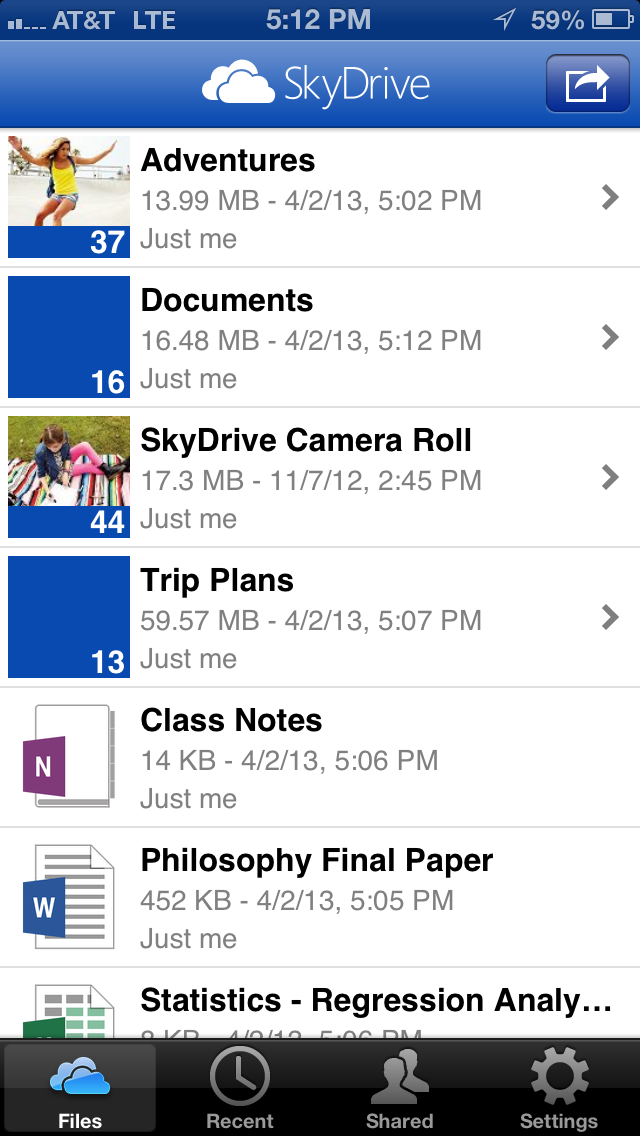
Version 3.0 of the app, the first update to SkyDrive for iOS since June, brings support for iPhone 5 and iPad mini, a revamped user experience, enhancements to photo features such as the ability to download full res photos to iPad and iPhone, and much more:
Expand
Expanding
Close

Site default logo image

Duke Nukem 2 gets 20th anniversary re-release on iOS, now available on App Store

We knew it was coming through previous teasers released for the title, and today Duke Nukem 2 has officially landed on the App Store as a 20th anniversary re-release of the original 1993 title. Publisher Interceptor Entertainment and 3DRealms are including the full 32 level experience, “Insane VGA Graphics”, and the usual touchscreen control enhancements, new artwork, and much more.

Duke Nukem II is everything you’d want from an action game. Duke blasts his way through your screen with enough firepower to wake your neighbors. In 1993 Apogee released Duke Nukem II. Its explosive action made it an instant side-scrolling classic. 20 years later, Interceptor Entertainment and 3DRealms have teamed up to bring Duke Nukem II back. Duke Nukem II for iOS lets you experience this 90′s classic all over again on the most popular gaming platform in the world!

Duke Nukem 2 is available as a universal iPhone & iPad app on the App Store now for $1.99.

Key Features
– Smooth Side Scrolling Action
– Insane VGA Graphics
– 256 Eye Popping Colors
– Kick A** Weapons
– Amazing Interactive Environments
– 32 Action Packed Levels
– Full Touch Screen Support
– Brutal New Artwork and Music
– Save/Load, Replay and Track Your Highscore

Screenshots below:

Site default logo image

Algoriddim’s ‘djay’ apps get Audiobus support alongside new features & enhancements

djay-algoriddim-audiobus

Following Apple’s decision to update GarageBand with support for the inter-app audio routing system known as “Audiobus”, the popular djay apps by developer Algoriddim have been updated with Audiobus support alongside a long list of new features.

On top of support for the Pioneer DDJ-WeGO and DDJ-ERGO controllers through the Pioneer DJC-WeCAi iPad Connection Cable for the iPad version of the app, both the iPhone and iPad djay apps get the following new features and enhancements:

What’s New in Version 1.6.4

✔ Introducing Audiobus support: Now you can stream live audio directly to other Audiobus-compatible apps! See http://audiob.us for more information
✔ Added support for Pioneer DDJ-WeGO and DDJ-ERGO controllers (requires Pioneer DJC-WeCAi iPad Connection Cable, sold separately)
✔ “Shuffle” setting is now also applied to Automix Queue
✔ Pause audio when disconnecting headphones or dock audio
✔ Gain is no longer reset when “Reset EQ” setting is off
✔ Allow sliding crossfader up after tapping to leave it centered
✔ Improved handling of iOS audio system errors
✔ Improved caching
✔ Improved Vestax Spin 2 mapping: allow tempo fine-adjust using Shift & +/– buttons
✔ Changed ION iDJ 2 Go jog wheels to scratch during playback (the previous pitch-bend behavior can be enabled using “Jog Pitch Bend Mode” in the MIDI settings)
✔ Fixed playback issue after loading error with specific files
✔ Fixed audio distortion when using Key Lock with Bluetooth audio
✔ Fixed lock screen audio controls starting both turntables
✔ Fixed possible crash when editing Automix Queue while Automix is active
✔ Bug fixes, performance and stability improvements

djay for iPhone is available on the App Store now for $0.99, and the iPad version is available for $4.99. The free, LE versions of the app also gained Audiobus support today.

Algoriddim even updated its vjay apps that allow users to mix music and videos with many of the new features—minus Audiobus support—included in the djay updates.

Google releases free Quickoffice iPhone app for Google Apps for Business customers

Site default logo image

After releasing a free version of the Quickoffice iPad app for its Google Apps for Business customers in December, Google today announced free iPhone and Android versions of the app exclusively for its Apps for Business customers.

Google Apps for Business can already edit Microsoft Office files using Quickoffice on an iPad, and starting today they can do the same on iPhone and Androiddevices. From Word to Excel to Powerpoint, you can make quick edits at the airport or from the back of a taxi and save and share everything in Google Drive… iPad and iPhone users can open and edit Office files directly from the Drive app. Just open Drive and select the file, make edits using Quickoffice and save it back to Drive.

Google noted the updated apps also bring new features including support for multiple Google Drive accounts, improved chart rendering, ZIP folders from multiple files, and the ability to sort Drive files by “Shared with me, Starred, and Recent”:
Expand
Expanding
Close

Site default logo image

Adobe releases preview 2 of Edge Reflow, gives first look at ‘CSS Designer’ Dreamweaver features

http://www.youtube.com/watch?v=aSgbZPlWlQs

Adobe today announced the second preview of its responsive web design tool known as “Edge Reflow.” Adobe first released a public preview of the app to Creative Cloud members in February, and it today added “more styling and layout capabilities” in the release of preview 2.

In terms of layout, one of the most frequent requests we have received from web designers is the ability to leverage absolute and fixed positioning, as well as their z-index.  These new layout types provide the flexibility to create the responsive designs you envisioned.

Adobe also provided a sneak peek at a new ‘CSS Designer’ feature that will be available to Dreamweaver users later this year through Creative Cloud. Adobe said the feature “gives users the ability to visually apply and set different media queries for web content to be presented in different sized media.” A video showing off the CSS Designer below:

http://www.youtube.com/watch?v=IF20ozzviwg

Adobe is currently offering 60 percent off Creative Cloud memberships through its website.

Site default logo image

Google Reader aftermath: Feedly iOS gets big updates, while Reeder for iOS/Mac goes free

Google announced on the Official Google Blog earlier this month that it will retire Google Reader on July 1, 2013, but the brains behind Reeder, a Google Reader client, clarified that development of its apps will continue after July 1. Moreover, since explaining what’s in store for Reeder, both the Mac and iPad apps are now free starting April 1.

[tweet https://twitter.com/reederapp/status/318766984487653376]

This doesn’t seem to be an April Fool’s joke, either, as Apple’s App Store and Mac App Store currently reflect the price drops.

Feedly for iOS, another Google Reader client, updated to version 14 today and brought a new and improved Feed Search and Discovery function, as well as a Title Only View, Must Read section, and more control over layouts.

The update also enhanced Sharing & Save for Later and allows customization of Favorite Sharing Tool to social networks and Favorite Save for Later Tool to Pocket. Version 14 even added a “mark as read” card at the end of each sections, a pull-to-refresh ability in the home selector, and fixes for a logout bug.

Site default logo image

MLB.com At Bat and At the Ball Park apps get redesign, classic games library and Passbook updates

April is almost here and that means Opening Day is almost upon us.  Getting its affairs in order, MLB issued two updates today. MLB.com At Bat 6.1.0 was released with the following updates

• Multi-platform live audio access for At Bat 13 subscribers (portable to Mac/PC with a valid MLB.com account)
• Universal support for At Bat 13 subscribers, accessible on iPhone, iPad and other supported smartphones and tablets
• New video section featuring more highlights and search (iPad)
• Sortable batting, pitching and fielding statistics (iPad)
• Re-designed individual team pages (iPhone)
• Updated news section interface (iPhone)
• Classic games library featuring more than 60 historic games dating back to 1952 (iPhone and iPad)
• Re-architected navigations (iPhone and iPad)
• Additional push notification options (iPhone & iPad)
• Closed captioning availability for live video (iPhone and iPad)

Meanwhile MLB.com At The Park gets Passbook integration for digital ticket delivery and storage for select clubs as well as other updates:

• Re-architected My Journal section
• Manually enter all of your ballpark visits dating back to 2005
• Upload and share personal photos from your ballpark visits, dating back to 2005
• View team statistics and watch video highlights from games attended
• Ballpark and player entrance music
• Social media clubhouse, including social rewards for select clubs
• Updated tickets section, featuring special offers by club
• Seat and experience upgrade functionality at select ballparks*
• Passbook integration for digital ticket delivery and storage (select clubs only)
• Re-designed user interface

Site default logo image

Amtrak for iOS updates with iPhone 5 support and Train Status redesign

Amtrak revamped its official app today with support for iPhone 5.

The support—like timing for its trains— is a few months late, but the latest version makes up for the wait with a complete redesign of the Train Status feature. Amtrak said the tweaked UI better presents information, but the national railroad corporation also recommended users update to iOS 6.1 before using the latest version of its app.

Check it out:

Version 1.5 also reduces Facebook alerts for Amtrak eTickets and removes the 24-hour-wait limit for creating a new account or changing an existing account. Moreover, new accounts are available immediately. Amtrak said changes will launch when the app starts, and it included numerous, unspecified big fixes to improve performance.


Expand
Expanding
Close

Site default logo image

TweetDeck for Mac updated with column & content filters, advanced search, wide columns, much more

Twitter today released a big update to its popular TweetDeck Mac App Store app, bringing a long list of highly requested features like enhancements to filters, columns, fonts, and key commands.

Version 2.7.1 of TweetDeck for Mac introduces new column filters, the ability to filter columns by content type, Users filters on columns, and a new ‘wide column setting’. Also included in today’s update is a new “powerful advanced search”.

When it comes to Content filters, you can now filter by “media, RTs, including and excluding terms.” Meanwhile, the new Users filters will let you view “verified users, members of a list and more.”

Other new features in today’s release include new font size settings, the ability close windows using CMD+W, verified badges when searching lists, and an option to enable infinite scroll in temporary columns. The release notes pointed out that Spacebar would also now trigger a page down event.

A full list of what’s new is below:

What’s New in Version 2.7.1

➤ Introduced column filters and powerful advanced search
➤ Added Content filters to columns and search including ability to filter by media, RTs, including and excluding terms
➤ Added Users filters to columns and search including ability to filter by verified users, members of a list and more
➤ Added wide column setting
➤ Added new font sizes to settings
➤ Spacebar now triggers page down event
➤ Cmd+W closes windows
➤ Social proof for favorites & RTs in detail view
➤ Added verified badge to list searches
➤ Enabled infinite scroll in temporary columns

Gmail app updated with swipe to move between messages, multiple select edit mode

Site default logo image

Google updated its Gmail for iOS app today with the ability to swipe right or left to move between messages without going back to the inbox.

Version 2.1 also includes the ability to enable edit mode by selecting a message in the inbox. Once in edit mode, Google said users could tap on messages to select. They can then archive, delete, etc., from the new actions bar, or they can just Cancel to exit edit mode.

Check it out:


Expand
Expanding
Close

BMW app integration, Plants vs Zombies 2, IM+, Pac-Man, StreamBoard, deals, more

Site default logo image

BMW-App-integration-audible

News:

BMW iOS app integration: Following some recent Siri Eyes Free news from Chevrolet, BMW announced today that it has partnered with handful of developers to bring similar eyes free experiences for a number of third-party iOS apps to its vehicles. BMW has partnered with Audible for audio books, Glympse for location sharing services, Rhapsody for subscription music and TuneIn for internet radio, all of which will be updating their apps in the weeks to come for compatibility with the BMW Apps system.

Plants vs Zombies 2: PopCap announced today that part two of its incredibly popular Plants vs Zombies title is finally going to land on iOS in additional to all the other usual platforms “early summer.”  No clues on what might be included in the second installment, but in the meantime PopCap will launch a new version of the game on Facebook.

App Updates:

IM+ Instant Messenger version 7.7: A nice update to the very popular IM+ service today offers Beep mobile-to-mobile service as an in-app purchase, the ability to preview transferred images directly in chats, and the usual bug fixes and performance enhancements. iPad users will also now be able to capture photos and videos in the app.

StreamBoard version 5.0: The Twitter client that lets you track keywords and hashtags in real-time is updated to version 5.0 with many new features and enhancements:

For this incredible milestone, StreamBoard has been rewritten from the ground up bringing to you:
– A brand new streamlined interface powered by gestures
– A reimagined filter view featuring real-time graphs that you can interact with
– Much improved engine for faster speed!
– and many more!

Pac-Man version 3.5.0: iOS 6 support and new features for the Pac-Man iPad app.

Added support for iOS 6
Fixed Game Center issue for iOS 6
Updated More Games functionality

Deals:
Expand
Expanding
Close

Site default logo image

Flipboard 2.0 update allows you to make your own magazines, personalized recommendations and more

Popular iOS news app Flipboard was updated today to version 2.0, and it brings a refreshed look, speed improvements, and the ability to create your own magazines. The UI enhancements include a more prominent search bar with improved personalize recommendations and updated sharing buttons to Twitter, Facebook and Google +.

The most notable new feature in the update is the ability to create your own custom magazines article by article. The way the feature works is: if you want to save an article that you’ve found online or within Flipboard, you bookmark it and it’s automatically added to your personalized magazine. Once you’ve finished creating your magazine, you can publish it publicly or save it privately.

https://twitter.com/markgurman/status/316729661843443712

According to TheVerge, Flipboard also announced today that it reached 50 million users.

The update to Flipboard is available today and should be available on Android next month.

What’s New in Version 2.0

★ You can now collect and save content into your own magazines, tap the new “+” button to get started.
★ Your magazines are public, but can be made private (viewable only to you).
★ Use the new bookmarklet to add items to your magazines from your browser.
★ Get Flipboard notifications when people like, comment or subscribe to your magazines.
★ Easily email or share magazines to Facebook, Twitter, G+, etc
✓ Search is now front and center on your Flipboard, with new improved results.
✓ Faster page-loading and faster flipping performance.
★ Personalized recommendations for more to add to your Flipboard.

Twitterrific 5.2 finally brings native push notifications, but there’s a catch…

Site default logo image

large_upload

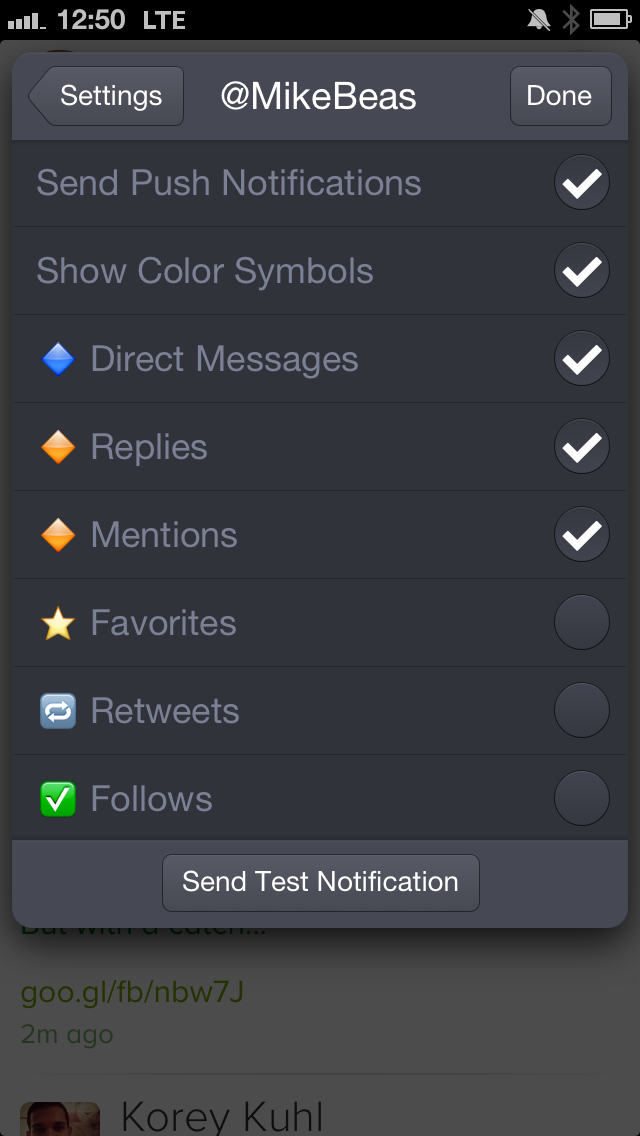
Twitterrific 5, the newest version of the Iconfactory’s wildly popular Twitter client, got a big update today. For the first time since its original release, Twitterrific finally supports native push notifications for new mentions, direct messages, followers, favorited tweets, and retweets. IMG_3489

Until today, Twitterrific users had to rely on a third-party service called Boxcar for notifications. Boxcar’s service has become somewhat finicky over the last few years and put a bit of a sour note on the launch of the completely refreshed interface in December. In fact, the lack of native push notifications was one of the biggest issues in our original review.

Unfortunately, the notifications aren’t available for all users just yet, and they are being considered a “beta” feature right now according to the Iconfactory. In fact, only 1,000 users will receive push notification access initially. These users will be granted access on a first-come, first-served basis. As with Tweetbot’s launch of push, “getting in” will just be a matter of installing the update, racing to the notifications settings, and enabling at least one option before all the slots are gone.

Once notifications are enabled for your Twitter account, you’ll be able to get notifications for that account on all of your devices. You’ll have to repeat the process for any other accounts you want notifications on. More users will be added to this pool in the coming weeks, but for now it’s just a matter of racing to be the first to get in.

Twitterrific 5.2 also has a few other new features and fixes:


Expand
Expanding
Close