Dropbox

See All Stories
Site default logo image

Experimental Dropbox build introduces easy screenshot sharing and more

Dropbox released version 2.3.12 as an “experiemental” build today, adding a few interesting new features that will hopefully make it through the beta process into the shipping version of the app. The new features, as noted by MacStories, include the option to have screenshots automatically added to your dropbox with the link copied to your clipboard for easy sharing, much like the automatic sharing features found in CloudApp and Droplr.

New in 2.3.12

  • Screenshot to Dropbox
  • Move to Dropbox
  • Import from iPhoto
  • Much faster upload/download speeds for large files
Site default logo image

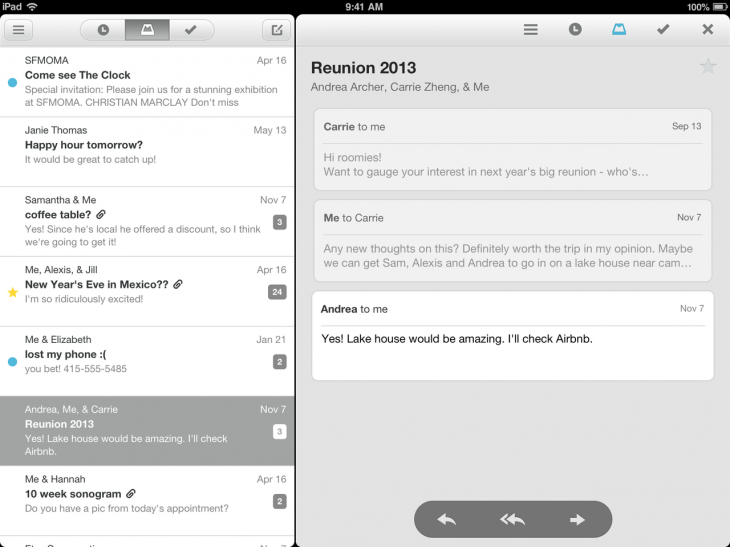
iPad version of Mailbox email-management app now available

Image: The Next Web

Update: The iPad version is now out on iTunes as a universal app. 

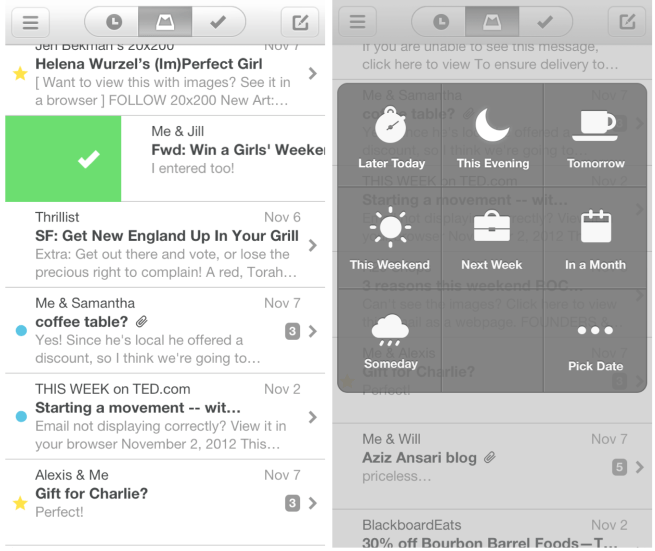
The promised iPad version of the email management app Mailbox recently acquired by Dropbox is launching today, offering essentially the same user-interface as the iPhone original, with the addition of a reading pane to the right.
Expand
Expanding
Close

Site default logo image

Readdle’s Scanner Pro updated with live border detection during scans

Scanner Pro, which lets users scan documents, receipts, and more using their iPhone or iPad, recieved a big update to version 4.5 this week. The update enables live border detection, which allows the app to intelligently find the edges of whatever is being scanned while you photograph it.

In our testing, the border detection was very accurate, although it did have a bit of trouble when the paper and the background where different shades of the same color. The app does still allow you to manually edit the borders to fit the document perfectly, just in case there is a detection error, so any small problems are easy to correct.

The app itself is well-designed and features a solid storage solution for your documents. Multi-page scans are supported and you can save everything to a variety of cloud storage services, including iCloud, Google Drive, Dropbox, and more. You can even fax scanned items right from your iOS device.

Scanner Pro 4.5 is available now on the App Store. Existing users get the update for free, while new customers can get it for $6.99.

Amazon launches Cloud Drive Photos app for iPhone

Site default logo image

Amazon today released an iPhone version of its Amazon Cloud Drive Photos mobile app that it originally launched on Android only back in November. Amazon;’s Cloud Drive Photos app for iPhone, like the Android version, will allow users to back up and view photos to their Amazon Cloud Drive accounts. Up until today, iOS device users have only had access to Amazon’s Cloud Player app for streaming music stored in an Amazon cloud account.

The app provides everything a user might need to ditch Apple’s less than perfect iCloud Photostream feature, including the ability to automatically save photos taken on your iPhone to Cloud Drive, access your entire Cloud Drive photo collection from any device, and easily share through social networks.


Expand
Expanding
Close

Site default logo image

Mailbox email app for iPhone removes reservation system following scaling improvements

The Mailbox for iPhone email application no longer has a reservation system, its developers announced today. The developers say that improved scaling contributed to this.

Good news! Mailbox is now available without having to wait in line. After 10 weeks of around-the-clock hard work, our engineering team has scaled the Mailbox service to deliver over 100 million messages per day (and growing). We believe we can now confidently handle new users as they sign up, so we’ve pulled down the reservation system.

It is unclear if Dropbox, the new owner of Mailbox, contributed to the new scaling efforts. The developers say that the app processes 100 million emails per day. Yesterday, Mailbox was updated with interface enhancements and new snooze options.


Expand
Expanding
Close

Site default logo image

Mailbox email app for iPhone updated with improved swipes, smarter snoozes

Mailbox for iPhone and iPod touch, the popular Gmail application recently acquired by Dropbox, has been updated with a couple neat enhancements. Adjustments for snooze times are now more specific, swipes are faster, and the UI has been updated with various tweaks. Additionally, bug and performance fixes are also present.

What’s New in Version 1.2.0

– smarter snoozes (adjust based on time of day and week)
– faster swipes (swipe as many items at one time as you want)
– UI improvements (e.g. double-tap a name bubble to see email address)
– bug fixes (including swipe-to-open bug) and performance improvements


Expand
Expanding
Close

Review: Readdle brings Documents to the small screen

Site default logo image

Readdle has finally brought their popular Documents iPad app to the iPhone and iPod touch with the latest update. The iPhone version has all of the features you would expect in a file management app and a few extras.

The main file manager window displays all of your files in a grid or list sorted by name, date, or size. You can create folders, zip and unzip archives, and view a variety of file types from this view. PDFs, plaintext files, audio, pictures, and more can be added to your collection. The audio player works when the app is in the background so you can continue listening to your music.

Your most recently used files will accumulate in a special folder automatically so you can find them again easily. A search feature on the main page allows you to search any file by name, but you can also enable an indexing feature lets the app search the contents of your documents as well.


Expand
Expanding
Close

Site default logo image

Study finds iCloud/iTunes Match on top in cloud storage wars with 27 percent market share in US

According to a recent survey by research firm Strategy Analytics (via Engadget), Apple is dominating the cloud storage space with 27 percent of respondents picking iTunes Match and iCloud as their go-to service. Closely behind is Dropbox at 17 percent, Amazon Cloud Drive at 15 percent and Google Drive at 10 percent. The report is quick to point out that Dropbox is the one major player that has gained its share of the market without actually selling content associated with its service. It might not be entirely accurate of usage worldwide, as the survey included around 2,300 people only in the United States.

Usage of cloud storage is heavily skewed towards younger people, in particular 20-24 year olds, whilst Apple’s service is the only one with more female than male users. Amongst the big four, Google’s is the one most heavily skewed towards males.

Cloud storage is overwhelmingly dominated by music; around 90% of Apple, Amazon and Google’s cloud users store music. Even Dropbox – which has no associated content ecosystem – sees around 45% of its users storing music files. Dropbox’s recent acquisition of Audiogalaxy will add a much needed native music player to the platform in the coming months.

Site default logo image

Twitter launches ‘Vine’ video sharing app, 50% off Things for Mac, Textilus Word Processor, Cycloramic, more

Vine — Make a scene: Today Twitter announced on its blog the launch of Vine, a mobile app it acquired a few months back that allows users to capture and share abbreviated, looping video clips. The free iPhone app is available now in the App Store and offers unlimited, free video uploads, Twitter and Facebook integration, and the developers noted a Twitter account would not be required to sign up.

Today, we’re introducing Vine: a mobile service that lets you capture and share short looping videos. Like Tweets, the brevity of videos on Vine (6 seconds or less) inspires creativity. Now that you can easily capture motion and sound, we look forward to seeing what you create.

Hotels.com version 3.7:

-You can now leave hotel reviews once you have completed your stay
-The app now supports iPhone 5
-Many bugs fixes

Cycloramic version 2.0: The app that uses your iPhones vibrating motor to shoot 360 degree video hands-free was updated today with new hands-free panoramic shooting modes and more:

Just place your iPhone in an upright position on a smooth and level surface and press GO. The Phone will automatically rotate 360 degrees while taking multiple pictures, instantaneously stitch them, generate the panoramic picture and finally open it and immerse you in our 3D viewer.

PANORAMIC PHOTO MODE
1) Guided Mode (iPhone 4/4S/5)
2) Hands-free Mode (iPhone 5 only)
With this update, Cycloramic brings you a whole new way to take panoramic pictures.

Textilus Word Processor version 1.5.9:

– New feature: Improved the file browser for local documents and Dropbox documents. Create, delete edit new documents and folders in Dropbox directly from the file browser
– New feature: Scrivener sync support (via Dropbox) for unlimited number of nested folders and sub-folders, preserving locally the document original path
– New feature: Green highlight color in Style menu
– New feature: Greek alphabet in the Math symbols
– New feature: Latest Dropbox SDK 1.3.3. Support for international characters in Dropbox file and folder names (Chinese, Japanese, etc.)

Call-It-Out: Officially launching today, Call-it-Out is a new app that aims to blend elements of YouTube, Instagram, Twitter, and Pinterest allowing users to  “easily rate, capture, and share life through comments, images and videos.

Deals:

Things for Mac | 50% until Jan. 31 (usually $49.99)

Site default logo image

Dropbox 2.0 lands for iOS, introduces redesigned UI, new photos tab, & easier uploads

Dropbox announced on its blog today the introduction of an all-new iOS app that introduces a redesigned, streamlined UI, a new Photos tab that allows you to scroll through a timeline of your automatically uploaded photos, and improvements to the photo-viewing experience. Dropbox noted that uploads have now been improved, allowing users to ” tap the ‘+’ icon to upload something or create a new folder.”

We’ve packed a ton of love and tiny details into our new iOS design, and we think you’ll dig its simplicity. For example, we got rid of the text labels on our tabs in favor of clean and streamlined iconography. Splashed across the app is the glorious Dropbox blue you’ve come to know and love, and we’ve reduced complexity to make everything feel so fresh and so clean, clean.

Site default logo image

Google Voice, Dropbox, Minecraft Reality, Autodesk FormIt, Korg iPolysix, more

[youtube=http://www.youtube.com/watch?feature=player_embedded&v=2pOpcR7uf5U]

Minecraft Reality: Minecraft developers Mojang officially announced a new augmented reality iOS app yesterday dubbed “Minecraft Reality” allowing players to view their Minecraft creations in the real world. The app was developed by 13th lab with a little help from Mojang using advanced computer vision and augmented reality tech. Users will also be able to save their creations at specific real-world locations for others users to discover:

The app uses your iOS device’s camera to track the surroundings, before projecting creations onto the landscape. You get to view the mind-boggling results on-screen. You can change the size of your object as you please, and even wander around it to view from different angles… Imagine being able to dump your Minecraft creations into the real world for other people to find. You could put an exploding creeper in your school, a cheeky pig in your garden, or a giant enemy crab on the beach, if you like.

Google Voice version 1.4.3:

– Optimized for iPhone 5 and iOS 6
– Bug fixes and performance enhancements
– iOS 4.3 or above is now required

Dropbox version 1.5.7: Dropbox gets a few nice new features today including improved video streaming, support for Password-protected Office documents on iOS 6, Italian and Iberian Spanish language support, and more.

• Improved video streaming
• Italian and Iberian Spanish language support
• Support for Password-protected Office documents (iOS 6)
• Various bug fixes and performance improvement

Autodesk FormIt: A new mobile app from Autodesk will allow you to “Use real-world site information to help create forms in context and support early design decisions with real building data.” In other words, the ability to create building design concepts using a gallery of shapes, a searchable map interface, and satellite imagery to “design directly in the context of your proposed building location.” The iPad app is available for free on the App Store.

KORG iPolysix: KORG is releasing an analog polyphonic synthesizer app today for iPad that uses its “proprietary “CMT” (Component Modeling Technology) to simulate the actual electronic circuits” of the 1981 six-voice Polysix analog polyphonic synthesizer. The app is 50% off to celebrate its introduction.

Sonic Jump version 1.1:
Expand
Expanding
Close

Site default logo image

Dropbox remains unfazed by rival services, quadruples to 100M users over the last year

Even with the influx of cloud storage options like Apple’s iCloud and Google’s Drive, Dropbox is having continued success adding users, according to the company’s co-founder Drew Houston. Houston took to the company’s blog to boast that Dropbox now has 100 million users, quadrupling in the last year. Speaking to the New York Times, Houston further expressed that he is not worried about the competition that his company has seen. “Those companies are busy trying to build something we had four years ago. We’re out front,” Houston said, “We’re already out there and building smaller features and things. All those other companies have turf to protect, and they’re fighting a battle on a totally different front.”

Apple announced iCloud now boasts 190 million users on its last earnings call, as its integration with iOS helps bring new users. However in comparison, the Galaxy S III (not inside the US) comes with a free Dropbox account loaded with 50GB of storage, along with many HTC devices that come with 25GB — surely driving sales.
Expand
Expanding
Close

Site default logo image

Apps & updates: Bolt!, PDF Expert for iPad, Vyclone, and more

[tweet https://twitter.com/MikeTyson/status/225260161734934529]

[tweet https://twitter.com/SnoopDogg/status/225999765593264128]

We already had some app news today with the release of Gameloft’s official The Dark Knight Rises iOS game/movie tie-in, but the rest of the notable apps and updates hitting App Stores worldwide are below:

Bolt!: The free game, featuring the World’s Fastest Man and Jamaican track star Usain Bolt, was released by Rock Live a couple of days ago, but it is getting a ton of attention for its addictive gameplay. You might notice a few celebs playing this one (as you can see in the tweets above), and Mike Tyson is even accepting challenges. An iPad version is coming soon.

PDF Expert version 4.1: The iPad version of Readdle’s PDF Expert app was updated today to version 4.1 with a number of new features including:

– Faster PDF rendering

– AutoSync for Dropbox and other storages

– Support for Microsoft SkyDrive

– Recording audio notes into PDFs

– Ability to move opened notes

– Network connectivity fixes (FTP, SFTP, Dropbox)

Vyclone: Released as a free iPhone app on the App Store today, Vyclone takes video shots on several iPhones and stitches it together into the perfect video clip with multiple viewing angles. You can also take all the raw footage and make your own cuts.

Tango Video Calls: The Tango Video Calls app received a decent update today, including the ability to send and receive free text messages to Tango contacts, share videos in text conversations, and more.

Call of Duty: Black Ops Zombies: Activision’s Black Ops Zombies app received a huge update today brining the “dark and ice-covered isles of Siberia” as Call of Dead: Director’s Cut content. The updated also includes new V-R11 and Semtex mine weapons, new achievements, and a new perk called “Deadshot Daquiri”.

Site default logo image

Apps & updates: Amazing Alex, Hulu Plus, Weather Channel, Tweetbot, and more

[youtube=http://www.youtube.com/watch?v=xk7vezL36IU]

Amazing Alex: (iPhone $.99/iPad $2.99)We recently got a little teaser for Rovio’s new game, but today we get the official launch trailer for Amazing Alex that now has a solid July 12 release date for iOS devices. Also included in today’s list of apps and updates is a refreshed Weather Channel iPad app, and updates to CloudOn and the VLC Remote app.

Weather Channel for iPad v3.3.0: The popular Weather Channel app for iPad was updated today with a number of notable new features and enhancements. Included in the update are improved radar maps, HD backgrounds for the iPad’s Retina display, and improvements to crashes experienced by first-gen iPad users. You can now also refresh data by tapping the Weather Channel logo within the app.

CloudOn v2.0.55: CloudOn allows you to access Microsoft Office on the iPad with DropBox and Google Drive integration, and today’s update brings even more functionality, including: the ability to open password protected Office files, an improved experience for Retina iPad users, and more.

Hulu Plus: Hulu Plus is now offering a free two-month trial opposed to its usual 1-month offering. The Hulu Plus iOS app is available here.

VLC Remote v6.02: The app that controls the VLC Media Player on Macs and PCs received a minor updated today that fixes issues with YouTube browsing and translations in several languages.

Tweetbot v2.4.1: A small updated to the Tweetbot iPhone and iPad client today brings the ability to “toggle smart quotes in the compose view (tap in the text input area)” and various fixes including one related to crashes for Droplr uploads.

Site default logo image

Former Mac OS X chief Bertrand Serlet working on cloud startup with ex-Apple colleagues

In March 2011, Apple officially announced that Mac OS X chief Bertrand Serlet would leave Apple after 22 years with Steve Jobs at NeXT and Apple. At the time of the announcement, Serlet said he wanted “to focus less on products and more on science,” but we did not have any other information on what was in the cards for the man Apple credited with the “definition, development and creation of Mac OS X.”

Today, BusinessInsider reported on what Serlet has in the works:

Business Insider has learned that Serlet has spent much of the time since his departure from Apple working with at least two other former Apple employees to launch a cloud computing startup in downtown Palo Alto called Upthere

Some of these job postings also allude to the fact that the startup was founded by high-profile ex-Apple employees.

We have since learned that this is a reference to Serlet (the brains behind Mac OS X) and Roger Bodamer, a former VP of product operations and development at Apple who previously worked at Oracle.

Based on the job postings we’ve seen, it’s clear the startup is looking to rethink the way people store files in the cloud, though just how this service will compare to options like Dropbox or Apple’s own iCloud feature remains unclear.

Google Drive goes live [Video]

Site default logo image

After all of this time, Google has now unveiled the Google Drive. Mac Client downloadable here. (Bonus: Gmail bumped to 10GB.)


Expand
Expanding
Close

Microsoft releases SkyDrive for Mac app, updates iOS app

Site default logo image

Following the launch of Microsoft’s SkyDrive iPhone app, the company gave a preview of its refreshed SkyDrive service for Windows 8 and OS X. Today Microsoft has launched a new app for both Windows and Mac that brings Dropbox-like file management to the service. Of course SkyDrive is seen by many as a direct competitor to iCloud and other alternative cloud services. The tool essentially allows you to manage content stored in your SkyDrive by accessing files from your desktop, dragging and dropping them to the cloud, and organizing files in familiar folders.

The release comes following rumors that Google is prepping a Google Drive Mac app for its upcoming cloud service.

SkyDrive for Mac is the easiest way to access your SkyDrive from your Mac. When you install SkyDrive, a SkyDrive folder is created on your computer. Everything you put in this folder is automatically kept in sync between your computers (Mac or PC) and SkyDrive.com, so you can get to your latest files from virtually anywhere… Almost 70% of Mac users also regularly use a Windows PC. Since we want every customer to be able to rely on SkyDrive to access files anywhere, it’s important for SkyDrive be wherever they are. 

Microsoft has also updated its iOS SkyDrive app today bringing support for iPad, Retina displays, the ability to open SkyDrive files in third-party iOS apps, and much more. The new application is available for download on your Mac here, and a full description of features from Microsoft is below:

Expand
Expanding
Close

Site default logo image

Dropbox beefs up sharing features with direct links to content

Dropbox announced a new feature today that will let you easily share a link directly to your content stored in the service. Just click the new “Get link” icon next to files in your Dropbox online or in the iOS app—or right click, and then select “Get link” for files in Finder. The content will be accessible from new gallery pages.

Anyone with the link gets access to a snazzy page where they can view (but not edit) your stuff. Our gallery pages give your photos, videos, and even docs the gorgeous, full-browser view they deserve. This means that people who follow your link can see pictures, look at presentations, and watch home videos without having to download and open them separately.

Do you need to worry about that Facebook iOS security issue?

Site default logo image

Probably not.

The “hacks” require the attacker to have physical access to your device (whether it be Android or iOS). That could be a speaker dock, a charging station, or a friend’s computer, but it still requires you to plug the iPhone into something compromised or give up physical access to it.

The issue, as Gareth Wright first discovered, is that Facebook stores saved account information in a plaintext file that can be transferred to another phone and used to log into your Facebook account without signing in. Other services, like Dropbox, were also shown to have the same vulnerability (but that is disputed).

This is why, when you restore a phone from a backup, you already have access to your Facebook app without having to sign-in again. Facebook attempted to dispel the concern by claiming that a phone would need to be compromised for this to work. That is untrue.

However, as we know, once someone with the right software has your iPhone, your information is pretty much his or hers to use.

[tweet https://twitter.com/chronic/status/188363051139989504]

The bigger issue here is the software that people use to access your data. It is free—and the process is very simple. I expect Facebook and Apple will probably make it more difficult in forthcoming updates.


Expand
Expanding
Close

Apple joins other tech firms in Digital Due Process group

Site default logo image

As the Electronic Frontier Foundation notes, Apple (and Dropbox) have joined up with the Digital Due Process group which seeks to modernize digital surveilance laws.

In April we launched “Who Has Your Back”, a campaign calling on major Internet companies like Google, Amazon and Microsoft to stand with their users when it comes to government demands for users’ data. Today, we’re pleased to see that two of the thirteen companies highlighted in our petition, Apple and Dropbox, have agreed to one of our requests: that they stand up for user privacy in Congress by joining the Digital Due Process coalition.

Digital Due Process is a diverse coalition of privacy advocates like EFF, ACLU and the Center for Democracy & Technology and major companies like AT&T, eBay and Comcast that has come together with the shared goal of modernizing surveillance laws for the Internet age. The DDP coalition is especially focused on pressing Congress to update the woefully-outdated Electronic Communications Privacy Act or “ECPA.”

The timing of the announcement would seem to coincide nicely with Apple’s iCloud release in the coming days. Now that Apple is a Cloud vendor (OK MobileMe, .mac, eworld were all Cloud too), it would be good to hear where they stand on giving private data to law enforcement or foreign governments.

Expand
Expanding
Close

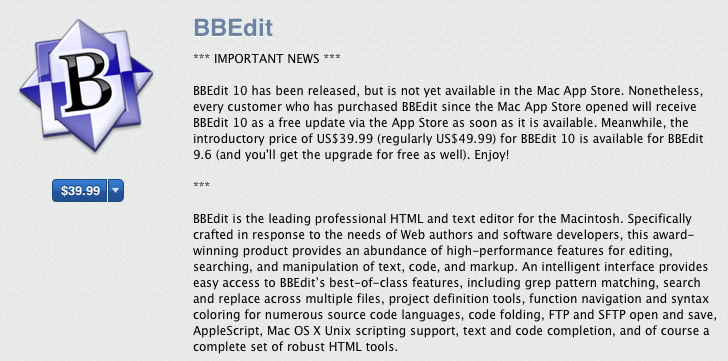
BBEdit gets monster upgrade

Site default logo image

We’re big fans of BBEdit over here (and its free counterpart TextWrangler) so today’s update is exciting news. I built 9to5mac a few years ago using BBEdit (on Drupal!) and the software has just gotten better and better (though 9to5mac has since been ported to WordPress.com).

How much is updated today?  Just have a look at the release notes if you’ve got some time to kill.

It isn’t upgraded in the App Store just yet but Bare Bones says that any BBEdit purchase since the App Store opened will get a free upgrade.  Get it here until October 20, 2011 for $40.  Full info below:


Expand
Expanding
Close

iCloud icon revealed, looks familiar

Site default logo image

Douglas Bowman (via MR) had a peak into Moscone West and saw an iCloud icon.   Looks familiar, no? Oh yes, we detailed this just a few months ago:

A 9to5mac reader writes in telling us he/she’s found some interesting files in Lion.  These files are labeled “MobileDocumentsFolder.icns, Mobile Documents 32.png and SidebarMobileDocumentsFolder.icns” and show new types of icons for a Cloud file system.  Clearly, this would seem to be the successor to iDisk and is probably shows a more transparent interface between the desktop and the Cloud, perhaps a little more like Dropbox. We’re also thinking there is an iWork.com component as well since these are “documentsFolders”.

– here’s the new sidebar icon.

Update: In fact, it looks a lot like a mix of iDisk and iSync (which makes a lot of sense)


+
Expand
Expanding
Close