MacBook

See All Stories

Light. Years ahead.

Check out our top stories on MacBook:

Originally released April 10, 2015 and last refreshed April 19, 2016, the all-new MacBook ($1,299 and up from the Apple Store) is the thinnest and lightest Mac laptop ever made. It’s also the first MacBook to be offered in four color options: classic silver, space gray, gold and rose gold.

Currently offered only with a 12″ screen, it represents the future of Apple laptops. Following a refresh in April 2016, it now includes a 2304×1440 (226ppi) Retina display, 8GB of RAM and up to 512GB of SSD storage, coupled with ultra-low-power Intel Core M processors. The base model includes a 1.1GHz dual-core Intel Core M chip with an Intel HD Graphics 515 GPU; and upgraded models offer to 1.2GHz dual-core Intel Core m5 or 1.3GHz dual-core Intel Core m7 processor with Turbo Boost up to 3.1GHz.

With a redesigned chassis that’s only slightly wider than the keyboard, the new MacBook’s 0.14″–0.52″ thickness was achieved in part by dropping all external connectivity ports save for a 3.5mm headphone port and a new reversible USB-C port, which can be used for power, data connectivity, and video output. Most of the MacBook’s connectivity is handled wirelessly with 802.11ac and Bluetooth 4 support. It promises 9-10 hours of battery life depending on how the computer is being used.

A redesigned Force Touch trackpad now can sense multiple levels of pressure rather than just one, using four pressure sensors and a haptic feedback pad to replicate the clickiness of a traditional trackpad. Additionally, the keyboard has been completely redesigned to retain the expected clicks, precision, and travel of conventional keys, while cutting their depth and width to fit the chassis. An ultra-thin top lid has only enough depth for a 640×480 FaceTime camera, a compromise for the smaller size.

Just like the first-generation MacBook Air, the new MacBook is aimed at users whose computing needs don’t demand incredible horsepower, yet benefit from a slim, light chassis with a really nice screen. Though you’ll do better in raw dollar terms and power by buying a comparably priced 13″ Retina MacBook Pro, you’ll have nearly twice the weight to carry around (2.03 pounds versus 3.48 pounds) and a larger footprint to manage. The choice of which is best for your needs will be highly personal.

Current Lineup:

  • MacBook (12-inch, Early 2016)

Related Guides:


Report: Apple to ship new dream machine 15-inch MacBook Air in March

Site default logo image

Digitimes says we’ll only have to wait until March to get the long sought after 15 (and possibly 17) inch MacBook Airs.

Upstream suppliers of Apple have recently started shipping a small volume of components for a 15-inch ultra-thin notebook model from Apple in November and the device could be either MacBook Air or just a thinner MacBook Pro….Estimated by the product planning, mass shipments of the notebook device will start in March…While a 15-inch ultrabook model would be considered a full function machine, which consumers normally expect to have an optical drive, limitations over the thickness restriction of 0.8-inch for the ultrabook means the launch of a 15-inch machine with an optical drive and a thickness of less than 0.8-inch may not be in the plans until a later time.

It is uncertain whether these machines will be called MacBook Pros or Airs or just “MacBooks” at that point.  The industry has been moving away from hard disc platter computers with optical drives and the recent flooding in Thailand, where many hard drives are manufactured, has only served to hasten that migration.

Intel is also expected to produce quad core Ivy Bridge i7 CPUs based on a 22nm platter that will shave 10W off the current chip power consumption, thereby allowing quad-core ultra portable laptops.

Apple in particular is limited to 35W in its 13-inch MacBook Pro chassis, we may see a quad-core option in the 2012 13-inch Ivy Bridge MacBook Pro as a result.

Beyond energy consumption benefits, Ivy Bridge processors have a 20% increase in CPU performance and up to 60% increase in integrated graphics performance over current Sandy Bridge models. They should also support 4K video.

The new MacBook is expected to appear as early as the second quarter of 2012, according to the report.
Expand
Expanding
Close

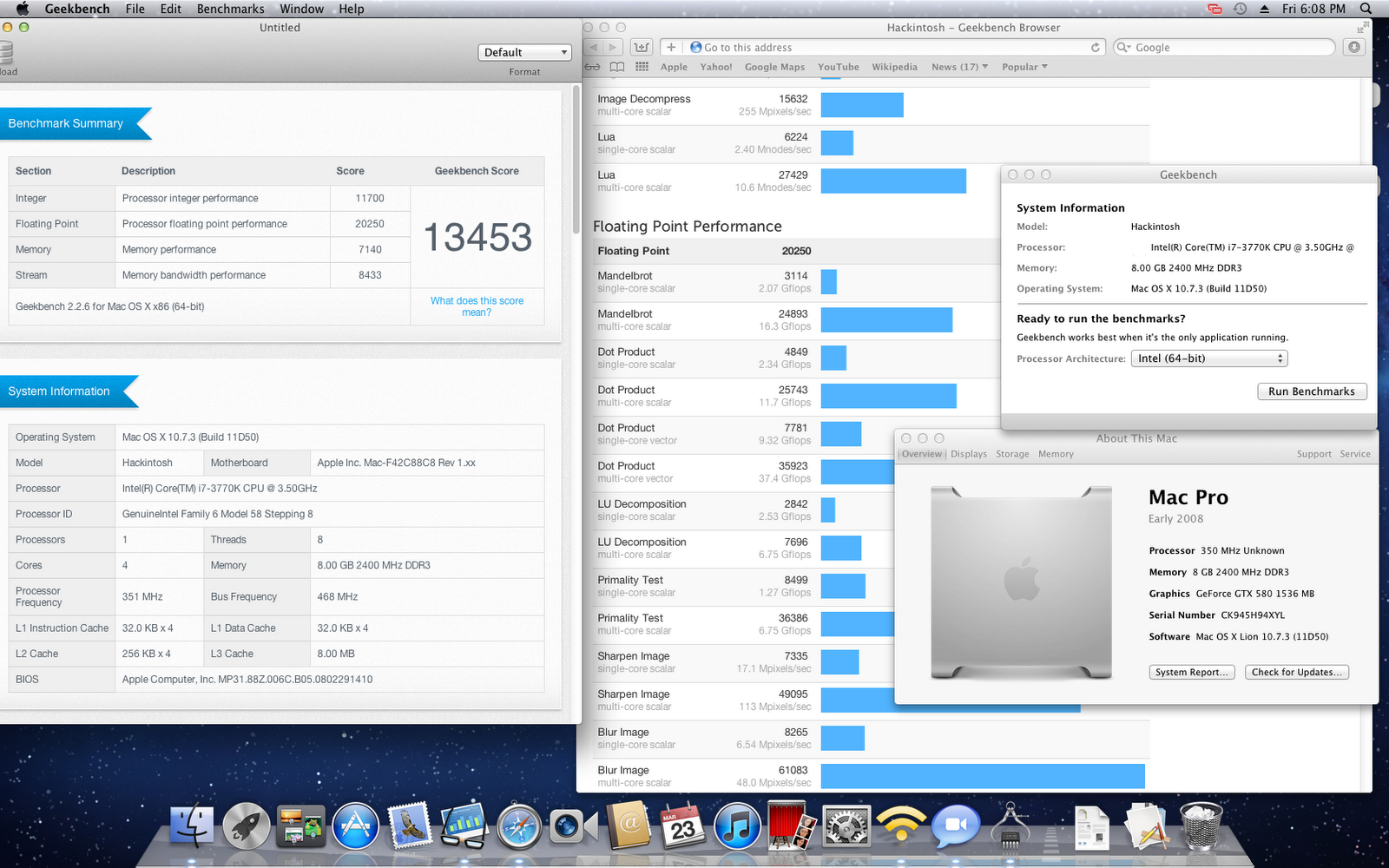
How the $300 Mini Hackintosh turned into a $750 beast

Site default logo image

I was in New York City for a Samsung event focused on SSDs and gaming on PCs last month.  There wasn’t much in the way of new information, but Samsung gave me one of their SATA III 256GB 830 SSDs to try out.  These are within a few bytes per second of the fastest SATA3 SSDs money can buy, so I was pretty excited to get home and throw it in a Mac.

The problem is that I don’t have a worthy Mac to test it out on.  I’ve been using an Air as my exclusive machine for a year and my wife is tired of me testing stuff on her MacBook Pro.  We have a bunch of old Macs laying around the house but nothing with a SATA III connection.

Luckily, I’ve been in the market for a new Mac desktop since I replaced my MacBook Pro with an Air  last year, but to my surprise, I haven’t really found myself in need of one.  The Air drives my 30-inch display pretty well and most of my media has been offloaded to a Gigabit NAS.  Since I already have a 30-inch display, an iMac doesn’t really appeal to me.  Apple’s headless desktops don’t make sense in my situation either. A Mac Mini isn’t going to be much faster than my Air and the Mac Pro hasn’t been updated in over a year and doesn’t even have SATA 3 on board.

I also have some USB3 and eSATA peripherals that I get for testing and can’t use these products on standard Mac hardware.

I decided to give into temptation and build a Hackintosh…
Expand
Expanding
Close

Mind-controlled Siri hack uses brain activity to initiate calls using only your thoughts (Updated)

Site default logo image

Update: Some are calling this a fake, which technically wouldn’t be hard to do.

[youtube=http://www.youtube.com/watch?feature=player_embedded&v=xFIRmnRHNUM]

Apart from a press of the home button to initiate Siri, this prototype Siri hack first spotted by IntoMobile is completely thought-controlled. The guys behind Project Black Mirror have recorded brain wave activity with ECG pads, matched the incoming patterns to pre-saved digital patterns saved on a MacBook, then fed the matched commands to a speech synthesizer chip that translates the command to Siri. The video above shows the developers initiating a call, but they say they’ve linked approximately twenty-five brain wave patterns to various Siri-controlled functions, and hope to bypass having to physically press the home button with a fully automated solution in the future. IntoMobile breaks down the intricacies:

Expand
Expanding
Close

Thunderbolt 13-inch MacBook Pro drops below $1000 ($987.99)

Site default logo image

From 9to5toys.com:

Update: Drops to $987.99

MacConnection drops the price on the base MacBook Pro 13 inch from $1199 to $999 after a $50 rebate with free shipping.  Even without the rebate, it is the lowest price we could find on a Thunderbolt-equipped MacBook Pro anywhere.  This model includes Intel 3000 Graphics, LED-backlit display, 802.11n wireless, full-size backlit keyboard, Multi-Touch trackpad, FaceTime camera, Bluetooth 2.1 + EDR, Thunderbolt port, and up to 7 hours of battery life.

Note that this is last month’s  model with a marginally .1GHz slower processor and smaller 320GB HDD which were upgraded slightly a few weeks ago.

You can also pick this up for $929 factory refurbished or $1199 newat the Apple Store.
Expand
Expanding
Close

MacBook USB subwoofer/software gets even better with Twelve South’s BassJump 2 update

Site default logo image

Apple accessory maker Twelve South has just launched their new BassJump 2 USB subwoofer for Apple’s MacBook lineup. If you’re not familiar, same as the original BassJump, the new model aims to blend the sound output between the subwoofer and your MacBook’s built-in speakers using Twelve South’s proprietary software. In other words, the BassJump 2 sub adds the mid- and low-frequencies, your MacBook speakers act as stereo tweeters, and the software attempts to create an ideal mix between the two.

According to the company’s press release, the proprietary software used in the new model includes rewritten code that provides “greater compatibility and eight more decibels” for “dramatically enhanced sound”. The software’s UI (below), which includes a retro VU meter and other basic preset controls, has been redesigned and now allows you to save your customized settings.

When it comes to the greater compatibility, the BassJump 2 includes support for iMac and Apple Thunderbolt display speakers, as well as other non-Apple headphone-connected and USB-powered speakers.


Expand
Expanding
Close

Apple quietly updates MacBook Pros with faster processors and bumped specs

Site default logo image

As leaked by Mr. X (and it didn’t take until November) Apple quietly updated its MacBook Pro line this morning. There are slight processor speed improvements across the board with updated hard drives and video cards peppered throughout. Compare today’s MacBook Pros, above, with yesterday’s MacBook Pros, below:


Expand
Expanding
Close

New MacBook Pros launching as soon as next week at current price points

Last week we exclusively reported that the current line of MacBook Pros is severely constrained and that part numbers for a new MacBook Pro line had surfaced. Based on these similar internal part numbers, the new MBP’s design should be the same as the current design.

Now, we’ve received pricing for the new laptops and the prices for each unit are the same as the prices for the current generation.

With supplies only becoming more constrained, and with shipments already touching down in select countries, we think a launch next week is likely (between Tuesday and Thursday). That is, of course, if there are no unforeseen circumstances. Thanks Mr. X! 

One more thing… after the break:


Expand
Expanding
Close

Apple leaks clues to new MacBook Pros on its own website?

Site default logo image

Last week we revealed that Apple is planning a small refresh for its MacBook Pro line with modest CPU bumps and possibly improved Bluetooth Wireless networking. Today we’ve found what seems to be evidence for such a refresh in Apple’s own online store.

If you do a search on Apple’s online store for ‘MacBook Pro’, you get a list of Apple’s products. In that list of products, there are two mysterious entries for ‘Macbook Pro Memory Model’ toward the bottom with the caption “Ships: Coming in November”.

Perhaps more interestingly, they link to the following two URLs which aren’t currently active:

http://store.apple.com/us/product/ME_17_2_33_MBP?mco=MTY3ODQ5OTY

http://store.apple.com/us/product/ME_17_2_4_MBP_PREV?mco=MTY3ODQ5OTY

We’ve heard that these could be the spare part part numbers for the new MacBook Pros and the 2_33 and 2_4 could be the new speeds of the quad-core Intel Core i7 processors (current is 2.0 to 2.3 GHz). If they are spare parts, these often ship a week or so after the new products so the MBPs could come sooner than ‘November’.

Update: 4-year-old MacBook Pro RAM has a similar URL but it isn’t certain if the two parts are related.


Expand
Expanding
Close

MacBook Pros constrained, new models appear in Apple’s inventory system

Site default logo image

Apple’s current line of MacBook Pros is heavily constrained with all models appearing to be nearly out of stock. Don’t fear, though, if you want a MacBook Pro because new models are right around the corner. Updates to all MacBook Pro models have appeared in Apple’s inventory system for the 13-inch, 15-inch, and 17-inch screen sizes. Apple will continue to ship two 13-inch models, two 15-inch models, and one 17-inch model.

This MacBook Pro refresh will not be the expected re-designed models, but will likely bring some marginally faster processors and the Bluetooth 4.0 technology that Apple started shipping in the latest MacBook Airs and the new iPhone 4S. The new internal code names for the updated MacBook Pro line are K90IA (13-inch), K91A (15-inch), and K92A (17-inch). The A in the codename signifies this next MacBook Pro refresh as being relatively minor. Thanks, Mr. X!


Expand
Expanding
Close

Review: Western Digital My Passport Studio portable hard drives go high class

Site default logo image

We’ve been messing around with a damn fine looking set of portable hard drives for the past few days from Western Digital called My Passport Studio and My Passport Mac. They are encased in an all-aluminum shell, the My Passport Studio comes with two FireWire 800 ports as well as a Mini USB port around back; the latter only has a Mini USB port. The speed tests on these guys (see results below) was pretty average for 2.5-inch Firewire hard drives at just under 80MB/sec read, making the slight premium Western Digital is asking for these mostly “an aesthetic upgrade”.

…not that there is anything wrong with that. You can feel the quality in these drive enclosures. The aluminum shell is going to protect these from more drops than a plastic casing and these drives look the part of a high quality Mac setup. These drives are also so whisper quiet that the only way to know if they are running is the white LED on the back (much better than the front). As you can see from the pictures, both the Studio (formatted Windows) and Mac go well with a Unibody MacBook.

On the downside, these are slightly heavier than your typical hard drive at half a pound. Still though, that’s a small price to pay for quality. They are available now for $189.99 from Amazon for the Studio and $159 for the 1TB Mac

Press release follows:


Expand
Expanding
Close

Apple outlines some limitations of Thunderbolt displays

Site default logo image

Following the first shipments of Apple’s new 27-inch Thunderbolt Display, a new support document reveals some limitations regarding multiple display support that we weren’t exactly expecting.

Nearly every current Mac model is able to support two Thunderbolt displays. The exceptions are the 13-inch MacBook Air (mid 2011), which only supports one, and the 13-inch MacBook Pro which supports two, but disables the device’s main display to do so. Also of note, the $800 Mac mini can support three Thunderbolt displays thanks to the AMD graphics and its HDMI port.

One other somewhat surprising limitation of the new displays is the inability to daisy chain a Mini DisplayPort screen off the new Thunderbolt display. The support document explains:

Expand
Expanding
Close

Thunderbolt Displays now shipping to end users

Site default logo image

…in New Zealand anyway.  One 9to5Mac reader said that the Thunderbolt Display he ordered on August 17th was now en route to his home.  If anyone else has a shipping display let us know in the comments or at tips@9to5mac.com.

What’s perhaps most interesting about this shipment information is that these displays aren’t shipping directly from China as most Apple products do. They are shipping from a holding spot in Australia (below) perhaps indicating that the wait on these displays isn’t because of hardware, but in fact software, which, incidentally was updated last night on Thunderbolt MacBook Pros and Mac Minis.

Apple releases EFI firmware update 2.2 for MacBook Pro and 1.3 for Mac mini, fixing Thunderbolt issues

Site default logo image

After releasing an EFI firmware update for the MacBook Air earlier this week, Apple has released an EFI update for both the MacBook Pro and Mac mini this afternoon. The MacBook Pro update is version 2.2 and Mac mini version 1.3, fixing compatibility issues for the upcoming Thunderbolt Display and bringing numerous Lion fixes — and adding Lion Internet Recovery on the MacBook Pro.

Hit up Software Update on your Mac to get downloading. (via The Next Web)

MacBook Pro refresh coming before Christmas?

Site default logo image

AI reports that the MacBook Pro line will receive minor processor updates before the holiday shopping season.  In fact, they say the updates should come before the end of the month.

According to people with proven insight into Apple’s future product plans, the late-2011 MacBook Pro refresh will deliver marginal speed bumps to the notebooks’ Core i-Series of Sandy Bridge processors but will otherwise introduce no material changes over the existing models.

While precise timing for the update may change, those same people say the Mac maker currently anticipates an introduction of the refreshed line before the end of the month,

The report seems to stem from the recent release of Intel Core i7 2700 series processors fit for use in MacBook Pros (right).

This seems to fly counter to earlier reports from MacRumors that the next update to the MacBook Pro line would be a big redesign.

MacRumors has heard reliable confirmation that the next revision of Apple’s MacBook Pro line will utilize a new case design for the first time in several years.

For what it is worth, we’re seeing no hiccups in the supply chain on current models.  Silent updates aren’t unheard of however.


Expand
Expanding
Close

Intel’s new chips could give future MacBooks 24 hours of battery life (just like current ARM chips)

Site default logo image

Today at the Intel’s Developer Forum, Intel unveiled a new processor that will be able to power a x86 computer for 24 hours/10 days of stand-by time off a single charge. Intel’s new Haswell chip uses a 22-nanometer 3D-transistor architecture that uses 20 times less power than current Sandy Bridge models which are featured in the newest line of Macs. The new chip was demonstrated using solar-power to grab light from a source as small as a light bulb to power the system.  Oh, and the Haswell chips will be faster than current processors.

The new chips will land in 2013, after Intel’s Ivy Bridge in 2012. Recently, Intel revealed that Apple wasn’t entirely pleased with upcoming Intel Chips power usage and were currently investigating other alternatives.  Clearly, Apple’s own ARM AX line which already can provide 24 hour battery life (with PC-sized batteries) is being considered. (via Gizmodo)

It is interesting to note how much the image reminds us of the image below:
Expand
Expanding
Close

Get your MacBook Air ready for Thunderbolt with EFI firmware update 2.1

Site default logo image

Apple’s Thunderbolt hardware pieces are coming together and to get ready, Apple is updating MacBook Air firmware. The 4 MB update promises to enhance the stability of Lion Recovery from an Internet connection, and resolve issues with Apple Thunderbolt Display compatibility and Thunderbolt Target Disk Mode performance on MacBook Air (mid 2011) models.

Thunderbolt parts have already began shipping and new products include Docks, external PCI Card adapters, as well as storage.


Expand
Expanding
Close

MacConnection coupon: 3% off already low-priced Apple desktops and laptops

Site default logo image

From 9to5Toys:

MacConnection offers readers an additional 3% off Mac desktops and laptops via coupon code “3%MacDeal”. The coupon applies to MacBook Pro, MacBook Air, Mac Pro, Mac Mini, and iMac computers. It’s the best percent-off coupon we’ve seen from MacConnection in recent months. Even better, free shipping applies to most deals, yielding a trove of lowest-we-could-find prices.

Best Bets: New Core i5 MacBook Airs now start $921 (Amazon is $949).  Mac Minis start at $551.88  (Amazon is$569)

MacConnection also has the lowest price we could find on the new Thunderbolt display at $979 and a 128GB Crucial 6Gb/s SSD for $189.99.  AppleTVs are $94.99 as are Airport Express base stations..  Wireless Magic Mouse – $64.99.
Expand
Expanding
Close

Apple plans to launch entirely new Mac this year?

Site default logo image

Apple may be planning on unveiling an all new Mac that is “absolutely different from current products”, according to a rough translation from the sometimes reliable macotakara.jp. The site’s track record is less than perfect, however they did accurately predict the iPad 2’s march release.

The report seems to claim the product will be so different from current product lines that it will indeed be given a new name. Other than that, there aren’t many details offered up in terms of specs on the potential next-gen Mac (iOS/OS X hybrid?), but it may be one of the new products Apple is already rumoured to be working on.

It’s a possibility these are the ultra-thin air-like MacBooks we’ve been hearing are in the final stages of testing, or perhaps Apple is designing an all new product that will see a platform switch from Intel to ARM processors. And don’t forget the rackable, stackable Mac Pro and that iMac touch patent,below.

Expand
Expanding
Close

Apple threatening to leave Intel behind for next MacBook Air (A6?)

Site default logo image

[youtube=http://www.youtube.com/watch?v=ghdTqnYnFyg&start=120]

(Substitute PowerPC for Intel and Intel for ARM)

There are a lot of people who think Apple is going to eventually move its “Mac” line to iOS. In fact we found it curious when Apple turned ‘MacOSX’ to ‘OSX’ as of Lion earlier this year.

Steve Jobs and Apple in general are very sensitive to CPU power issues with their push to make high end devices thinner.

As part of the WSJ article on Intel spending $300 million on developing MacBook Air alternatives (a hint in itself – why does Intel need to create competition for its own Air), it was revealed that Apple was threatening to leave Intel’s ‘low power’ processors if they didn’t drastically cut power.

Welch said Apple informed Intel that it better drastically slash its power consumption or would likely lose Apple’s business. “It was a real wake-up call to us,” he said.

What are the alternative processors for the MacBook Air? AMD? Not likely (though not impossible).

The big alternative is a platform switch to ARM which certainly schools the Atom Chip in terms of power consumption. It would also mess with a lot of non-App Store Apps built on legacy code.

But, you know Apple would love to create a cheaper, thinner, more power efficient iAir type of hybrid device that still operated like a laptop. In fact, Lion seems to already be heading in that direction.


Expand
Expanding
Close

Apple patents projector technology and “Shared Projected Workspace” concept for MacBooks and iOS devices

Site default logo image

There certainly isn’t a shortage of Apple patents being published today (probably more fuel for a legal battle a year from now). We just told you about a new Map related (Placebase acquisition) patent, and now Patently Apple reports Apple has been granted a patent that will allow them to integrate tiny projectors into future mobile devices.

This latest patent describes, in rather clear detail, exactly how Apple could integrate projectors into iPhones, iPads, and MacBooks. It even suggests Apple cameras will be able to detect gestures and “shadows and/or silhouettes” (Kinect-style iOS games anyone?).

The patent also describes what Apple calls a “shared projected workspace”. This appears to essentially be the ability for users to share content with one another over two projected displays. For example, if I were to project an image from one iOS device, and you from another, we could then share content (via gestures?) between both displays. The patent explains:

Expand
Expanding
Close

New MacBook Air and Mac Mini best prices

Site default logo image

From 9to5Toys:

We noted before the release of the new Apple products that it often pays to wait a week before buying Apple’s new products.  Not only don’t you get “the first ones off the line”, but prices drop significantly over the first week.

A number of Apple Authorized Retailers/affiliates are new selling Apple’s new MacBook Airs and Minis at prices up to $100 lower than Apple.  MacMall and Amazon appear to be the lowest.

MacMall has the MacBook Air for the following prices (note: $30 more is taken off at checkout):

1.60GHz 11″ MacBook Air 2GB/64GB  $940.89
1.60GHz 11″ MacBook Air 4GB/128GB $1,129.07
1.70GHz 13″ MacBook Air 4GB/128GB $1,216.37
1.70GHz 13″ MacBook Air 4GB/256GB $1,502.52


Update: The MacMall deals are over.

Mac Minis are lowest at Amazon, however…

2.30GHz Core i5 Mac mini $569.00
2.50GHz Core i5 Mac mini $769.00

And the 2.00GHz Core i7 Mac mini Server is lowest –  $959.99 at MacConnection.  

For RAM upgrades, you aren’t going to do better than this 8GB for $45

Note: Best Buy will often match these prices.


Expand
Expanding
Close

New Apple hardware: What you need to know

Site default logo image


The old Cinema Display (left) had three USB ports on the back and required a cable with separate power, USB and Mini DisplayPort connections. The new Thunderbolt  display (right) adds Gigabit Ethernet, FireWire 800 and Thunderbolt, all fed to a computer via a single Thunderbolt cable (in addition to three USB ports, built-in microphone and FaceTime HD camera).

We take it you’re still digesting the new hardware Apple has released this morning. Before you grab that credit card, here are some observations you may wanna take into consideration.

MacBook Airs

• Built-in FaceTime camera has not been upgraded to high-definition. As a result, you are not able to FaceTime in HD with people who use the latest iMacs or MacBook Pros, which sport a FaceTime HD camera

•Based on the description from Apple  “And because we place the flash chips directly on the logic board, they take up much less space — about 90 percent less, in fact.” , it sounds like the SSD is probably no longer upgradable via OWC and others (thanks commenter)

• Just as previous, RAM is soldered directly on the motherboard so configure your machine carefully because you won’t be able to upgrade RAM yourself later
• Just like with the previous generation, the 11.6-incher lacks an SD card slot found on the 13-inch model
• Last year’s models got a significant discount today 

• New Airs sport Bluetooth 4.0 compatibility versus Bluetooth 3.0 in the previous generation, which gives you low-energy wireless Bluetooth transfer within a short range of up to 50 meters, per this Wikipedia article
New MacBook Airs can use Firewire and Gig Ethernet! If you hook up your new MacBook Air to that latest Apple Thunderbolt Display, you will enjoy the ultimate simplicity because a single Thunderbolt cable is all you need to charge your notebook and transfer data from your monitor’s Gigabit Ethernet, FireWire 800, an additional Thunderbolt port, three USB ports, a FaceTime HD camera, 2.1 stereo sound and a built-in microphone.  Perhaps Apple will release a Thunderbolt to GigE, Firewire, etc. standalone adapter.

• On the Thunderbolt Displays, the old MagSafe would have been a better match, because the new one has to be bent around (see the image below) for MacBook Pros

• Additionally, On MacBook Airs, the Thunderbolt port and MagSafe are on opposite sides of the keyboard meaning that cable is going to Y-Out behind the computer.

The new Thunderbolt Display comes with a new MagSafe adapter, which has to be bent around the computer rather than going straight on, like the old MafSafe adapter could have

Mac Minis:


Expand
Expanding
Close

Apple Certified Refurbs: 11.6″ MacBook Airs drop to $749, Minis (with Superdrives!) drop to $469

Site default logo image

From 9to5toys.com

Along with the new MacBook Air and Mini updates today, Apple dropped the previous Apple-Certified refurbished versions to all time lows offering $250 off yesterday’s prices.  Remember, Apple’s stock of the older models didn’t just disappear.  Many moved to “Refurb”.  Apple also includes the same 1-year warranty.

MacBook Air MC505LL/A Core 2 Duo 1.4GHz 11.6″ 64GB SSD for $749 ($80 drop)
MacBook Air MC506LL/A Core 2 Duo 1.4GHz 11.6″ 128GB SSD for $949 ($50 drop)
MacBook Air MC503LL/A Core 2 Duo 1.86GHz 13.3″ 128GB SSD for $999 ($80 drop)
MacBook Air MC504LL/A Core 2 Duo 1.86GHz 13.3″ 256GB SSD for $1,249 ($80 drop)

Compare those to the new MacBook Airs:
2.4-lb. MacBook Air 11.6″ Core i5 1.6GHz 64GB SSD for $999
2.4-lb. MacBook Air 11.6″ Core i5 1.6GHz 128GB SSD for $1,199
3-lb. MacBook Air 13.3″ Core i5 1.7GHz 128GB SSD for $1,299
3-lb. MacBook Air 13.3″ Core i5 1.7GHz 256GB SSD for $1,599


Apple Certified Minis Also saw drops (Remember, the $469, $549 models have a Superdrive and probably make better media centers  ;):

Apple Mac mini MC270LL/A Core 2 Duo 2.4GHz Desktop for $469 ($130 drop)
Apple Mac mini MC438LL/A Core 2 Duo 2.66GHz Desktop for $549 ($170 drop)
Apple Mac mini MC438LL/A Core 2 Duo 2.66GHz w/ Snow Leopard Server for $749 ($100 drop)
Expand
Expanding
Close

Apple ‘leaks’ Thunderbolt-equipped LED Display…on their website

Site default logo image

MacRumors noticed that Apple placed images of their new LED Cinema Display on their website yesterday. The leaked display looks identical to the current model, but will have a Thunderbolt port on the back to easily connect with Apple’s latest Thunderbolt machines: iMacs, MacBook Pros and Mac Pros, MacBook Airs, and Mac minis in the very near future. You can tell that these are new displays based on the unreleased model number, previously thought to be a new White MacBook that they are attached to and by the OS X Lion wallpaper.

The differentiation is important because, as Apple has warned in a previous KB article, the CD no longer has to be the end of a Thunderbolt chain of devices.  For instance, you could have an external hard drive array connected to your monitor permanently rather than having to plug into another device which would terminate at the monitor.  For MacBook Air/Pro users, this would allow the ‘power-USB-Thunderbolt’ cable to do everything, yet again.


Expand
Expanding
Close