9to5Mac Reviews
All the products that the 9to5Mac team has reviewed.

All the products that the 9to5Mac team has reviewed.
All the products that the 9to5Mac team has reviewed.
All the products that the 9to5Mac team has reviewed.



Blue Microphones is known for its high-end studio mics and, in recent years, iOS recording accessories. Not too long ago, I had a chance to check out Blue’s Spark Digital which is a USB/Lightning/30-pin microphone compatible with a wide range of devices. Today we’re looking at something a bit more portable.
Blue’s Mikey Digital is a stereo condenser microphone. It’s now available with a Lightning connection and will provide on-the-go high quality audio for your iPhone, iPad, or iPod touch. So what makes Mikey Digital so special? Well, let’s find out…


MacBook sleeves and bags are practically a commodity today, with a wide variety of options and styles available for purchase at almost all online and offline retailers, and for good reason. Even as Apple’s portable computers trend towards lighter and more durable designs, a practical carrying case is still essential for any kind of travel. I’ve been using Inateck’s felt sleeve style MacBook cover for the past several weeks- a durable, unobtrusive, and light way to protect a 13-inch Retina MacBook Pro or 11-inch MacBook Air. Let’s take a closer look at the product.
In my opinion, the worst part about having a portable battery pack to charge up your devices is making sure it actually has juice. I have a few battery packs around the house, but whenever I go to use them, they’re always dead. Sure, that’s my fault, but most of them take quite a while to charge. Thankfully, uNu has come up with a better solution…


Yelp has updated its iPhone application with the ability to add short videos (3-12 seconds) to reviews. The app has allowed photo uploads alongside reviews, and according to The Next Web users are uploading over 23,000 photos a day.
You can grab the updated Yelp app now from the App Store for free.
What’s New in Version 8.1.0
They say a picture is worth 1,000 words, well now on iPhone you can take 3-12 second videos of your experiences at your favorite local businesses. So that’s worth like… 30 frames per second multiplied by video length… (pulls out calculator)… between 90 and 360 thousand words! Whoa.
Along with this new feature we also also added some polish to our app and fixed a bunch of bugs. Enjoy!
I don’t understand why Apple doesn’t sell a premium dock for iOS devices. There’s such an attention to detail when it comes to product design at Apple, yet they continue to sell a dinky plastic dock for select devices. I’ve never been a fan of these plastic docks and have been in search of something with a little more class for a while now.
Recently, I came across Gravitas from Henge Docks. This is a weighted dock crafted from zinc alloy that has interchangeable inserts for all of my iOS devices. It’s also advertised as having the ability to “stay put” when undocking your device thanks to the hefty 2.5lbs of weight it’s packing. This is definitely one of the best docks I’ve used, but it does have a few shortcomings…


We’ve already taken a close look at Fantastical 2 for iPhone and Fantastical 2 for iPad, and today Flexibits is releasing Fantastical 2.1 for both platforms with a list of new features and discounting Fantastical for iPhone, iPad, and Mac. Among the list of changes include new snooze functionality, event invitation notifications and badges, notifications for upcoming birthdays, external keyboard shortcut support, and more. Below we’ll take a look at each new feature added to Fantastical for iPhone and iPad…
Expand
Expanding
Close

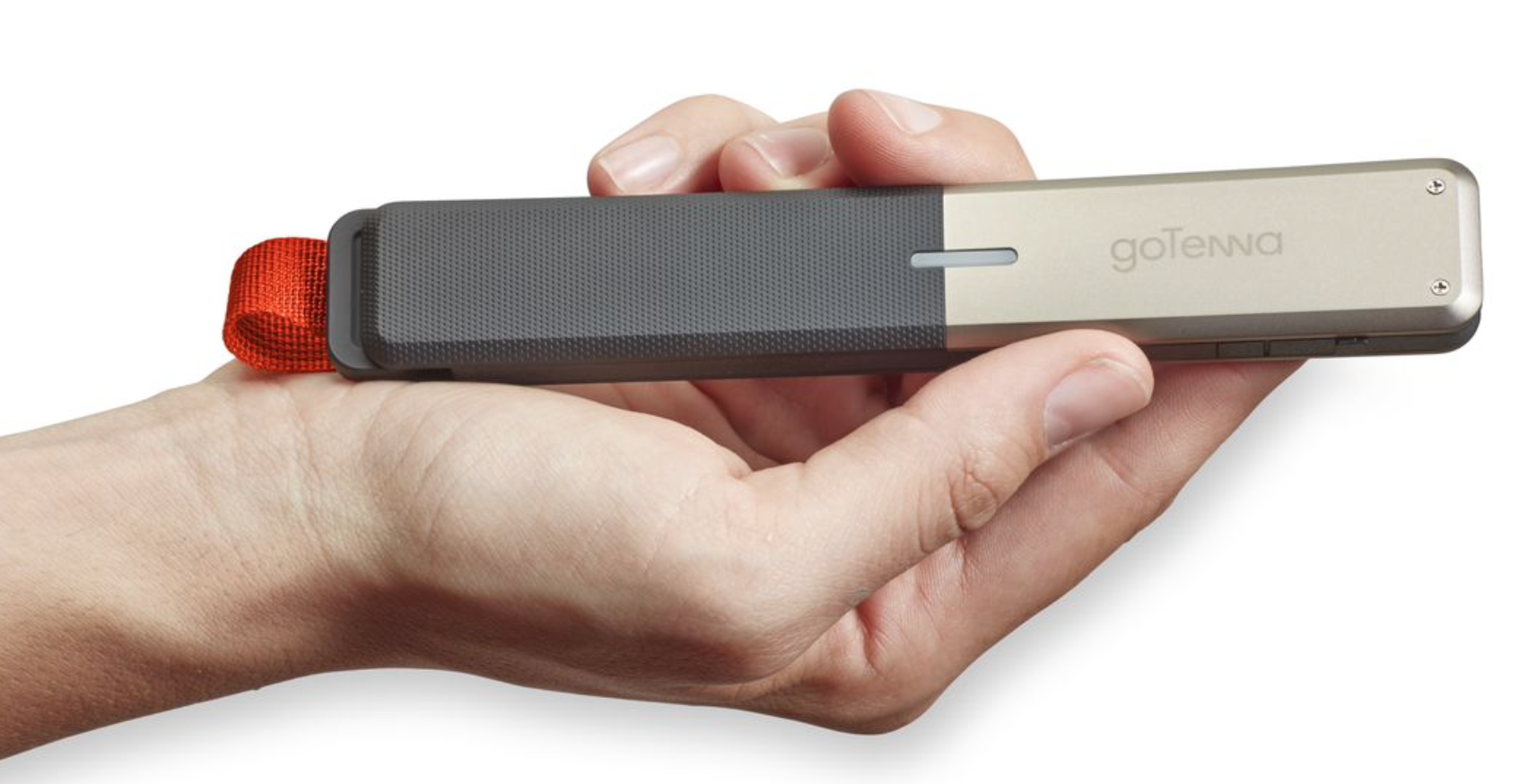
If you’ve ever been on a hike, out of the country, or at a crowded concert with no service, goTenna is aiming to be your connectivity solution. The hardware accessory combined with an application for both iOS and Android says it will allow you to create a local network that works reliably. The network is based on a group of people each having a goTenna stick connected to the iPhone. The video from the company, below, explains it well:

With Instapaper and The Magazine, Marco Arment effectively invented the read-it-later and independent publishing idioms on iOS. Naturally, competitors followed but Arment was already a ‘front runner’ in the market. With Overcast, Arment is the follower. Overcast joins a whole host of other developers in a segment of the App Store that is already well established. It’s a different set of challenges.
In many respects, Overcast acts like its the only podcast app on the iPhone. I mean this in a good way. There aren’t any gimmicky extras or visual widgets to try and spur interest. This is very much Arment’s take on how a podcast app should look and behave. Read on for our full review …

For the past couple of weeks, I have been testing a new MacBook stand called the Kickflip. I’ve used some of the more high-end stands for my laptop in the past as it improves the ergonomics involved with keyboard typing and because it improves the cooling of the computer. This new Kickflip is not stationary like some other stands on the market, but it is an accessory that sticks to the bottom of your laptop. The stand can be closed for when you want to keep the laptop in a bag or carry it around, and you flip out the kickstand when you want to raise up your laptop. The experience is nice, the stand is sturdy, and I very much have enjoyed using the Kickflip…
Yes, another secure and ephemeral messaging app. There’s Wickr, Snapchat, Confide, so what makes Wiper Messenger different? I’ve had the chance to play around with the new free chatting app on iOS, and it seems to act as a fusion of WhatsApp, Snapchat, and Wickr. The app prompts you for your email address or phone number in order to create your account, and then you are brought to a fairly simple interface with three tabs across the bottom: Chats, Contacts, and More. Let’s go tab-by-tab:

You don’t need me to tell you that being a tech-head can pose a few challenges when travelling. Budget airlines often have ridiculously tight carry-on restrictions, which can make it hard to get all your gadgets into a bag that meets both size and weight limits. And once you arrive at your destination, you also have the worry of ensuring that all your valuable electronics remain safe from thieves.
Scott eVests are designed to solve both problems, allowing you to carry lots of technology on your person, rather than in a bag, with each item securely zipped into an inside pocket. The company’s latest addition to the range – the RFID Travel Vest – adds one further feature: protection of RFID-readable payment cards and passports from portable skimmers …
Expand
Expanding
Close

See that little $190 daughter card up there^? It houses 240GB of Transcend SSD and it could replace the 64GB or 128GB SSD that came in your MacBook Air in as little as 5 minutes. Even better, Transcend just released larger versions in 480GB and 960GB sizes to blow your SATA III MacBook Air or Pro into new worlds of space. Keep in mind these are SATA-based SSDs and Apple’s latest round of MacBook Pro/Airs came with speedier PCIe SSDs so you can’t use these on Apple’s late 2013/2014 models (see bottom of the article for compatibility list).
I got my hands on a demo unit and took it for a test drive…
I enjoy photography, and mostly prefer to take full control of the final output using powerful software like Lightroom. But there are times when I just want something fast, easy and automated to create something fun for a Facebook image or similar – and that’s what PhotoMatte is all about.
The idea is a simple one: choose a template to suit the occasion, ranging from beach holidays to a wedding; drag your chosen photos onto the template; choose your output format – from Mac desktop image down to iPhone wallpaper – click Export and the job’s done …
Expand
Expanding
Close
One of the reasons I like Macs is that their useful life tends to be significantly longer than that of a typical Windows machine. This is especially true of the pre-Retina MacBook Pro models, where it’s trivial to upgrade both the RAM and the drive.
I’d previously swapped out the 750GB hard drive and optical drive that came with my late-2011 MacBook Pro 17 for two 1TB hard drives. Along with a RAM upgrade, that gave me a 16GB RAM, 2TB hard drive machine. The plan was to use the machine in that form for a year or two, then do a further upgrade to SSDs once 1TB models arrived and fell to a halfway sensible price.
When that finally happened, and I did the upgrade, that gave me two 1TB hard drives surplus to requirements. I could have placed each into its own external drive caddy, but one 2TB drive is more useful than two 1TB ones, so I decided instead to try out OWC’s Mercury Elite Pro mini. This is an external enclosure for two 2.5-inch drives, which supports both USB 3 and Firewire 800, drawing power from either source – making it a portable drive without the need for external power …
Expand
Expanding
Close

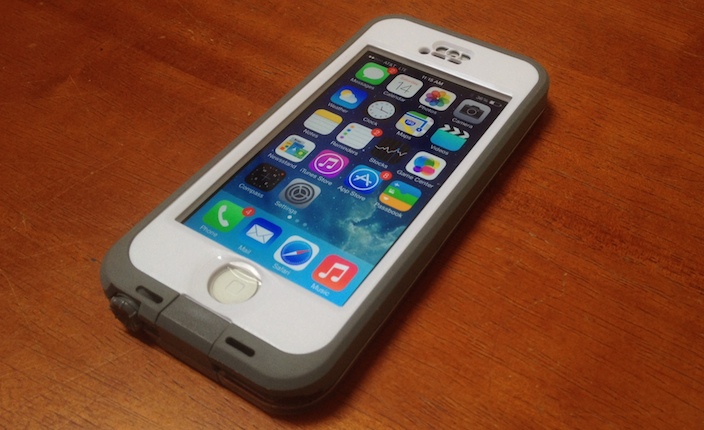
This case has been around for a while, and frankly, I’ve always been a no-case kind of guy. But when I found myself not being as careful with my now almost two-year old iPhone 5, I thought that maybe I should just go all the way. Maybe I should get ahold of one of the more protective cases out there, without going off the deep end and getting something would provide more protection than I need.

Ever since the Mac Pro was released in December, we’ve faced an onslaught of 4k displays. We reviewed Seiki’s budget offering last year, and while we liked it overall, it did have more than its fair share of set backs. For instance, you could only use the full 4k resolution at 30Hz, which meant that there would be noticeable lag when using the display as a monitor. Despite the low refresh rate, the display was still a great deal at its then $450 price point (now down to $390) and truly got us excited for the potential of 4k. At CES this year, we also saw a variety of 4k displays, some of which were priced for budget-minded customers, and some of which were high-end. Noticeably missing from CES, however, was Apple’s frenemy supplier/competitor Samsung.
Samsung, at the end of May, unveiled its take on an affordable 4k display. Samsung’s U28D590D is a 28-inch 4k monitor that supports full 4k resolution at 60Hz via a DisplayPort 1.2 connection. There are also two HDMI ports, but they’ll only do 4k at 30Hz, like the Seiki. The big selling point of the Samsung monitor, aside from doing 4k at 60Hz, is that it costs just $646 on Amazon. This puts it far below any currently available 4k monitor with 60Hz capabilities. I purchased the Samsung U28D590D on Amazon while it was priced at $666 and have been using it as my primary display for the past week. How does it compare to the Seiki? Is 4k all it’s hyped up to be? Let’s discuss.
There are times when an iPad can act as a handy sidekick to your Mac, but with a typical iPad stand you end up looking a little like a nodding dog as you look up at your monitor and down at your iPad. The TwelveSouth HoverBar 3 is designed to solve that, positioning your iPad display right next to your iMac or Apple Thunderbolt/Cinema Display.
The HoverBar can also be used on its own to position an iPad more comfortably, especially when using it to watch movies …
Expand
Expanding
Close
A few weeks before initial reports that Apple was planning to acquire Beats Electronics, I started AT&T’s three month trial of the Beats Music subscription streaming service.. Given that generous window of time, I felt more comfortable investing my time than I would with a one or two week trial. When news broke that Apple was in final talks to purchase Beats, I was caught off guard and immediately concerned that the subscription service that I was starting to really like would change under Apple’s watch. Since the deal has been made official, Apple has said that Beats Music will continue as it is (across multiple platforms even) as will the headphones line (Beats branded, not Apple branded) for now.
Because I was rather surprised by the appeal of Beats Music and Apple is now endorsing the headphones more than ever (even if only really for their massive profit margins), I got really curious Friday afternoon to try out a pair of Beats headphones first hand so I did just that. I’ve been using the Beats Studio Wireless headphones (Amazon) just about all waking hour of this weekend, and below you can read my thoughts on one of the products included in Apple’s biggest acquisition to date.
Expand
Expanding
Close

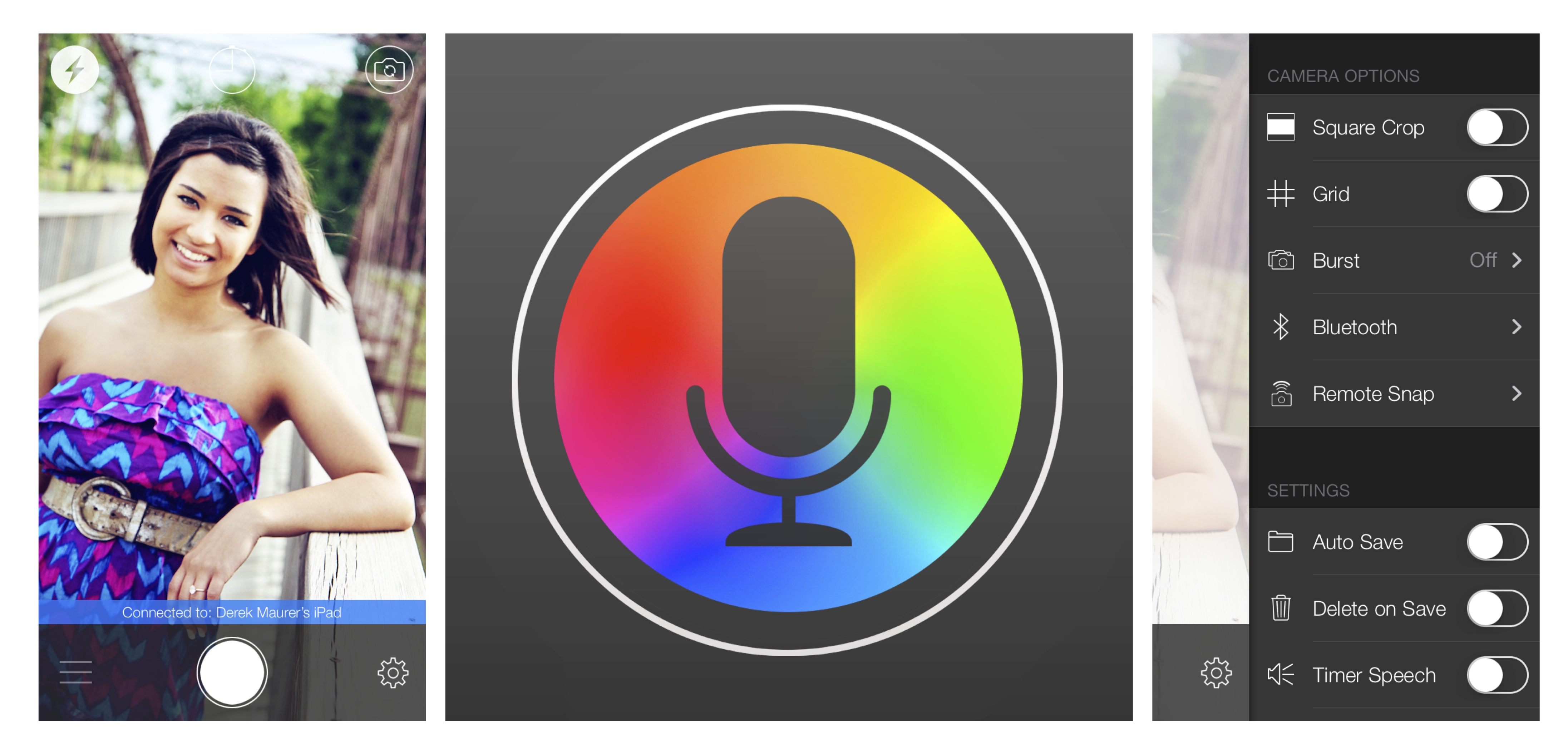
VoiceSnap, a new app from MocaApps LLC, allows you to take photos using voice commands on an iPhone or other iOS device. Rich in features, the app is very customizable and includes the settings needed to make it an effective solution for taking photos.
We were eager to get our hands on Logitech’s iPhone transforming Case+ system immediately following its announcement. The idea is that this system is so versatile that it’s up to nearly any task you could ask of an iPhone case. It allows you to switch between rugged protection, wallet functionality, a windshield/dashboard mount, and a battery pack without having to remove anything.
Without the Case+, you would need to buy at least five different iPhone accessories to perform all of the same core functions that the Case+ offers: rugged protection, multi-angle stand, ID/credit card carrier, car dashboard/windshield mount, extended battery. It’s certainly a novel idea and an ambitious product from Logitech so head below to find out if we think the Case+ is worth investing in…
Expand
Expanding
Close

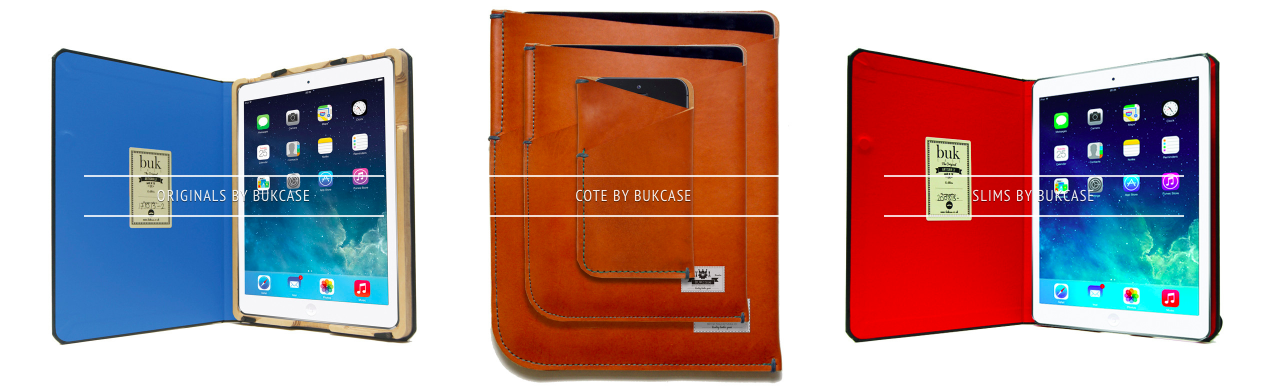
BUKcase creates handmade cases for Apple products. Each of their products is made-to-order by local master bookbinders in Manchester, England, who use local materials and traditional machinery. Each product comes with a unique personal ID number and a birthday.
To make its products more unique, BUKcase even offer custom engraving options. Since appearing on the television show Dragons’ Den, (the British version of Shark Tank), the company has had tremendous sales growth despite the lack of funding. We had the opportunity to review several of their products below…
ActiveBoard is a new tweak for iOS 7 that adds a couple of useful features to the home screen. Using a pulsating glow behind app icons, ActiveBoard will let you know if an app has a notification or is running in the background. A red glow and bouncing animation will indicate a missed or unread notification, while a white glow informs you of the app’s background status.
We’ve covered Algoriddim’s djay for iOS, the popular all-in-one DJ system software, in the past including the debut of djay 2, and today djay is out with a major new feature that unlocks over 20 million songs: Spotify integration. Previously, the DJ app relied solely on songs downloaded and stored in the iPhone or iPad Music app. The latest version of djay focuses on music access and discovery and also includes set list sharing using Spotify playlists as well as more than 30 new audio effects to unlock within the app. I’ve had the opportunity to test drive the new version of djay with Spotify integration over the past week, and it’s definitely a major benefit to users of the DJ system software.
Expand
Expanding
Close
You’d think choosing a photo to use on your iPhone lockscreen would be a pretty simple task. Scroll through your Camera Roll, choose a photo you like, hit Set and you’re done.
The reality is a little different. Half the time the photo you really want to use is landscape format (horizontal) and you need a vertical image. The iPhone will automatically crop it, and allow you to slide the image around to get a crop you like, but the result rarely does justice to the original shot.
The other half of the time, you find a portrait (vertical) photo which looks great on its own but then clashes with the clock and slide to unlock text when you set it as your lockscreen. Lockscreen Wallpaper Designer is a very simple app that aims to solve these problems …
Expand
Expanding
Close