9to5Mac Reviews
All the products that the 9to5Mac team has reviewed.

All the products that the 9to5Mac team has reviewed.
All the products that the 9to5Mac team has reviewed.
All the products that the 9to5Mac team has reviewed.



Buying an iPhone isn’t just about the device. Instead, you are buying into the entire ecosystem of apps, accessories and add-ons available from third-party companies. In this review roundup, we’ll be looking at a small assortment of hardware accessories for iOS devices.
The marketplace is full of iPhone/iPod docks and speaker systems. Lately, it seems that the trend is moving towards portable Bluetooth speakers rather than plug-in dock (and hopefully we’ll continue to see a trend towards AirPlay – one can hope!). So why would we spend any time with a docking station that needs AC power? It’s an all-around system.
The Sound Step Lightning has many different inputs – Bluetooth, an auxilary jack, USB, and a dock connector. With the remote (or app which you’re prompted to download when you dock your device), you can switch sources at any time. Thus, the system could act as a small stereo system for your TV and a Bluetooth speaker for your device at the same time.
There’s still something special about a docking station. Not only does the lightning plug provide for a data connection for music playback, but it also charges your device. The lightning connector is strong enough to hold up even the iPad with Retina display.
The speakers themselves can get extremely loud and the bass is definitely strong. Even when the volume is on high, music is still clear and doesn’t become distorted. Make no mistake, this is a high-quality device with a sleek design and intelligent sound.
You can pick up the Soundfreaq Sound Step SFQ-02L on Amazon for $129.99.
Losing your keys is extremely inconvenient. For me, I never leave the house without my phone, wallet, and keys, so if I’m in a rush and the keys seemed to drift off somewhere, I’m stuck until they’re found.
Hone is BiteMyApple’s solution to this problem. Through the use of Bluetooth 4.0 and the Hone app, an arrow in the app lights up as you get closer and closer to your keys. What’s more useful is the “Find” button, which makes the Hone light up and beep from up to 150 feet away.
The device itself is a little bit on the large side – just about the size of a key fob. However, it’s only half an ounce and the battery should last you about six months.
This device started as a Kickstarter with 1,132 backers. Today you can buy the Hone for $59.99 on the BiteMyApple’s website.
In fact, BiteMyApple is a web store that exclusively sells devices that started out as Kickstarter projects and reached their funding goals.
The iPhone’s camera is incredibly powerful, and, as the saying goes, “the best camera is the one you have with you.” Since it’s so portable, taking pictures from an iPhone is extremely convenient. However, trying to take a steady video or a long-exposure photo (using a third-party app) doesn’t turn out so well when holding the phone.
Enter Glif. Like the Hone, the Glif is sold by BiteMyApple. It’s a sturdy accessory that works with any regular tripod or mount. Simply twist the Glif into place, fit your phone into the Glif, and you’re ready to start taking pictures or videos. I’ve actually used the Glif in some of my videos and found it to be extremely simple and useful. In addition, it has a good enough grip on your iPhone that you can tilt your tripod at a 90° angle toward the ground and it’ll still keep the phone in place. The Glif is approved and used by me.
The Glif is available on BiteMyApple’s website for $19.99.

Yelp receives a nice update today for iPhone and iPad that brings the app up to version 6.9.1 and introduces a new feature (in at least the US) for users to order food directly from within the app. Now, while reading a review of a local restaurant users will be able to tap a new “Order Pickup or Delivery” button to place an order. The feature isn’t available everywhere yet, but Yelp plans to roll out the button to new locations in the weeks ahead.
New in 6.9.1:
• Reading that review making you hungry? Well, you can now order delicious meals without ever leaving the Yelp app! We’ll be rolling this out to more locations in the coming weeks, so check for the “Order Pickup or Delivery” button on your favorite local restaurants.

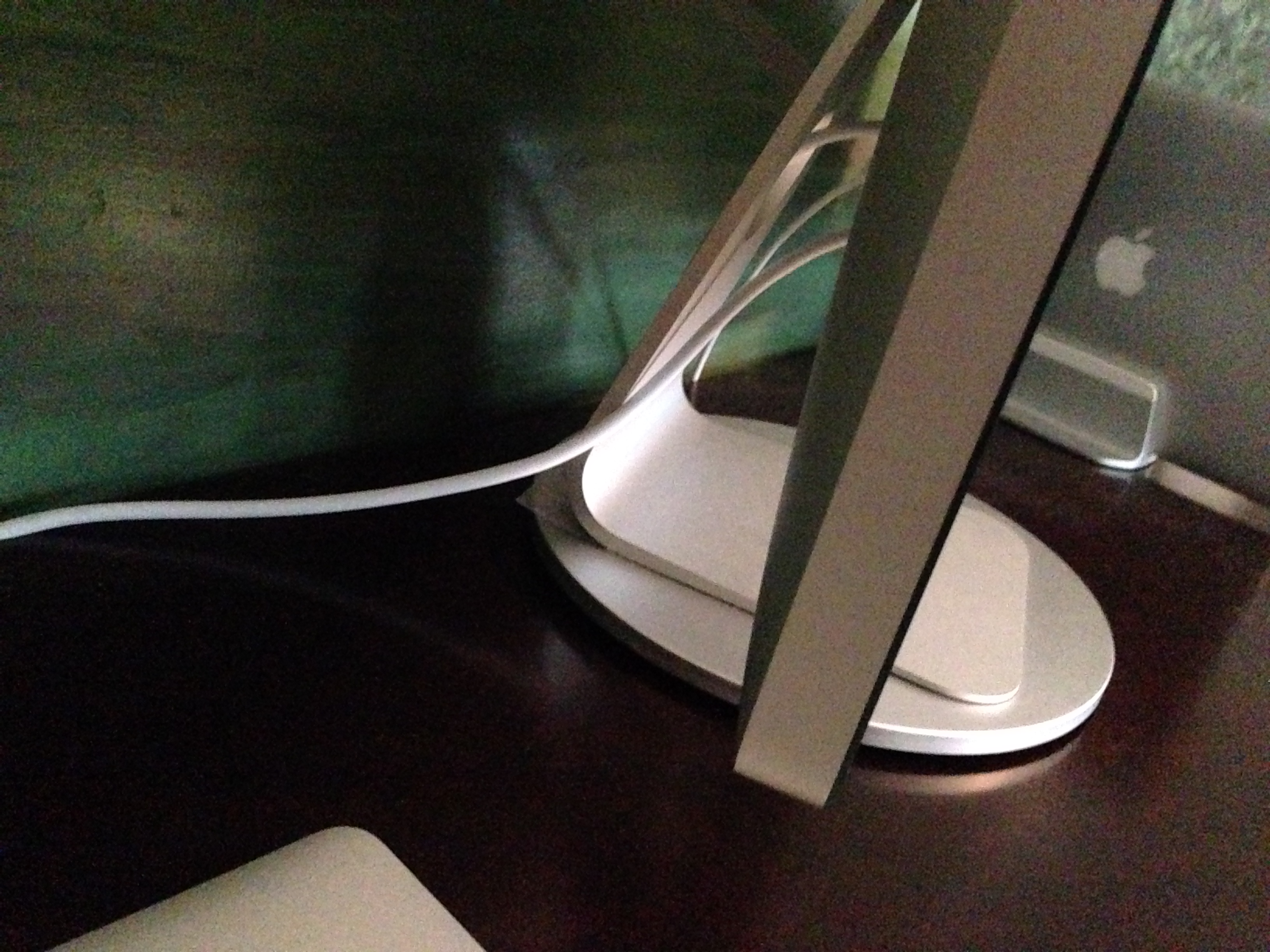
Just Mobile is known for making accessories built from high quality materials, like aluminum, that nicely match the designs of Apple’s recent hardware products. However, some of their products seemed to have focused on function over form, rather than a mix of both. However, over the past few weeks, I have been using their AluDisc accessory for the Apple Thunderbolt Display, LED Cinema Display, and iMac, and I have found the accessory to be a nice, helpful addition to any workspace with those large Apple screens.
The AluDisc is a high-quality, seemingly well-built pedestal that allows you to easily and quickly rotate your display. During my daily workflow, I need to consistently pull USB and Thunderbolt cables out and in of the back of my Thunderbolt Display. Usually, to accomplish this task, I need to manually rotate my display. This is not a truly complex task, but the AluDisc actually makes this process extremely quick and easy. The disc can spins 360 degrees, making it simple to rotate my display.


Eton Rukus solar/speaker, GoalZero 7W foldable, and Gomatic 10W Sunvolt
This year, the solar charging options have really improved for those who need to charge their iOS (or any) devices away from a wall outlet or car. The three products below are some of the more interesting we’ve seen.
We already knew critically acclaimed indie game Limbo would be arriving on iOS this week after an announcement from Danish developer Playdead late last month. Today the title has finally arrived in the App Store for all users and comes with a mere $4.99 price tag for one of the best reviewed indie console games in recent years.
Early reviews for the iOS port seem to be positive and, apart from some tweaked controls for the touchscreen, includes the entire game experience from the console versions.
Limbo ($4.99) for iPhone and iPad is available on the App Store now.
Expand
Expanding
Close

In a world where Netflix releases entire seasons of TV shows at a time, like House of Cards and the new season of Arrested Development, personally, I find it increasingly difficult to schedule myself around when HBO wants to air a show or even when it has already aired something.
So when I shared a screenshot on Twitter a few months ago of Episodes, an app that allows you to follow and manage TV shows, a handful of people asked me which app this was I was using. Managing and tracking TV show scheduling is clearly something many people need a solution for.
TeeVee 2 is similar in that it allows you to follow your favorite shows on television without having to manually input any information aside for the name of the series.
Expand
Expanding
Close


When Apple announced the Retina Macbook Pro at the 2012 Worldwide Developer Conference, we noted how it seemed like the company was integrating the selling points from all of its devices into one, with the iPad and iPhone’s Retina display being the main point of interest. Fast forward a year and Apple has done something similar, but this time with the MacBook Air. One thing the iPad has always been praised for is its battery life. It almost always lives up to the expectations set by Apple and can often exceed the marks with lighter usage patterns.
With the mid-2013 Macbook Air, Apple has taken that amazing iPad battery life and stuck in a laptop. While it’s not the Retina Macbook Air many of us were hoping for and may look nearly identical from the outside, it’s what’s on the inside that matters. Assuming, of course, that it can live up to the hype. Keep reading for our full review of the mid-2013 Macbook Air.
Expand
Expanding
Close
It feels like I’ve gone through dozens of laptop backpacks over the years. Either the zipper breaks in a disastrous way, the bottom tears, or the weight becomes hard to bear. But that may be about to change with the new Hercules Laptop Backpack from ECBC.
Right off the bat, I’m going to mention the biggest thing I love about ECBC: they offer a 3-year warranty with their products. Since most of my backpacks end up with some sort of a problem within the first year – I promise, I try to be nice to them! – this is a huge advantage.
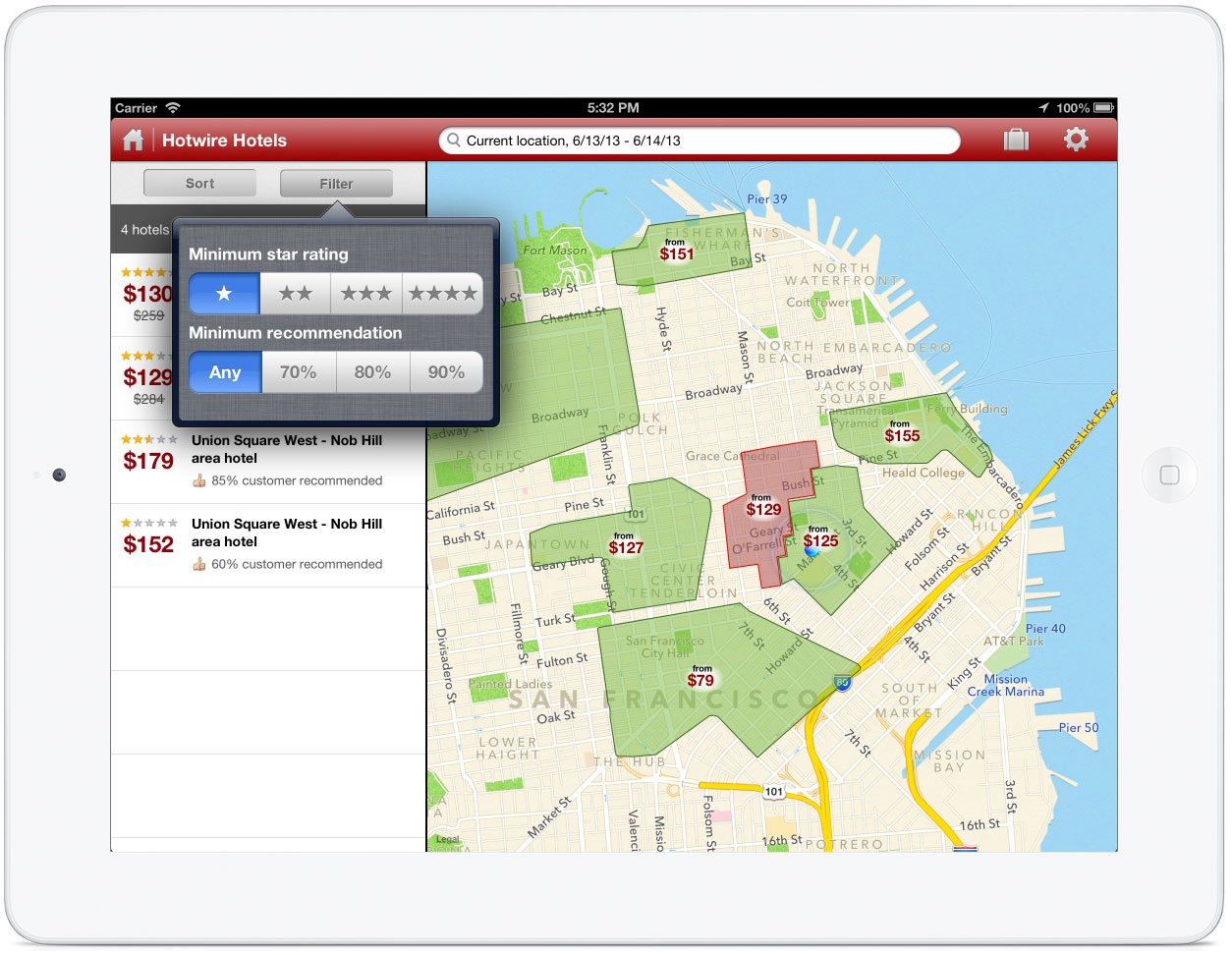
After arriving on the iPhone late last year, Hotwire, the popular travel discount site for flights and hotels, has arrived on the iPad via an intuitive App Store app. The iPad version launches today as a free, universal update to the existing iPhone app.
The iPad app is very simple to use. From the start screen of the app, a user can input either their current location or another location where they want to travel, check-in/check-out dates, a number of rooms and guests, and tap a single button to immediately search for matching hotels.
https://www.youtube.com/watch?v=KUinMxBHLPk&feature=youtu.be
While there is no shortage of to-do lists or note taking apps on the App Store, it isn’t always easy to jump from one app to another and still stay productive. NoteSuite features note taking, task management, PDF viewing and annotation, and Office document management all in a single app, creating one digital briefcase of sorts.
I had the chance to meet Peter Tamte of Theory.io during WWDC week in San Francisco and see a preview of NoteSuite in person. Peter’s demonstration was very impressionable and left me with one particular thought: NoteSuite is entering a saturated app market, but should thrive as it does a few key things better than its competition.
Continue reading for specific thoughts and observations as I unpack the features of NoteSuite.
Expand
Expanding
Close
Unknown to many people, Apple handed out devices running its latest OS X Mavericks operating system to select members of the press and media after announcing it back at WWDC, and early reviews and previews are starting to flow in.
As soon as the developer preview hit the web, we dove in and looked for subtle changes from Mountain Lion and found things such as LinkedIn integration, a Messages tab in Notification Center, an option in the menu bar to see what apps were draining your battery power, and much more. We also covered new dictation features in Mavericks. Via an option in System Preferences, there is now the ability to download a file and have offline dictation capabilities. One of the biggest selling points about Mavericks are the new multi-display capabilities, such as the ability to access the dock and menu bar across all of your monitors.
David Pierce of The Verge says that in Mavericks, multiple display support works like it always should have:
The New Trent Travelpak 4000mAh plug in adapter makes a handy replacement to your iOS device AC USB adapter. I’ve been using the Travelpak 4000mAhfor about 3 months now and find it to be the perfect travelling companion for my phones, tablets and other USB-charged devices. At 4000mAh, you’ll get about 2 full iPhone charges. At 5V/2A, you’ll also get a speedy charge on your iPad, though not as fast as possible. For those focusing on iPad charging, there are bigger versions that come in the 7000mAh and 11200mAh sizes. In fact, the bigger 6000mAh has more ports, a more convenient form factor, and costs less ($39.99). Need more than that? Time for some Hyperjuice.
What’s nice here is that the portable Travelpak can charge two USB devices at the same time while plugged in. It has a nice bright 5 bar light system telling you if it is charging or how much charge it has left (making it a night-light as well). What’s even nicer and contrasts from other plug/batteries is that it turns off when unplugged and only starts charging again when you hit the power button on the side. Where typical generic AC USB batteries will drain unless they are powered down, these will automatically turn off.
On the down side, when the plug is extended, the 4000mAh version can cover up the other plugs in a wall outlet or surge protector making this aspect of the design puzzling. Still, the other plusses far outweigh this technical oversight. It appears that the new high end 6000mAh and 11200mAh form factor fixes this issue and at a cheaper price, it is hard not to recommend this version.
The Travelpak is currently $41.54 at Amazon off the List Price of $79.95 for the 4000mAh version that I tried, but it would appear that the larger 6000mAh version at $39.99 might be the better deal, especially since it adds a MicroUSB port and doesn’t cover up an additional plug.

This morning, I received what appears to be magic in a box. Bracketron’s NanoTek Stand uses micro-suction technology to stick to flat surfaces and hold iPhones and iPad minis without a ledge or any magnets. This device was originally a Kickstarter project called the “SETA Smartphone Stand” and now Bracketron has partnered with SETA to offer the product to the masses.
From the Kickstarter project:
How It Works. SETA incorporates NanoSuction™ technology that synthetically emulates the adhesive qualities of gecko feet. Your phone magically clings to the NanoSuction™ SETA pad while another pad on the base secures the stand to most flat, non-porous surfaces.
When I put my iPhone or iPad mini on the dock, it feels like a tiny vacuum holds it in place. Swiping left to right or scrolling through webpages does not move the phone or the dock at all, but when you want to take your device off, it just takes a simple pull or tug to the left or right. The micro-suction leaves no residue or stickiness on the device.
At first, the small size made it seem like the dock would only work with small phones like the iPhone. However, it has no problem holding up my iPad mini in the landscape or portrait position.
The angle is great for Facetime calls, sending snapchats, texting, or watching videos. Unlike some other docks that closely resemble the design, the NanoTek Stand does not use gravity as a factor (the angle is there just to make it easier to see) and the footprint is extremely small. In addition, there is a slot for a 30-pin or lightning connector.
Bracketron’s NanoTek Stand can be found on BestBuy.com for just $27.99 with free shipping. The durable construction and amazing technology makes it a steal at that price. In addition, the small size means you could fit both your iPad mini and iPhone on your desk, each with their own stand.
In its extensive review of the new 2013 MacBook Air, AnandTech notes an issue with the machine’s new 802.11ac WiFi capabilities that it says is limiting the faster Wi-Fi chip’s potential. While it was able to get an average of 533Mbps using the iPerf networking tool, Anand found real world file transfers would only get 21.2MB/s or 169.6Mbps:
I disabled all other wireless in my office. Still, no difference. I switched ethernet cables, I tried different Macs, I tried copying from a PC, I even tried copying smaller files – none of these changes did anything. At most, I only saw 21.2MB/s over 802.11ac. I double checked my iPerf data. 533Mbps. Something weird was going on. I plugged in Apple’s Thunderbolt Gigabit Ethernet adaptor and saw 906Mbps, clearly the source and the MacBook Air were both capable of high speed transfers. What I tried next gave me some insight into what was going on. I setup web and FTP servers on the MacBook Air and transferred files that way. I didn’t get 533Mbps, but I broke 300Mbps. For some reason, copying over AFP or SMB shares was limited to much lower performance. This was a protocol issue.
According to the review, the problem is likely with the OS X networking stack that is for some reason artificially limiting the capabilities of 802.11ac:
Expand
Expanding
Close
Bluetooth portable speakers are become more and more popular. Whether you’re having a party outside, working out, or just wanting some loud speakers wherever you move, these devices boast great battery life and the simplicity of Bluetooth connectivity.
Back in April, Seth posted a “Mega Review” of many of the Best portable Bluetooth speakers on the market. Jawbone’s Jambox was truly the first innovator in the market, but now companies like creators of the RockSteady XS, KillerConcepts, have brought in less expensive or more powerful alternatives. Today, we’re taking a look at the updated Rocksteady XS 1.5.
Look & Feel
The device’s case is all-aluminum, which is pretty clear when you pick it up. It’s extremely lightweight – it almost feels like the battery is the only component inside. On the bottom of the device is the cover to the removal battery. The controls (mode, pause/play, volume, skip/back) are on the front of the device. In addition, there is a microphone for phone calls… but more on that later. The back of the device has the on/off switch, AUX line in, DC power, and USB plug (more on that port in just a second). The main speakers are on the sides of the device, but there is also a speaker on the top for additional sound.
The design and structure of the device get a big two thumbs up.
Sound
On the press sheet we received with the device, one of the questions they answer is, “Why is it so loud?” I read that question before I actually used the device and thought it was the weirdest “issue” for them to address. But after I turned up the volume, it all made sense. To turn up the volume to 100%, I had to set it down on my desk then walk into another room and increase the volume using my phone. I couldn’t sit right next to it without my ears falling off. Even in such a small casing, this device has no problem pumping out over 90dB. If you main concern with a portable Bluetooth speaker is volume, you have no need to worry about that with the Rocksteady.
Speakerphone Feature
New in this version, the Rocksteady boasts a speakerphone function and even has an “answer/hangup” button right on the device. This would be a great thing… if anyone could actually hear you. I called up my colleague Zac and he could not even hear a word of what I was saying even when I spoke right into the speakerphone. On the other hand, I could hear him just fine, although I couldn’t get his voice to be loud.
Additional Features
Other new features include the ability to connect two devices at the same time (up to four can be paired with the Rocksteady) and the dual function USB port that allows you to charge your phone. If you don’t take advantage of this feature, expect over 10 hours of battery life (and our real-world tests brought us to just about the same amount).
Conclusion
What started as a niche product is becoming increasingly popular as people discover new places where they can be handy. At just $99.95 on Amazon, the Rocksteady XS is a great choice for audiophiles and casual music listeners alike.
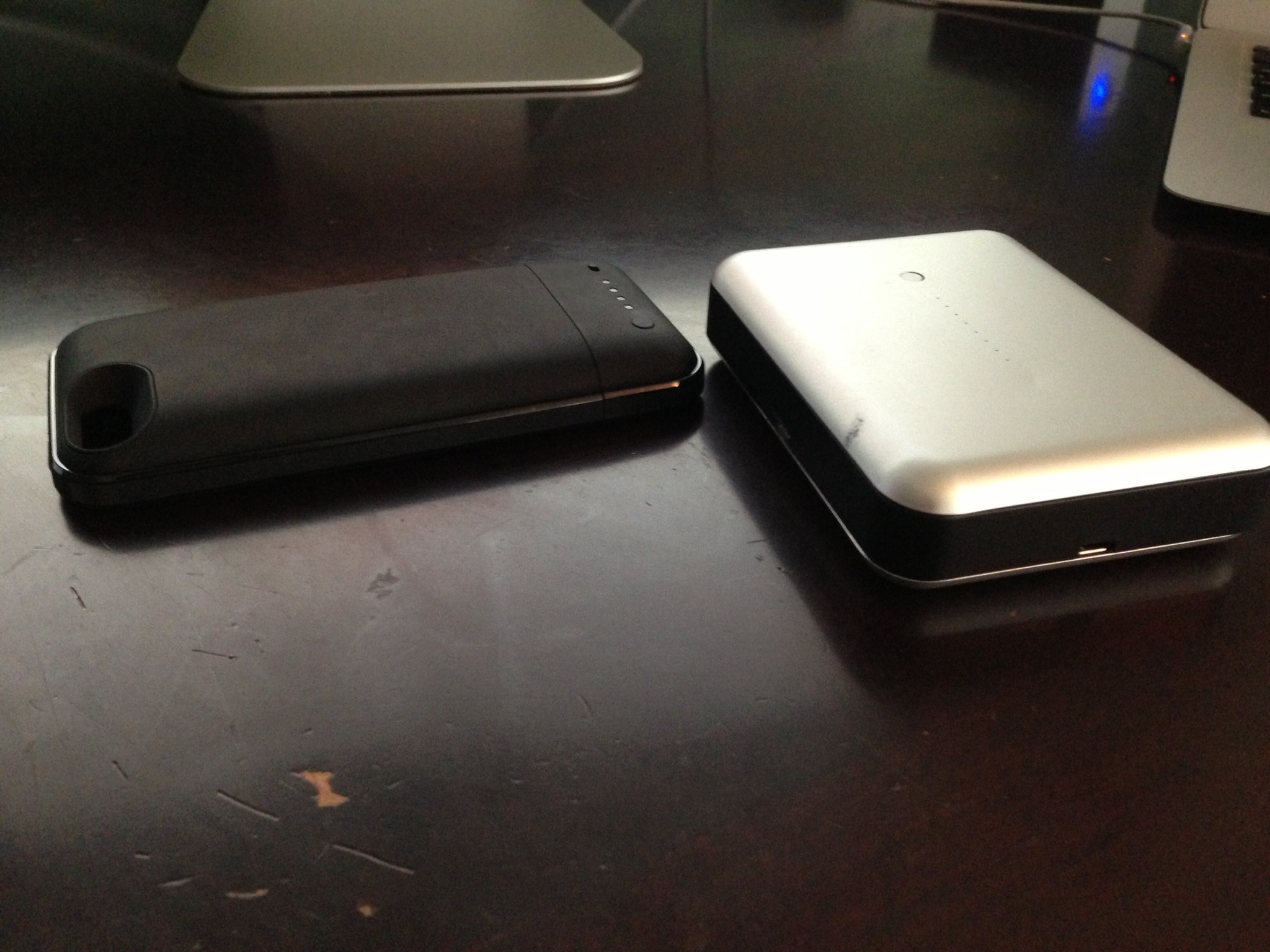
For the past few weeks, we have been testing two battery backup accessories for iOS devices: Mophie’s Juice Pack Plus case for the iPhone 5 and Just Mobile’s Gum Max Duo accessory for iPads, iPhones, and iPod touches. You can find our full reviews of both battery accessories below:
As interactive signs and kiosks become more popular in retail and corporate environments, the search for the perfect secure stand seems to be never-ending. The design should be sleek yet quite – there’s no reason to distract from the device itself. It should be flexible, allowing for quick viewing angle adjustments. And most importantly, it should be extremely secure so no one goes running off with the device. 9to5Mac took a first-hand look at newPCgadgets’ Arcylic Sign display.
Expand
Expanding
Close

Messages for Mac is buggy. There’s no denying that fact. At some point, all of us have tried to search for a specific message in the app only to be confronted by everyone’s favorite multi-colored symbol of despair.
Several weeks ago, Flexibits, developers of Fantastical for Mac and iPhone, announced a new project called Chatology that would finally solve this issue once and for all. Today, they unveiled the app to the world. So what exactly is Chatology? Does it solve the problem it sets out to solve? Keep reading to get answers to those questions and more.
Freeform3 aluminum case is the perfect Bumper for iPhone 5
When Phil Schiller unveiled the iPhone 5 in front of a sea of exclusively invited press last September, he proudly stated that the smartphone is “an absolute jewel.” Schiller went on to say that the iPhone “is the most beautiful product we have ever made. Bar none.” So when Apple decidedly refrained from releasing a Bumper case for the iPhone 5 as it had done for the previous iPhone design, it was immediately clear that Apple wanted to showcase its new “jewel” and leave case making to third party companies.
That’s where Freeform3 comes in. What began as a crowd-funded Kickstart project has materialized as a beautiful new Bumper finally worthy of the iPhone 5.
Expand
Expanding
Close
<a href="http://9to5mac.com/2013/06/07/apple-displays-ios-7-banner-at-moscone-ahead-of-wwdc/" target="_blank">(via Nick)</a>
I had the opportunity to travel to San Francisco this year for WWDC and experience the City by the Bay for my first time. Though I wasn’t among the lucky few to attend the keynote this year, that hardly robbed me of any adventure in the journey. Because this was my first time making the trek (and I was technically covering a portion of the event for work), I deliberately planned what gear was most appropriate for trip and sort of compiled a list of recommendations based on my experience below.
Expand
Expanding
Close


I’ve been curious about the 21:9 display format since it started to creep into mainstream displays last year. Originally developed to display cinema grade movies natively, computer users are now snapping these up to give themselves a sort of wide ‘Bloomberg terminal’ without the break (and the swivel between displays).
I received the Philips 298P4 29-inch 21:9 display a few weeks ago and have set it up as my display at my desk. It has an unusual 2560×1080 pixel display which is the same amount of pixels across as traditional 30 inch 16:10 displays or 27-inch 16:9 displays (like Apple’s 27-inch iMac or Thunderbolt Display). The 1080 pixels high however matches up with a typical 1080P display. I didn’t use it like a traditional desktop computer or with a laptop off to the side.
For me, I saw an opportunity to add a display on top of my Retina MacBook Pro whose keyboard/trackpad layout I find more usable than anything else out there including Apple’s Wireless Keyboard/Trackpad combo. The Philips’ stand (and this is the key part) allows the display to grow over the top of even the 15’inch Retina MacBook Pro so that I can continue to use the MBP keyboard and display even while looking up (for much improved posture) at the Philips display. It is also great for watching movies while working :D, unless productivity is a priority.
For this it was great, but how was the quality of the display?
Lead management services are usually quite complicated. In fact, I probably have ten neglected accounts out on the interwebs from my attempts of finding a simple, straight-forward CRM or lead management system. Thankfully, I ran across Stride when they launched their website beta a few years ago and recently stumbled across their free iOS app. In a few short words, it’s “spectacularly simple”.
I spoke with Stride’s Kevin Chau about the company’s mission and how they’re tackling the CRM world. It’s quite obvious that their go-simple-or-go-home approach extends to every part of the application:
We designed Stride around simplicity because we wanted to highlight focus on the deal pipeline. Before Stride, all of us tried other CRM solutions on the market, and they were overly complex, and took away from focusing on what we feel to be most important – deals. So we set out to build our own tool, make it intuitive, pretty, and easy to use. We tell ourselves that if we need to do an on-boarding walkthrough, we went in the wrong direction of simplicity.
After spending some time manage leads with the application, I’ve found that it’s nice to be able to add tasks or update the status of a lead with just a few taps rather than waiting to get to a desktop browser. Plus, everything syncs seamlessly with strideapp.com (not using iCloud, so it’s actually reliable – zing!) for managing the information on a browser.
If you currently manage your leads on paper, don’t track leads at all, or you are simply tired of your current CRM system, give the Stride iOS app a shot! The app itself is free with an account. Their pricing starts at $12/month or they have a free plan if you want to manage less than 5 deals a month.
For the past three weeks, I’ve been wearing the new Fitbit Flex, a new competitor in the health wristband market. As a former unofficial beta tester of the original Jawbone Up, I was excited to start using a new wristband to track my steps and sleep. With great battery life promised and a sleek design, I had high expectations. Did Fitbit pull it off? Read on to see my full review:
Expand
Expanding
Close
When Mountain Lion launched last year, Apple introduced some basic Facebook sharing options to OS X. You can post a status update from Notification Center or upload a photo from Finder, Preview, iPhoto, or other Mac applications. While those functions are useful, Apple has yet to really embrace all of Facebook’s features. For example, you can’t tag a friend in a status update or create a new photo album, and the notification integration, while nice, is a bit unreliable.
Today, Tapmates released Moment, a new app that bridges the gap between OS X’s Facebook integration and the features you’re already used to on the Facebook website. Keep reading for our full review.