app

See All Stories
Site default logo image

Google Play Music for iPhone updated with iOS 7 UI, “I’m feeling lucky” radio, genre search, and more


Google has updated its Google Play Music app for iPhone with several new features and a refreshed UI for iOS 7. The app was first released last month but had not yet been designed for the latest version of iOS.

Besides the updated interface, the app includes support for “I’m feeling lucky” radio stations, the ability to search for music and create stations by genre, and auto-playlists.

You can grab Google Play Music for free on the App Store.

What’s New in Version 1.1.0.988

– UI updated for iOS7

– Added support for I’m feeling lucky radio

– Auto-playlists (including Thumbs Up playlist) added to playlist view

– Genre radio stations added for All Access users

– Added ability to search for genres

Thanks for the tip, Isa!
Site default logo image

Snapchat updated to version 6.1, now has camera filters, up to seven “best friends,” and more

Snapchat was updated to version 6.1 today, introducing several new features to the popular photo messaging app for iOS. Like many photo apps, including iOS 7’s native Camera, Snapchat now supports visual filters for photos taken with the app.

Other additional features include a new “best friends” option that allows users to set seven favorite contacts apart from the rest, as opposed to the previous option for only five. The full change log is below.

Snapchat is available for free on the iOS App Store.

Introducing Additional Services

Smart Filters – Add data overlays to your Snaps!
Visual Filters
Replay
Special Text
Front-Facing Flash
Up to 7 Best Friends

To enable additional services go to Settings > Additional Services > Manage

Site default logo image

Veedeo for iPhone allows you to create and share custom video clips with animated text, music, and effects

A new app called Veedeo launched on the iOS App Store today that allows you to create video clips with custom text and a blur effect similar to what you see throughout iOS 7’s new design. The short video clips are designed to be shared via social networks like Twitter and Instagram.

The app doesn’t support importing video from your camera roll to edit, though the developers have said this is coming along with support for the front-facing camera soon. The current version of the app requires you to record a 12-second clip (or shorter) directly within the software. You can then add an optional blur effect to the video (with two different blur intensity options available), and select background music from your iTunes library.

Animated text can be added to the clips during creation by selecting one of the app’s built-in templates. Some contain fully pre-written messages like “Have a Merry Christmas” while many of the others have parts that can be customized, such as “Happy Birthday, <your text here>”.

Once you’ve got your video perfected, you can export it to your camera roll to share through iMessage, email, or your social network of choice.

You can grab Veedeo for iPhone right now on the App Store for $.99. It requires an iPhone 4S or newer running iOS 7.

Apple launches Best of 2013 page on iTunes, highlights top music, apps, books, and more

Site default logo image

Apple has just published its Best of 2013 page, highlighting some of the most popular music, movies, TV shows, iOS apps, ebooks, and podcasts from the past year. In the music section, Lorde’s “Royals” took the pick for Song of the Year, while Macklemore & Ryan Lewis’ The Heist was named Best Album.

Gravity, the box office hit starring George Clooney and Sandra Bullock, was named Movie of the Year. Despite the confusion it caused when its final season was broken into two separate purchases earlier this year, Breaking Bad was Apple’s pick for Show of the Year.


Expand
Expanding
Close

Site default logo image

Facebook Pages Manager for iOS updated with iOS 7 design and new tagging features

Facebook has updated its Pages management client for iOS. The new app has been redesigned for iOS 7 and now more closely resembles the mail Facebook app. The updated app also allows page administrators to tag other pages and people in posts and comments.

You can get Facebook Pages Manager on the iOS App Store for free.

What’s New in Version 2.2

• Optimized for iOS 7
• Tag other Pages in sharing tool
• Tag people in comments

Site default logo image

Apple updates Remote app with the ability to control iTunes Radio

Apple has updated its Remote application for iOS with the ability to control iTunes Radio playing on a user’s computer. Previously the app could only control playback of music that was stored locally in an iTunes library, but now Mac and PC users will be able to control their streaming stations remotely as well. The feature does not appear to work with Apple TVs running iTunes Radio yet.

The app was recently overhauled for iOS 7 along with Apple’s other iOS software. Remote is free on the iOS App Store.

Behind the scenes look at Apple TV app development w/ the new Bloomberg channel

Site default logo image

Unlike its developer program and vast ecosystem of apps on iOS and Mac, there’s not much we know about Apple’s strategy for content on the Apple TV. There’s been a lot of talk that a much rumored refreshed Apple TV set top box— or perhaps even the rumored full-fledged TV set— might also come alongside a more open developer platform with app distribution.

For now, however, Apple is slowly and quietly behind closed doors making deals with select content partners that are building apps for the platform. How is Apple working with developers to build and approve these apps? Does it have an Apple TV SDK that could in theory be released to all developers? With Bloomberg TV today becoming the latest app to launch on the platform, we’ve talked with the people that built the app to get some insight into the Apple TV development process.
Expand
Expanding
Close

Bloomberg launches on Apple TV globally with 24/7 live news stream, on-demand content, iOS integration & more

Site default logo image

Following Apple’s steady release of new content and features for its existing Apple TV platform in recent months, this week it adds yet another as Bloomberg becomes the first channel to live stream business news 24/7 to Apple TV customers. We spoke with Bloomberg’s head of mobile Oke Okaro who told us all about the new Apple TV app.

The majority of the content you’ll find in the new app is the same Bloomberg TV content you’ll find on its website and in its mobile apps but specifically optimized for the larger screen. That includes a live stream of business news, on-demand content with a mix of full TV show episodes and clips, and a special live stream that will appear only for events and breaking news. While there is similar news programming already on the Apple TV through apps like The Wall Street Journal and SkyNews, Bloomberg will be the first to have a 24/7 live stream of business news. That’s compared to the WSJ app which often only live streams content on certain hours throughout the day. It’s also going beyond the other news apps by offering all of its content for free in full-length form in addition to integration with its iOS apps coming in a future update.
Expand
Expanding
Close

Site default logo image

Microsoft updates Bing for iPad to version 2.0 with iOS 7 design, SkyDrive bookmarks, and more

Microsoft has released a major update for its Bing app for iPad. The new app features a revamped interface to match the aesthetic of Apple’s latest OS along with a host of other features and improvements. Users are now able to save the daily image found on the search engine’s home page to their camera rolls for use as a wallpaper or whatever other purpose they decide.

Images and bookmarks can now be saved in the app and synced via Mirosoft’s SkyDrive service to other devices. Search results can now be shared to Facebook, Twitter, and other social platforms. Improvements and updates have been made to maps results, the Bing logo, and other graphics throughout the app.


Expand
Expanding
Close

Site default logo image

Plex media player for iOS updated with new design for iOS 7

Plex, the popular media player for desktop and mobile devices, has been updated to version 3.3 today. The update introduces an updated look based on Apple’s iOS 7 design along with a new media player screen for music and videos. The iOS 7 design isn’t entirely new, but a tweaked version of the existing design. The update also includes miscellaneous bug fixes.

You can get Plex for iOS now on the App Store. For new users, the app is $4.99. Existing users can update to version 3.3 for free.

Site default logo image

Paper by FiftyThree app updated w/ palm rejection, erase, & blend for new ‘Pencil’ stylus shipping this week

Last month creators of the popular Paper by FiftyThree iPad app announced that it would soon be shipping a $60 Bluetooth stylus for the drawing app called “Pencil”. With the first preorders for the device expected to start shipping this week according to the company’s Twitter account, today it has also updated the official Paper by FiftyThree app with features specifically for Pencil.

The app now supports new palm rejection, erase, and blend features for Pencil:

Palm Rejection— Pencil and Paper work together to produce the most sophisticated and effective palm rejection in any app available today. No setup, no calibration, just natural feeling writing and drawing.

Erase— Pencil’s unique built-in eraser lets you get down to what’s essential.

Blend— Pencil takes care of the lines so you can use your fingers to blend colors on the page and smooth rough edges without ever picking up a tool.

FiftyThree has been taking preorders of Pencil as an in-app purchase directly in the Paper iPad app as well as through its website. It’s selling a graphite model for $50 and a walnut model for $60. While the first preorders will begin shipping this week, an update on its Twitter account today notes new orders will take around in 3-4 weeks.

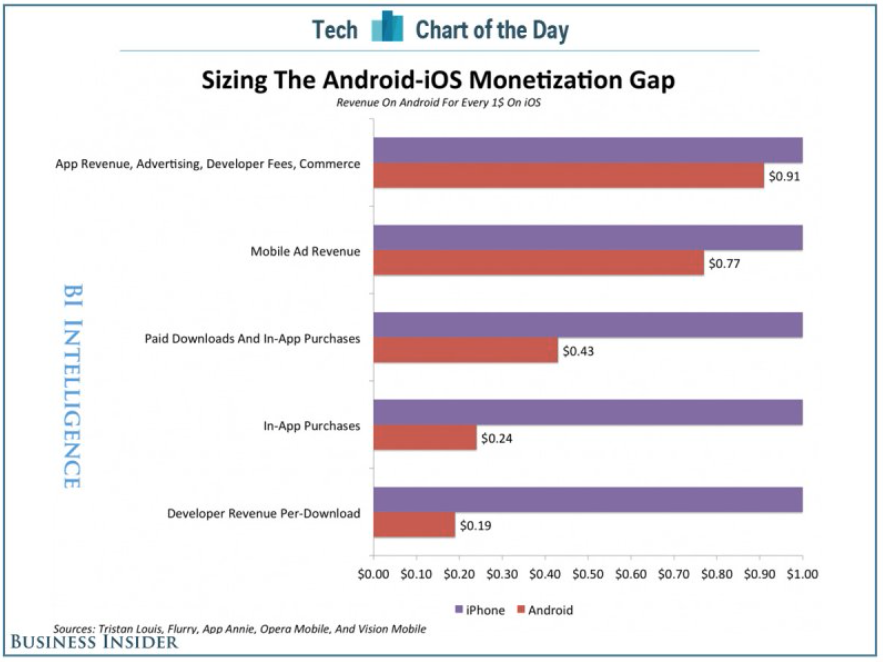
iOS/Android app revenue gap narrows, but iOS still miles ahead

Site default logo image

Business Insider created the above chart to show exactly how the revenue gap between iOS and Android apps shows up for developers.

While there’s no doubt the gap between the two platforms is narrowing, it’s also clear that in the metrics that count, iOS is still where you want to be. Ad revenue – read free apps – is where Android is making money for developers … 
Expand
Expanding
Close

Site default logo image

Google+ for iOS updated with full-resolution photo backups, design tweaks, and more

Google has updated its Google+ app for iOS with a few new tweaks. Version 4.6 of the social networking application introduces full-quality photo backups for iOS 7 users, a few design tweaks in the notifications screen, and the ability to share your location with friends (similar to Apple’s own Find My Friends app which was recently updated).

What’s New in Version 4.6.0

– Full resolution backup of your photos and videos (iOS7 only)
– Updated design for the notification tray
– Share your location, see where your friends are, control who is displayed on the map
– Translate posts and comments inline
– Additional bug fixes and performance improvements

Google+ is available for free on the iOS App Store.

Site default logo image

Dropbox updated with new design for iOS 7, AirDrop, and more

As first shown by 9to5Mac, Dropbox has updated its iOS app with an all-new design for iOS 7 and several new feature and improvements. The update brings a streamlined iPad interface, improvements to the sharing process, an updated PDF viewer, and AirDrop support on iOS 7 devices.

Version 3.0 also includes fixes for HTML rendering problems and a variety of crash bugs. Along with the bug fixes, users will find that the app is now faster at certain tasks.

The update is available free to all users on the iOS App Store. You can find the complete change log below.

What’s New in Version 3.0

• Beautiful new design for iOS 7
• Streamlined iPad experience: just tap on your files and photos to toggle fullscreen
• Improved sharing and exporting makes it easier than ever to send files to your favorite apps
• AirDrop support lets you send links and files in a snap
• Seamlessly save videos to your library
• Speed! Faster launch, photo loading, and video playback
• Vanquished our most common crashes
• Fixed bug that caused HTML to render as text
• Oodles of PDF viewing updates

Site default logo image

ESPN launches new SportsCenter app for real-time, personalized news & scores

ESPN is launching a new app today called ESPN SportsCenter, which actually replaces the old ScoreCenter app with a redesign and all new features. The app does much of what the old app did, offering real-time updates on scores for the biggest sporting events of the day, as well as breaking news, analysis, notifications, and more. You’ll also be able to add your favorite teams to customize your experience and the new app introduces a new Favorites feature for quickly accessing news and scores for the teams you want to keep up with most often.

The new ESPN SportsCenter app also includes a new Clubhouses feature that includes all content for every team and league, an Inbox for getting personalized content such as news and alerts, and enhanced game pages that feature “New native sharing and one-click GameCast access.” Also new in the app is ESPN Now, a feature that lets users get real-time scores and updates from social networks.

In addition, the new SportsCenter app has been given a number of enhancements to search and overall performance.

The free ESPN SportsCenter app is available for iPhone now.

What’s New in Version 4.0.0

– ScoreCenter is now SportsCenter
– Speed: Faster than Calvin Johnson going deep
– Favorites: Your team news and scores in an instant
– Clubhouses: Content central for every team and league under the sun
– ESPN Now: Your one-stop-shop for real-time scores and social updates
– Inbox: A dedicated home for personalized content from news to alerts to scores
– Enhanced Game Pages: New native sharing and one-click GameCast access
– Search: Easily navigate to teams, leagues, and sports to view content or add to favorites

Site default logo image

iMovie for Mac update enables installation on some older systems, fixes reliability issues

Apple has released a small update to iMovie for Mac today which allows the app to be installed on some older Macs. The change log doesn’t specify which machines are included, stating only that “computers with some older video cards” can now run the latest version of the video-editing software.

The update also introduces fixes for unreliable behavior when importing old iMovie projects into the updated app, which uses a new format for storing and maintaining video footage, events, and projects.

The app is availble for $14.99 on the Mac App Store for new purchases, although users who already own previous versions of iLfe may be able to update for free.

What’s New in Version 10.0.1

• Allows iMovie to be installed on computers with some older video cards
• Addresses reliability issues when updating projects and events from previous versions of iMovie

Site default logo image

PayPal iPhone app updated w/ iOS 7 redesign, withdraw to bank, QR/bar code scanning, more

PayPal is releasing an updated iPhone app today that on top of introducing a redesign for iOS 7 also introduces a few new features.

You’ll notice a number of UI tweaks in the new app and a redesign that fits in with the look and feel of iOS 7, but you’ll also now be able to withdraw money from your PayPal balance to your bank account within the Wallet tab. Also new is the ability to pay by scanning QR and bar codes a select retail partners:

Paying just got even easier! Scan a QR or bar code to pay at select merchants

In addition, version 5.2 of PayPal for iPhone includes the ability to choose your home screen for fast access to the features you use most.

What’s New in Version 5.2

5.2
• Need to withdraw some cash from your PayPal balance to your bank? You can do that in your Wallet
• Check out our new iOS7 look and feel
• Paying just got even easier! Scan a QR or bar code to pay at select merchants
• Choose your start screen for fast access to the info you need
• We’re still hard at work finding and fixing bugs

We’re always listening, so please send comments, suggestions, and any words of encouragement to mobile-apps@paypal.com.

Site default logo image

Twitter announces upcoming iPhone app update with new search filters (update: available now)

Update: the new version is available now.

Today Twitter has announced they will be updating their official app for iOS, making it easier to discover what is happening on the microblogging network. The update adds new search filters that allow you to quickly navigate to specific people and Tweets. The filters also allow you to toggle between all relevant Tweets and only the most popular “top Tweets.”

Filters will also allow you to filter by different media types, such as photos and videos. There’s also an option to see Tweets only from the people you follow. The update includes includes a new timeline in the Discover tab that makes it easier to see what’s currently trending. This trending timeline will show topics that are associated with nearby events and TV shows.


Expand
Expanding
Close

Site default logo image

Many users reporting Facebook app crashing following latest update

Update: It looks like Facebook is pushing out version 6.7.1 of the app now, with “Bug fixes”, although some users are currently reporting issues downloading the update.

Following a small update to the Facebook app for iOS yesterday that let users edit posts on the iPad for the first time, many users are reporting that the app seems to be inexplicably crashing.

Twitter users have been voicing their frustration about the update today, as they discover the app attempt to launch, and immediately crash. The problem effects both iOS 7 and iOS 6 users, as verified by our own tests. It’s currently unknown whether the bug is on the app side or the server side, but it’s likely that Facebook will release a fix soon.

Some users are reporting that simply deleting the app from your device and reinstalling it will fix the issue:

https://twitter.com/CiRoCoHoLiC661/status/398899650351996928


Expand
Expanding
Close

Site default logo image

PCalc iOS app updated w/ 64-bit support, new nighttime theme, & much more

Popular scientific calculator app PCalc was updated today with new features including 64-bit support for the iPhone 5s and new iPads. The updated app also includes a new nighttime theme on iOS 7 called “Samurai Night” that can automatically switch on when it’s dark.

Along with PCalc, we’re also huge fans of Digits Calculator in iOS.

Version 3.1 of PCalc for iPhone and iPad also includes a long list of other new features and fixes:

What’s New in Version 3.1

Added 64-bit support for the iPhone 5s and new iPads.
Added a new darker iOS 7 theme, “Samurai Night”.
Added an option to automatically switch to “Samurai Night” when it’s dark outside.
Added an accounting mode that automatically enters a decimal point and rounds the display to two decimal places.
Added an option to make the text on the keys bold.
Added new commands to the user functions and conversions.
Now display dark menus on an iPhone when using a dark theme.
Now disable the deg / rad buttons when not in decimal mode.
Now support touch typing using VoiceOver.
Fixed a problem adjusting sliders using VoiceOver.
Fixed a problem displaying the tape and registers in certain themes.
Fixed a problem hiding the status bar.
Fixed a problem with double-height status bars.
Fixed the sorting in the “Density” section of the conversions.

PCalc 3.0 is available for $9.99 on the App Store.

Site default logo image

Pinterest adds Safari Push Notifications for OS X Mavericks

Pinterest today announced on its blog that it’s introducing Safari Push Notifications for users running Apple’s new OS X Mavericks update.

This makes it easy to get real-time updates, like when someone comments on your Pin, or sends you a Pin they think you’ll like. Similar to the push notifications you might see on youriPhone or iPad, you can see alerts in the upper right of your desktop screen.

Pinterest is using Apple’s new Apple Push Notifications Service introduced with Mavericks that allows websites to offer users the ability to receive push notifications on their desktop and in the OS X Notification Center. Pinterest push notifications can be activated by visiting Pinterest in Safari on Mavericks.

Google Search iOS app gets massive update w/ ‘OK Google’ handsfree voice search, notifications, reminders, much more

Site default logo image

[youtube=https://www.youtube.com/watch?v=p8Ey0AufD9g]

The Google Search iOS app has received a huge update today that brings a number of new features including the ability to activate voice search handsfree. Users on iPhone 4S or later can now simply say “OK Google” to begin a voice search, much like what users have been able to do with Google Now on Android devices for quite some time.

Version 3.1.0 now includes notifications for upcoming events, flights and public transit. For example, the Google Search app will provide notifications for delayed flights, tell you how long you have to catch the last train, and remind you of upcoming appointments . You can also now set reminders within the app:

Ask Google to remember things for you. Just say
• “Remind me to buy coffee beans at Starbucks,” or
• “Remind me to check out the fair this weekend”
and Google will remind you at the right time or place

In addition, Google says users can now set reminders for when their favorite musicians, tv shows, actors or celebrities are releasing new content or appear in headlines. There are also new cards in the app that display info for movie and event tickets, boarding passes, rental car reservations, public transit and upcoming events.


Expand
Expanding
Close

Site default logo image

Google Maps for iOS updated with improved hotel search, tweaked transit directions

The Google Maps app for iPhone and iPad has been updated with a few changes to the hotel search feature and transit directions. When searching for a hotel, the app now presents some sponsored rates (ads, basically—but useful ones). You can also quickly access a map from the transit directions preview screen, as well as a list of upcoming departure times.

The app also include “bug fixes,” which are always nice. The complete change log is below.

What’s New in Version 2.4.3

● Improved hotel search results with sponsored rates and booking links
● Quick access to map and upcoming departures in transit directions preview
● Bug fixes