Apps

See All Stories

Learn about the latest news for iOS, Mac, Apple Watch, and Apple TV apps

Apps for iOS, macOS, tvOS, and watchOS power our modern world. 9to5Mac will update you on the latest news, review, and updates for all types of apps. “There’s an App for that”.

The term came became part of our vocabulary when Steve Jobs announced The App Store as part of the iPhone 2.0 software update in 2008.

Over the years, the term has become as common as kleenex for describing applications on all of our devices. Apple’s platforms have apps for just about anything from finance, banking, sports, social media, podcasting, music, and more. We have a guide for helping you discover the best ones as well. Apps are now on everything from our TV, to our smartphones, on our laptops, and all the way down to our wrists.

As new ones are released or existing ones have major updates, the team here at 9to5Mac will bring you the latest news and reviews. If you want to follow along with video footage, be sure to follow 9to5Mac on YouTube. Scroll down below our latest updates on all things relating to applications on iPhone, iPad, Mac, Apple TV, and Apple Watch.

Site default logo image

Roku’s iPhone app updated with ability to stream video to your TV

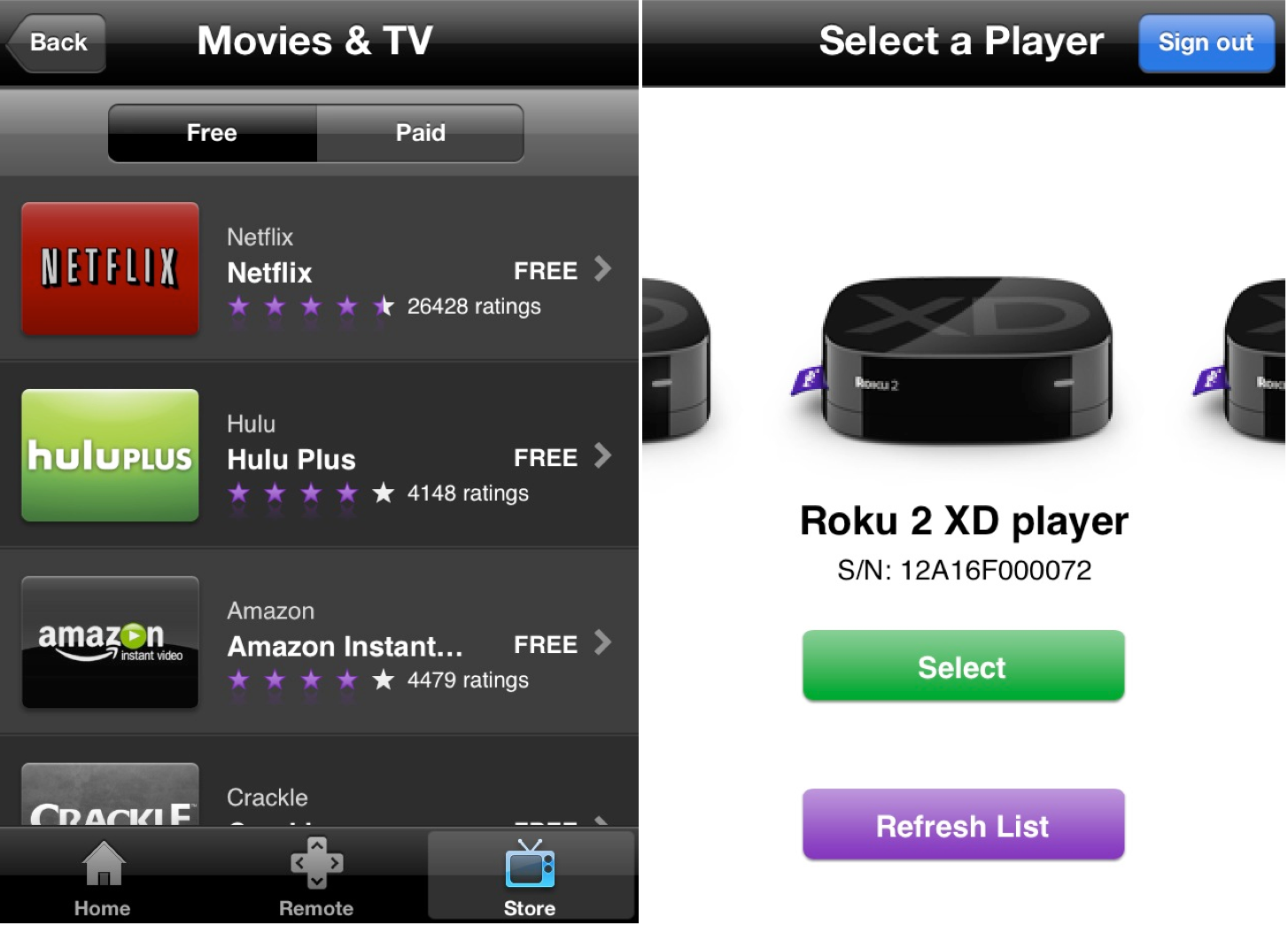
In an effort to further compete with the Apple TV, Roku has just updated its iOS app with a new AirPlay-like feature. Last fall, the app was updated with a new “Play on Roku” feature that let you beam music and photos to your TV, and now that feature has been further expanded upon to support videos.

The process for videos works just as it does for music and photos. Within the app, tap the Play on Roku button and then the video menu to select something to play.

The biggest downside to this feature, however, is that it only works with content you’ve shot with your iOS device, not videos/movies/TV stored in the actual Videos app like Apple’s AirPlay functionality.

The feature is supported on the Roku 2, Roku 3, Roku LT, Roku HD, and Streaming Stick and the update is available now in the App Store. In addition to the ability to beam videos, the update also includes “minor bug fixes.”
Expand
Expanding
Close

Site default logo image

9to5Toys Last Call: $33 Anker Astro 10000mAh power bank, $900 Seiki 50″ 4K LED HDTV, iPhone 5 battery case, Wacom Bamboo tablet, more

From 9to5Toys.com:

A large majority of the deals we cover each day come from a variety of ‘Daily Deal’ websites or are so popular that they don’t even last 24 hours. We know you can’t be at your computer every second, so we’re going to round up the best deals each day to make sure you have a fair shot at the deals you want. Be sure to follow 9to5Toys.com so you never miss a deal... Twitter, RSS Feed, Facebook, Google+.

Today’s Featured deals:

SOLD OUT Anker Astro 3E 10000mAh portable high capacity power bank $33 shipped (Reg. $100)

Seiki Digital 50″ 4K Ultra HDTV, 120Hz, LED $900 (Reg. $1,500)

Other great deals we love:

Site default logo image

Google introduces new local ads experience in Google Maps on iOS & Android

Google today announced on its blog that it’s introducing an “updated ad experience” for Google Maps on iPhone, iPad, and Android that will display a small banner at the bottom of the screen when a user performs a search. Google used to display smaller banner ads that would pop up as an overlay on the map after searching for a location, but the new experience brings ads into the new bottom bar that Google introduced in its recent redesign of the Google Maps mobile apps. 

Relevant ads on the Google Maps app can now appear at the bottom of the screen after a user performs a search. They include a title, ad text, and a link to get directions. Users can tap or swipe upward to see more information — this is a new click type known as “Get location details” and results in a standard CPC charge.

Just like the previous ads, tapping or swiping up on the new ads placed at the bottom of the screen will pull up details about businesses including images, reviews, phone numbers and addresses. Google’s recent update to the Google Maps mobile apps also brought Zagat ratings and Google Offers into the local business search results displayed on the new bottom navigation bar.

Google provides more information for advertisers interested in display local ads in Maps in its blog post here. 

Site default logo image

Rdio apps get revamped Stations with personalized “You FM” feature

Subscription music service Rdio announced today that it’s completely overhauling how stations work through the service.  While stations and the player get a refresh with new endless station types to pick from, the big new feature is something Rdio calls “You FM”:

You FM — A brand new, personalized, adjustable station that leverages Taste Profiling technology from The Echo Nest and incorporates all your listening history, track voting, Facebook likes, Twitter follows, and more to create a truly unique and individualized listening experience. As your tastes grow and evolve, so does You FM.

The new player will let users “vote on individual songs, tune stations towards familiar or adventurous sounds, and pivot stations based on favorite tracks” in order to fine tune stations. You’ll even be able to listen to others’ You FM stations. An endless station that’s automatically customized to the user’s listening habits seems like a must have feature for apps competing with Pandora and Spotify, and it’s something that Apple’s upcoming iTunes Radio app will take advantage of heavily.

The Rdio iOS app has already received the update and the new features are available on Android and the web app as well.

Site default logo image

1Password 4 for iOS goes on sale ahead of Dropbox API changes

AgileBits, the development team behind 1Password for iOS and Mac, announced today that due to an upcoming change in Dropbox’s API, Dropbox syncing in version 3 of the 1Password iOS client will no longer work as of September 1st. Because the old version of 1Password has been discontinued, it will not be updated to work with the new Dropbox API.

Instead, AgileBits is offering the new and improved 1Password 4 at $7.99 the lowest price to date. The sale will last until Friday, August 16th. Since 1Password 4 requires iOS 6, some customers may not be able to update to the latest version. If that’s the case, those users will be glad to know that 1Password 3 will still support Wi-Fi syncing with computers on the same network.

AgileBits has also published a new FAQ document to explain the changes and possible solutions.

Site default logo image

YouTube co-founders launch MixBit video editing app for iOS

Available starting today, YouTube co-founders Chad Hurley and Steve Chen have launched a new app called “MixBit” that appears to be a Vine-like approach to video editing on the go. Unlike Vine, and Instagram’s new video feature, MixBit will allow videos much longer than the rather short, up to 15 second long videos offered through competing services. You’ll also find the majority of videos uploaded to the service are much longer than those on Vine and Instagram, making the experience of browsing and watching videos feel much more like YouTube than Vine. MixBit will allow users to record video clips up to 16 seconds in length and stitch up to 256 clips together into a single video that plays back seamlessly. Videos on MixBit can be up to an hour in length.

It also differs from the other guys in that clips are stored separately even after stitching them together and uploading a video. That means you’ll be able to pull from individual clips from your own or other’s videos at any time to create another video in the future. Some basic editing functions for rearranging clips exist, but the app doesn’t go much beyond that yet. For now the app is only available on iOS, but an Android version is on the way.

Review: 4Snaps is a fun new word game for iOS

Site default logo image

Product: Today we’re taking a look at a brand-new word game for iOS called 4Snaps. The premise of the game is like a cross between charades and Draw Something. You’re given a choice of three words. You have to pick one of these and then take four photos (“snaps”) to help the other player guess the word. The object is to see how many turns you can take in a row before someone misses the word.


Expand
Expanding
Close

Latest OS X Mavericks Preview showcases iBooks for Mac [Gallery]

Site default logo image

Apple’s latest OS X Mavericks Developer Preview includes iBooks for Mac, according to tips from developers who have installed the new beta. The new iBooks app looks in line with what Apple showcased at WWDC earlier this year.

When you launch the app, your iBooks content from iTunes will be migrated over. Users are also given the option to login to their Apple ID to sync their iBooks collection from/with iCloud.

iBooks for Mac includes the same Collections, PDF reading, and other books functionality from the iOS version (except for the wooden bookshelf design). More screenshots and a video below:


Expand
Expanding
Close

Site default logo image

Instagram 4.1 arrives with video importing, photo straightening, more

Hitting the App Store soon, Instagram just announced on their company blog that version 4.1 will bring some nice improvements and features:

A little over a month ago we launched Video on Instagram, and today we’re happy to bring you our next major app update. We’ve included a few of the most requested features and added something special as well. Here’s what you’ll find in Instagram 4.1:

Import Video from Library
Starting today you can upload videos from your phone’s media library and share those moments to Instagram regardless of when they were captured. Once you select the video clip you’d like to import, you can trim it down to the exact part you like best. We’ve also made it so that you can choose how you square-crop your clip so you can keep the action front and center.

Automatic Straightening for iOS There are few things more distracting than a crooked horizon in a photo. We’re happy to announce that we’ve developed a brand new technology that brings you straight photos instantly. When you take a photo with the in-app camera, you can now tap the new Straighten icon and your photo will correct to be level—it’s that simple. The straightening tool also includes a slider so you can rotate and adjust any photo—including ones imported from your photo library—as much or as little as you’d like.

Video on Instagram for Ice Cream Sandwich We’re excited to expand Video on Instagram to people who use Android 4.0 (Ice Cream Sandwich). Since the launch of Video on Instagram this has been the Android community’s number-one request, and we’re excited to see this community grow.

Facebook recently updated Instagram with the ability to capture and share video. 

Update: The new version is now available in the App Store.

FireCore releases Infuse 1.3 with Wi-Fi file transfers, fullscreen TV-out, and more

Site default logo image

Our launch video review of Infuse

FireCore has released an update for Infuse, the popular video app for iPhone and iPad. The new update boasts new features such as the ability to transfer videos to your iOS device through a web browser, fullscreen TV-out support, new sharing options, and more.

Infuse 1.3 is a free update for existing owners. New owners can get the app for $4.99 on the App Store. The full change log can be found below.


Expand
Expanding
Close

Whatsapp adds easy to use push-to-talk voice messaging

Site default logo image

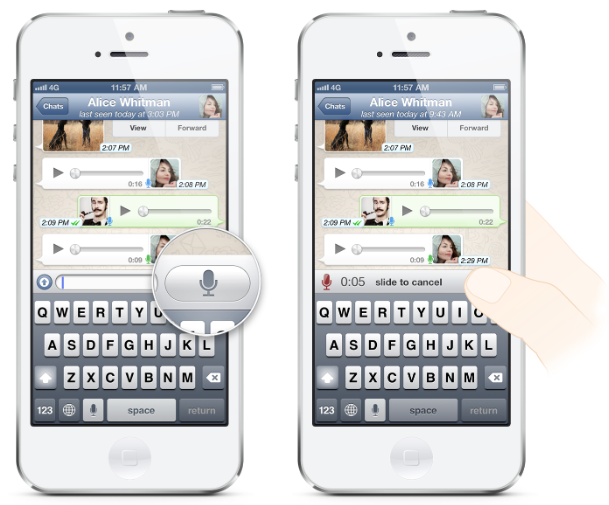
Popular chat app whatsapp now allows iPhone users to exchange voice messages with a push-to-talk style function. The feature is also being pushed out simultaneously on the app’s other platforms: Android, Blackberry, Nokia and Windows Phone.

We spend a lot of time at WhatsApp thinking how we can make keeping in touch easier, and we know there’s no substitute for hearing the sound of a friend or family member’s voice. So today we are introducing a new feature we are truly excited about: Voice Messages

While there are other push-to-talk apps out there, whatsapp has introduced a number of features which it says makes the functionality particularly easy to use … 
Expand
Expanding
Close

Site default logo image

Facebook Messenger iPhone app adds support for attaching Instagram photos

Facebook updated its Messenger iOS app today making it easier to send photos and emoji with a few new features. Facebook is deeper integrating Instagram into Messenger, allowing users to attach photos from Instagram albums (in addition to any other album on their iPhone) right in the app. Version 2.6 of the app also makes it easier to send photos and emoji with a new paper clip icon that users can tap from any message.

What’s New in Version 2.6

Now it’s easier to send photos and emoji:
– Just tap the paper clip from any message
– Choose photos from Instagram and any other album on your phone

Don’t forget about stickers: Tap the smiley to see what’s new in the sticker store.

Bug fixes

Site default logo image

9to5Toys Last Call: $33 D-Link wireless network camera, $80 Seagate GoFlex 500GB wireless drive, $35 Logitech solar iPad keyboard case, more

From 9to5Toys.com:

A large majority of the deals we cover each day come from a variety of ‘Daily Deal’ websites or are so popular that they don’t even last 24 hours. We know you can’t be at your computer every second, so we’re going to round up the best deals each day to make sure you have a fair shot at the deals you want. Be sure to follow 9to5Toys.com so you never miss a deal... Twitter, RSS Feed, Facebook, Google+.

Today’s Featured deals:
SOLD OUT D-Link wireless network day camera with iOS integration $33 shipped (Reg. $50)

Seagate GoFlex Satellite 500GB Mobile Wireless Storage $80 shipped

SOLD OUT Up to 60% off essential electronics:

Logitech Solar iPad keyboard case $35
Transcend 32GB USB 3 flash drive $19
ION Portable speaker system $70
Kensington ClickSafe lock for laptops, hard drives, monitors, more: $19

Other great deals we love:

Site default logo image

Google releases official AdSense iPhone app

Following Google’s release of an official AdSense Android app on Google Play last week, today the company has released an iOS version of the app. Much like the Android version, this is the first official AdSense client Google has released for the platform, and brings competition for some of the free and paid third-party clients already on the App Store. The app also provides much of the same functionality of the Android app, allowing users to access most reporting features available through the Adsense website, as well as payment alerts (which unfortunately can’t be dismissed at this point).

The AdSense app provides an easy way to access key data from your AdSense account. Access reporting features anywhere, directly from your iPhone. The first version of the app gives you access to: the key earnings information, top custom and URL channels, ad units and sites reports, payment alerts.

Site default logo image

Spotify introduces ‘expert playlists’, rolling out to iOS/Android users gradually

Popular music app Spotify has just introduced ‘expert playlists’ – a collection of songs chosen by the Spotify staff to match every moment, mood, or what’s hot. The feature is being rolled out to mobile devices first.

Press release from Spotify:

Introducing expert playlists for every mood and moment. Browse is available on mobile from today.

Going for a jog or to the gym? We’ve got the playlist to help you go the extra mile. Hosting a dinner or getting ready for a big night out? We’ve got you covered. We even have playlists for different moods, so regardless of whether you need an upbeat boost or something more relaxing to wind down to – we’ve got just the thing. You can also browse through a collection of our top lists and check out new releases.Rolling out to all mobile users from today, Spotify’s new Browse page offers carefully chosen playlists for every moment of your day, handpicked by our experts. With an easy-to-view interface, features include:

● Music for every moment: We’ve got just the right tunes for your morning commute, the party tonight, and the hangover tomorrow.
● Music for every mood: More than just genres, listen to a playlist for romance or a collection of face melting guitarists.
● Browse for what’s hot and what’s new: Find all the latest album and single releases from your favourite (or soon-to-be favourite) artists, and a collection of our top lists.

Recent innovations from Spotify have been all about helping people discover even more great music.

First, our social features made it simple to follow your friends, favourite artists and tastemakers, and to easily send music recommendations to your friends in return. Then, with the launch of Discover, we offered personalised recommendations, based on the combination of our unique algorithms and years of experience and data. Now, Browse adds the human touch to this mix, creating a three-dimensional approach to music discovery. Between your friends, our personalised recommendations and real music experts, it’s the perfect formula to ensure you’ll always have the right music for every moment.

“We don’t rely on one source for recommendations in real life – and music discovery can’t be onedimensional,” said Gustav Söderström, Chief Product Officer, at Spotify. “Our three-dimensional approach now combines the human touch with strong social features and unique technology from over five years of experience. We know music and we’re the first to marry all three aspects in one service, making it easier than ever for users to navigate the treasure trove of content within Spotify.”

Browse will be gradually rolled out to our iOS and Android users, and will soon be available across all platforms.

Site default logo image

FaceHalt brings Galaxy S4-style automatic video pausing to jailbroken iOS devices

http://www.youtube.com/watch?v=_HxnQAlrA9E

Recent Samsung ads for the Galaxy S4 have been used to highlight a unique feature of the phone that can automatically pause video when you turn your head away from your device. This has been an exclusive feature on the S4 for quite some time, but is now available to jailbroken iOS users through a new tweak called FaceHalt.

While early versions of FaceHalt seemed a bit buggy and unstable, the latest build works flawlessly on both the iPhone and iPad. The tweak works system-wide, from the YouTube app to the built-in Videos app, and all of the third-party apps tested. The biggest downside? You’ll actually have to watch those YouTube ads now.

FaceHalt is available on Cydia now for $1.99 on the BigBoss repo.

Site default logo image

Google copies Find my iPhone with new ‘Android Device Manager’

Android-Device-Manager

Google today announced on its Official Android Blog that it’s launching a brand new tool called ‘Android Device Manager’ that will let users easily locate and remotely wipe misplaced or stolen devices. Anyone familiar with the Find My iPhone feature that Apple has made available to iOS device users will already be quite familiar with how the software works.

Much like Apple’s service, Android Device Manager will let users locate their device on a Map in real-time, as well as remotely wipe the device of all data if happens to get into the wrong hands. You’ll also be able to make your device ring at maximum volume if you happen to misplace it in a nearby location.

If you ended up dropping your phone between those couch cushions, Android Device Manager lets you quickly ring your phone at maximum volume so you can find it, even it’s been silenced. And in the event that your phone or tablet is out of earshot (say, at that restaurant you left it at last night), you can locate it on a map in real time

Google’s announcement comes at a time when government officials are pressuring Apple, Google, and other smartphone manufacturers to implement new theft deterrent features. While Google’s new tool would be one step in the right direction, it doesn’t appear to go beyond what Apple has already had in place since back in 2010.

Recently, Apple announced a new Activation Lock feature that requires an Apple ID and password to reactivate a stolen phone after being remotely erased/wiped by the owner through the Apple Find my iPhone feature. The login information will also now be required to turn off Find My iPhone. If a user’s device is stolen, wiping the device clean will essentially leave the thief with a device that is inoperable without the user’s Apple ID and password. It doesn’t appear that Google’s new tool includes a similar feature.

Google said the new Android Device Manager service will available later this month for devices running Android 2.2 and up, and an Android app will also be available to help users manage their devices.

Free content begins showing up in Apple Store iOS app amid sales push

Site default logo image

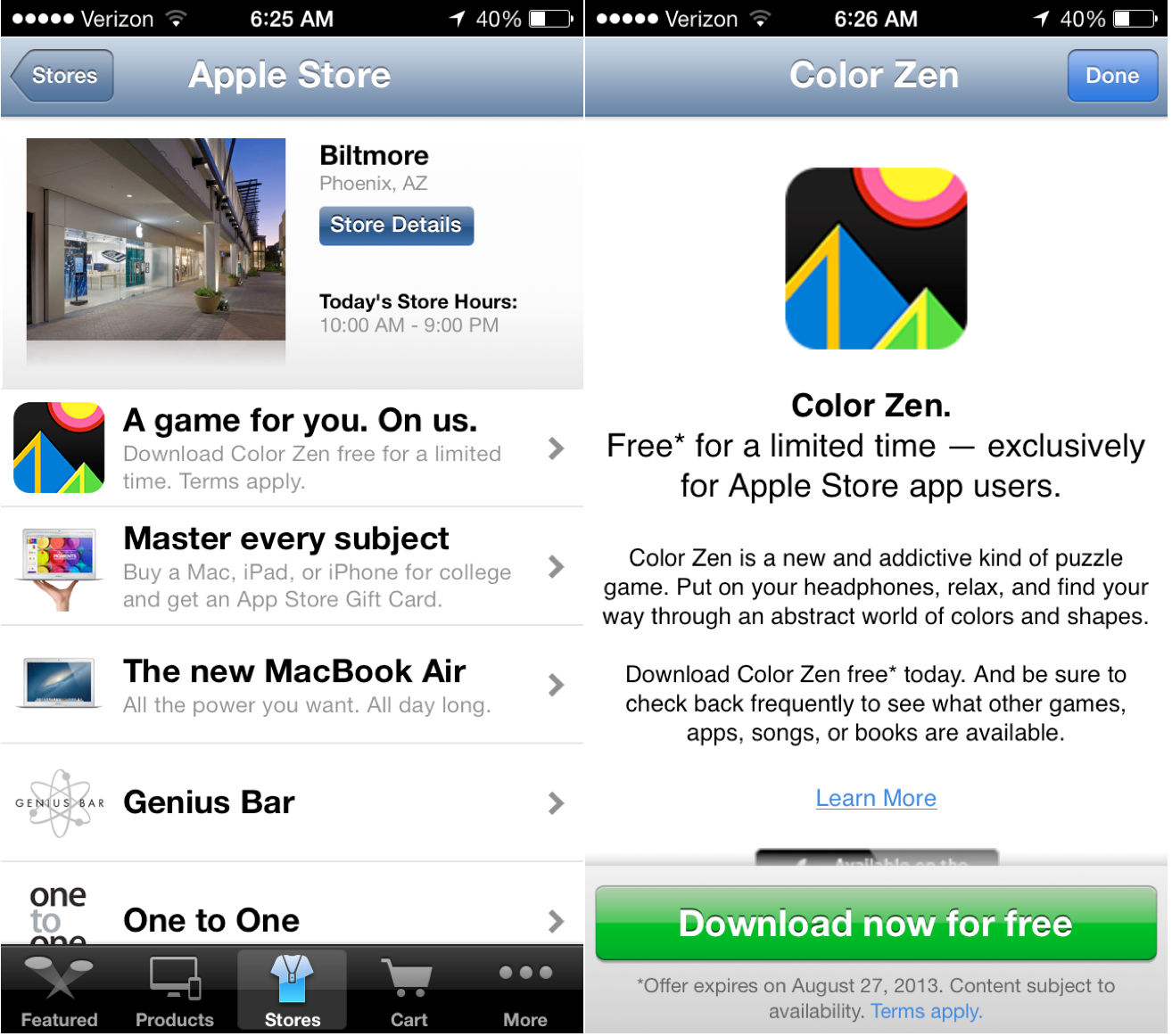
Two weeks ago, we reported that Apple would update its Apple Store iOS app with the ability to receive free content. The app was updated a couple of weeks ago to lay the groundwork for this feature, and now free content has begun appearing. The first paid app (normally $0.99) for free is Color Zen, and Apple will provide either a new app, piece of iTunes media content, or iBook each week.

The functionality works both in Apple Stores and actually if you are not in a store. A user just needs to pull up a store inside of the app’s store panel (see image above). When you click the free content option, you are taking to a screen to finalize your download.

We previously reported that Apple Store employees are instructed to install this application on a new iOS Device during Personal Setup (After a purchase). At an internal event in San Francisco last month, Tim Cook revealed that only a small percentage of Apple customers are aware of the app, but Cook wants to use the app as an element of his plan to boost iPhone sales in his stores. 


Expand
Expanding
Close

Site default logo image

Akai’s legendary MPC drum machine now available for iPhone

Back in March, Akai Professional released an iPad app that aims to emulate its classic MPC drum machine. Akai is perhaps best known for the MPC— a series of physical drum machine/midi sequencer/samplers that come with samples you’ve likely heard on many of your favorite hip-hop, dance, and pop songs. Today the MPC emulator, dubbed “iMPC”, makes its way to the iPhone for the first time for $2.99 on the App Store, slightly less than the $6.99 that the iPad version sells for.

You’re not going to be able to get full-on MPC emulation for less than $5, but Akai has included a ton of great samples and features stripped straight from its legendary MPC series:

Turn your iPad into an MPC. With more than 1,200 samples, 50 editable programs, 80 editable sequences, and iconic MPC workflow, iMPC is the first app to bring the look and feel of the classic Akai Pro MPC to your iPad. iMPC includes everything you need to create a beat quickly and easily, including built-in effects, plus the ability to create new sequences and record and overdub beats. Time correction from 1/8 note to 1/32T with variable swing, and Note Repeat from 1/8 note to 1/32T with latch control are also built in. The app’s built-in sampler can record samples three different ways: using the mic on the iPad, using the line input on the iPad, or using the multi-touch turntable interface in iMPC to record samples directly from iTunes or other music libraries.

Site default logo image

Pebble smartwatch app for iOS updated with email notification support

Pebble smartwatch users running iOS 6 won’t have to wait until iOS 7 to get email notifications: the company behind the watch has issued an update for its iOS app to support email alerts.

The update supports Gmail via a login through Google, while other IMAP email accounts are supported via a login-system within the app. Non-IMAP accounts (like POP) are not supported.

For those who receive a lot of email, Pebble has included an option to temporarily pause email notifications:

Once it has been successfully set up, you will see the account listed on the Email Notifications page. A blue bar means that the account is active. If you would like to temporarily disable the notifications, simply tap the bar once to turn them off; it will appear grey when the notifications are disabled. Tap the bar again when you wish to re-enable the notifications.

Pebble also has troubleshooting instructions on its support page. Of course, Apple is working on its own smart watch. The Pebble recently went on sale at Best Buy. 

Site default logo image

BlackBerry rolling out BBM for iOS and Android beta invites

A report from BlackBerryOS.com notes that invites to BlackBerry’s upcoming BBM service for iOS and Android have now started rolling out to users on the company’s Beta Zone website. Back in May, BlackBerry announced that its popular messaging platform would finally become cross-platform and arrive on both iOS and Android devices “later this summer,” and that deadline to launch is of course quickly approaching.

Not all Beta Zone members have received the invite email above, but it looks like BlackBerry is getting closer to finally launching the new apps.

We haven’t seen much of the iOS app, but BlackBerryOS also got its hands on the screenshots below of the latest Android beta:

If you have screenshots of the iOS app, you can send them to tips@9to5Mac.com.

Temple Run 2 adds Usain Bolt as a playable character

Celebrity endorsements can be cheesy, but this is a well-themed tie-in to the popular franchise. For a limited time, you can buy Usain Bolt as a playable character. Each character in Temple Run have different special abilities and Bolt is no exception. Bolt has a shield, providing invincibility for a short time as well as attracting coins, like a magnet. Imangi, the game’s developers, has warned that this is a limited-time promotion so eager fans should not wait if they want to play as an Olympian in the game.

Temple Run 2 is free; Usain Bolt is available, for a limited time, as an in-app purchase for 99cents.