Apps

See All Stories

Learn about the latest news for iOS, Mac, Apple Watch, and Apple TV apps

Apps for iOS, macOS, tvOS, and watchOS power our modern world. 9to5Mac will update you on the latest news, review, and updates for all types of apps. “There’s an App for that”.

The term came became part of our vocabulary when Steve Jobs announced The App Store as part of the iPhone 2.0 software update in 2008.

Over the years, the term has become as common as kleenex for describing applications on all of our devices. Apple’s platforms have apps for just about anything from finance, banking, sports, social media, podcasting, music, and more. We have a guide for helping you discover the best ones as well. Apps are now on everything from our TV, to our smartphones, on our laptops, and all the way down to our wrists.

As new ones are released or existing ones have major updates, the team here at 9to5Mac will bring you the latest news and reviews. If you want to follow along with video footage, be sure to follow 9to5Mac on YouTube. Scroll down below our latest updates on all things relating to applications on iPhone, iPad, Mac, Apple TV, and Apple Watch.

Clear + Leap Motion, Runtastic, DataMan Pro, Orbitz for iPad, Adobe Muse, deals, more

Site default logo image

http://vimeo.com/60564626

News:

Clear for Mac + Leap Motion: We’ve brought you a couple hands-on demos of the Leap Motion controller before, and today popular productivity app Clear for Mac announced it is working on bringing support for Leap Motion to Clear. There’s no timeframe yet, but Realmac Software provided the short preview above.

Updates:

Runtastic version 2.10.1: Personal fitness tracking app Runtastic gets a nice update today that brings more Sport types, improved Facebook integration, and number of other bug fixes and performance enhancements.

DataMan Pro version 6.3: After some trouble getting by Apple review guidelines with its last update, DataMan Pro is back on the App Store today and is 50% off for a limited time to celebrate. The app has also been completely redesigned:

The resurrected DataMan Pro has been completely reinvented to feature a stunning new interface, an intelligent real-time data usage forecast, and most advanced app tracking… The powerful App Watch technology that users love is also back. You can see the usage statistics for all apps. This amazing capability empowers you to root out data-hungry apps… The new DataMan Pro includes Smart Forecast and the beautiful interface that were recently introduced in DataMan Next. Combined with precise real-time tracking, you can say goodbye to overage.

Orbitz Flights, Hotels, Cars 3.0: Yesterday Orbitz launched its first “fully native, in-app search and book experience” for the iPad with an update to its Orbitz Flights, Hotels, Cars app that brings support for the larger screen and new iPad-specific features:

Our award-winning app (App Store Editors’ Choice & Hall of Fame inductee) is now also optimized for iPad and iPad mini! iPad users enjoy *all* the same app features as iPhone users, plus iPad-exclusives like a dual list/map view of hotels and the ability to compare details of multiple flights, rental cars, or hotels from a single screen.

Adobe Muse: Adobe announced today that it is updating Adobe Muse with some highly requested new features:
Expand
Expanding
Close

Apple settles in-app purchasing class action, agrees to pay $5 iTunes credit or cash refund

Site default logo image

[vodpod id=Video.15797906&w=1000&h=350&]

Last time we checked in on the in-app purchase class-action lawsuit against Apple, courts refused Apple’s request to throw out the case brought on by parents arguing the iOS freemium model, i.e. in-app purchases, allowed children to easily rack up hundreds or thousands of dollars. Today, Law360 (via GigaOM) reported Apple has agreed to pay a settlement and will be contacting 23 million iTunes users that “made a Game Currency purchase in one or more Qualified Apps.”

According to the report, Apple will pay $5 in iTunes credit to those who claim in-app content was purchased by a minor without their permission. For purchases above $30, users will be able to request a full refund. However, credits will likely not get to users until early 2014 when the settlement meets regulatory approval:
Expand
Expanding
Close

Site default logo image

Facebook releases SDK 3.2 for iOS with better analytics, API improvements and more

Facebook announced on its Developers blog today that it is releasing version 3.2 of its SDK for iOS. The updated SDK makes it even easier for iOS app developers implementing Facebook features, with improvements to APIs and better tools for tracking usage and optimizing ads. Version 3.2 includes improved analytics and new metrics such as the ability to track “iOS 6 native share sheet and built-in native UI controls usage.” Facebook also noted that it is including a beta for select partners showing off upcoming support for “logging in-app purchase events.”

  • Better mobile analytics – We’ve added support for measuring additional usage metrics and optimizing ads to help improve an app’s quality and monetization potential
  • Enhanced error handling – SDK support and documentation now enabled for all classes of error responses
  • API improvements – A new FBAccessTokenData type makes it easier to open a session from token data explicitly, and to better handle app and deep linking

Facebook also said the updated SDK included enhanced error handling, improved web dialog support, and a several API improvements and bug fixes. Improvements to Facebook’s SDK are important, as the company’s noted over 45 percent of the top 400 grossing iOS apps are now integrated with the social network.

Version 3.2 of the Facebook SDK for iOS is available here.

Site default logo image

iOS developer cleverly adds Street View app as a routing source for iOS 6 Maps

Recently launched on the App Store, a 99-cent app from developers FutureTap called simply “Street View” will allow users to quickly access Google Street View from seemingly within the stock iOS 6 Maps app.

When Apple first launched its new Maps app with iOS 6, one of the features many users missed was Street View’s 360-degree panoramas made popular by Google Maps. Things got a little better with the introduction of the Google Maps iOS app months later, but there are still a few reasons why many have not completely migrated away from Apple’s stock Maps app.

The biggest (at least for non-jailbroken users) is the inability to use third-party apps as the default mapping application. That means when tapping links for addresses or using Siri, for example, Apple will still default to its stock iOS 6 Maps app. Thankfully, with the 99-cent Street View app, you can continue using Maps and still be able to quickly pull up Street View without ever feeling like you’ve left the app.

Here’s how it works:


Expand
Expanding
Close

Site default logo image

Finish app developers discuss their success (Video)

[youtube http://www.youtube.com/watch?v=1bjzBDSqLts]

Sixteen-year-old app developers Michael Hansen and Ryan Orbuch, creators of the increasingly-popular to-do app Finish, were interviewed on Fox News’ morning show Fox and Friends today.

During the interview, the Colorado-based duo described the process that went into creating their hit app, what it was like to be featured by Apple, and more.

After the interview was over, Orbuch, the team’s designer, noted on Twitter that their app has risen to the 35th spot on the overall App Store charts and seems to show no signs of slowing. Be sure to check out our review of Finish for more about the app.

[tweet https://twitter.com/orbuch/status/305723394144477185]

Site default logo image

Facebook for iOS updated with easier sharing and commenting, free calling within app

Facebook has updated its official iPhone, iPad, and iPod touch application with a number of enhancements. Notably, version 5.5 of the app includes a new button design that makes Liking, commenting, and sharing stories easier. Additionally, Facebook has brought the free calling to friends feature from the Messenger app (as seen in the above screenshot) right into the standard Facebook app.


Expand
Expanding
Close

MLB updates At Bat 13 app for Spring Training

Site default logo image

MLB’s At Bat 13 app will get a Spring Training update today for iPhone, iPad, Android, and Kindle Fire devices.

The update is not yet live but will include multi-platform live audio access for At Bat 13 subscribers with account portability for listening to live games on Macs and PCs. It also offers universal iOS and Android support for At Bat 13 subscribers with full feature accessibility across all supported smartphones and tablets.

The app’s new key features will range per device: sortable batting, pitching, and fielding statistics and favorite team enhancements is for iPad and Android tablets, for instance, while re-designed individual team pages, an updated news section interface, and expanded video highlight integration is for iPhone and Android phones.

New features for all devices include a classic games video library archive, re-architected app navigation, and searchable video highlight library expansion to include access to complete video archives. The iPhone version will specifically get additional push notification options.

Check it out:

“MLB.TV Premium subscribers again may upgrade to At Bat 13 for free, unlocking all premium features,” explained MLB’s press release. “Fans also may subscribe to MLB.com At Bat 13 for the one-time annual fee of $19.99, covering the entire season through the World Series. iOS users may pay $2.99/month with the recurring billing offering.”

MLB also said the Opening Day update will come soon and At Bat will debut on the new BlackBerry 10 by Opening Day. The press release and screenshots are available below for more information.


Expand
Expanding
Close

Review: Doo for Mac — the incredible new cloud-based file manager (plus iOS app preview)

Site default logo image

There are a lot of places you can store your files these days. There’s the Documents folder on your Mac, of course, but there’s also Google Drive, Dropbox, Microsoft’s Skydrive and more. And, of course, everyone has their favorite storage service. Some people prefer one over the other, and it’s up to you to make sure you can keep them all straight.

Well, now you don’t have to. Doo is a brand new Mac app that aims to bring all of these services under one roof, and it does not disappoint. Keep reading to see how Doo can help you finally make sense of your cloud storage, and get a 9to5Mac-exclusive first look at the upcoming iPhone companion app.


Expand
Expanding
Close

Site default logo image

Netflix, Traktor DJ, Flickr, Amazon Mobile, Showtime Anytime, deals, more

As always, we’ll be updating the list below with more apps and updates as they continue to hit the App Store today:

Traktor DJ: Native Instruments, the company behind the massively popular Traktor DJ software and other well-known audio production tools, today released an iPad app dubbed Traktor DJ. For those familiar with the Traktor 2 Mac app, the iPad app provides you with a scaled back UI that offers two decks, 8 built-in effects, and the ability to record and share mixes. While you won’t get onscreen platters with this app like many other DJ apps, NI allows users to pinch and swipe the waveform on the deck itself “for simple looping and ultra-tight scratching.” A full list of features below:

– Revolutionary DJ app by Native Instruments – makers of the leading pro DJ software
– Touch the groove using familiar iPad gestures like swiping and pinching
– Direct access to your iTunes music library from TRAKTOR DJ
– Stylish waveform display allows for simple looping and ultra-tight scratching
– Intelligent browser recommends songs based on compatible tempo and key
– Automatic tempo and key detection plus BPM sync for super-smooth mixing
– Innovative Notification Center gives you in-app access to essential tips and undiscovered techniques
– 8 built-in pro DJ effects, including Reverb, Delay and dramatic glitch effects like BeatMasher
– Familiar DJ mixer layout with crossfader plus line faders, 3-band EQ and filter on each channel
– Prepare tracks on the road – all meta data (tempo, beatgrids, cue points etc.) in TRAKTOR DJ syncs with TRAKTOR PRO DJ software*
– Record your mixes live in high-quality on the iPad and share with your friends

Flickr version 2.1.0.803: The Flickr iOS app was gets an update this morning that brings faster uploading, the ability to quickly save images from Photostream to camera roll, and much more:

– Faster uploading
– Easily save photos from your Photostream to your camera roll
– Automatically saves your original, pre-filter photos to your camera roll
– Quickly tag your contacts in photo comments and description by simply typing @screename
– Get notified when your contacts mention you
– Higher resolution photo display in lightbox view so your photos look even more stunning
– Take photos in a snap using your iPhone’s volume up button

Netflix version 3.0: Netflix received an update today to version 3.0 and with it came an enhanced playback experience including the ability to view the title from the iPad player UI, the return of the zoom icon for fullscreen playback, and “better placement of play/pause and Back-10 buttons so you can easily control your experience.”

We enhanced the player UI for a better playback experience.
1. See the Title in the iPad player UI – Touch the player UI screen to see the title of movie/TV show you are watching
2. Zoom icon is back – so you can now control when you watch full screen mode
3. Note better placement of play/pause and Back-10 buttons so you can easily control your experience

Amazon Mobile version 2.3.3: A nice update to the Amazon Mobile app today for Canadians brings the ability to shop from Amazon.ca in addition to performance enhancements:
Expand
Expanding
Close

Site default logo image

Amazon announces massive game sale, up to 75% off many great Mac titles: Borderlands 2: $29, Black Ops: $18, Assassin’s Creed II: $5, many more

From 9to5toys.com (Twitter, Feed, Facebook), today:

Amazon is holding a “Farewell to February” sale on much of its digital game downloads for Mac and PC that includes over 850 games up to 75 percent off. Amazon is also offering an extra 25 percent off one item per customer with the checkout code “CAGROCKS”. While it might take you a while to flip through the hundreds of games Amazon has on sale, we decided to put together a list of some of the more notable Mac titles on sale today. Enjoy!

Bioshock 2 | $9.99 (was $24.99)

Call of Duty: Black Ops | $17.49 (was $49.99)

Rezurrection DLC- $7.49 (was $14.99)

Annihilation & Escalation DLC – $11.99 (was $24.99)

Call of Duty 4: Modern Warfare | $9.99 (was $39.99)

Assassin’s Creed Brotherhood | $7.49 (was $29.99)

Assassin’s Creed II | $4.99 (was $19.99)

Borderlands 2 | $29.99 (was $59.99)

Driver San Francisco Deluxe Edition | $12.49 (was $24.99)

Sid Meier’s Civilization V | $7.49 (was $29.99)

Quake 4 | $4.49 (was $19.99)

Duke Nukem Forever | $4.99 ($19.99)

RAGE: Campaign Edition | $4.99 (was $29.99)

Star Wars The Force Unleashed: Ultimate Sith Edition | $5.99 (was $29.99)

Prince of Persia (2009) | $4.99 (was $49.99)

Dragon Age 2 | $14.77 (was $19.99)

You can check out all Mac games that are 70 percent off or more on Amazon.

Site default logo image

Twitterrific 5.1 brings new features and fixes, teases push notifications en route

[vimeo http://www.vimeo.com/59750120 w=700&h=394]

Twitterrific 5, the popular new version of The Iconfactory’s Twitter client, has updated to version 5.1. The update introduces several new features and fixes. One of the new features, which you see in the video above, is the ability to mute, or “muffle,” hashtags, users, and even URL domain names. The full change log is lengthy and hints at push notifications coming in the next update:


Expand
Expanding
Close

Site default logo image

What happens when you make your app free for a week

For an app developer like Infinity Blade maker Epic Games, making an old iOS game free for a week accounted for an enormous boost in revenue and downloads. As noted by The Wall Street Journal, Epic’s decision to drop the price of its original Infinity Blade title from 99 cents to free brought the title up hundreds of spots in App Store rankings. The increase is highlighted in the chart above from AppData. While being featured as one of Apple’s “App of the Week” certainly didn’t hurt, temporarily switching to the freemium model allowed Epic to generate more money than it was earning when the app was 99 cents. It also created a nice increase in sales for the developer’s $7 Infinity Blade II sequel, as shown in AppData’s second chart below:

Sunrise Calendar, IMDb, iA Writer, Dolphin Browser, Myst, Finish, deals, more

Site default logo image

Sunrise Calendar: Launched today by former Foursquare designers, the free Sunrise calendar app is getting a lot of attention for its simplistic approach to combining calendars, Facebook events and birthdays, and weather forecasts based on your current location. The app initially only supports Google Calendar, includes Timezone support (a feature missing from many popular calendar apps), and integration with LinkedIn to “see faces of people you are meeting.”

Features:
☆ 100% free calendar app with a gorgeous design.
☆ Compatible only with Google Calendar for now.
☆ A completely redesigned calendar experience for your iPhone.
☆ Synchronization that just works, in real-time.
☆ Quick Add Event just by typing “Lunch tomorrow at 9pm” (long-press on the +).
☆ Reminders.
☆ Timezone Support. No more headache when travelling!
☆ Facebook Events and Birthdays included.
☆ See faces of people you are meeting with using LinkedIn.
☆ Weather forecast based on your location.
☆ Smart icons.
☆ Tag location to events.
☆ Use Google Maps for Directions.
☆ Connect multiple Google Calendars.

IMDb version 3.1: IMDb announced a nice update to its IMDb Movies & TV iOS app that brings a number of new features including links to titles available on Amazon Prime for users that have the  Amazon Instant Video app installed on their iPhone or iPad. The update also includes a Special Oscars section with a “list of nominees and photos from the red carpet and ceremony and live winners,” a new Recommendations feature, and a few improvements:

– Award information for celebrities and titles (iPad/iPhone)
– Titles available on Amazon Prime feature a link to watch if the Amazon Instant Video app is also installed (iPhone/iPad)
– Special Oscars® section: list of nominees and photos from the red carpet and ceremony and live winners on iPhone and iPad during the ceremony
– Recommendations: tap on the “i” in the corner of the poster to see why it’s recommended for you, rate the title if you’ve seen it, or indicate “not interested” (iPad)
– Improved accessibility for TV episode navigation (iPad)
– Updates to side navigation (iPad)
– Bug fixes include episode picker in VoiceOver (iPad)

Finish version 1.0.2: Improvements and new features for productivity app Finish:
1. There’s now an option in settings to start the week on Monday.
2. Smoother gestures!
3. Some small interface improvements
4. Good ol’ VARIOUS BUG FIXES!

iA Writer version 1.8: Popular text editor iOS app iA Writer gets a big update today that includes a new iCloud engine and UI, overall new look and feel for the entire app, and a ton of features and improvements:
Expand
Expanding
Close

New quick app switching & other concepts show options on the table for iOS 7 [Videos]

Site default logo image

With the recent departure of longtime iOS chief Scott Forstall, many expect some big changes in iOS 7. Not only is Jony Ive taking over design responsibilities related to iOS, but also Apple is increasingly coming under criticism for its aging core iOS apps and highly requested features already available on other platforms that it has yet to implement. We discussed some of the big software features iOS 7 might have in store, but today we present a roundup of the best iOS 7 concepts we could find starting with a new one from the creator of jailbreak tweak Auxo.

Sentry, the original designer behind the popular Auxo jailbreak tweak, yesterday posted the new Quick App Switching concept above (via iFun). While Auxo provided a screenshot of running apps integrated into the iOS multitasking tray, the concept above takes a different approach and aims to add speed to the app switching process.

This next concept comes from YouTube user imjeanmarc and shows a tray accessible from the lock screen, providing quick toggles for Bluetooth, Wi-Fi, etc.:


Expand
Expanding
Close

Site default logo image

Jailbreak developer helps fight cancer with his latest tweak

Jailbreak tweak developer Filippo Bigarella released his newest piece of iPhone-modding software, called “LivelyIcons”, today. The tweak itself is simple: it adds fun animations to your iPhone’s homescreen icons when you open an application. You can find a video of it in action right here. The animations aren’t the only reason to buy it, though.

Biga has also announced via a blog post that he will donate the proceeds from this tweak to two foundations that focus on funding research to fight pediatric cancer. On his blog, Biga wrote:


Expand
Expanding
Close

iOS 6 bug lets institutional users bypass ‘Don’t Allow Changes’ account restriction, install unapproved apps (Update: fixed)

Site default logo image

Update (Feb 21st): This has been fixed according to a reader. The iTunes and App Stores use HTML on the backend so Apple can “push” updates via backend code changes:

As of this morning, the bug is gone! No update required! Looks
like the somehow they pushed the update! I can no longer change the
account in the App Store or iTunes store! This reminds me when I was
beta testing 6.0 and Apple changed the behavior of downloading updates
not requiring a password (they also allowed free apps with no password
for a short while). That didn’t need an update to change either.
They seem to have ways of fixing App Store behavior without needing to
update iOS. I’m still running 6.1 on my devices, haven’t gone to
6.1.2 yet.

Would be nice for an official answer from Apple, but so far, it’s
working correctly! Also, I see redeem and send gift are grayed out
also, at the bottom of the App Store. Same for iTunes Store.

For those unaware, iOS 6 received some beefed up Restriction settings when it was released that allowed users to select “Don’t Allow Changes” for an entire account linked to an iOS device. This option was particularly useful for schools and organizations that wanted to limit a device to a specific account and keep students and others from installing apps not approved by the institution. Without the restriction, students or employees could easily change the iTunes account linked to the iOS device. Unfortunately, as noticed by one frustrated 9to5Mac reader, it seems there are several backdoor methods of bypassing the setting…


Expand
Expanding
Close

Adobe releases public preview of Edge Reflow, updates Edge Animate, Dreamweaver & Edge Code for Creative Cloud members

Site default logo image

Adobe announced updates on Thursday to many of its HTML5 design tools for Creative Cloud users. Among the updates, we get new features for Edge Animate, Dreamweaver, and Edge Code. Adobe is also releasing the first public preview of its Adobe Edge Reflow responsive web design tool. Head below for all the details:

Adobe Edge Reflow: After giving us a look at its new responsive design tool Adobe Edge Reflow in September, Adobe is finally releasing the first public preview free of charge to all Creative Cloud users. Adobe said the tool provides designers with the ability to create responsive layouts and high-fidelity web designs using CSS, a resizable design surface, and real-time previews with Edge Inspect. Users will also be able to extract the CSS for use in Dreamweaver, Edge Code, or another editor. Adobe detailed today’s public release in the video above.

Adobe Edge Animate: Today’s update to Edge Animate brings new features, including: “gradients, CSS filters, and enhanced font support.” Adobe highlighted new CSS capabilities that consist of the ability to style and animate linear and radial gradients, new CSS filters such as blur, greyscale, brightness, contrast, sepia, and saturate filters, and a visual web font selector to add typography and live preview web fonts.

Adobe Dreamweaver: As for Dreamweaver, Adobe has updated the app exclusively for Creative Cloud members to bring integrated access to typography and a new fluid grid layout. The fluid grid layout feature was first introduced in Dreamweaver CS6, but it now includes “class tags in addition to ID tags” and a new editing UI. Users will also be able to preview and select Edge Web Fonts in Dreamweaver.

Adobe Edge Code preview: Adobe also highlighted new features of the latest Adobe Edge Code preview:
Expand
Expanding
Close

Kickstarter for iPhone, DIE HARD, Autodesk 123D Creature, Skype for Mac, QuickBooks for iPad, deals, more

Site default logo image

Kickstarter: Today Kickstarter announced that it is finally launching an official app for iPhone and iPod touch. The app provides users with the majority of features accessible through the website including the ability to find, filter, and back projects, watch project videos, follow and keep up with projects in an always up-to-date Activity tab, and receive notifications when someone backs or launches a project. The app also includes creator tools such as a feature to “take pictures and videos with their iPhone camera and post them as project updates straight from the app.”

http://www.youtube.com/watch?v=Fv6Sj5ot3c8&feature=youtu.be

DIE HARD: Fox Digital Entertainment today released the official DIE HARD iOS game in support of the upcoming “A GOOD DAY TO DIE HARD” feature film. You play as Jack McClane as you “blast your way out of Moscow’s mean streets and travel to the radioactive wasteland of Chernobyl.” The developer called the game an “endless shooter”– a combination of “the “endless runner” and “first-person shooter” genres. It’s available now for 99 cents.

With DIE HARD, the mission was to develop an app with the gameplay and attitude to match the groundbreaking nature of the DIE HARD franchise, its longtime hero John McClane and new protagonist Jack McClane.  In a twist on the endless runner genre, where the player runs from danger, DIE HARD equips the player to face the action head on, running towards foes and confronting them from a first-person perspective.

Skype 6.2 for Mac: Skype was updated with a few new features and improvements. Users can now send Skype credit as a gift through an eGifting feature, as well as send “one-way SMS without verifying your mobile number. ”

QuickBooks Online for iPad: Intuit announced today a new iPad app for QuickBooks Online. It’s free for subscribers, but the app also provides a 30 day free trail and monthly and annual subscriptions for $13 and $125. Full list of features below:
Expand
Expanding
Close

Review: Tempo for iPhone – How smart does a calendar need to be?

Site default logo image

Calendars. Contacts. Maps. Emails. Text messages. Facebook. LinkedIn.

There are a lot of things you can do with the iPhone. Each of those things is scattered across the phone in it’s own separate app, however. Sure, there’s some integration of those services, but most of the time you’re going to have to switch apps to get from one function to the other. It’s easy to get annoyed or overwhelmed trying to manage your time while everyone up-to-date on the things that matter.

Tempo is a new app from SRI (the company that originally developed Siri) that aims to bring all of those functions together—at least as far as the concern your schedule—into a cohesive system for managing your life. But how well do all of these different services coexist in the same application?


Expand
Expanding
Close

Site default logo image

Review: Cloudier is a great way to manage your CloudApp account

[vimeo http://www.vimeo.com/58173643 w=700&h=394]

Note: Not all the animations in this video made it into the final product.

Cloudier is a great new CloudApp management client. While we’ve seen some of the design concepts in this app before, Cloudier adds new design features like a grid view for photos and a zip viewer for peeking inside file archives.

Cloudier boasts a much lighter interface than I’m used to in Cloud clients, and I actually like it a lot. Rather than focusing on fitting a ton of features into the app, the developers focused on fitting in only the features you’ll actually need and making them work beautifully. It’s fast, looks great, and does exactly what you need.

Cloudier is available now on the App Store for $2.99. If you’re looking for an app to manage your CloudApp files, I highly recommend it.

Site default logo image

A&E, HISTORY, and Lifetime bring full episodes and movies to iPhone/iPod touch

A&E Networks finally rolled out iPad apps in December for watching full episodes and accessing content from its biggest networks including A&E, HISTORY, and Lifetime. The three apps provided extra content for Xfinity TV users, and A&E told 9to5Mac that support for AirPlay was on the way. Today, the company has brought all three apps to iPhone and iPod touch users. It is offering full episodes of shows like “Duck Dynasty,” “Storage Wars,” “The First 48,” “Pawn Stars,” “American Pickers,” “Swamp People,” as well as 25 full-length Lifetime movies. The updated A&E, History, and Lifetime apps not only include support for iPhone and iPod touch, but they also now provide iCloud syncing to resume episodes on any iOS device.

A+E Networks is expanding its award-winning content to smaller screens with new video watch apps available for free in iTunes for all iOS devices. Now on-the-go viewing goes beyond the iPad, viewers can watch full episodes, movies and exclusive clips from A&E, HISTORY and Lifetime on iPhone and iPod Touch.

To make the viewing experience even more seamless,  HISTORY, A&E and Lifetime apps now conveniently sync with multiple devices. For instance, if you’re watching an episode of Swamp People on your iPad at home you can then finish watching it on your iPhone so you don’t miss the train to work. Currently, viewers who sign in to verify Xfinity TV from Comcast will also have more access to content, including full previous seasons.

Site default logo image

evasi0n jailbreaks record 7M iOS devices in four days

We previously told you that around 1.7 million people had used the new evasi0n tool to jailbreak their iOS device, according to stats from Cydia installs. Today, we get a little update on the progress: Jay Freeman told Forbes that Cydia recorded over 7 million devices, as of last night, and “insanely more new traffic” than the release of iOS 5’s Absinthe jailbreak tool and others before it.

As of Thursday night, Freeman’s alternative app store had received visits from 5.15 million iPhones, 1.35 million iPads, and 400,000 iPod touches that were jailbroken with evasi0n, the first jailbreaking software for the iPhone 5 and iOS 6.1.

Freeman says that evasi0n has brought Cydia “insanely more new traffic” than the release of the jailbreak tool called Absinthe that worked on some versions of iOS 5. And even Jailbreakme3, the popular web-based jailbreak released by iPhone hacker Comex in the summer of 2011, was only used on 1.4 million devices in its first nine days online

The top third-party email clients for the iPhone

Site default logo image

Welcome to 9to5Mac’s Smackdown series, where we compare the top hardware and software accessories for your Apple products.

When it comes to email on the iPhone, some users find the built-in Mail app lacking. Luckily, there are quite a few third-party clients available for your emailing needs. We’ll be running down all the major ones today, including those from the mail providers themselves and today’s big news Mailbox.app.

What you won’t find here are “apps” that simply give you the mobile web version of a mail service. If that’s what you want, you already have an app for that. If you want a native third-party email app for your iPhone, keep reading.


Expand
Expanding
Close

Mailbox for iPhone goes live for free in the App Store, reservations now being filled

Site default logo image

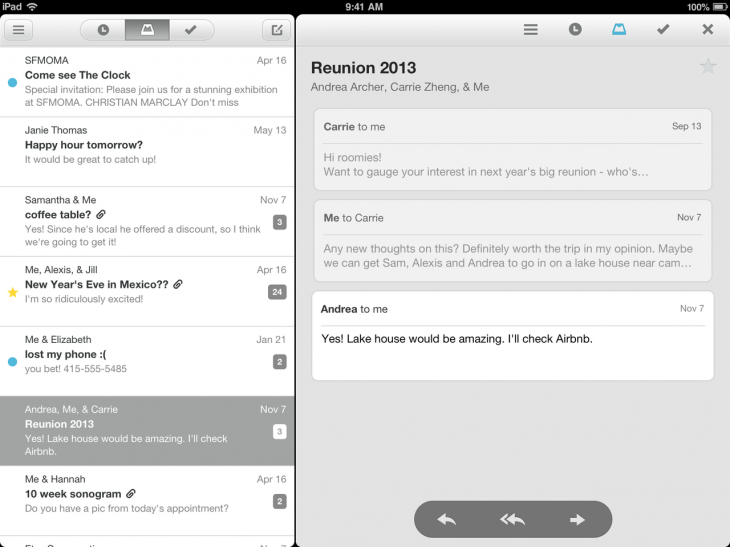
Mailbox, the highly anticipated third-party Gmail client for the iPhone from Orchestra, is now available in the App Store. Here’s the essence of why Mailbox is meant to be a better mobile email client:

  • Mailbox is light, fast, and mobile-friendly.
  • Swipes make checking mail from your phone a delight.
  • Snoozes let you put off an email until later and remind you when the time has come.
  • Mailbox makes getting to inbox zero, and staying there, a breeze.

The app is free, but you’ll need a reservation code to use it today. These codes were given out on a first-come, first-served basis a few weeks ago to anyone who signed up for the app in advance. This system was put in place to prevent the company’s servers from being overwhelmed, as there is substantial demand for the free app.

Screenshots and video overview:


Expand
Expanding
Close