MacBook Pro: The biggest and baddest Mac laptops

See All Stories

Apple's premium laptop comes in 13- and 16-inch screen sizes. Each model includes 2-4 USB-C ports for charging, accessories, and data transfer. Higher-end models also include the Touch Bar.

2021 MacBook Pro

MacBook Pro has been the product name for Apple’s high-end laptop since early 2006 when the transition to Intel processors began. Now, that Pro naming has carried forth as Apple has moved to its own silicon. The latest fourth and fifth-generation Pro Apple notebooks bring dramatically more power with lower heat generation and better battery life thanks to the ARM-based Apple silicon. Keep reading for a brief history of the line and a breakdown of the current lineup.

MacBook Pro history

The first generation MacBook Pro followed in the style of the PowerBook G4 that came before it, but used Intel processors rather than PowerPC chips.

The second generation of the MacBook Pro was the first to really separate itself from the products before, with a unibody enclosure. The third-generation MacBook Pro introduced the retina display as well as MagSafe 2.

Perhaps the most controversial version of the MacBook Pro is the fourth generation. While the third generation received some backlash for the removal of ethernet and the optical drive, the fourth generation was a complete rethinking of the device peripherals. No more MagSafe, no more USB-A ports, and only the 13-inch model kept the function keys. Instead, this redesigned MacBook Pro opted for all Thunderbolt 3 ports and headphone jack. In place of function keys, the MacBook Pro gained an OLED Touch Bar. In late-2020, Apple introduced the M1 chip and updated the 13-inch MacBook Pro. The ARM-based processor brought down power consumption and increased performance.

In October of 2021, Apple introduced the fifth-generation MacBook Pro with not one but two updated versions of the M1 chip, the M1 Pro and M1 Max. The move walked back some of the decisions from the previous generation, adding back an HDMI Port, MagSafe charger, and SD card reader while removing the Touch Bar.

The 2020 13-Inch MacBook Pro

In late 2020, Apple introduced the 13-inch M1 MacBook Pro as the latest update to the fourth-generation MacBook. The MacBook features the same look as previous MacBooks, but like the MacBook Air and Mac Mini, switched to Apple silicon.

Apple’s M1 chip brought ARM architecture to the MacBook line, and this was the first MacBook without an Intel processor.

The M1 chip is a unified design with an 8-core CPU and an 8-core CPU. The processor integrated memory on board, limiting the device to either 8GB or 16GB of unified memory. The 13-inch M1 MacBook Pro is configurable with between 256GB and 2TB of storage and features a Magic Keyboard, rather than the problematic butterfly keyboard.

13-inch MacBook Pro specs

Base Configuration$1,299.00

  • Apple M1 chip with 8‑core CPU, 8‑core GPU, and 16‑core Neural Engine
  • 8GB unified memory
  • 256GB SSD storage
  • 13-inch Retina display with True Tone
  • Backlit Magic Keyboard – US English
  • Touch Bar and Touch ID
  • Two Thunderbolt / USB 4 ports

Max Configuration$2,299.00

  • Apple M1 chip with 8‑core CPU, 8‑core GPU, and 16‑core Neural Engine
  • 16GB unified memory
  • 2TB SSD storage
  • 13-inch Retina display with True Tone
  • Backlit Magic Keyboard – US English
  • Touch Bar and Touch ID
  • Two Thunderbolt / USB 4 ports

13-inch MacBook Pro pricing

The price for the 13-inch M1 MacBook Pro starts at $1,299. Upgrading this base configuration to 16GB of memory adds $200 to the price. Likewise, each step above 256GB of storage – 512GB, 1TB, and 2TB – will add $200 to the price. A fully specced out 13-inch MacBook Pro will run you $2,299.

You can configure your own 13-inch MacBook Pro on Apple’s website.

Current 14-inch and 16-inch MacBook Pro

In October 2021, Apple brought a brand new design to the MacBook Pro line. Apple increased the screen size on the 13-inch, making it a 14-inch, and shrunk the bezels on the 16-inch. This fifth-generation notebook addressed many complaints of the last generation. MagSafe returned, in the form of an improved MagSafe 3, while the MacBook also regained an HDMI port and an SD-card slot.

Also gone is the Touch Bar. Instead, the standard row of function keys return. The latest MacBooks also bring a ProMotion display that was first introduced on the iPad Pro, with a variable refresh rate and mini-LED backlight.

The 2021 MacBooks aren’t without a controversial feature, as while the display has been made larger there is now a large notch for the 1080P FaceTime camera. While FaceID would have been a nice addition in exchange for this small chunk of the screen, there are some reasons this is not totally practical.

14-inch MacBook Pro specs

Base Configuration$1,999.00

  • Apple M1 Pro with 8-core CPU, 14-core GPU, 16-core Neural Engine
  • 16GB unified memory
  • 512GB SSD storage
  • 67W USB-C Power Adapter
  • 14-inch Liquid Retina XDR display
  • Three Thunderbolt 4 ports, HDMI port, SDXC card slot, MagSafe 3 port
  • Backlit Magic Keyboard with Touch ID – US English

Maximum Configuration$5,899.00

  • Apple M1 Max with 10-core CPU, 32-core GPU, 16-core Neural Engine
  • 64GB unified memory
  • 8TB SSD storage
  • 96W USB-C Power Adapter
  • 14-inch Liquid Retina XDR display
  • Three Thunderbolt 4 ports, HDMI port, SDXC card slot, MagSafe 3 port
  • Backlit Magic Keyboard with Touch ID – US English

14-inch MacBook Pro pricing

The 14-inch MacBook Pro starts at $1,999. The base model includes 16GB of memory, 512GB of storage, and an M1 Pro processor with an 8-core CPU and 14-core GPU. There are multiple versions of the M1 Pro processor available, while jumping to an M1 Max processor will cost $500 more, and requires you to jump up to 32GB of memory – a $400 upgrade. Going with the M1 Max processor means you can configure up to the full 64GB of memory, an $800 upgrade.

You can configure up to 8TB of storage in the 2021 14-inch MacBook Pro. Upgrade costs are as follows:

  • 1TB SSD Storage – $200
  • 2TB SSD Storage – $600
  • 4TB SSD Storage – $1,200
  • 8TB SSD Storage – $2,400

You can configure your own 14-inch MacBook Pro on Apple’s website.

16-inch MacBook Pro specs

Base Configuration$2,499.00

  • Apple M1 Pro with 10-core CPU, 16-core GPU, 16-core Neural Engine
  • 16GB unified memory
  • 512GB SSD storage
  • 16-inch Liquid Retina XDR display
  • Three Thunderbolt 4 ports, HDMI port, SDXC card slot, MagSafe 3 port
  • 140W USB-C Power Adapter
  • Backlit Magic Keyboard with Touch ID – US English

Maximum Configuration$6,099.00

  • Apple M1 Max with 10-core CPU, 32-core GPU, 16-core Neural Engine
  • 64GB unified memory
  • 8TB SSD storage
  • 16-inch Liquid Retina XDR display
  • Three Thunderbolt 4 ports, HDMI port, SDXC card slot, MagSafe 3 port
  • 140W USB-C Power Adapter
  • Backlit Magic Keyboard with Touch ID – US English

16-inch MacBook Pro pricing

The 16-inch MacBook Pro starts at $2,499. There is only one M1 Pro processor available on the 16-inch MacBook, and that’s the highest version 10-core CPU, 16-core GPU version of the M1 Pro processor that is a $300 upgrade on the 14-inch MacBook Pro. Of course, you can also step up to the M1 Max processor with either a 24-core or 32-core GPU, a $200 and $400 upgrade respectively (which also requires the $400 upgrade to 32GB of memory). The memory and storage options are all the same as the 14-inch MacBook Pro.

You can configure your own 16-inch MacBook Pro on Apple’s website.

Differences between 13-inch,14-inch, and 16-inch models

The 2021 MacBook Pro lineup is a refreshing change. The return of ports and physical keys make the laptops more versatile, while additions like an XDR display and hardware acceleration for ProRes improves the experience but is harder to quantify for the average user.

13-inch14-inch16-inch
ProcessorM1M1 Pro / M1 MaxM1 Pro / M1 Max
Memory8GB / 16GB16GB / 32GB / 64GB16GB / 32GB / 64GB
Storage512GB, 1TB, 2TB512GB, 1TB, 2TB, 4TB, 8TB512GB, 1TB, 2TB, 4TB, 8TB
Screen2560×1600 pixels 3024×1964 pixels; ProMotion3456×2234 pixels; ProMotion
Weight3.0 pounds (1.4 kg)3.5 pounds (1.6 kg)M1 Pro: 4.7 pounds (2.1 kg)
M1 Max: 4.8 pounds (2.2 kg)
Size (Width x Depth)11.97 x 8.36 inches (30.41 x 21.24 cm)12.31 x 8.71 inches (31.26 x 22.12 cm)14.01 x 9.77 inches (35.57 x 24.81 cm)
Height0.61 inch (1.56 cm)0.61 inch (1.55 cm)0.66 inch (1.68 cm)
Base Price$1,299.00$1,999.00$2,499.00

The $1,999 starting price for Apple latest computer is a harder pill to swallow than the $1,300 13-inch Pro from last year. For an average user, the superb M1 MacBook Air will likely suffice (and that sub-$1,000 price is hard to pass up).

But the 2021 14-inch and 16-inch MacBook Pro are exactly what they need to be, a return to function-over-form that will truly meet the needs of professional users.

Site default logo image

9to5Toys Last Call: iPad Air 2 $489 w/ $100 gift card, iPhone 6 discounts, Retina MacBook Pro (2013) $1149, more

Keep up with the best gear and deals on the web by signing up for the brand new 9to5Toys Newsletter. Also, be sure to check us out on: TwitterRSS FeedFacebookGoogle+ and Safari push notifications.

Today’s can’t miss deals:


16 GB iPad Air 2 (Wi-Fi model): $489 + get a $100 gift card (orig. $499)

iPhone deals at Walmart:

  • Get a $75 Walmart gift card when you buy a new iPhone 6 or iPhone 5s
  • iPhone 6 (16 GB) priced at $179 on contract (orig. $199)
  • iPhone 5s (16 GB) priced at $79 (orig. $99)

Apple 13.3-inch Retina MacBook Pro (2013) 2.4GHz/8GB/256GB: $1,149 shipped (orig. $1,399)

First look: LifeProof starts taking orders for its waterproof iPhone 6 frē case

Amazon offers $40 off Kindles, Fire TV and more w/ Prime membership purchases

Twelve South makes the best iPhone 6/iPad dock even better by simplifying its setup and adding a gold color option

Small States – TM1985: former Ralph Lauren designer goes American made w/ elegant backpacks, $407 giveaway + 25% discount


Other new deals:


More deals still alive:

Black Friday:

We’re updating our email newsletter with Black Friday/holiday shopping ideas and savings

Top leaks:

All other leaks/info:

New products/ongoing promos:

Disney announces Disney Infinity 2.0 mobile built w/ Metal, new ESPN app, and more during today’s special event

Site default logo image

Today’s Disney Mobile Product Showcase kicked off with Disney’s CEO, Bob Iger, sharing a Steve Jobs anecdote. No matter the time or place it’s always incredibly interesting to hear personal stories of Apple’s late leader.

Iger recalled the time when he contacted his buddy Jobs with what he thought was a novel idea: to unleash movies/TV shows like iTunes did for music. Of course, being the visionary he was, Jobs had already thought of this and even brought an early version of the iPod with video to the meeting. And of course, being the businessman he was, Jobs then asked Iger if he would commit Disney content to the project.

Iger used this story as a jump off for a two hour presentation in which other Disney, ESPN, and ABC executives would showcase a smattering of new mobile apps, games, and products…


Expand
Expanding
Close

Site default logo image

9to5Toys Last Call: Retina MacBook Pro (2013) $200 off, Air-Fi wireless over-ears $40, 4-port charger $10, more

Be sure to follow 9to5Toys to keep up with the best gear and deals on the web: TwitterRSS FeedFacebookGoogle+ and Safari push notifications.

Today’s can’t miss deals:

Apple Deals:

MEElectronics Air-Fi AF52 wireless over-ear headphones $40 shipped (orig. $120), more

USB Charging: 4-port wall charger $10, Lumsing 4000mAh powerbank $18, Poweradd charger w/flashlight $19, much more

Small States – DODOcase uses old world craftsmanship to protect your modern devices, giveaways & 20% off promo code

Other new deals:

More deals still alive:

Black Friday:

New products/ongoing promos:

Pixelmator 3.3 released with OS X Yosemite optimizations, Repair Tool extension

Site default logo image

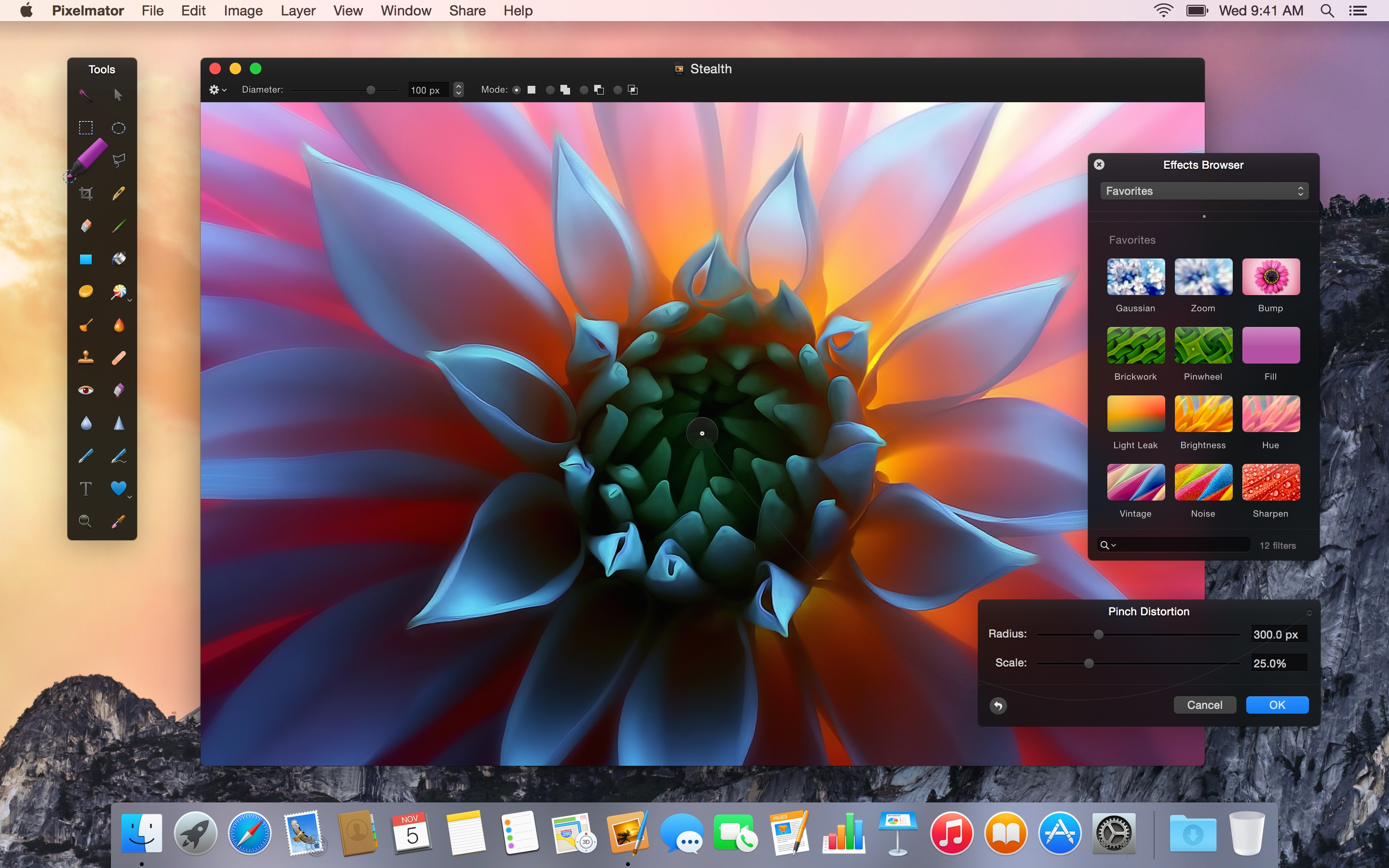
Hot off the heels of their iPad app, the Pixelmator team have today released Pixelmator 3.3 for Mac. This update centers around design and structural optimizations for OS X Yosemite, including an extension for integration with other apps and a new icon to match the ‘flatter’ aesthetic of the operating system. The update also includes a new file format to improve syncing and compatibility with the iPad version.

Although the app largely resembles previous versions, with custom floating panels and black chrome, it now takes advantage of Apple’s transparency effects to mesh well with the OS.


Expand
Expanding
Close

Apple faces class-action lawsuit over 2011 MacBook Pro GPU issues

Following a petition with thousands of signatures related to GPU complaints, Apple has been named a defendant in a new class-action lawsuit filed against the Cupertino-based company in the United States District Court for Northern California over system failures and graphical issues affecting 2011 MacBook Pros.

The class-action lawsuit was filed by Kentucky-based law firm Whitfield Bryson & Mason on behalf of plaintiffs Zachary Book, Donald Cowart, and John Manners, a trio of individuals that accuse Apple of failing to rectify the graphical issues that have affected both 15-inch and 17-inch MacBook Pro models released in 2011.
Expand
Expanding
Close

2011 MacBook Pro GPU complaints not going away as petition reaches 18k signatures

Site default logo image

Update: Repair Extension Program…

Long-standing complaints that the 2011 MacBook Pro suffered from a manufacturing fault resulting in GPU glitches and failures don’t appear to be going away, as an online petition calling for Apple to fix or replace affected machines reaches more than 18,000 signatures.

To:
Timothy D. Cook, Apple Inc
Craig Federighi (Apple Inc) (Apple Inc), Apple Inc

Replace or Fix All 2011 Macbook Pro with Graphics Failure

The petition notes the premium spent to buy Apple laptops, and says that Apple’s only response to date has been to ask owners to pay for an extremely expensive logic board replacement … 
Expand
Expanding
Close

KGI: 27″ Retina iMac ready to roll, 21″ next year, iPad Air 2 supply constrained, iPad minis to see minimal updates

Site default logo image

KGI has published a new research note indicating that the 27″ model of the new “Retina” iMac will begin shipping before the end of this year. However, according to the note, a 21-inch version which is currently in development will not be released until the beginning of 2015, probably alongside other products “early 2015” like the Apple Watch and Photos for Mac.

With regards to the iPad Air 2, KGI says that constrained supplies are likely, with a possible initial shipment of only 7-9 million. Compare that to the original iPad Air, which kicked of sales with 12 million units. The iPad mini will be updated, but the changes will be more conservative than those coming to the Air. A 12.9″ iPad is also said to be in development, though no timeline seems to have been set for its release.


Expand
Expanding
Close

Review: Apple wireless keyboard for Logic Pro X from EditorsKeys

Site default logo image

There are a few companies that make skins specifically for Apple’s keyboards to add icons for the various shortcuts that pros use daily in apps like Logic Pro and Final Cut. I’ve tried a few in the past, but the benefits never seemed to outweigh the tradeoff of putting a clunky rubber skin over Apple’s masterfully built keyboard. The latest Logic keyboard I received in for review from EditorsKeys, however, has actually won me over and proven up to the task of permanently replacing my stock Apple keyboard.
Expand
Expanding
Close

Site default logo image

PARC scientist retells story of Jobs at Xerox: ‘You’re sitting on a gold mine!’ (Video)

Fortune has flagged up a video from 2011 of an eyewitness retelling how Jobs behaved and interacted when seeing Xerox’s PARC revolutionary graphical user interface inventions for the first time. Although the video is old, it seems to have gone largely unnoticed until this week and features some interesting anecdotes about the events.


Expand
Expanding
Close

Review: Lumsing Prophet $20 Bluetooth Speaker/phone rocks out with its dock out

Site default logo image

Although we’ve covered the gamut of portable Bluetooth speakers here at 9to5Mac, we typically recommend higher-end products like the Bose Soundlink Mini ($199), JBL Charge ($138) or Ultimate Ears Mini/Boom ($80/$179). It’s usually not worth cheaping out on Bluetooth speakers (unless you are looking for niche products like wearables) because the sound quality degrades heavily once you drop below the top tier. Sadly, today’s entrant into the Bluetooth speaker cage-match lot isn’t going to compete with any of the $100+speakers above. But I have to say, the Lumsing Prophet isn’t bad at all, especially if you aren’t listening to bass-heavy tracks. And, the freaky part is it only costs $20 bucks after coupon code PROPHET0 (expires 8/13) at Amazon which makes it an absolute steal…
Expand
Expanding
Close

Site default logo image

Review: Inateck’s felt sleeve for the 13-inch Retina MacBook Pro and 11-inch MacBook Air

MacBook sleeves and bags are practically a commodity today, with a wide variety of options and styles available for purchase at almost all online and offline retailers, and for good reason. Even as Apple’s portable computers trend towards lighter and more durable designs, a practical carrying case is still essential for any kind of travel. I’ve been using Inateck’s felt sleeve style MacBook cover for the past several weeks- a durable, unobtrusive, and light way to protect a 13-inch Retina MacBook Pro or 11-inch MacBook Air. Let’s take a closer look at the product.


Expand
Expanding
Close

Site default logo image

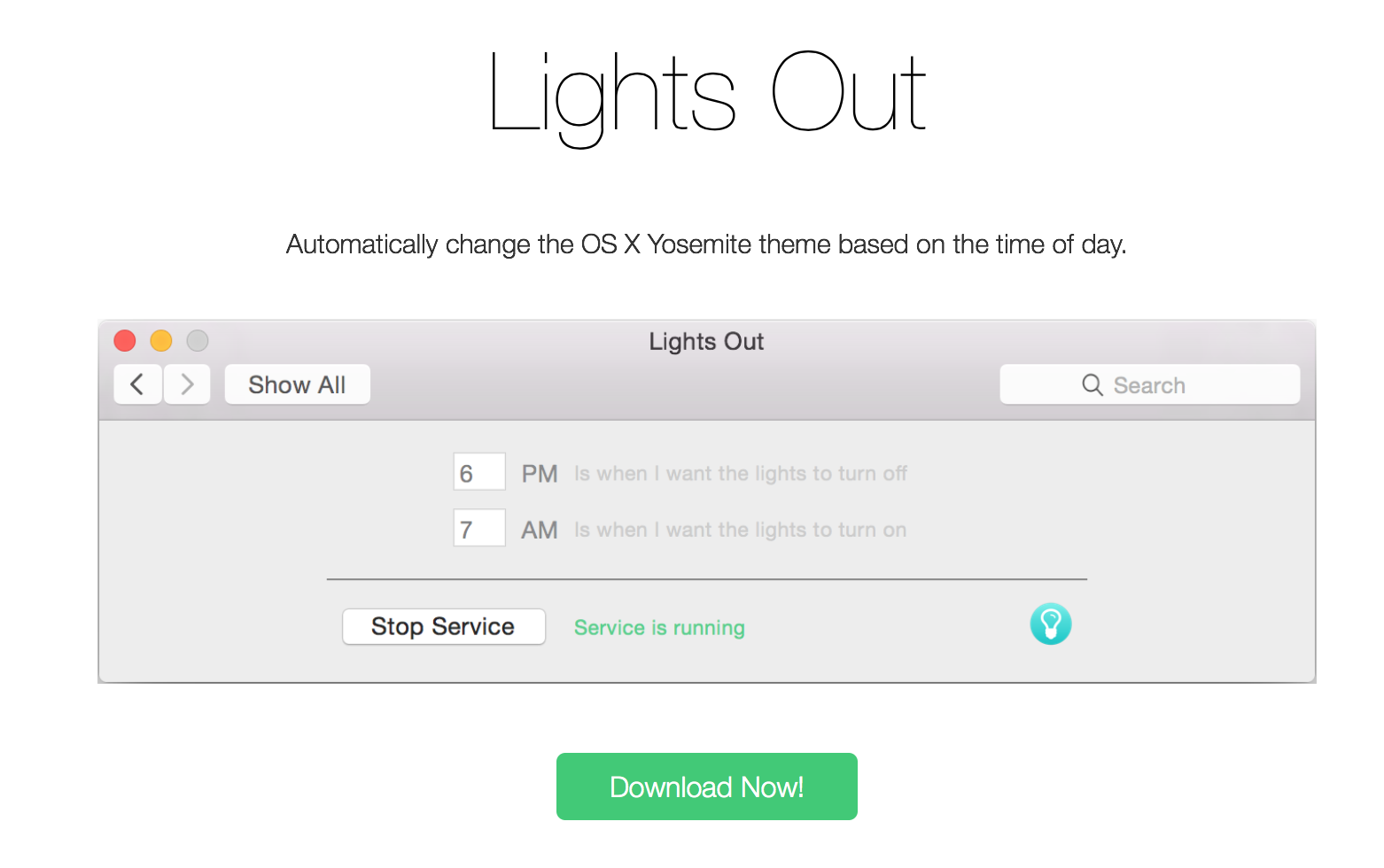
Make OS X Yosemite’s dark mode turn on automatically with this neat utility

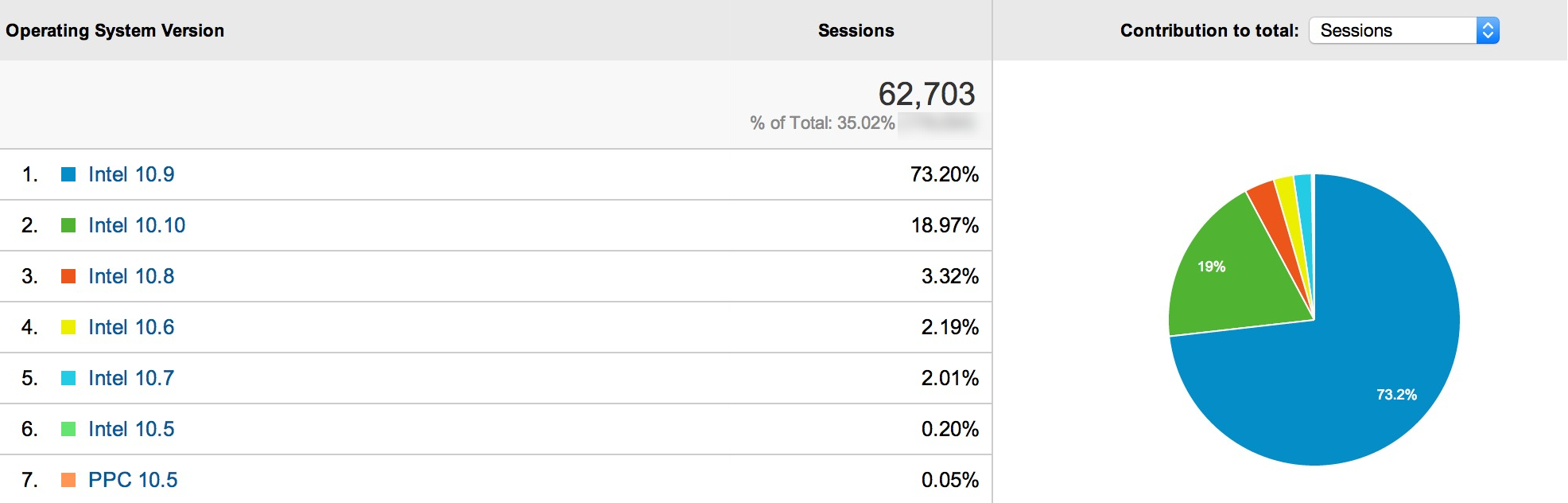
Although OS X Yosemite is still a few months out from public release, the public beta and developer seeds means the OS is already seeing wide adoption — hence, apps for Yosemite are already starting to surface. In fact, the unreleased OS already makes up 18% of Mac users on 9to5Mac, already the second most popular version of OS X.


Expand
Expanding
Close

Apple support page also listed as yet unseen ‘mid-2014 iMac 27’

Site default logo image

The same Bootcamp support page that either reveals an upcoming Mac mini refresh or a misprint also listed an iMac 27-inch mid-2014′ model before the page was updated – spotted by French site Consomac.

The model was listed above the 21.5-inch mid-2014 iMac released last month. That model was a low-end one, with a 1.4GHz dual-core i5 processor and 500GB hard drive. That might suggest a new entry-level 27-inch iMac is on the way – though Apple doesn’t generally offer a low-spec version of the larger iMac … 
Expand
Expanding
Close

Mid-2014 Mac mini listed on Apple Support page, but no 2014 Mac mini in sight

Site default logo image


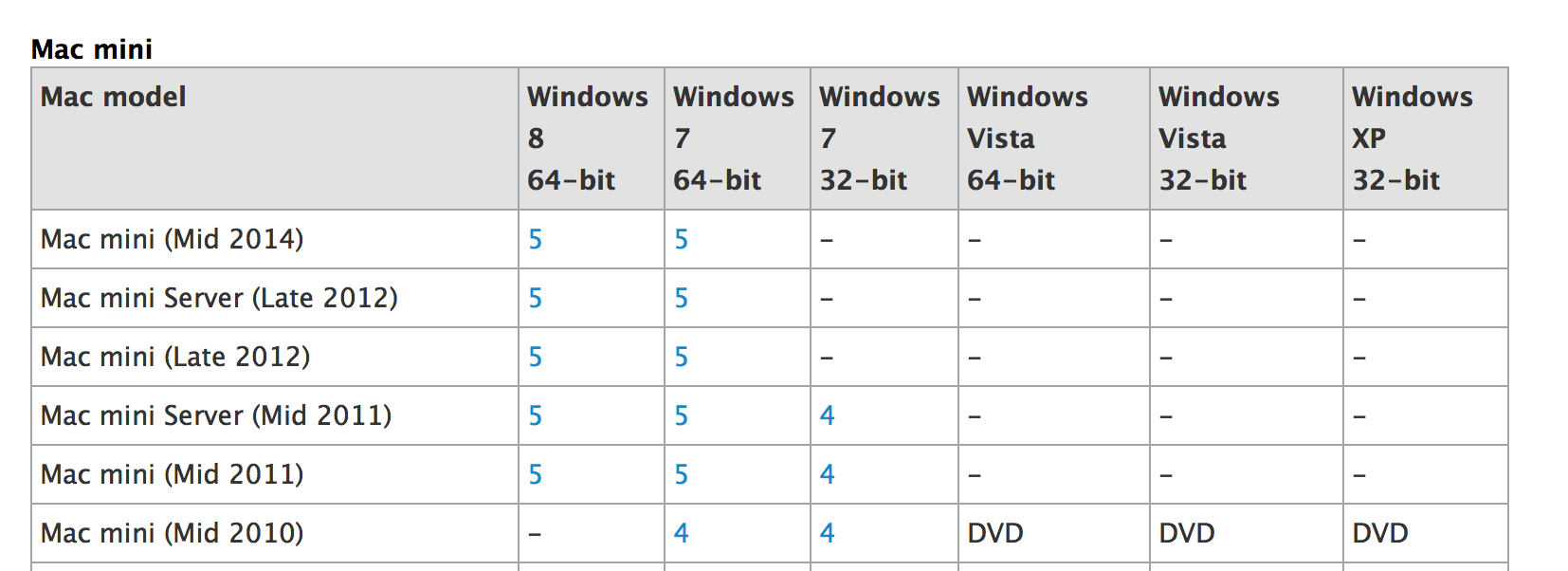
Apple seems to have inadvertently referenced a new model of Mac mini on an Apple Support page. The page was last modified yesterday, presumably to include information on the new MacBook Pro’s but instead lists “Mac mini (Mid 2014)” as a supported machine. There is a possibility that this is simply a human error on Apple’s part, of course, confusing the MacBook Pro and the Mac mini updates. There haven’t really been rumors of a new Mac mini being in the works, but due to the relative unimportance of the product in the Mac lineup, it is not of the question for it to have slid under the radar.


Expand
Expanding
Close

Apple refreshes entire Retina MacBook Pro lineup with improved processors and more RAM standard

Site default logo image

As expected, Apple has pushed out an upgrade to the Retina MacBook Pro lineup. Both the 15-inch and 13-inch models were updated, and two models received price drops.

Each 15-inch model received a modest processor speed bump, starting with a new 2.2 GHz chip in the base model, followed by 2.5 GHz in the upgraded version. The Turbo Boost speeds of each model are now up to 3.4 and 3.7 GHz, respectively. Both of the new models include 16 GB of RAM standard. The graphics processor in the upgraded model is still an NVIDIA GeForce 750M with 2 GB of VRAM.

A built-to-order option for a 2.8 GHz processor is also now available for the 15-inch model, which features Turbo Boost speeds of up to 4.0 GHz.


Expand
Expanding
Close

Modest Retina MacBook Pro refresh expected tomorrow, still with GeForce GT 750M but base RAM up to 16GB

Site default logo image

The unverified photo from a Chinese Apple Store appearing to show a slight refresh to the Retina MacBook Pro launch is accurate, claims French site MacG, citing a reliable source. The site claims that the refreshed models will go on sale tomorrow.

The refresh is a minor one, with a modest speed boost of 200MHz and an increase in RAM across the range to 16GB. Apple is also, for the first time, offering a 1TB SSD in a standard model … 
Expand
Expanding
Close

Faster Retina MacBook Pros w/ 16GB of RAM across the board teased by unverified Apple Store photo

Site default logo image

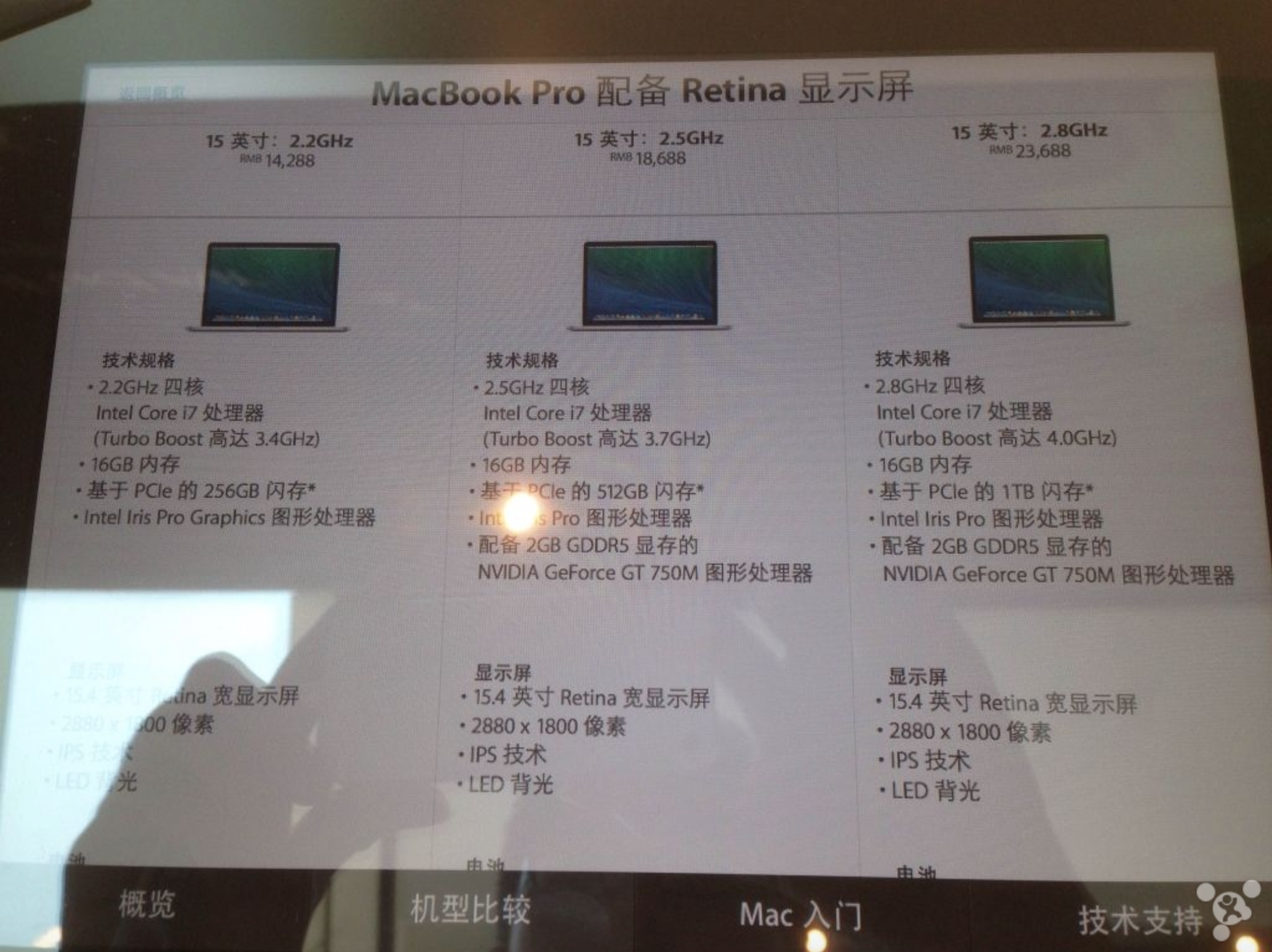
An image posted on a Chinese forum, claimed to have been taken inside of Apple’s new Paradise Walk store, indicates that Apple could be preparing to release an updated line of Retina MacBook Pros in the near-future. The image appears to be from one of Apple’s iPad Smart Signs within the store, and the sign advertises 15-inch MacBook Pros with technical specifications and features not found in the current lineup.

The first possibility is that this image is faked, but the other likely possibility is a system error on Apple’s part. There’s also room for this image to indicate an actual MacBook Pro lineup update coming in the near-future. The rumored specifications indicate that Apple will be bumping the standard 15-inch Retina MacBook Pro line from two models to three, and all will include 16GB of RAM as a standard option. Here are all the purported models:

  • 2.2GHz Intel Core i7 (Turbo Boost to 3.4GHz), 16GB of RAM, 256GB of storage, and Intel Iris Pro Graphics
  • 2.5GHz Intel Core i7 (Turbo Boost to 3.7GHz), 16GB of RAM, 512GB of storage, and Intel Iris Pro Graphics & NVIDIA GeForce GT 750M w/2GB Video Memory
  • 2.8GHz Intel Core i7 (Turbo Boost to 4.0GHz), 16GB of RAM, 1TB of storage, and Intel Iris Pro Graphics NVIDIA GeForce GT 750M w/2GB Video Memory

For comparison, here is the current MacBook Pro with Retina display lineup:


Expand
Expanding
Close

Site default logo image

How-to: Use Spotlight and Smart Folders to search for anything on your Mac

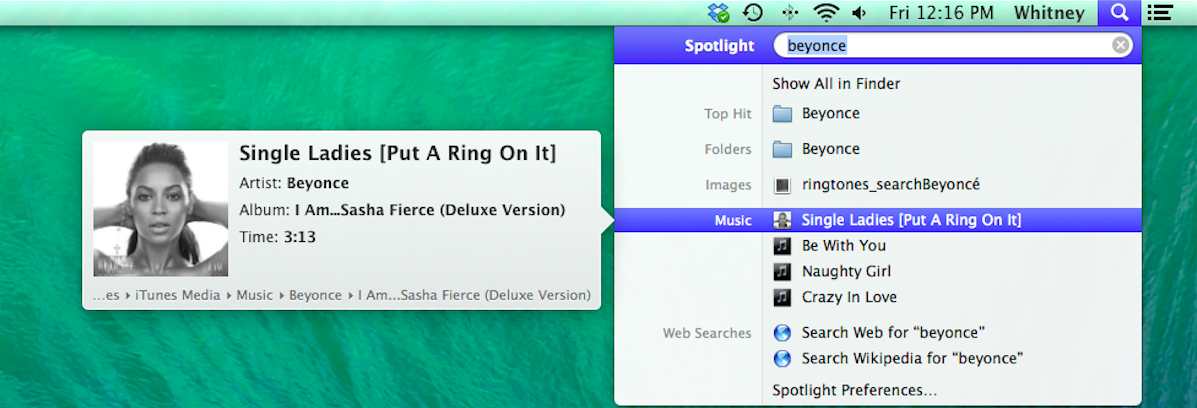
In OS X, Spotlight is an effective way to search your entire hard drive for a file or folder, email, or any other file. There are many other things Spotlight can do, and searching for files is just one of them. Spotlight is also capable of looking up dictionary definitions, launching apps, performing calculations, previewing audio, video, documents, and other files. This article will outline some of the benefits of using Spotlight and how to use Smart Folders, which allow you to search for a file even if you don’t know its name.


Expand
Expanding
Close

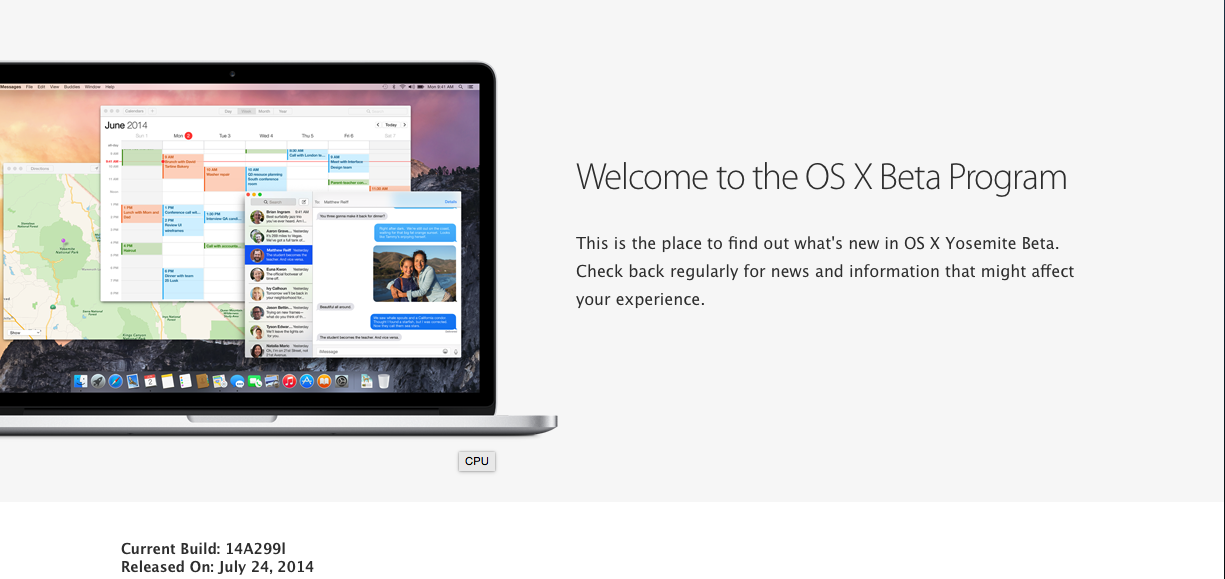
Apple releases OS X Yosemite Public Beta

Site default logo image

Apple has started sending out OS X Yosemite builds for Beta Program, as announced yesterday. The build is being sent out to a million Beta Program members. Participants can get a redemption code from the site, to redeem in the Mac App Store.

Apple has said that Apple will not update the Beta Program Yosemite builds as often as the developer seeds (which come out every two weeks, usually), but participants will be able to upgrade to the final public version of Yosemite seamlessly through the App Store, when it is released.  The seed released in the beta program is one build newer than the one released to developers on Monday.


Expand
Expanding
Close

Intel launches updated Haswell chips, likely to appear in upcoming MacBook Pro spec bump

Site default logo image

Intel has debuted the next generation of its Core i5 and i7 processors, according to a report from CPU World. Each of these updated chips sports a 200 MHz speed boost over its previous incarnation, which can currently be found in the MacBook Pro lineup. It’s likely that these processors will be found in a spec-bumped version of the MacBook Pro later this year.

The current series of MacBook Pro processors are available at clock speeds of 2.0 GHz (in the lowest-end 13-inch model) up to 2.6 GHz (in the top-of-the-line, built-to-order 15-inch model). The next-gen models released this week range from 2.2 to 3.0 GHz, which will provide a decent speed boost to each model.


Expand
Expanding
Close

Review: Kickflip is a cool, simple, and affordable stand for your MacBook

Site default logo image

For the past couple of weeks, I have been testing a new MacBook stand called the Kickflip. I’ve used some of the more high-end stands for my laptop in the past as it improves the ergonomics involved with keyboard typing and because it improves the cooling of the computer. This new Kickflip is not stationary like some other stands on the market, but it is an accessory that sticks to the bottom of your laptop. The stand can be closed for when you want to keep the laptop in a bag or carry it around, and you flip out the kickstand when you want to raise up your laptop. The experience is nice, the stand is sturdy, and I very much have enjoyed using the Kickflip…


Expand
Expanding
Close

Review: Transcend’s JetDrives add whopping 240-960GB SSD to MacBook Air at a great price

Site default logo image

See that little $190 daughter card up there^? It houses 240GB of Transcend SSD and it could replace the 64GB or 128GB SSD that came in your MacBook Air in as little as 5 minutes. Even better, Transcend just released larger versions in 480GB and 960GB sizes to blow your SATA III MacBook Air or Pro into new worlds of space. Keep in mind these are SATA-based SSDs and Apple’s latest round of MacBook Pro/Airs came with speedier PCIe SSDs so you can’t use these on Apple’s late 2013/2014 models (see bottom of the article for compatibility list).

I got my hands on a demo unit and took it for a test drive…


Expand
Expanding
Close

Site default logo image

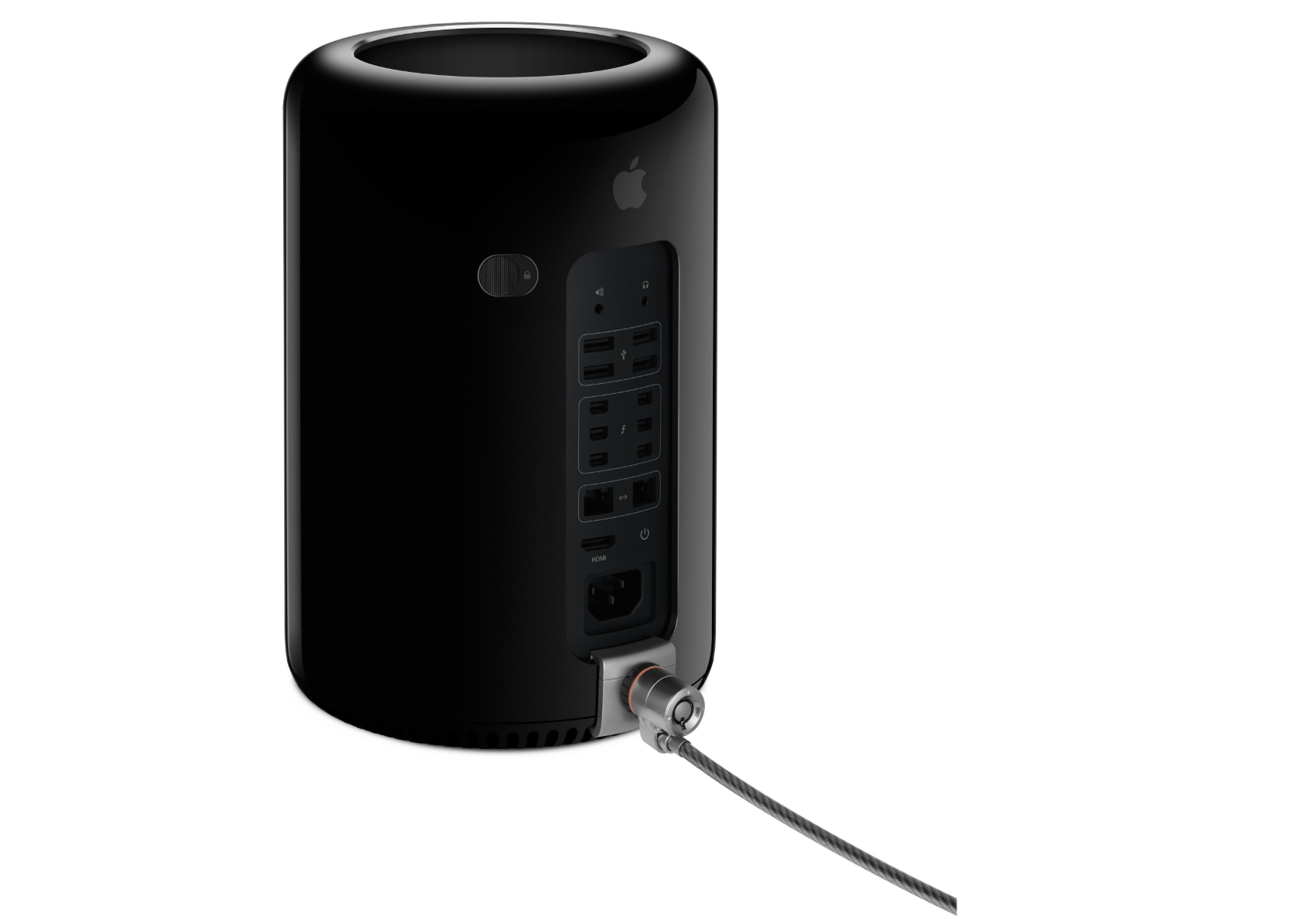
Apple introduces official $49 Mac Pro Security Lock Adapter, connects with Kensington locks

Apple has quietly introduced an official solution for users seeking to lock their 2013 Mac Pro to a stationary desk or other item. The $49 adapter attaches to the rear of the Mac Pro without any additional tools or instruction and can connect to a series of different Kensington locking mechanisms (via MacRumors). Here are the accessory’s highlights from Apple:

  • Enables Mac Pro (Late 2013) to be physically secured with a compatible lock (sold separately)
  • Attaches to Mac Pro without tools or enclosure modification
  • With a third-party lock attached, prevents Mac Pro from being opened, protecting internal components
  • Compatible with most standard Kensington or similar lock products

Earlier this year, third-party solutions with a more advanced setup process began hitting the Mac Pro accessory marketplace. This new Apple adapter marks the second first-party accessory optimized for the new Mac Pro design. Alongside the computer’s launch, Apple released black Thunderbolt cables to match the exterior color of the computer.

Customers interested in the new lock adapter will have the easiest time purchasing it from the Apple Online Store, which is currently showing shipment times of 24 hours. Apple’s stores, according to Apple’s ship to store tool, are not yet stocking the adapter.


Expand
Expanding
Close

Site default logo image

How-to: Request an iTunes purchase refund if you have a legitimate reason

When you purchase an item from the App Store or iTunes, it is possible to obtain a refund on items purchased within the past 90 days if you have a legitimate reason. For example, you might buy the live version of a song when you meant to get the studio version. It is certainly possible to download the wrong app inadvertently, especially on an iOS device.

In this article, I will outline the process of how report a problem (and request a refund) with items purchased in the App Store or iTunes.


Expand
Expanding
Close