App Store

See All Stories

European Commision to accuse Ireland of giving illegal state aid to Apple, fines could be €Billions

Site default logo image

It looks like this week’s Apple “xxx-gate” is a big one with the Financial Times reporting that the European Commision is about to come down hard on Apple for its long held tax avoidance strategies in Ireland.

Typically the EU has used its state aid powers to address broader competition issues. But in the past year Brussels has attempted to target the tax affairs of companies such as Apple, Starbucks and Amazon. It is a novel application of the law with far-reaching implications, not just for the companies, or EU countries, but for EU-US relations in general.

This week the European Commission will publish the first findings in the Apple case. The details – including evidence from bygone tax negotiations – are likely to be explosive.

The US is no happier with Apple’s use of specially created Irish tax loopholes which allow it to avoid paying taxes it would otherwise be due. Apple CEO Tim Cook and other execs faced Senate Subcommittee questioning in May in which focused on Apple’s tax avoidance schemes.

Did Apple apply pressure to Irish authorities in 1991 and again in 2007 when negotiating tax deals and if so were these illegal competitive measures that gave Apple advantages over competitors? Luca Maestri, Apple’s finance chief, of course denies any wrongdoing…
Expand
Expanding
Close

Apple removes Launcher app from App Store for ‘misuse’ of iOS 8’s widget capability

Site default logo image

An iOS 8 app that allowed users to create custom shortcuts and access them from a Notification Center widget has been removed from the App Store by Apple for what it calls “misuse of widgets,” the developers said in a notice posted on the app’s website.

The app, called Launcher, worked by letting users enter a URL or select an application to be launched when a shortcut was tapped. The shortcuts would then be displayed in Notification Center, allowing quick access to a variety of tasks such as starting a phone or FaceTime call, creating a new text message, email, or iMessage, opening an application, or more.


Expand
Expanding
Close

‘Apps for Health’ section hits App Store following Apple’s release of Healthkit enabled iOS 8.0.2

Site default logo image

Now that Apple is 8.0.2 rolled out and we’re all relatively stable with a Healthkit-enabled OS, Apple is giving us a new section of the App Store for health-related apps. 

Experience an entirely new approach to wellness where your fitness app can talk to your calorie tracker, your doctor can be automatically notified of updates to your health data, and great apps work together for a healthier you. This handpicked collection highlights the best fitness, nutrition, and medical apps customized for iOS 8.

Red prices on pink background?  They must have moved that Maps launch and iOS 8.0.1 guy over to design. 
Expand
Expanding
Close

Site default logo image

MLB At Bat app will for the first time live stream every World Series game, select Postseason games

The MLB.com At Bat app was updated today alongside a couple notable announcements including the league’s plan to live stream every World Series game and select Postseason games to all of its MLB.TV Premium subscribers through the app. The 2014 World Series is set to kick off on October 21. 

The release notes add that the app will now also offer “Live Postseason coverage for every game through the 2014 World Series” and a Postseason.TV feature with “Live companion coverage featuring up to 10 alternate camera angles for the AL Wild Card, AL Division Series and AL Championship Series (TBS broadcasts only).”

The update MLB.com At Bat app is available in the App Store now for iPhone and iPad. Regular $129 for the full year, an MLB.TV Premium subscription is available to purchase now for $3.99 for the remainder of the season, World Series, and postseason. 

What’s New in Version 7.4.2

• For the first time we will be streaming live every World Series game and select other Postseason games to all authenticated MLB.TV Premium subscribers
• Live Postseason coverage for every game through the 2014 World Series
• Postseason.TV: Live companion coverage featuring up to 10 alternate camera angles for the AL Wild Card, AL Division Series and AL Championship Series (TBS broadcasts only)
• General performance improvements

Instagram’s Hyperlapse video shooter adds support for front camera & iPhone 6/6 Plus

Site default logo image

Last month Instagram launched a new video shooting app for iPhone and iPad that combines effects like time-lapse and cinema stabilization called Hyperlapse. Today Instagram is introducing what they call the “selfielapse” by adding support for shooting Hyperlapse videos with the front facing camera on your device using the same features previously only available on the back camera…


Expand
Expanding
Close

Site default logo image

Google’s Currents iOS app redesigned & renamed ‘Google Play Newsstand’

Following the renaming of its Google Currents news reader app to “Google Play Newsstand” on Android back in February, Google has now given a similar treatment to the iOS app. The app, like the Android version earlier this year, also receives a makeover in the process with a streamlined design and new features:

What’s new
• New navigation helping you easily access the articles and editions you love including:
– Read Now – Easily access articles you subscribe to and discover new articles and editions all in one place
– Topics – Subscribe and get news from topics you are most interested in
– My Library – All of your subscriptions will be found here
• A brand new design giving you a streamlined news reading experience

The Google Play Newsstand app is available for free for iPhone and iPad on the App Store now.

Apple: Almost 50% of the iOS devices that visited the App Store Sunday were iOS 8 (9to5Mac readers: 80%)

Site default logo image

Apple isn’t bragging on its iOS 8 adoption numbers like it has in years past because it appears uptake has been slightly slower. The reason? The much bigger iOS 8 download doesn’t fit on many people’s devices which are often stuffed to capacity with music, movies, photos and apps.

(Hint: Here’s how to slim some GBs off your iOS 8 device or install via iTunes on a Mac/PC which doesn’t require extra space)

Apple’s latest numbers are for Sunday September 21, 2014 and show that from people who visited the App Store on their iOS device, 46% were already on the new iOS 8.  On one hand this number is skewed higher because most of the early adopter nature of frequent App Store visitors but on the other hand many people visit the App Store from older devices that can’t be updated to iOS 8.

Apple’s own numbers show something else slightly troubling. App Store app submissions are being delayed slightly as of iOS 8 launch with only 74% of app updates and 53% of new apps being reviewed. Apple is usually in the high 90% range on iOS as it is with Mac.

As for 9to5Mac readers’ iOS adoption, the numbers are much much higher than the general audience as you’d probably expect. This morning, we’re close to 80% iOS 8 adoption. The pie chart from Google Analytics taken at 5:30 am ET is below:


Expand
Expanding
Close

Site default logo image

Chrome iOS update enables third-party app extensions, iOS 8 support

Google today updated its Chrome browser for iPhone and iPad with support for iOS 8’s new third-party App Extensions feature. That means that Chrome’s sharing menu will now show additional sharing options from apps you have installed supporting the new App Extensions feature. We previously put together a roundup of some of the best apps offering App Extensions when iOS 8 launched.

Google says the update, version 37.0.2062.60, also includes iOS 8 compatibility, stability improvements, and bug fixes.

The updated Chrome app for iPhone and iPad is available on the App Store now.

What’s New in Version 37.0.2062.60

• Supports using 3rd party App Extensions to post and share content.
• iOS 8 Compatibility.
• Stability improvements and bug fixes.

Site default logo image

GarageBand’s iOS 8 update adds MIDI over Bluetooth for wirelessly connecting instruments

As one of the last of its own apps to get an update for iOS 8, Apple has now updated its GarageBand app for iPhone and iPad with support for the new operating system and more.

On top of the expected iOS 8 support, the app also gains MIDI over Bluetooth support, which means compatible MIDI keyboards, DJ controllers and other MIDI-based instruments can now connect wirelessly and send MIDI data to the app over Bluetooth LE. We first told you about Apple’s new MIDI over Bluetooth support in iOS 8 and coming soon in OS X Yosemite, which will also allow users to advertise their device as a MIDI device for sending MIDI from virtual apps on either OS to the other.

Also new for GarageBand is iCloud Drive compatibility, although developers have warned users to avoid upgrading to the feature before the release of OS X Yosemite.

Lastly, the app adds the ability to “Toggle the metronome on and off directly from the control bar.”

The updated GarageBand is available on the App Store now.

Site default logo image

Apple rolling out app specifics passwords for iCloud, required starting on Oct. 1

Apple has informed iCloud users via email that the company will begin rolling out an app-specific password feature. The feature allows users with iCloud two-factor authentication enabled to use third-party apps.

Apple explains:

It will be required starting October 1st. Apple has also informed users via email about this morning’s general rollout of two-factor verification for iCloud. 


Expand
Expanding
Close

Site default logo image

WATCH Disney iOS apps updated with AirPlay and Chromecast streaming support

Disney’s popular apps iOS apps including WATCH Disney Channel, WATCH Disney Junior, and WATCH Disney X D have all been updated today with support for AirPlay and Chromecast streaming.

That means that owners of an Apple TV or Google’s Chromecast can now send content from the iPhone and iPad apps to an Apple TV or Chromecast-connected TV. Apple TV already has dedicated Disney channels offering most if not all of content available through the apps, but AirPlay streaming offers another way to get content to the big screen if you prefer browsing from a mobile device.

The updated WATCH Disney Channel, WATCH Disney Junior, and WATCH Disney X D apps are available now on the App Store.

What’s New in Version 4.0.2

AirPlay streaming now available via Apple TV
Casting now available via Google Chromecast

iOS 8 extensions in newly-updated apps not working right now, but should be fixed for tomorrow’s launch

Site default logo image

Update: Apple has resolved the problem overnight. Downloading apps now also loads the embedded extensions successfully, just in time for iOS 8’s public debut …

With iOS 8 set to launch tomorrow, Apple is well underway approving apps and app updates that incorporate the new features of iOS 8. Apps that require iOS 8 are currently ‘Pending An Apple Release’, but apps that support earlier versions are beginning to show up in the store. However, developers have discovered that integrated extensions, like Today widgets, are not working and failing to appear in Notification Center. Both PCalc and OmniFocus have acknowledged these issues, but it applies universally.


Expand
Expanding
Close

60 percent of apps fail basic privacy tests, finds international cross-governmental study

Site default logo image


A review of 1,211 apps carried out by a coalition of privacy officials across 19 countries found that 60 percent of them failed at least one basic privacy test, reports the WSJ.

The officials found that 60% of apps raised privacy concerns, based on three criteria: They did not disclose how they used personal information; they required that the user give up an excessive amount of personal data as a condition of downloading the app; and their privacy policies were rendered in type too small to be read on a phone’s screen …


Expand
Expanding
Close

Site default logo image

Google Voice for iOS updated w/ refreshed design and Hangouts integration

Google this evening rolled out an update to the Google Voice app on iOS, adding several new features and much-needed visual enhancements. Bumping the app to version 1.6, this evening’s update is the first the app has seen since September 2013, and the first major update since 2012.


Expand
Expanding
Close

WhatsApp Messenger for iPhone updated w/ photo captions, slow-motion video sharing, more

Site default logo image

The latest update to the popular, Facebook-owned WhatsApp Messenger app for iPhone hit the App Store with a long list of new features for users including the ability to share slow-mo videos from the iPhone 5s and trim clips down right in the app without having to edit the video in the Photos app.

Chatting with photos also received improvements with the ability to add captions and snap and share photos even faster added. Improvements and changes to location sharing, app wallpapers, and new notification tones are included. The latest version also allows users to move chat logs and contact groups away to an archive. Complete list of changes below…
Expand
Expanding
Close

Apple wearable to run third-party apps, big developers already seeded SDK

Site default logo image

Apple’s upcoming wearable device, based on iOS, will run third-party applications and, furthermore, may come equipped with an App Store, according to two sources with knowledge of the new device. It is currently unclear if the App Store will be full-fledged, like on the iPhone and iPad, or if it will be a special section with in the iPhone App Store for apps that play nicely with the new wearable device.

A small handful of high-profile social network and services companies with apps on the iPhone and iPad App Store have already been seeded with a pre-release version of the Apple SDK (Software Development Kit) for wearables under strict non-disclosure agreements. One of the developers with access to the pre-release SDK is Facebook, according to a source. Facebook is also said to be finishing up work on an iOS 8-optimized version of its iPhone app with improved notifications. The social network is also experimenting with ways it can leverage the new Notification Center widget APIs.

The SDK was seeded “very recently” to these developers, and Apple likely wants to demonstrate some third-party wearable apps at Tuesday’s event, according to one source. Apple, in the past, has provided select developers with early versions of SDKs in order to boast new apps on the keynote stage. For example, several apps from companies like AOL were shown off with the first public demonstration of the iPhone SDK, fancy gaming and drawing apps were demonstrated alongside the first iPad in 2010, and the iPhone 4S’s dual-core A5 chip was launched alongside a graphics-intense video game…


Expand
Expanding
Close

Apple’s digital stores face second outage this week across all platforms (update: resolved)

Site default logo image

Earlier this week, iOS users discovered that the App Store was experiencing some technical issues that caused every item for sale to become unavailable. Now, only two days later, the company’s status page indicates that the App Store on Mac and iOS, iBooks Store, and various iTunes services such as the music store and Radio, are all suffering from even more downtime.

According to the status page, the issues first cropped up around 4:30 PM and have persisted for about three hours so far. A notice on the page states that only “some users” are having difficulty accessing the store, but there’s no mention of exactly how many users could be impacted.


Expand
Expanding
Close

Apple Store app redesigned, gains upcoming events feature, synchronized shopping

Site default logo image

Ahead of its major media event next week, Apple has issued a significant update to its Apple Store shopping iOS app. The first addition is a complete redesign for the iPhone and iPod touch application’s interface. The new design is more in-line with the recently released iPad variant. Speaking of the iPad version, the tablet-optimized layout is now a universal bundle (single download) with the iPhone/iPod touch version, and it has also gained support for making Apple Store One to One reservations. The app also has a new Stores section to search for upcoming events at local Apple Stores. There is also a new icon. Perhaps the most significant new feature is support for synchronizing shopping between iOS devices and desktop computers. For example, you can start shopping on your Mac and continue via the app on your iPhone. Apple (rightfully so) doesn’t want to a miss a single iPhone 6 or iWatch/iBand sale.


Expand
Expanding
Close

Ginger Keyboard brings customizable themes to iOS 8’s keyboard

Site default logo image

More developers are stepping forward with early looks at upcoming third-party keyboards for iOS 8. Today, Ginger Keyboard is going public with a keyboard that focuses on customization. The actual keyboard itself while used across iOS 8 does not add much new functionality, but many users will likely enjoy being able to completely customize the design of their keyboard.


Expand
Expanding
Close

Site default logo image

Helpful shift scheduler for Apple Store employees turning into App Store app for all

A couple of years ago, Australia-based former Apple Retail Store employee Josh Hunt realized that he (and his colleagues) had a major problem: even with Apple’s cloud technologies, viewing his Apple Store work schedule was a pain. Apple’s internal network allows Apple Store employees to view their hours each day, but this information is not easily accessible from the Calendar application on the iPhone, iPad, or Mac. Hunt created a tool called Roster Genius that is a web extension to convert Apple’s internal calendaring system into a file that is compatible with the iOS and Mac calendar applications.

Roster Genius was a hit inside the Apple Retail world, and Hunt tells us that the service amassed 8,000 users in 14 countries. But Hunt shut down Roster Genius in favor of building something, alongside co-founder Sam Elliott, with larger implications: an App Store app with similar shift management functionality that could be used by all sorts of users, not just Apple Retail Store employees. The new app, launching in the coming months, is called Shifts, and as the developers tell us, “it is a calendar app, but made specifically for casual/part-time employees – that is, people who work different shifts every day.”

The application can connect to the schedules of others so that “you’ll be able to see when your days off align with your friends, and share your roster with a group of friends and coordinate for things to do on days off, organize the carpool or plan after-work drinks,” according to the developers. The interface for the app is very slick, and it boldly does not use the date picker as it instead relies on the numbered keypad for quickly entering in work times. As for the Apple Retail Store-optimized version, that’s coming back too.


Expand
Expanding
Close

Apple sets developer rules for HealthKit, HomeKit, TestFlight, and Extensions ahead of iOS 8 launch

Site default logo image

Today, Apple has updated its official App Store developers Review Guidelines to outline the requirements for iOS 8 applications that will make use of the new HealthKit, HomeKit, TestFlight, and Extensions services. Today’s update indicates that Apple is nearing the release of iOS 8, the next-generation mobile operating system for the iPhone, iPad, and iPod touch ahead of the September 9th Apple media event. Apple will provide developers with a golden master seed of iOS 8 on the day of the event, according to sources with knowledge of the plans. The review guidelines are a “living document” that list reasons that App Store apps could be rejected. Below are the full lists for HealthKit, HomeKit, TestFlight, and Extensions, but here are some of the more significant points:

  • “Apps using the HealthKit framework that store users’ health information in iCloud will be rejected.” This point should reduce fears of intruders being able to access a user’s health data, especially after the scandal surrounding the leak of celebrity photos potentially stored in iCloud.
  • “Apps that share user data acquired via the HealthKit API with third parties without user consent will be rejected.”
  • “Apps that provide diagnoses, treatment advice, or control hardware designed to diagnose or treat medical conditions that do not provide written regulatory approval upon request will be rejected.” This point is crucial in that these fine print allows Apple to work around the FDA’s regulatory guidelines for mobile health applications.
  • “Apps using the HealthKit framework must provide a privacy policy or they will be rejected.”
  • “Apps must not use data gathered from the HomeKit APIs for advertising or other use-based data mining.” Same deal with HealthKit, as we noted earlier this week.
  • There are also a number of third party keyboard guidelines that will be critical for developers to follow.

In addition to those four new sections, Apple has also updated the guidelines to say that “if your app is plain creepy, it may not be accepted.” You can read all of the new bullet points below:


Expand
Expanding
Close

iOS App Store suffers outage as entire catalog of apps becomes “no longer available” (Updates: Apple confirms/fixes)

Site default logo image

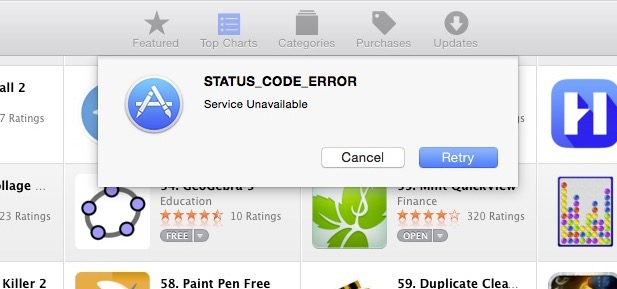
The iOS App Store seems to be suffering a major outage, though Apple’s system status page doesn’t yet say that there are any issues (update: now it does). Users took to Twitter to point out that every single application listed on the store is now returning an error stating that it is “no longer available.” Typically this error is reserved for applications that have been pulled from sale.

The Mac App Store seems to be fine and still allows downloading applications. However, both the desktop and mobile versions of the iOS store are experiencing the issue.

Update: Apple has acknowledged that “[some] users may be unable to access multiple stores or make purchases.” The page lists issues for the App Store, the iBooks Store, and the iTunes music store. It also indicates that the issue is ongoing, though a few people have noted that they can now download apps.

Update 2: Apple System Status now says systems are functioning normally, 7 hours after we initially reported the outage.


Expand
Expanding
Close

Site default logo image

Instagram details the technology behind its new Hyperlapse app

As you can see above, Instagram’s new Hyperlapse app that debuted yesterday is one of the most simple apps on the surface. It does two things: shoots video in either portrait or landscape and changes speed from 1x to 12x for a time-lapse effect. There’s not very much other user interface aside from the record button and speed slider (and the share screen after you save a video), but under the hood there’s a lot of really smart stuff going on with Hyperlapse.

For those interested in all the under-the-hood work that went in to Hyperlapse’s video stabilization and time-lapse features, Instagram’s engineers behind the app have published a blog post detailing the technology that makes it all work.

The blog post goes into Hyperlapse’s approach to video stabilization, time-lapse stabilization, and adaptive zoom to detail how it all works under the surface. Below is a snippet including a chart describing one of the algorithms used by the app.

Video stabilization is instrumental in capturing beautiful fluid videos. In the movie industry, this is achieved by having the camera operator wear a harness that separates the motion of the camera from the motion of the operator’s body. Since we can’t expect Instagrammers to wear a body harness to capture the world’s moments, we instead developed Cinema, which uses the phone’s built-in gyroscope to measure and remove unwanted hand shake.

The diagram below shows the pipeline of the Cinema stabilization algorithm. We feed gyroscope samples and frames into the stabilizer and obtain a new set of camera orientations as output. These camera orientations correspond to a smooth “synthetic” camera motion with all the unwanted kinks and bumps removed.

If you’re interested in the wonkier side of capturing video and software, give Instagram’s post a read and check out Hyperlapse for iPhone and iPad on the App Store.