iPad Pro

See All Stories

The new iPad Pro is powered by the A12Z processor and features a new camera setup on the back. Apple has also unveiled a new Magic Keyboard with a trackpad for iPad Pro.

New iPad Pro vs 2020 iPad Pro

The iPad Pro is Apple’s professional tablet choice. This iPad promises to fill any professional user’s needs with a stunning display and high specs. Here’s everything you need to know about it.

History

Site default logo image

The first-generation iPad Pro was first available in November of 2015 with a giant 12.9-inch screen. Later in March of 2016, Apple announced a smaller version, with a 9.7-inch display. Apple also introduced the first-generation Apple Pencil and Smart Keyboard with this iPad

The Apple Pencil was a key accessory to this iPad since it rejects the user’s palm while in use and is designed for low latency to enable smooth marking on the screen. The Smart Keyboard makes it easier for the user to take notes and work anywhere with the iPad.

The second generation arrived in June of 2017, featuring the A10X Fusion processor and up to 512GB of storage. The 9.7-inch model was replaced with a 10.5-inch version.

In October of 2018, Apple introduced the third-generation iPad Pro, giving the tablet its biggest update yet. With a bezel-less design, the 12.9-inch model became smaller, while Apple replaced the 10.5-inch version for the first-generation 11-inch iPad Pro.

Site default logo image

Apple added Face ID to the tablet, with the ability to unlock the iPad in any orientation. This was also the first mobile product from the company to feature a USB-C port. With up to 1TB of storage, Apple also introduced the second-generation Apple Pencil, now charging when attached to the iPad’s side, and a new Smart Keyboard Folio that protects the iPad when closed.

In March of 2020, Apple introduced the fourth-generation 12.9-inch iPad Pro and the second-generation 11-inch model. These iPads were the first product to feature a redesigned camera module and the LiDAR Scanner.

in April of 2021, Apple unveiled the fifth-generation iPad Pro with the M1 chip, Thunderbolt port, 5G support, and the mini-LED display technology in the 12.9-inch model.

iPad Pro Specs and Accessories

Site default logo image

Apple sells today the 12.9-inch iPad Pro (5th generation) and the 11-inch model (third generation). Both versions feature the M1 chip, which is up to 50% faster than the A12Z Bionic in the previous model, 5G support, a Thunderbolt port, and up to 2TB of storage.

For the first time, Apple says the models with more than 1TB of storage have 16GB of RAM, and versions with less than 1TB of storage have 8GB of RAM.

The iPad Pro uses Face ID technology and has a redesigned camera module, with 12MP Wide Len, 10MP Ultra Wide Len, and a LiDAR Scanner, which is used for AR applications and helps to enhance focus while recording videos or taking pictures.

Site default logo image

The TrueDepth camera now has a 12MP Ultra Wide Len with the “Center Stage” feature, which always puts the user in the center of a video call.

With up to ten hours of surfing the web on Wi-Fi or up to nine hours using a cellular data network, this iPad is available in Silver and Space Gray.

The fifth-generation Pro model works with the Magic Keyboard, featuring a trackpad, backlighted keys, a hinge to adjust the viewing angle, and a USB-C port for pass-through charging. It’s available in white and black. This model also uses the second-generation Apple Pencil, which charges attached to the iPad. You can learn more about the 2021 iPad Pro here.

iPadOS 15

Site default logo image

The iPad Pro runs iPadOS 15. Previewed during the WWDC21 keynote, the operating system brings a redesigned Home Screen with widgets and App Library support.

In the productivity section, Apple, unfortunately, didn’t bring all the features pro users wanted to take full advantage of their new M1 iPad Pro, even though, later this year, it will be possible to create apps using Swift Playgrounds, as you can learn more about it here

There’s a new multitasking menu on the top of the screen. When you click there, it’s possible to see what configurations you can use on Split View or just go to Slide Over with just a tap.

The experience with an external keyboard allows users to get more done with all-new keyboard shortcuts and a redesign of the menu bar.

With the Quick Note feature, users can use the Apple Pencil to add a quick note. They just need to slide the pencil through the bottom right corner to the center of the screen and start writing.

iPadOS 15 is already out, with version 15.0.1 also available. Learn more about it here. In a future update, Apple will bring SharePlay for the iPad, which will let users share their screens, listen to Apple Music songs together, or watch Apple TV+, HBO Max, Disney+, and others while in a call.

iPadOS 15.1

One month after releasing iPadOS 15, Apple released iPadOS 15.1 More notable, the company finally brought SharePlay support for the iPhone, iPad, and Apple TV. Unfortunately, Universal Control wasn’t one of the features added with this new version. Here’s what else is new:

  • Mandarin Chinese (Taiwan) support in the Translate app and for system-wide translation
  • New automation triggers based on the current reading of a HomeKit-enabled humidity, air quality, or light level sensor
  • New pre-built actions let you overlay text on images or gifs, plus a new collection of games lets you pass the time with Siri

iPadOS 15.2

apple-music-hey-siri-plays-voice-plan-9to5mac-2

Five weeks after releasing iPadOS 15.1, Apple is releasing iPadOS 15.2. It brings more features that were expected to launch alongside iPadOS 15. Here are the top features of this version:

  • Apple Music Voice Plan is a new subscription tier that gives you access to all songs, playlists, and stations in Apple Music using Siri
  • App Privacy Report in Settings lets you see how often apps have accessed your location, photos, camera, microphone, contacts, and more during the last seven days, as well as their network activity
  • Communication safety setting gives parents the ability to enable warnings for children when they receive or send photos that contain nudity
  • Digital Legacy allows you to designate people as Legacy Contacts so they can access your iCloud account and personal information in the event of your death
  • Apple TV app: Store tab lets you browse, buy, and rent movies and TV Shows all in one place

iPadOS 15.3

Six weeks after releasing iPadOS 15.2, Apple is releasing iPadOS 15.3. This update foregoes new features in favor of under-the-hood bug fixes and improvements. One of the most notable changes here is a fix for a Safari vulnerability that may have been leaking your browsing history and Google ID data to the websites you visited.

iPadOS 15.4

iPadOS 15.4 finally brings one of the most important features expected from iPadOS 15 and that got delayed: Universal Control. Here’s everything new with iPadOS 15.4:

  • Universal Control: This feature allows you to control your Mac and iPad using the same keyboard and mouse/trackpad. Universal Control needs iPadOS 15.4 and macOS Monterey 12.3;
  • New Siri voice: Siri has a fifth American voice. Apple says a member of the LGBTQ+ community recorded the voice and it’s non-binary;
  • More emoji: iPadOS 15.4 also brings new emojis. You can discover all of the new characters here;
  • Shortcuts automation: Adds support for running Personal Automations in the background without requiring a pesky banner notification.

You can learn everything new with this update here.

iPadOS 15.5

Different from other software updates, iPadOS 15.5 only improves the Podcast app experience, as Apple focused on Wallet changes for the iPhone this time:

  • Apple Podcasts includes a new setting to limit episodes stored on your iPhone and automatically delete older ones

iPadOS 15.6

iPadOS 15.6 is yet another small update for iPad users. Here’s what’s news:

  • TV app adds the option to restart a live sports game already in progress and pause, rewind, or fast-forward.
  • Fixes an issue where Settings may continue to display that device storage is full even if it is available.
  • Fixes an issue that may cause Braille devices to slow down or stop responding when navigating text in Mail.
  • Fixes an issue in Safari where a tab may revert to a previous page.

iPadOS 15.7 features

Apple released iPadOS 15.7 with bug fixes while the company readies iPadOS 16.

iPadOS 14

Site default logo image

With iPad OS 14, Apple has redesigned widgets for the Home Screen and added a new enhanced sidebar, compact calls function, and Scribble. With this function, you don’t have to put your Apple Pencil away to do other things. You can write by hand in any text field across iPadOS, and your words automatically convert to text.

Messages received pinned conversations, group photos, and inline replies. It’s possible to mention people in iMessage now and give your Memoji a more personalized look.

In April, Apple released iPadOS 14.5, with some major changes in the iPadOS 14 cycle:

  • App Tracking Transparency: iPadOS 14.5 includes the new App Tracking Transparency feature. This requires that applications ask permission from users before tracking them across other apps and websites. For example, when you open the Facebook app, you’ll see a prompt that says the app would like to track you across other apps and services. There will be two options from which to choose: “Ask App Not to Track” or “Allow.”
  • Siri: There is a new Siri intelligence feature that helps the virtual assistant adapt to your preferring music application. Apple also added two additional Siri voice options from which to choose. The company has said that these changes are part of its ongoing commitment to diversity.
  • Emoji: iPadOS 14.5 adds over 200 new emojis.
  • Podcasts: Podcasts Show Pages are redesigned to make it easier to start listening to a podcast. Option to save and download episodes, automatically adding them to your library for quick access. Top Charts and popular categories in Search help discover new shows.
  • Horizontal boot screen on the iPad
  • Updates to the Music app, including swipe gestures, a lyrics sharing feature, and more.

Even though Apple gave the option for users to stay on iPadOS 14.8 and not update to iPadOS 15, the company now recommends users to update their devices, as it won’t release new updates to iPadOS 14.

Pricing

Site default logo image

iPad Pro (2021) pricing starts at $799 for the 11-inch model, with a 128GB storage option, and Wi-Fi only. The prices can go up to $2,399 with the 12.9-inch model, 2TB storage option, and Wi-Fi + Cellular. Here are the full prices of the third-generation 11-inch model and the fifth-generation 12.9-inch version Apple sell:

11-inch iPad Pro and accessories:

  • 128GB with Wi-Fi: $799
  • 128GB with Wi-Fi + Cellular: $949
  • 256GB with Wi-Fi: $899
  • 256GB with Wi-Fi + Cellular: $1,049
  • 512GB with Wi-Fi: $1,099
  • 512GB with Wi-Fi + Cellular: $1,249
  • 1TB with Wi-Fi: $1,299
  • 1TB with Wi-Fi + Cellular: $1,499
  • 2TB with Wi-Fi: $1899
  • 2TB with Wi-Fi + Cellular: $ 2.099
  • Magic Keyboard (11-inch): $299
  • Apple Pencil (2nd gen): $129

12.9-inch iPad Pro and accessories:

  • 128GB with Wi-Fi: $1099
  • 128GB with Wi-Fi + Cellular: $1,299
  • 256GB with Wi-Fi: $1,199
  • 256GB with Wi-Fi + Cellular: $1,399
  • 512GB with Wi-Fi: $1,399
  • 512GB with Wi-Fi + Cellular: $1,599
  • 1TB with Wi-Fi: $1,799
  • 1TB with Wi-Fi + Cellular: $1,999
  • 2TB with Wi-Fi: $2,199
  • 2TB with Wi-Fi + Cellular: $2,399
  • Magic Keyboard (11-inch): $349
  • Apple Pencil (2nd gen): $129

Lower prices may be available from Apple’s official Amazon store. You can also find the Magic Keyboard and second-generation Apple Pencil.

2021 iPad Pro Launch

The fifth generation launched on May 21. Orders started on April 30, 2021.

Fifth-generation 12.9-inch iPad Pro review

Site default logo image

In our video review of the fifth-generation iPad Pro, we say this is the perfect model to upgrade if you want the power of the M1 chip on the iPad but it still needs a better software update to unleash its full power.

Hardware-wise this is the complete package. The 2021 iPad is basically a Mac computer without macOS. But it’s so much more than a Mac, and that’s what makes the iPad such a compelling product. The iPad has a display that’s better than any MacBook, can connect to the Internet independent of Wi-Fi, has a better speaker system, features easy Face ID authentication, works with the Apple Pencil, and so much more.

If Apple can provide big enhancements in areas like multitasking, external display support, and file management, I think the iPad will finally be able to compete with the Mac and be the laptop replacement that so many people have wanted it to be.

Deals

Over at 9to5Toys, you can find the best deals on the iPad Pro and other Apple products. Download the 9to5Toys iPhone app to receive push notifications for new deals as well.

Rumors

Site default logo image

After a year since Apple released the M1 iPad Pro, there are some rumors about its next generation.

According to Apple analyst Ming-Chi Kuo and supply chain analyst Ross Young, Apple will not add a miniLED display to the new 11-inch iPad Pro model, keeping this technology for the larger version.

Kuo’s report also corroborates that the 2022 iPad Pro will likely keep the same screen sizes as the current generation, which are 11 and 12.9 inches. In December of 2021, Mark Gurman’s Power On newsletter gave Apple customers a tidbit of what to expect from the new iPad Pro.

He says that Apple is planning a new iPad Pro design with support for wireless charging, as well as updates to the lower-end iPad Air and entry-level iPad.

In January 2022, 9to5Mac was able to report that Apple is indeed working on a new iPad Pro, but it won’t feature a full glass back. The company is planning to grow the Apple logo with glass material so it can charge the device through MagSafe support. An M2 chip is also expected.

According to Gurman, these new iPad Pro should be available in the near future, around October or November.


iPad Pro: ‘Monster screen’ runs full-sized side-by-side apps, LTE models, keyboard + stylus separate

Site default logo image

Alongside the new iPhones, new Apple TV, new Apple Watch bands, and a gold anodized version of the Apple Watch Sport, Apple plans to debut a pair of new iPads on Wednesday: the larger iPad Pro and a new iPad mini. Since our report last week that the iPad Pro would be unveiled at this event, we’ve gathered a few more details about the device from several sources who have either used the iPad Pro or are familiar with the product.

Unlike earlier iPads, which have started at 16GB of capacity and been designed to appeal in both pricing and size to the masses, even the base model iPad Pro will have features fitting its name. We’re also hearing that it’s coming a little later than originally expected, but will still make it out by year’s end…


Expand
Expanding
Close

Apple’s ‘Hey Siri’ Event Roundup: Upgraded iPhone 6s, Bigger iPad Pro, Revamped Apple TV + Apple Watch updates

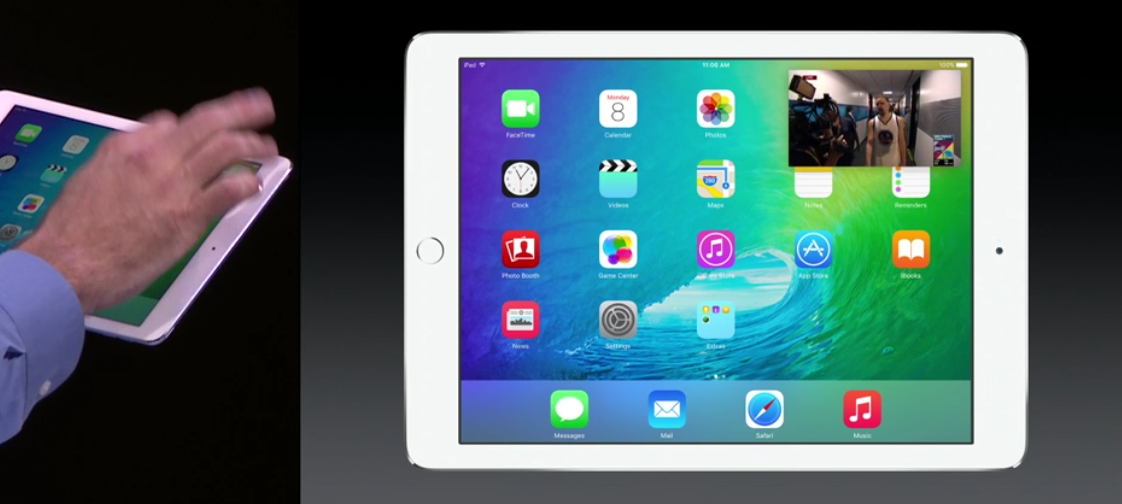
Apple’s Wednesday, September 9th event is shaping up to be one of the largest in the company’s history. The Cupertino-based company is planning to unveil several major new products on stage, including a pair of new iPhones with revamped internals, a sequel to the Apple TV, a larger version of the iPad Air, a refreshed iPad mini, and new Apple Watch accessories. The company is also likely to discuss at least two of its latest software platforms: iOS 9 and watchOS 2. We’ve reported the lion’s share of what is to come at next week’s event, so this article outlines everything we’re expecting and adds some new details…


Expand
Expanding
Close

iPad Pro planned for Sept. 9 debut with iPad mini 4; October pre-orders, November launch

Apple’s September 9th event is set to be one of the company’s largest events in history, as is reflected by the expansive size of its San Francisco venue. Besides a pair of new iPhones, the substantially revamped Apple TV set top box, and new bands for the Apple Watch, Apple is currently planning to debut a pair of new iPads at next week’s event: the long-rumored iPad Pro, and a refreshed version of the iPad mini, according to trusted sources…


Expand
Expanding
Close

IDC lowers tablet forecast as it anticipates a larger iPad Pro & more 2-in-1 hybrids

IDC today published an updated forecast for worldwide tablet shipments this year, predicting the segment will experience a “notable slowdown” with both iOS and Android expected to record a year over year decline in growth. While IDC notes that the majority of the 212 million tablets it expects to ship this year will be “pure slate tablets”, it does anticipate growth in the 2-in-1 hybrid tablet/laptop category, of which it’s apparently including the larger 12-inch+ iPad that Apple is expected to introduce later this year:
Expand
Expanding
Close

Supply chain reports back KGI timings of iPad Pro entering production in September

Site default logo image

Supply chain sources cited by Digitimes back a KGI report that the iPad Pro is expected to begin production in September, ramping up into mass production from October. While Digitimes has a spotty track record, this report is more specific than many, providing details of display suppliers for the new device.

The device will enter production by the end of the third quarter and go into mass production in the fourth. Sharp will provide Open Cell LCD displays while [Foxconn subsidiary] GIS will provide GF touch panels.

Samsung Display and TPK will be secondary suppliers, with TPK responsible for touch modules and Samsung for displays as well as LCD assembly … 


Expand
Expanding
Close

App analytics data latest to suggest rumored iPad Pro resolution is 2732×2048

Data from Appsee claims to have identified information regarding the as-yet-unannounced larger iPad Pro, expected to feature a display ranging between 12.3 and 12.9 inches. The app analytics firm says an iPad with identifier ‘iPad6,8’ appeared in its logs with a reported screen resolution of 2732×2048. Internally, the larger iPad models are referred to as J98 and J99. The resolution is especially notable as it was previously spotted within code for iOS 9. For comparison, the current iPad Air 2 has a screen resolution of 2048×1536 with a ‘iPad5,1’ model identifier.

The jump in pixels for both axis is substantial although somewhat expected given the screen will also be increasing in area by about 80%. AppSee says its logs indicate the device has been used to open several apps from the App Store. The company has also identified ‘iPhone 8,1’ and ‘iPhone8,2’ devices corresponding to the iPhone 6S and iPhone 6S Plus.


Expand
Expanding
Close

KGI: Apple 12.9-inch iPad Pro to feature optional Force Touch compatible stylus, 2015 shipments in the 4-5.5M range

According to respected and generally reliable analyst Ming Chi-Kuo from KGI Securities, Apple’s long-awaited 12.9-inch iPad Pro will feature Force Touch stylus support—perhaps for something like an enhanced Pencil from Paper’s FiftyThree. Earlier this month, we detailed what to expect from Force Touch on iOS including support for an enhanced stylus paired with the larger iPad models.

He expects the larger tablet to go in to production between September and October and that the stylus will be able to take advantage of the new iPad’s Force Touch-enabled screen. It’s being imagined as a feature which could help users more easily navigate the larger display of the iPad Pro. KGI has predicted an optional Lightning-charging stylus sold alongside the larger-screened iPad since earlier this year.


Expand
Expanding
Close

Force Touch on iPhone 6S revealed: expect shortcuts, faster actions across iOS

While Force Touch on the Apple Watch allowed Apple to add an additional layer of buttons to a small display, the iPhone 6S and iPhone 6S Plus screens don’t lack for either real estate or buttons. So why would Force Touch be desirable on larger displays? Following up on our May report that Force Touch is coming to Apple’s next iPhones, sources who have used the iPhone 6S have provided new details on how Force Touch works and feels under iOS.


Expand
Expanding
Close

Rumor: Thinner iPad mini 4 will resemble iPad Air 2 hardware

Site default logo image

Japanese blog Macotakara, which often publishes accurate information about unreleased Apple products and company news, today claims to have some reliable information on the yet-to-be-announced, upcoming iPad mini 4. Today’s report claims that the iPad mini 4 will look a lot like a smaller version of the current iPad Air 2.
Expand
Expanding
Close

Happy Hour Podcast 024 | New iPods, September hardware expectations, and Apple’s latest earnings call

Apple has refreshed its entire iPod lineup and we’re discussing all of the details along with what to expect later this year. New hardware is expected, but aside from an iPhone what will Apple launch? Along with that, developers now have access to a new iOS 9 beta plus watchOS 2 beta and we discuss Apple’s latest earnings call. The Happy Hour podcast is available for download on iTunes and through our dedicated RSS feed.

[soundcloud url=”https://api.soundcloud.com/tracks/215805815?secret_token=s-R6bxm” params=”auto_play=false&hide_related=false&show_comments=true&show_user=true&show_reposts=false&visual=true” width=”100%” height=”150″ iframe=”true” /]


Expand
Expanding
Close

Site default logo image

Sketchy rumor: iPad Pro and last new iPad mini launch in Q4, iPad Air 3 in 2016

A rumor published this morning predicts that Apple will release it’s long-rumored 12.9-inch iPad Pro alongside the next generation iPad mini during the second half of the holiday season in Q4. Both will allegedly be assembled exclusively by Foxconn. That much we knew.

Speculation from Asian sources referenced by Economic Daily News suggests that Apple wants to ensure that nothing distracts from the focus on the larger iPad Pro, meaning the iPad Air 3 launch would be pushed back until 2016. In this seemingly unlikely scenario, when a Pro tablet is eventually launched, it’s more likely to fit a niche in the market rather than be the new, main device Cupertino is touting.

What’s more, the story goes as far as suggesting that Apple might discontinue the iPad mini range altogether after the 4th generation mini. This suggestion itself is highly speculative. We’re not sure even Apple would know if the iPad mini 4 is its last mini tablet, or not, at this point in time. That seems like a decision that would be made after seeing how the market reacts to the mini 4. Perhaps Apple is planning to build a hybrid Mini/iPod touch next year?

Saying that, with the iPhone 6 Plus on the market now, Apple has a large smartphone on the market which could cannibalize sales of any small tablets it sells. Especially when the presumed second generation 6 Plus hits store shelves.

With the iPad Pro, Apple is expected to launch a large tablet to bridge a gap which may, or may not, exist between tablets and laptops. Or more specifically, between iPad Air and MacBook. With the launch of multi-window multitasking in iOS 9, a larger screened tablet seems a no-brainer. iOS 9 itself also seemingly contains code pointing towards an iPad with a larger screen and higher resolution than the iPad Air currently on the market.

As always, treat any of this information as speculation and take the appropriate dosage of salt along with it. We’re doubtful of a lot being rumored from EDN.

Site default logo image

12.9 inch ‘iPad Pro’ reportedly set for release in mid-November

The always-doubted sometimes-accurate Digitimes is reporting that Apple will release the long-rumored iPad Pro in mid November this year. The ‘iPad Pro’ is expected to feature a large 12.9 inch screen with stereo speakers and targeted at business and education uses. Digitimes says that Apple has asked suppliers to ramp up in late September which should mean a November debut, with manufacturing by Foxconn.


Expand
Expanding
Close

Happy Hour Podcast 022 | Everything we know about the iPhone 6s

This week Brian from Pad & Quill returns and we’re discussing the latest reports and rumors surrounding Apple’s upcoming iPhone 6s. We’ve got all the details you need to know. Along with that we get into some iPad Pro talk, and our one week review of Apple Music. The Happy Hour podcast is available for download on iTunes and through our dedicated RSS feed.

[soundcloud url=”https://api.soundcloud.com/tracks/213744140?secret_token=s-UaYMJ” params=”auto_play=false&hide_related=false&show_comments=true&show_user=true&show_reposts=false&visual=true” width=”100%” height=”150″ iframe=”true” /]


Expand
Expanding
Close

Opinion: Will size alone be enough to sell a bigger iPad?

There isn’t any question that Apple’s working on a larger-screened iPad: early details leaked in 2013 and have been followed by dimensional drawings and prototype shells over the past year. All of the leaks suggest that the “iPad Pro” or “iPad Plus” will be nearly identical to the iPad Air 2, except with an almost 13″ screen and four (rather than two) speaker grilles. Few of the leaks have suggested major new design elements, such as an extra connector port, an integrated stand, or a stylus; no one believes Apple will even rotate the rear logo to signify a preferred horizontal orientation. In short, the “iPad Pro” will likely be a bigger-screened iPad Air, much as the iPad Air was just a bigger version of the iPad mini that preceded it.

Despite once-credible reports of an early 2015 release, the big iPad was apparently pushed back at least twice so Apple could focus on making more iPhones. Since it’s supposedly been rescheduled for a fall release, I wanted to pose a question: given what we (think we) know about it, do you believe a bigger-screened iPad without other major design changes will be compelling enough to succeed?…


Expand
Expanding
Close

Happy Hour Podcast 020 | Apple Music launch details, new iOS 9/OS X betas, and Apple Watch 2 features

Apple Music is almost here and it looks like Taylor Swift had a thing or two to say about it. Along with that, we have some exclusive details on Apple Watch 2 and an overview of the new iOS 9, OS X El Capitan, and watchOS 2.0 betas. The Happy Hour podcast is available for download on iTunes and through our dedicated RSS feed.

This week we’re very excited to podcast with Brian from Pad & Quill and talk a little bit about some of the excellent accessories they make. Be sure to check out padandquill.com to view their products.

[soundcloud url=”https://api.soundcloud.com/tracks/211749201?secret_token=s-zIavL” params=”auto_play=false&hide_related=false&show_comments=true&show_user=true&show_reposts=false&visual=true” width=”100%” height=”150″ iframe=”true” /]


Expand
Expanding
Close

Happy Hour Podcast 019 | iPad Pro wish list

It looks like a few lines of iOS 9 code have provided a couple of key details regarding the upcoming iPad Pro. The resolution of this mysterious large device has been discovered, along with a new keyboard layout. In this episode we discuss our iPad Pro wish list and what we’d like to see if this device becomes a reality later this year. The Happy Hour podcast is available for download on iTunes and through our dedicated RSS feed…

[soundcloud url=”https://api.soundcloud.com/tracks/210797377″ params=”auto_play=false&hide_related=false&show_comments=true&show_user=true&show_reposts=false&visual=true” width=”100%” height=”150″ iframe=”true” /]


Expand
Expanding
Close

iPad Pro to feature 2732×2048 resolution according to iOS 9 code

Site default logo image

Earlier today, a keyboard with much better support for the supposed iPad Pro, a device that has been rumored for some time now, was shown off thanks to the iOS 9 code. Steve Troughton Smith and Hiraku Wang now suggest that the iPad Pro will feature a resolution of 2732×2048, which at 12.9-inches, comes out to 263 pixels-per-inch.


Expand
Expanding
Close

iOS 9 iPad keyboard adds keys & symbols at bigger screen resolutions, seemingly ready for iPad Pro [Update]

Site default logo image

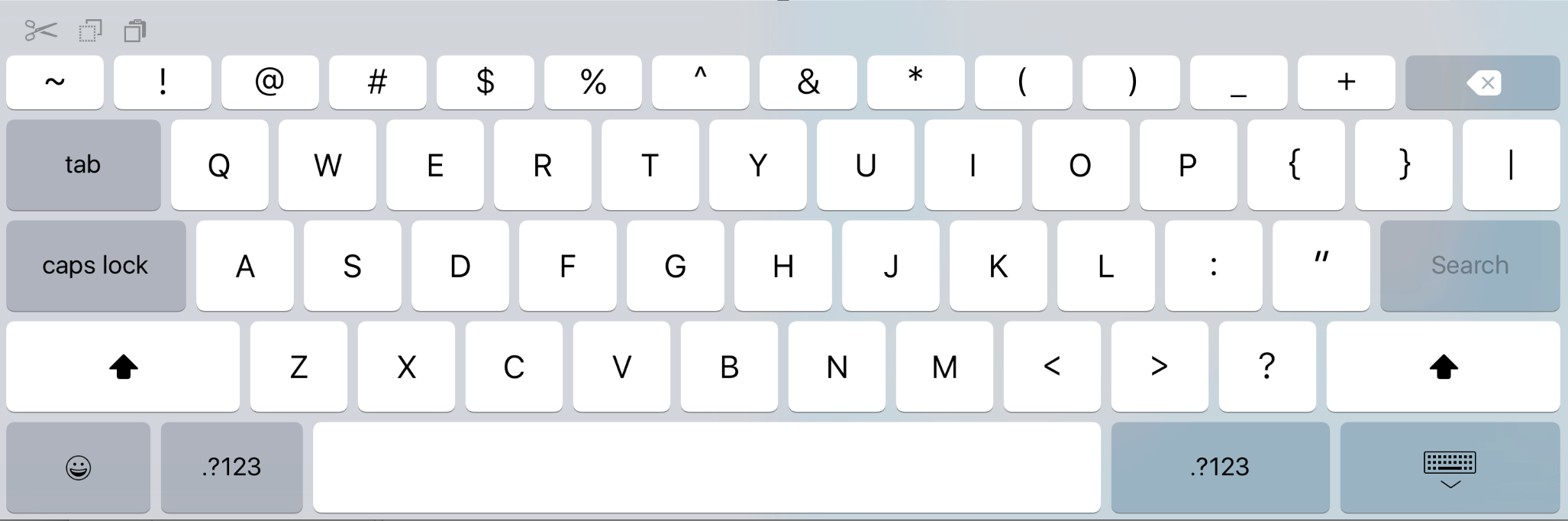
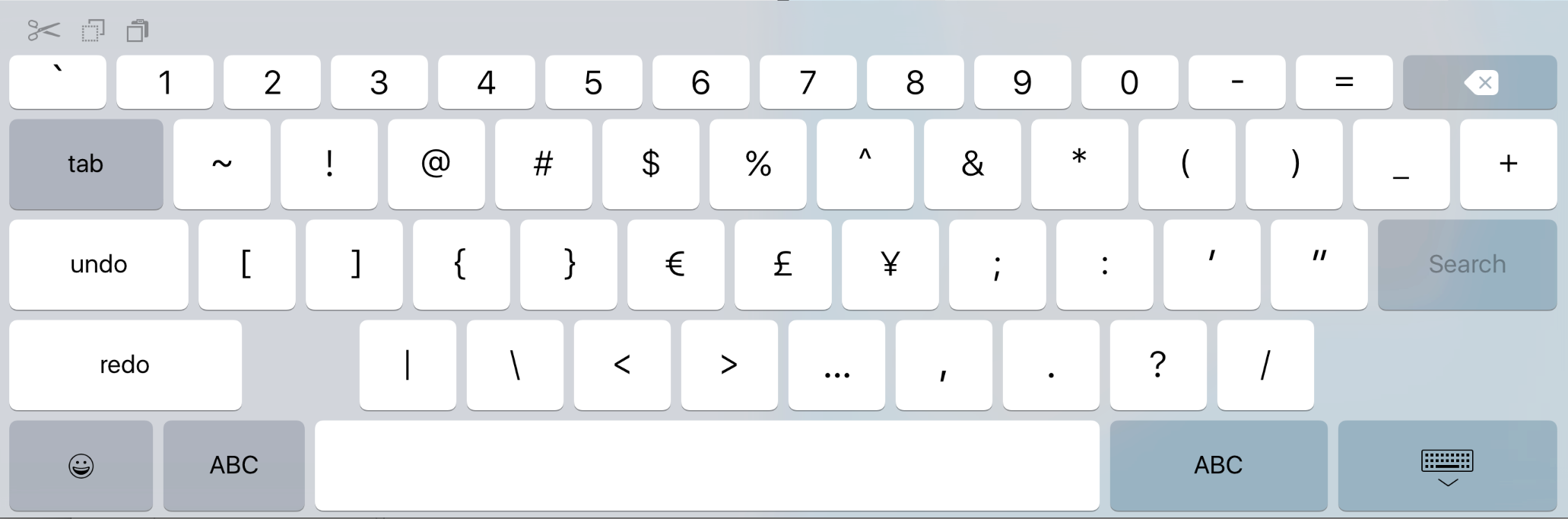
Following on from the Apple Watch native apps hack, Steve Troughton Smith has also found that the keyboard view in iOS 9 has much better adaptability support on Apple’s latest operating system. As shown by the screenshots, at larger resolutions, the iPad keyboard rearranges itself to make use of the space. Tab and Caps Lock keys are notably added onto to the left side as well as an entirely new top row of symbols.

This new row reflects the symbols normally found on hardware keyboards above the number keys: @ # $ % ^ & * ( ) _ +. Next to the ‘p’ on the first row, the keyboard also gains curly braces and a pipe symbol.


Expand
Expanding
Close

Opinion: These were the 10 game-changing WWDC 2015 announcements

There were so many announcements during the WWDC keynote yesterday that even people who follow Apple for a living (and expected most of the details) were overwhelmed. New versions of iOS, OS X, and watchOS were only three of the biggies, alongside the official debut of Apple Music and a lot of small but interesting new details.

Since the keynote ended, I’ve been sorting through all of the stories, as well as all three new operating systems. What follows are my picks for the ten most game-changing WWDC 2015 announcements, some of them requiring more explanation than others. They’re not in rank order, but there’s definitely one that I thought was the biggest of the bunch. Share your picks in the comments section below…


Expand
Expanding
Close

Site default logo image

Mark Gurman talks to CNBC about the iPad’s future, iOS 9, and WWDC

Mark discussing his recent scoops including split-screen apps and the upcoming 12-inch iPad on CNBC today following this week’s exclusives on the Apple Watch’s San Francisco font coming to iOS and OS X, Apple’s plans for a ‘Home’ app to manage HomeKit on iOS, Apple Maps transit and indoor mapping plans, and features coming to iOS 9 and OS X 10.11.
Expand
Expanding
Close

Future of iPad: Dual-app viewing mode, then J98/J99 ‘iPad Pros,’ multi-user support

Site default logo image

Facing slowing growth for the first time since the iPad’s 2010 debut, Apple is working on several significant software and hardware updates to reinvigorate the tablet over the next year. Apple is developing a dual-app viewing mode, 12-inch iPads codenamed “J98” and “J99,” as well as support for multi-user logins, according to sources briefed on the plans. First planned for debut last year, the split-screen applications feature for the iPad could be introduced as soon as June at Apple’s annual Worldwide Developers Conference, while multi-user login support and the 12-inch iPads will apparently arrive later…


Expand
Expanding
Close

Report claims Apple investigating improved touch panel for 12.9-inch iPad using silver nanowire tech

Site default logo image

A new report from ETNews claims that Apple is investigating silver nanowire technology to improve touch panels in its much anticipated upcoming 12+-inch iPad:

Apple is planning to apply nano new material on touch panel. By changing ITO-based clear film with silver nano wire (AgNW) material, it plans to raise sense of touch and decrease cost.국내 은나노와이어 Domestic AgNW based touch-screen panel (TSP) industries are getting ready to commercialize the products as soon as possible.

The report, citing sources close to the supply chain, adds that Apple has already requested samples of the tech from LG Display, Samsung Display, Japan Display and others earlier this month.

And it isn’t the first time we’ve heard Apple is experimenting with the technology. The company has a patent for a “Touch Screen Display with Transparent Electrical Shielding Layer” which details an IPS LCD that utilizes “microscopic metal meshes, such as silver nano-wires (AGNW)” as a conducting layer. In the patent, published in January 2014, Apple imagines a display with better power efficiency, a thinner design, and reduced light reflectivity for an iPad. Here’s an excerpt:
Expand
Expanding
Close

Happy Hour Podcast 013 | Apple Watch experiences, official third party band support, and iPad Pro news

Apple Watch is finally here and this week we all have one. In this episode we discuss our experiences (good and bad) with Apple Watch, Apple’s official solution for third-party bands, and news about the rumored iPad Pro. Feel free to drop us a line about your Apple Watch experience at listenermail@9to5mac.com. The Happy Hour podcast is available for download on iTunes and through our dedicated RSS feed…

[soundcloud url=”https://api.soundcloud.com/tracks/204179794″ params=”auto_play=false&hide_related=false&show_comments=true&show_user=true&show_reposts=false&visual=true” width=”100%” height=”150″ iframe=”true” /]


Expand
Expanding
Close