iPad (2021)

See All Stories

Apple's tablet debuted in 2010. Since the original version, it's expanded into multiple screen sizes and Pro and non-Pro options.

The iPad is Apple’s base tablet model. In its ninth generation, the iPad focuses on being the perfect tool for education and people who seek a bigger screen to read and surface the web compared to the iPhone. With Apple Pencil and Smart Keyboard support, the iPad has never been better.

History

Site default logo image

The iPad is a line of tablets designed and developed by Apple. It was originally announced in 2010, three years after the first iPhone was introduced. With a 9.7-inch screen and with iPhone OS 3.2 the iPad was a success, hitting 1 million tablets sold in over three months, half the time the first iPhone took to reach this mark.

Steve Jobs then unveiled the iPad 2 in March of 2011. About 33% thinner than its predecessor and 15% lighter, the second generation used the A5 chip, twice as faster as its predecessor. The iPad 2 also introduced front and back cameras that supported FaceTime video calls.

The successor of the iPad 2 wasn’t a success at all. The third generation was introduced in March of 2012 with a Retina display and the A5X processor. The problem with this tablet it was too heavy and the battery didn’t last long enough. In October of the same year, Apple announced the fourth generation with the A6X processor, HD FaceTime camera, improved LTE capabilities, and the Lightning connector.

At this October event, Apple also introduced the first iPad mini. In 2013, Apple went with the first iPad Air and the iPad mini 2. In 2015, the company introduced the first Pro model, with two different sizes.

Site default logo image

In March of 2017, Apple announced the fifth-generation iPad with the A9 processor. It was a budget option compared to the other tablets. It was in 2018 that the company brought expressive news to the base iPad line. The sixth-generation had the A10 Fusion processor and fully supports the first-generation Apple Pencil.

A year later, the seventh generation was announced with a larger 10.2-inch display and support for the Smart Keyboard as well. It retained most of the specs of the previous model.

In September of 2020, the eighth generation was introduced alongside the fourth-generation iPad Air model. The eighth generation received an upgraded processor, now with the A12 Bionic, while keeping the same storage options: 32GB and 128GB.

In September of 2021, the ninth generation was introduced alongside a redesigned iPad mini. This iPad now features the A13 Bionic processor, True Tone support, and new storage options: 64GB and 256GB while keeping the same price.

iPad 9 Specs

Site default logo image

The ninth-generation iPad launched in September of 2021. Available in two colors, Silver and Space Gray, this tablet is made of 100% recyclable aluminum, and supports the first-generation Apple Pencil and Smart Keyboard.

With thinner bezels, the product comes with a 10.2-inch Retina display with a fingerprint-resistant oleophobic coating, and True Tone support for the first time, which adjusts screen content to the color temperature of a room.

This tablet uses the A13 Bionic chip, the same available on the iPhone 11, 11 Pro, and 11 Pro Max. It has an “all-day” battery with up to 10 hours of surfing the web on Wi-Fi or watching videos.

The iPad also comes in 64GB and 256GB storage options and Wi-Fi and Wi-Fi + Cellular versions.

Revamped cameras

Site default logo image

For the first time, this iPad shares the same FaceTime camera as the M1 iPad Pro with the Center Stage experience. With a new 12MP Ultra Wide front camera and Neural Engine, users can enjoy even more engaging video calls.

As users move around, Center Stage automatically pans the camera to keep them in view. When others join in, the camera detects them too, and smoothly zooms out to include them in the conversation. Center Stage makes video calls more natural in FaceTime as well as third-party video-calling apps.

Its main camera is the same: 8MP, f/2.4 aperture, and digital zoom up to 5x.

iPadOS 15

Site default logo image

The ninth-generation iPad comes with the iPadOS 15. Previewed during the WWDC21 keynote, the new operating system brings a redesigned Home Screen with widgets and App Library support.

On iPadOS 15, FaceTime group calls can finally appear in a grid, so it’s easier to see everyone. It’s also possible to share your screen, listen to Apple Music songs together, or watch Apple TV+, HBO Max, Disney+, and others while in a call.

In the productivity section, Apple, unfortunately, didn’t bring all the features pro users wanted to take full advantage of their new M1 iPad Pro, even though Apple made it easier to rely on multitasking features.

There’s a new multitasking menu on the top of the screen. When you click there, it’s possible to see what configurations you can use on Split View or just go to Slide Over with just a tap.

The experience with an external keyboard allows users to get more done with all-new keyboard shortcuts and a redesign of the menu bar.

With the Quick Note feature, users can use the Apple Pencil to add a quick note. They just need to slide the pencil through the bottom right corner to the center of the screen and start writing.

iPadOS 15 launched on September 20. Learn more about it here.

iPadOS 15.1 features

One month after releasing iPadOS 15, Apple released iPadOS 15.1 More notable, the company finally brought SharePlay support for the iPhone, iPad, and Apple TV. Unfortunately, Universal Control wasn’t one of the features added with this new version. Here’s what else is new:

Translate

  • Mandarin Chinese (Taiwan) support in the Translate app and for system-wide translation

Home

  • New automation triggers based on the current reading of a HomeKit-enabled humidity, air quality, or light level sensor

Shortcuts

  • New pre-built actions let you overlay text on images or gifs, plus a new collection of games lets you pass the time with Siri

iPadOS 15.2 features

apple-music-hey-siri-plays-voice-plan-9to5mac-2

Five weeks after releasing iPadOS 15.1, Apple is releasing iPadOS 15.2. It brings more features that were expected to launch alongside iPadOS 15 but, unfortunately, Universal Control is still nowhere to be seen. Here are the top features of this version:

  • Apple Music Voice Plan is a new subscription tier that gives you access to all songs, playlists, and stations in Apple Music using Siri
  • App Privacy Report in Settings lets you see how often apps have accessed your location, photos, camera, microphone, contacts, and more during the last seven days, as well as their network activity
  • Communication safety setting gives parents the ability to enable warnings for children when they receive or send photos that contain nudity
  • Digital Legacy allows you to designate people as Legacy Contacts so they can access your iCloud account and personal information in the event of your death
  • Apple TV app: Store tab lets you browse, buy, and rent movies and TV Shows all in one place

iPadOS 15.3 features

Six weeks after releasing iPadOS 15.2, Apple is releasing iPadOS 15.3. This update foregoes new features in favor of under-the-hood bug fixes and improvements. One of the most notable changes here is a fix for a Safari vulnerability that may have been leaking your browsing history and Google ID data to the websites you visited.

iPadOS 15.4 features

iPadOS 15.4 finally brings one of the most important features expected from iPadOS 15 and that got delayed: Universal Control. Here’s everything new with iPadOS 15.4:

  • Universal Control: This feature allows you to control your Mac and iPad using the same keyboard and mouse/trackpad. Universal Control needs iPadOS 15.4 and macOS Monterey 12.3;
  • New Siri voice: Siri has a fifth American voice. Apple says a member of the LGBTQ+ community recorded the voice and it’s non-binary;
  • More emoji: iPadOS 15.4 also brings new emojis. You can discover all of the new characters here;
  • Shortcuts automation: Adds support for running Personal Automations in the background without requiring a pesky banner notification.

You can learn everything new with this update here.

iPadOS 15.5 features

Different from other software updates, iPadOS 15.5 only improves the Podcast app experience, as Apple focused on Wallet changes for the iPhone this time:

  • Apple Podcasts includes a new setting to limit episodes stored on your iPhone and automatically delete older ones

iPadOS 15.6 features

iPadOS 15.6 is yet another small update for iPad users. Here’s what’s news:

  • TV app adds the option to restart a live sports game already in progress and pause, rewind, or fast-forward.
  • Fixes an issue where Settings may continue to display that device storage is full even if it is available.
  • Fixes an issue that may cause Braille devices to slow down or stop responding when navigating text in Mail.
  • Fixes an issue in Safari where a tab may revert to a previous page.

iPadOS 15.7 features

iPadOS 15.7 only brings bug fixes and some security improvements as the company readies the iPadOS 16 release.

Education

Site default logo image

Apple describes this iPad as the go-to tablet for education. For several years the company discounts this tablet up to 10%.

Apple is always promoting ways students can use the iPad to learn new things: using Augmented Reality, the Apple Pencil, and how to code with Playgrounds.

The company says the “App Store is the best place to discover apps” for education purposes:

Let your curiosity run wild with iPad. The App Store is the best place to discover apps that let you get a leg up in geometry, learn a new language, and attend virtual classes. You can even use augmented reality to learn something exciting, like watching the history of spaceflight unfold in your living room or making characters from your favorite book literally leap off the page.

Release date: When Apple will launch the ninth-generation iPad?

Apple launched the iPad 9 on September 24, 2021.

Pricing

iPad (2021) pricing starts at $329 for the 32GB storage option with Wi-Fi only. The prices can go up to $559 with the 128GB storage option and WI-Fi + Cellular. Here are the full prices of the ninth-generation tablet:

  • 32GB with Wi-Fi: $329
  • 32GB with Wi-Fi + Cellular: $459
  • 128GB with Wi-Fi: $429
  • 128GB with Wi-Fi + Cellular: $559
  • Apple Pencil (1st generation): $99
  • Smart Keyboard: $159

Lower prices may be available from Apple’s official Amazon store.

iPad (2021) Review

Site default logo image

Soon, we’ll review the ninth-generation iPad. As for now, you can watch our video review of the eighth-generation iPad, as we described it as the “best value tablet you can buy:”

“The iPad 8 was never meant to be a huge update. But even still, I think this is easily the best value tablet you can buy. For $329, this tablet has so much to offer: The performance, the great battery life, and the Apple pencil functionality. I’d highly recommend you pick up this tablet if you simply need an inexpensive tablet today that’s going to last you for three to four years with no trouble.”

iPad Deals

Over at 9to5Toys, you can find the best deals on the iPad and other Apple products. Download the 9to5Toys iPhone app to receive push notifications for new deals as well.

Rumors

As of now, Bloomberg‘s Mark Gurman said in his Power On newsletter by the end of 2021 that Apple plans a new entry-level iPad for 2022. In June 2022, 9to5Mac exclusively reported the details of the tenth-generation iPad model.

According to Filipe Espósito, this new entry-level tablet will pack the A14 Bionic chip, 5G compatibility, and, for the first time, USB-C connectivity, unlocking new experiences with the second-generation Apple Pencil. Its display will also increase, although it’s unclear whether it will have the same design as the M1 iPad Air.

This iPad could be released in October of 2022.

Apple sends ‘take down’ notices to cracked iOS apps creator AppTrackr

Site default logo image

AppTrackr is the most popular marketplace for downloading cracked iOS applications. The company announced in a blog post, via Installous, that Apple began sending “take down” notices over cracked applications and have been scraping AppTrackr’s links looking for infractions (via iJailbreak). To combat Apple’s wrath, the crew at AppTrackr have moved several of their servers offshore to countries without copyright laws and have added CAPATCHA code to all outbound links. AppTrackr will now place an ad on the CAPATCHA page to pay for moving servers.

It looks like Apple has begun to make the leap and crack down on cracked iOS applications. AppTrackr uses their installer tool called Installous to install cracked applications, and makes available applications like Apple’s Numbers, NOAA Radar US, Nike+ GPS, and more to those who jailbreak. Obviously with the wide range of applications that AppTrackr makes available, it could potentially hurt some of Apple’s sales (right now). Check out a screenshot of AppTrackr’s blog post after the break.

In other jailbreak news…


Expand
Expanding
Close

Report: Apple to double the capacity of next iPad battery, release two different models with high megapixel cameras

Site default logo image

A report this evening from DigiTimes said the next iPad will have a monster battery that will more than double the current  6579 mAH to a whopping 14,000mAH.  Apple currently uses battery suppliers Simplo Technology and Dynapack who both denied to comment on the report.

Furthermore, Apple is set to unveil two versions of its next-iPad, “One for the high-end segment and one for the mid-range segment” according to another DigiTimes report.  Strangely, the report said the new iPads will be released at Macworld/iWorld in late January, a show that Apple has no plans to attend right now and bowed out of completely two years ago.

Apple is set to unveil its next-generation iPad – which will come in two versions – at the iWorld scheduled for January 26, 2012, according to sources at its supply chain partners

This is extremely unlikely; however, perhaps, a same-time but separate release could happen.  More details that are interesting were reported, as well….


Expand
Expanding
Close

Airtight brings Airplay support to GoogleTV, minus mirroring, DRM, and music

Site default logo image

A new application in the Android Market available for GoogleTVs running 3.0 and up will allow users to stream content from the iPad or iPhone using Airplay, Apple’s wireless streaming feature built into iOS.

After downloading the 99-cent app called “Airtight” to Google TV, users will be able to stream videos and pictures by selecting a device from within the Airplay UI on the iPhone, iPad, or iPod touch (pictured above). Unfortunately, mirroring, DRM protected video, and music is not supported. Users will of course need the latest Google TV update to access the Android Market.

Apple has nothing to do with the app, and the developers said they are looking into methods of including music and the rest of Airplay’s functionality in a future update. We will keep you posted.


Expand
Expanding
Close

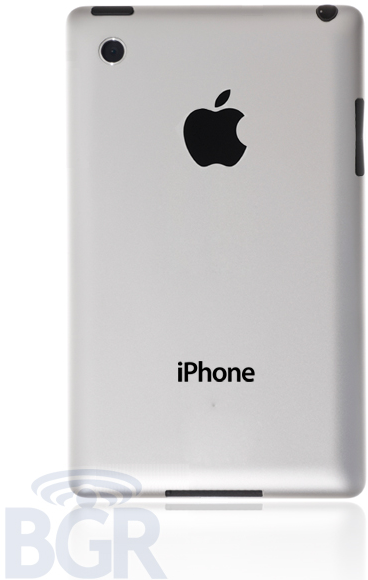
Report: iPhone 5 to have plastic/rubberized bezel, aluminum back, come Fall of 2012

Site default logo image

BGR reports that the iPhone 5, slated to be released in the fall of 2012, would have a number of differences to the current 4/4S models.  The back will be aluminum and it will likely be surrounded by a plastic or rubberized bezel according to the report.

It will join the glass iPhone face with a new aluminum back plate. It will also cover a redesigned antenna system that surrounds the device, allowing Apple to build the rear case out of aluminum without having to use a large plastic insert above the antennas as the company does on its iPad 2 Wi-Fi + 3G.

The last we had heard from our contacts at Foxconn was that the iPhone 5 would be delivered in the summer of 2012 along with a slightly bigger screen at the same resolution, faster processor and redesigned form factor.


Expand
Expanding
Close

iPad 3 home buttons begin floating around China, feature more design tweaks

Site default logo image

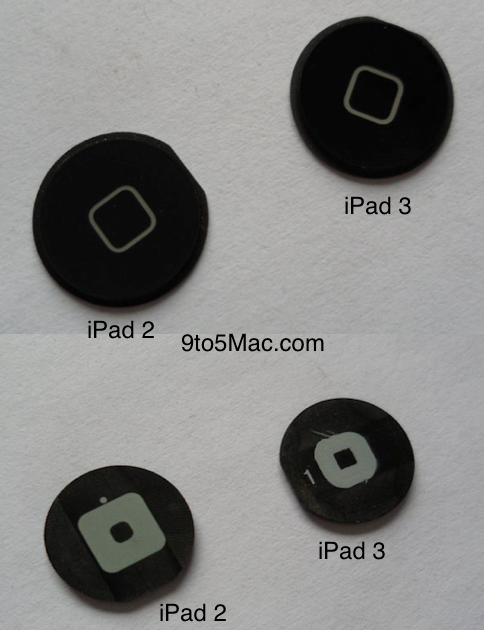
The above image is a comparison of an iPad 2 home button and an iPad 3 home button. At the surface, not much as changed, but the prospects of some minor structural tweaks do hint at something greater. The iPad 3 home button, which has been handled in both black and white flavors, looks almost identical to the iPad 2 home button. However, the gray glyph representing the frame of a home screen application icon is slightly thicker. This, obviously, is not all the interesting…but we do learn a few things:

– The iPad 3 will likely come in both black and white-just like the iPad 2-if these iPad 3 home buttons pan out to be the ones used in the final.

– The buttons floating around right now-in large quantities-signal that the iPad 3 is either in production or close to the production stage

– The iPad 3 will not lose the home button (iOS devices have been rumored to soon be losing the home button).

Perhaps the most interesting part about the iPad 3 home button is that its internal structuring is smaller than the iPad 2’s connector (easy to tell in the comparison image above). Apple tweaking the home button structural design and making its size smaller may indicate that Apple is trying to make room for something else. The iPad 3 is already rumored to be nearly 1 mm thicker to accommodate a more pixel-dense Retina Display. Perhaps this slightly smaller home button is one method Apple is using to keep the extra thickness required to a minimum.

Power and volume rockers with a similar design to their iPad 2 counterparts are also floating around, perhaps hinting a minimal design changes. Stay tuned for more.


Expand
Expanding
Close

Report claims Asian suppliers scramble to meet special iPad 3 launch date: Jobs’ Feb. 24 birthday anniversary

Site default logo image

Apply a healthy dose of skepticism to this report rather than take it at face value. According to Focus Taiwan, that also cited a local report in the Chinese Economic Times newspaper, Apple is shooting to launch iPad 3 on Steve Jobs’ birthday anniversary Feb. 24.

The newspaper based their report on sources close to Taiwanese makers in Apple’s supply chain:

After the iPhone 4S successfully took the tech market by storm, the iPad3 is widely expected to be Apple’s first hit product to be released next year. Industry sources said the first shipment of the iPad3 could exceed 4 million units. Because it is a new gadget, it is taking time for makers in the supply chain to raise their yield rates. The sources said all OEM and ODM makers have exercised great caution in ensuring the smooth operations of their production lines.

The original iPad was introduced Jan. 27, 2010 by Apple’s then-CEO Steve Jobs. In order to meet the deadline, the report noted, Asian component makers and contract manufacturers are demanding that employees work during the Lunar New Year holiday. This February 24 “launch” date should be referring to an availbility versus an introduction date as Feb. 24 is a Friday and Apple typically releases their major products like iPhones and iPads on Fridays.

Specifically…


Expand
Expanding
Close

Judge: “We don’t think someone buys a Samsung to make his table neighbor at the coffee house believe he owns an iPad”

Site default logo image

Perhaps in what might be read as a wake-up call for Apple, the Cupertino, Calif., gadget powerhouse was just served a dose of reality before a Dusseldorf court in Germany. A quick recap: Apple secured a sales ban on Samsung’s Galaxy Tab 10.1 in September on the grounds of too many similarities and patent infringement.

Samsung then re-engineered its device and re-introduced it under the Galaxy Tab 10.1N moniker, but Apple pushed for an injunction of that model, too. Today at the Dusseldorf court, presiding judge Johanna Brueckner-Hofmann made it known that Apple was pushing its luck with a request for an injunction.

According to Bloomberg, she said:


Expand
Expanding
Close

Skitch for iPad is here, annotation becomes tactile

Site default logo image

Evernote acquired Skitch in mid-August and re-launched it as a free download on the Mac App Store. Yesterday, the company made good on its promise to release an iOS version of the program. Skitch for iPad is here, allowing users to take notes, annotate, edit screenshots and more on the 9.7-inch Apple tablet.

The app lets users annotate and draw anything, just by using their fingers. It works with photos, web pages, screenshots, maps, or users can start a new blank canvas. Projects can be shared on Twitter, sent through email, saved to Evernote and beamed wirelessly onto Apple TV with AirPlay.

The drawing tools include your finger, pencil, arrows, text, shapes, crop, color and thickness and more. Evernote also noted in a blog post that Skitch for iPhone is in the works. Skitch for iPad is a free download from the App Store. Full release notes and nice screen shots are below.

[youtube=http://www.youtube.com/watch?v=L0KQbLOPDvc]

Expand
Expanding
Close

Adobe brings legally binding e-signatures to iOS with EchoSign for iPhone and iPad

Site default logo image

Adobe just -the No. 1 e-signature service used by over four millions users- for both iPhone and iPad as a free universal iOS application. The new app is available now, and it allows users to send documents and have them signed with a legally binding e-signature on the iPad or iPhone.

Users will access their EchoSign account, search and send from the EchoSign library, or send documents from their photo album, an email attachment, or apps like Box.net and Dropbox. There is also built-in, real-time status tracking, and the ability to quickly view signed agreements in an EchoSign account. Adobe promised the signing process within the app includes all of EchoSign’s “key authentication and privacy, fraud protection, and consumer disclosure”.

Out of EchoSign’s four million users, some of the estimated 50,000 paid subscribers include Twitter, Google, Facebook, VMware, Dell, and Groupon. Jason Lemkin started the company in 2006, and it was eventually acquired by Adobe in July of 2011 when the company had around 35,000 paid subscribers.

You can grab the app for free from the App Store now (iTunes link). Apple iPad screenshots are below:


Expand
Expanding
Close

Kindle iOS app updated with new iPad UI for magazines, Send-to-Kindle cloud storage and more

Site default logo image

The Kindle iPhone and iPad app were given a significant update, bringing it up to version 2.9 and introducing many new and highly requested features.

First up are a few iPad specific changes, such as a new user interface for magazines on the larger screen, and you now have the ability to “read print replica textbooks” with support for layout and rich formatting of the print editions, notes, zoom and pan, and table of contents.

When it comes to updates that apply to the iPhone, iPad, and iPod touch, you can now email documents to your “Send-to-Kindle” address to store in Amazon Cloud, open PDFs from within Safari or Mail by sending them to your Send-to-Kindle address. Moreover, a new library organization view lets you manage content from Newsstand, Docs, and Kindle Books.

You can grab the Kindle iOS app as a universal download from the App Store (iTunes link). Check out a full list of changes below:


Expand
Expanding
Close

Last minute gift reviews for Apple lovers

Site default logo image

As we close out the year and approach Christmas, here is a quick review of some stellar items we have reviewed over the past few months.

Audyssey Lower East Side Speakers.  Truth be told, we were interested in the Airplay-enabled Lower East Side Audio Dock Air that seems to have been struck by production delays.  In the meantime, we are in love with the standalone LES powered speakers (right).  Very simple I/Os and almost perfect desktop-level sound makes these incredibly good for the small room or workspace.  Sure, they will fill up a medium sized room, but you will find much larger/expensive setups for that.  $199 Amazon. Bonus: If you want Airplay functionality, throw in a $95 Apple TV and an Optical cable.

Doxie Go Wireless scanner: The magic is putting an Eye-Fi card in the SD card slot that allows automatic Evernote/flickr Cloud synchronizing.  I use this at the front of my house without a computer where mail comes in.  Important stuff is run through the scanner and sent to the Cloud before it hits recycling.  Standalone Cloud scanners are the future.  It also does traditional Desktop scanning via USB. ($150-200 at Amazon.)

Atari Arcade. This little plastic iPad “dock” (does not work with iPhone 4) adds a joystick to the 100 Atari applications for $15 app (at present no other games support this – but more are planned). The quality is good and the gaming is certainly nostalgic.  It was fun to teach my kid the games I played when I was his age (which is probably why this thing is such a hit).  It would have been much better with a pass thru charger and landscape options.  Still, fun. ($59.99 Amazon) iCade is a more expensive option.

iHelicopter.net sent us a review unit after we showed their latest preview of their missile-shooting iHelocopter. After a few weeks of playing with this iOS device controlled (through an earphone dongle) helicopter, I can say it works as expected.  I have only used it inside but it has survived a lot of hard “landings” as well as direct hits on the ceiling and walls. The reason this one is so notable is that it shoots missiles through a spring-loaded system.  Yes, this works and with the gyroscope going, it is easy to hit your target.  ($69 shipped free globally.)

Logitech Tablet speaker.  Initially we were down on this little gadget because, let us face it, it is not a “looker”.  However, after playing with our review unit for a number of weeks, it has come in handy on a number of occasions and it produces impressive sound considering its size and portability. It clips to your iPad, is charged via USB and plugs into the headphone jack. The rechargeable batteries last for 8 hours. (Amazon – as low as $22)

Western Digital TV Live. Sure Apple TV does 90% of what this thing does, but if you want stuff like Hulu Plus, Spotify, Facebook or compatibility with DLNA and non- iOS compatible videos, this little $90 1080P TV works great. It also has a full sized USB port for hooking directly into USB Sticks, wireless keyboards, and hard drives.  ($89.99 – Amazon.) Also, consider Roku devices that start at $45.

Apple grabs 61.5-percent of global tablet market in Q3, 10 times over closest competitor (Samsung)

Site default logo image

Last time we checked with research firm IDC, they listed Apple at 68.3-percent of the worldwide tablet market with approximately 9.3 million units of the iPad 2 shipped in quarter two of 2011. While the firm’s estimates for Q3 saw a drop to 61.5-percent of the market, Apple still leads the market and increased shipments from the 9.3 million in Q2 to approximately 11.1 million units in Q3.

To put that in perspective, Apple’s closest competitor, Samsung, is over 10 times behind with just 5.6-percent of the market. The overall tablet market increased 23.9-percent to approximately 18.1 million units, representing a 264.5-percent increase from the year-ago quarter.

As for where Apple stands in comparison to the overall Android tablet market, IDC expects Android tablet market share to increase rapidly in Q4 from just 33.2-percent in Q3 to 40.3-percent. It’s important to note that IDC recently included “media tablets,” such as Amazon’s Kindle Fire and Barnes & Noble’s Nook Tablet, in their worldwide tablet market estimates. These additions will more than likely account for much of the increase.

This morning, Morgan Stanley significantly raised its forecasts for 2012, predicting Apple could possibly sell 90 million iPads during the year (in addition to 190 million iPhones). The analysts apparently have high hopes for Android 4.0’s ability to offer a competitive alternative to iPad going forward:


Expand
Expanding
Close

Make the iPhone’s Apple logo glow with $40 in 5 minutes

Site default logo image

A new hack by a Chinese manufacturer will allow a user to make an iPhone 4/4S’s Apple logo glow. Much like the MacBook’s, the logo will glow once you turn the device on.

K.O. Gadget, the maker of this mod, said it can be done at home in less than five minutes. For $42, K.O. Gadget will send you the kit to perform this hack, but it would void an iPhone’s warranty.

The mod is easy because all you’re doing is replacing the back panel on the iPhone. The backpanel has a transparent Apple logo that allows light to pass through, but the key is the “light strip” that is added in. You can see the addition in the video below.

The light strip and custom backing doesn’t add any thickness to the device, because it uses the same glass material that Apple uses. K.O. Gadget also said there isn’t any over heating issues or battery life issues.

If you’re the adventurous type, this is something definitely worth checking out. Check out the install process below:


Expand
Expanding
Close

Top Google searches in 2011: iPad 3, iPhone 5, Steve Jobs and yes – Rebecca Black

Site default logo image

As originally reported on our sister blog, the search Goliath has published its annual list of top search queries, a tradition that started eleven years ago. It comes as little surprise that ‘iPad 3’ and ‘iPhone 5’ were among the fastest-growing search terms of the past year. More specifically, ‘iPhone 5’ was the sixth fastest-growing search term on Google.com in 2011, while ‘iPad 3’ ranked tenth.

Feverish iPhone 5 speculation hit its highest point in search the week of September 25, just a week ahead of the October 4 iPhone 4S presser. Searches for ‘iPhone 5’ rose 1,658 percent between 2010 and 2011, easily outnumbering those for the iPhone 4S, as seen in the above chart from the Zeitgeist site. Searches for ‘Steve Jobs’ grew 982 percent in 2011, enough to score the ninth spot.

Called Zeitgeist, the project “sorts billions of Google searches to capture the year’s ten fastest-rising global queries and the rest of the spirit of 2011″, per the official Google blog post. In a testament to the popularity of the Kindle Fire, positioned as an inexpensive iPad alternative, Amazon’s tablet placed ahead of Apple’s new phone, the iPhone 4S, which ranked second in the fastest-rising consumer electronics category, followed by the HTC Sensation, the Samsung Nexus Prime, Sony NPG and the yet-to-be-released iPad 3 (#9).

Two unreleased products piquing such a commanding interest – the cell phone that never materialized and the forthcoming tablet – wow, talk about the power of the Apple hype machine. More below the fold.

[youtube=http://www.youtube.com/watch?v=SAIEamakLoY]

Apple’s late co-founder Steve Jobs made the list (mark 1:50) was the ninth fastest-growing search term on Google.com in 2011.


Expand
Expanding
Close

Morgan Stanley raises forecast to over a quarter billion iPhones and iPads in 2012

Site default logo image

Morgan Stanley analyst Katy Huberty wrote in a note to clients issued yesterday (via Fortune) that U.S. consumers are expect to buy more iPhones in the first calendar quarter of 2012 than even the holiday quarter this year. This is noteworthy as the holiday quarter has traditionally been Apple’s strongest three-month sales period.

Not even the two recent Samsung television commercials (here and here) that poke fun of line waiters seem to be slowing the iPhone momentum (unless you believe a YouGov survey, chart included below the fold). Huberty is now projecting CQ4 iPhone sales anywhere from 31 to 36 million iPhones versus the previous model calling for 30 million units (Wall Street: 28 million). For the first quarter of the next year, Huberty is projecting an astounding 41 million units based on last week’s comments from AT&T and an Alphawise survey conducted for Morgan Stanley the week after Thanksgiving.

That’s a 46 percent increase over her previous 28 million estimate (Wall Street: 26 million). In all, Huberty wrote, Apple should sell 190 million iPhones during the calendar year 2012. As for iPad…


Expand
Expanding
Close

Samsung markets Galaxy Tab as “the tablet Apple tried to stop”

Site default logo image

Last week Samsung got to breathe a sigh of relief as an Australian court ruled they didn’t “slavishly copy” the iPad with the Galaxy Tab 10.1, as Apple has been insisted from the onset in court documents. Yesterday, the South Korean company told the Sydney Morning Herald that the court cases have helped make their device a “household name” and today we are seeing the Galaxy Tab maker taking advantage of the media spotlight and the fact that it’s been in the headlines thanks to lawsuits and those cheesy commercials.

As tweeted by Martin Aungle, an Australian corporate and marketing communications professional, Samsung is now pitching its device as “the tablet Apple tried to stop”. The above advert ran in the Sun-Herald newspaper this week. Samsung has obviously decided to up the stakes in this game considering they resisted up until now mentioning Apple by name in their marketing communication. We’ll see, of course, whether publicly celebrating its courtroom victory at Apple’s expense will have any effect on sales.


Expand
Expanding
Close

Grand Theft Auto 3 hits the iPhone and iPad

Site default logo image

[youtube=”http://www.youtube.com/watch?v=PtbUORusNvo”]

Rockstar games has just released Grand Theft Auto 3 for both the iPhone and iPad late this evening. This release  marks the 10th anniversary of the game, which was originally released for the PS2. Grand Theft Auto 3 is available for $4.99 on the iTunes App Store.

Rockstar Games celebrates the 10th anniversary of one of the most influential games of all time. The critically acclaimed blockbuster Grand Theft Auto III comes to mobile devices, bringing to life the dark and seedy underworld of Liberty City. With a massive and diverse open world, a wild cast of characters from every walk of life and the freedom to explore at will, Grand Theft Auto III puts the dark, intriguing and ruthless world of crime at your fingertips.

Check out some gameplay after the break:


Expand
Expanding
Close

Google rolls out updated Gmail iOS app with custom signatures, vacation responders, Scribbles, more

Site default logo image

Google has just started rolling out an update to the Gmail app for iPhone, iPad, and iPod touch with a few new welcomed features. First off, users now have the ability to set a custom signature for messages as well as a vacation responder. Both of those new features will be available via the gear icon at the top of the app’s new menu. The update also includes support for nested labels and the usual “bug fixes and UI improvements”.

A new Scribbles feature allows you to open a canvas, draw a picture or sketch with multiple colors, brush sizes and line elements, and attach it to a message within Gmail. Scribbles is available now in both the Gmail iOS app and Gmail mobile web app. Another notable and highly requested change is a new notification sound on iOS 5, making it easier to tell when you’ve received an email

Google also mentioned in their blog post that they are continuing to work on some of the most requested features from users including multiple login support, banner notifications, and a “send as” feature to send mail from multiple accounts within the app.

Expand
Expanding
Close

Netflix updates iOS app with new iPad UI for all regions, now available in Latin America for iPhone and iPad

Site default logo image

Netflix has just updated its iOS app with a nicer user interface following an overhauled Android app from a month ago. Netflix version 2.0 with a prettified appearance is now available in all regions, Netflix said, including the United States, Canada and Latin America. The new interface provides access to twice as many television shows and movies available for streaming.

Interestingly, the app is now available in Latin America for both the iPhone and iPad just as Apple announced the arrival of both the iTunes Store with iTunes Match in Latin America and Apple TV in Brazil. Netflix for iOS is a free download (a Netflix subscription is required). Video out is supported on the iPad, iPhone 4, iPhone 4S and fourth-generation iPod Touch 4G. Full release notes after the break.


Expand
Expanding
Close

Rockmate puts the whole music studio on one iPad screen, SHREDDER Synth for Guitar pros debuts

Site default logo image

[youtube=http://www.youtube.com/watch?v=FUa4IAQetTk]

Here’s a fun iPad game for the whole (Partridge) family.

Rockmate turns your iPad into a complete music studio easy and super fun to use. You can compose, record and play songs with up to 4 Rock players on one single iPad. Rockmate is easy to play with smart chords progressions, sounds great with separated guitar effects and in-house produced audio samples and is also fully customizable with multiple drums and keyboard styles.

Rockmate is ready to rock ! Your guitars are always well tuned, no need to carry your drum kit or to patch your keyboard. A smart metronome and a real-time looper will assist you in composing and recording your songs. That you can share by email or in your iTunes sharing folder.

We want as many people as possible to experience Rockmate. So we have decided to make Rockmate available for one week (From 14 to 21 december 2011) at the introductory price of $0.99. Regular price $3.99.

(iTunes $.99)

For those who are after something in the professional realm, a new App called Shredder was released today…
Expand
Expanding
Close

Finally, an iPad app that taps your inner woodworker

Site default logo image

The novelty of smartphone apps may have worn off since the original iPhone but every now and then an app comes along that captures our imagination. Woodcraft for iPad  ($9.99 iTunes) by software artisans at Fasterre is interesting for its novel idea and professional execution. Say you’re an amateur or pro woodworker and you want to design your next deck, bench, furniture or backyard shed on your iPad.

Niche apps like that are few and far between and Woodcraft arrives to fill the gap. It’s no toy: The program features the fully automated bill of materials, seamless switches between 2D or 3D and lets you measure distances with up to 1/64th of an inch precision.

Watching their promo clip (nice editing work, BTW) makes me wanna explore my carpenter genes (my grandpa was an adept woodworker). Woodcraft is a universal binary that supports both iPad and iPhone/iPod touch and is available in exchange for ten bucks during the launch period. Release notes right after the break.

[youtube=http://www.youtube.com/watch?v=3xStZZsx6A4]


Expand
Expanding
Close

DigiTimes: 2880-by-1800 Retina Display rumored to come to 2012 MacBook Pro

Site default logo image

DigiTimes reports, based on “sources in the upstream supply chain”, that a next-generation MacBook Pro with a Retina-capable display sporting a 2880-by-1800 resolution could arrive in the second quarter of 2012:

While the prevailing MacBook models have displays with resolutions ranging from 1680 by 1050 to 1280 by 800, the ultra-high resolution for the new MacBook Pro will further differentiate Apple’s products from other brands, commented the sources.

The report continues asserting that Acer and Asustek Computer also plan to launch high-end Ultrabook models sporting  the 1920-by-1080 pixel resolution displays versus the 1366-by-768 displays typically found on today’s Ultrabooks. The rumor might make sense as Intel’s upcoming Ivy Bridge platform natively supports displays with up to a 4096-by-4096 pixel resolution and is capable of decoding multiple 4K video streams at once. Lion also added support for 3200-by-2000 wallpapers, doubling icon resolution to 1024-by-1024 pixels and enabling HiDPI display modes.


Expand
Expanding
Close