iPad (2021)

See All Stories

Apple's tablet debuted in 2010. Since the original version, it's expanded into multiple screen sizes and Pro and non-Pro options.

The iPad is Apple’s base tablet model. In its ninth generation, the iPad focuses on being the perfect tool for education and people who seek a bigger screen to read and surface the web compared to the iPhone. With Apple Pencil and Smart Keyboard support, the iPad has never been better.

History

Site default logo image

The iPad is a line of tablets designed and developed by Apple. It was originally announced in 2010, three years after the first iPhone was introduced. With a 9.7-inch screen and with iPhone OS 3.2 the iPad was a success, hitting 1 million tablets sold in over three months, half the time the first iPhone took to reach this mark.

Steve Jobs then unveiled the iPad 2 in March of 2011. About 33% thinner than its predecessor and 15% lighter, the second generation used the A5 chip, twice as faster as its predecessor. The iPad 2 also introduced front and back cameras that supported FaceTime video calls.

The successor of the iPad 2 wasn’t a success at all. The third generation was introduced in March of 2012 with a Retina display and the A5X processor. The problem with this tablet it was too heavy and the battery didn’t last long enough. In October of the same year, Apple announced the fourth generation with the A6X processor, HD FaceTime camera, improved LTE capabilities, and the Lightning connector.

At this October event, Apple also introduced the first iPad mini. In 2013, Apple went with the first iPad Air and the iPad mini 2. In 2015, the company introduced the first Pro model, with two different sizes.

Site default logo image

In March of 2017, Apple announced the fifth-generation iPad with the A9 processor. It was a budget option compared to the other tablets. It was in 2018 that the company brought expressive news to the base iPad line. The sixth-generation had the A10 Fusion processor and fully supports the first-generation Apple Pencil.

A year later, the seventh generation was announced with a larger 10.2-inch display and support for the Smart Keyboard as well. It retained most of the specs of the previous model.

In September of 2020, the eighth generation was introduced alongside the fourth-generation iPad Air model. The eighth generation received an upgraded processor, now with the A12 Bionic, while keeping the same storage options: 32GB and 128GB.

In September of 2021, the ninth generation was introduced alongside a redesigned iPad mini. This iPad now features the A13 Bionic processor, True Tone support, and new storage options: 64GB and 256GB while keeping the same price.

iPad 9 Specs

Site default logo image

The ninth-generation iPad launched in September of 2021. Available in two colors, Silver and Space Gray, this tablet is made of 100% recyclable aluminum, and supports the first-generation Apple Pencil and Smart Keyboard.

With thinner bezels, the product comes with a 10.2-inch Retina display with a fingerprint-resistant oleophobic coating, and True Tone support for the first time, which adjusts screen content to the color temperature of a room.

This tablet uses the A13 Bionic chip, the same available on the iPhone 11, 11 Pro, and 11 Pro Max. It has an “all-day” battery with up to 10 hours of surfing the web on Wi-Fi or watching videos.

The iPad also comes in 64GB and 256GB storage options and Wi-Fi and Wi-Fi + Cellular versions.

Revamped cameras

Site default logo image

For the first time, this iPad shares the same FaceTime camera as the M1 iPad Pro with the Center Stage experience. With a new 12MP Ultra Wide front camera and Neural Engine, users can enjoy even more engaging video calls.

As users move around, Center Stage automatically pans the camera to keep them in view. When others join in, the camera detects them too, and smoothly zooms out to include them in the conversation. Center Stage makes video calls more natural in FaceTime as well as third-party video-calling apps.

Its main camera is the same: 8MP, f/2.4 aperture, and digital zoom up to 5x.

iPadOS 15

Site default logo image

The ninth-generation iPad comes with the iPadOS 15. Previewed during the WWDC21 keynote, the new operating system brings a redesigned Home Screen with widgets and App Library support.

On iPadOS 15, FaceTime group calls can finally appear in a grid, so it’s easier to see everyone. It’s also possible to share your screen, listen to Apple Music songs together, or watch Apple TV+, HBO Max, Disney+, and others while in a call.

In the productivity section, Apple, unfortunately, didn’t bring all the features pro users wanted to take full advantage of their new M1 iPad Pro, even though Apple made it easier to rely on multitasking features.

There’s a new multitasking menu on the top of the screen. When you click there, it’s possible to see what configurations you can use on Split View or just go to Slide Over with just a tap.

The experience with an external keyboard allows users to get more done with all-new keyboard shortcuts and a redesign of the menu bar.

With the Quick Note feature, users can use the Apple Pencil to add a quick note. They just need to slide the pencil through the bottom right corner to the center of the screen and start writing.

iPadOS 15 launched on September 20. Learn more about it here.

iPadOS 15.1 features

One month after releasing iPadOS 15, Apple released iPadOS 15.1 More notable, the company finally brought SharePlay support for the iPhone, iPad, and Apple TV. Unfortunately, Universal Control wasn’t one of the features added with this new version. Here’s what else is new:

Translate

  • Mandarin Chinese (Taiwan) support in the Translate app and for system-wide translation

Home

  • New automation triggers based on the current reading of a HomeKit-enabled humidity, air quality, or light level sensor

Shortcuts

  • New pre-built actions let you overlay text on images or gifs, plus a new collection of games lets you pass the time with Siri

iPadOS 15.2 features

apple-music-hey-siri-plays-voice-plan-9to5mac-2

Five weeks after releasing iPadOS 15.1, Apple is releasing iPadOS 15.2. It brings more features that were expected to launch alongside iPadOS 15 but, unfortunately, Universal Control is still nowhere to be seen. Here are the top features of this version:

  • Apple Music Voice Plan is a new subscription tier that gives you access to all songs, playlists, and stations in Apple Music using Siri
  • App Privacy Report in Settings lets you see how often apps have accessed your location, photos, camera, microphone, contacts, and more during the last seven days, as well as their network activity
  • Communication safety setting gives parents the ability to enable warnings for children when they receive or send photos that contain nudity
  • Digital Legacy allows you to designate people as Legacy Contacts so they can access your iCloud account and personal information in the event of your death
  • Apple TV app: Store tab lets you browse, buy, and rent movies and TV Shows all in one place

iPadOS 15.3 features

Six weeks after releasing iPadOS 15.2, Apple is releasing iPadOS 15.3. This update foregoes new features in favor of under-the-hood bug fixes and improvements. One of the most notable changes here is a fix for a Safari vulnerability that may have been leaking your browsing history and Google ID data to the websites you visited.

iPadOS 15.4 features

iPadOS 15.4 finally brings one of the most important features expected from iPadOS 15 and that got delayed: Universal Control. Here’s everything new with iPadOS 15.4:

  • Universal Control: This feature allows you to control your Mac and iPad using the same keyboard and mouse/trackpad. Universal Control needs iPadOS 15.4 and macOS Monterey 12.3;
  • New Siri voice: Siri has a fifth American voice. Apple says a member of the LGBTQ+ community recorded the voice and it’s non-binary;
  • More emoji: iPadOS 15.4 also brings new emojis. You can discover all of the new characters here;
  • Shortcuts automation: Adds support for running Personal Automations in the background without requiring a pesky banner notification.

You can learn everything new with this update here.

iPadOS 15.5 features

Different from other software updates, iPadOS 15.5 only improves the Podcast app experience, as Apple focused on Wallet changes for the iPhone this time:

  • Apple Podcasts includes a new setting to limit episodes stored on your iPhone and automatically delete older ones

iPadOS 15.6 features

iPadOS 15.6 is yet another small update for iPad users. Here’s what’s news:

  • TV app adds the option to restart a live sports game already in progress and pause, rewind, or fast-forward.
  • Fixes an issue where Settings may continue to display that device storage is full even if it is available.
  • Fixes an issue that may cause Braille devices to slow down or stop responding when navigating text in Mail.
  • Fixes an issue in Safari where a tab may revert to a previous page.

iPadOS 15.7 features

iPadOS 15.7 only brings bug fixes and some security improvements as the company readies the iPadOS 16 release.

Education

Site default logo image

Apple describes this iPad as the go-to tablet for education. For several years the company discounts this tablet up to 10%.

Apple is always promoting ways students can use the iPad to learn new things: using Augmented Reality, the Apple Pencil, and how to code with Playgrounds.

The company says the “App Store is the best place to discover apps” for education purposes:

Let your curiosity run wild with iPad. The App Store is the best place to discover apps that let you get a leg up in geometry, learn a new language, and attend virtual classes. You can even use augmented reality to learn something exciting, like watching the history of spaceflight unfold in your living room or making characters from your favorite book literally leap off the page.

Release date: When Apple will launch the ninth-generation iPad?

Apple launched the iPad 9 on September 24, 2021.

Pricing

iPad (2021) pricing starts at $329 for the 32GB storage option with Wi-Fi only. The prices can go up to $559 with the 128GB storage option and WI-Fi + Cellular. Here are the full prices of the ninth-generation tablet:

  • 32GB with Wi-Fi: $329
  • 32GB with Wi-Fi + Cellular: $459
  • 128GB with Wi-Fi: $429
  • 128GB with Wi-Fi + Cellular: $559
  • Apple Pencil (1st generation): $99
  • Smart Keyboard: $159

Lower prices may be available from Apple’s official Amazon store.

iPad (2021) Review

Site default logo image

Soon, we’ll review the ninth-generation iPad. As for now, you can watch our video review of the eighth-generation iPad, as we described it as the “best value tablet you can buy:”

“The iPad 8 was never meant to be a huge update. But even still, I think this is easily the best value tablet you can buy. For $329, this tablet has so much to offer: The performance, the great battery life, and the Apple pencil functionality. I’d highly recommend you pick up this tablet if you simply need an inexpensive tablet today that’s going to last you for three to four years with no trouble.”

iPad Deals

Over at 9to5Toys, you can find the best deals on the iPad and other Apple products. Download the 9to5Toys iPhone app to receive push notifications for new deals as well.

Rumors

As of now, Bloomberg‘s Mark Gurman said in his Power On newsletter by the end of 2021 that Apple plans a new entry-level iPad for 2022. In June 2022, 9to5Mac exclusively reported the details of the tenth-generation iPad model.

According to Filipe Espósito, this new entry-level tablet will pack the A14 Bionic chip, 5G compatibility, and, for the first time, USB-C connectivity, unlocking new experiences with the second-generation Apple Pencil. Its display will also increase, although it’s unclear whether it will have the same design as the M1 iPad Air.

This iPad could be released in October of 2022.

Site default logo image

We’re not the only ones used to calling it the iWatch – even Tim Cook slips up

I tweeted earlier that it’s going to take a while to get used to referring to the Apple Watch instead of iWatch, and it seems I’m in good company. As The Verge noted, even Tim Cook said iWatch during his ABC News interview when talking about US jobs created by the company.

Developers writing applications for iPhone and iPad and Mac and now, of course, as of today, the iWatch

The question is, was the slip-up because Cook spends too much time reading tech sites, or was it that Apple originally intended to release it as the iWatch, having a change of mind some way down the line?

iWatch was (and I think still is) the obvious name for the product. Apple Watch feels awkward in comparison. As Mike Beasley observed, Apple Phone or Apple Tablet doesn’t have the same ring as iPhone and iPad, so why not iWatch? It surely can’t just be that Apple was miffed that the tech press has been using the term so long it felt it had to prove us wrong?

Site default logo image

With one day to go, a flurry of additional iPhone 6 videos posted

[youtube=https://www.youtube.com/watch?v=DZO1j2ASSqk]

In the final run-up to the official launch of the iPhone 6, we’ve been seeing a number of videos of what appear to be the real thing. With just one day to go, Miaopai has just posted no fewer than 17 short videos claiming to show the Chinese version of the iPhone 6 in use.

We don’t learn anything from them we didn’t already know, but they do give a sense of what the size of the 4.7-inch display is like to use in practice.

[youtube=https://www.youtube.com/watch?v=RJmhcZAYgmI]

French site NWE has also re-posted video of what it says is the battery from the 5.5-inch iPhone 6, showing a capacity of 2915mAh. This is consistent with earlier reports. While it has almost twice the capacity of the 1560mAh battery used in the iPhone 5s, it’s unknown how much of that power will be needed to drive the extra size and resolution of the larger display.

We heard over the weekend that Apple’s long-rumored NFC-based mobile payment system will use tokenization to maximize security, transmitting coded one-time tokens to payment terminals, and that the 5.5-inch model may run landscape apps, giving a more iPad-like user experience.

All will be revealed tomorrow at 10am PDT. We’ll of course be bringing you live coverage and commentary. In the meantime, you can see a whole bunch of the videos below … 
Expand
Expanding
Close

5.5-inch iPhone 6 may run landscape apps with more productive iPad-like interface

Site default logo image

While the 4.7-inch version of the upcoming iPhone 6 will seemingly function as a large version of the current iPhone interface, it appears that the larger model with a 5.5-inch display could run software in landscape mode with an iPad-like user interface (portrait views likely remain unchanged). Developer Steven Troughton-Smith altered the iOS simulator to run at 736 points x 414 points (1472 x 828 at 2x or 2208 x 1242 at 3x), the resolution we first reported was likely in the cards for at least one iPhone 6 model, and provided us with screenshots of the presented interface…


Expand
Expanding
Close

Apple and Disney Stores upgrading iBeacons and NFC scanners ahead of iPhone 6 launch

Site default logo image

Apple and longtime partner Disney this week are bolstering their stores with upgraded versions of iBeacon sensors and NFC readers, according to sources. Apple Stores have had iBeacons stationed throughout showroom floors for several months as a way to pinpoint exactly where a customer is within the store. This allows Apple to better serve customers by providing relevant sales information to their iPhones and iPads while in the store. The upgrades happening this week within Apple Stores place several new Gimbal Series 20 Proximity Beacons across stores to make location tracking within the store even more accurate.

In addition to providing relevant information for the Apple Store app, iBeacons can be useful for NFC mobile payment technologies as a form of authentication. If Apple knows where a customer is in the store to a precise degree, it can ensure that is it wirelessly connecting to the correct iPhone for mobile payments. As has been widely reported, the new iPhone 6 and upcoming Apple wearable device will include new wireless sensors (including a near field communication chipset) to conduct mobile payments with credit cards stored in an upgraded Passbook application.


Expand
Expanding
Close

Apple wearable to run third-party apps, big developers already seeded SDK

Site default logo image

Apple’s upcoming wearable device, based on iOS, will run third-party applications and, furthermore, may come equipped with an App Store, according to two sources with knowledge of the new device. It is currently unclear if the App Store will be full-fledged, like on the iPhone and iPad, or if it will be a special section with in the iPhone App Store for apps that play nicely with the new wearable device.

A small handful of high-profile social network and services companies with apps on the iPhone and iPad App Store have already been seeded with a pre-release version of the Apple SDK (Software Development Kit) for wearables under strict non-disclosure agreements. One of the developers with access to the pre-release SDK is Facebook, according to a source. Facebook is also said to be finishing up work on an iOS 8-optimized version of its iPhone app with improved notifications. The social network is also experimenting with ways it can leverage the new Notification Center widget APIs.

The SDK was seeded “very recently” to these developers, and Apple likely wants to demonstrate some third-party wearable apps at Tuesday’s event, according to one source. Apple, in the past, has provided select developers with early versions of SDKs in order to boast new apps on the keynote stage. For example, several apps from companies like AOL were shown off with the first public demonstration of the iPhone SDK, fancy gaming and drawing apps were demonstrated alongside the first iPad in 2010, and the iPhone 4S’s dual-core A5 chip was launched alongside a graphics-intense video game…


Expand
Expanding
Close

Site default logo image

AppleCare+ finally coming soon to Australia

AppleCare+ is coming for the first time to Australia in the coming weeks, according to a source. Apple will begin training Apple Store employees in Australia on how to sell the premium protection plan in the coming days. MacRumors is also reporting that the service is inbound to Down Under. iPhone and iPad users in Australia can currently only buy the less-expensive standard AppleCare plan. Apple revamped AppleCare+ for many countries earlier this year with an extended purchase window and by making the plan the standard. Apple typically adds a few new countries to its list of AppleCare countries with new iPhone launches, and with the iPhone 6 upon us, it makes sense that Australia (and potentially some other yet-to-be-supported countries) will get AppleCare+.


Expand
Expanding
Close

Apple Store app redesigned, gains upcoming events feature, synchronized shopping

Site default logo image

Ahead of its major media event next week, Apple has issued a significant update to its Apple Store shopping iOS app. The first addition is a complete redesign for the iPhone and iPod touch application’s interface. The new design is more in-line with the recently released iPad variant. Speaking of the iPad version, the tablet-optimized layout is now a universal bundle (single download) with the iPhone/iPod touch version, and it has also gained support for making Apple Store One to One reservations. The app also has a new Stores section to search for upcoming events at local Apple Stores. There is also a new icon. Perhaps the most significant new feature is support for synchronizing shopping between iOS devices and desktop computers. For example, you can start shopping on your Mac and continue via the app on your iPhone. Apple (rightfully so) doesn’t want to a miss a single iPhone 6 or iWatch/iBand sale.


Expand
Expanding
Close

KGI report claims both iPhone 6 models to offer 128GB storage; iPad Air 2 launch on same day

Site default logo image

KGI analyst Ming-Chi Kuo, in a report this morning, states that both 4.7- and 5.5-inch models of the iPhone 6 will be launched next week and will both offer 128GB storage option. If Apple retains its usual three-tier structure this would suggest 32GB, 64GB and 128GB models – though it could be that 128GB would be a fourth tier, as with its iPad Air models. Or, as a previous report suggested, Apple could keep the 16GB option as a very low price tier and skip 32GB.

The same report predicts that the iPad Air 2 will be announced on the same day as the iPhone 6 rather than in a separate event in October. In this scenario, Apple would forgo any physical updates to the iPad mini line (perhaps price drops?). If true, this suggests that it could be a relatively minor refresh, perhaps simply with Touch ID added and a marginally thinner casing along with the RAM bumped up to 2GB for things like split window multitasking … 
Expand
Expanding
Close

Site default logo image

Expedia redesigns its iPad app with combined flight and hotel search

Travel booking website Expedia has revamped its iPad application with a new, tablet-optimized look and improved search. Expedia says that its app is faster at helping you book travel than apps from the competition because of its combined search feature.

You just enter your destination and the app will provide results for both hotels and flights in one panel. The app has a handful of other helpful features, according to Expedia:

  • Single Search Box: To eliminate hefty search interfaces, the new tablet app offers a single search box to do the lifting. When a traveler enters a city] name, landmark, or airport code, the app will surface hotels and flights relevant to that query – no dates or specific details are required at the start.
  • First-Ever Combined Hotel & Flight Travel Search:For the first time in the industry, combined search has arrived for the travel market. Rather than searching for trips in a rigid, linear progression of flights then hotels, or hotels then flights, Expedia is introducing one combined search that provides both hotel and flight results simultaneously, available all in one glance.
  • Collections:Expedia presents various themed travel destinations to spark interest in future journeys. Collections offer customers the opportunity to explore vacation destinations they may not have otherwise considered. Beautiful locations come to life in a particularly compelling way on tablet devices. Collections offer a rich combination of design, mobility and travel research. Content is catered to various regions and will be updated based on traveler feedback.
  • Integrated Trip Planning, Booking, & Data, Shared Across Devices:Earlier this year, Expedia introduced Scratchpad in certain markets around the globe. Scratchpad is an easy way to keep track of your travel searches. When a traveler is signed into an Expedia app, trips researched on a tablet device will appear on the desktop or mobile Scratchpad. This allows travelers to begin their travel planning from where they left off – on any device.

A new version for Android tablets is also available. Expedia also has an iPhone version , and both apps are a free universal download on the App Store.


Expand
Expanding
Close

Digitimes says iPad Air 2 will be ‘thinner’ and have ‘improved fingerprint recognition’

Site default logo image


Says Digitimes:

Touch panel makers TPK and GIS are among some of the makers receiving orders from Apple for full-lamination units. Sources said the new model will remain unchanged in terms of size and resolution, but that it will be thinner, equipped with an enhanced processor, and contain improved fingerprint recognition features.

Two problems there (at least).

1) The current batch of physical mockups/leaks indicate that the new iPad Air will look mostly the same as the current version, and that it will be roughly the same thinness. You can tell in the image above that the new model (on the top) is only very slightly skinner.

2) How can the fingerprint sensor be “improved” if it never existed in the first place? Nonetheless, we’re hearing the new model does include a Touch ID sensor, like the iPhone.


Expand
Expanding
Close

Site default logo image

Future patent battles could be fun as Apple patents Samsung Air Command style menus …

Future patent battles between Apple and Samsung could take an entertaining turn as Apple has been granted a patent on radial menus for touchscreen devices – using an illustration that bears a notable resemblance to the Air Command menu used by Samsung on the Galaxy Note 3.

Lest anyone accuse Apple of copying Samsung, Apple first patented the menu approach back in 2012 – a year before Samsung adopted it. The reason for the second patent granted today is that Apple seemingly had in mind OS X rather than iOS when it first came up with the idea, illustrating it in a desktop environment.

The second patent specifically references using the menu based on “input from a touchscreen.”

As ever, the fact that Apple has patented something provides no evidence at all that it will ever see the light of day in an Apple product – OS X or iOS. Apple plays around with all kinds of ideas and patents thousands of them, only a tiny minority of which are ever used.

With Apple possessing a patent for a particular menu approach used by Samsung, but patenting touchscreen application of the approach after Samsung launched it in a tablet, the legal arguments could get interesting should the matter ever end up in court …

Via GigaOM

Elgato announces Eve home automation integrated with Apple’s HomeKit, Avea smart LED lights and Smart Power batteries

Site default logo image


Everything has pretty much stopped in North America for Labor Day (except for perv hackers), but IFA 2014 is ramping up in Germany and Elgato is using this event to debut a new lineup of smart accessories. The announcement encompasses three major new products: Eve, Avea, and Smart Power.

Elgato Eve is easily the most compelling new product in this lineup. Through the use of several sensors, Avea monitors your home’s “air quality, temperature, humidity, air pressure, energy and water consumption.” These Bluetooth connected sensors report back to your iPhone or iPad via the Elgato Eve app. And here’s the best part, it will be fully compatible with Apple HomeKit…

Expand
Expanding
Close

Seeing Through the Illusion: Understanding Apple’s Mastery of the Media

Site default logo image

Apple CEO Tim Cook with former VP of Worldwide Communications Katie Cotton

“Beautifully, unapologetically plastic.”

“Feature for feature, it’s identical to iPad Air in every way.”

“Just avoid holding it in that way.”

Apple’s public relations (PR) department is probably the best in the world — certainly more impressive at shaping and controlling the discussion of its products than any other technology company. Before customers get their first chance to see or touch a new Apple product, the company has carefully orchestrated almost every one of its public appearances: controlled leaks and advance briefings for favored writers, an invite-only media debut, and a special early review process for a group of pre-screened, known-positive writers. Nothing is left to chance, and in the rare case where Apple doesn’t control the initial message, it remedies that by using proxies to deliver carefully crafted, off-the-record responses.

Except for a few big exceptions, such as the memorably off-pitch quotes above, Apple’s “tell them what to believe” PR strategy has worked incredibly well for years. But it has also created tensions between the company and the people who cover it, as well as within Apple itself. The company’s long-time head of PR, Katie Cotton, left the company earlier this year as CEO Tim Cook openly sought to make a major change in the way Apple interacted with the press and its customers. As the hunt for Cotton’s replacement is still in progress, and the depth of Apple’s commitment to change remains unclear, we look today at the techniques Apple has used to quietly manipulate its coverage over the years.

You can navigate between the chapters, below:

– Part 1) Apple Events and Shredded White Booklets

– Part 2) Introducing the Teams: How PR Is Organized at 3 Infinite Loop

– Part 3) Strategies: The “Art of Deep Background” and Controlling the Press

– Part 4) The Departure of a “Tyrant”

– Part 5) Two Heads In Place Of One

– Part 6) Controversies: From Maps to Beats to Haunted Empires

– Part 7) Product Reviews, Briefings, & Reviewer’s Guides

– Part 8) Steve Jobs and the Process Behind Press Releases

– Part 9) A Friendlier, More Transparent Future?

Two months in the making, this article is the product of over a dozen interviews with journalists, bloggers, and PR professionals, including many who have worked at Apple.


Expand
Expanding
Close

“Thinner, brighter, lighter” – Samsung attack ads on Apple continue with anti-iPad NYers

Site default logo image

[youtube=https://www.youtube.com/watch?v=wCrcm_CHM3g]

Samsung’s series of attack ads on Apple continue with a video of supposed voxpops in which New Yorkers are shown both the iPad Air and Galaxy Tab S and asked to compare them. Would you believe it, everyone prefers the Samsung, even the guy with limited room in his purse … 
Expand
Expanding
Close

Site default logo image

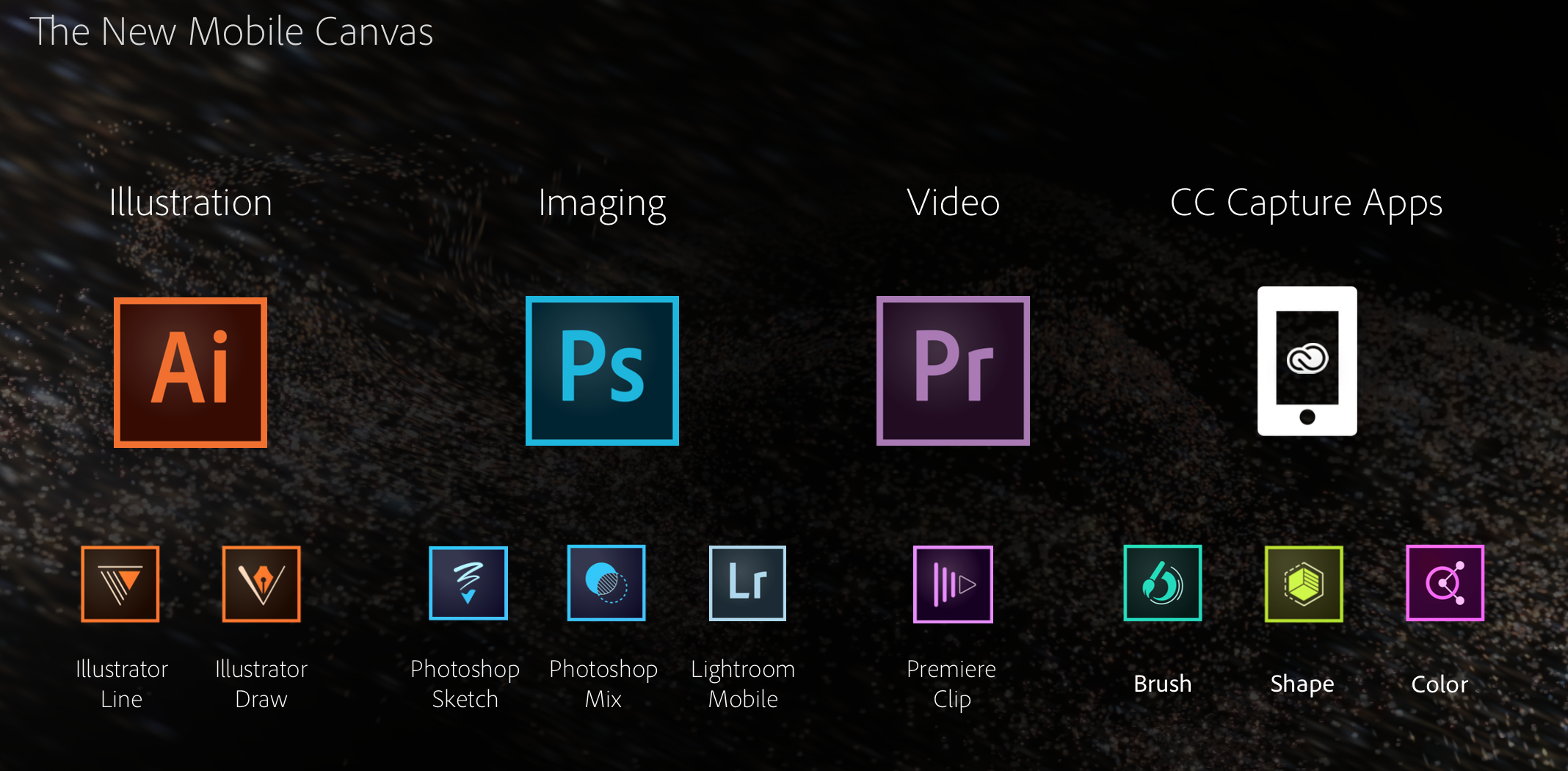
Adobe updates Photoshop Mix for iPad with undo/redo support, Dropbox support, and more

Adobe has updated its Photoshop Mix iPad app with several new features and tweaks. Version 1.1 of the app includes undo and redo support for quickly rolling back edits up to three levels.

The update also introduces support for exporting a JPEG or masked PNG to the iPad’s camera roll. You can also import images to edit from Dropbox. Foregrounds and background layers can now be switched using the Image Swap feature. Other miscellaneous performance enhancements have also been made to allow for faster project loading.


Expand
Expanding
Close

Apple announces special event for September 9th: ‘Wish we could say more’

Site default logo image

Apple has just sent out press invites for its latest event, via The Loop, where the company is expected to announce the iPhone 6. The event is scheduled for 10 AM Pacific Time on September 9th. Atypically, Apple is holding the event at a new venue, the Flint Center for the Performing Arts in Cupertino. This is the same venue that Apple introduced the original Mac, over 30 years ago. Apple has constructed a ‘three-story structure’ at the site, which may be used as the hands-on area after the presentation is over. Usually, Apple’s demo areas are only the size of a large room and do not span multiple floors.

Yesterday, Recode reported that Apple will also show off its new wrist wearable device (‘iWatch’) at the September 9th event. Unsurprisingly, the invite does not reveal specifics about what Apple will announce, bearing a rather bland image of the Apple logo coupled with the slogan ‘Wish we could say more’. Feel free to speculate what you think will be announced in the comments. A full screenshot of the email is after the break.
Expand
Expanding
Close

Site default logo image

NFL Mobile app updated with integrated video feeds, Fantasy Live streaming, social media sharing & more

The NFL Mobile app has been updated to version 11.1 with a number of updates, as well as bug fixes to reduce app crashes.

– Integration of NFL Now national and personalized video feeds
– Live stream of “Fantasy Live” now available for all users
– Ability to share articles and VOD via Facebook and Twitter
– Additional social content added to News section
– Access to NFL Network Schedule

Verizon Premium and MORE Everything customers additionally get live streams of local Sunday CBS and FOX games, while the latter also have the option of a $1.99/month upgrade to NFL RedZone.

NFL Mobile is a free download on iTunes, but offers in-app purchases ranging from $4.99 for a one-month subscription to $39.99 for Season Pass Plus.

NFL Enterprises recently launched a separate NFL Now app, initially on iPhone and iPad, later on Apple TV, offering personalized video streams

BioShock for iOS brings the classic console shooter to the small screen

Site default logo image

[youtube https://www.youtube.com/watch?v=savBvN9Jz5g]

Earlier this month, 2K Games announced that it would be bringing its landmark horror-shooter BioShock to the iPhone and iPad. Tonight, the game finally arrived on the App Store in most of its original glory. The story, game mechanics, level design, and audio have all be ported to the mobile devices, though the graphics have been toned down to make it run on phones and tablets.

BioShock is set in the underwater would-be utopia of Rapture, which has been overrun by its own psychotic, drug-addled citizens on one especially-unfortunate New Years Eve. Players take on the role of Jack, who arrives in Rapture after a plane crash that leaves him stranded in the middle of the Atlantic, and must utilize a selection of upgradable weapons and genetic enhancements to track down Andrew Ryan, the madman running what’s left of the city.


Expand
Expanding
Close

Site default logo image

Instagram details the technology behind its new Hyperlapse app

As you can see above, Instagram’s new Hyperlapse app that debuted yesterday is one of the most simple apps on the surface. It does two things: shoots video in either portrait or landscape and changes speed from 1x to 12x for a time-lapse effect. There’s not very much other user interface aside from the record button and speed slider (and the share screen after you save a video), but under the hood there’s a lot of really smart stuff going on with Hyperlapse.

For those interested in all the under-the-hood work that went in to Hyperlapse’s video stabilization and time-lapse features, Instagram’s engineers behind the app have published a blog post detailing the technology that makes it all work.

The blog post goes into Hyperlapse’s approach to video stabilization, time-lapse stabilization, and adaptive zoom to detail how it all works under the surface. Below is a snippet including a chart describing one of the algorithms used by the app.

Video stabilization is instrumental in capturing beautiful fluid videos. In the movie industry, this is achieved by having the camera operator wear a harness that separates the motion of the camera from the motion of the operator’s body. Since we can’t expect Instagrammers to wear a body harness to capture the world’s moments, we instead developed Cinema, which uses the phone’s built-in gyroscope to measure and remove unwanted hand shake.

The diagram below shows the pipeline of the Cinema stabilization algorithm. We feed gyroscope samples and frames into the stabilizer and obtain a new set of camera orientations as output. These camera orientations correspond to a smooth “synthetic” camera motion with all the unwanted kinks and bumps removed.

If you’re interested in the wonkier side of capturing video and software, give Instagram’s post a read and check out Hyperlapse for iPhone and iPad on the App Store.

Apple on Campus program reportedly no longer available in Belgium or Switzerland

Site default logo image

Mac4Ever is reporting that Apple has confirmed that the Apple on Campus program, allowing students to buy significantly discounted Macs and accessories via their college, is no longer available in either Belgium or Switzerland. The confirmation was provided in a one-line response by Apple Switzerland.

Yes, Apple on Campus was stopped. However, the Apple Education Store discounts are obviously still valid …


Expand
Expanding
Close

Apple’s iPad business at-a-glance as CEO Tim Cook plots breaking out of “speedbump” slump

Site default logo image

Tim Cook hinted at significant developments to the iPad line in describing the recent 16 percent drop in year-on-year sales yesterday as “a speedbump” in an interview with Re/code.

“We couldn’t be happier with how we’ve done with the first four years of the iPad. I’d call what’s going on recently a speed bump, and I’ve seen that in every category” …

He made that same comment before during the last earnings call and obviously that’s not the whole story…


Expand
Expanding
Close

Thinner MacBook to launch later this year or early 2015, according to report

Site default logo image

Digitimes is claiming Apple will launch a new model of MacBook soon, potentially by the end of 2014. According to the report, component production has already begun in small quantities. The current MacBook Air tapers from 0.3 cm to 1.7cm, so it is unclear in what form the new product will be thinner. Although the report is not specific, the report could be referencing the long-rumored 12 inch Retina MacBook Air.

Digitimes’ report lacks any specifics aside from the release window. KGI’s Ming-Chi Kuo first mentioned the idea of a brand new Retina Air in 2013, predicting a launch in Q3 2014. The Air is expected to feature a radical new design, high-resolution display and a buttonless trackpad.


Expand
Expanding
Close

LA Unified School District’s “iPad for every student” plan suspended, may be abandoned

Site default logo image

A plan by the LA Unified School District to provide an iPad for each of its 640,000 students by the end of this year has now been suspended, and appears likely to be abandoned altogether.

Apple proudly announced the plan in June of last year, but it wasn’t too long before the arrangement came into question. Rollout was temporarily halted last September, when it was found that students were able to bypass restrictions designed to ensure they were only used for school work when taken home. A month later, it was suggested  that the school district might have gotten its sums wrong, with the true cost significantly higher than budgeted. It was then suggested in June of this year that iPads might not be the right devices … 
Expand
Expanding
Close

Site default logo image

Dropbox for iOS updated w/ search support within Word and PowerPoint documents, larger GIF support, more

A minor update to Dropbox for iPhone and iPad is out today bringing a few new features and enhancements.

With Dropbox version 3.3, the app now supports search within Microsoft Word and Microsoft PowerPoint documents. Dropbox says this improvement is due to “new, higher fidelity previews” available in this version. The latest update also adds larger animated GIF support and “smarter caching” which users with low storage availability will appreciate.

The latest version of Dropbox is rolling out now on the App Store.