Apps

See All Stories

Learn about the latest news for iOS, Mac, Apple Watch, and Apple TV apps

Apps for iOS, macOS, tvOS, and watchOS power our modern world. 9to5Mac will update you on the latest news, review, and updates for all types of apps. “There’s an App for that”.

The term came became part of our vocabulary when Steve Jobs announced The App Store as part of the iPhone 2.0 software update in 2008.

Over the years, the term has become as common as kleenex for describing applications on all of our devices. Apple’s platforms have apps for just about anything from finance, banking, sports, social media, podcasting, music, and more. We have a guide for helping you discover the best ones as well. Apps are now on everything from our TV, to our smartphones, on our laptops, and all the way down to our wrists.

As new ones are released or existing ones have major updates, the team here at 9to5Mac will bring you the latest news and reviews. If you want to follow along with video footage, be sure to follow 9to5Mac on YouTube. Scroll down below our latest updates on all things relating to applications on iPhone, iPad, Mac, Apple TV, and Apple Watch.


Instagram reportedly mass-deleting seemingly-random accounts for ‘violation of terms’ (Updated 2x: accounts being restored, Instagram blames glitch)

Site default logo image

[tweet https://twitter.com/FabulousButEvil/status/337737589702418432 align=”center”]

UPDATE: Some users are reporting that their accounts have been restored following the deletion earlier this evening. We’re still waiting on an official response from Instagram.

UPDATE 2: Instagram has responded with the following comment.

A small percentage of users could not access their accounts for a few
hours as a result of a temporary glitch. We have restored access for these
users, and no pictures or data were lost.


It seems many Instagram were caught off-guard today when the free photo-sharing app suddenly deleted a significant number of accounts, citing “terms of service violations” as the reason despite many affected users having no such content on their profiles.


Expand
Expanding
Close

Site default logo image

9to5Toys Last Call: App Sales Galore, $80 Logitech UE Bluetooth Speaker, 35% off SlickWraps, more

From 9to5Toys.com:

A large majority of the deals we cover each day come from a variety of ‘Daily Deal’ websites that feature a couple exceptional deals for just 24 hours. We know you can’t be at your computer every second of the day, so we’re going to roundup the best daily deals to make sure you have a fair shot at the deals you want.

Be sure to follow Follow 9to5Toys so you never miss a deal... TwitterRSS FeedFacebook

Today’s Featured deals:

Other great deals we love that may not see tomorrow:

gMusic app unofficially brings Google’s new “All Access” subscription music service to iOS

Site default logo image

When Google unveiled its brand new $9.99/month “All Access” Google Play music streaming service earlier this month at its I/O keynote, we quickly learned that the service would not be coming to iOS initially. Google didn’t get into why, but today developers of the popular gMusic iOS app has unofficially brought support for the service to iPhone and iPad.

The app previously acted as client for songs stored in your Google Music library, but with an update to version 6.0 today the All Access subscription service is now officially available to iOS users. The changelog on iTunes also lists the ability to “Create/play Radio Stations” and “Search, listen, and add music to your library from inside the app.”

As for why Google didn’t make it’s own All Access app for iOS, we’ve heard from sources close to the situation that Google wants to submit an app but is currently in a holding pattern with Apple regarding what they will accept.

gMusic: Google Music Player is available on the App Store now for $1.99. The updated app will require users to have a Google Play All Access subscription to access the new features. 
Expand
Expanding
Close

Site default logo image

1Password 4 for Mac beta signups are now open

[tweet https://twitter.com/1Password/status/337670364379373568 align=”center”]

1Password has just announced the private beta for the overhauled version of their Mac client. Users interested in testing the new update can sign up through the 1Password beta page.

1Password 4 for iOS (see our review) launched in December of last year. The new features from that update will finally make their way to the Mac in the upcoming version 4.0 release.

Verizon Cloud service now available on iOS devices

Site default logo image

After announcing that it would be rolling out a new Verizon Cloud service to iOS and Android users back in April, the carrier provided an update today informing us that the service is now available to iOS devices and additional Android users. The app, available for free on the App Store here, will allow users to securely back up and access their content in the cloud.

Verizon Cloud is now available for iOS devices and additional Android devices, including the Samsung Galaxy S4 and the DROID DNA by HTC… Whether customers are looking to save text messages, call logs, contacts, music, multimedia or other files, Verizon Cloud allows for up to 125 GB of storage.

The service will also allow for users to transfer some content from the cloud to multiple devices, including the ability to sync photos and videos, stream music, and access documents. You’ll also be able to backup your computer via a desktop app for Verizon Cloud
Expand
Expanding
Close

Microsoft lies and cheats to portray advantage in tablet ads

Site default logo image

Optical illusions? The iPad screen on the left is actually bigger

Earlier today Microsoft unleashed its second ad in what appears to be a new campaign focusing on directly comparing iPad to Windows 8 tablets side-by-side– not unlike Apple’s own very successful ‘Get a Mac’ campaign. However, it appears that some of Microsoft’s claims are turning out to be quite inaccurate.

To go along with the two videos posted to its YouTube channel and currently running on TV, curi.us (Via DaringFireball) points us to a comparison Microsoft has posted on its website pitting iPad against the ASUS VivoTab Smart Windows tablet. In the ad, Microsoft claims that the Windows tablet “has a bigger touchscreen,” but Elliot Temple from curi.us breaks down why it just isn’t true:

The iPad screen is 7.76 by 5.82 inches. The ASUS screen is 8.8 by 4.95 inches. ASUS is larger in one direction but smaller in the other direction, and has 3.55% less area than the iPad, not 36% more as Microsoft depicts. 

How can the screen with a larger diagonal measurement be smaller? Because it’s a different shape. Long and thin gets you a bigger diagonal but a smaller screen, for the same diagonal inches.

While Microsoft might not have all its facts straight on display size, it using the fact it still hasn’t delivered an Office app for iOS as major part of its new campaign…
Expand
Expanding
Close

Site default logo image

Rhapsody releases completely redesigned iPhone app with new UI, full-screen player, much more

Rhapsody is rolling out an all new iPhone app today following some big updates to competitive music services earlier this week including Pandora and Rdio. Rhapsody is calling this app update “a completely new experience” for iOS and broke down on its blog a ton of changes its made to the UI on top of adding new features like customizable organization for your library and downloads, improved album and artist pages, and a new full-screen player.

         Personalized organization: The music you curate lives in the My Music section, which now has improved organization into two key categories:

o    Library: The central folder for your Rhapsody music when connected to the Internet. Music is sub-categorized by playlists, artists, albums, stations, queue and listening history

o    Downloads: All the music you can’t live without can be downloaded for easy offline playback

·         Upgraded Album and Artist pages: Read a review of an album, shuffle tracks from an artist, and much more

·         Full-screen player: Showcase gorgeous artist and album imagery that takes advantage of iPhone’s full screen real estate

·         Pop-up menus: Easily add tracks to “My Music,” download, add to a queue or favorite by tapping the + image

Site default logo image

Smule ships free, collaborative, interactive ‘Guitar!’ game for iPhone

[youtube http://www.youtube.com/watch?v=xLl8-eJfVME?rel=0]

Smule, one of the early high-profile developers for Apple’s App Store, has launched a new app to follow-up on its taste for music software. The company, today, launched a new free game called “Guitar!” The app sources music from its own with the company’s “Sing!” karaoke app, and this new guitar app works as a virtual guitar for the iPhone’s display. As you improve in your gaming skills, your awarded points will increase in the game.


Expand
Expanding
Close

Site default logo image

iPad version of Mailbox email-management app now available

Image: The Next Web

Update: The iPad version is now out on iTunes as a universal app. 

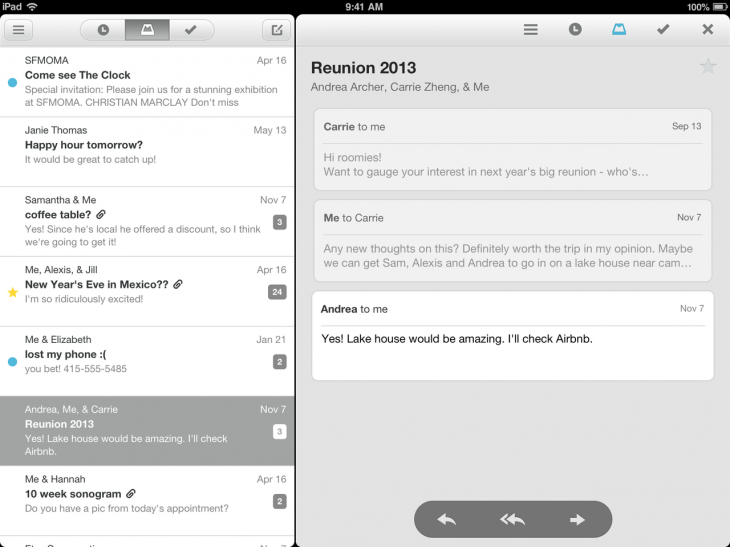
The promised iPad version of the email management app Mailbox recently acquired by Dropbox is launching today, offering essentially the same user-interface as the iPhone original, with the addition of a reading pane to the right.
Expand
Expanding
Close

Site default logo image

Shazam for iPad introduces passive tagging, lyrics display, auto-play in Spotify & Rdio and more

http://www.youtube.com/watch?v=zKOowwejuAQ

A new iPad version of Shazam available today introduces a whole raft of new functions, ranging from passive tagging without user input to the ability to recognise a song and then play it in Spotify or Rdio.

With passive tagging, the app continually listens to any music in the background and automatically tags it, ideal for use in bars where you may idly wonder what a track is but not want to go to the trouble of manually checking. The feature also works in the background, displaying a notification while the iPad is running other apps. Shazam’s claim of one-second tagging appears somewhat optimistic, however: a random sampling of tracks I tested took the usual several seconds.

LyricPlay displays lyrics in sync with the background music (Encore version only), while you can now immediately open the currently-playing track in either Rdio (all versions) or Spotify (Encore version only).

Shazam for iPad also introduces the kind of networked feature which seems to be expected in apps these days even if we’re not quite sure why. You can see which music and TV shows people are currently tagging in your country, city of neighborhood – as well as use a map to see tagging charts for anywhere else in the world.

Site default logo image

Clear for iPhone and Mac gains list sharing via email, multi task pasting, coming soon to iPad

Realmac Software is on the brink of launching its fun new camera app Analog Camera for iPhone, but it has one more major task to mark off its list before we all get our hands on it. With its latest update to Clear, that item can now be swiped right off the list.

Clear on the iPhone and Mac both were updated today receiving a frequently requested feature: list sharing over email.


Expand
Expanding
Close

Site default logo image

Readdle’s Scanner Pro updated with live border detection during scans

Scanner Pro, which lets users scan documents, receipts, and more using their iPhone or iPad, recieved a big update to version 4.5 this week. The update enables live border detection, which allows the app to intelligently find the edges of whatever is being scanned while you photograph it.

In our testing, the border detection was very accurate, although it did have a bit of trouble when the paper and the background where different shades of the same color. The app does still allow you to manually edit the borders to fit the document perfectly, just in case there is a detection error, so any small problems are easy to correct.

The app itself is well-designed and features a solid storage solution for your documents. Multi-page scans are supported and you can save everything to a variety of cloud storage services, including iCloud, Google Drive, Dropbox, and more. You can even fax scanned items right from your iOS device.

Scanner Pro 4.5 is available now on the App Store. Existing users get the update for free, while new customers can get it for $6.99.

Site default logo image

Google rolling out voice search for Chrome on iPhone and iPad in coming days

Google announced today on its Chrome blog that a new update will soon be rolling out to its Chrome app for iPhone and iPad that will allow users to access voice search features previously limited to the Google Search app. Using the same omnibox currently included in the app, Google will soon allow users to tap a microphone icon to search using only their voice with a UI similar to the recently redesigned voice search on Mac.

Google said the updated Chrome app should be landing on the App Store in the coming days.

Google also noted that the updated iOS app would provide faster reloading of web pages and an option for third-party apps “to open links in Chrome and then return to the app with just one tap.”

Earlier today Google began rolling out revamped voice search functionality in the Chrome app for Mac users.

Site default logo image

Twitter for Mac updated with Notification Center integration, performance improvements, more

Twitter for Mac is continuously receiving updates and today it received a highly requested feature: Notification Center integration. Users can configure the setting in the preference window within the app.

OS X already offered Twitter integration, but notifications deferred to the web rather than its native client. It was less than a month ago when the app received its first update in countless months, and today’s update demonstrates Twitter’s dedication to its continued development.

Twitter 2.2.1 is now available in the Mac App Store:


Expand
Expanding
Close

Site default logo image

Rdio iOS app updated with improved UI, “Find People” feature & record label search

Following a big update to the Pandora Radio app earlier today, the subscription based Rdio iPhone and iPad app has been updated today with UI improvements, a new “Find People” feature for finding artists and friends to follow, and the ability to search by record label to find artists and albums.

The updates to the app’s UI are most noticeable in a “new, cleaner look for sliding side navigation.” (as pictured to the right)

What’s New in Version 2.2

– Find People. New feature makes following friends and artists easier than ever.
– Labels. Search for a record label to find its top albums and artists.
– Various minor bug fixes and UI improvements, including new, cleaner look for sliding side navigation.

Site default logo image

Pandora Radio rolls out Facebook publishing, improved interface, enhanced track menu, more

Just as Apple appears to be readying its music streaming service and Google just announced its subscription music servicePandora Radio has released a sturdy update to its iPhone app.

Users can now publish Now Playing activity to Facebook as it updates, similar to Spotify or Rdio, allowing friends to interact with the music you enjoy. Sharing individual tracks and stations to Facebook, Twitter, and email is built right in now as well.

Pandora 4.3 also includes a handful of UI improvements that greatly improve the native feel of the app, including the ability to tap the album art to reveal track information, but the new features and improvements are only available for iPhone for now.

Pandora 4.3 is available on the App Store now:
Expand
Expanding
Close

Google begins rolling out revamped conversational Voice Search features in Chrome

Site default logo image

During its Google I/O keynote earlier this month, Google announced that it would be bringing conversational, Google-Now like voice search to the desktop. Using a UI similar to voice search and Google Now in its mobile apps, Google would soon allow Chrome users to search and drill down further into results using only their voice.

Today, Google appears to have finally started rolling out the feature for Chrome users on the stable and beta channels of Chrome.

After updating to the latest version 27.0.1453.93 of Chrome, users can navigate to Google.com, click the microphone icon, and choose to allow the new Google Voice search feature to begin listening. Google will only ask for permission to listen once and from then on users can simply speak in order to search. For certain search results such as questions Google will also provide audible results.

Not all of the functionality seems to be available as of yet. For example, when Google first showed off the feature users weren’t required to click at all. Google execs were activating the feature by simply saying “Ok, Google” and were able to continue searching with their voice, hands-free, from on the search results page. The feature as it’s currently implemented now requires users to click the mic icon in order to start a voice search.
Expand
Expanding
Close

Logitech announces ‘UE BOOM’ Bluetooth speaker, first with 360-degree sound & 15-hour battery

Site default logo image

http://www.youtube.com/watch?feature=player_embedded&v=kwSzsCMLghc

Logitech’s UE brand is often at the top of our list when it comes to the best bluetooth speakers around, so we’re excited that today the company introduced its latest product with the announcement of the ‘UE BOOM’. Logitech is calling this “the world’s first social music player,” and that’s due to the fact that it’s the first to offer 360-degree sound and a 15-hour rechargeable battery. That’s a nice step up from the 5-8 hours you’ll get with most Bluetooth speakers.

Logitech is also following a trend that many Bluetooth speaker manufacturers have been lately: With UE BOOM you’ll be able to wirelessly connect two UE BOOMs via a free companion app to allow for traditional right/left stereo sound and other sound settings. It’s also water and stain proof:
Expand
Expanding
Close

Site default logo image

Facebook makes sharing in iOS apps even easier with new native Share Dialog for developers

At its event last month Facebook showed us a native Share Dialog as part of its Facebook SDK 3.5 for iOS update, and today Facebook announced on its blog that the feature is now available to developers.

Now officially out of beta, the native Share Dialog will allow developers to implement easier sharing features into their apps using a single line of code. Facebook said it provides “a lightweight and consistent way to enable sharing from your apps,” allowing users to share data from apps without first having to login into Facebook. The result is the elimination of 1 – 3 extra steps required for login when sharing via the feed dialog and an experience similar to using a Facebook Like button.

The Share Dialog further improves upon the iOS 6 share sheet by adding support for publishing Open Graph actions to make it easier for people to tell their stories on mobile. In addition, people can now tag friends and share where they are enabling them to share in a more meaningful and engaging way, while helping even more people connect with your app.

The new native Share Dialog and more is available to developers now through Facebook SDK for iOS 3.5.

Site default logo image

Yahoo’s new Tumblr for iOS updated with “stacks” like post type chooser, app attribution

Tumblr, which was purchased by Yahoo today for a cool $1.1 billion, received an update for iPhone and iPad today that introduces a new post type chooser that resembles fan stacks on the dock in OS X but still includes a 17+ rating. The update also includes attributing app sources to posts shared on Tumblr. This update doesn’t seem to reflect any changes from Yahoo as the social blogging platform was just acquired this morning.


Expand
Expanding
Close

Site default logo image

“Bang with Friends” mysteriously pulled from App Store

Apple might have just ruined everyone’s weekend plans by pulling the provocative “Bang with Friends” iPhone app from the App Store.

BWF, which is the “anonymous, simple, fun way to find 
friends who are down for the night,” says Apple has banned it from the App Store, but that it is “working with Apple to get BWF back into the App Store shortly.”

Presumably, users who already installed the app can continue to do whatever one would do with such an app, and Android’s Wild Wild West approach to the Google Play Store almost guarantees it isn’t going anywhere for phablet users.

If you still find that you just can’t get no satisfaction, you might try using FaceTime or maybe even Google’s new Hangouts for iOS app.

Cofounder and CEO Colin Hodge told Valleywag that he’s working with Apple to get the app, which recently crossed the million user mark, back in the iPhone’s warm embrace.

Just don’t accidentally dial your parents while you have those candles lit and Drake playing in the background.

Site default logo image

Stitcher Radio iPhone app updated with simplified ‘Car Mode’ UI for drivers

Sticher Radio, home to over 15,000+  live radio shows and podcasts, updated its iPhone app today with a new Car Mode feature that makes controlling the app even easier while driving. The new simplified UI features large, easy to see buttons and can be accessed at any time with a tap of the Stitcher logo at the top of the app. It works in both portrait and landscape orientations and is definitely a welcomed improvement for the nearly 60% of its users that Stitcher says listen to the app while in a vehicle.

The updated app also comes with a redesigned front page, one-tap access to search and Sleep timer, and a number of other performance improvements:

What’s New in Version 5.3.0

New! Car Mode for iPhone. A simplified interface that allows you to safely and easily control Stitcher while driving in both portrait and landscape orientations. Tap the Stitcher Logo at top of any screen to select car mode.

Improved! Redesigned Front Page, bringing you breaking news headlines from your favorite media sources.

Improved! Easier one-tap access to the shows you’re looking for via search.

New! Listen to archives of your favorite shows either newest first or chronological order.  To play episodes of your favorite shows in order, tap an episode on the episodes tab. To reverse the order to chronological, tap “Playing Next” then select the playlist order button.

New! Sleep timer quick access via the player screen – tap the equalizer icon while listening to set the sleep timer.

Improved! Faster playback start up for shows you’ve already started listening to.

Improved! Now it’s even easier for new users to get started with our new wizard.

Improved! Improved memory management and bug fixes.