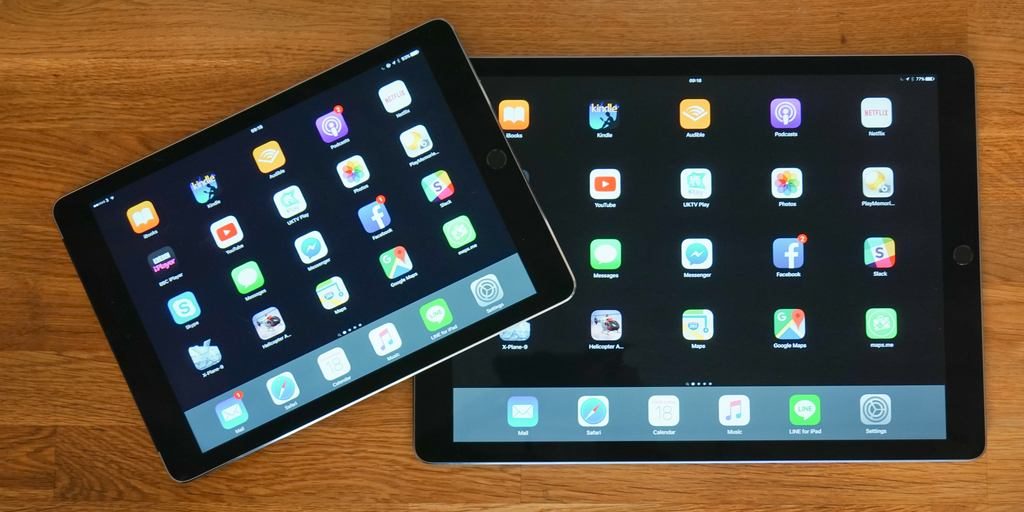
iOS devices refer to any of Apple’s hardware that runs the iOS mobile operating system which include iPhones, iPads, and iPods. Historically, Apple releases a new iOS version once a year, the current version is iOS 10. Here is the complete list of iOS 10 compatible devices.
Apple’s massive new iPad Pro is only available with built-in cellular connectivity in the pricey 128GB configuration, but all four of the major carriers in the US are offering the $1,079 tablet at discounts on contract or through installment plans. Here’s where you can find the iPad Pro 128GB + Cellular and how much you should expect to pay: Expand Expanding Close
The Apple Pencil may be a very clever piece of technology, but one thing a number of people have been wondering is how vulnerable it might be when charging. At first glance, having it sticking out of the iPad Pro like that doesn’t seem the smartest of ideas.
But it appears Apple has thought it through, and there’s a hinge mechanism inside the connector designed to take the strain if the Pencil is knocked.
Video blogger Zach Straley did his best to break it, and while he did eventually succeed, he had to work very hard to do so. Check out the video below. Try not to curse him too much if you’re still waiting for yours to arrive …
Both Tim Cook and Jony Ive have been arguing that the Pencil is much more than a stylus, even if the rest of us may have to wait a while to find out. Check out our unboxing in the meantime.
Having started out with my first impressions a week ago, highlighted my core questions and decided on Monday that the iPad Pro couldn’t replace my iPad Air 2 (only be an additional device), it’s time to make my decision.
I think between us at 9to5Mac we’ve been putting the tablet through its paces in a pretty comprehensive fashion! We don’t always reach the same conclusions about devices, but in this case I found myself agreeing with the bottom-line of each of my colleagues who’ve been trying it.
Dom described it as a giant Netflix machine, and it certainly is. With that huge screen and extremely loud speakers, movies and TV shows are very compelling, and – unlike a MacBook with the same size screen – you don’t feel like you’re looking at a work device.
Zac saw it as the best entertainment iPad, and I agree with that – with the single proviso that it’s just too big for comfortable ebook reading in bed. But reading ebooks on your lap is a delightful experience. Magazines are just wow. Casual web-browsing – sat on the sofa, just passively consuming content rather than planning to act on it – is a joy. In portrait mode, you can see a decent chunk of a page at a time, everything is big enough to read comfortably and it just feels like a much more relaxing experience than using a MacBook or a smaller iPad where you have to do more scrolling.
Jeremy found that it sat awkwardly between two devices – not feeling like a better alternative than either his iPad Air 2 or his MacBook Pro when it comes to either work or play. I agree 100% on the work side of the equation. I’m more sold on the play side of things, but given that I like to read in bed every night, ultimately I’d have to agree that my iPad Air 2 is a complete solution where the iPad Pro isn’t.
But it’s not just my colleagues’ views I’ve been reading, it’s yours too – in the comments on my earlier diary pieces. So let me address a couple of those before delivering my own final verdict …
Apple’s new official dock for Apple Watch, the Apple Watch Magnetic Charging Dock, is now available to buy in Apple Stores and online. This particular image is from the Berlin store in Germany. In the US, the first-party Apple Watch dock costs $79. The Apple store website says the product will be available in US retail for in-store pickup starting this Friday, the 20th November.
As indicated by the leaked photos from last night, the dock allows the watch to either lay flat or sit upright in Nightstand mode thanks to the magnetic attachment. The charger itself is integrated into the unit, so you will still have the charger that comes bundled with the Apple Watch available as a spare if you buy the dock. The dock also comes with a 2 metre Lightning cable, longer than typical Lightning cables Apple provides.
A reader got their hands on one and has already compiled a full hands on video with Apple’s new dock which you can see after the break …
Update 8:30PT PM: Apple’s system status page now reflects that the issues have been resolved.
Apple this evening appears to be suffering from a widespread outage, affecting a number of its online services. According to the company’s status page, The issues began roughly half an hour ago and are affecting the App Store, Apple TV, iBooks Store, iTunes Match, iTunes Store, Mac App Store, and Radio.
Respected analyst Ming Chi-Kuo from KGI Securities has this evening issued an investor note in which he predicts sales for Apple’s latest tablet, iPad Pro. Kuo predicts in his note that Apple will sell between 2.4 million and 2.6 million iPad Pro units in the fourth quarter of 2015. As we head into 2016, Kuo expects those numbers to slide slightly to between 2.1 million units and 2.3 million units.
If you have a new iPad Pro and have had issues using the new software keyboard, you’re probably not alone. Aside from following the iPhone 6/Plus lead and adding new keys in the space around the QWERTY keyboard, iPad Pro includes a full sized shift key and half-height number keys which in theory require fewer taps to access more characters.
In practice, the new layout requires an adjustment period, to put it mildly, as the keys most frequently accessed are surrounded by targets that you have to avoid tapping accidentally. I’m on day four and getting better, but there’s one embarrassing keyboard bug that had me convinced I was crazy. Turns out I may not be. Here’s the deal: Expand Expanding Close
Alongside iPad Pro, Apple revealed a new tool to accompany the device, the Apple Pencil. While Apple Pencil has been hard to come by in terms of availability, those who have managed to get their hands on one have seemingly been impressed with the $99 Jony Ive-deisgned accessory. Now Ive, Apple’s Chief Design Officer, has sat down with Wallpaper Magazine and The Telegraph to discuss his inspiration to make Apple Pencil…
Apple has emailed developers about the recent damaged apps bug affecting a sizeable proportion of the OS X user base with some getting repeated errors on app launch. Whilst a reboot should be enough to invalidate and reload the certificate cache for most people, there are some weird edge cases. Apple says that a permanent fix for the caching issue will be included in a future OS X software update.
The email is effectively Apple apologising to developers for the store platform problems, which caused many customers to understandably, but incorrectly, point blame at the app developers, not Apple.
Steve Jobs’ vision of a “post-PC” future really resonated with me. As a dedicated Mac and iPhone user, I was a day one fan of the original iPad, and have spent countless hours enjoying every full-sized iPad released since then. When the iPad mini came out, I happily shifted over to the smaller form factor until buying an iPhone 6 Plus, which pushed me back to full-sized iPads. Like many people, I wouldn’t want to give up my iPad, and would be thrilled if it could replace my laptop.
If any iPad had laptop replacement potential, the 12.9″ iPad Pro was it. So I was the first person in line at the local Apple Store to buy one, hoping that it would supplant either my iPad Air 2 or Retina MacBook Pro. But after a week of daily use, I’m convinced that the iPad Pro won’t replace anything, and am still trying to decide whether to keep or return it. Below, I’ll explain why…
DisplayMate is out today with a comparison of iPad displays following the introduction of Apple’s new larger 12.9-inch iPad, and the results might surprise you.
While the larger display on the iPad Pro is one of the device’s standout features on Apple’s latest and greatest iPad, the iPad mini 4, introduced alongside the iPad Pro to not quite as much fanfare, actually beats out its bigger sibling in several categories. The iPad Pro, however, does hold its own and DisplayMate’s analysis shows a number of improvements Apple has made to make it one of its best displays for a mobile device yet. Expand Expanding Close
Nobody who watched the news coverage of the terrorist attacks in Paris could fail to be moved by the scenes and the stories emerging from it. It was undeniably a horrific series of events, and it’s only human nature to want action to be taken to reduce the likelihood of future such atrocities.
But there is always a danger at such times that emotion, rather than rational thought, will drive government policy-making. I won’t get into the broader theme there, as there are more appropriate forums for that, but there is one aspect that is very much on-topic for us: the battle between Apple and governments over encryption.
There have already been unattributed reports that the terrorists in Paris used encrypted communication. I have no idea whether there is any specific evidence for that, but it would hardly be damning were such evidence to emerge: it would be frankly astonishing if they hadn’t.
There are three reasons why Apple is right to maintain that it will continue to offer end-to-end encrypted communication no matter how much governments in the USA, UK and elsewhere may protest … Expand Expanding Close
There aren’t many iPad Pro-specific keyboards out there — Apple’s $170 Smart Keyboard and Logitech’s $150 Create (reviewed here) are the first two, if you can find them, with at least a few others announced and on their way to stores. But there’s really no need to wait on iPad Pro-specific keyboards, or spend a king’s ransom for one. Tons of iPad-compatible Bluetooth keyboards are already available, and thankfully at much lower prices.
Depicted with an iPad Pro on its box, Zagg’s Messenger Universal ($70) is clearly an alternative to Apple’s Smart Keyboard. Just like Apple’s accessory, Messenger Universal combines a full-sized keyboard with a magnetic iPad Pro-ready stand that folds down to a small size. But it skips the iPad Pro-only Smart Connector in favor of Bluetooth, and rather than serving as an oddly thick screen cover, takes the shape of a standalone folio that you can carry around as needed. Although it fits the iPad Pro perfectly, Messenger Universal works with all iPads — and other devices — so you needn’t feel constrained to using the keyboard with only a single tablet…
As expected, Apple Pay is now available in Canada. You can use use eligible American Express bank cards to make mobile payments at a whole host of retailers that support the NFC technology across Canada. Apple Pay retailer mobile payments works with iPhone 6, iPhone 6 Plus, iPhone 6S and iPhone 6S Plus. Some had suggested that Apple may need to push out an iOS software update but iOS 9.2 remains in beta — this all works from within the Wallet setup on iOS 9.1.
For the UK, Apple has also brought Tesco Bank and TSB onboard … expanding Apple Pay to even more people in the country.
When I reviewed the 12-inch MacBook with Retina display earlier this year, my one question was this: could I possibly use such a low power machine reliably for work? For blog posting and editing, switching between chat apps and email, and keeping up with a few Twitter accounts, the single-port MacBook is totally fine, and the Retina display was an upgrade over the dated one on my old MacBook Air.
While I’d like to apply that same question to the iPad Pro, which has a slightly larger display and effectively twice the battery life of my MacBook, the difference in how iOS and OS X handle multitasking and window management currently limit my ability to apply my same workflows from the Mac to the iPad. That didn’t stop me from lusting after the iPad Pro when it hit stores last week. Despite the Pro in its name, I think the new iPad is the best content consumption tablet on the planet. Expand Expanding Close
With the accessory in short supply at Apple Stores, the new Apple Pencil stylus for the iPad Pro is listed for as high as $400 on eBay, four times the $99 sticker price through Apple.
Most models of Apple’s new 12.9-inch iPad Pro launched last week are available at Apple Stores and shipping for online orders in 1-7 days, but accessories for the device are harder to find. Despite Apple’s new Smart Keyboard case and Apple Pencil stylus being among the the standout new features alongside the iPad Pro’s larger display, they appear to be in shorter supply with both backordered 4-5 weeks online and hard to find in stores after hardly being available on day one.
The short supply of the accessories frustrated early adopters of the new iPad Pro enough that Apple offered a comment last week, noting that it has “limited supply of Apple Pencil and the Smart Keyboard” and that it will continue “regular shipments” of the accessories to Apple Stores.
If you’re absolutely desperate for an Apple Pencil, can’t wait a month or more for Apple to catch up with demand, and want to pay a little higher than retail price, you can find a handful of listings on eBay here.
Things have moved on rather a lot since I gave my first impressions and highlighted my core questions in choosing between my existing iPad Air 2 and the iPad Pro. Further usage of it has made it abundantly clear that the iPad Pro cannot replace a standard iPad. It’s ridiculously over-sized for reading or watching Netflix in bed, and there are other times when the smaller version was simply more convenient.
But I do still love that screen! It’s great for casual web-browsing – better than either my MacBooks or iPad Air 2. It’s fantastic for viewing photos. It’s great for ebooks so long as you’re not trying to read them in bed. Magazines are amazing. Netflix is great with the huge screen and really loud speakers. Split View makes it a genuine multi-tasking device.
So, the question now is: send the iPad Pro back, or keep both devices? I said last time that I really couldn’t see a justification for having that much cash invested in iOS devices. One commentator responded to this with “Ah, just do it” – which I have to confess is a well-argued position.
I’d certainly find that easier to justify if it could earn its keep as a mobile writing device, so that was my next experiment … Expand Expanding Close
According to the iPhone in Canada blog, American Express representatives have confirmed that eligible American Express bank cards will be able to use Apple Pay from tomorrow in the country, Tuesday November 17th. Apple announced on its last earnings call that American Express would lead the expansion of Apple Pay beyond the UK and US, with Canada and Australia coming by end of year and Spain, Singapore and Hong Kong to be added in 2016.
Apple has acknowledged the recent terrorism attacks in Paris with a commemorative ribbon on the Apple France homepage, www.apple.com/fr. The black ribbon is a sign of remembrance and mourning; Google has also added the symbol to its homepage in response to the attacks.
In addition, Apple has been contacting affected employees in French Apple retail stores to check they are safe.
Apple calling all employees in France to check they are safe… 👍
Aukey is a Chinese company more commonly known for producing charging accessories like in-car chargers and multi-port USB stations. But, it also builds headphones. I’ve been testing the wireless Bluetooth earphones while out running for a few months now. For $25, it’s really hard to argue against the Aukey Sport Bluetooth Headphone…
Tonight I won the Apple Pencil lottery at my local Apple Store. I made the two-hour drive over to New Orleans to pick up an iPad Pro that I’d ordered online for Personal Pickup in store, half because I wanted avoid shipping delays and half because I want to take a chance on iPad Pro accessories being in stock. That paid off thanks to some dumb luck, and now I’ve officially had some hands-on time with the iPad Pro’s digital stylus.
But first, the story of how I caught one of these rare unicorns in the wild… Expand Expanding Close
I posted my first impressions of the iPad Pro yesterday, and having spent much of the past 24 hours mostly using it rather than my MacBook, I now have more of a sense of why Tim Cook thinks it could be a laptop replacement.
While most reviewers dismissed that, and I would certainly join them in doing so when thinking of you or I, it’s easy to forget that we are not normals. We want the power of pro apps, and the ability to do plenty of multitasking. We’re a very different user case to the average non-tech user who rarely ventures further than email, web, chat and a bit of light photo-editing.
I’ve said before that when non-tech friends ask me for advice on which laptop to buy, I quiz them on what they want to do with it and often end up recommending an iPad and keyboard instead. With the increased screen size of the iPad Pro, I can see myself doing that even more often in the future. Sure, it’s expensive for what it is, but it’s a hassle-free, flexible device with the option of built-in LTE. For many, that makes it a better option than a MacBook.
In my usage so far, I’ve been impressed by quite a lot, have some grumbles – and have two key concerns about the possibility of the device replacing my much-loved iPad Air 2. Let’s start with the good news … Expand Expanding Close
I wanted to like Create. In all honesty, I wanted to love Create, because it’s obvious that the large, heavy iPad Pro desperately needs a great keyboard case to simultaneously function as a stand, a great typing surface, and an insurance policy against damage. But rather than borrowing the best elements from Logitech’s prior keyboard cases, Create uses some design touches that really don’t work with the larger tablet. Consequently, while it’s an okay first day option, it falls short in a number of important ways that are worth considering in light of the iPad Pro’s release this week…
Apple has launched a holiday gift guide microsite today, featuring Apple products and accessories targeted at a wide variety of audiences. The list is separated into six main sections: Gaming, Photography, Music, Fitness, Learning and Travel. Naturally, Apple prominently features its own devices in the recommendations (iPhones, iPads, Apple TV, Beats headphones) alongside third-party accessories and suggested apps.