Mac

See All Stories

Apple’s Mac lineup consists of MacBook, MacBook Air, MacBook Pro, iMac, Mac Pro, and Mac Mini. The Mac runs macOS for its operating system.

Mac lineup

History

The Mac is Apple’s lineup of computers, and it can be considered the company’s oldest product. The name “Mac” comes from the original Macintosh, which was introduced in 1984 and is also considered the first personal computer for the masses to have a graphical user interface. The first Macintosh hit the stores on January 24, 1984, costing $2,945.

Among all these years, Apple has introduced many different Mac models, ranging from desktops to laptops to professional tower machines. The current lineup consists of the MacBook Air, MacBook Pro, Mac mini, iMac, and Mac Pro. However, there have been other Mac models were discontinued, such as the eMac, MacBook, and iMac Pro.

The history of modern Macs began in 1998, a year after Steve Jobs returned to Apple. Apple had dozens of Macintosh computers at that time, but Steve decided to rethink the entire lineup. In 1998, Apple announced the iMac G3, which ditched the floppy disk and serial ports in favor of USB connectors.

Macintosh and iMac G3.

Unlike the Macintosh, the first iMac was considered a huge success — not only for its technology, but also for its unique design with colorful translucent plastic. Apple quickly expanded the Mac lineup with other models, which included the iBook and PowerBook (which became the MacBook and MacBook Pro) and the PowerMac, which is now the Mac Pro.

macOS

What makes a Mac the Mac is the macOS operating system, which has also had a long history since the introduction of the first Macintosh. Initially called Mac OS, the operating system was rebuilt when Steve Jobs returned to Apple.

The first version of Mac OS X was released on March 24, 2001 with a new interface that is still present in some ways in current versions of macOS. Apple’s desktop operating system comes with many free applications such as Pages, Keynote, Numbers, iMovie, and GarageBand.

With macOS, users also have access to deep integrations with other Apple devices. For instance, you can answer calls and send SMS from your iPhone using your Mac. Handoff lets you switch from one device to the other and pick up where you left off. Apple Watch users can unlock their computer without entering a password, and you can even copy and paste between devices.

macOS Sonoma

Apple’s desktop operating system is also integrated with services offered by the company, such as iCloud, Apple Music, and Apple TV+.

The current version of macOS is Sonoma (version 14), which features new slow-motion screen savers, widgets on desktop, camera effects on FaceTime and other apps, web apps, passkey sharing, improved PDF support, and Game Mode. The update also comes with a new API that lets developers easily port Windows games to macOS.

Architecture Transitions

The Mac has had three major architecture transitions in its history. Apple’s first computers ran on Motorola processors, but the company decided to migrate to the new PowerPC platform in 1994. While this brought benefits at the time, the PowerPC processors were not delivering what Apple expected.

It was in 2005 that Apple confirmed the transition from PowerPC to Intel. Intel processors had become faster and more efficient than PowerPC, which enabled the development of new Mac computers that were more powerful and also more compact. Developers have been given access to a Developer Transition Kit running Mac OS X Tiger with Intel Pentium 4 to update their apps before the transition begins.

Power PC, Mac OS X, and Intel processor.

Apple said that the transition would begin in June 2006 and be finished by the end of 2007. However, the transition to Intel was fully completed in August 2006 when the company replaced the PowerMac with the new Intel Mac Pro.

As the years went by, Apple once again felt the need to have more powerful and efficient processors for its computers. This time, the company was already working on its own chips for the iPhone and iPad. In June 2020, Apple confirmed that it was changing the architecture of the Mac, now from Intel to ARM chips, which are called Apple Silicon.

Apple offered a Mac mini DTK running on the same A12Z Bionic chip as the 2020 iPad Pro. This way developers could once again update their apps ahead of the transition. In addition to being more powerful and energy efficient, the ARM architecture of Apple Silicon chips has enabled Macs to run iOS apps for the first time.

Apple M1 chip | Mac

The first Apple Silicon Macs were released in November 2020 with the M1 chip. The company later introduced more powerful variants of the M1 chip, called M1 Pro, M1 Max, and M1 Ultra. Macs with Apple Silicon have become known for being more powerful while consuming much less power, which has resulted in MacBooks with extended battery life.

In June 2022, Apple introduced the M2 chip, which is around 20% faster than the M1 and also supports more RAM. M2 also has more powerful variants: M2 Pro, M2 Max, and M2 Ultra.

Apple unveiled the M3, M3 Pro, and M3 Max chips in October 2023. The main highlight of this generation is the 3 nanometer technology, the same as the A17 Pro chip. The M3 family also features better GPUs with support for hardware-accelerated ray-tracing.

Current Mac lineup

Apple currently sells a variety of Mac computers, which includes MacBooks, Mac mini, iMac, and Mac Pro. While some of the Macs have already been updated with an Apple Silicon chip, others remain with Intel processors.

MacBook Air

The MacBook Air is Apple’s most affordable laptop and it has become popular for its light, compact design. The 2022 version is powered by the M2 chip and is offered with 8GB, 16GB, or 24GB of RAM. Plus, it has a new, edge-to edge 13.6-inch Retina display.

The laptop features Touch ID and has two Thunderbolt 3 compatible USB-C ports, a MagSafe connector for charging, and a headphone jack. Prices start at $1099 in the US. It’s offered in silver, space gray, starlight, and midnight.

M2 MacBook Air.

A year later, Apple introduced the first 15-inch MacBook Air. It has essentially the same hardware as the smaller version with a similar design, but with a larger display. Prices start at $1299 in the US.Apple is still selling the M1 MacBook Air for prices starting at $999.

MacBook Pro

The 2023 MacBook Pro is available in multiple versions, and customers can choose between 14-inch and 16-inch screen sizes. For the first time, Apple has introduced a less expensive version of the 14-inch MacBook Pro with the base M3 chip. This version has the same design and display as the high-end versions, except that it only has two USB-C ports instead of three.

M3 MacBook Pro

The most expensive versions of the MacBook Pro are equipped with the more powerful M3 Pro and M3 Max chips. The laptop can be configured with up to 128GB of RAM and 8TB SSD. These versions also come in a new Space Black color.

Unlike the MacBook Air, the MacBook Pro comes with an HDMI port and an SD card reader. It also features MagSafe and Touch ID on the keyboard. Apple no longer sells MacBooks with the Touch Bar. Prices start at $1,599 in the US.

Mac mini

Mac mini is the cheapest Mac currently available since it’s basically a desktop without a built-in display or other peripherals. The base model with the M2 chip features one Ethernet port, two USB-C/Thunderbolt 4 ports, HDMI 2.0, two USB-A ports, and a headphone jack.

Apple sells a more powerful version of the Mac mini with the M2 Pro chip, which also comes with four USB-C ports instead of two. Mac mini can be configured with up to 32GB of RAM and up to 8TB of storage. Customers can also opt for a 10 Gigabit Ethernet port. The Apple Silicon Mac mini is only available in silver, while the now discontinued Intel model was available in space gray.

Apple Silicon Mac mini.

Prices for the Mac mini start at $599 in the US. Again, it’s worth noting that it doesn’t come with a keyboard or mouse in the box – you need to buy them separately or use your current ones.

Mac Studio

Mac Studio represents a new category between Mac mini and Mac Pro. It features a design based on the Mac mini, but with a taller body to support the more powerful hardware and also a better cooling system.

The new Mac Studio is targeted at professional users who work with demanding tasks such as video editing, 3D rendering, and machine learning. 

Embraced by creative pros everywhere, Mac Studio now delivers next-generation power in the form of the lightning-fast M2 Max and the boundary-breaking M2 Ultra. It packs outrageous performance and extensive connectivity in an unbelievably compact form, putting everything you need within easy reach and transforming any space into a studio.

By default, Mac Studio already comes with the M2 Max chip, 32GB of RAM, and 512GB SSD storage. A more expensive option lets users customize Mac Studio with M2 Ultra. While M2 Max has a 12-core CPU and a 30-core GPU, M2 Ultra doubles all of those specs. The new chip has a 24-core CPU and a 60-core GPU.

Mac Studio can also be configured with up to 192GB of RAM and 8TB of SSD storage. The machine offers up to six Thunderbolt ports, 10 Gigabit Ethernet, headphone jack, two USB-A ports, and one HDMI port.

Mac Studio

Apple has been rumored to be working on new versions of this machine with the M3 Max and M3 Ultra chips. However, these versions may not be ready until 2025. Bloomberg’s Mark Gurman said in November last year that the M3 Ultra chip “hasn’t yet gone into broad testing” inside Apple.

In the US, prices for the Mac Studio with M2 Max chip start at $1999. The M2 Ultra chip version starts at $3999. Just like the Mac mini, Mac Studio doesn’t come with a keyboard and mouse in the box. You can find accessories for your Mac Studio here.

iMac

iMac is Apple’s most popular desktop computer with an all-in-one construction. It features a 4.5K display in its 24-inch version and a 5K display in the 27-inch version. At the same time, Apple still sells an entry-level iMac with a regular 1080p display.

The 24-inch iMac is the first to feature the M1 chip, the same as in the Mac mini, MacBook Air, and MacBook Pro. This allowed Apple to introduce a completely redesigned model with a slimmer design, which is also offered in seven new colors. Customers can customize the new 24-inch iMac with up to 16GB of RAM and 2TB of storage.

Site default logo image

The company ships the 24-inch iMac with Magic Mouse and Magic Keyboard, plus a Lightning cable for recharging accessories. Prices in the US start at $1299. Apple has discontinued its old 21.5-inch iMac and the 27-inch iMac 5K.

Mac Pro

Mac Pro is a computer built for professional users who depend on extremely powerful hardware. Available in tower and rack versions, it has a completely modular design. That means users can replace RAM, SSD, GPU, and other internal components.

By default, it features four USB-C/Thunderbolt 3 ports, two USB-A ports, and two 10Gb Ethernet ports. However, the ports can be expanded using the PCI Express slots. Apple also ships the computer with a Magic Mouse and Magic Keyboard, but it does not come with an external monitor included.

All models feature Intel Xeon W processors, which are the most powerful processors offered by Intel. Consumers can configure Mac Pro with up to 28-core processor, 1.5TB RAM, and 8TB of SSD storage. In addition to supporting multiple dedicated GPUs, Apple also offers the Afterburner card — which accelerates the decoding of ProRes videos.

The company recently updated the Mac Pro with new graphics card modules, which include Radeon Pro W6800X and Radeon Pro W6900X.

Site default logo image

Mac Pro prices start at $5999 in the US.

Rumors about upcoming Macs

Top stories about the Mac

Site default logo image

Google: Digital Creative Agency Fred & Farid replaces Macs w/ Chromebooks

Google loves to highlight its work getting Chromebooks into the hands of business customers and a lot of the time that also means a switch from Windows and Microsoft Office products to Chrome OS and Google Apps. It’s not as often, however, that we hear about companies that decide to replace their Macs with Chromebooks. Today Google published a guest blog post from CIO of digital creative group Fred & Farid Group about the company’s decision to do exactly that, replace Macs with Chromebooks for around 60 percent of its employees:

Macs are a popular choice among the creative team. But I soon realized not everyone needs a Mac, especially the 60 percent of our employees who work in office roles like marketing, sales, IT, and administration. We recently rolled out 10 Samsung Chromebooks in a small pilot and plan to have 200 employees on Chromebooks by the end of the year. Our decision to adopt Chromebooks wasn’t based solely on price — though we expect to save a significant amount compared to deploying Macs — but also a desire to have faster collaboration. When you have a Chromebook, you think less about downloading stuff to your hard drive and more about sharing information in the cloud. With Google Drive, we’re able to store, sync and share all our important files easily, whether it’s when we’re on our Chromebooks or on our phones and tablets on the go.

Like with those switching from Windows, relying on mostly Google Apps is one of the reasons the company decided Macs weren’t necessary for many of its employees: We use Google Hangouts for all our voice communications — we don’t even have phone lines in our offices anymore. In the Paris office alone, we conduct more than 50 Hangouts each day. Of course, we also use Drive for document sharing and Calendar for scheduling.

More on the Google Enterprise Blog here.

Site default logo image

RSS client Reeder 2 for Mac now available on the Mac App Store

After a brief public beta period, the popular RSS client Reeder is out with the first update to its Mac software since Google Reader broke support Reeder last year.

The new version supports a number of RSS services that have proven popular since Google Reader ended (like Feedbin, Feedly, and Feed Wrangler), and it now serves as a standalone RSS client without syncing so you won’t have to depend on an RSS service to use the app in the future.
Expand
Expanding
Close

Site default logo image

HockeyApp app testing platform gets big 3.0 update w/ Team Management & more

HockeyApp, one of the last big independent, cross-platform app testing platforms after Apple acquired TestFlight (and pulled Android support) earlier this year, gets a big update today with version 3.0. The full change log includes a long list of new features, enhancements, and fixes, but the company ran through a few of the most notable new features in a blog post. One of the most requested new features is Team Management:

You asked for it, you (finally!) got it. You can now create and manage users in teams with HockeyApp. Once a user has accepted your team invite, you can add this team to apps without sending further invites. Our new User Control Center shows you which teams and users have been added to the app, which device are not provisioned, and which users have applied to become a tester.

The release also includes a new feature for adding Organizations that are owned by multiple people, a new notification system, feedback attachments, and a much improved user interface and overall user experience. In addition, you’ll find updated pricing plans and more details on the company’s website here.

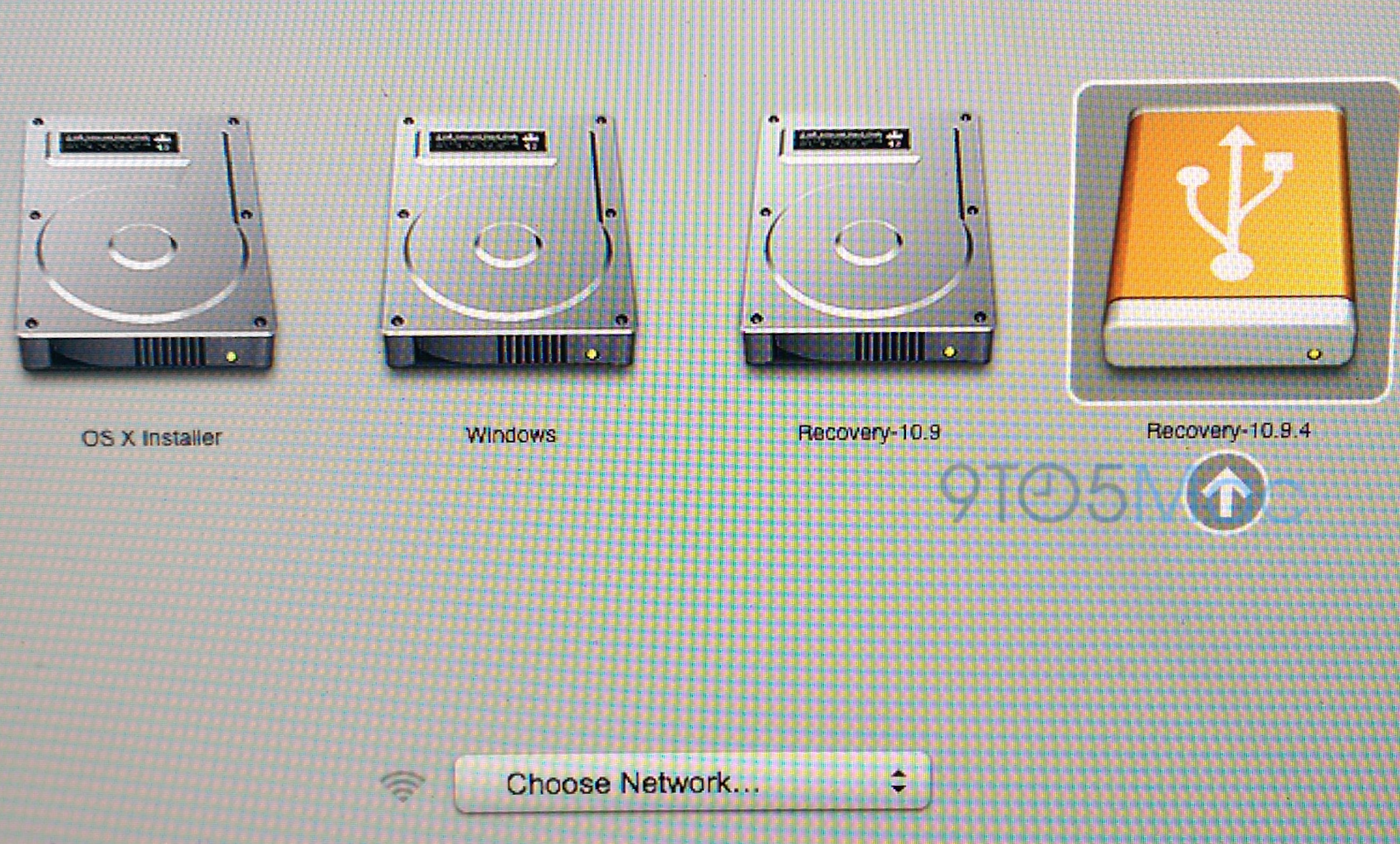
References to new iMac model discovered in OS X 10.9.4 developer preview

Site default logo image

OS X users digging through today’s beta update to the system have discovered what appears to be a reference to an as-of-yet unannounced version of the iMac. The model, dubbed iMac 15,1 could be shown off next week at Apple’s WWDC conference, where we’ve heard that there will likely be some new hardware announcements.

More specifically, the following lines were added to a power management file in the new beta:


Expand
Expanding
Close

Opinion: Will Apple’s Smart Home concept bring home automation to the masses?

Site default logo image

It’s the 21st Century: weren’t we all supposed to be living in automated homes by now? Where we walk in the door after a long day to have our home playing some soothing music, informing us that it’s run us a bath and that dinner will be ready in 45 minutes? Where a robot has done the cleaning, changed the flowers, accepted a parcel that arrived while we were at work and fed the cat?

That dream seems to be a long time coming. I’m a reasonably techy guy who loves the idea of home automation, yet even I only have three examples in my home (which I’ll mention along the way). Most mass-market consumers haven’t even noticed that the products exist, and the few who have tend to view it all as too complicated or fiddly.

If anyone can change that perception, it’s Apple. Which is why the Financial Times report yesterday that Apple is working on a new approach to home automation that may be unveiled at WWDC next week caught my attention … 
Expand
Expanding
Close

Australian Mac and iOS users find devices remotely locked, held for ransom (and how to keep yours safe)

Site default logo image

The Sydney Morning Herald reports that several Australian Mac, iPhone, and iPad users are finding that their devices have been locked remotely through Apple’s Find My iPhone service by someone using the name “Oleg Pliss.” The hacker (or hackers) then demand payments of around $50 to $100 to an anonymous PayPal account in order to restore the devices to their owners.

An active thread on Apple’s support forum was started yesterday as users started to discover that they had been targeted by the attack. According to that discussion, users are finding all of their devices locked at once rather than a single device per user. Based on that report and the fact that Find My iPhone is being used to hold the devices hostage, it seems likely that the perpetrator has gained access to these users’ iCloud accounts—possibly through password reuse by those users—rather than some device-specific malware or hack.


Expand
Expanding
Close

Slipping shipping times may support analyst prediction of new, cheaper iMacs launching at WWDC

Site default logo image

Slipping shipping times for iMacs on Apple’s site may support a timeline released last month by KGI Research analyst Ming-Chi Kuo indicating that new, lower-cost iMacs could be launched this quarter.

Apple usually quotes 24 hours for delivery of standard-configuration iMacs, but is currently showing 3-5 business days across the range. Increased shipping times are sometimes an indication of lower or sporadic stocks, which tend to precede the launch of new models. With WWDC just one week away, that would be a logical time to announce them … 
Expand
Expanding
Close

Site default logo image

“Where’s the mouse?” Today’s kids try to figure out an Apple II [Video]

[youtube=https://www.youtube.com/watch?v=PF7EpEnglgk]

If you ever wanted an illustration of how far computer technology has come in a single generation, this video portrays it well. A bunch of kids who’ve grown up with Macs, iPads and iPhones, and for whom apps and the web are as natural as breathing, try their hand at an Apple II – starting with the challenge of how to switch it on.

Scarily, I’m old enough to have used an Apple II and now feel slightly nostalgic, but I don’t think I’ll be trading in my MacBook Pro anytime soon.

Rumor: Apple working on ARM-based Mac variants with larger trackpad built into keyboard

Site default logo image

MacBidouille is the source of an interesting new rumor [translation] that Apple is currently experimenting with new ARM-powered Mac variants that include a Magic trackpad built into the system’s keyboard. The company is also reportedly working on a new version of OS X that will be compatible with these ARM machines.

According to MacBidouille’s sources, Apple is developing three new machines with this configuration: the aforementioned iMac and Mac mini as well as a 13″ MacBook, presumably a MacBook Air. The iMac and notebook are both said to have “4 or 8” quad-core arm64 processors, while the Mac mini has only four.


Expand
Expanding
Close

Mac OS X software update temporarily broken, likely due to expired SSL certificate

Site default logo image

Apple’s SSL certificate that is responsible for verifying and authenticating connections to Apple’s Mac App Store software update servers has expired, causing the Mac App Store to issue errors like those above. Another error notification points to the swscan.apple.com server as being the issue, below.
 

A quick search shows that this SSL certificate expired yesterday May 24th at midnight.


Expand
Expanding
Close

Site default logo image

Apple releases Safari 7.0.4 & 6.1.4 for OS X with security improvements

Alongside the release of OS X 10.9.3 and iTunes 11.2 last week, Apple released Safari version 7.0.3 and 6.1.4. Apple has since released a minor bug fix to that version of iTunes, and today Apple has released a security update to Safari bringing the latest version to 7.0.4. Users can find the latest version in the Mac App Store.

Safari 6.1.4 and Safari 7.0.4

  • WebKitAvailable for: OS X Lion v10.7.5, OS X Lion Server v10.7.5, OS X Mountain Lion v10.8.5, OS X Mavericks v10.9.3Impact: Visiting a maliciously crafted website may lead to an unexpected application termination or arbitrary code execution

    Description: Multiple memory corruption issues existed in WebKit. These issues were addressed through improved memory handling.

Read Apple’s documentation on the latest version of Safari here.

OS X 10.9.3 quietly increases VRAM on newer MacBook Pros and MacBook Airs, perhaps to improve 4K performance

Site default logo image

We already knew that the latest version of OS X Mavericks, version 10.9.3, has provided increased compatibility between certain Macs and 4K displays. It appears, though, that may be in part due to a change in how OS X allocates certain resources, specifically VRAM, on newer machines. As Mac4ever and MacGeneration point out, certain hardware including the MacBook Pro with Retina display from Late 2013 and the MacBook Air from 2013 and 2014 have all seen an increase in the maximum level of VRAM available from 1024MB to 1536MB …
Expand
Expanding
Close

Apple details new 4K display support in OS X 10.9.3

Site default logo image

Following the release of OS X 10.9.3 yesterday with improvements for driving 4K displays, Apple has updated its support document detailing the new features and what hardware is officially supported. It also outlined how to optimize Macs that support 4K displays to get the best experience.

Apple notes that with Mavericks version 10.9.3 or higher, it now officially supports the following displays via DisplayPort at 30Hz using single-stream transport (SST):
Expand
Expanding
Close

Many users experiencing a hidden /Users folder after upgrading to OS X 10.9.3, here’s how to fix

Site default logo image

Update: The glitch may be related with the latest versions of Find My Mac and iTunes, according to testing by The Mac Observer.

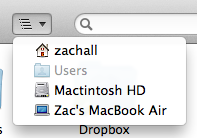
Since upgrading to OS X 10.9.3, some users are reporting that their /Users folder is now hidden. This means the folder is no longer visible when looking at the root of the hard drive in the Finder, which is inconvenient for Macs with multiple users installed.

With OS X Lion, Apple took the liberty to hide the Library folder from OS X users. However, it does not seem like hiding the /Users directory is an Apple design decision. Many users are still seeing this folder after updating and the behaviour is consistent. The most likely conclusion is that is simply a bug that slipped through to final release, despite Apple’s new beta testing program. If you are affected by this bug, you can find out how to make your /Users folder visible again after the break …


Expand
Expanding
Close

Site default logo image

Apple improves refund turnaround times for returns to less than a week

A retail research firm is reporting that Apple has improved its return systems for customers, via Reuters. Customers can now get a refund in a less than a week, whereas it used to take about ten days.

The report says Apple has transitioned to a new expedited shipping service, which ships returned products back to Apple within three days. In turn, this means customers get their money back faster. The new delivery method was first spotted during the holiday period and now seems to be a permanent measure.

Reuters positions the change as a way to lift online sales. This seems a little farfetched, and is unlikely to significantly affect purchasing decisions, but it will no doubt be appreciated by Apple’s customer base. Perhaps, it will help customer satisfaction slightly, Tim Cook’s favorite statistic.

Site default logo image

Despite decline in iPad sales, Apple remains #1 in combined PC & tablet sales

New data from Canalys shows that Apple remained the market leader in the combined PC and tablet market in Q1 this year, despite a 16 percent fall in iPad sales.

Worldwide, iPad shipments in Q1 fell 16% year on year to 16.4 million and accounted for 80% of Apple’s total PC shipments. Despite this, Apple continued to lead the global PC market. Its share fell both sequentially and year on year from 20% to 17%, due chiefly to the increasingly competitive tablet market.

With many consumers buying tablets in place of laptops, the approach taken by Canalys in combining the two arguably makes more sense than separating them out as other companies do. Tablets now outsell laptops, with desktops the poor relation.

Consumers, and increasingly businesses, are continuing to adapt, with tablets acting as disruptors and finding their place as desktop and notebook replacements. Apple’s ecosystem and the recent launch of Office for iPad should ensure it is well placed to remain a leader for some time.

Worldwide, tablets now account for 41 percent of combined sales, laptops 38 percent and desktops 21 percent.

Site default logo image

Dropcam adds $29 motion sensors (and teaches its cam to recognize cats)

[youtube=https://www.youtube.com/watch?v=fPkxt0QpRD8]

Dropcam, whose Wi-Fi video security system impressed us when we previously tried it, is now adding separate motion sensors to its product range. Costing just $29 each, Dropcam Tabs are small, weather-resistant devices that can be attached to doors, windows, and valuables. They use Bluetooth LE to connect to your existing Dropcam Pro camera which then sends push alerts when motion is detected, turning it into a much more comprehensive security system.

Dropcam says battery-life is rated for around two years, making Tabs close to fit-and-forget. Tabs can be pre-ordered today, and will be shipped in the summer.

The company has also made the Dropcam Pro suitable for more households by allowing it to recognize and ignore cats. Previously, the system would send push alerts any time it detected any movement, creating lots of false alarms as Tiddles engaged in her hectic schedule of moving from the sofa to the food dish and back.

Detecting pets usually requires 3D sensor systems which can measure the size of moving things, but Dropcam says that it has analyzed many hours of publicly-shared video in order to teach the system to recognize cats using only analysis of the visual data.

First OS X Mavericks 10.9.4 ‘Epic’ build seeded inside Apple as 10.9.3 release approaches

Site default logo image

Even as the redesigned OS X 10.10 approaches, Apple is continuing work on OS X Mavericks. According to multiple sources, Apple has provided its employees with the first seed of OS X 10.9.4. Codenamed “Epic,” 10.9.4 will continue to bring bug fixes and various stability enhancements to Mavericks…


Expand
Expanding
Close

Slingshot app lets you share your iOS screen with others on any platform

Site default logo image

I’ve written about apps from Squirrels in the past. It makes the AirParrot and Reflection apps that let you mirror your Mac or PC screen to an Apple TV or your iPad, iPhone, and iPod touch screen to a Mac or PC. Today it’s launching a new product that utilizes technology from both of those previous apps called ‘Slingshot.’ The cross-platform apps let you share your iOS screen with others on iOS, Mac OS X, Windows, or Android, and provides some slick collaboration tools in the process:
Expand
Expanding
Close

Site default logo image

Microsoft updates OneNote for iPhone & Mac w/ top requested features

Following updates to the Office apps for iPad yesterday that introduced printing support, Microsoft announced today that it’s updating the OneNote apps for iPhone and Mac with the top requested features from users. Included in the new features for iPhone users is the ability to create new notebook and sections, a revamped look that fits in more with iOS 7, and the Office Lens feature that was already available to iPad users. 

We’ve built Office Lens into OneNote for iPhone. Similar to Office Lens on OneNote for iPad, this popular feature turns your iPhone into a pocket scanner so you can use it to take pictures of things like receipts or whiteboard notes. Then, with Office Lens you can trim, enhance and make pictures more readable. Best thing is, images are automatically synced to OneNote, and if your picture includes printed text, OneNote can recognize the text with optical character recognition (OCR) so you can search for words in the image.

The Mac app gets improved printing, drag and drop images from the web, and much more:

  1. Print notes: You can now print out your lecture notes, travel itineraries or recipes by simply navigating to the page of your choice and bringing up the standard system print dialog from the menu. In addition, you can save the page as a PDF file through the Print dialog.
  2. Drag and drop images: Yes, this is as easy as it sounds! If you are browsing the web for ideas for a remodeling project and find some pictures you want to capture, you can easily drag and drop those into OneNote. If you have an album on your local machine, you can simply drag and drop multiple photos from Finder into OneNote. Additionally, this update also adds image formatting tools so you can restore the size of the picture if it’s been modified from its original state, or rotate pictures as desired.
  3. Format Painter: You may recognize this option from other Office applications. Format Painter is a handy tool to quickly apply the same text formatting throughout your notes. For example, if you copy and paste content from different sources with different formats, you can easily apply the same consistent format across all the content in a couple clicks. WARNING: this tool is highly addictive. Once you start using it, you won’t be able to stop.
  4. Copy and paste formatted content: When using OneNote for project management, class research or travel planning, capturing content from other places into OneNote is essential. Whether it’s formatted text from a Word document, tables from Excel or webpages, you can easily capture rich content and place it in your notes so it looks the same as it did in Word, Excel or on the webpage.
  5. Hyperlinks: Sometimes links can be long, unwieldy and aren’t always self-explanatory. You can now keep your notes organized by adding a display name for links in your notes.

The OneNote for Mac and OneNote for iPhone apps are available on the App Store now.

Site default logo image

Aerial photo shows Apple Campus 2 starting to take shape

In a tweet, KCBS reporter Ron Cervi shows the groundwork of Apple’s new ‘spaceship’ campus taking shape. Cervi often tweets from his reporting helicopter and caught this shot a few hours ago.

Last time we checked in with the site, it was in the midst of demolition. In this latest photo, the circular foundations of Apple Campus 2 (Apple’s official name for the project) are much more defined. Apple is expected to start new building work at some point this year. The campus is currently planned to open in 2016.


Expand
Expanding
Close

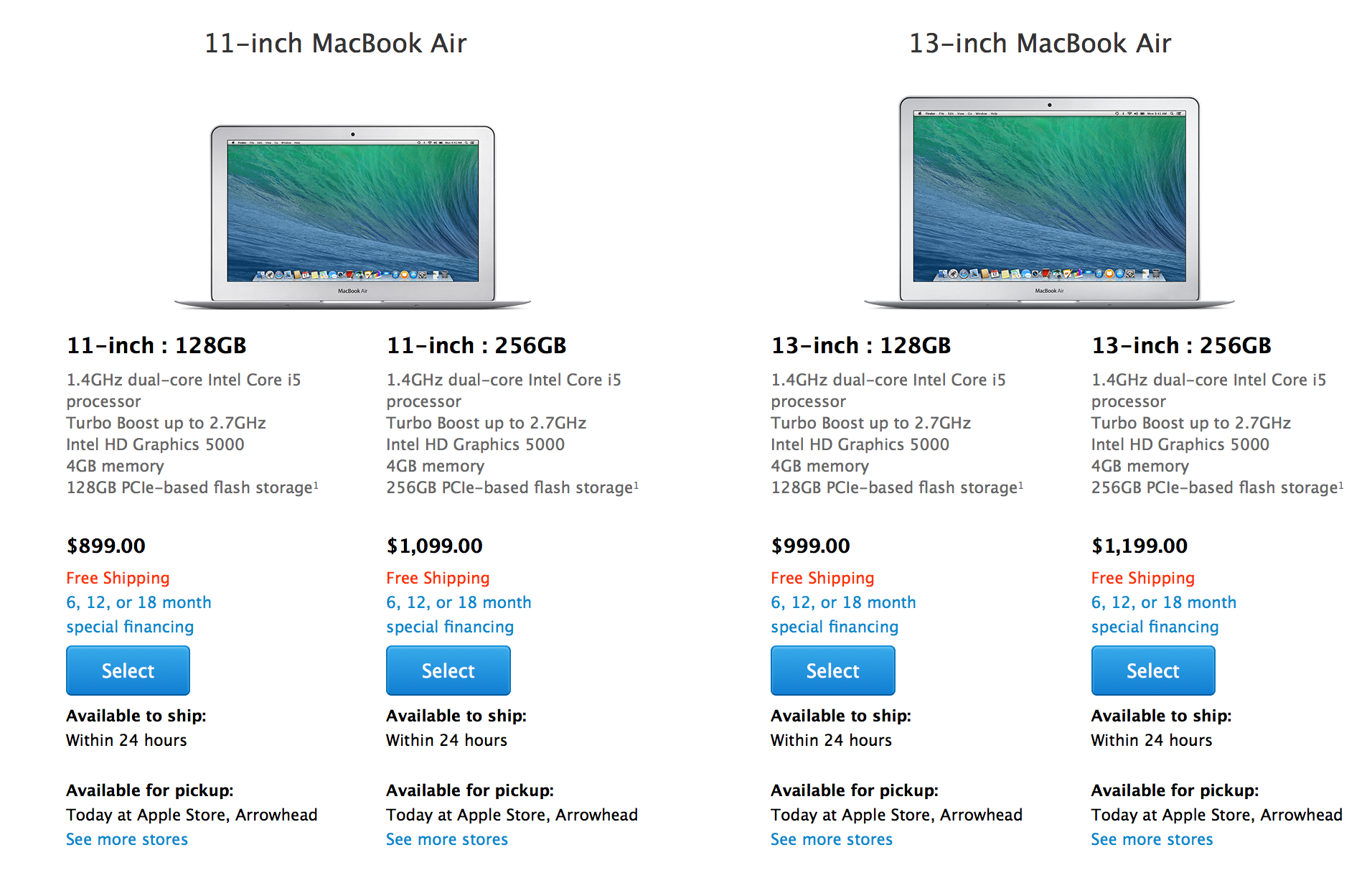
Apple’s MacBook Air lineup updated with faster Haswell processors, now starts at $899

In line with our recent scoops, Apple has updated its MacBook Air lineup early this morning. The refresh features the slightly updated Intel’s Haswell processor and all models are now priced $100 less than the previous models. The design is exactly the same and we don’t expect any significant changes to the MacBook Air lineup until later this year.

You won’t find much different here, but the 11-inch and 13-inch MacBook Air models have been bumped up to a 1.4GHz dual-core Intel Core i5 processor with 4GB of RAM and 128GB of storage in the low-end configurations and 256GB of storage in the top 11-inch and 13-inch models. These baseline models are configurable with built-to-order options up to a 1.7GHz dual-core Intel Core i7, 8GB of RAM, and 512GB of flash storage. Apple did give one particular spec a slight boost however…


Expand
Expanding
Close

Mac Pro shipping improves to 3-5 weeks after four months

Site default logo image


While it is still not readily available for purchase, 2013 Mac Pro shipping dates are gradually starting to improve since it debuted in late December last year. You still can’t walk in to an Apple Store or similar retailer and walk out with a new Mac Pro, but you might just get it in less than a month from the time you order it. Shipping estimates from Apple.com have dropped down to three to five weeks for the first time since the new machine debuted at the end of last year; previous shipping estimates pegged shipping at five to six weeks…
Expand
Expanding
Close

Cook says new products ‘closer than it’s ever been’, ponders mobile payments

Site default logo image

In Cook’s latest interview with The Wall Street Journal, the Apple CEO largely reiterates his comments about the company’s values and the product creation process but also expanded on his opinion of mobile payments.

Cook said that their strong results should qualm some of the recent anti-Apple chatter. However, he added that it will likely take the addition of some new products to change people’s minds…
Expand
Expanding
Close