
MacBook Pro: The biggest and baddest Mac laptops

See All Stories

Apple's premium laptop comes in 13- and 16-inch screen sizes. Each model includes 2-4 USB-C ports for charging, accessories, and data transfer. Higher-end models also include the Touch Bar.
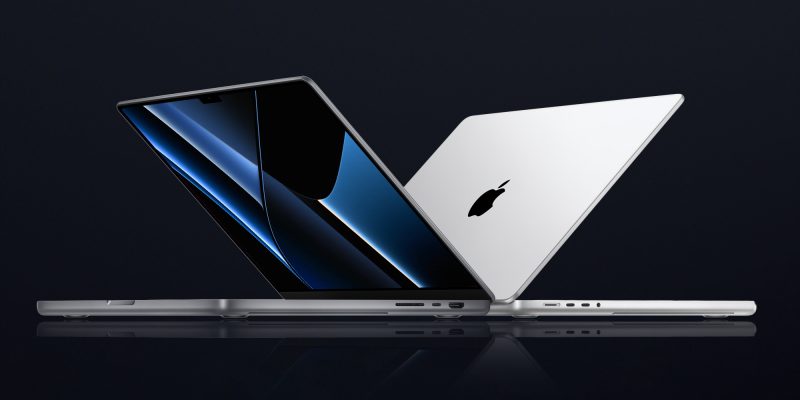
2021 MacBook Pro

MacBook Pro has been the product name for Apple’s high-end laptop since early 2006 when the transition to Intel processors began. Now, that Pro naming has carried forth as Apple has moved to its own silicon. The latest fourth and fifth-generation Pro Apple notebooks bring dramatically more power with lower heat generation and better battery life thanks to the ARM-based Apple silicon. Keep reading for a brief history of the line and a breakdown of the current lineup.

MacBook Pro history

The first generation MacBook Pro followed in the style of the PowerBook G4 that came before it, but used Intel processors rather than PowerPC chips.

The second generation of the MacBook Pro was the first to really separate itself from the products before, with a unibody enclosure. The third-generation MacBook Pro introduced the retina display as well as MagSafe 2.

Perhaps the most controversial version of the MacBook Pro is the fourth generation. While the third generation received some backlash for the removal of ethernet and the optical drive, the fourth generation was a complete rethinking of the device peripherals. No more MagSafe, no more USB-A ports, and only the 13-inch model kept the function keys. Instead, this redesigned MacBook Pro opted for all Thunderbolt 3 ports and headphone jack. In place of function keys, the MacBook Pro gained an OLED Touch Bar. In late-2020, Apple introduced the M1 chip and updated the 13-inch MacBook Pro. The ARM-based processor brought down power consumption and increased performance.

In October of 2021, Apple introduced the fifth-generation MacBook Pro with not one but two updated versions of the M1 chip, the M1 Pro and M1 Max. The move walked back some of the decisions from the previous generation, adding back an HDMI Port, MagSafe charger, and SD card reader while removing the Touch Bar.

The 2020 13-Inch MacBook Pro

In late 2020, Apple introduced the 13-inch M1 MacBook Pro as the latest update to the fourth-generation MacBook. The MacBook features the same look as previous MacBooks, but like the MacBook Air and Mac Mini, switched to Apple silicon.

Apple’s M1 chip brought ARM architecture to the MacBook line, and this was the first MacBook without an Intel processor.

The M1 chip is a unified design with an 8-core CPU and an 8-core CPU. The processor integrated memory on board, limiting the device to either 8GB or 16GB of unified memory. The 13-inch M1 MacBook Pro is configurable with between 256GB and 2TB of storage and features a Magic Keyboard, rather than the problematic butterfly keyboard.

13-inch MacBook Pro specs

Base Configuration$1,299.00

  • Apple M1 chip with 8‑core CPU, 8‑core GPU, and 16‑core Neural Engine
  • 8GB unified memory
  • 256GB SSD storage
  • 13-inch Retina display with True Tone
  • Backlit Magic Keyboard – US English
  • Touch Bar and Touch ID
  • Two Thunderbolt / USB 4 ports

Max Configuration$2,299.00

  • Apple M1 chip with 8‑core CPU, 8‑core GPU, and 16‑core Neural Engine
  • 16GB unified memory
  • 2TB SSD storage
  • 13-inch Retina display with True Tone
  • Backlit Magic Keyboard – US English
  • Touch Bar and Touch ID
  • Two Thunderbolt / USB 4 ports

13-inch MacBook Pro pricing

The price for the 13-inch M1 MacBook Pro starts at $1,299. Upgrading this base configuration to 16GB of memory adds $200 to the price. Likewise, each step above 256GB of storage – 512GB, 1TB, and 2TB – will add $200 to the price. A fully specced out 13-inch MacBook Pro will run you $2,299.

You can configure your own 13-inch MacBook Pro on Apple’s website.

Current 14-inch and 16-inch MacBook Pro

In October 2021, Apple brought a brand new design to the MacBook Pro line. Apple increased the screen size on the 13-inch, making it a 14-inch, and shrunk the bezels on the 16-inch. This fifth-generation notebook addressed many complaints of the last generation. MagSafe returned, in the form of an improved MagSafe 3, while the MacBook also regained an HDMI port and an SD-card slot.

Also gone is the Touch Bar. Instead, the standard row of function keys return. The latest MacBooks also bring a ProMotion display that was first introduced on the iPad Pro, with a variable refresh rate and mini-LED backlight.

The 2021 MacBooks aren’t without a controversial feature, as while the display has been made larger there is now a large notch for the 1080P FaceTime camera. While FaceID would have been a nice addition in exchange for this small chunk of the screen, there are some reasons this is not totally practical.

14-inch MacBook Pro specs

Base Configuration$1,999.00

  • Apple M1 Pro with 8-core CPU, 14-core GPU, 16-core Neural Engine
  • 16GB unified memory
  • 512GB SSD storage
  • 67W USB-C Power Adapter
  • 14-inch Liquid Retina XDR display
  • Three Thunderbolt 4 ports, HDMI port, SDXC card slot, MagSafe 3 port
  • Backlit Magic Keyboard with Touch ID – US English

Maximum Configuration$5,899.00

  • Apple M1 Max with 10-core CPU, 32-core GPU, 16-core Neural Engine
  • 64GB unified memory
  • 8TB SSD storage
  • 96W USB-C Power Adapter
  • 14-inch Liquid Retina XDR display
  • Three Thunderbolt 4 ports, HDMI port, SDXC card slot, MagSafe 3 port
  • Backlit Magic Keyboard with Touch ID – US English

14-inch MacBook Pro pricing

The 14-inch MacBook Pro starts at $1,999. The base model includes 16GB of memory, 512GB of storage, and an M1 Pro processor with an 8-core CPU and 14-core GPU. There are multiple versions of the M1 Pro processor available, while jumping to an M1 Max processor will cost $500 more, and requires you to jump up to 32GB of memory – a $400 upgrade. Going with the M1 Max processor means you can configure up to the full 64GB of memory, an $800 upgrade.

You can configure up to 8TB of storage in the 2021 14-inch MacBook Pro. Upgrade costs are as follows:

  • 1TB SSD Storage – $200
  • 2TB SSD Storage – $600
  • 4TB SSD Storage – $1,200
  • 8TB SSD Storage – $2,400

You can configure your own 14-inch MacBook Pro on Apple’s website.

16-inch MacBook Pro specs

Base Configuration$2,499.00

  • Apple M1 Pro with 10-core CPU, 16-core GPU, 16-core Neural Engine
  • 16GB unified memory
  • 512GB SSD storage
  • 16-inch Liquid Retina XDR display
  • Three Thunderbolt 4 ports, HDMI port, SDXC card slot, MagSafe 3 port
  • 140W USB-C Power Adapter
  • Backlit Magic Keyboard with Touch ID – US English

Maximum Configuration$6,099.00

  • Apple M1 Max with 10-core CPU, 32-core GPU, 16-core Neural Engine
  • 64GB unified memory
  • 8TB SSD storage
  • 16-inch Liquid Retina XDR display
  • Three Thunderbolt 4 ports, HDMI port, SDXC card slot, MagSafe 3 port
  • 140W USB-C Power Adapter
  • Backlit Magic Keyboard with Touch ID – US English

16-inch MacBook Pro pricing

The 16-inch MacBook Pro starts at $2,499. There is only one M1 Pro processor available on the 16-inch MacBook, and that’s the highest version 10-core CPU, 16-core GPU version of the M1 Pro processor that is a $300 upgrade on the 14-inch MacBook Pro. Of course, you can also step up to the M1 Max processor with either a 24-core or 32-core GPU, a $200 and $400 upgrade respectively (which also requires the $400 upgrade to 32GB of memory). The memory and storage options are all the same as the 14-inch MacBook Pro.

You can configure your own 16-inch MacBook Pro on Apple’s website.

Differences between 13-inch,14-inch, and 16-inch models

The 2021 MacBook Pro lineup is a refreshing change. The return of ports and physical keys make the laptops more versatile, while additions like an XDR display and hardware acceleration for ProRes improves the experience but is harder to quantify for the average user.

13-inch14-inch16-inch
ProcessorM1M1 Pro / M1 MaxM1 Pro / M1 Max
Memory8GB / 16GB16GB / 32GB / 64GB16GB / 32GB / 64GB
Storage512GB, 1TB, 2TB512GB, 1TB, 2TB, 4TB, 8TB512GB, 1TB, 2TB, 4TB, 8TB
Screen2560×1600 pixels 3024×1964 pixels; ProMotion3456×2234 pixels; ProMotion
Weight3.0 pounds (1.4 kg)3.5 pounds (1.6 kg)M1 Pro: 4.7 pounds (2.1 kg)
M1 Max: 4.8 pounds (2.2 kg)
Size (Width x Depth)11.97 x 8.36 inches (30.41 x 21.24 cm)12.31 x 8.71 inches (31.26 x 22.12 cm)14.01 x 9.77 inches (35.57 x 24.81 cm)
Height0.61 inch (1.56 cm)0.61 inch (1.55 cm)0.66 inch (1.68 cm)
Base Price$1,299.00$1,999.00$2,499.00

The $1,999 starting price for Apple latest computer is a harder pill to swallow than the $1,300 13-inch Pro from last year. For an average user, the superb M1 MacBook Air will likely suffice (and that sub-$1,000 price is hard to pass up).

But the 2021 14-inch and 16-inch MacBook Pro are exactly what they need to be, a return to function-over-form that will truly meet the needs of professional users.

Apple releases ‘Bulbs’ TV ad featuring the new MacBook Pro with Touch Bar, a “tool for all the ideas to come”

Apple has just shared a new TV commercial to its YouTube page, called ‘Bulbs’. The ad shows a series of lightbulbs exploding around the world, ending with a tag line ‘Ideas push the world forward’ and a few short shots of the new MacBook Pro with Touch Bar.

The ad highlights human inventions like fire, harvesting, woodwork, trains, transport, television, robots and space travel, finishing with a few glimpses of Apple’s newest MacBook Pro which it calls “a tool for all the ideas to come”. Watch the minute and a half spot after the jump …


Expand
Expanding
Close

PSA: Apple’s Thunderbolt 3 to Thunderbolt 2 MacBook Pro adapter doesn’t support your Mini DisplayPort displays

Site default logo image

There is a bit of confusion over what displays are supported via the new MacBook Pro’s Thunderbolt 3/USB-C ports. If you don’t have a display that uses a Thunderbolt 3/USB-C port— like the new 4K and 5K LG displays being sold exclusively by Apple for the new MacBook Pros— then you’ll need an adapter to go from Thunderbolt 3 to whatever I/O your display has (DisplayPort, HDMI, Thunderbolt 2, etc). Something like Apple’s Thunderbolt 3 to Thunderbolt 2 adapter, for example. 

But here’s where some users have been confused and accidentally purchased the wrong adapter:

Expand
Expanding
Close

Hands-on impressions: 13-inch MacBook Pro with Touch Bar [Video]

Site default logo image

After going hands-on with the Late-2016 13-inch MacBook Pro sans Touch Bar, I was finally able to spend some significant hands-on time with the real MacBook Pro for this generation, the Touch Bar-equipped version.

Outside of a few obvious differences, the MacBook Pro with Touch Bar shares the same form factor and design as the version without Apple’s fancy new input method. Therefore, I’m going to avoid rehashing topics that I’ve already covered, such as in-depth impressions of the keyboard, trackpad, display, build quality, etc. If you want a hands-on synopsis of the overall design of the Late-2016 MacBook Pro, then be sure to read our original hands-on post.

These impressions will focus on the areas that differentiate the Touch Bar-equipped MacBook Pro from the entry-level model. It is here where you’ll find my hands-on impressions of the Touch Bar, Touch ID, faster processors, additional USB-C ports, and more. Have a look at our full video walkthrough for all of the details.
Expand
Expanding
Close

How to add or disable Touch ID fingerprints, Apple Pay cards & view transaction history on MacBook Pro

Site default logo image

The new MacBook Pro with Touch Bar is the first of Apple’s Macs to include a Touch ID sensor built-in for Apple Pay, unlocking the Mac with your fingerprint, and authentication purposes in third-party apps.

Other Macs can use Apple Pay, but they need to use a nearby iPhone or Apple Watch to authenticate and complete the purchase.

Here’s how it works:


Expand
Expanding
Close

How to create Touch Bar screenshots on the new MacBook Pro + more

Site default logo image

Apple’s new flagship MacBook Pro replaces the function key row with a dynamic multi-touch display called Touch Bar. This new screen changes based on which app you’re currently using and enables quick access to additional functionality throughout macOS.

One example of this is how Touch Bar handles screenshots. Whether you’re using the system keyboard shortcuts to create a screenshot or using the optional screenshot button on Touch Bar, you can assign the app or folder where you want the screenshot to save to on-the-fly.

And since Touch Bar is actually a second display, you can create a screenshot of whatever Touch Bar is displaying using a new system keyboard shortcut…


Expand
Expanding
Close

MacBook Pro Diary: I’ve come to terms with the fact that it’s the end of the line for upgradable MacBooks

Site default logo image

I’ve always upgraded my MacBooks. Usually, I would spec out my machine with the best processor and GPU, and couple that to the bare-bones RAM and drive, then upgrade those components myself to avoid the Apple premium. Sometimes I’d upgrade more than once during a machine’s lifetime.

My Late 2011 17-inch MacBook Pro, for example, was bought with 8GB RAM and a 750GB hard drive. I immediately upgraded the RAM to 16GB – a ten-minute task – and swapped out both the hard drive and optical drive for two 1TB hard drives. Later on, when SSD prices fell to more sensible levels, I swapped out the spinning metal drives for a couple of 1TB SSDs. In this way, the 17-inch machine I was reluctant to give up has remained remarkably usable even five years on.

That approach is no longer an option. The RAM has long been soldered on in MacBooks, and the past couple of days confirmed what I suspected about the new MacBook Pro with Touch Bar when I maxed-out my order: the SSD, too, is soldered on and thus non-upgradable


Expand
Expanding
Close

ArsTechnica review explains why Apple had to use AMD GPUs in the 15″ MacBook Pro

Site default logo image

One slightly surprising spec in the new 15-inch MacBook Pro line-up is that even the base model got an AMD GPU. Previously, Apple has offered only integrated GPU in the base model, reserving discrete graphics for the higher-specced models.

John Gruber noticed that the ArsTechnica review explains this: it was the only way to allow the machine to drive two 5K monitors. And the reason for that is that Apple had to use something of a workaround to achieve it …


Expand
Expanding
Close

Apple 13-inch MacBook Pro with Touch Bar teardown reveals speaker grilles are only cosmetic, Touch Bar is hard to replace

With the new MacBook Pro now shipping to customers, iFixit have got their hands on the new 13-inch MacBook Pro with Touch Bar and have disassembled it and completed their usual teardown. There are quite a few differences between this model and the cheaper 13-inch 2016 MacBook Pro that retains traditional keys; teardown for that model here.

Much of the internal component layout has been adjusted to accommodate the inclusion of the Touch Bar. Apple’s latest laptop scores just 1/10 for repairability as Touch Bar is difficult to replace and the battery is glued into the case. Interestingly, the new speaker grilles on the 13-inch model appear to serve no function and are purely cosmetic …


Expand
Expanding
Close

Drop, a color picker utility for macOS, launches with Touch Bar support

Site default logo image

Drop, a color picker for macOS, has launched today with support for the new MacBook Pro’s Touch Bar. Built by the Tapity app development team, Drop serves as lightweight tool allowing user’s to quickly select and grab colors on-screen, while also switching between a multitude of color formats. Colors grabbed can be added to the palette and automatically copied to the clipboard.


Expand
Expanding
Close

Touch Bar MacBook Pro models have non-upgradeable SSDs, seemingly under-sized batteries

The first MacBook Pro with Touch Bar models are arriving, and if you were encouraged by the removable SSD OWC found in the entry-level machine, there’s bad news. Owners who have opened them up are finding that the SSD chips in the Touch Bar machines are permanently soldered to the logic board.

This means that, like the 12-inch MacBook, the SSD size you order from Apple is the capacity you’re going to be stuck with for the life of the machine, so you may want to take a fresh look at those rather eye-watering upgrade prices.

The SSD chips are beneath some shielding, but one owner was brave enough to remove it to peek beneath …


Expand
Expanding
Close

Pixelmator for Mac update adds Sierra Tabs, Touch Bar integration, content-aware Smart Refine, more

(The update is rolling out now, it may take some time to propagate across all App Store regions)

Pixelmator for Mac today updated to version 3.6 optimized for macOS Sierra and the new MacBook Pro Touch Bar, as well as a handful of other enhancements for the photo editor. Pixelmator 3.6 includes support for the latest macOS Sierra APIs, like Universal Clipboard and Tabs. Tabs enable users to edit multiple Pixelmator documents in a single window. As promised at the Apple event, this update brings a contextual row of Pixelmator editing tools into the Touch Bar present in the new MacBook Pros.

The update also includes new ways to make selections, including a content-aware Smart Refine, a live preview Quick Selection, wide color image support, and more.


Expand
Expanding
Close

Review: CalDigit USB-C Dock – an okay solution for MacBook Pro owners, if you’re willing to make compromises [Video]

Site default logo image

The Late 2016 MacBook Pro lacks many of the convenient ports that we’ve seen on previous MacBook releases. But if there’s a silver lining to be found, it’s that the USB-C ports featured on the new machines are super-versatile.

With a single USB-C cable, for instance, you can tap into CalDigit’s USB-C Dock, which gains you instant access to multiple legacy USB-A ports, Gigabit Ethernet, HDMI 2.0, DisplayPort 1.2, an extra USB-C port, and an additional 3.5mm headphone jack along with a microphone jack.

In addition, the unit is able to charge a MacBook up to 60W. That means that the dock should do fine charging the smaller 13″ MacBook Pro at full speed, but will take a bit longer charging the 15″ MacBook Pro that ships with a larger power adapter.

CalDigit’s USB-C Dock isn’t a perfect device, but it does a pretty good job of turning the new MacBook Pro into a desktop-worthy machine, if you can put up with the compromises you’ll have to make in order to use it. Have a look at our hands-on video walkthrough for the details.
Expand
Expanding
Close

Touché lets you easily test drive and screenshot Apple’s Touch Bar features on your Mac before upgrading

Site default logo image

Apple’s new MacBook Pro replaces the function row of keys with a dynamic screen called the Touch Bar, and customers who pre-ordered early are starting to see them ship as soon as today. Apple Stores should also receive inventory to try out this week, but you can test drive how macOS will handle the Touch Bar from your current Mac with a new app called Touché.


Expand
Expanding
Close

The best apps for the new MacBook Pro’s Touch Bar & Touch ID

With the new MacBook Pros with Touch Bar arriving to the first pre-order customers and going on sale at Apple stores this week, you might be looking to try out some apps that support the new hardware. Fortunately, Apple has already confirmed many apps that will get support for Touch Bar, the new contextually sensitive touchscreen panel embedded into the MacBook Pro’s keyboard, and many others app developers are announcing updates. 

Head below for the full list.


Expand
Expanding
Close

Apple’s new MacBook Pro with Touch Bar will be in stock, available to try at Apple Stores this week

Update: Some customers report being able to purchase the new MacBook Pro with Touch Bar at some locations as of Wedneday, November 15th. Other stores will officially start selling stock of the new device tomorrow, as detailed in our original story below.

The new MacBook Pro with Touch Bar will be available at Apple retail stores later this week alongside demo units for customers to try, according to sources familiar with Apple’s plans.

Apple’s new MacBook Pro with Touch Bar has up until now only been available to order with a 4-5 week shipping estimate from Apple’s website, but this week the device will arrive at retail stores as the first shipments are delivered to pre-order customers. So far Apple has only had the new MacBook Pro with Touch Bar models displayed under glass with a demo loop, but this week customers should also be able to get their hands on demo units to try for themselves in at least some locations. 


Expand
Expanding
Close

Customers start receiving new MacBook Pro with Touch Bar, most early orders set to deliver this week

The new MacBook Pro with Touch Bar is finally getting into customer’s hands, with some lucky people receiving deliveries of their new laptops today. The MacBook Pro packaging features a side-on shot of the machine with the Touch Bar displaying a vibrant color palette. Based on reader tips, it seems that those who ordered early will be receiving their laptop this week or next with many deliveries confirmed for tomorrow.

The MacBook Pro with Touch Bar has received mixed reviews from press with a lack of consensus on whether the Touch Bar is a silly gimmick or a useful addition …


Expand
Expanding
Close

Schiller: Apple tried touch screen MacBooks but doesn’t work for iMacs, landed on Touch Bar instead

Site default logo image

Despite what companies like Microsoft may be doing and what some customers continue asking for, Apple is really confident that you wouldn’t like a touch screen on your MacBook. Here’s Phil Schiller explaining Apple’s view on touch screen Macs to Backchannel‘s Steven Levy:

Apple came to this conclusion by testing if touch screens made sense on the Mac. “Our instincts were that it didn’t, but, what the heck, we could be wrong—so our teams worked on that for a number of times over the years,” says Schiller. “We’ve absolutely come away with the belief that it isn’t the right thing to do. Our instincts were correct.”

Of course, Apple is slowly introducing multi-touch to Macs with the release of new MacBook Pros that replace function keys with a dynamic touch panel…


Expand
Expanding
Close

First MacBook Pro with Touch Bar orders ship, deliver as soon as Monday

Apple has now started shipping the first new MacBook Pro with Touch Bar orders with the delivery notifications indicating that the laptops will arrive in people’s hands as soon as Monday, November 14.

Several 9to5Mac readers and others online report receiving shipping notifications from Apple and or UPS, as pictured above and below. All shipped orders we’ve seen so far are for 15-inch MacBook Pro models. Shipment alerts for the 13-inch units will likely follow soon.


Expand
Expanding
Close

Review: Aukey USB-C Card Reader – an inexpensive, yet potentially awkward way to connect SD Cards to the MacBook Pro [Video]

The MacBook Pro lacks many traditional external connection options, such as an SD Card reader or an HDMI port. In the place of all of those legacy ports resides two or more USB-C ports. USB-C is an uber-versatile form factor that will ultimately offer tons of flexibility in the future when it comes to external connections, but at this early stage in the game, the pickings are somewhat slim.

One of the major outcries that we’ve heard with regard to the new MacBook Pro centers around the lack of a built-in SD Card reader. It’s a valid complaint, as SD Cards are central to the workflows of many creatives who use Macs.

Aukey, who has produced several USB-C-oriented adapters already, offers a helping hand with its new USB 3.0 compatible Type-C Card Reader. This tiny, inexpensive, $9.99 adapter not only offers quick SD Card connectivity via USB-C, but features a slot for microSD Cards as well.

Should you consider it? Have a look at our hands-on video walkthrough for more details.
Expand
Expanding
Close

Comment: Apple selling a $79 MacBook Pro power adapter without a USB-C cable is a step too far

I’ve said more than once that I’m relaxed about Apple’s decision to fit only USB-C ports in the new MacBook Pro. I’d rather have to pay for two adapters and one cable now than be stuck with outdated ports for most of the 4-5 years I expect to keep the machine.

But I discovered that Apple did have one more hidden extra cost in store for 2016 MacBook Pro buyers: the $69 (13-inch model) or $79 (15-inch model) power adapter the company sells as an accessory doesn’t include the USB-C cable you need to actually, you know, use it …


Expand
Expanding
Close

