Apps

See All Stories

Learn about the latest news for iOS, Mac, Apple Watch, and Apple TV apps

Apps for iOS, macOS, tvOS, and watchOS power our modern world. 9to5Mac will update you on the latest news, review, and updates for all types of apps. “There’s an App for that”.

The term came became part of our vocabulary when Steve Jobs announced The App Store as part of the iPhone 2.0 software update in 2008.

Over the years, the term has become as common as kleenex for describing applications on all of our devices. Apple’s platforms have apps for just about anything from finance, banking, sports, social media, podcasting, music, and more. We have a guide for helping you discover the best ones as well. Apps are now on everything from our TV, to our smartphones, on our laptops, and all the way down to our wrists.

As new ones are released or existing ones have major updates, the team here at 9to5Mac will bring you the latest news and reviews. If you want to follow along with video footage, be sure to follow 9to5Mac on YouTube. Scroll down below our latest updates on all things relating to applications on iPhone, iPad, Mac, Apple TV, and Apple Watch.

Site default logo image

Veedeo for iPhone allows you to create and share custom video clips with animated text, music, and effects

A new app called Veedeo launched on the iOS App Store today that allows you to create video clips with custom text and a blur effect similar to what you see throughout iOS 7’s new design. The short video clips are designed to be shared via social networks like Twitter and Instagram.

The app doesn’t support importing video from your camera roll to edit, though the developers have said this is coming along with support for the front-facing camera soon. The current version of the app requires you to record a 12-second clip (or shorter) directly within the software. You can then add an optional blur effect to the video (with two different blur intensity options available), and select background music from your iTunes library.

Animated text can be added to the clips during creation by selecting one of the app’s built-in templates. Some contain fully pre-written messages like “Have a Merry Christmas” while many of the others have parts that can be customized, such as “Happy Birthday, <your text here>”.

Once you’ve got your video perfected, you can export it to your camera roll to share through iMessage, email, or your social network of choice.

You can grab Veedeo for iPhone right now on the App Store for $.99. It requires an iPhone 4S or newer running iOS 7.

Site default logo image

Google’s Zagat app makes its way to the iPad, complete with ratings for shops and hotels

Earlier this year, Google launched Zagat for iPhone and iPod touch. The application is Google’s form of allowing users to discover new places, such as restaurants, across many cities in the United States. Today, Google has updated the application with support for the iPad’s larger display. Also in the mix is support for ratings and reviews for shops and restaurants. Support for Charleston, South Carolina and Nashville, Tennessee has also been added. The 2.0 update is free on the App Store.


Expand
Expanding
Close

Site default logo image

CNN for iPhone and iPad receives iOS 7 redesign, Dynamic Type support, more

CNN has updated its iOS apps for iPhone and iPad with new icons and a new user interface optimized for the sleek look of iOS 7.

Both the smartphone and tablet apps now support iOS 7’s Dynamic Type feature which allows users to adjust the system font in the iOS Settings app. This means you can make the default text view either larger or smaller depending on your preference. Version 2.0 also brings a number of bug fixes to the app.

Download CNN for iPhone and CNN for iPad for free from the App Store.
Expand
Expanding
Close

Site default logo image

9to5Toys Lunch Break: Tons of iOS/desktop game deals, Airbender BT iPad Air keyboard $37, iTunes 15% off, more

Take a few minutes out of your lunch break to cash in on limited time deals. Be sure to follow 9to5Toys to keep up with the best gear and deals on the web: Twitter, RSS Feed, Facebook, Google+ and subscribe to the new Safari push notifications feature.

Today’s can’t miss deals:

Game/App Deals: Digital games sale up to 80% off, Disney/Warner Bros. iOS apps, Angry Birds Star Wars FREE, iOS freebies, Blu-rays, more

Airbender Bluetooth Air Keyboard in Matte for iPad Air: $37 shipped

$50 iTunes gift card for $42.50: Save 15% on future apps, music, movies, more

The winner of the Dropcam giveaway is Greg H. (@ghomyak) Congratulations!


Other great deals from today:


The best deals that are still alive:

Site default logo image

Flow Instagram app for iPad looks (almost) good enough to be official

Instagram now has direct messaging, an iOS 7-friendly design (save for the app icon), and video sharing, but it’s still without an iPad app. For the past couple of years, a number of third-party developers have posted iPad Instagram apps to the App Store, and today, Flow has arrived. I’ve been testing it for a couple of days, and it seems good enough to be almost official. Due to certain restrictions, the app can’t upload photos to the media-sharing service, but it does do a great job giving users a clean, large interface for viewing photos and user profiles. 

  • Smooth browsing experience
  • Super fast loading of photos and videos
  • Carefully crafted interactions: scroll, tap, like, swipe, peek & more
  • Search and bookmark #tags @users & places
  • Discover top ranked Instagram accounts and #tags
  • Shopping & fashion feeds for every country!
  • Video playback with fullscreen & airplay
  • Share to Facebook & Twitter or save on your camera roll
  • And more much more…

The designed for iOS 7 application is free, and it’s definitely worth checking out if you’re an Instagram fan with an iPad.


Expand
Expanding
Close

Get 75% off Borderlands 2 GOTY for Mac from 9to5 & GameAgent: $15

Site default logo image

From 9to5toys:
[youtube=http://www.youtube.com/watch?v=R52I9sprmmI]

In case you missed our last mega deal for Mac gamers, we’ve once again teamed up with our friends over at GameAgent to get an exclusive deal on one of the hottest Mac titles around. This time you’ll be able to get 75% off Borderlands 2 Game of The Year Edition for Mac. Here’s what you’ll get with the GOTY edition:
Expand
Expanding
Close

Site default logo image

IMDb iOS app gets iOS 7 redesign, improved navigation & filters, Oscars section, more

The IMDb iOS app for iPhone and iPad gets a nice update today that finally introduces an iOS 7 style redesign for the app. On top of the new look and feel, the app also adds a bunch of new features that improve navigation and make it easier to track people and release dates using filters and wish lists:

What’s New in Version 4.0

– New iOS7 look and feel!
– New navigation and homepages for iphone, including a sleek dropdown menu, accessible from every page.
– Name lists! Finally, you can keep track of your favorite people!
– New list sorts and filters (including the much requested Release Date sort for Watchlists).
– Vote on interesting name trivia, title trivia, quotes, and goofs.

The updated app also includes a new section dubbed “Road to the Oscars” that includes “all your nominations and award season photos leading up to The Academy Awards®, including live results during both the Golden Globes and The Academy Awards® broadcasts.”

Version 4.0 of the IMDb app for iPhone and iPad is available on the App Store now.

Site default logo image

Cut the Rope 2 hits the App Store for 99¢

[youtube http://www.youtube.com/watch?v=jwyCaO9J9Qw]

Need a new game to entertain you over the holidays? The sequel to the popular Cut the Rope series just launched today with all new levels and characters and its exclusive to the App Store.

As with the original app, Cut the Rope 2 follows the main character Om Nom through an animated world through a puzzles to solve in pursuit of candy.

Cut the Rope 2 is available for iPhone, iPad, and iPod touch for $0.99 on the App Store.
Expand
Expanding
Close

Site default logo image

Logic Pro X adds new Drummers/Drum Kit Designer patches, redesigned EQ plug-ins & more

Update: This update includes a ton of new changes and features that weren’t listed in Mac App Store release notes. The full, massive changelog is listed below and on Apple’s website. The Logic Pro Remote iPad app also gets updated today with MainStage v3.0.2 support.

We already knew that a new version of Final Cut Pro would be debuting alongside the new Mac Pro, but along with FCP 10.1, Apple has also released updates to its other pro apps including Compressor, Motion, and now Logic Pro X. The latest update to Logic Pro X doesn’t change anything I had to say in our full review, but it does bring a couple welcomed improvements and new features.

Apple’s new virtual Drummer feature now includes three new “drummers” that will play along to your tracks, but what we really care about is 11 new drum patches included in Drum Kit Designer (the plug-in that powers the Drummer feature). Also notable in today’s update is big improvements to the Channel EQ and Linear Phase EQ plug-ins including “redesigned interfaces that are also accessible within the Smart Controls area.” You can see the new slick Channel EQ UI pictured above.

The lack of redesigned plug-ins was something that we mentioned as a downside in our full review, but it looks like Apple does have plans to slowly upgrade some of its popular but aging stock plug-ins.

Other improvements included in the update get rid of a few small annoyances that were introduced with the latest version.

Version 10.0.5 of Logic Pro X is available on the Mac App Store now as as free update. For new users, Logic Pro X sells for $199. Here’s the full changelog:

Logic Pro X 10.0.5 update

New features and enhancements

  • Includes 3 new Drummers and 11 new Drum Kit Designer patches.
  • Significant enhancements to Channel EQ and Linear Phase EQ plug-ins, including:
    • Redesigned, easier-to-use interface that’s also accessible within the Smart Controls area
    • Double Precision processing provides more accurate filtering, especially for low frequencies
    • Oversampling option improves high-frequency clarity
    • Option to apply EQ only to stereo left, right, middle, or side signals
  • There is now an option to set the Piano Roll to a light background color.
  • Selected notes in the Piano Roll are now highlighted by a selection frame.
  • When Logic is stopped or in Play mode, the glyph on the Metronome button in the control bar now illuminates to indicate that “Click while recording” is enabled.
  • The Shuffle commands are improved (see Logic Pro X Help for details).

User interface

  • There is now a command to assign region names to track names.
  • The waveform size in an audio region now adapts to the value of the region gain parameter.
  • Loops that belong to the same family can now be selected and changed using a new control in the region header.
  • Logic Pro X now assigns region and Mixer channel colors that are closer to the original colors when opening a project created in an earlier version of Logic.
  • Option-clicking a disclosure triangle in the Project Audio window now toggles all disclosure triangles in the window.
  • The Windows menu again lists all currently open windows.
  • The Mixer can now be reliably resized when in All mode.
  • Renaming multiple selected Mixer channels now reliably renames all channel strips in the selection.
  • When creating a duplicate track, the correct track icon and color are now assigned to the duplicate.
  • The song title is now automatically populated in the Share to iTunes dialog when sharing a song created in Logic 9 or GarageBand for iOS.
  • It’s once again possible to browse or load patches onto the Output channel strip via the Library.
  • The View menu items One Track and Selected Regions in the Piano Roll are now disabled when Link mode is disabled.

Performance

  • Improves processor balancing for multi-output software instrument configurations.
  • Improves handling of multiple displays on OS X Mavericks v10.9.
  • Resolves an issue that in some cases might cause audio clicks and pops when scrolling.
  • Moving an automation line while playing no longer spikes in CPU usages, or clicks and pops in the audio output.
  • Resolves an issue that could cause clicks and pops in the audio output when adjusting the gain or output level settings during playback in the various plug-ins.
  • Logic’s interface no longer freezes when using the Native Instruments Maschine controller to adjust two macro controls simultaneously.
  • Fixes an issue in which a warning about not enough memory might be displayed when performing Undo after editing a protected track.
  • Adjusting the frequency controls while playing audio through the Stereo Spread plug-in no longer causes audible zipper noise.
  • Improves the performance of scrolling when dragging regions in the Tracks area beyond the currently visible section.
  • Playing notes live into the Arpeggiator plug-in no longer sometimes leads to spikes in CPU usage.
  • Fixes an issue that could cause a spike in CPU usage when recording near the end of a project.
  • Logic 9 projects that contain a macro object in the Environment now behave more reliably when opened into Logic Pro X.
  • Multiple instances of the Scripter plug-in no longer have the potential to cause stuck notes.
  • The Scripter plug-in is no longer prone to causing stuck notes when using the Delay Note Until Next Beat preset.
  • Switching between presets in the Space Designer plug-in no longer sometimes results in noise.

General

  • Regions copied from a Track Stack can now be muted as expected even when they are within a Track Stack that is muted.
  • Deleting an audio Track Stack while it was soloed no longer leaves all the remaining tracks muted.
  • Entering a new crossfade value in the Region inspector for multiple selected regions now works as expected.
  • Region-based automation data beyond the end of a region is now chased properly even when playback is started after the last automation node within the bounds of the region.
  • Logic now maintains the correct relative levels when automation on multiple tracks belonging to the same Group are copied by dragging.
  • Resolves an issue in which track automation might be deleted when switching patches.
  • The default display setting when showing automation on Track Stacks is now Volume, instead of Display Off.
  • A track is now created as expected when using a control surface to set the automation mode of a channel strip not previously assigned to a track.
  • Moving a SMPTE locked region can no longer cause the automation on the track to move.
  • The position of the automation line no longer jumps unexpectedly when it is selected after creating 4 automation points with a Marquee selection.
  • Adjacent automation points of the same value are no longer sometimes inadvertently deleted when moving automation points on a grouped track.
  • The Repeat Section Between Locators command now includes automation on tracks that contain no regions in the repeated section.
  • When using Touch mode, Logic no longer writes unneeded automation points at the held value when holding a fader at the same position where there is an existing automation ramp.
  • Writing automation to an Aux not assigned to a track can no longer potentially cause tracks in a Track Stack to be rerouted to that Aux.
  • Copying multiple regions where only some affected tracks contain automation no longer activates Automation Read mode on the channel strips that have no automation.
  • Chase now works as expected for MIDI controllers on channels other than channel 1.
  • Takes are now shortened as expected when the take folder containing them is shortened by an edit operation and No Overlap mode is enabled.
  • Fixes an issue in which the visible area might jump unexpectedly when comping in a take folder that was not on the selected track.
  • Fixes an issue that caused some audio regions to be immovable when duplicate regions are packed into a take folder.
  • Packing regions with names containing non-ASCII characters into a take folder no longer creates garbled take names.
  • Numbers assigned to MIDI takes now increment reliably.
  • Expanding a take folder no longer potentially causes the playhead to fall out of sync with the audio output.
  • When using OS X v10.9, the playhead in the Audio Editor now consistently maintains the correct position when switching from Flex Time to Flex Pitch mode.
  • It’s now possible to set a loop to a length of less than 1/16 note.
  • The position of beat markers in the Global Beat Mapping track are now updated appropriately when using the various Cut/Insert Time commands.
  • Inserting a beat marker in the Beat Mapping track no longer creates unexpected tempo events in some circumstances.
  • Expanding a take folder no longer potentially causes the playhead to fall out of sync with the audio output.
  • Resolves an issue in which some MIDI notes might unexpectedly change position when Beat Mapping.
  • Adding a Beat Mapping marker no longer intermittently removes existing tempo events.
  • Inserting a fade-in using Shift-Control and the Pointer tool now works consistently.
  • Using the Fade tool to set fade-ins on multiple regions in a set of grouped tracks now works reliably.
  • Dragging regions on multiple grouped tracks with the Drag Mode set to X-Fade no longer potentially results in crossfades of varying lengths.
  • The Delete command now works as expected on selected regions that are inside a collapsed Group in the Project Audio window.
  • It’s now possible to add a green Apple MIDI loop to the Tracks area as an audio loop by dragging it from the Loops browser while pressing the Option key.
  • Logic Pro X no longer creates separate tracks for non-overlapping regions when unpacking folders in projects created by earlier versions of Logic.
  • Using the menu that appears when pressing the Metronome button in the Control Bar, it’s now possible to set the metronome to sound only during count-in.
  • Improves the reliability of Undo in several areas.
  • The Mixer window no longer intermittently moves when scrolling past the minimum or maximum value of the fader using a scroll wheel or gesture.
  • It’s now possible to select or open folder tracks in the Mixer.
  • Right-clicking an Aux or Output channel strip in the Mixer and selecting Create Track now behaves as expected even if the channel strip is not initially selected.
  • Command-click again works reliably to deselect a Mixer channel within a selected group of channels.
  • The display of audio waveforms of regions in a track no longer change unexpectedly when enabling or disabling the Groove status on a track.
  • Looped regions inside a folder now update the point they are supposed to stop playing after extending the length of the folder.
  • Overwriting an existing project no longer potentially leaves assets from the original project in place.
  • When creating a new project from a Logic 9 template, the default save path is no longer the location of the template.
  • Improves the mapping of Smart Controls to channel strip settings created in Logic 9.
  • The Follow Tempo parameter in the Region inspector is no longer incorrectly disabled for Apple Loops in songs last saved in GarageBand 6 or earlier.
  • Clicking and holding down on the upper-right corner of a region no longer unexpectedly enables looping in the Region inspector, with a loop length of zero.
  • The Region Inspector no longer displays a Loop checkbox for selected Track Stack folder regions.
  • It’s once again possible to disable Quantize in the Region Inspector for a region on a track slaved to a Groove Master track.
  • Saving a song created from a template no longer resets the tempo to 120 BPM.
  • Text for alert messages now always displays correctly on control surfaces.
  • Changing Region inspector parameters for MIDI regions on the main track of a Track Stack now behaves as expected.
  • It’s again possible to change the Transpose value in the Region Inspector using the + and – keys.
  • Logic now consistently responds to Play or Stop key commands when a floating Region inspector window is open.
  • It’s no longer possible to give the same name to more than one project alternative.
  • MIDI played from the Musical Typing Keyboard and Logic Remote is now routed through the Physical Input object in the Environment, which allows Environment processing of MIDI as it is being played into Logic from these sources.
  • Logic no longer adds 2 extra frames to the value when entering a SMPTE position in a project set to a non-drop frame rate.
  • Regions copied by option-dragging in projects with a start position earlier than bar 1 now end at the desired position.
  • Moving the first arrangement marker in a project no longer inadvertently moves other arrangement markers.
  • Resolves a rare issue that could cause the timing of a track in a project with many tempo changes to be altered after turning Flex on and then off.
  • Logic now asks the user to save the project when closing a project immediately after entering text into the Project Notes area.
  • It’s now possible to consistently add, remove, or edit plug-ins on tracks that were frozen in Source Only mode.
  • Pressing the Control key while dragging a region with the Snap Mode set to Bar now moves the region by beats instead of ticks, as expected.
  • Editing the left border of an audio region now behaves as expected when the Snap setting is set to “Snap Regions to Relative Value”.
  • Resizing a region with the Snap setting set to “Snap Regions to Absolute Value” now behaves as expected.
  • Resolves an issue that caused an event in the Event List to move later than expected when editing its position.
  • The “Capture as Recording” command now works as expected when multiple MIDI tracks are record-enabled.
  • It’s now possible to preview sections of an audio file outside the current region borders by clicking the area in the Project Audio window.
  • The tap-to-click option for trackpads now works reliably with all drop down menus.
  • The “Discard Recording and Return to Last Play Position” key command now reliably discards the recording.
  • It’s again possible to use the Tab key to navigate to the next control while working with plug-ins in Controls view.
  • The MIDI Activity display now shows chords as they are played when using Musical Typing.
  • All currently found audio files are now reliably saved with a project when using Save As or Save a Copy As with a project in which one or more audio files are missing.
  • The name of a project is now correctly updated after saving a project created from a template.
  • Fixes an issue in which clicking on the level LED in the track header did not select the track.
  • Resolves an issue in which changes made to the setup for Mackie Control and other MCU-compatible control surfaces were not saved by Logic Pro X.
  • Setting the Display Time preference to “SMPTE/EBU with Subframes”, “SMPTE/EBU without Subframes,” or “SMPTE/EBU with Quarter frames” can no longer cause the time display to jump unexpectedly.
  • Saving a project for the first time no longer resets the record path when it was previously set to an external path.
  • Performing undo in the Piano Roll or after deleting a flex marker no longer has the potential to unfreeze currently frozen tracks in the project.
  • Sample rate, tempo, and key information is now reliably stored within template files.
  • Fixes an issue in which the Repeat Regions dialog did not have key focus when opened, making it necessary to click it with the mouse before pressing Return to confirm the operation.
  • Individual MIDI Draw points in the Piano Roll are now easier to grab.
  • Deleting a track no longer has the potential to inadvertently delete regions on other tracks.
  • Cut/Insert Time edits no longer add unexpected tempo changes.
  • Scrubbing the SMPTE display in the LCD no longer moves the playhead to the wrong position.
  • Copying an arrangement marker to a position between two other arrangement markers now moves the end-of-song marker to accommodate the new section, as expected.

Audio

  • Audio regions now appear as expected in the Audio Editor, even when cycle is enabled and there are no audio regions within the cycle area.
  • Flex Pitch now correctly detects notes for take regions that have manually inserted flex markers.
  • The timing of notes played during the count-in on EXS24 or Drummer tracks is now more reliable.
  • Pasting an audio region into a take folder now correctly places the region on the selected take lane.
  • When saving an EXS instrument, the default save location is now ~/Music/Audio Music Apps/Sampler Instruments.
  • Editing the start point and anchor in the EXS audio editor now consistently alters playback as expected.
  • Logic no longer overwrites an existing audio file of the same name when performing a bounce with the option to create a split stereo file enabled.
  • Audio tracks assigned to output to a bus now consistently maintain that assignment when imported into a different song.
  • User-defined controller assignments now work as expected to control MIDI plug-in parameters.
  • The Record Repeat command now deletes the previous recording when used after recording in Cycle mode.
  • Quantize now operates reliably on takes that are displayed in the Audio Editor.
  • The Tuner window is no longer affected by the Content Link setting of other plug-in windows.
  • Audio now plays for multiple cycle iterations when using marquee selection to define the cycle area.
  • When the Edit command “Analyze Audio for Flex Editing” is used, Logic now properly resets any existing pitch edits on the selected audio files.
  • Command-clicking a selected note in Flex Pitch mode in the Audio Editor now deselects the note, as expected.
  • Setting a track to Flex Edit mode with the Slicing algorithm no longer processes the track with Flex if no edits have been applied.
  • It’s again possible to set Software Instruments to mono.
  • Logic no longer creates an extra audio file when merging or format-converting audio files.
  • Resolves an issue in which the Mixer did not show the 8th bus send on a channel strip.
  • Changing the input format of a stereo output channel strip to mono now creates a second mono output channel strip on the Mixer for the other channel in the stereo pair.
  • Setting an external recording path now reliably resets the Audio Assets setting. Conversely, enabling the Audio Assets setting now disables an externally set recording path.
  • The compressor meter in the channel strip is now in sync with the meter in the plug-in window.

Drummer

  • Improves the translation of articulations when an Ultrabeat-based patch is assigned to a Drummer track.
  • When a project starts on an upbeat, a Drummer region at the project start now automatically creates a fill at the beginning.
  • Changes to Drummer regions are now reliably applied when the regions are set to follow a flexed audio track.

MIDI editors

  • The Link mode button is now available for the Piano Roll editor.
  • The “Limit Dragging to One Direction” setting now works as expected in the Piano Roll.
  • It’s now possible to grab notes shorter than 15 ticks for editing in the Piano Roll.
  • Double-clicking a region with MIDI Draw enabled now consistently opens or closes a MIDI editor.
  • Resolves an issue in which recently recorded MIDI notes might disappear from view in the Piano Roll when recording with cycle engaged.
  • It’s again possible to alter the pitch of notes in the Piano Roll via MIDI input.
  • Using Option-Shift to edit the end points of multiple selected notes to the same position in the Piano Roll Editor now works as expected.
  • In the Piano Roll, it’s again possible to use Option-Shift in conjunction with the Velocity tool to set all selected notes to the same velocity.
  • An Event Float window that is linked no longer switches unexpectedly to the Region level when using arrow keys to move from note to note in the Piano Roll.
  • Pasting events in the Piano Roll when the playhead is to the right of the region border will not trigger the error “Illegal Region number”.
  • It’s now possible to copy a note in the Piano Roll to a different pitch at the same position when the note starts before the left edge of the region.
  • It’s now possible to move notes in the Piano Roll by increments smaller than 13 ticks when the “Limit Dragging to One Direction” setting is enabled.
  • User-inserted rests no longer incorrectly appear as notes in the Piano Roll.
  • Copying a muted note in the Piano Roll now creates a muted copy of the note, as expected.
  • Fixes an issue in which some note events might not be selectable in the Step Editor.
  • The contents of the Event List are now updated properly when deselecting a region from a multiple selection while Content Link mode is enabled.
  • The Event List now displays the correct LSB values for 14-bit pitch bend events.
  • Editing Release Velocity values in the Event List now behaves as expected.
  • The “Copy selected events” option in the MIDI Transform window now behaves as expected.

Score Editor

  • Fixes an issue that could cause the menu option for switching between Parts and Score view in the Score Sets window to disappear.
  • Double-clicking a region with the All Instruments filter setting active now reliably reveals all regions on that track, rather than just the single region.
  • The contents of the Event List editor are more consistently updated when changing the region selection from the Score window.
  • Newly inserted key signatures no longer display “xx Major” in some circumstances.
  • The Chord Grid Editor now correctly names Add 9 chords.
  • The clef menu no longer disappears for a Mapped Instrument staff style set to “No Clef”.
  • It’s again possible to create a new Chord Grid library that uses an alternate tuning.
  • It’s now possible to adjust the Velocity setting in the MIDI Meanings settings window by scrubbing the value with the mouse.
  • The length adjustment in the MIDI Meanings settings window can now be adjusted via a pop-up menu.
  • In the Staff Style window, the check marks indicating that a style is used in the current song now reliably update to reflect changes when Content Link mode is off.
  • Grace notes now scale properly when the scale setting of a Score Set is less than 100.
  • Resolves an issue that prevented reassigning instruments assigned to a Score Set after performing certain other edits.
  • Fixes an issue that prevented naming a floating score Part box set.

Plug-ins

  • Solo now works as expected on channel strips using an external I/O plug-in
  • Ultrabeat can now find samples that have been relocated from the default install location.
  • Ultrabeat now correctly applies the Fine Pitch adjustment to all triggered samples when trigger mode is set to Multi.
  • It’s now possible to halve/double the current rate of the Arpeggiator plug-in by clicking the Slow/Fast buttons.
  • The ES1 synth plug-in can now be set to offer 32 and 64 voices per instance.
  • The Scripter plug-in now allows System Realtime MIDI events to pass through.
  • The Scripter plug-in now offers an option to keep current control values when recompiling a script, rather than resetting all values back to their defaults.
  • The Scripter MIDI plug-in now includes a Set Parameter function.
  • Switching between Vintage Electric Piano patches while holding notes no longer potentially results in momentary jumps in level.
  • The Vintage Electric Piano no longer potentially creates audible pops when switching patches when the Drive is enabled and set to Type II.
  • It’s now possible to continue working with the Scripter editor window when Logic Pro X is not in focus.
  • The Surround Compressor plug-in now properly shows all the new circuit types available in Logic Pro X.
  • It’s again possible to copy or paste settings in the Space Designer plug-in window.
  • The order of controls in the Retrosynth Filter Envelope and Amp Envelope sections has been reorganized to improve usability.
  • The plug-in window no longer appears empty for Waves plug-ins opened in projects created in Logic 9.
  • Fixes an issue in which inserting a plug-in on multiple stereo Software Instrument channel strips would insert mono versions of the plug-in on some channel strips.
  • EXS24 or Kontakt settings are no longer removed from a song if the Audio Device buffer size is changed before saving the song.
  • Resolves an issue in which adjusting parameters on the Channel EQ while playing back might cause minor clicks and pops in the audio signal.
  • Moving an Amp Designer instance to a different plug-in slot no longer sometimes changes its sound.
  • “Save as Default” for Audio Unit presets again works as expected.

Video

  • It’s now possible to exchange movie files in a project by dragging a new movie file into the Movie window or the Movie inspector.
  • Logic Pro X can now work with the following professional video codecs, if OS X Mavericks v10.9 and the codecs are installed: Apple Intermediate Codec, Apple ProRes, AVC-Intra, DVCPRO HD, HDV, XDCAM HD / EX / HD422, MPEG IMX, Uncompressed 4:2:2, XAVC.
  • There is now a Show/Hide Movie Window command in the View menu when the current project contains a movie.
  • Resolves an issue in which some movies that were compatible with QuickTime X did not play in Logic Pro X.
  • Exporting audio to a movie with a portrait orientation no longer causes the movie to rotate 90 degrees.
  • Logic is now  able to export surround AAC audio to a movie even if the original audio in the movie was originally kept.
  • The visible frame of a movie now updates as note lengths in the Piano Roll are changed.

Import/export fixes and improvements

  • XML projects imported from Final Cut Pro X now contain volume and pan automation when opened in Logic Pro X.
  • Exporting a project as an Final Cut Pro/XML file with the “Export as Final Cut Compound Clip” option enabled now behaves as expected.
  • Includes several improvements to the way Logic handles audio sample-rate conversion when importing Final Cut Pro XML.
  • Logic now shows a progress bar when importing large Final Cut Pro XML projects.
  • 32-bit float audio files in Final Cut Pro XML projects are now converted to 24-bit files during import so they play properly when imported into Logic.
  • The start time of imported Final Cut Pro XML projects is now consistently correct.
  • It’s now possible to export Music XML when the Score window is in linear view mode.
  • Logic no longer shows multiple alerts when importing a Final Cut Pro XML project containing videos in a format not supported by Logic.
  • Songs created in GarageBand 6 no longer load in Logic Pro X with an extra channel in the Mixer.
  • Fixes an issue in which audio in a song imported from GarageBand 6 might play back too fast in Logic Pro X.
  • Logic now offers to include embedded tempo and marker information when using Track Import to bring an audio file into a project that contains no other audio regions.
  • Simultaneously dragging multiple MIDI files into the Tracks area now behaves as expected when using No Overlap mode.
  • The default destination path for exported MIDI files is now the project folder instead of ~/Music/Logic.
  • When importing projects, there is now an Add All button in the Aux import dialog.
  • The user settings in the Bounce window are now retained after sharing to iTunes.
  • Split stereo SD2 files no longer incorrectly import as AIFF files when the WAV file option is enabled.
  • The “Share Song to iTunes” command now creates a playlist with the name entered if there is not already an iTunes playlist with that name.
  • MIDI events that precede the start point of a region are no longer included when the region is exported as a MIDI file.

Stability and reliability

Includes several fixes related to stability and reliability, including to resolve issues that could cause Logic to quit unexpectedly in these circumstances:

  • When changing the length of a time-stretched region
  • When importing tracks from another project
  • When recording with the color palette open
  • When bypassing an instance of the Maschine plug-in
  • When exporting Music XML after applying Enharmonic Shift to some notes
  • When changing the range on an Environment fader whose style was set to Text
  • When quitting a project that has a Surround Compressor inserted on a channel strip
  • When removing a control surface from the Control Surface setup window when the Logic Remote is also present
  • When changing the range value of a Smart Control during playback.
  • When reapplying a Time and Pitch operation after undoing a previous one
  • When dragging an audio region from a take folder to a new song

Final Cut Pro updated to version 10.1, 4K monitoring, Mac Pro optimisations and more

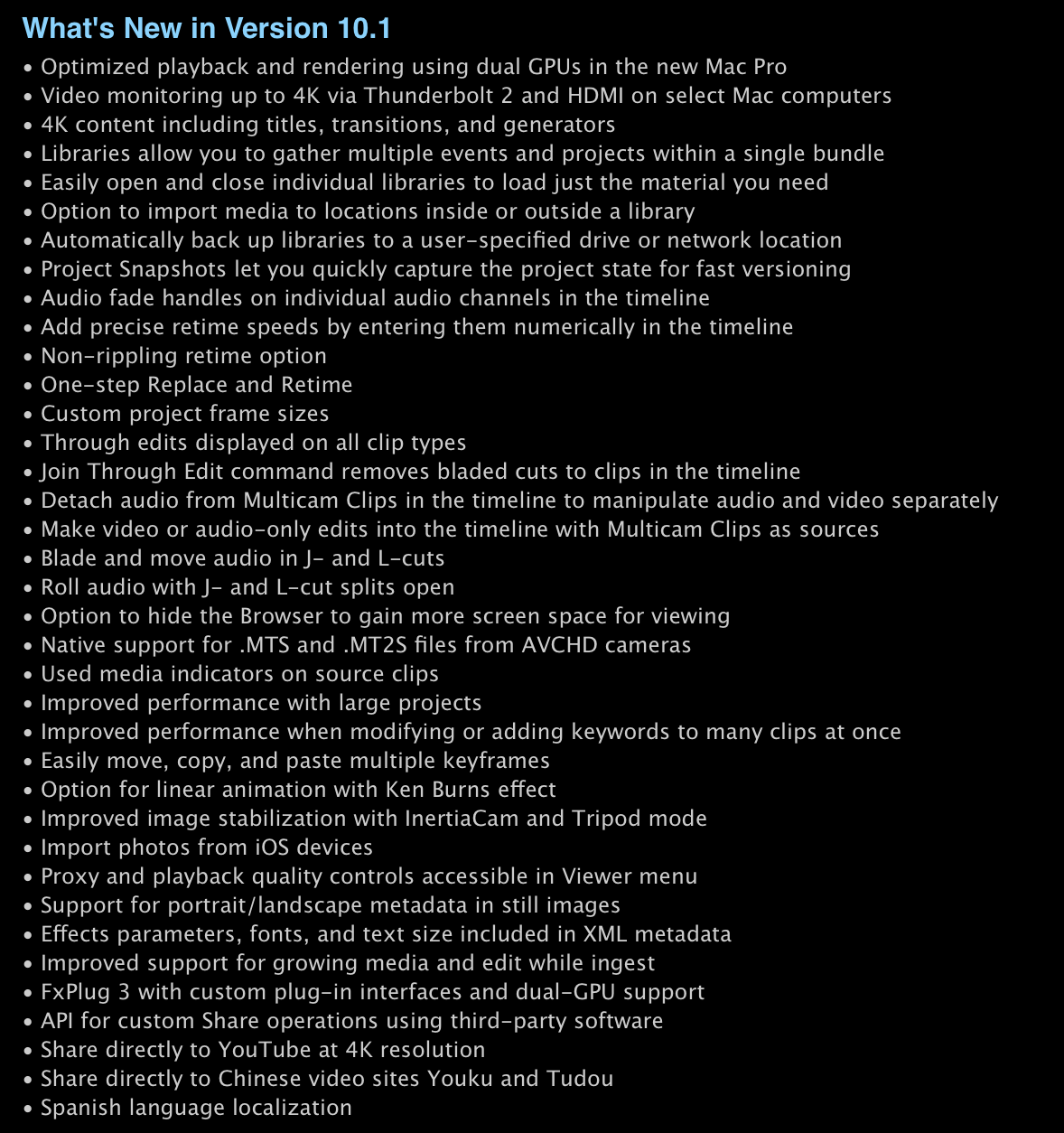
Alongside the release of the new Mac Pro, Apple has updated Final Cut Pro in the Mac App Store to take advantage of the machine’s immense raw processing power. Specifically, Apple says that playback and rendering has been optimised for the Mac Pro’s dual GPUs.

Final Cut 10.1 also adds 4K support, including monitoring across Thunderbolt 2 and HDMI displays as well as 4K titles, transition and generators. The update also adds a whole slew of other minor features and changes to the modern (if controversial) video editing suite.


Expand
Expanding
Close

Site default logo image

Google releases One Today charity app on iOS

Following its release on Android back in July, Google has just made its One Today charity app available on iOS. For those unfamiliar with the app, it details a new charity everyday and encourages users to donate $1 a day, or more, to it. Users can share their donations to social networks, or keep them totally private.

One Today will present you with a new project every day from a nonprofit that is changing the world. You can donate to the projects that inspire you with just one click. Amplify your impact by sharing your donations with your friends on social media and matching their contributions to your favorite projects.

Google notes that all donations are tax deductible, as well. One Today is available on the App Store now.

Site default logo image

9to5Toys Last Call: 1Password for Mac 30% off, MacBook Air $150 off, iMac $160 off, rechargeable batteries $5, more

Be sure to follow 9to5Toys to keep up with the best gear and deals on the web: Twitter, RSS Feed, Facebook, Google+ and subscribe to the new Safari push notifications feature.

Today’s can’t miss deals:

Last Call updates:

Game/App Deals: 1Password for Mac: $35 (Reg. $50), Deus Ex: The Fall: $1 (Reg. $7), iOS freebies, more

Apple Computer Deals: Apple MacBook Air $100 off ($150 for .edu emails), iMac $160 off

Save up to 54% on select AA and AAA AmazonBasics rechargeable batteries

Up to 65% off Sony Flash Memory and Sales on Stocking Stuffers

Belkin WeMo iOS/Android enabled light switch $40 shipped (Reg. $50)

Giveaway: Dropcam Pro Wi-Fi video monitoring camera ($200 value)

Other great deals from today:

The best deals that are still alive:

Site default logo image

Camera+ 5 launches with iOS 7 redesign, wallpaper composer, more

Coincidentally with the debut of Photos+ (and no affiliation), popular photography app for iPhone Camera+ released a major overhaul of its app today bringing an all new design optimized for iOS 7 and a handful of new features.

Aside from the new flatter app icon and icons within the app, Camera+ now features what it calls The Lab, which is a suite of additional editing features including the ability to edit and crop images for an iOS 7-style wallpaper.

Camera+ 5 for iPhone is a free update to existing users and $1.99 on the App Store for new customers. Full release notes below:


Expand
Expanding
Close

Review: Airmail, an exceedingly pretty but Gmail-centric alternative to Apple Mail

Site default logo image

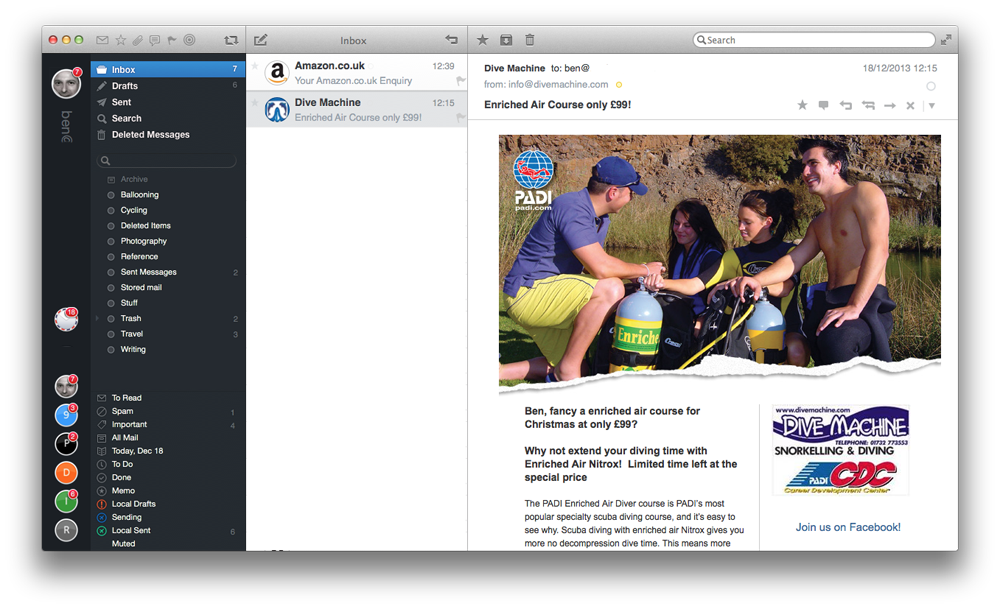
9to5Mac readers know a thing or two. When I reviewed Postbox, after explaining that I had lost patience with the flakiness of late of Apple Mail, several of the commentators recommended Airmail, a lightweight email client based on the popular but discontinued Sparrow app. It’s also the only alternative to Apple Mail and (of course) Outlook for those who need Exchange support.

Since then, Apple released OS X 10.9.1 with Mail fixes. It’s definitely better, but those unread mail counts still don’t update promptly, and my jury is still out (to put it nicely) on Gmail integration and other issues. As I mentioned before, so long as you use IMAP, switching back-and-forth between email apps is trivial, so I decided to give Airmail a try …


Expand
Expanding
Close

Site default logo image

Telltale’s ‘Walking Dead: The Game – Season 2’ arrives on iOS and Mac

[youtube=http://www.youtube.com/watch?v=8DO0l_hwoQ8]

The much anticipated Season 2 of Telltale’s official Walking Dead game, which some of you might have picked up for free in our bundle earlier this month, has today finally landed on both Mac and iOS. Telltale confirmed on its blog that the new season is now available to download for Mac and PC through Steam ($24.99), and the iOS version for iPhone and iPad is now available on the App Store for $4.99.

The sequel to 2012’s Game of the Year continues the story of Clementine, a young girl orphaned by the undead apocalypse. Left to fend for herself, she has been forced to learn how to survive in an unforgiving world. But what can an ordinary child do to stay alive when the living can be just as bad – and sometimes worse – than the dead?

Experience what it’s like to play as Clementine, meet new survivors, explore new locations and make gruesome decisions in this five-part game series of choice and consequence.

Episode one is available now for Season 2, but Telltale notes that you can “Save 25% on additional episodes in The Walking Dead: Season Two by purchasing the Multi-Pack [Episodes 2-5 bundle] via in-app in the ‘Episodes’ menu.”

Photos+ debuts on iPhone with EXIF info support, improved grid view, more

Site default logo image

Way back in May, Justin Williams’s Second Gear teased an unannounced app via Passbook using an in-house system called Pit Pass. The Passbook pass updated to reveal the icon and name of the app released by Second Gear today: Photos+.

What the app does is really simple but useful in a big way. Photos+ displays your images from your Camera Roll and other albums found in Photos.app, but it takes a different approach to displaying thumbnails and most importantly includes EXIF info like timestamp and location hidden in the native photo browser…


Expand
Expanding
Close

Site default logo image

Copy your Flipboard articles over to friends as iOS app goes social

[youtube=http://www.youtube.com/watch?v=D2d742jUo-M]

If you’ve grabbed a Flipboard article that you want to share with other Flipboarding friends, the latest version of the iOS app allows you to do it right from within the app.

Do you ever find something on Flipboard that you want to pass along? Now it’s easy to share the stories you enjoy with other people within in the app—give the gift of awesome reading this season.

– Share stories directly to your friends on Flipboard. Select the mail icon in the share menu and enter their name or email address. Your friends will be notified in Flipboard to see what you have shared with them.
– Receive notifications when other people on Flipboard share stories with you.
– Bug fixes and performance improvements.

Flipboard is a free download on iTunes. The app was last updated in November with a more iOS 7 style look and performance improvements.

Apple enables iBook gifting on iOS and OS X ahead of the holidays

Site default logo image

After recently overhauling its iBooks apps for iOS 7, Apple has enabled the ability to purchase iBooks for others through its gifting system as Macworld first noted.

Previously, you could purchase credit for the iBooks Store for someone else, but you could not purchase a specific book intended for someone else’s account. Amazon’s Kindle ecosystem has allowed e-book gifting for a few years now, but the feature’s absence remained a point of confusion for many iBook customers before today…
Expand
Expanding
Close

Site default logo image

Dropbox-owned Mailbox email app finally gets iCloud, Yahoo Mail support

Mailbox, the popular email application owned by Dropbox, has finally received one of its most requested features: support for email accounts using Apple’s iCloud email service. Also in the mix with today’s update is support for Yahoo Mail. The app is yet to hit the App Store, but the company tells us that the app is propagating out to users today via the App Store. (Update: it’s live)


Expand
Expanding
Close

Google Glass companion app MyGlass launches for iPhone

Site default logo image

Update: It’s back!

Google has just increased compatibility between its Google Glass wearable computer and iOS: the company has released its MyGlass companion app for the iPhone. The application allows users to setup their Glass, connect to WiFi networks, install Glassware apps, integrate with contacts, and mirror content from Glass to the iPhone’s display. The app is free, but it (obviously) requires the $1,500 computerized shades. Update: Looks like the app has been pulled. Google offered a mention of the app on a help document discussing the XE12 update to Glass:


Expand
Expanding
Close

Site default logo image

9to5Toys Last Call: EA iOS games mega sale, $49 Kindle eReader, iTunes 15% off, WeMo light switch $40, more

Be sure to follow 9to5Toys to keep up with the best gear and deals on the web: Twitter, RSS Feed, Facebook, Google+ and subscribe to the new Safari push notifications feature.

Today’s can’t miss deals:

Game/App Deals: Up to 90% off 50+ EA iOS games: $1 each, 75% off Civ V + DLC for Mac, iOS freebies more

Amazon Kindle Wifi 6-inch eReader: $49 shipped ($20 off)

$100 iTunes gift card for $85: Save 15% on future apps, music, movies, more

Belkin WeMo iOS/Android enabled light switch $40 shipped (Reg. $50)

Giveaway: Dropcam Pro Wi-Fi video monitoring camera ($200 value)

Other great deals from today:


The best deals that are still alive:

Site default logo image

Apple continues to dominate mobile gaming, but Android is moving up fast

From 9to5Google:

As Samsung works to capture more of the Android gaming market with the release of a new controller, a new analytics study shows Android gaming is on the rise. Apple may be considered the dominant leader in the mobile gaming category and it remains steadily in the driver’s seat, but 2013 indicated the Play Store is moving up fast.


Expand
Expanding
Close