Apps

See All Stories

Learn about the latest news for iOS, Mac, Apple Watch, and Apple TV apps

Apps for iOS, macOS, tvOS, and watchOS power our modern world. 9to5Mac will update you on the latest news, review, and updates for all types of apps. “There’s an App for that”.

The term came became part of our vocabulary when Steve Jobs announced The App Store as part of the iPhone 2.0 software update in 2008.

Over the years, the term has become as common as kleenex for describing applications on all of our devices. Apple’s platforms have apps for just about anything from finance, banking, sports, social media, podcasting, music, and more. We have a guide for helping you discover the best ones as well. Apps are now on everything from our TV, to our smartphones, on our laptops, and all the way down to our wrists.

As new ones are released or existing ones have major updates, the team here at 9to5Mac will bring you the latest news and reviews. If you want to follow along with video footage, be sure to follow 9to5Mac on YouTube. Scroll down below our latest updates on all things relating to applications on iPhone, iPad, Mac, Apple TV, and Apple Watch.


Site default logo image

9to5Toys Last Call: Seagate 1TB portable HD $56, Smart Covers $15, iOS freebies, Incase Retina MBP case $19, more

Be sure to follow 9to5Toys to keep up with the best gear and deals on the web: Twitter, RSS Feed, Facebook, Google+.

Today’s can’t miss deals:

SOLD OUT Seagate Backup Plus 1TB USB 3.0 portable hard drive (red) $56 shipped (Reg. $95) – Act fast it is “Almost Gone”

Apple iPad full-size/iPad mini polyurethane and leather Smart Covers from $15, Smart Case $23, more

Game/App Deals: Batman Arkham Origins for iOS out now, Asphalt 8: Airborne FREE, iOS freebiesmore

Other great deals from today:


The best deals that are still alive:

Mac software bundles:

New product announcements & reviews:

  • Pyle Audio releases new mini Hi-Speed HD sports camera
  • Synology introduces new, faster SOHO NAS w/ hot-swappable drives for $330
  • LaCie’s new Porsche designed USB 3.0 key drive available now
  • OtterBox begins shipping new Commuter Series Wallet case for iPhone 5/5s and Galaxy S4
Site default logo image

Facebook for iOS updated with comment editing, photos, and more

Facebook for iOS received an update today bringing the ability to edit posts and comments directly from your iPhone, iPad, or iPod touch. Previously, this feature was only available from the desktop version of the website. The update also brings another desktop feature: the ability to add photos to comments. All in all, version 6.6 appears to bring the app closer to feature parity with the desktop, but a few of these features like status and comment editing appear to be absent from the iPad app for now. Read the full change log and see examples below:
Expand
Expanding
Close

Site default logo image

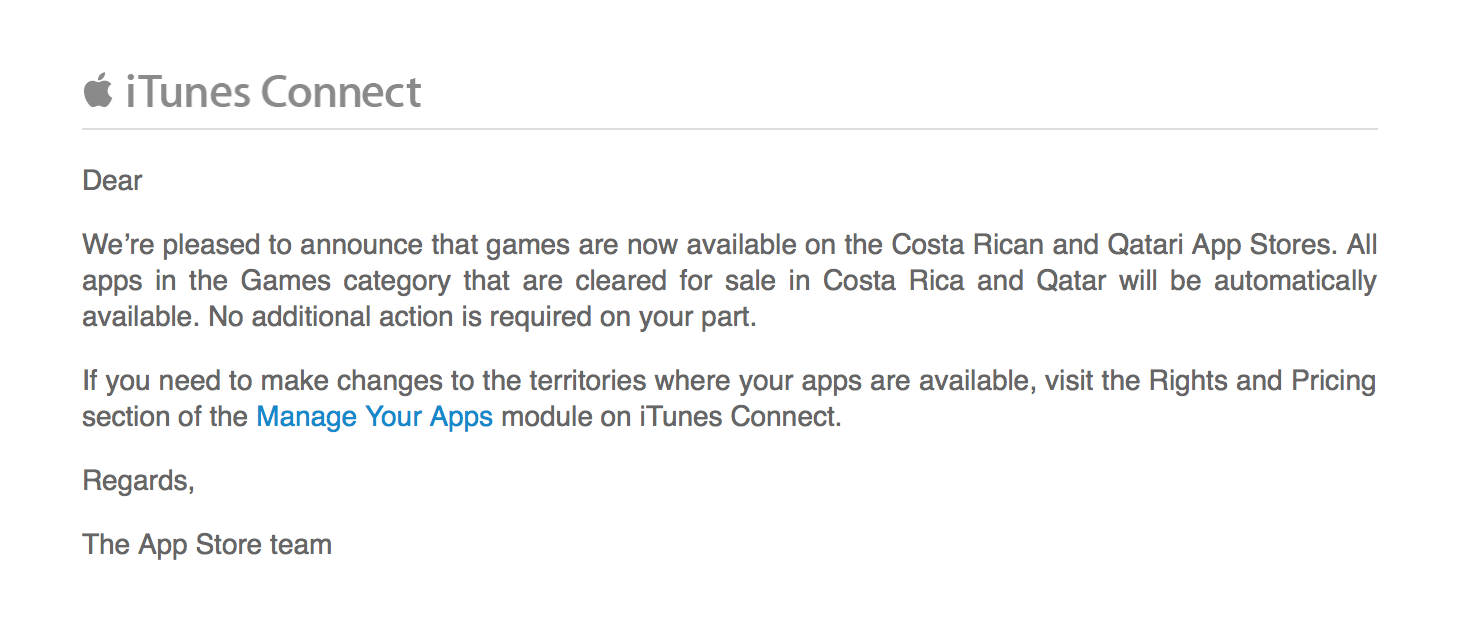
Apple finally allowing Games into South Africa App Store

Update: Several readers report that games were previously held up by a dispute with the Films and Publications Board responsible for approving movies, games, and other content before going on sale in the country. No word on the resolution with Apple, but it appears they are now allowing Apple to sell games to iOS users in South Africa.

Apple has flicked the switch on the ability for developers to offer their games in the iTunes App Store in South Africa. It is unclear why Games have been unavailable in the country until now. A look at the South Africa App Store shows that the Games category is now active. Apple informed developers of the new ability to sell games, and the company tells the creators that games will automatically appear in the South African store.

We’re pleased to announce that games are now available on the South African App Store. All apps in the Games category that are cleared for sale in South Africa will be automatically available on the South African App Store. No additional action is required on your part.  If you need to make changes to the territories where your apps are available, visit the Rights and Pricing section of the Manage Your Apps module on iTunes Connect.

Apple is celebrating the addition with a large Games banner at the top of the App Store in South Africa (shown above).


Expand
Expanding
Close

Site default logo image

Yahoo Screen iOS app adds AirPlay support, push notifications, and more

Yahoo Screen, the iOS app the company launched back in September as a TV remote-like experience for browsing content from Yahoo, gets updated today to version 1.0.2. With the update, users can now AirPlay content from the app to an Apple TV and receive push notifications for live content like “breaking news and concerts.”

The updated app also brings the usual bug fixes and performance enhancements.

Yahoo Screen is available on the App Store for free on iPhone and iPad and includes Yahoo content from Comedy Central, MLB, UFC, The Onion, Martha Stewart, and more.

What’s New in Version 1.0.2

* Now with AirPlay support! Send a video to your TV while still browsing others in the app.
* Push notifications for live and featured videos, such as breaking news and concerts.
* Bug fixes and performance improvements

Site default logo image

Microsoft debuts Remote Desktop app for PC access on iOS (Update: For Mac too)

Alongside Windows 8.1, Microsoft released a rather useful app for iOS as well today. Microsoft Remote Desktop allows you to access and control your Windows PC from your iPhone, iPad, or iPod touch. It looks like a rather decent utility, especially for business users, as plenty of similar apps have tried to pull off the same function with less simplicity.

With the Microsoft Remote Desktop app, you can connect to a remote PC and your work resources from almost anywhere. Experience the power of Windows with RemoteFX in a Remote Desktop client designed to help you get your work done wherever you are.

Features
•Access to remote resources through the Remote Desktop Gateway
•Rich multi-touch experience with remote desktop protocol (RDP) and RemoteFX supporting Windows gestures
•Secure connection to your data and applications with breakthrough Network Layer Authentication (NLA) technology
•Simple management of all remote connections from the connection center
•High quality video and sound streaming with improved compression and bandwidth usage
•Easy connection to external monitors or projectors for presentations

Microsoft Remote Desktop is a free for iPhone, iPad, and iPod touch users in the App Store.

Update: Microsoft introduced a version for Mac as well for OS X users to control Windows remotely.

Site default logo image

Twitter to launch standalone Direct Messaging app?

Twitter has been making a lot of improvements to its messaging experience in its mobile apps in recent months. It first introduced Direct Message syncing and other improvements back in July, and in recent weeks started rolling out the ability to receive direct messages from any follower (even those you don’t specifically follow) for a select number of users after testing it internally. Today, a new report claims that Twitter is planning further improvements to Direct Messaging and could as far as launching a standalone messaging app, much like Facebook Messenger.

The company plans to significantly update its direct-messaging product in the near future, according to multiple sources, bringing the long-buried feature to the forefront for the first time in years.

But Twitter’s new vision for direct messages will go further. It has kicked around the idea of launching a standalone direct-messaging application separate from the Twitter app, according to three people familiar with the matter. It is unclear, however, what form the final revamp of direct messages will take.

The report doesn’t provide much more info on Twitter’s plans, but does say it recently met with employees from MessageMe, one of the increasingly popular messaging apps that Twitter’s revamped DM service would attempt to combat. It also adds that we could see the new Direct Messaging app by the end of the year alongside a previously reported design overhaul.

Review: Catch the Berry, a new original addicting physics-puzzle game made by Random House Digital

Site default logo image

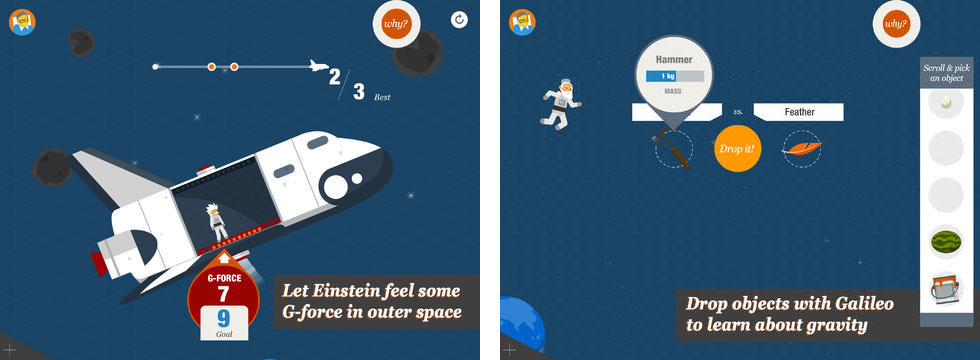
Random House Digital launched their first original game app today: Catch the Berry. In this physics-based puzzle game, mystical creatures called the Telfnords harvest and collect magical berries. The object of the game is to catch the berries and gems in the Telfnords’ basket using your knowledge of gravity, velocity, and acceleration.
Expand
Expanding
Close

Redesigned iPhoto & Garageband iOS icons appear, indicate likely makeovers next week

Site default logo image

Redesigned icons for iPhoto for iPhone, iPad, and iPod touch and Garageband have appeared in the iCloud Storage Management function in the iOS Settings app. The new icons are simpler, flatter, and is designed with iOS 7’s new icon grid system in mind. They are a stark contrast from the colorful, 3D-like icons used in the current versions of the apps.

In line with the app redesigns for all of Apple’s bundled iOS 7 apps, it is likely that the new icon will come as a complement to a completely redesigned version of the iPhoto app. When Apple released iOS 7 last month, the designs to Apple’s App Store apps went noticeably unchanged. Besides iPhoto, Apple has a slew of other App Store apps (like iWork’s Pages, Numbers, and Keynote & iLife’s iMovie). However, there are yet to be any solid indications of redesigns for the other apps…


Expand
Expanding
Close

Site default logo image

Real Racing 3 iOS app updated w/ Ferraris, HUD customization, new tracks & challenges

EA’s popular Real Racing 3 app for iOS gets a nice update today that introduces Ferraris into the game for the first time. On top of new cars from Ferrari including the FF, the 458 Italia, and the V12-powered F12berlinetta, version 1.40 also brings new tracks, time trial challenges, and the ability to customize the HUD.

EA is including the Circuit de Catalunya track from Spain in the latest update, and also says AI improvements offer ” better collision avoidance and faster times through the first corner.”

A full list of what’s new in the update is below:

What’s New in Version 1.4.0

Real Racing 3’s garage is bolstered by the introduction of highly requested cars from iconic Italian manufacturer, Ferrari.

• New Cars – for the first time in Real Racing, get behind the wheel of magnificent Ferrari vehicles: the FF, the 458 Italia, and the V12-powered F12berlinetta
• New Track – experience the sweeping turns and blistering straights of Spain’s famous Circuit de Catalunya
• Time Trial Ghost Challenges – learn from the best, compete with Friends and start new racing rivalries
• Meet The Crew – hire Crew Members to earn R$, Fame, and Servicing bonuses
• AI Improvements – better collision avoidance and faster times through the first corner
• HUD Customisation – tweak new settings to personalise your racing experience
• Lap and Sector Times – precise performance comparison
—–

[youtube=http://www.youtube.com/watch?v=VEAj9cK611Q]

Site default logo image

9to5Toys Last Call: Anker Astro 13000mAh power bank $37, Crucial 480GB SSD $310, iOS freebies, games, more

Be sure to follow 9to5Toys to keep up with the best gear and deals on the web: Twitter, RSS Feed, Facebook, Google+.

Today’s can’t miss deals:

Anker Astro E4 13000mAh portable dual-port external battery pack $37 shipped

SOLD OUT Crucial M500 480GB SATA 2.5″ Solid State Drive $310 shipped (Reg. $407)


Other great deals from today:

The best deals that are still alive:

Mac software bundles:

  • The SuperStacked Mac Bundle: Over $3,000 Worth Of Premium Developer & Designer Tools – $40 today, but price increases everyday it’s on sale.
  • Design Bundler #2 with Premium Photoshop Layer Styles and 4 other Mac apps – Name your own price (ends tonight)
  • The Mac Freebie Bundle 2.0: 10 Apps To Enhance Your Design, Photography & Productivity

New product announcements & reviews:

  • Synology introduces new, faster SOHO NAS w/ hot-swappable drives for $330
  • LaCie’s new Porsche designed USB 3.0 key drive available now
  • OtterBox begins shipping new Commuter Series Wallet case for iPhone 5/5s and Galaxy S4
Site default logo image

Pricing in Japanese App Store to increase due to exchange rate fluctuations


Apple has informed App Store developers via email that it will be increasing the prices of App Store apps in the Japanese App Store on October 17th. It is already October 17th in Japan, so it’s likely that the new prices will propagate throughout the day. The increases are due to natural fluctuations in currency exchange rates across the world. Apple tells developers that the new Pricing Matrix will be available to view in iTunes Connect after the change occurs.


Expand
Expanding
Close

Review: Boxie for iPhone makes Dropbox management even easier

Site default logo image

Many of us keep files in the cloud using services like Dropbox. While Dropbox has a decent iPhone app, there are quite a few features that it lacks. Boxie is an intuitive and beautiful new Dropbox client that aims to alleviate some of those issues. From the ability to view any file’s previous revisions and restore deleted files to the simple drag-and-drop file manager, Boxie has a ton of advantages over the official Dropbox app.


Expand
Expanding
Close

Review: Weather Line is a simple way to track weather trends

Site default logo image

A beautiful new weather app called Weather Line launched this morning in the App Store. Weather Line is designed for iOS 7, and it adopts the updated design language and icons introduced in iOS 7’s native Weather app. The app is also compatible with iOS 6 for those using older devices like the iPhone 3GS or fourth-generation iPod touch. It provides a much deeper level of detail than you’ll find in the default Weather app.


Expand
Expanding
Close

Square launches Square Cash, allowing money transfers between anyone through email

Site default logo image

Square has just launched a new service called Square Cash, which allows quick money transfers between any two parties using through an email. Contrary to what you might be expecting, you don’t need to sign up or get all of your friends onto Square Cash to share funds. Instead, you just need to link a debit card to your account.


Expand
Expanding
Close

Site default logo image

TweetDeck for Mac updated with username autocomplete, a new tweet composer, and more


Twitter updated its TweetDeck app for Mac today with a few new enhancements. The new version finally adds support for autocompletion of usernames when mentioning other users. Also new in the latest version is an in-line reply composer that allows you to create replies to tweets right in your timeline without having to open a new tweet panel.

Speaking of the tweet composer, it has been overhauled in this version. Instead of a popup window, the new composer has a column of its own with all of the usual options. The panel closes automatically as you send a tweet, but can be optionally set to stay open at all times, making composing a new tweet a much quicker process. In-line replies can also be “popped out” to the composer panel to apply additional options like scheduling. The new tweet panel also allows you to preview your tweet before you send it so that you know how it will look on the web and in Twitter’s official apps.

You can get TweetDeck for Mac for free from the Mac App Store.

Site default logo image

Apple asks developers to begin submitting apps for OS X Mavericks ahead of October 22 event

Ahead of its October 22nd event where the company is expected to unveil new iPads alongside other product announcements, Apple today asked developers to begin submitting apps optimized for OS X Mavericks.

Apple seeded the final Golden Master release of OS X Mavericks to developers along with the Xcode 5.0.1 GM seed earlier this month and today urged developers to download the latest builds to test and submit OS X Mavericks apps to the Mac App Store. The move is likely in preparation of public release and pricing details expected to be announced during Apple’s event on the 22nd.

Submit your OS X Mavericks apps today.

Make sure your app takes advantage of the great new features in OS X Mavericks when the world’s most advanced desktop operating system becomes available to millions of customers later this fall. Download OS X Mavericks GM seed and Xcode 5.0.1 GM seed, now available on the Mac Dev Center. Build your apps with these latest seeds, then test and submit them to the Mac App Store.

Mavericks offers app developers a lot of new features to take advantage of from new energy saving features like App Nap, to Apple’s new Sprite Kit game engine, enhanced multiple display support, and auto-renewable subscriptions.

Apple first showed off and announced OS X Mavericks earlier this year during its WWDC developer conference, but next week’s event will likely be the perfect venue to announce official pricing and release date info for the public.

We previously reported that OS X Mavericks will be available in late October.

Site default logo image

9to5Toys Last Call: Free Sonos bridge w/ Play speaker, Angry Birds Go!, Lenmar iPhone 5 battery case $40, more

Be sure to follow 9to5Toys to keep up with the best gear and deals on the web: Twitter, RSS Feed, Facebook, Google+.

Today’s can’t miss deals:

Get a free Sonos wireless bridge ($49 value) w/ the purchase of any Sonos Play wireless streaming speaker

[youtube=http://www.youtube.com/watch?v=5xP12tpJrl8&w=640&h=480]

Game/App Deals: Andry Birds Go! gameplay trailer, Dictionary.com Premium: $2, iOS freebiesmore

Lenmar Meridian 2300mAh Apple certified battery case for iPhone 5/5s: $40 (Reg. $80)

Other great deals from today:

The best deals that are still alive:

Mac software bundles:

  • The SuperStacked Mac Bundle: Over $3,000 Worth Of Premium Developer & Designer Tools – $40 today, but price increases everyday it’s on sale.
  • Design Bundler #2 with Premium Photoshop Layer Styles and 4 other Mac apps – Name your own price (ends in 1 day)
  • The Mac Freebie Bundle 2.0: 10 Apps To Enhance Your Design, Photography & Productivity

New product announcements & reviews:

  • Synology introduces new, faster SOHO NAS w/ hot-swappable drives for $330
  • LaCie’s new Porsche designed USB 3.0 key drive available now
  • OtterBox begins shipping new Commuter Series Wallet case for iPhone 5/5s and Galaxy S4
Site default logo image

YouTube for iOS updated with ability to choose video quality on Wi-Fi, iOS 7 improvements

YouTube has updated its app for iPhone and iPad today to version 2.2.0 and with it comes a few performance enhancements and new features.

One highly requested feature that YouTube is making available in the latest version of the iOS app is the ability to select video quality, much like you can on the full desktop website, while over WiFi.

The updated app also includes improvements for iOS 7 compatibility and Accessibility.

What’s New in Version 2.2.0

* Choose your video quality while on Wi-Fi
* Accessibility improvements
* iOS 7 compatibility improvements

Site default logo image

Google Maps for iOS updated w/ quick access to navigation, new languages, & more

Google updated its Google Maps app for iPhone and iPad today with a few new features as the app moves to version 2.3.4. Google says the updated app includes “Faster access to navigation,” which includes new overviews for traffic and routes.

The updated app also includes a new Tips and Tricks section available from the side menu and support for new languages, including: Arabic and Hebrew. Google also notes that the new supported languages will offer voice guidance “where available.”

A full list of what’s new below:

What’s New in Version 2.3.4

● Faster access to navigation, complete with route and traffic overview
● Tips and Tricks available in the side menu
�� Arabic and Hebrew now supported, including voice guidance in navigation, where available
● Bug fixes

Google’s Sparrow mail app updated for the first time in months with new icon, iOS 7 fixes

Despite being bought out by Google, the replacement mail app Sparrow has now been updated for iOS 7. Whilst the developers behind Sparrow never said that work on the app had ceased, this was the implied meaning of Sparrow’s thank you letter still visible on the Sparrow website. Until today, the app had not been updated since December 2012, nearly a year ago.

This update brings compatibility bug fixes for iOS 7 as well as a new flatter icon, shown above.  Even so, work on Sparrow is obviously not a priority for the team. Apart from a new icon, the point-fix update brings no new visual appearance to the app’s interface or any new features for users.

Site default logo image

Seene for iPhone makes creating interactive 3D photos fun and easy

A new app called Seene popped up on the App Store last night that lets you create interactive 3D photos. If you’ve used Vine before, you’re already familiar with most of Seene’s interface. The apps are laid out mostly the same, even down to the location of the sharing options during seene creation, but the process for taking photos is a little more complicated. The resulting effect is worth a little extra effort though.


Expand
Expanding
Close

iPhone app turns your iPhone 5c (and case) into ‘Connect Four’ board

Site default logo image

Ever since the iPhone 5c launched along with a specially-designed case, people have compared the case’s design to a the game Connect Four. Now a new app has arrived on the App Store that takes that observation and turns it into a real game. The app is called Flipcase, and the idea is pretty simple: you put your iPhone 5c case on backwards, so that the holes on the back are on top of the screen, and then take turns tapping the columns to try to connect four colored dots.

The app’s description says it’s compatible with other iPhone models, including the iPhone 5 and 5s, though it’s designed specifically with the 5c in mind. Flipcase is available for free on the App Store.

… And another cool use for the 5c case:


Expand
Expanding
Close

Site default logo image

9to5Toys Last Call: OtterBox iPhone 5 cases from $16, Samsung 250GB 840 EVO Series SSD $159, iGrill $40, more

Be sure to follow 9to5Toys to keep up with the best gear and deals on the web: Twitter, RSS Feed, Facebook, Google+.

Today’s can’t miss deals:

Tough iPhone cases from Otterbox and Lifeproof:

Solid State Drives: Samsung 840 EVO-Series 250GB $159, Toshiba Q-Series 256GB $150 shipped

Other great deals from today:

The best deals that are still alive:

Mac software bundles:

New product announcements & reviews:

  • LaCie’s new Porsche designed USB 3.0 key drive available now
  • OtterBox begins shipping new Commuter Series Wallet case for iPhone 5/5s and Galaxy S4
Site default logo image

Yelp iOS app replaces Home tab w/ new toolbar for quick access to reviews, photos, and check-ins

Yelp updated its iOS app today with a slightly tweaked UI that makes it easier for users to quickly post reviews, photos and check-in at locations. The app is getting rid of its old Home tab and now by default loads up the “Nearby” tab. In addition, the the tab in the middle along the bottom of the app now launches quick access to Check In, Review, and Photo buttons (as pictured above).

The updated app also includes “larger notification photos, better scrolling performance, updated icons and animations.”

What’s New in Version 7.2.0

New in v7.2
– We said goodbye to our homepage and hello to a beautiful new navigation that makes it even easier for you to discover great places nearby, add photos and reviews, and check in to your favorite businesses.
– We also added tons of polish to our app, including larger notification photos, better scrolling performance, updated icons and animations, and a whole lot more!