Latest

Review: TodoMovies 3 – Manage and discover new movies in a great free app

Site default logo image

Taphive GmbH has recently released a major update to their movie management and discovery app, TodoMovies 3. TodoMovies 3 is a to-do app focused on movies. It has a gorgeous layout, and does a superb job managing a movie related to-do list with a robust set of features.

In this article, I will provide some examples of how the app could be used to aggregate a list of movies you want to watch, explore a vast amount of information about those movies, and discover movies you may not know about.


Expand
Expanding
Close

Site default logo image

Apple-partner Vimeo revamps its iOS app with new design, faster video loading

Screen Shot 2014-05-09 at 2.10.36 PM

Vimeo has updated its iPhone, iPad, and iPod touch application with a new, lighter design as well as some helpful new features. The “friendlier” design is easier to navigate, lighter, and cleaner and features more user-interface elements to blend into the design aesthetic of iOS 7. Vimeo became an iOS partner last year with integrated Vimeo video uploading in iOS 7.


Expand
Expanding
Close

Site default logo image

Latest Chrome build lets Mac users launch files in Chrome Web apps

Chrome-Finder-web-app

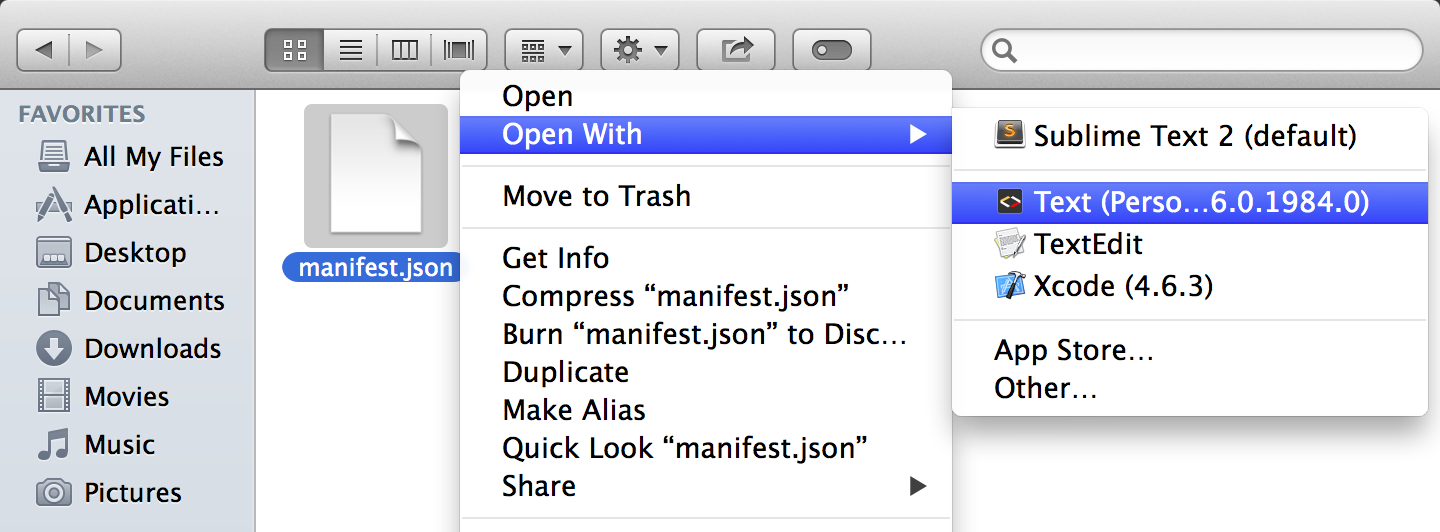
Google is experimenting with a new feature in the latest Canary build of Chrome that will allow Mac OS X users to open files from Finder directly in Chrome web apps running in the browser. As highlighted in the image above from Googler Francois Beaufort, that means you’ll be able to launch, for example, a text document in a Chrome web app like Text instead of using TextEdit, Word or another application installed natively on your Mac. Google is presumably hoping the feature will make using Chrome web apps a smoother experience when transitioning from the browser and back to local file management and native apps.

For now the feature is only available if specifically enabled (details here) in the Chrome Canary build, but there’s a good chance this will eventually make its way to the beta and public releases of Chrome for all Mac users.

Adobe Voice debuts on iPad with simple and powerful tools for telling stories through multimedia

Site default logo image

Adobe is out today with a new app for iPad that leverages the use of multimedia and speech to create simple and creative animated videos. The app is called Adobe Voice (it may look familiar to you if you recall Ginger) and the creative software company thinks it can make you a better story teller using your iPad. Adobe Voice combines the use of narration, photographs, text, and iconography with a number of templates which include music to create a really neat experience for making crafty videos. Check out my experience (and videos) below.
Expand
Expanding
Close

Site default logo image

LinkedIn discontinuing its own CardMunch app in favor of Evernote’s business card scanning feature

LinkedIn announced today plans to shut down its business card scanning app CardMunch in favor of a new partnership with Evernote which offers a competing service. In its initial reasoning for the new approach, LinkedIn points to the more advanced feature set of Evernote’s offering:

Evernote’s card scanning service is fast, reliable, and literally world-class, with support for seven languages.

In Evernote, our members will be able to view profile photos, job titles and company information from LinkedIn right in the notes created when they scan business cards. LinkedIn members will now also be able to enter comments related to the scanned card and geo-tag the location where the card was scanned.


Expand
Expanding
Close

Google Maps for iOS updated with lane guidance, improved offline maps, Uber integration

Site default logo image

Google released a major feature update to Google Maps for iOS today bringing a handful of useful features for navigation and travel with your iPhone and iPad including integration with the private transportation service Uber.

First up is a feature found on many dedicated GPS devices: lane guidance. The feature will present which lane is necessary with current directions to help you avoid missing important turns. Notably, Apple’s Maps software does not currently offer this feature. Google says lane guidance is currently only available for users in the US and Canada…
Expand
Expanding
Close

Site default logo image

Tumblr now lets you customize your blog theme from its iOS app

Tumblr today released an updated version of its app for iPhone and iPad that allows users for the first time to customize the look and design of their blog directly from within the app. While you could always post and edit content to your blog from the app, the update means you’ll now be able to also edit your blog’s theme— change colors, fonts, pictures, etc— through the mobile app.

You now have total control over how your blog looks in the app. Colors, fonts, pictures, whatever—however you want to look, you can look that way. Download this thing and make your blog look amazing already.

You’ll be able to make changes to layout, color, font, etc through a WYSIWYG-style UI similar to on the web and also view a live preview of the changes before going live.

The update is available now on the App Store for iPhone and iPad users and also arrive for Android today.

Site default logo image

Rovio launches Flappy Bird-style game ‘Retry’ in select countries

[youtube=https://www.youtube.com/watch?v=ta0SJa6Sglo]

Angry Birds maker Rovio is today launching its latest title in the App Store with the release of ‘Retry,’ a game that appears to be inspired by the gameplay and retro 8-bit graphics of recent hit iOS game Flappy Birds. Although that might be selling it short, as it’s clear from the mechanics shown off in the trailer above that this is much more than just a Flappy Birds clone.

From the guys sitting in the room next to the guys who made Angry Birds, comes RETRY – a game so hard, so addictive, so old school that you’ll think you’ve stepped into an 8-bit time machine and gone back to 1986. Totally rad!

The game is the first release from Rovio’s latest publishing arm “Rovio LVL 11,” which, according to Gamasutra, will exist for Rovio’s new titles that don’t quite fit in with the Angry Birds world. That means you shouldn’t expect to see a ton of cross-promotions with Retry and Angry Birds or any of the other Rovio’s titles.

Retry is already available in the App Store for both iPhone and iPad, but it’s currently only available in Canada, Finland, and Poland. We’d expect to see the title arrive in the US and globally in the near future.

Site default logo image

T-Mobile is again offering free MLB At Bat access to customers

mlbatbat

Like it did last year after inking a partnership with Major League Baseball, T-Mobile is once again offering free access to the MLB At Bat apps on iOS and Android. Tmonews points us to official confirmation from a T-Mobile support employee:

“UPDATE: As the official sponsor of Major League Baseball, we will be offering MLB At Bat 14 to our customers for free starting May 1 through the entire regular season! With our unlimited data and nationwide 4G LTE, you can enjoy all the great features MLB’s At Bat has to offer!”

That’s instead of paying for one of several MLB subscriptions that grants access to the app starting at $2.99 monthly or $20 for the entire season. There’s no word from T-Mobile with the official details yet, but we’d imagine customers will get access to all the live games and content apart from premium features available to $115/per year MLB.TV Premium subscription. 

The MLB At Bat app is available for iOS and Android now.

Site default logo image

Apple brings iTunes Match to Japan

bucket_itunes_match

As shown on Apple’s iTunes Match availability page, Apple has now brought its iTunes Match service to Japan. This follows an expansion of iTunes in the Cloud and Apple TV content to Germany, earlier today.

For $30 a year, iTunes Match uploads your entire music library and makes it available across all your devices automatically. Lower quality, or pirated music, is replaced with high-quality 256kbps legal songs.

The service in Japan is priced at 3980 yen.

(via MacRumors)

Slingshot app lets you share your iOS screen with others on any platform

Site default logo image

Slingshot-iOS-app-01

I’ve written about apps from Squirrels in the past. It makes the AirParrot and Reflection apps that let you mirror your Mac or PC screen to an Apple TV or your iPad, iPhone, and iPod touch screen to a Mac or PC. Today it’s launching a new product that utilizes technology from both of those previous apps called ‘Slingshot.’ The cross-platform apps let you share your iOS screen with others on iOS, Mac OS X, Windows, or Android, and provides some slick collaboration tools in the process:
Expand
Expanding
Close

Site default logo image

Microsoft updates OneNote for iPhone & Mac w/ top requested features

Following updates to the Office apps for iPad yesterday that introduced printing support, Microsoft announced today that it’s updating the OneNote apps for iPhone and Mac with the top requested features from users. Included in the new features for iPhone users is the ability to create new notebook and sections, a revamped look that fits in more with iOS 7, and the Office Lens feature that was already available to iPad users. 

We’ve built Office Lens into OneNote for iPhone. Similar to Office Lens on OneNote for iPad, this popular feature turns your iPhone into a pocket scanner so you can use it to take pictures of things like receipts or whiteboard notes. Then, with Office Lens you can trim, enhance and make pictures more readable. Best thing is, images are automatically synced to OneNote, and if your picture includes printed text, OneNote can recognize the text with optical character recognition (OCR) so you can search for words in the image.

The Mac app gets improved printing, drag and drop images from the web, and much more:

  1. Print notes: You can now print out your lecture notes, travel itineraries or recipes by simply navigating to the page of your choice and bringing up the standard system print dialog from the menu. In addition, you can save the page as a PDF file through the Print dialog.
  2. Drag and drop images: Yes, this is as easy as it sounds! If you are browsing the web for ideas for a remodeling project and find some pictures you want to capture, you can easily drag and drop those into OneNote. If you have an album on your local machine, you can simply drag and drop multiple photos from Finder into OneNote. Additionally, this update also adds image formatting tools so you can restore the size of the picture if it’s been modified from its original state, or rotate pictures as desired.
  3. Format Painter: You may recognize this option from other Office applications. Format Painter is a handy tool to quickly apply the same text formatting throughout your notes. For example, if you copy and paste content from different sources with different formats, you can easily apply the same consistent format across all the content in a couple clicks. WARNING: this tool is highly addictive. Once you start using it, you won’t be able to stop.
  4. Copy and paste formatted content: When using OneNote for project management, class research or travel planning, capturing content from other places into OneNote is essential. Whether it’s formatted text from a Word document, tables from Excel or webpages, you can easily capture rich content and place it in your notes so it looks the same as it did in Word, Excel or on the webpage.
  5. Hyperlinks: Sometimes links can be long, unwieldy and aren’t always self-explanatory. You can now keep your notes organized by adding a display name for links in your notes.

The OneNote for Mac and OneNote for iPhone apps are available on the App Store now.

Site default logo image

Beats Music teases upcoming iPad version of streaming service

Bmfds-SIIAI43mt.png-large

After being announced last fall and debuting an iPhone app at launch in January, streaming music service Beats is finally ready to ship an iPad-optimized version of its software… almost. Beats Music tweeted the photo above earlier today with the caption “THIS JUST IN: Your favorite Music App is feeling ready to grow in size…literally… “. The news follows recent moves to increase accessibility to becoming a paid subscriber to the service as it recently added in-app subscription purchasing capability (something which gives Apple a 30% cut of the rate).

Site default logo image

Adobe updates Photoshop Express for iOS with new design and features

Adobe has published an update for its mobile photo editing app, Photoshop Express, bringing the version up to 3.3. The update includes a redesigned interface to match iOS 7’s look along with a handful of new features.

Feature-wise, the update adds a ‘green eye’ correction filter, an auto-save feature, improved tool tips, a better photo picker, and new sharing options for Instagram and SMS.

The update is available for free to everyone on the iOS App Store.

What’s New in Version 3.3

• A brand new editing experience with a new look for iOS7
• Share via Instagram or SMS
• Pet-eye (a.k.a. green-eye) correction
• Save your work without saving now that the app resumes where you left off
• Navigation improvements throughout the app, including Tool Tips and updates to the Photo Picker
• Bug fixes and performance improvements.

Microsoft adds printing support to Office for iPad apps, other features

Site default logo image

Word-print-options

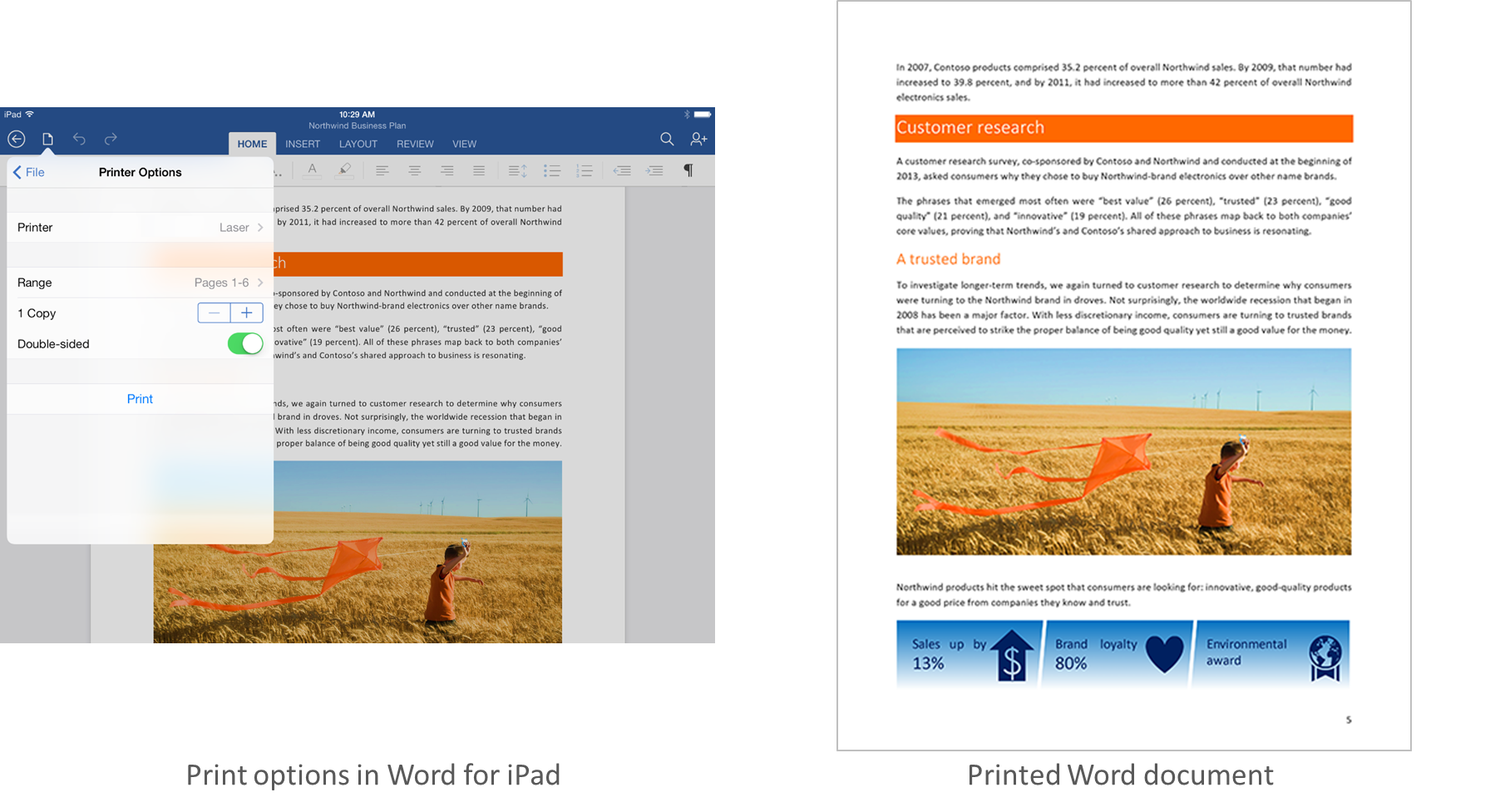
When Microsoft launched its Office for iPad apps last month, one of the most requested missing features was printing support. Just over a month later, today the company announced in a blog post that it’s updating the Word, Excel, and PowerPoint iPad apps with support for printing in addition to other new features and fixes.

Your top request is here! You can now print Word documents, Excel spreadsheets, and PowerPoint presentations to an AirPrintTM printer. In Word for iPad, you can choose to print a document with or without markup. In Excel, print a selected range, a single worksheet or an entire spreadsheet. Of course, you can select the pages or slides you want to print.

In addition to printing, the company also announced that its updated PowerPoint with SmartGuides, the tool that allows users to easily “align pictures, shapes, and textboxes as you move them around on a slide.” You’ll also find other new features for Excel, as well as fixes and improvements in the other apps:
Expand
Expanding
Close

Site default logo image

Yahoo Mail iPhone app adds weather, web search, news, scores & more (for better or worse)

Yahoo released an interesting update to its Yahoo Mail app for iPhone today. In version 3.0, Yahoo is integrating many of its other services including weather, sports scores, stocks, images, news, and web search directly into the mail app. The goal is to provide users one easy place to access all their content from Yahoo, but it’s unclear what that means for the future of Yahoo’s other iOS apps for each of the services. The feature is currently only available to iPhone users running iOS 7 and up.

When you’re finished reading and replying to your email, see what’s happening in the world by tapping on the News icon. From celebrity gossip to the latest political news, you’ll find it in your personalized, visually rich news stream.

Let’s head over to the Today icon. Here’s where you’ll find a snapshot of the information you care about most every day and search — from your local weather to a news digest to the latest stock quotes and sports scores you care about.

The updated app provides new three new tabs along the bottom—  Mail, News, and Today— with Mail bringing you to your inbox, News providing a stream of all stories from Yahoo, and Today providing an overview of weather, trending content, scores, and access to web search. While I have a feeling that some might not be too happy about their Mail app being bombarded with all this new content, Yahoo has done a pretty good job of keeping it out of the way if you only ever want to see your inbox.

Yahoo Mail version 3.0 is available on the App Store now.

What’s New in Version 3.0

– Feature updates for iPhone iOS7+. Your Yahoo Mail app is now enhanced with news, search, and snapshots of the weather, sports scores, stocks, and News Digest. Access the info you need, all in one app.
– Performance improvements
– Bug fixes

[youtube=https://www.youtube.com/watch?v=pSjEMBLANjw]

Site default logo image

4Snaps word game for iOS updated to version 2.0 with a new look and gameplay tweaks

[vimeo 92684154 w=700 h=394]

4Snaps, the creative new word game we first wrote about when it debuted last year, has gotten a big overhaul today with the launch of its 2.0 update. The new version brings a new design with a gesture-focused interface that bounces around playfully using the new UI physics found in iOS 7.

Other interface tweaks include the ability to rearrange your snaps before sending them, delete finished games from the main screen, and preview exactly what your opponent will see when you hit the ‘send’ button.

The update also adds some new tweaks to the gameplay. If you’re having trouble figuring a word out, you can now share snaps to Instagram and ask your followers on that network for help.

The in-game economy has also gotten a boost. In the old version of the game, you could spend in-game coins to switch out your set of playable words for a new one. Now you can also spend those coins on hints, such as removing any incorrect letters from the board. And where coins were previously earned only by completing rounds, you can also now earn them by watching in-game video ads.

Overall, this is a really solid update to what was already a fun game. 4Snaps 2.0 is a free download on the App Store for all players.

Clear for iOS and Mac updated with Reminders feature and new sound packs

Site default logo image

Clear with Reminders - iPhone

After previously announcing the feature and showing it off last month in a promotional teaser, Realmac Software is finally bringing the highly requested reminders functionality to the popular Clear to-do list app on both the Mac and iOS platform. The latest version also brings some extra goodies that add even more personality to the app like new sound packs. Check out the details below to see how the latest version of Clear measures up as an alternative to Apple’s own Reminders application and other apps as well.
Expand
Expanding
Close

Site default logo image

Facebook Messenger 5.0 adds video sharing, faster photo and sticker access, more

Facebook today updated Messenger to version 5.0 bringing a list of feature improvements to the iPhone messaging app. The new version boasts a streamlined design for accessing and sharing photos as well as a new shortcut for downloading sticker packs (tap and hold a sent sticker to download the pack), but it’s main feature addition tackles video. Users can now access and share video clips to other users within the app. Previous versions were limited to only sharing photos and voice recordings. The update also includes improvements to searching people and groups by name.
Expand
Expanding
Close

Site default logo image

Skype brings free group video calling back to the Mac (and PC)

gvc-1

You may recall Skype debuted a very useful (and social) feature for Mac way back in 2010: group video calling. Specifically, the feature was in a public beta stage with widespread testing thus carried a price tag of $0 with idea being it would eventually be a paid feature when the service was stable enough. Fast forward a few months to 2011 and Skype rolled the feature out to its official version of the app for Mac and put a price tag on it. As you can imagine, as the price of entry went above nothing, free alternative services including Google’s Hangouts video calling emerged. Three years later, the Microsoft-owned company is back in the business of bringing multiple faces together over video for free (hooray!) as today it announced group video calling for everyone at no cost… again.
Expand
Expanding
Close

Site default logo image

eBay revamps iOS apps, adds in-store pickup on iPad, Passbook integration, more

Ebay has pushed out a notable update to its main iPhone and iPad apps today that include a number of new features and updated designs. Most notably, the iPad now includes an in-store pickup option that shows a “Free In-Store Pickup” option under the “Shop Locally” search filter to show items from local merchants available for purchase.” That feature was previously limited to the iPhone. To go along with the new in-store pickup option on iPad, you can also now save your in-store pickup orders directly to Apple’s Passbook app.

For the iPad app, eBay says it’s also added a new selling landing page, smarter search results, and “more current shipping tracking”:

When something is on the way, where is it? We’ve updated our tracking capabilities to provide more timely status updates from within the app. Pull to refresh and get the latest info.

On the iPhone, users will noticed an updated Home page that provides quick access to Watched items, Feed and eBay Deals, and the updated app also includes larger photos, product reviews for many items, the ability to attach photos to messages, and support for selling from Austria and Netherlands.

Ebay for iPhone and Ebay for iPad versions 3.3.0 are on the App Store now.

What’s New in Version 3.3.0

Version 3.3.0

• Updated Home page includes Watched items, Feed and eBay Deals!
• Larger photos on search and item pages
• Product reviews now included for many items in the eBay catalog
• You can now attach photos to messages
• Selling support added for Austria and Netherlands
• Save your in-store pick up order details to iPhone’s Passbook
• Brazilian Portuguese language support
• Speed improvements and Bug fixes

Opera’s Coast browser adds iPhone support, adds iCloud syncing of bookmark tiles

Opera first launched Coast back in September 2013, on the iPad. Although it didn’t make a huge impression on the App Store first time around, Opera is probably hoping its new version will be more popular.

The app has been fully reworked for the iPhone size. There are hardly any buttons onscreen; the app relies almost exclusively on gesture-based navigation.


Expand
Expanding
Close

Site default logo image

Weather Channel launches redesigned iPhone app with ‘social weather’ and flight info

The Weather Channel app for iPhone has been updated with a brand new iOS 7-inspired design and features. The new design gives each bit of information a more prominent location on the screen, though it does so at the expense of an all-in-one overview. Where previously all relevant weather information was contained on the main screen, the updated app places various types of information on separate pages that can be swiped through.

The addition of a new airport mode that provides users with information about weather-related flight delays and cancellations could serve as a useful tool for travelers. A new severe weather mode causes the entire app’s interface to change if severe weather is reported in your area, putting critical information front-and-center. Finally, a social component has been added that allows users to submit weather reports and photos of their own.

You can grab the redesigned Weather Channel app on the iPhone App Store free of charge.