Latest

Site default logo image

Blogging service Medium launches its iPhone app, focuses on reading rather than writing

Medium, the blogging service designed for (you guessed it) medium-length entries, has released its first iPhone app. Unlike most blogging apps, however, the Medium app does not have any writing tools. Instead, the app’s sole purpose is to provide a platform for reading the writings of other users. The app also allows you to bookmark and share your favorite posts and get personalized recommendations based on your Twitter account. You can grab the Medium app for free on the App Store.

Site default logo image

GarageBand for Mac brings back MP3 exporting, adds new Drummers & more

screen800x500

Apple released an updated version of GarageBand for Mac today bringing back MP3 exporting and adding 3 new Drummers to the instrument recording software. MP3 exporting, which you would think is a standard feature for the software, was removed from the app in version 10. The update also features improvements to the software accessibility features and bug fixes.

What’s New in Version 10.0.2

• Improves stability and addresses a number of minor issues
• Adds the option to export songs as an MP3
• Contains multiple enhancements to Accessibility
• Includes 3 new Drummers and drum kits from the rock, songwriter, and R&B genres*

*Part of the one-time in-app purchase that includes the complete set of GarageBand sounds, loops, and drummers, as well as access to the GarageBand Lesson Store.

The last version of GarageBand (10.0.1) was released last November while Apple first released GarageBand 10 last October.

GarageBand 10.0.2 is available now on the Mac App Store.

Starbucks releases iOS 7-friendly iPhone app with a few new tricks

Site default logo image

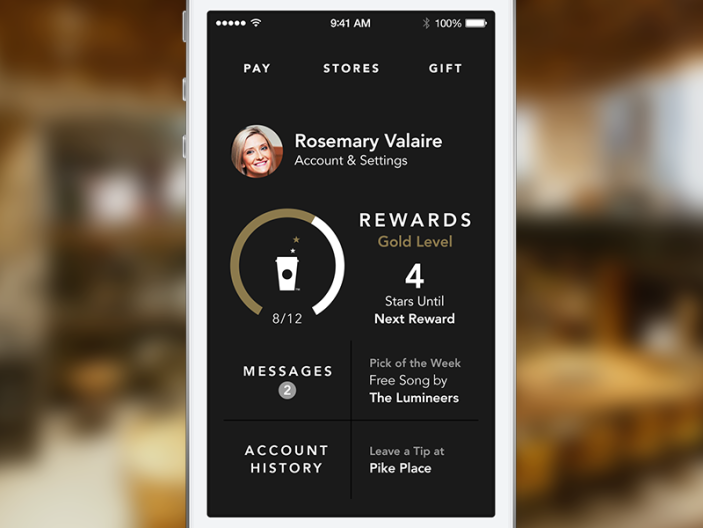
We’ve already seen Starbucks show off a new way to pay and tip your barista in the long-awaited update to its iPhone app it previously announced, and today it is finally available and features a brand new design for iOS 7 when buying your latte.

starbucks-3.0_1xPreviously, the Starbucks app featured a number of various tabs on the bottom navigation bar, but the updated version has been dramatically simplified to focus on three main sections under the headers Pay, Stores, and Gift.

Reward member profiles, messages, and Pick of the Week content is now featured in a clean view with the app’s new tip feature as well.

The update also comes with a new icon to represent the refreshed design of the app.
Expand
Expanding
Close

Site default logo image

Unreal Engine 4 arrives w/ new $19/month (+ 5% royalty) subscription model

[youtube=https://www.youtube.com/watch?v=PD5cRnrMqWw]

Epic Games is announcing the release of its new Unreal Engine 4 engine today and in the process introducing a new pricing scheme and support for OS X out of the gate. The engine that powers many of our favorite games across platforms will now be available to developers as a subscription that will see devs pay $19 a month plus a 5 percent royalty on gross product revenue (that’s before Apple takes its 30% cut for the App Store, for example.) That will give devs access to the all Unreal Engine 4 features and tools, full C++ source code available on GitHub, as well as the usual documentation and upcoming updates.

This first release of Unreal Engine 4 is just the beginning. In the C++ code, you can see many new initiatives underway, for example to support Oculus VR, Linux, Valve’s Steamworks and Steam Box efforts, and deployment of games to web browsers via HTML5.  It’s all right there, in plain view, on day one of many years of exciting and open development ahead!

Epic hopes that the new model will make it easier for anyone, especially the many smaller mobile game developers that might not yet be using the platform, to ship a product using Unreal Engine. That being said, Epic will negotiate custom terms for some developers, for example, “reducing or eliminating the royalty in exchange for an upfront license fee.” Epic used to charge a $99 license fee plus 25% of revenue after the first $50,000 any particular game brought in.

Epic warns that Mac OS X support in UE 4 still “hasn’t undergone serious developer testing yet” and that iOS deployment is only available on Mac so far.

You can get more info and sign up for UE4 here.

[youtube=https://www.youtube.com/watch?v=dO2rM-l-vdQ]

[youtube=https://www.youtube.com/watch?v=cS6q1H23njM]

Site default logo image

Firefox 28 released w/ Mac OS X Notification Center support for web notifications

Firefox-Notification-Center-Mac-OSX

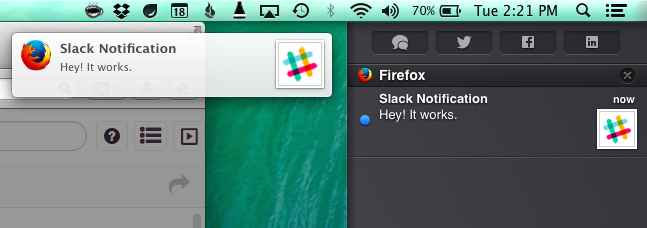
Firefox today released the latest version of its desktop browser for Mac, Linux, and Windows and in the process added one much welcomed feature for Mac OS X users: support for Notification Center. This means that web apps and sites taking advantage of Firefox’s web notifications feature will now also appear for Mac users in the Notification Center.

Version 28 of Firefox also introduces a few new behind the scenes improvements including VP9 video decoding, volume control for HTML5 audio/video, and a number of other fixes.

Firefox 28 for Mac is available to download from the Mozilla website now.

Site default logo image

YouTube for iOS updated with changes to comments, improvements to playlists

Google updated YouTube for iOS today to version 2.5 with a few new changes and enhancements. The bigger changes include support for sharing entire playlists (where previously you could only share individual videos) and the option to quickly get to your own saved playlists from the sidebar.

Comments have also received some upgrades, giving users the ability to reply to other commenters and create conversation threads. Users can also now delete their own comments and see whether another user’s comment was posted publicly or not.

You can grab the free YouTube app on the App Store.

What’s New in Version 2.5.0

* Share and like playlists
* Quickly access your favorite playlists from the Guide
* Reply to comments and delete your own
* See if a comment was shared privately or publicly

Site default logo image

Apple Store for iPhone updated with improved notifications, iPad version gets gift card purchases

Apple updated its mobile shopping apps for both iPhone and iPad today, with each platform getting a different set of new features or fixes. On the iPhone, improvements were made to the way in-store notifications are handled. These notifications can be triggered by a variety of events, such as a Genius Bar appointment or a nearby iBeacon.


Expand
Expanding
Close

Site default logo image

Microsoft launches ‘My Apps’ for Windows Azure Active Directory users on iPhone and iPad

Microsoft has just published a new iOS app for Windows Azure Active Directory users. The app, called “My Apps,” allows users to login to a variety of web apps and services using a single Active Directory login, saving them the trouble of having to manually log into those services through the mobile Safari browser every time.

My Apps is available for free on the iOS App Store. It requires a Windows Azure account to work.

Site default logo image

Google Wallet adds “Orders” feature to track online purchases using receipts from Gmail

From 9to5Google:

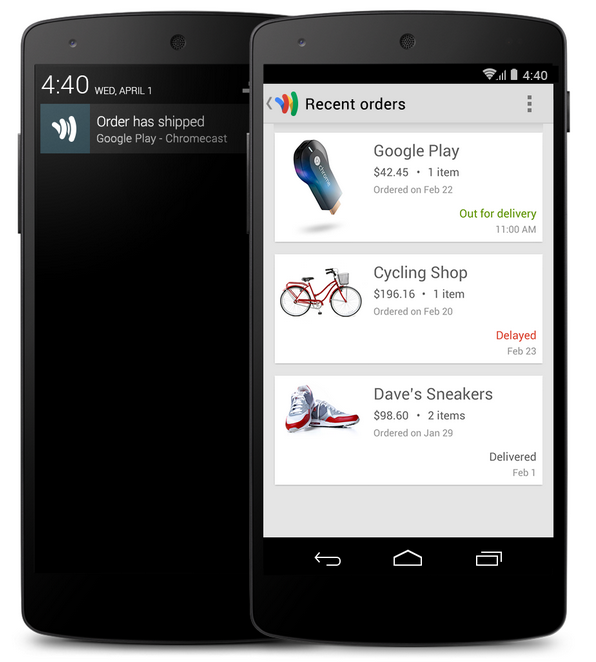
Google-Wallet-Orders-featureGoogle announced today on its Google Commerce blog that it’s rolling out an update for the Google Wallet mobile apps that includes a new “Orders” feature for tracking online purchases. Google says the feature will let you stay on top of your online orders (including past purchases) as well as get notifications for status updates regarding deliveries. How will Google know what you’ve purchased? In order to track your recent online orders, the feature pulls receipts out of your Gmail account :

Once you activate Orders in Google Wallet, you’ll be able to see any receipts sent to your Gmail right in the Google Wallet app. We’ve also worked with primary package carriers in the US so that when your order status is updated, you’ll get notified of the update through Wallet. So whether your order is shipped, out for delivery, or delayed, you’ll never wonder about the status of your order.

The app also includes “products you’ve ordered, merchant contact information, and shipping details in the app” for your purchases and links to quickly contact retailers.

Google said the feature is rolling out to Android and iOS users in the US this week. You can activate Orders by tapping “Activate” under “Track your orders” or by tapping “Orders” in the app’s main menu.

Rovio’s next Angry Birds game is a turn-based RPG, called Angry Birds Epic

rsqn5vdiksaww5uhudbm

Rovio has announced details of its latest game in the Angry Birds series(Via Kotaku). The game is a turn-based role player, a significant departure from the mobile mini-game physics puzzler Angry Birds is known for. The game will feature turn-based combat and a crafting system — players can craft armor, potions and weapons. This item system will apparently be funded through a game currency, or via in-app purchases.

The game is launching in Australia and Canada this week (likely tomorrow), with more countries to follow. Rovio is touting it as the most ‘epic’ soft launch ever.

[youtube=http://www.youtube.com/watch?v=-6Nh92eGP8I]

Site default logo image

Speedtest.net for iOS updated with iPad support, speedometer improvements, more

<em>Please, please, don’t laugh at my blazing fast network speed</em>

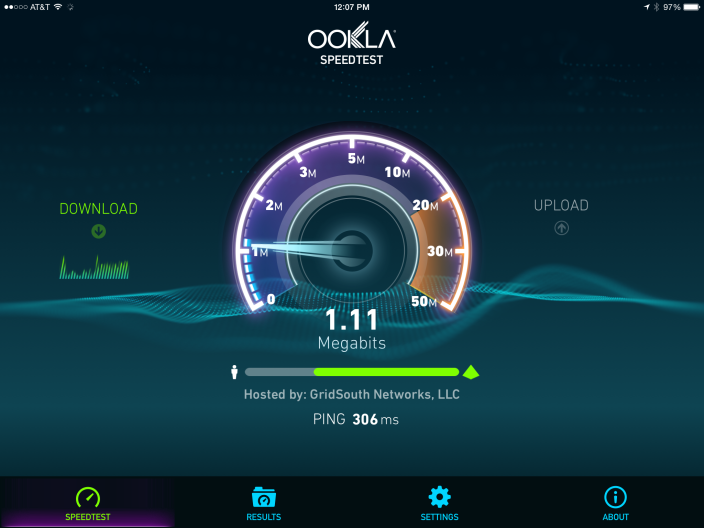
This is a welcome feature update for iPad users: Ookla’s popular Speedtest.net app for iOS received an update today bringing native iPad support to the app for the first time.

Speedtest.net is a popular site for checking your network speed whether you want to show off your better-than-mine download speed or see how far from advertised your speed rates really are, but iOS doesn’t support the site, and iPad users have had to made due with the stretched out iPhone app for a long while.

The update also includes enhancements to the speedometer for high speed connections and a number of bug fixes. Speedtest for iOS is a free app and update with an optional 99¢ in-app purchase to remove the banner ad.

Site default logo image

Verbs IM client for iOS updated with overhauled design, iCloud message sync, and a lot more

Verbs, the popular instant messaging app for iPhone and iPad, was updated today at long last with a revamped design for iOS 7 and a whole host of new features and fixes, including the removal of an in-app purchase to enable extra features.

One of the bigger notable features in version 3.0 is the ability to keep your conversations in sync across all of your devices via iCloud. This works a lot like iMessage’s syncing function, where every message you get will automatically show up on all devices whether Verbs is currently running on that specific device or not. Previously any devices that didn’t have the app running would miss any messages that were downloaded on other devices.

Other changes include the addition of Dropbox for file sharing (alongside the old CloudApp and Droplr options), Pocket and Safari Reading List options for saving links, tappable URLs in chat bubbles, per-contact muting, the ability to manage your contact lists, in-app notifications for messages that come in while you’re in the settings view or another thread, and notifications when certain contacts come online.

Speaking of notifications, the former “Verbs Pro” in-app purchase has been removed, and all of its features are now included standard in the app. These include push notifications and longer connection times after the app closes.

You can grab the completely overhauled Verbs 3.0 from the iOS App Store for $2.99 today. The complete change log is below:

What’s New in Version 3.0.0

• Designed for iOS 7
• Completely rewritten server side code
• Supports Jabber protocol
• Added OAuth support for GTalk
• Real time syncing of chat messages across devices
• New Conversations view
• Use Dropbox to share files in chat
• Sync Chat, File Sharing and Read Later accounts over iCloud
• Pocket (Read later) support
• Safari’s Reading Lists support
• Sent bubble color changes when messages are delivered
• Notify when a buddy comes online
• Ability to mute buddies
• New Notification sounds
• HTML hyperlinks are supported in messages
• Use shapes to indicate Buddy Status
• Ability to create Lists (Groups)
• In-app notifications
• Lotta bug fixes!

IMPORTANT NOTES:
• Before upgrading, please back up your existing conversations using the “Email conversation” feature. Because of the new sync features, your existing (2.x) accounts and conversations would not be available after upgrade.
• We’re removing Facebook chat support for the time being
• Also, we’re deprecating Verbs Pro and the basic app itself will include all the pro features.

Site default logo image

Remote for iOS now features purchased TV show & movie browsing, iTunes Radio control, more (U: GarageBand, Podcasts bug fixes)

In addition to releasing iOS 7.1 and Xcode 5.1 today, Apple has shipped a new version of its Remote app for iOS. In version 4.2, users can browse previously purchased movies and TV shows from the iOS app for playback on Apple TV. The update also includes the ability to control iTunes Radio playback on Apple TV from iOS (without AirPlaying content from iOS).  Remote 4.2 is available for iPhone, iPad, and iPod touch for free on the App Store.

GarageBand for iOS and Podcasts for iOS were also updated with minor big fixes.

Site default logo image

Tweetbot for iPhone adds Avenir font option, thumbnail and filter toggles, more

In its first update since December of last year, Tweetbot for iPhone  (review) is newly updated with a few additional features in version 3.3 today.

Joining the system font of Helvetica is an option to use Avenir found in the app settings. Additional features include toggles for image preview size (larger or disabled) and improvements to list filtering as well as standard bug fixes.

Tweetbot for iPhone is $4.99 on the App Store. Version 3.3 is a free update to Tweetbot 3 users.

(Now we’re hoping the time between updates means progress on Tweetbot for iPad is well under way!)

Review: Font Studio provides affordable custom fonts for all of your creative needs

Site default logo image

font title final

Font Studio from Paolo Quadrani is a Mac app that allows you to modify and customize fonts. It provides you with the ability to create a range of font styles. It also includes in impressive collection of fonts that can be customized, saved and organized. In this article we will discuss scenarios in which this app can be useful, how the app works, and what you should expect if you purchase it.


Expand
Expanding
Close

f.lux for Mac gets smarter with screen-dimming based on daily schedule, Movie Mode and more

Screen Shot 2014-03-08 at 13.58.09

f.lux, the popular utility that changes the color temperature of your Mac’s display to reflect the sun’s daylight cycle, has received a major update. Whilst still being in beta, the app can now calibrate your screen based on your actual schedule, not just sunrise and sunset times.

This means the app is now useful for people who have non-standard schedules, such as people who work night shifts. The app smoothly transitions between ‘daytime’,’sunset’ and ‘bedtime’ presets based on the schedule information provided. You tell the app when you wake up and it automatically calculates the color temperature levels for every hour of the day.


Expand
Expanding
Close

Site default logo image

iBetterCharge puts iPhone & iPad battery notifications on your Mac

iBetterCharge

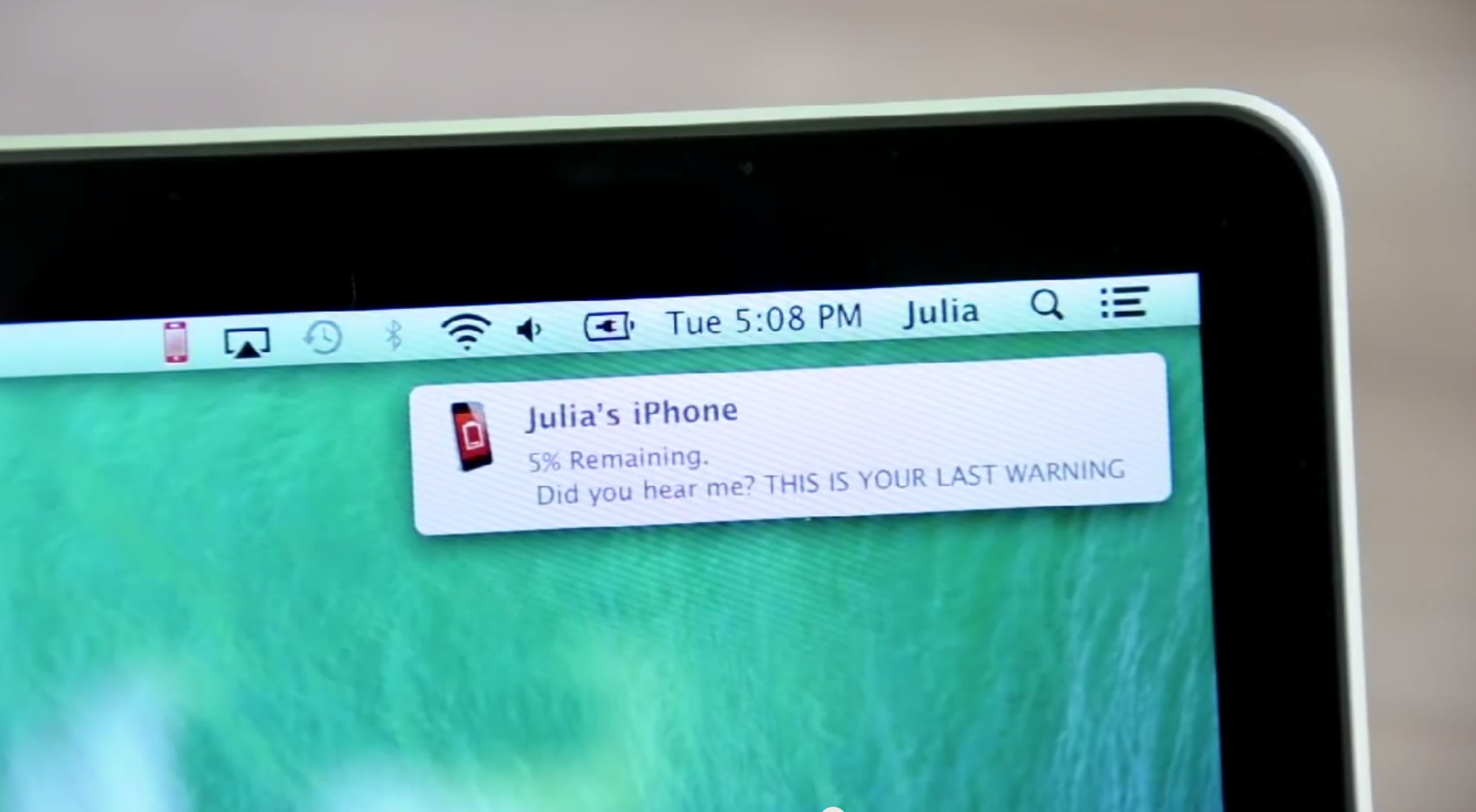
A nice, new utility called iBetterCharge brings those 20% and 10% battery warnings from your iPhone or iPad onto your Mac. Rather than picking up your phone before heading out the door only to realize your battery is almost dead, the app will remind you to plug in with warnings that pop up as desktop notifications on your Mac. This is a handy little tool for anyone that likes to leave their iPhone or iPad out of sight while working on their Mac or people with multiple iOS devices to manage. It has already saved me a few times this week as I’ve been testing it.

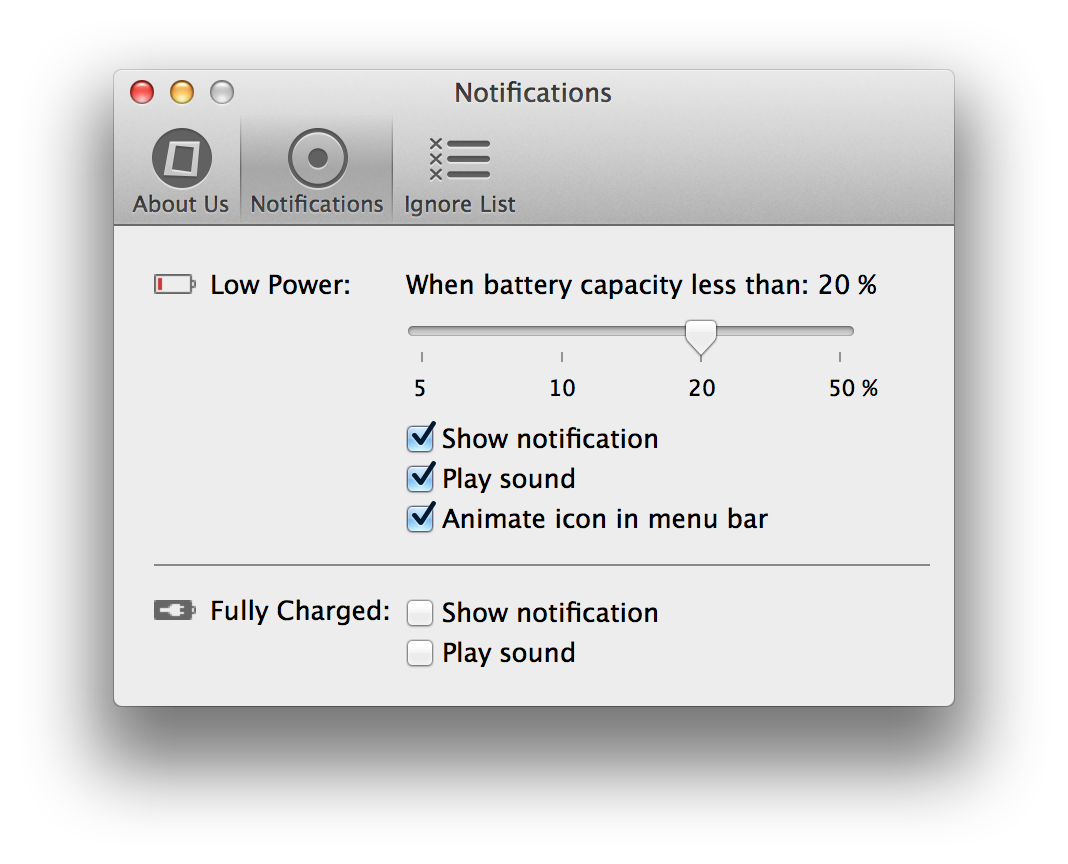
iBetterCharge-02You can connect multiple devices, set granular preferences for notifications when your battery gets lower than 50%, 20%, 10%, or 5%, and also select options to play sounds, animate the menu bar icon, or show a notification. Another preference will let you get notified when a device is fully charged and an ignore list lets you quickly mute notifications for certain devices.

The app is rather lightweight and a free download. Once you’ve installed it, iBetterCharge sits in your menu bar and automatically finds your devices over WiFi. Note: For this to work you have to have WiFi Sync enabled on your device.

You can download iBetterCharge for free here.

[youtube=https://www.youtube.com/watch?v=TaWovz5WviI]

Site default logo image

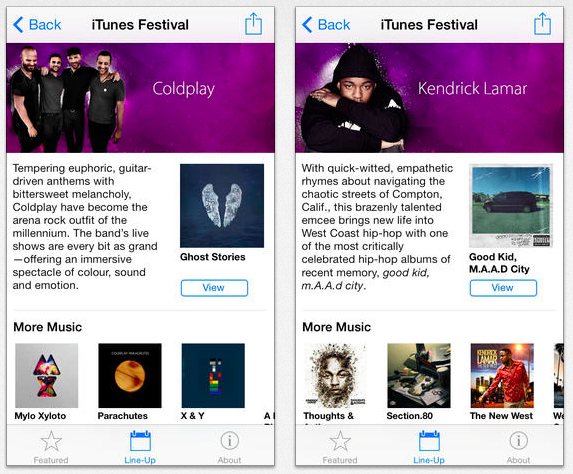
iTunes Festival for iOS updated with refreshed design, SXSW streaming support

As MacStories notes, an updated version of Apple’s iTunes Festival app has appeared in the App Store with an iOS 7 redesign and streaming support for next week’s iTunes Festival at SXSW (although the app does not appear ready for download just yet).

Earlier this week, John Gruber offered that Apple’s iTunes Festival app could require iOS 7.1 and suggested a correlation between the absence of both software releases. Compatibility notes, though, list iOS 7.0 is supported and some users are reporting success with downloading the app with iOS 7.0.6.

At any rate, iOS 7.1 is still expected to debut sometime this month.

Site default logo image

Shazam debuts Linkin Park song through Warner deal, Spotify buys competing service ‘The Echo Nest’

Shazam-linkin-parkBack in February news broke that Warner Music Group made a deal with popular music recognition app Shazam that would see the label have access to Shazam’s proprietary music data gathered from its users as well as the formation of a new Shazam-branded label. Today, Shazam announced another perk of that deal with the app launching its first exclusive single, offering users the first chance to listen to the latest from Grammy Award-winning band Linkin Park before anyone else.

Shazam® today announced that multi-platinum, Grammy Award-winning band Linkin Park and Warner Bros. Records, are launching the band’s new single “Guilty All The Same” (feat. Rakim), and are giving Shazamers around the world the first chance to hear the song.  When users Shazam any song today, they’ll see a special link to hear the new Linkin Park track, then will be able to buy it from all major digital retailers after wider release Friday… Last night, Linkin Park fans who had previously Shazamed the band were treated to an exclusive opportunity to hear “Guilty All The Same” via a notification in the app’s News Feed, giving them advance access to the new single.

While the deal with Warner Music Group was originally thought to be mainly Warner’s attempt to get its hands on Shazam’s valuable user data— the data helps labels and services identify what’s popular and what music users are interested in purchasing— we see that the other end of the deal is exclusive content for Shazam. It’s unclear if the Linkin Park promotion, however, is part of the co-branded label deal that Shazam and Warner Music announced they would create as part of the original deal.

In other related music industry app news today, Spotify announced that it has acquired music recommendation service ‘The Echo Nest’, a tool currently used by many similar services such as Rdio, Vevo, and Xbox Music.
Expand
Expanding
Close

Site default logo image

Real Racing 3 iOS app updated w/ vehicle customizations, Aston Martin cars, iOS 7 controller support, more

Real-Racing-3-Customization

The popular Real Racing 3 title from EA for iPhone and iPad received a big update today that on top of introducing tons of new content brings iOS 7 controller support. That means you’ll now be able to pick up and play the game with any of Apple’s new authorized Made-for-iPhone controllers. We’ve reviewed the majority of controllers to hit the market so far including products from Logitech, Moga, and SteelSeries.

Perhaps the most notable new feature is new customization options that allow users to “Change rims, tweak ride height, and apply a multitude of awesome vinyls using the powerful customization tools.”

In addition, the update introduces a photo mode to easily capture a snapshot of the action at any moment, the “All Star Vendetta Series”, and new Gold Achievements.

Version 2.1.0 of Real Racing 3 also brings new vehicles from Aston Martin including the DB9, Vanquish and V12 Vantage S.

The updated app is available on the App Store now for iPhone and iPad.