Apps

See All Stories

Learn about the latest news for iOS, Mac, Apple Watch, and Apple TV apps

Apps for iOS, macOS, tvOS, and watchOS power our modern world. 9to5Mac will update you on the latest news, review, and updates for all types of apps. “There’s an App for that”.

The term came became part of our vocabulary when Steve Jobs announced The App Store as part of the iPhone 2.0 software update in 2008.

Over the years, the term has become as common as kleenex for describing applications on all of our devices. Apple’s platforms have apps for just about anything from finance, banking, sports, social media, podcasting, music, and more. We have a guide for helping you discover the best ones as well. Apps are now on everything from our TV, to our smartphones, on our laptops, and all the way down to our wrists.

As new ones are released or existing ones have major updates, the team here at 9to5Mac will bring you the latest news and reviews. If you want to follow along with video footage, be sure to follow 9to5Mac on YouTube. Scroll down below our latest updates on all things relating to applications on iPhone, iPad, Mac, Apple TV, and Apple Watch.

Site default logo image

Google Maps for iOS updated with improved hotel search, tweaked transit directions

The Google Maps app for iPhone and iPad has been updated with a few changes to the hotel search feature and transit directions. When searching for a hotel, the app now presents some sponsored rates (ads, basically—but useful ones). You can also quickly access a map from the transit directions preview screen, as well as a list of upcoming departure times.

The app also include “bug fixes,” which are always nice. The complete change log is below.

What’s New in Version 2.4.3

● Improved hotel search results with sponsored rates and booking links
● Quick access to map and upcoming departures in transit directions preview
● Bug fixes

Site default logo image

iTunes Festival apps updated w/ live EPs from festival performers

Apple has updated its iTunes Festival app for iOS tonight, the app where users can access live streamed content from Apple’s month long musical festival held during September. While Apple has now removed the video content that was only available for a limited time, it has added a number of live EPs from festival performers. It’s also added the content to the iTunes Festival app on Apple TV and started promoting the EPs in iTunes on the Mac.

All of the albums were recorded live during the iTunes Festival last month at The Roadhouse art center in London.

The live EPs are available for select artists including Sigur Ros, Janelle Monae, The Lumineers, Queens of the Stone AgeJohn Legend, Phox, and others, and run $10 and below depending on the number of songs on each album.

During Apple’s iPhone event in September, Tim Cook noted that the iTunes Festival event, now in its seventh year, reached around 100+ countries through its live streams with more than 20 million people applying for tickets to attend the live show.

Site default logo image

Stargazing app Star Walk updated for iOS 7 with an all-new design

Star Walk, the popular and award-winning astronomy app which has previously been featured in Apple’s ads, has just lauched a brand-new version with a redesigned interface for iOS 7. It has the same look and feel as the new OS, with a clean, flat interface. The new Star Walk makes it easier than ever to stargaze. Now you no longer have to deal with reading and interpreting star charts, or twisting and turning in awkward positions to find the objects you are looking for while holding a red light.

Using this augmented reality app, users just need to hold and point the iPhone, iPod Touch or the iPad up at the sky. The app reveals over two hundred thousand stars (in their original color according to the star catalog), constellations, planets, satellites, comets and galaxies. Best of all the device does not have to be connected to the internet or a 3G network to use.


Expand
Expanding
Close

Site default logo image

App Store banner corroborates impending iOS 7 update for Apple’s Remote app

Image via MacRumors

A banner that appeared in the Colombian App Store seems to indicate that Apple may finally be updating its Remote app with a new design for iOS 7. The banner sports a redesigned icon that we first noticed earlier this month in the iTunes device manager. The new icon uses much more white than the previous version and conforms to the icon grid used to design Apple’s other iOS 7 icons.

Many of Apple’s apps have already been updated with a new design, but updates for Remote, Find My Friends, iTunes Connect and iBooks have been noticeably absent. It seems at least one of those will be redesigned in the near future, although there’s still no word yet on when the others might finally get a makeover.

We haven’t been able to independently confirm the precense of the banner in the App Store, which was likely published earlier by accident.

Site default logo image

9to5Toys Last Call: OtterBox iPhone 5 Defender case $15, FREE week of NBA League Pass, $100 off iPad 4, more

Be sure to follow 9to5Toys to keep up with the best gear and deals on the web: Twitter, RSS Feed, Facebook, Google+.

Today’s can’t miss deals:

OtterBox iPhone 5 Defender Series Case (multiple colors): $15 shipped (Reg. $50), Chromo 2000mAh 5c battery case: $20 shipped

Watch the first week of the NBA season for FREE on your iPhone, iPad, more

Take $100 off iPad 4th gen. with Retina display, 16GB $399/32GB $499

Other great deals from today:

The best deals that are still alive:

Mac software bundles:

  • The SuperStacked Mac Bundle: Over $3,000 Worth Of Premium Developer & Designer Tools – $49 today, but price increases everyday it’s on sale.

New product announcements & reviews:

Apple promoting its own stock iOS apps for popular App Store search queries

Site default logo image

Apple appears to have recently started promoting some of its own stock iOS apps on the App Store for search terms that would have previously displayed results from third-party developers first. As noted by MacStories, when searching for terms such as “browser”, “web”, “SMS”, “Movies”, “cloud, “Siri”, “internet”, and others on the App Store, Apple is now promoting some of its own apps and services such as Safari, iTunes, Messages, iCloud, and Siri as the first results.

The result for Apple’s apps aren’t typical App Store listings but instead provide users with a brief description and link to either “Learn more” or open the app. Clicking Learn More takes users to Apple’s website in Safari for more information on the app, while some listings, such as iTunes, allow users to tap “Visit iTunes Store” and automatically launch the iOS iTunes app.
Expand
Expanding
Close

Site default logo image

Square Enix releases lite version of Deus Ex: The Fall for iPhone and iPad

[youtube http://www.youtube.com/watch?v=fw3w68YrKwc]

Back in July, Square Enix released the mobile-exclusive game Deus Ex: The Fall as a tie-in to the popular console and PC franchise. Today the company published a free version of the game that allows players to run through the full game’s opening mission. Other than the limit on how far into the game you play, everything else is unrestricted.

Even though the iTunes requirements say that the iPhone 4 and fourth-generation iPod touch are compatible, the company notes in the app’s description that it will not actually run on those devices. Players looking to take the mobile Deus Ex experience for a test run can grab it now for free on iTunes.

Site default logo image

9to5Toys Last Call: Seagate GoFlex 3TB external $100, XCOM for iOS 50% off, Audio-Technica ‘phones $95, more

Be sure to follow 9to5Toys to keep up with the best gear and deals on the web: Twitter, RSS Feed, Facebook, Google+.

Today’s can’t miss deals:

Seagate 3TB FreeAgent GoFlex Desk Kit USB 3.0 External Hard Drive $100 shipped

Game/App Deals:

– 50% off iOS XCOM Enemy Unknown, Nintendo 3DS XL Zelda preorder, iOS freebiesmore
– Target’s PS4 launch week ad leaks: will offer buy 2 get 1 free on PS4, Xbox One games, others

Audio-Technica ATH-M50 professional closed-back studio headphones $95 shipped (Reg. $199)


Other great deals from today:

The best deals that are still alive:

Mac software bundles:

  • The SuperStacked Mac Bundle: Over $3,000 Worth Of Premium Developer & Designer Tools – $50 today, but price increases everyday it’s on sale.

New product announcements & reviews:

Site default logo image

CloudMagic brings cloud-powered email search to the iPhone

A brand-new mail client called CloudMagic launched today on the App Store. The app supports most email services and has all of the basic features you’d expect from a mail app. One CloudMagic feature blows most other apps away, though: search.

Rather than searching on your phone for a certain email and then remotely searching each individual mail account to find what you’re looking for, CloudMagic caches your entire mail account on their server and uses server-side search to find any message almost instantly. The search is powerful and intelligently suggests words and phrases that I found to be exactly what I was looking for.


Expand
Expanding
Close

Fantastical 2: The calendar Apple should have built… again

Site default logo image

After bringing natural language input to the mobile calendar experience with Fantastical for iPhone last November, Flexibits today released a brand new version of what was already my absolute favorite calendar app.

Fantastical 2 delivers an all new design made just for iOS 7 as well as numerous new features like Reminders support, dark and light themes, landscape support for week view, and much more.

I’ve been using Fantastical 2 for the past few weeks, and below I’ll show you why it’s my go-to calendar for iPhone.


Expand
Expanding
Close

Job listing corroborates Apple working on public transit directions for future Maps update

Site default logo image

We reported exclusively back in September that Apple was working on implementing public transit directions for iOS 8 alongside other new mapping features. Backing up our report, today Apple posted a job listing (via MacRumors) that shows the company is indeed working on its own solution for transit directions for a future version of Maps. The job listing seeks an engineer to join Apple’s Transit Routing team and “work on one of the most anticipated features of Apple Maps.”
Expand
Expanding
Close

Site default logo image

Twitter for iPhone updated with in-line photos and Vine videos, quick-actions in the timeline

Twitter for iPhone was updated today to version 5.12, which includes in-line photos in the main timeline view rather than using photo links. Vine videos now show up in the timeline as well, although it seems other video services will still require you to tap a link first.

The update also adds buttons to quickly reply, retweet, or favorite a tweet without having to swipe or tap it first. The new version of Twitter for iPhone is available for free in the App Store now.

Review: Flamingo for Mac looks to improve on Messages for Mac

Site default logo image

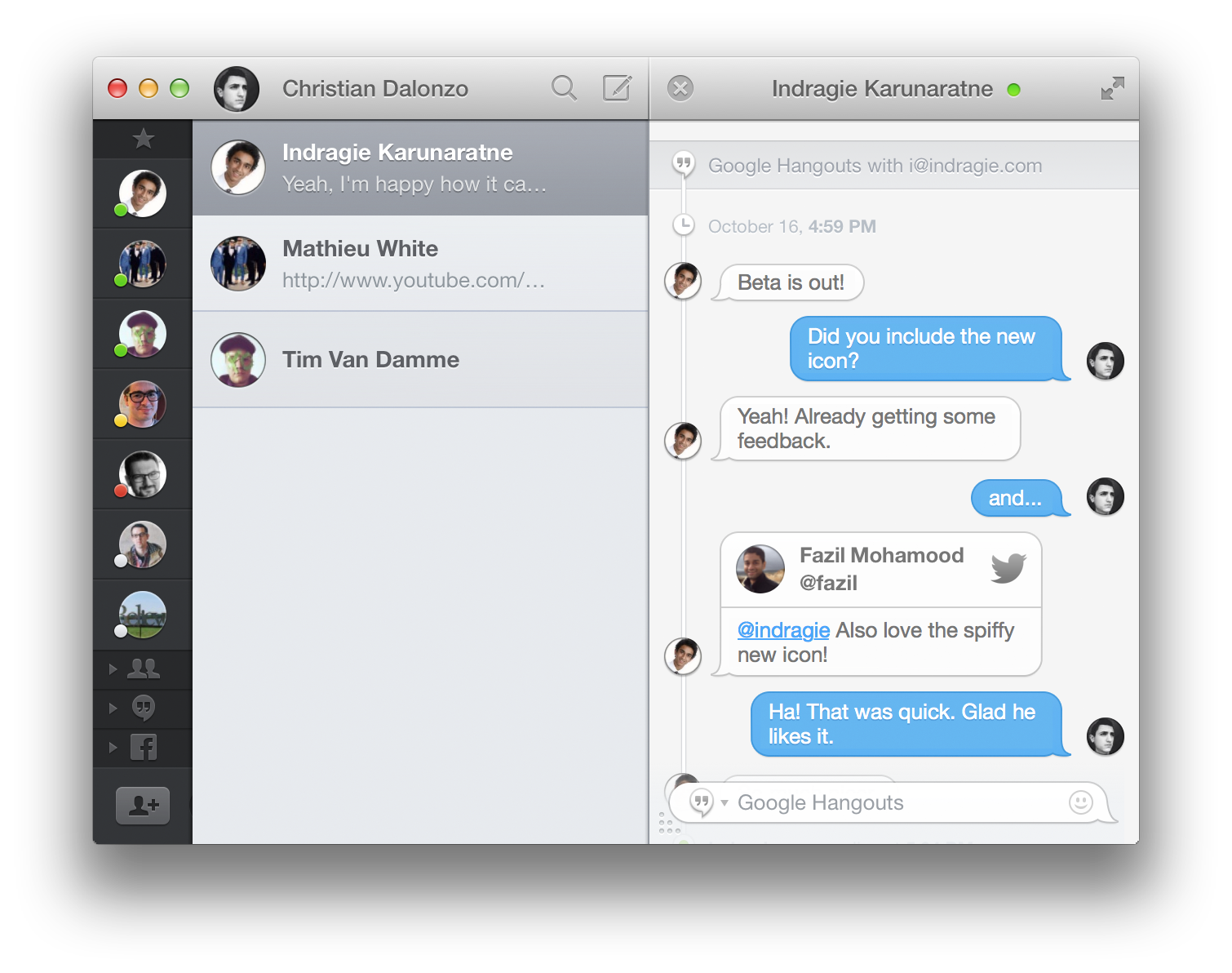
Messages for Mac may support a few different chat services, but there are still a variety of features that would vastly improve the experience of messaging on the Mac. Flamingo is a new app designed to make chatting even better with a whole host of features you didn’t even realize you were missing.

Unfortunately because Apple keeps iMessage pretty locked-down, you won’t be able to use Flamingo with that. You can still use it with your Facebook, Google Hangouts (text, not video), and other XMPP-based chat services. But should you use it for those things? Keep reading for our full review.


Expand
Expanding
Close

Site default logo image

9to5Toys Last Call: RAVPower 10400mAh power bank $26, Kindle Matchbook, Battlefield 4 $43, FREE apps, more

Be sure to follow 9to5Toys to keep up with the best gear and deals on the web: Twitter, RSS Feed, Facebook, Google+.

Today’s can’t miss deals:

RAVPower Element 10400mAh (that’s about 4 iPad Air charges) external power bank $26 shipped (Reg. $36)

Amazon launches Kindle Matchbook, offering Kindle versions of print books for $3 or less

50% off Final Fantasy IV for iOS, Battlefield 4 $43, Rayman Jungle Run $1, iOS freebiesmore

In-ear headphone deals: Logitech 500vm $33, MEElectronics M9P $10 / Sport-Fi M6P $23


Other great deals from today:

The best deals that are still alive:

Mac software bundles:

  • The SuperStacked Mac Bundle: Over $3,000 Worth Of Premium Developer & Designer Tools – $49 today, but price increases everyday it’s on sale.

New product announcements & reviews:

Site default logo image

Facebook announces it will revamp Messenger apps with new design, phone number integration

In line with my report from earlier this month, Facebook has announced that it will be revamping its Android and iOS Messenger apps. As we previously noted, the new apps have an entirely new design that is flatter and distinct from the standard Facebook application on Android and iOS. The Verge was given a preview of the Android version has some new features besides the new design:

In terms of functionality, there are a host of under-the-hood improvements to make sending and receiving messages faster, says product manager Peter Martinazzi. There are also some front-end tweaks that makes the app faster — especially on Android, where the SMS texting feature, which let you text friends who don’t have Facebook, has been removed.

The highlight feature, however, of the new apps is phone number integration. The repot summarizes the functionality as a WhatsApp competitor:

While Facebook won’t let you text a phone number from Messenger, the company plans to use phone numbers in a new way: to identify its users, just like in WhatsApp. Upon opening Messenger for the first time, it will ask you to provide your phone number. Then, the app can match you with people whose numbers you have, but whom you aren’t Facebook friends with. Facebook guarantees your messages will reach somebody’s inbox if you have their phone number.

The Android version is available as a test with a limited number of users beginning today and iOS in the near-future. Also incoming, we previously reported, are updates to the main Facebook app that integrate Graph Search, but Facebook has not confirmed this as of yet.


Expand
Expanding
Close

Site default logo image

Amazon releases Cloud Player app for Mac

Amazon announced today that it’s releasing Amazon Cloud Player for Mac, a desktop client for its Amazon Cloud Player service that was previously released only for PC users earlier this year. You’ll be able to store all of your Amazon and iTunes music, browse and purchase Amazon MP3’s 25 million strong song catalog to purchase new songs, and also take advantage of features like AutoRip for getting free digital copies of CDs or vinyl purchased through Amazon’s AutoRip collection.

Once uploading and purchasing music for your Amazon Cloud Player app through the new Mac App, you’ll be able to access your whole collection on any device through apps for iPhone, iPad, iPod, Android devices, Roku, Sonos, and Samsung TVs.

You can download the Amazon Cloud Player for Mac app for free here. The 45MB download is available for Macs running OS X 10.6 and up.

Amazon Cloud Player for Mac features include:

  • One-place for all your music: Play your Amazon and iTunes music all from one place, even when offline.
  • A music library that is always up-to-date: Cloud Player automatically detects and adds new music to your library even if you bought it from iTunes or ripped a CD. The app does all the work for you.
  • An integrated MP3 Store: You can shop from the Amazon MP3 catalog of more than 25 million songs and discover new music with personalized recommendations, all without having to leave the app.
  • AutoRip: Buy an AutoRip CD or vinyl record from Amazon and a free MP3 version of the album will be added to your Cloud Player for Mac library.
  • Built for speed: Forget bloated players with extra features you don’t need or use. Cloud Player for Mac is lean, mean and made for your music. It’ll get you from launch to play in seconds.
  • Music management made simple: Download your MP3 purchases automatically or with one click. Export your music to other music players. Create and manage playlists using simple drag-and-drop.
  • Instant search & play: Find music easily and quickly. Type anywhere to search for an artist, album or song and play directly from the search results.
  • Rich artist content: See artist photos, bios, tweets, and gorgeous, large album art.
  • Anywhere access: Music purchased using Amazon Cloud Player for Mac is securely backed up in the cloud for free and made instantly available on any Kindle Fire, Android phone or tablet, iPhone, iPad, iPod touch, Samsung TV, Roku, Sonos, PC or web browser.
Site default logo image

9to5Toys Last Call: Logitech/ZAGG iPad keyboards from $20, Anker 5-port USB charger $16, Logitech Mac trackpad $30, more

Be sure to follow 9to5Toys to keep up with the best gear and deals on the web: Twitter, RSS Feed, Facebook, Google+.

Today’s can’t miss deals:


iPad Bluetooth Keyboards refurbished w/ free shipping: Logitech Ultrathin $30, ZAGGkeys Mini 7 $20

Anker 5-port Family iPad/tablet/iPhone USB Charger: $16 shipped

Logitech rechargeable multi-touch trackpad for Mac $30 shipped (Reg. $60)


Other great deals from today:

The best deals that are still alive:

Mac software bundles:

  • The SuperStacked Mac Bundle: Over $3,000 Worth Of Premium Developer & Designer Tools – $48 today, but price increases everyday it’s on sale.

New product announcements & reviews:

Site default logo image

Clear iOS apps updated with support for iOS 7’s Background Refresh

The popular Clear productivity apps for iOS have been updated today with support for Apple’s Background Refresh feature new in iOS 7. That means your lists in Clear will now update more often, refreshing from iCloud in the background so they’re always up to date across all of your devices running Clear.

The update is available for the $1.99 Clear app for iPhone and the $4.99 Clear+ for iPhone and iPad now. Developer Realmac Software also teased that it’s working on other big new features for a future update:

We’re hard at work on some great new features for Clear – and today we’re releasing a small update to Clear and Clear+ to take advantage of a great new iOS 7 feature: Background Refresh.

iOS 7 launches your most frequently-used apps in the background throughout the day, allowing them to refresh their data. This means that, with today’s update, Clear will refresh your lists from iCloud to ensure they’re always up to date on all your devices.

Site default logo image

NBA Game Time apps updated for 2013-14 season w/ iOS 7 redesign, new free content, and much more

The NBA Game Time apps for both iPhone and iPad have been updated today with a redesign for iOS 7 alongside full support for the 2013-2014 regular season and new content for both free and paid subscribers.

On top of the redesign pictured in the screenshots above, the apps add home and away broadcasts for every game and archives for each nationally broadcast game for those that have an NBA League Pass. It also adds new content for free users, however, including the Game Recaps, Team Video, Player Statistics, Team Rosters, and Team Statistics features previously only available to paid users.

Version 5.1 of NBA Game Time also includes alerts for live streaming videos and push notifications for League Pass subscribers.

NBA Game Time is available for free from the App Store now as separate downloads for iPhone and iPad.

What’s New in Version 5.1

Redesigned and Optimized for iOS7

Full support for the 2013-2014 NBA regular season

NBA League Pass subscribers will now be able to enjoy both the home and away TV broadcasts from every game.

NBA League Pass subscribers will now be able to enjoy archives from each nationally broadcast game.

Game Recaps from every game now free.

Team Video from every team now free.

Player Statistics, Team Rosters, and Team Statistics now free.

Live Video alerts let you know when we’re streaming press conferences and events live.

League Pass Push Notifications now let NBA League Pass users know when games they can watch get exciting.

Many performance improvements.

Review: RoboMouse HD is a classic strategy game reinvented for the iPad

Site default logo image

RoboMouse HD is a new iPad strategy and tower-defense game from LongKoo Studio. It features a straightforward premise and easy-to-pickup gameplay mechanic that can be quickly learned, but takes time to master. While the strategy game genre is not lacking for entries, RoboMouse HD is a fun addition to the existing landscape that can provide hours of fun. Keep reading for our full review to find out why you should grab your own copy.


Expand
Expanding
Close

Review: Wibbitz for iPhone creates video summaries from news articles

Site default logo image

Wibbitz is a free innovative news-reader app for iPhone that creates a video summary of text articles from major news outlets. It features political, sports, business, technology, and entertainment news providers such as CNN, BBC, Huffington Post, FOX, TMZ, and Sports Illustrated. Some specific local outlets such as the Jerusalem Post, UK Telegraph and Korea News are also available. The app summarizes the text and images in the articles into videos between one and two minutes long.


Expand
Expanding
Close

Site default logo image

Boxie Dropbox iPhone app gains passcode lock, smart text selection & folder-by-folder sorting

Boxie, a new Dropbox client that was launched last week, is already receiving significant updates to make this an even more powerful alternative to the Dropbox app.

Boxie version 1.1 has a lot of behind-the-scenes improvements and optimizations. The update fixes issues with deleting items and offline access. It also adds support for more language including Spanish, Simplified Chinese, Dutch, German, and Portuguese. The new version introduces new error notifications when uploading items into a shared folder fails. It also adds automatic smart selection of text when renaming folders.

New folder-by-folder sorting options let Boxie remember your sorting settings for each folder rather than the app as a whole, allowing you to use customized views in each folder without having to change the view every time you change the folder. Last but not least is an important security setting that allows you to set a passcode to open Boxie, complete with customizable time interval settings and the ability to securely wipe local data.

If you have not tried Boxie yet, check out our in-depth review to learn more about all the features and benefits. Boxie is available in the App Store for $2.99.


Expand
Expanding
Close

New iWork & iLife apps go for simplicity, upset power users all over again

Site default logo image

Following the introduction of Apple’s new iWork apps at its iPad Air event earlier this week, an increasing number of users have taken to Apple’s support forums to voice concerns over the removal of features as the apps receive new simplified user interfaces that bring them more in line with the iOS versions. Several pages of complaints from users in Apple’s forums point out that many features, those mostly used by power users, have been removed from Apple’s new redesigned version of Pages:

Why does Apple get rid of so many useful features in new pages? iWork 13 has been a huge disappointment and nothing more than a downgrade to match the capabilities of the iOS iWork apps.  If Apple simply made performance upgrades to iWork 09 I would have been happy.  I hope there is a way to get back to the most up to date version of iWork 09.

It comes down to this. Apple has discontinued Pages in its entirety. You can no longer download it or purchase it, and Apple won’t support it. Apple has simultaneously introduced a completely new and different product, also called Pages, that is designed for different users and different use cases. Despite the name, it is not a successor to Pages (old), except in the licensing terms, it is completely a completely different species of animal. Those of us who depended on Pages (old) cannot use Pages (new). We have to save all our Pages files in a widely used format and import them into a new word processor that supports the formatting.

Pages isn’t the only app, users are also hitting Apple’s forums to list features that have been removed from the redesigned versions of Keynote, Numbers, and iMovie:
Expand
Expanding
Close

Tweetbot 3 becomes top paid app in several countries, developers discuss future enhancements

Site default logo image

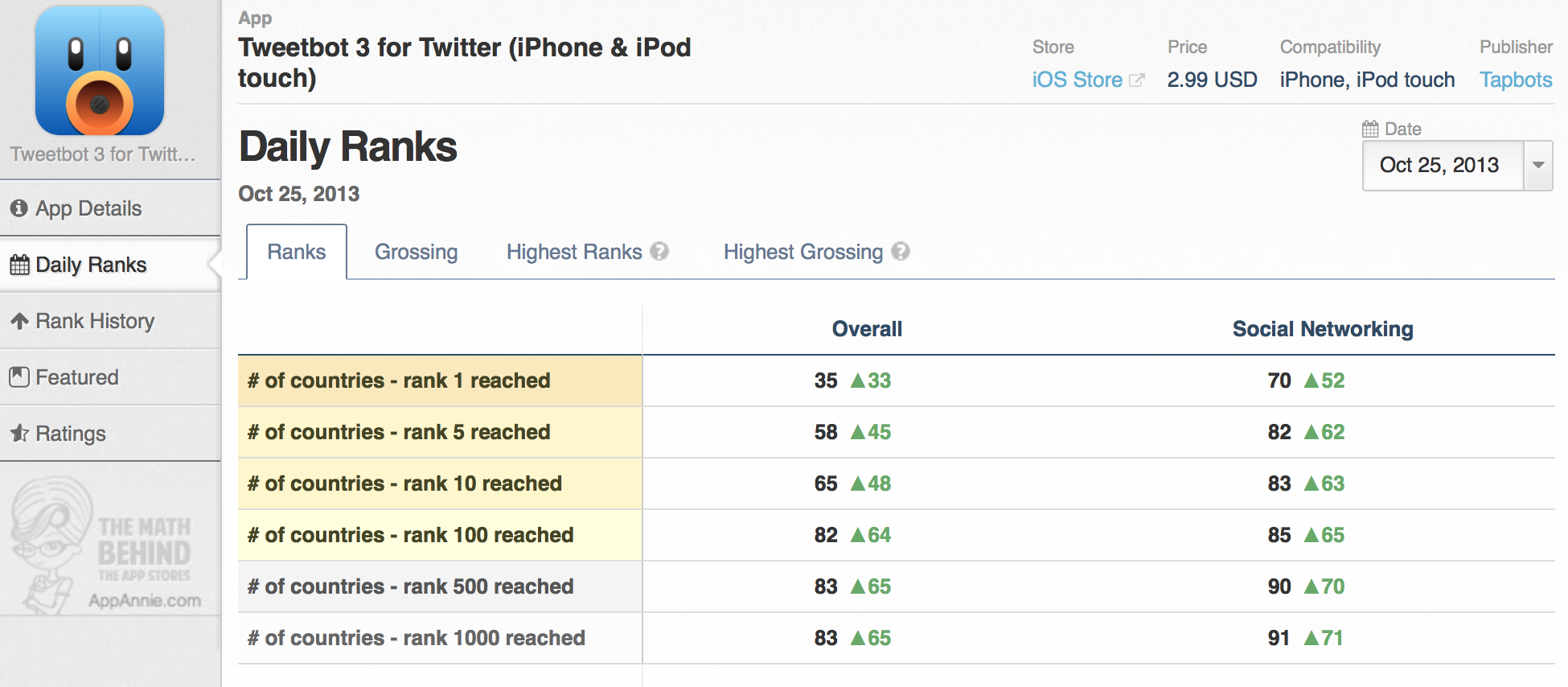
Since its launch yesterday, popular Twitter client Tweetbot 3 for iPhone has topped the paid app charts in several App Store-supported countries across the world. A look at AppAnnie’s data indicates that the new application is the top paid app overall in 35 countries, and it is the top app in the Social Networking category in 70 countries. As Tweetbot developer Paul Haddad notes, these impressive launch day statistics are evidence for why developers should charge for major app updates…


Expand
Expanding
Close