iOS

See All Stories

The world’s most advanced mobile operating system

iOS is Apple’s mobile operating system that runs on iPhone, iPad, and iPod touch. Historically, Apple releases a new iOS version once a year, the current version is iOS 13.

In 2007, Steve Jobs introduced the iPhone and iPhone OS. During the event, Jobs referred to the operating system as OS X because it shared a similar Unix core compared to the Mac. When Apple launched the iPhone SDK a year later, they officially changed the name to iPhone OS.

In the summer of 2008, Apple added the App Store to iPhone OS with version 2.0, and this set the stage for the “app economy” that we still enjoy to this day.

Version 3.0 was released in 2009, and it included copy/paste, MMS support, Spotlight, mobile tethering, and push notifications for 3rd party apps.

In version 4, Apple finally renamed iPhone OS to iOS (with the iPad sharing the same software). The major features were multitasking and FaceTime.

iOS 5.0 introduced Notification Center, iMessage, Siri, and iCloud.

iOS 6.0 removes Google Maps in favor of Apple Maps and added the Passbook app (now known as Wallet).

Version 7.0 brought a dramatic redesign of iOS with a new font, flatter icons, a and new Photos app. The redesign was led by Jony Ive.

Version iOS 8.0, Apple finally allowed third-party keyboards and the ability to share files from different apps.

Version 9.0 included Apple Maps, an overhauled Notes app, and multitasking for iPad.

Version 10.0 included an SDK for Siri, Maps, and iMessages.

Version 11.0 included a new iPad Dock, Customizable Control center, drag and drop on iPad, and the Files app with third-party integration.

Version 12.0 added Screen Time features for managing your time on devices, the Shortcuts app, ARKit 2.0, and Memoji.

iOS 13 added Dark Mode, swipe-style typing, a redesigned share sheet, made app downloads 50% smaller, 2x faster app launch speed, Memoji Stickers and Memoji Makeup, HomeKit-enabled routers and HomeKit Secure Video, a new “Sign in with Apple” option for logging into third-party services, all-new Apple Maps, and much more.

Compatible Devices with iOS 13

  • iPhone 11
  • iPhone 11 Pro
  • iPhone 11 Pro Max
  • iPhone XS
  • iPhone XS Max
  • iPhone XR
  • iPhone X
  • iPhone 8
  • iPhone 8 Plus
  • iPhone 7
  • iPhone 7 Plus
  • iPhone 6s
  • iPhone 6s Plus
  • iPhone SE
  • iPod touch (7th generation)

Site default logo image

Kickstarter campaign begins for iPhone-controlled Bluetooth padlock

Locks always struck me as the perfect application for Bluetooth LE: walk up to the lock, it detects the phone in your pocket or bag, checks the code and unlocks. If you need to let someone else in, you authorize their app on a one-off or permanent basis. Simple, secure, convenient.

There are a bunch of Bluetooth door locks on the way, and you can even lock and unlock your Mac via Bluetooth, so why not a Bluetooth padlock too? Noke is a Kickstarter campaign for a $59 lock where you simply click the hasp to unlock. Provided your phone is with you, and the app code matches the lock, it opens without key or combination.

Cleverly, you can also program the padlock with a Morse code-style pattern that you can click to open the lock if your phone battery is dead.

The campaign has an ambitious $100,000 target, so it’s by no means certain it’ll get funded, but as with all Kickstarter campaigns you lose nothing if it doesn’t make it. $59 is the Kickstarter price, with a planned retail price of $99.

The campaign doesn’t say anything about the security credentials of the lock, so it’s probably best considered something for relatively low-security applications like gym lockers and ‘cafe locks’ for bikes (ones you use just to stop someone hopping on and riding off while your bike is within sight).

Xiaomi, the Chinese company behind the Mi Pad, announces iOS-like Android skin

Site default logo image

Not content with a blatant copy of the iPad mini and a smartphone called the Mi Phone, Xiaomi’s latest Android overlay – MIUI 6 – bears more than a passing resemblance to iOS 7. The flat icons, the icon screens scrolling above the fixed app tray at the bottom, the calendar, calculator, compass … 
Expand
Expanding
Close

Review: iHome’s iBN26 is a classy Bluetooth Speaker/speakerphone that won’t break the bank (Video)

If you haven’t heard of iHome products before now, they manufacture a wide variety of home audio accessories for iOS and Android devices. If you’re into Bluetooth speakers, they’ve got you covered. You’ll find Bluetooth speakers in just about every shape and size on the company’s website.

Over the past couple of weeks, I’ve been testing out iHome’s awkwardly named iBN26 Bluetooth speaker with built-in speakerphone. Yes, that is both the model number and product name. I know, it’s weird. Either way, if you’re in the market for a new speaker setup, you may want to give this one a closer look…


Expand
Expanding
Close

Now even more shots of the 4.7-inch iPhone 6’s 1810mAh battery have leaked

Site default logo image

Yesterday, we reported on purported photos of the larger, 5.5-inch iPhone 6’s 2915mAh battery pack among other parts, and today, new clear shots of the 4.7-inch models have leaked. Photos of the smaller next-generation iPhone’s 1810mAh battery first hit the web in July, and these new photos add weight to the previous photos being legitimate. For comparison, the iPhone 5s’s battery is 1560mAh, but because of the higher-res screen on the iPhone 6, it’s possible that the bigger battery pack could be offset but the additional pixel pushing. Besides a bigger battery, the new iPhones will likely include sharper displays, faster A8 processors, new sensors, and improved cameras. The new devices will debut at an event on September 9th and begin shipping around a week-and-a-half later. Another shot of the 4.7-inch model’s battery is below:


Expand
Expanding
Close

Apple bolstering ‘Report A Problem’ Maps options in iOS 8

Site default logo image

Apple has shown a renewed focus on Maps with iOS 8. Although headline features like transit did not show at WWDC, recent iOS 8 betas are bringing improvements to the ‘Report A Problem’ features. The frequency at which these updates are passed through has also improved dramatically in the past couple of months.

Apple has added a new explicit ‘follow-up by email’ option at the end of the Report A Problem form. This means Apple is now actively looking to get additional information about map queries from customers via email.


Expand
Expanding
Close

Purported photos of 5.5-inch ‘iPhone 6L’ show 2915mAh battery, wider display panel

Site default logo image

Asia-based rumor site Apple Daily has acquired photos of what it claims are the next-generation iPhone, including the 5.5-inch model we’ve seen much less of in recent weeks. The two photos above show the larger device (with the purple interior) paired with a 4.7-inch version. The wider 5.5-inch model is to the right and the 4.7 display panel is on the left. While some may note that the part on the right does not appear much larger than the part on the left, it is possible that the image’s perspective does not highlight the size differentiation well.

The larger model, which Apple Daily claims will be called ‘iPhone 6L’ also sports a larger 2915mAh battery (seen below), compared to the 1810mAh in the 4.7-inch device and 1560 mAh in the iPhone 5s. The larger display area and form-factor allows Apple to squeeze a much larger battery pack into the phone, but it is currently unclear if this will mean stronger battery life. It’s uncertain if the larger display and more powerful chip rumored for the bigger phone will counterbalance the effects of the bigger battery pack…

Keep reading for more photos

Apple starts using China Telecom’s data centers to store iCloud data for China users, rather than US locations

Site default logo image

Update: Apple confirmed the use of China Telecom servers in a statement to the Wall Street Journal.

But the company said Friday in a statement to The Wall Street Journal that all data stored is encrypted, meaning China Telecom won’t have access to its content.

“Apple takes user security and privacy very seriously. We have added China Telecom to our list of data center providers to increase bandwidth and improve performance for our customers in mainland China,” it said.

Apple has begun using Chinese data centers to store iCloud data for local Apple customers, the first time Apple has used mainland China for iCloud account and information storage. On a municipal government website, Fuzhuo City Telecom said that ‘Apple China has completed the iCloud data dump into China Telecom’s cloud services’. The post has since been taken down from the government site, however.


Expand
Expanding
Close

Site default logo image

Apple seeds OS X Mavericks 10.9.5 build 13F14 to developers

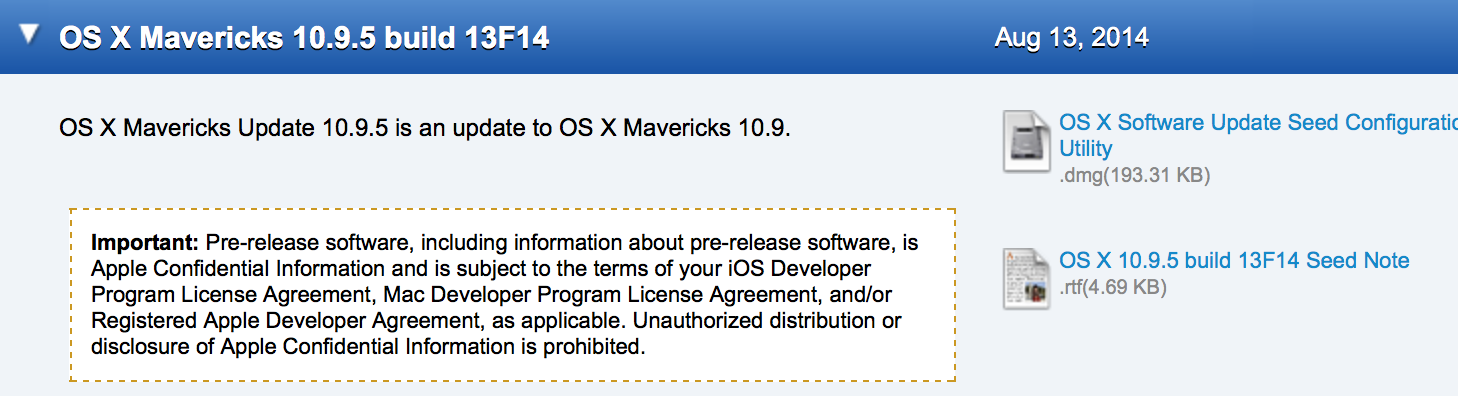
Apple today has provided developers with a new beta of the upcoming OS X Mavericks 10.9.5 release. Today’s build number is 13F14, which is two builds newer than last week’s 13F12 build. Apple has asked developers to continue testing USB, USB Smart Cards, Safari, Graphics, and Thunderbolt integration with 10.9.5. The update is available for developers running the previous 10.9.5 seed via Software Update in the Mac App Store.


Expand
Expanding
Close

Beats Music “Listen Now” feature starts rolling out to Shazam iOS app

Site default logo image

Users of the Shazam iOS application have begun noticing that Shazam is testing a new “Listen Now” feature with the Apple-owned Beats Music streaming service. Like it does with iTunes Radio, Spotify, and Rdio, this feature allows a user to tag a song with Shazam and then instantly play it in Beats Music. We tested the feature this morning and it works as advertised. You’ll need a Beats Music subscription or a 14-day free trial in order to make use of the feature. With Beats now under Apple’s wing and Shazam a key partner for Siri in iOS 8, it makes sense that the trio would integrate in a fashion such as the new Listen Now button in the Shazam app. You’ll need the latest Shazam update to make use of the feature.


Expand
Expanding
Close

As Siri gets more powers in iOS 8, we ask: Do you use it to its fullest or is it still a party trick?

Site default logo image

When Siri lost its beta tag almost a year ago, I suggested it might be a good time for those who’d been frustrated with its early performance to give it another chance. What I discovered through your comments was that Siri seems to be one of those things that polarizes views: people either loving it and using it every day, or dismissing it as a useless gimmick. Not too many people seem to fall between the two.

But Apple has continued to work hard on improving the service, adding new capabilities as well as refining its ability to handle existing ones. It might not yet be as sophisticated as its creators envisage for the future, but a year on seemed a good point to revisit the topic and find just how many of its capabilities people are using … 
Expand
Expanding
Close

Site default logo image

Uber adds destination entry for riders & turn-by-turn navigation for drivers to mobile apps

Uber announced today that it’s added new features that will make the experience even more seamless for both users and its drivers.

We envision a day when there is no coordination necessary to take an Uber ride. Simply push the button, and the rest is essentially on cruise control: the car quickly shows up at exactly the right place and whisks you away to your destination via the best possible route. The latest rider and driver app releases take us one step closer to that world with two new features:

A new destination entry feature lets users quickly enter destination details into the Uber app that are then automatically available to the driver when they arrive. “You can literally skip the step where you tell the driver where you’re going.”

Uber has also added turn-by-turn navigation to its driver app: With one tap, the driver can enable turn-by-turn navigation to the destination you’ve provided. There’s no need to juggle multiple apps or waste time typing in an address.

Uber says the features are live now, although doesn’t list the features in the latest update that hit the app yesterday.

Site default logo image

Murder suspect really did ask Siri for advice on hiding a body

One of the best-known Siri easter eggs is its response to the question “Where’s a good place to hide a body?” Siri’s usual response was to ask “What kind of place are you looking for? Swamps. Reservoirs. Metal foundries. Dumps.”

In a story you really couldn’t make up, Kirotv reports that ‘a Florida man’ on trial for a 2012 murder seriously did ask Siri for this advice, according to evidence presented in court yesterday.

New evidence presented Tuesday in the trial of a man accused of killing his roommate showed he apparently asked Siri on his iPhone, “I need to hide my roommate.”

Pedro Bravo is accused of killing University of Florida student Christian Aguilar in 2012.

The Huffington Post reports that the query no longer works, but trying it myself today, the response I got from Siri was “What, again?”.

It was reported in June that Apple is looking to replace Siri’s Nuance-powered back-end, while the former Siri team are working on a next-generation virtual personal assistant.

Update: Bravo’s lawyer argued in court that while the query was made out on the defendant’s phone, it was not done on the night of the murder and is ‘not evidence’ that Bravo was the one who made it. The detective in the case agreed.

Site default logo image

Facebook 13.1 released for iOS, boasts crash rate reduction of over 50 percent

Facebook released version 13.1 of its iOS client today with a rather uninteresting change log noting that the app had received “bug fixes” and nothing more. However, over on Facebook’s engineering blog the company has outlined what exactly went into this fix, and it turns out the update contains a significant fix that will resolve over 50% of reported crashes.

According to the blog post, the issue arose from a file corruption error that appeared in iOS’s Core Data system:


Expand
Expanding
Close

Site default logo image

Award-winning MacLovin’ Bundle, $40 for djay, Boom, Cinemagraph Pro, Keyboard Maestro, NetSpot Pro, much more

Specials.9to5Toys.com has a pretty solid bundle of disparate Mac apps available for $40 bucks today. All apps included are award winners – Either Apple Design Award, Best of Mac App Store, or Macworld Editors’ Choice Award-Winners so no duds here:

  • Cinemagraph Pro ($100) – The Professional Photography & Cinematography Tool For Mac – Apple Design Award Winner 2014
  • Djay ($20) – The #1 DJ Software For Mac – Best of Mac App Store
  • NetSpot Pro ($149) – The Only App For WiFi Analysis and Troubleshooting on Max OS X – Macworld Editors’ Choice Award-Winner
  • Keyboard Maestro ($36) – Record and Design Your Own Macro Shortcuts –Macworld Editors’ Choice Award-Winner
  • Hype 2 ($30) – Create Beautiful HTML5 Web Content w/out Coding –Macworld Editors’ Choice Award Winner
  • Dropzone 3 ($10) – The Swiss Army Knife of Productivity – Mac Gem Award-Winner
  • Moom ($10) – Move and Zoom Like Never Before – Macworld Editors’ Choice Award-Winner
  • Boom ($7) – System-Wide Volume Booster & Equalizer That Makes Your Mac Louder, Clearer, & Better – Macworld Best of Show Award-Winner
  • The OS X App Master Class ($499) – Learn To Make Fantastic Mac Apps w/22 Hours of Instruction

Apple Stores to start offering iPhones via carrier financing on Aug. 20th

Site default logo image

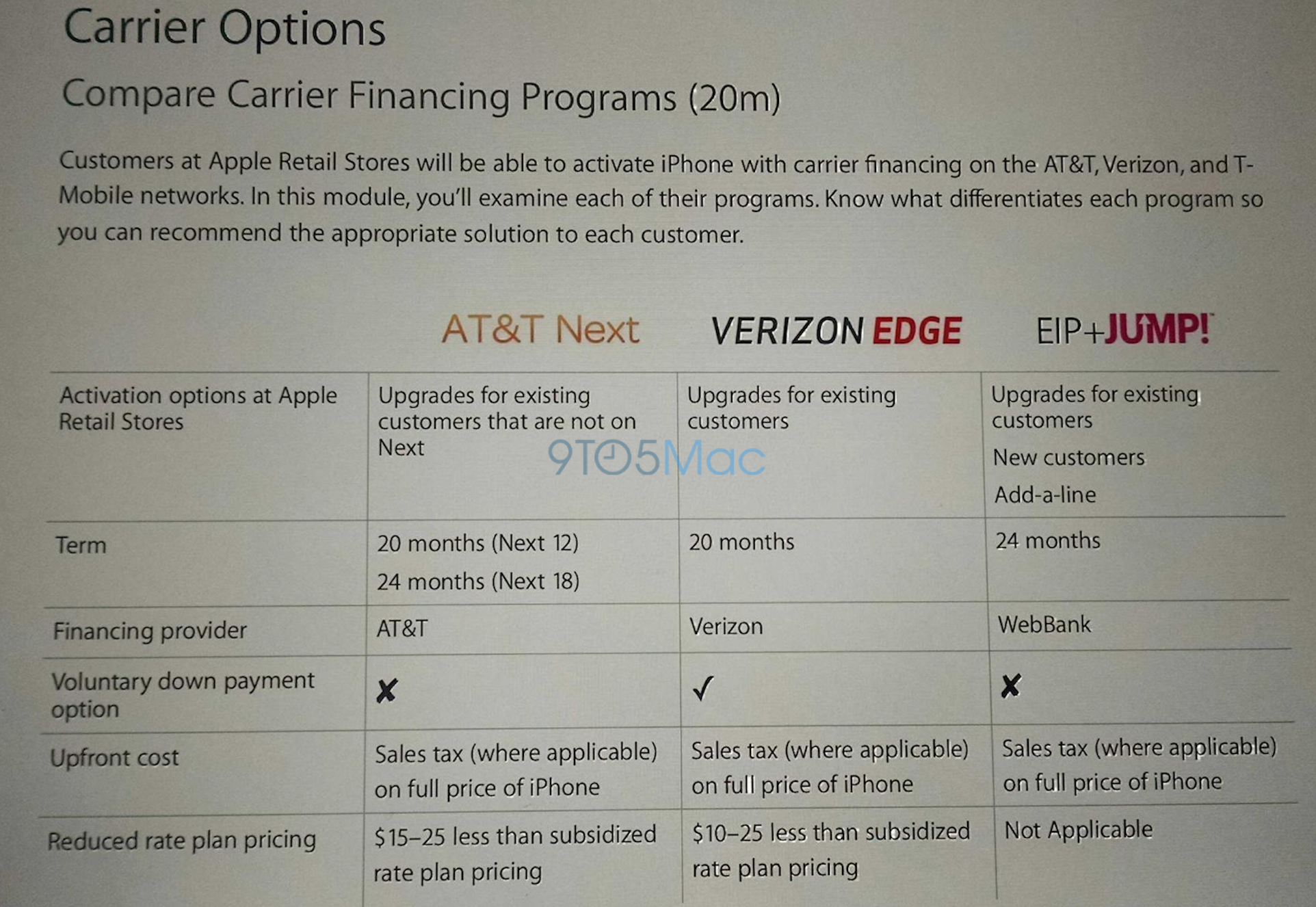
A significant number of Apple Stores in the United States will likely begin offering iPhone sales via the latest carrier financing programs later this month, according to several sources. We previously detailed that Apple Stores will soon offer iPhones on AT&T Next, Verizon Edge, and the T-Mobile Jump plans, and now we’ve learned some new information on the matter. We’re told that Apple is tentatively planning to begin rolling out the programs on Wednesday, August 20th as a pilot.

Of course, this could slip back a few days as this new program’s existence has not even been officially confirmed by Apple.  We’ve also been sent a couple of slides from internal Apple employee training materials showcasing what exact plans will be offered. The slide above details the differences between the plans, and the photo below compares the perks of each program. Also, it does not appear that Sprint’s latest financing offerings will be in the mix for Apple Stores anytime in the near future. Will you buy your iPhone 6 at the Apple Store via carrier financing? Tim Cook certainly thinks you should.


Expand
Expanding
Close

Apple prominently advertising Beats Music to new iOS device users

Site default logo image

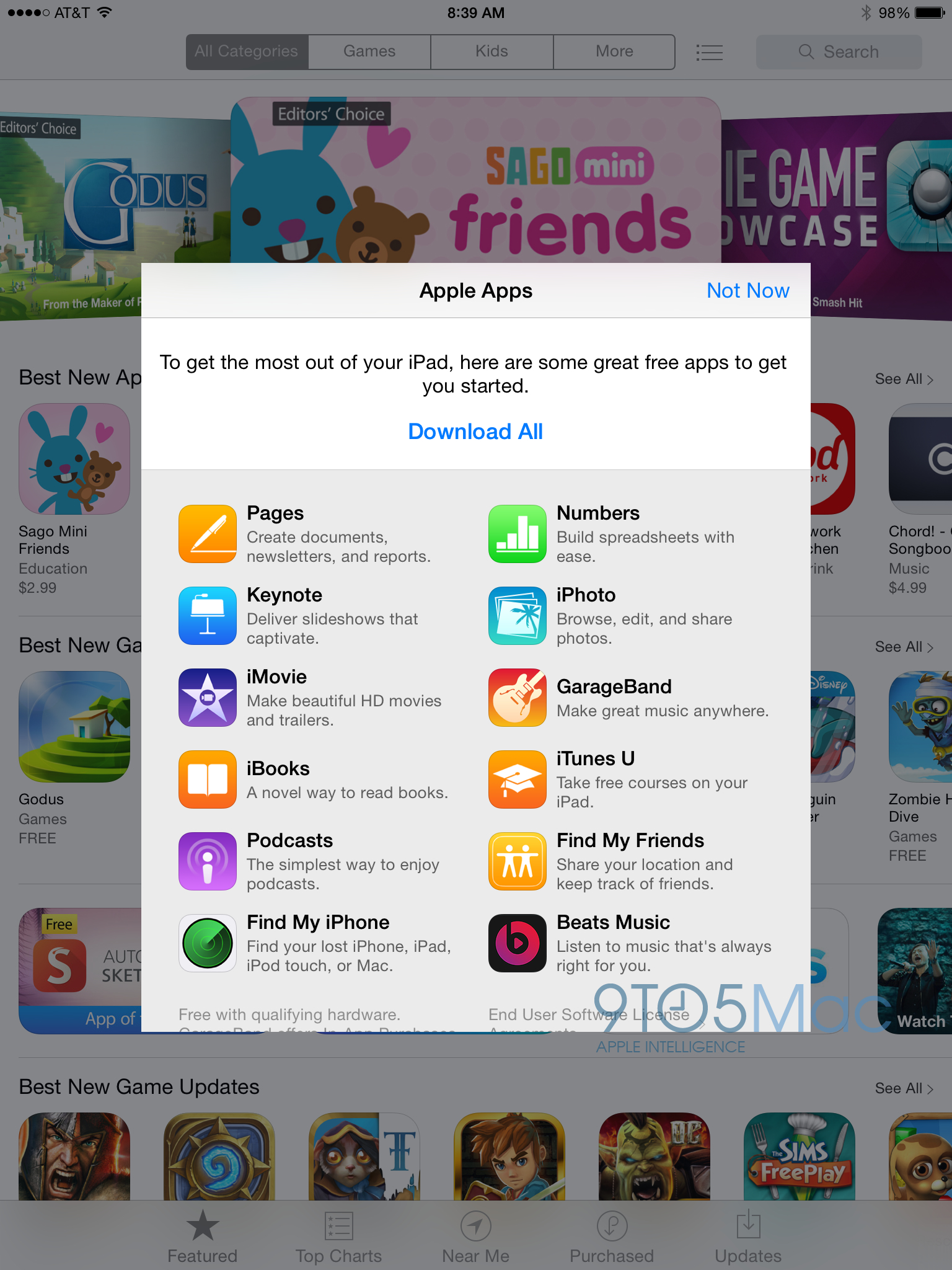
Apple has prominently featured its own suite of free apps when iOS users first open the App Store, such as its iLife and iWork apps, for a while. Now that Beats Music and Beats Electronics are officially part of the family, the Beats Music app is now appearing on this ‘Apple Apps’ list as well. Beats Music is currently the last entry in the list, described as a way to ‘listen to music that’s always right for you’.

Tapping ‘Download All’ will install Beats Music alongside Apple’s other apps. Naturally, one way for Apple to significantly increase adoption of the service is to advertise it to every new iOS user.

The view will show up for new iOS devices or by performing a clean restore to a version of iOS 7, on both iPhone and iPad.


Expand
Expanding
Close

iOS holds two-thirds of enterprise market, but drops five points to Android

Site default logo image

The latest enterprise market share data from Good Technology shows that iOS holds two-thirds of the market, at 67 percent, but has dropped five points to Android – which increased its share to 32 percent. Windows Phone remains flat (and irrelevant) at just 1 percent. (BlackBerry data is not included as the company uses its own servers and activations are invisible to Good Technology.) 
Expand
Expanding
Close

Apple unsurprisingly working with more healthcare providers ahead of iOS 8’s Health launch

Site default logo image

Reuters noted today that Apple is working with healthcare professionals at hospitals across the country, including Mount Sinai and John Hopkins, in preparation for the rollout of the HealthKit system in iOS 8. The goal is to ensure that medical personnel are ready to read data from the system when it ships later this year.

This move is hardly surprising, as Apple intends HealthKit to serve as a collection place for all of a user’s health-related data, which can be valuable—even lifesaving—during a medical emergency. In fact, the Mayo Clinic demoed the first HealthKit-enabled application earlier this year during WWDC:


Expand
Expanding
Close

UK carrier reports increased Apple Maps usage as ComScore numbers show downward trend

Site default logo image

Apple’s Maps app, introduced as part of iOS 6 in 2012, has had its fair share of technical issues and was the source of a PR crisis and the ejection of multiple long-time Apple executives. But two years later, if data from UK carrier EE is any indication, Apple Maps usage appears to be on an upward trend. Here’s the latest usage data for Apple Maps from the network:


Expand
Expanding
Close

Apple tests Family Sharing notice on App Store pages ahead of iOS 8 launch

Site default logo image

According to a new tag discovered on iOS App Store pages by iFun, it would appear that Apple is testing a new label for applications that work with the upcoming Family Sharing feature in iOS 8. The feature, which was announced at WWDC, allows a family to share a single list of purchased music, movies, and iOS apps, all charged to a single credit card. It also includes parental controls so that purchases require permission from the card holder.

Apple has given third-party developers the option to opt-out of this program, however, which would require users to purchase such apps once for each member of the family, rather than once for everyone. To ensure that there’s no confusion among those looking to buy apps for a whole family, it looks like Apple will be labeling apps that support the feature the same way it highlights apps that Game Center, in-app purchases, and other iOS features.


Expand
Expanding
Close