Ubiquiti has officially taken the wraps off its new UniFi Access product that is aimed at reimagining door access control.
Expand Expanding CloseUbiquiti launches UniFi Access to reimagine door access control



Bradley has worked at K-12 independent schools for much of the last 20 years, serving as the head of the information technology department and leading classroom technology integration. He’s well-versed in enterprise Wi-Fi, macOS and iOS system management, school technology, and SaaS tools.
Ubiquiti has officially taken the wraps off its new UniFi Access product that is aimed at reimagining door access control.
Expand Expanding Close
NetNewsWire has gone through many owners in its history, but it’s back in the rightful hands of Brent Simmons, and it’s seeing rapid development on macOS and iOS thanks to a team of open source supporters. NetNewsWire 5.1 for Mac is now available with many requested features.
Expand Expanding Close
If you follow my HomeKit Weekly series, you know that I am a sucker for anything I can make “smart.” In my never-ending quest to have an app for everything in my house, I now have a Bluetooth enabled toothbrush from Quip. I’ve been using Quip for a couple of years after I heard a podcast ad for them, and now every member of my house is using one of them. I recently got an email about a new ‘motor’ for their existing toothbrushes that adds Bluetooth support, so I jumped on to add it.
Expand Expanding Close
Now that the dust has settled on Apple’s acquisition of Fleetsmith, I want to discuss their removal of the Fleetsmith app store and why I think Apple should bring it back in a different way (as a Mac App Library), even as a possible API for third party device management systems to tie into as well.
Expand Expanding Close
I consider myself a technology enthusiast, but I am not someone who wants to maintain a complicated setup. I previously wrote about the Starling Home Hub and how it turned the Nest Homebridge project into a turnkey solution. This product is my ideal type of setup. It’s a turnkey solution that accomplishes something very technical. Homebridge is a growing platform, though. There are countless other projects going to make all of your smart home products HomeKit compatible. Suppose you want to take advantage of the growing Homebridge ecosystem (2,000 plugins) without the hassle. In that case, you’ll be delighted to hear that HOOBS is available as a Homebridge in a box setup.
Expand Expanding Close
The sudden release of iOS 14, iPadOS 14, and tvOS 14 came as a shock to many people in the Apple IT community, but Jamf announced earlier today that they were ready to support the new software. Jamf will also be ready for macOS Big Sur when it is released later this fall.
Expand Expanding Close
During Apple’s fall event, the company announced Fitness+, a new subscription service with deep integration with Apple Watch that will available later year this on iPhone, iPad, and Apple TV for $9.99/month or $79.99/year.
Expand Expanding Close
In this episode of the Apple @ Work podcast, Bradley is joined by Sam Johnson from Jamf to discuss the 2020 virtual Jamf Nation User Conference.
One of the brands that seem to transcend to all people of all ages is LEGO. I am continually amazed by how the company continues to create unique products. LEGO Harry Potter products are some of my all-time favorites, and my kids play with LEGO products almost every day. LEGO products aren’t just for offline play, though. Over the past few weeks, I’ve been testing the LEGO Education SPIKE Prime kit
Expand Expanding Close
After my experience installing the OneLink Safe and Sound, I decided to expand my OneLink setup by replacing another smoke detector with OneLink’s Smoke Detector and Carbon Monoxide detector.
Expand Expanding Close
On our newest site, Connect the Watts, we’ve put together a handy guide on how to pair Apple Watch with Peloton bike+.
Expand Expanding Close
Jamf, the Apple-focused mobile device management vendor, has announced a deeper collaboration with Microsoft Enterprise Mobility by adding iOS Device Compliance.
Expand Expanding Close
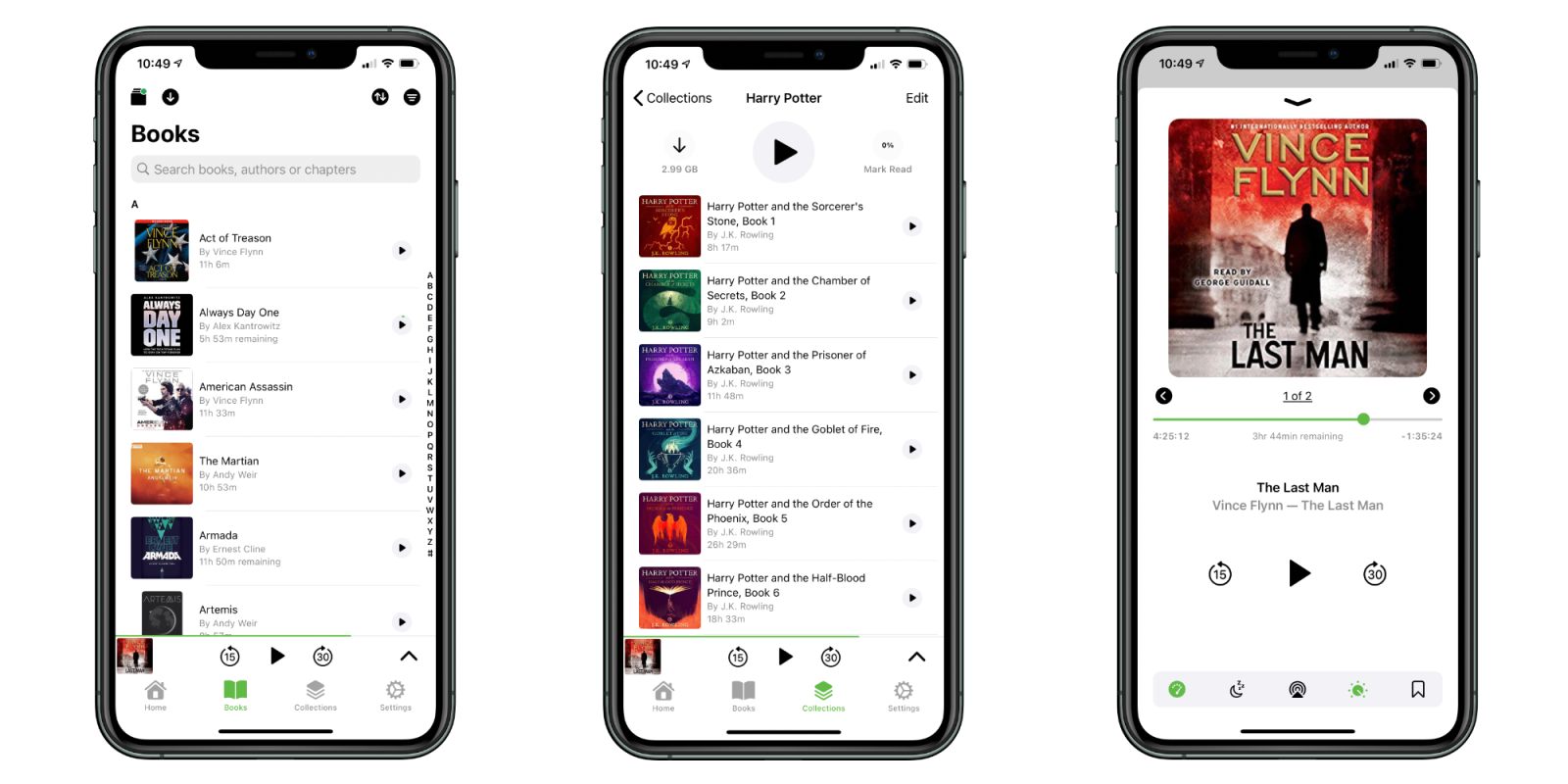
When I moved in 2013, I decided I was done with physical media for TV shows and movies and ripping all of my DVDs into digital format. I set up my first very Plex server running on an old MacBook Pro I had, and it worked well for several years. After that, I used an Nvidia Shield for several years and recently moved to an Intel NUC with a 14 TB external drive to house all of my media. I then have my setup rounded out with a Backblaze subscription to keep everything backed up. Plex is an essential part of my media life for TV and Movies. Earlier this year, I added a new type of media to my server: Plex audiobooks with the Prologue app.
Expand Expanding Close
Building an IT system entirely on campus is one challenge, as is making one for completely remote is another challenging process. Trying to come up with solutions for when some kids are off-campus, and others are on is a daunting challenge, though. As we headed into summer, we knew that some of our kids would not return for the start of school regardless of what was going on in the world, so we wanted to be ready.
Expand Expanding Close
My family has never used overhead lights unless we have company over. We prefer natural light and lamps. A few years ago, I swapped out all of our bulbs to LED light bulbs, and I invested in HomeKit compatible outlet switches as a way to control them from the Home app, HomePod with Siri, and HomeKit automations. As part of my outdoor lighting project I did earlier this year, I invested in a Philips Hue Hub with the Hue outdoor floodlights. After a few months of using them, I decided that I was ready to begin converting my switched outlets to Hue bulbs.
Expand Expanding Close
In this episode of the Apple @ Work podcast, Bradley is joined by Sunil Patro from SignEasy to talk about how the digital signature industry has evolved in the last decade.
Sponsored by iMazing: The popular iOS device manager which gives you unparalleled control over iOS and iPadOS data. Request your free trial now.
Edison announced OnMail back in April as a completely new email service to rethink a lot of the ways that we interact with email. Today, OnMail is available to purchase with free custom domain names.
Expand Expanding Close
If you’re waking up this morning finding that a lot of the services you use on the internet are not working, don’t worry, it’s not just you. Earlier this morning, an outage with CenturyLink has interrupted services for many across the world.
Expand Expanding Close
Since the Files app was released with iOS 11, it’s become a staple of how I use the iPhone and iPad. I don’t think it gets enough credit for helping bridge the gap between macOS, iOS, and iPadOS. Between the ability to access all my iCloud Drive documents on top of integration with Google Drive, it’s one of the most used apps on my iPhone and iPad.
Expand Expanding Close
In my decade of working in IT, the one area I’ve struggled to find a great cost-effective solution is internal cameras for the enterprise. There are plenty of advanced options, but they usually break the budget. After years of searching, I finally landed on UniFi Protect from Ubiquiti with its new Network Video Recorder (NVR).
Expand Expanding Close
Since receiving my Peloton bike in the middle of May, it’s been a constant in my life. Outside of days I’ve not been at home, I have only taken one day off from riding. I’ve become immersed in the community over on Reddit where I’ve enjoyed the group rides, celebrating milestones, and just chatting about connected fitness. Peloton is an ecosystem instead of just being a fitness product. A new iPhone app, Motion, is a perfect example of the ecosystem expanding with new options to extend the built-in functionality.
Expand Expanding Close
The Home app is a handy application for managing HomeKit products regardless if you’re using iPhone, iPad, or even the Mac. With tvOS 14, even Apple TV can access some HomeKit products. The Home app isn’t perfect, though. Several third-party applications can provide extended functionality or even a more focused way to access certain aspects of HomeKit. Here’s a round-up of the best third-party HomeKit apps.
Expand Expanding Close
Spike has been my email app of choice since earlier this year, and it’s continued to get better with frequent updates. Just recently, the Mac version was updated to include a new download manager, a built-in web browser, and the option to install Spike for Mac from the Mac App Store.
Expand Expanding Close
The podcast industry is at a crossroads in 2020. Since 2004, we’ve enjoyed an open ecosystem with podcasting driven by RSS feeds. Once Apple released the iTunes podcast directory in iTunes 4.9, but it’s still been based on the open RSS standard. When listeners subscribe to a show, it is directly pulled from the RSS feed and, therefore, a direct download from the podcast’s server. As Spotify has made its mark on the industry with exclusive shows, it’s worth discussing the differences between free shows, the open podcast market, and paid podcasts.
Expand Expanding Close