Apps

See All Stories

Learn about the latest news for iOS, Mac, Apple Watch, and Apple TV apps

Apps for iOS, macOS, tvOS, and watchOS power our modern world. 9to5Mac will update you on the latest news, review, and updates for all types of apps. “There’s an App for that”.

The term came became part of our vocabulary when Steve Jobs announced The App Store as part of the iPhone 2.0 software update in 2008.

Over the years, the term has become as common as kleenex for describing applications on all of our devices. Apple’s platforms have apps for just about anything from finance, banking, sports, social media, podcasting, music, and more. We have a guide for helping you discover the best ones as well. Apps are now on everything from our TV, to our smartphones, on our laptops, and all the way down to our wrists.

As new ones are released or existing ones have major updates, the team here at 9to5Mac will bring you the latest news and reviews. If you want to follow along with video footage, be sure to follow 9to5Mac on YouTube. Scroll down below our latest updates on all things relating to applications on iPhone, iPad, Mac, Apple TV, and Apple Watch.

Site default logo image

Just in time for Black Friday: Target app update brings store maps, iOS7 design and gestures

With only 2 days left until the holiday shopping season kicks off with Black Friday, Target has pushed out an update for its iOS app. Version 6.3 brings a new design full of iOS 7-inspired fonts, colors and icons. Users can more easily navigate the app with the swipe-to-go-back feature just like the one that is prominently used in the stock Mail app. Of course, the app continues to offer power shopping tools like a Store Finder, TargetLists, access to the weekly ad, and more.

As a heads up for all you Black Friday shoppers, Target has already made some of its deals available for Red customers. Stay tuned to 9to5Toys all week for instant access to the hottest deals.

What’s New in Version 6.3
Just in time for the holidays…
• Design: Say hello to iOS 7 with updated designs and swipe-to-go-back.
• Shopping List: Build your lists faster with improved typeahead results. See which items in your list are on sale. Then, simply swipe right to check it off your list.
• What’s in Store: Open the app in any Target store to be inspired by trending products, deals across the store, popular Cartwheel offers and recipes.
• Save: See an item with a Cartwheel offer? Add it to your Cartwheel app with a single tap.

Beta Features*
Thanks to your feedback, in-store features keep getting better.
• Find: Maps are now more accurate with better support for multiple floors.
Whether a specific product or a generic item, the new shopping list will show you where to find it on your store map. As you check items off, we’ll show you the next item nearest to you.
• Decide: Tap on an item in your shopping list to see what options are available and if it’s in stock in your store, even from the comfort of home.

*Available in select stores in Minneapolis, Seattle and Chicago, plus all City Target locations.

Site default logo image

Procreate for iPad updated with iOS 7 redesign, 64-bit support, 4k canvas, more

Procreate, the powerful sketching app for iPad and 2013 WWDC Apple Design Award winner, received a major update to version 2 today bringing with it support for the 64-bit Apple A7 chip as well as a new 4k resolution canvas.

The update also includes an iOS 7 redesign and a new icon to match as well as several performance enhancements.

Procreate 2 is a free update to existing users and $5.99 on the App Store for new customers. Happy creating!

Full change log below:
Expand
Expanding
Close

Site default logo image

9to5Toys Last Call: Just-Mobile iPhone stand giveaway, Mophie Helium case $35, Infinity Blade Free, iPad Air $429, Sonos free bridge/credit, more

Be sure to follow 9to5Toys to keep up with the best gear and deals on the web: Twitter, RSS Feed, Facebook, Google+

Today’s can’t miss deals:

Giveaway: Just-Mobile AluCup aluminum iPhone stand ($30 value)

Mophie Juice Pack Helium Protective Charging Case Refurb. for iPhone 5/5S $35 shipped (Reg. $99)

App/Game Deals:

  • Infinity Blade for iOS goes free ($5.99 savings)
  • Xbox One & PS4 titles: $49, Oxford Dictionary and Thesaurus freemore

iPad Deals:

Get a free Sonos bridge ($49 value) and up to $40 Amazon credit w/ a Sonos Play wireless speaker


Other great deals from today:

The best deals that are still alive:

Black Friday:

New product announcements & reviews:

  • Xbox One midnight launch info, reviews from around the web
  • PlayStation 4 launches tonight at midnight, reviews from around the web
Site default logo image

Fantastical for Mac updated with Reminders due times and performance improvements

Fantastical for Mac received a small performance update today but also added one really useful feature: Reminder due times. As we mentioned in our full review here, Fantastical 2 for iPhone recently picked up full Reminders support and today’s update brings further parity between the two apps.

Fantastical for Mac, which I find to be the easiest way to input dates and reminders, is available on the Mac App Store for $19.99 to new users and today’s update is free for existing users.

Full change log below:
Expand
Expanding
Close

How-To: Start using Maps in OS X Mavericks

Site default logo image

Apple has finally implemented a maps app in the OS X platform, and it seems to have been worth the wait. After being noticeably missing from the system, Maps (and iBooks) are helping achieve a greater consistency between the iOS and OS X platforms. After running the free Mavericks update, the Maps app icon will automatically be added to your dock.

In this guide, we’ll show you how to use the new app for everything from searching for locations to getting turn-by-turn directions set directly to your iPhone.


Expand
Expanding
Close

Site default logo image

Google+ for iOS updated with full-resolution photo backups, design tweaks, and more

Google has updated its Google+ app for iOS with a few new tweaks. Version 4.6 of the social networking application introduces full-quality photo backups for iOS 7 users, a few design tweaks in the notifications screen, and the ability to share your location with friends (similar to Apple’s own Find My Friends app which was recently updated).

What’s New in Version 4.6.0

– Full resolution backup of your photos and videos (iOS7 only)
– Updated design for the notification tray
– Share your location, see where your friends are, control who is displayed on the map
– Translate posts and comments inline
– Additional bug fixes and performance improvements

Google+ is available for free on the iOS App Store.

Site default logo image

Dropbox updated with new design for iOS 7, AirDrop, and more

As first shown by 9to5Mac, Dropbox has updated its iOS app with an all-new design for iOS 7 and several new feature and improvements. The update brings a streamlined iPad interface, improvements to the sharing process, an updated PDF viewer, and AirDrop support on iOS 7 devices.

Version 3.0 also includes fixes for HTML rendering problems and a variety of crash bugs. Along with the bug fixes, users will find that the app is now faster at certain tasks.

The update is available free to all users on the iOS App Store. You can find the complete change log below.

What’s New in Version 3.0

• Beautiful new design for iOS 7
• Streamlined iPad experience: just tap on your files and photos to toggle fullscreen
• Improved sharing and exporting makes it easier than ever to send files to your favorite apps
• AirDrop support lets you send links and files in a snap
• Seamlessly save videos to your library
• Speed! Faster launch, photo loading, and video playback
• Vanquished our most common crashes
• Fixed bug that caused HTML to render as text
• Oodles of PDF viewing updates

Site default logo image

Springpad for iOS updated with customized smart notebook templates

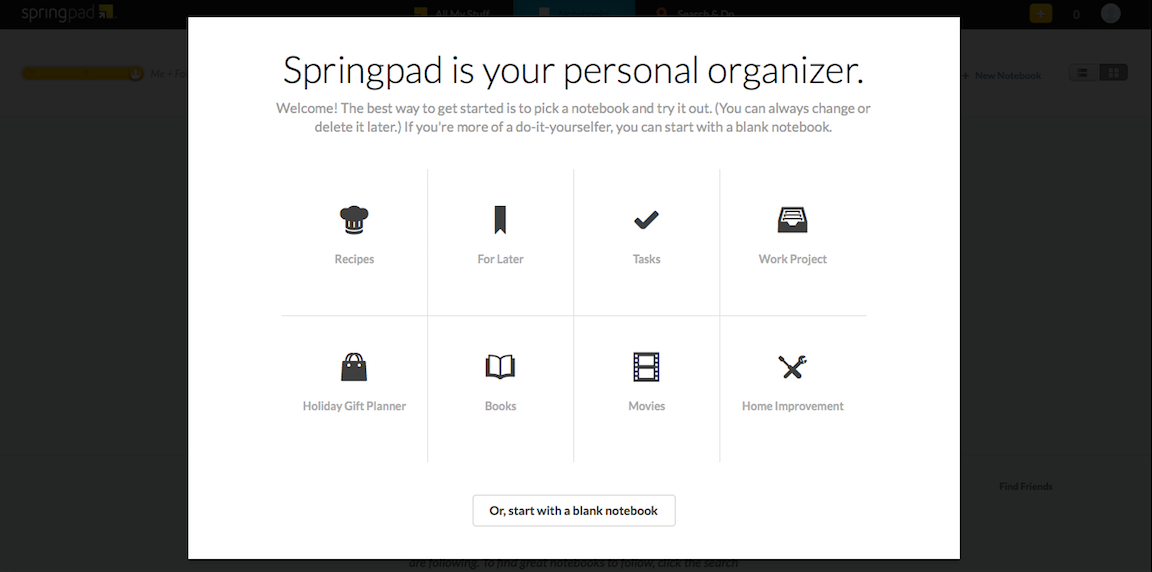
Springpad, the popular personal organizer app, makes it even easier to stay organized with their latest update by introducing customized notebook templates. These themed notebooks include different categories: Recipes, For Later, Tasks, Work Project, Holiday Gift Planner, Books, Movies, and Home Improvement. These templates are great for helping unorganized people get organized.

[youtube http://www.youtube.com/watch?v=gVl19HOdMeY]

Some of these templates are “smart templates,” meaning that the app knows the information you are putting in and either organizes it for you or provides you with more information. My family goes out to the movies frequently during the holiday season. Using the Movies template, entering  movies we want to see automatically organizes them based on whether each movie is playing in theaters, available to stream on Netflix, or available to rent. Another new template, the Holiday Gift Planner makes it easier to come up with your shopping list. When entering items, you are able to either scan the product’s bar code or type it in manually. This allows you to look up more information about the product and quickly buy it. If you are buying tech-related gifts, don’t forget to check out 9to5Mac for product reviews and 9to5Toys for the best deals this holiday season.

Springpad is a free app available for iOS, Android, Windows, Kindle and on the web.

Site default logo image

Apple updates iWork apps for Mac & iOS w/ customizable toolbar, new transitions, and more

Apple has just updated its Keynote app for iPhone and iPad today with a number of new features including new builds and transition effects.

Version 2.0.1 of the Keynote app includes new transitions including: Blinds, Color Planes, Confetti, Fall, Perspective, Pivot, and Swoosh. The new builds include: Blinds, Fly in, Fly out, Orbital, Pivot, Scale Big, and Swoosh.

Apple’s other iWork iOS apps, Pages and Numbers, also hit version 2.0.1 today with stability improvements and bug fixes.

On the Mac side of things, Apple’s Keynote, Pages, and Numbers apps all get a new customizable toolbar that gives users the ability to have quick access to their most often used tools. The Keynote Mac app also gets the same transitions and builds mentioned above for the iOS version, and Pages and Numbers get a couple other new app-specific features. Full release notes for all apps below.

Keynote iOS:

What’s New in Version 2.0.1

• New transitions including Blinds, Color Planes, Confetti, Fall, Perspective, Pivot, and Swoosh
• New builds including Blinds, Fly in, Fly out, Orbital, Pivot, Scale Big, and Swoosh
• Stability improvements and bug fixes

Keynote Mac:

What’s New in Version 6.0.1

• Customize the toolbar with your most important tools
• New transitions including Blinds, Color Planes, Confetti, Fall, Perspective, Pivot, and Swoosh
• New builds including Blinds, Fly in, Fly out, Orbital, Pivot, Scale Big, and Swoosh
• Stability improvements and bug fixes

Pages iOS:

What’s New in Version 2.0.1

• Stability improvements and bug fixes

Pages Mac:

What’s New in Version 5.0.1

• Customize the toolbar with your most important tools
• Center and edge guides are on by default
• Stability improvements and bug fixes

Numbers iOS:

What’s New in Version 2.0.1

• Stability improvements and bug fixes

Numbers Mac:

What’s New in Version 3.0.1

• Customize the toolbar with your most important tools
• Window size and placement preserved on Save
• Set default zoom in Preferences
• Stability improvements and bug fixes

Site default logo image

9to5Toys Last Call: BodyGuardz giveaway, Haswell 15″ Retina MBP $250 off, Xbox One reviews/midnight release, app deals galore, more

Be sure to follow 9to5Toys to keep up with the best gear and deals on the web: Twitter, RSS Feed, Facebook, Google+

Today’s can’t miss deals:

Giveaway: $30 worth of Apple accessories from BodyGuardz

Haswell 15″ Retina MacBook Pro from $1,750 shipped, $1,700 for .edu email addresses

Xbox One midnight launch info, reviews from around the web

Amazon Black Friday Detailed: Earliest start date ever and deals every 10 minutes

Game/App Deals: MegaMan X: $1 (Reg. $5), Amazon pre-Black Friday game sale, iOS freebies, many more

$50 iTunes gift card for $40: Save 20% on future apps, music, movies, more

Other great deals from today:

The best deals that are still alive:

Black Friday:

New product announcements & reviews:

  • PlayStation 4 launches tonight at midnight, reviews from around the web
  • The best gets better: reVOLT 12W + 12W Dual USB Car Charger for iPod, iPhone and iPad $30 shipped
Site default logo image

ESPN launches new SportsCenter app for real-time, personalized news & scores

ESPN is launching a new app today called ESPN SportsCenter, which actually replaces the old ScoreCenter app with a redesign and all new features. The app does much of what the old app did, offering real-time updates on scores for the biggest sporting events of the day, as well as breaking news, analysis, notifications, and more. You’ll also be able to add your favorite teams to customize your experience and the new app introduces a new Favorites feature for quickly accessing news and scores for the teams you want to keep up with most often.

The new ESPN SportsCenter app also includes a new Clubhouses feature that includes all content for every team and league, an Inbox for getting personalized content such as news and alerts, and enhanced game pages that feature “New native sharing and one-click GameCast access.” Also new in the app is ESPN Now, a feature that lets users get real-time scores and updates from social networks.

In addition, the new SportsCenter app has been given a number of enhancements to search and overall performance.

The free ESPN SportsCenter app is available for iPhone now.

What’s New in Version 4.0.0

– ScoreCenter is now SportsCenter
– Speed: Faster than Calvin Johnson going deep
– Favorites: Your team news and scores in an instant
– Clubhouses: Content central for every team and league under the sun
– ESPN Now: Your one-stop-shop for real-time scores and social updates
– Inbox: A dedicated home for personalized content from news to alerts to scores
– Enhanced Game Pages: New native sharing and one-click GameCast access
– Search: Easily navigate to teams, leagues, and sports to view content or add to favorites

Site default logo image

HBO GO for iOS picks up Chromecast support

[youtube https://www.youtube.com/watch?v=M9jA2km9TKM]

Google announced today Chromecast support for the HBO GO apps for iPhone, iPad, and iPod touch.

This means HBO GO subscribers can now push content from their iOS Devices to their Chromecast-connected HDTVs. HBO GO casting is also available from the website from Chrome browser.

The actual Chromecast hardware is only $35 on Amazon (and if that’s not cheap enough, keep an eye on 9to5Toys for more deals) and offers a comparable experience in many ways to AirPlay on Apple TV. HBO subscribers can download and use the HBO GO apps at no additional charge from the App Store.
Expand
Expanding
Close

Clumsy Ninja finally hits the App Store, originally announced at iPhone 5 event last year

Originally demoed at Apple’s September 2012 event, to show off the power of the new fifth-generation iPod touch, Clumsy Ninja was said to be launching that holiday season; i.e. fall 2012. However, much like with the announcement of Infinity Blade Dungeons, the app never arrived. Whereas Dungeons ended up being axed entirely, it turns out that Clumsy Ninja was just severely delayed.

After over a year since the game was demoed, Clumsy Ninja has finally hit the App Store today. At Apple’s event, NaturalMotion described the game as an ‘interactive toy’ based on “years of research”. The game centres around a cute 3D ninja, which acts similarly to a virtual pet.


Expand
Expanding
Close

Site default logo image

iMovie for Mac update enables installation on some older systems, fixes reliability issues

Apple has released a small update to iMovie for Mac today which allows the app to be installed on some older Macs. The change log doesn’t specify which machines are included, stating only that “computers with some older video cards” can now run the latest version of the video-editing software.

The update also introduces fixes for unreliable behavior when importing old iMovie projects into the updated app, which uses a new format for storing and maintaining video footage, events, and projects.

The app is availble for $14.99 on the Mac App Store for new purchases, although users who already own previous versions of iLfe may be able to update for free.

What’s New in Version 10.0.1

• Allows iMovie to be installed on computers with some older video cards
• Addresses reliability issues when updating projects and events from previous versions of iMovie

Parallels Black Friday Bundle: 8 great apps for the $79.99 price of Parallels 9 alone (82% off)

Site default logo image

The Black Friday software bundles are already streaming in and this latest from Parallels promises to be popular.  For the retail price of Parallels 9 alone ($79.99), you get Parallels 9 and a 6 month subscription to Parallels Access for iPad.  Parallels then adds Snagit screen capture tool, CleanMyMac 2 and Kaspersky Internet Security for Mac. You also get a year of Hightail (formally Yousendit) Professional plan for sending big files via email, Boom volume booster and mSecure password manager. A fantastic deal at $79.99 (make sure to click the “Bundle and Save” link), it ends December 3.

We reviewed Parallels 9 in September (excerpted below the fold) and found it to again be the best virtualization software for Mac with speed improvements for Mavericks and Windows 8.1 along with easier setup and operation.

Today’s earlier Black Friday software bundles from Adobe and Stack Social
Expand
Expanding
Close

Site default logo image

Tweetbot for Mac updated with smoother scrolling, quick-reply via notifications

Tapbots has pushed out a notable update for their popular Tweetbot for Mac Twitter client. The update brings a number of fixing, and also adds smoother scrolling and quick-reply via notifications for users on OS X Mavericks:

  • Smoother Scrolling (10.9 only)
  • You can now reply to tweets/DMs from the notification itself (10.9 only)
  • Lists and saved searches now refresh every 2 minutes instead of 4
  • Fixed the issue where you’d see ‘Please enable wifi’ when fetching your location while composing a tweet
  • Fixed the issue where searching your timeline, then scrolling to top then dismissing search field could move your timeline to the top
  • Fixed a potential issue where app could hang when using secondary windows
  • Fixed a few issues on 10.7
  • Various bug fixes and improvements for 10.9

The update is free on the App Store, and the app costs $20 for the initial purchase.


Expand
Expanding
Close

Site default logo image

Tumblr iOS app completely redesigned for iOS 7

Tumblr has finally released a complete redesign of its app for iOS 7 today. The app introduces a new streamlined look and feel for both the iPhone and iPad and also a few new features.

On top of a complete redesign for the Dashboard, you’ll notice a new UI for composing, choosing a post style, and reblogging. The updated app also includes a new autocomplete feature for tags.

What’s New in Version 3.5

We’ve completely redesigned Tumblr for iPhone and iPad! It’s faster and has a beautiful new look and feel, just like iOS 7.

• Total Dashboard makeover
• New post compose screen
• New post chooser
• New fast reblog
• Tag autocomplete!

Tumblr version 3.5 is available now for iPhone and iPad. Screenshots of the iPad app below:

Site default logo image

Google Chrome iOS app updated w/ synced Autofill, long press for related image search

Google today released an update to its Chrome app for iOS that it first announced last week and released for Android. As promised, Google has added a new synced Autofill feature that allows users to autofill forms in a few taps and also sign into their Google account on Mac or other iOS devices to sync the data.

Version 31 of Chrome for iOS also adds a new long press feature for images. When holding an image with a long press, Chrome will now automatically run a search for related images.

In addition, Google says the update brings stability and security enhancements.

What’s New in Version 31.0.1650.18

• Fast form completion with Autofill
Tired of filling out web forms with the same information time and time again? The Autofill feature lets you complete forms with just a few clicks. Sign in to sync this data from your computer to your iPhone or iPad and save even more typing.
• Long press on an image to search for related images
• Stability / security improvements and bug fixes

Site default logo image

9to5Toys Last Call: SLXtreme iPhone case giveaway, Belkin Thunderstorm iPad theater $130+, Logitech Bluetooth headset $21, more

Be sure to follow 9to5Toys to keep up with the best gear and deals on the web: Twitter, RSS Feed, Facebook, Google+

Today’s can’t miss deals:

Giveaway: SnowLizard SLXtreme iPhone 4/4s solar powered, waterproof case ($130 value)

Belkin Thunderstorm iPad home theater speaker case 30-pin $130, Lightning $150 (Reg. $200)

Logitech Bluetooth over-ear headphones+noise cancelling mic: $21

Game/App Deals: Angry Birds SW (Mac) $2, Deus Ex Human Revolution (Mac) 75% off, iOS freebiesmore

Stack Social is offering up a very solid Black Friday Bundle this week.  11 great apps for $49.99, chance to win an iPad, and no lines to wait in. Get in there now.

Other great deals from today:

The best deals that are still alive:

Black Friday:

New product announcements & reviews:

  • PlayStation 4 launches tonight at midnight, reviews from around the web
  • The best gets better: reVOLT 12W + 12W Dual USB Car Charger for iPod, iPhone and iPad $30 shipped
Site default logo image

Google drops Currents for Newsstand, iOS app coming sometime in 2014

A quick news blip for the 12 remaining Google Currents users on iOS as the company just announced Currents will be going by the wayside in favor of Google’s aptly named “Newsstand.” Aside from Google’s ridiculously original name, the company is ready to place all of your magazine, newspaper, blog and news site subscriptions in one place. Any other iOS users having a deja vu moment with the “Newsstand” name right about now?


Expand
Expanding
Close

Site default logo image

PayPal iPhone app updated w/ iOS 7 redesign, withdraw to bank, QR/bar code scanning, more

PayPal is releasing an updated iPhone app today that on top of introducing a redesign for iOS 7 also introduces a few new features.

You’ll notice a number of UI tweaks in the new app and a redesign that fits in with the look and feel of iOS 7, but you’ll also now be able to withdraw money from your PayPal balance to your bank account within the Wallet tab. Also new is the ability to pay by scanning QR and bar codes a select retail partners:

Paying just got even easier! Scan a QR or bar code to pay at select merchants

In addition, version 5.2 of PayPal for iPhone includes the ability to choose your home screen for fast access to the features you use most.

What’s New in Version 5.2

5.2
• Need to withdraw some cash from your PayPal balance to your bank? You can do that in your Wallet
• Check out our new iOS7 look and feel
• Paying just got even easier! Scan a QR or bar code to pay at select merchants
• Choose your start screen for fast access to the info you need
• We’re still hard at work finding and fixing bugs

We’re always listening, so please send comments, suggestions, and any words of encouragement to mobile-apps@paypal.com.

Hatch for iPhone delivers playful Tamagotchi-like experience to iOS [Review]

Site default logo image

The 90s brought with it a plethora of culture and fun (myself included) from breakthrough Nintendo handheld video games to pop music and weird boy bands (like Britney Spears and N*SYNC). We recently witnessed N*SYNC reunite, but something else from the 90s needed modernizing: Tamagotchi, the digital pet you fed and loved as a kid.

That’s where Hatch steps in… err, hatches… right on your iPhone!

In a collaborative effort between Impending and Realmac Software, who last teamed up to deliver Clear, the two studios deliver on what is an absolutely adorable and lovable game for the iPhone. Check out my complete hands-on review of the long-anticipated Hatch (and lots of entertaining photos) below:
Expand
Expanding
Close

Site default logo image

Xbox One SmartGlass companion app for iPhone and iPad now available

Microsoft has released its companion iOS app for the new Xbox One console today, according to Engadget. A similar app has existed for the Xbox 360 for some time now, but owners of the newest Microsoft console will need to use the app released today.

The app allows Xbox One users to control their Xbox remotely using their iOS device, enhance their gaming and media-viewing experience with second screen functionality, and access many Xbox Live features such as messaging, achievements, and more.

Xbox One SmartGlass is the perfect companion app for your Xbox One, both in your living room and on the go. Connect and control your Xbox One. Stay connected with the games and gamers you like. And add a new dimension to your console entertainment with the mobile device you already own.

In the living room:
•Navigate your Xbox One console using your device’s keyboard and touch
•Control your media and set top box with the SmartGlass remote control
•Browse the web on your TV using your mobile device
•Enhance what you are watching or playing with SmartGlass companions
•Increase performance with faster connections and reliability

In the living room and on the go:
•Search, browse, and pin content to play on your Xbox One console
•Track achievements, get game help, message friends, and watch game clips

The app is available for free on the iTunes App Store.