Mac

See All Stories

Apple’s Mac lineup consists of MacBook, MacBook Air, MacBook Pro, iMac, Mac Pro, and Mac Mini. The Mac runs macOS for its operating system.

Mac lineup

History

The Mac is Apple’s lineup of computers, and it can be considered the company’s oldest product. The name “Mac” comes from the original Macintosh, which was introduced in 1984 and is also considered the first personal computer for the masses to have a graphical user interface. The first Macintosh hit the stores on January 24, 1984, costing $2,945.

Among all these years, Apple has introduced many different Mac models, ranging from desktops to laptops to professional tower machines. The current lineup consists of the MacBook Air, MacBook Pro, Mac mini, iMac, and Mac Pro. However, there have been other Mac models were discontinued, such as the eMac, MacBook, and iMac Pro.

The history of modern Macs began in 1998, a year after Steve Jobs returned to Apple. Apple had dozens of Macintosh computers at that time, but Steve decided to rethink the entire lineup. In 1998, Apple announced the iMac G3, which ditched the floppy disk and serial ports in favor of USB connectors.

Macintosh and iMac G3.

Unlike the Macintosh, the first iMac was considered a huge success — not only for its technology, but also for its unique design with colorful translucent plastic. Apple quickly expanded the Mac lineup with other models, which included the iBook and PowerBook (which became the MacBook and MacBook Pro) and the PowerMac, which is now the Mac Pro.

macOS

What makes a Mac the Mac is the macOS operating system, which has also had a long history since the introduction of the first Macintosh. Initially called Mac OS, the operating system was rebuilt when Steve Jobs returned to Apple.

The first version of Mac OS X was released on March 24, 2001 with a new interface that is still present in some ways in current versions of macOS. Apple’s desktop operating system comes with many free applications such as Pages, Keynote, Numbers, iMovie, and GarageBand.

With macOS, users also have access to deep integrations with other Apple devices. For instance, you can answer calls and send SMS from your iPhone using your Mac. Handoff lets you switch from one device to the other and pick up where you left off. Apple Watch users can unlock their computer without entering a password, and you can even copy and paste between devices.

macOS Sonoma

Apple’s desktop operating system is also integrated with services offered by the company, such as iCloud, Apple Music, and Apple TV+.

The current version of macOS is Sonoma (version 14), which features new slow-motion screen savers, widgets on desktop, camera effects on FaceTime and other apps, web apps, passkey sharing, improved PDF support, and Game Mode. The update also comes with a new API that lets developers easily port Windows games to macOS.

Architecture Transitions

The Mac has had three major architecture transitions in its history. Apple’s first computers ran on Motorola processors, but the company decided to migrate to the new PowerPC platform in 1994. While this brought benefits at the time, the PowerPC processors were not delivering what Apple expected.

It was in 2005 that Apple confirmed the transition from PowerPC to Intel. Intel processors had become faster and more efficient than PowerPC, which enabled the development of new Mac computers that were more powerful and also more compact. Developers have been given access to a Developer Transition Kit running Mac OS X Tiger with Intel Pentium 4 to update their apps before the transition begins.

Power PC, Mac OS X, and Intel processor.

Apple said that the transition would begin in June 2006 and be finished by the end of 2007. However, the transition to Intel was fully completed in August 2006 when the company replaced the PowerMac with the new Intel Mac Pro.

As the years went by, Apple once again felt the need to have more powerful and efficient processors for its computers. This time, the company was already working on its own chips for the iPhone and iPad. In June 2020, Apple confirmed that it was changing the architecture of the Mac, now from Intel to ARM chips, which are called Apple Silicon.

Apple offered a Mac mini DTK running on the same A12Z Bionic chip as the 2020 iPad Pro. This way developers could once again update their apps ahead of the transition. In addition to being more powerful and energy efficient, the ARM architecture of Apple Silicon chips has enabled Macs to run iOS apps for the first time.

Apple M1 chip | Mac

The first Apple Silicon Macs were released in November 2020 with the M1 chip. The company later introduced more powerful variants of the M1 chip, called M1 Pro, M1 Max, and M1 Ultra. Macs with Apple Silicon have become known for being more powerful while consuming much less power, which has resulted in MacBooks with extended battery life.

In June 2022, Apple introduced the M2 chip, which is around 20% faster than the M1 and also supports more RAM. M2 also has more powerful variants: M2 Pro, M2 Max, and M2 Ultra.

Apple unveiled the M3, M3 Pro, and M3 Max chips in October 2023. The main highlight of this generation is the 3 nanometer technology, the same as the A17 Pro chip. The M3 family also features better GPUs with support for hardware-accelerated ray-tracing.

Current Mac lineup

Apple currently sells a variety of Mac computers, which includes MacBooks, Mac mini, iMac, and Mac Pro. While some of the Macs have already been updated with an Apple Silicon chip, others remain with Intel processors.

MacBook Air

The MacBook Air is Apple’s most affordable laptop and it has become popular for its light, compact design. The 2022 version is powered by the M2 chip and is offered with 8GB, 16GB, or 24GB of RAM. Plus, it has a new, edge-to edge 13.6-inch Retina display.

The laptop features Touch ID and has two Thunderbolt 3 compatible USB-C ports, a MagSafe connector for charging, and a headphone jack. Prices start at $1099 in the US. It’s offered in silver, space gray, starlight, and midnight.

M2 MacBook Air.

A year later, Apple introduced the first 15-inch MacBook Air. It has essentially the same hardware as the smaller version with a similar design, but with a larger display. Prices start at $1299 in the US.Apple is still selling the M1 MacBook Air for prices starting at $999.

MacBook Pro

The 2023 MacBook Pro is available in multiple versions, and customers can choose between 14-inch and 16-inch screen sizes. For the first time, Apple has introduced a less expensive version of the 14-inch MacBook Pro with the base M3 chip. This version has the same design and display as the high-end versions, except that it only has two USB-C ports instead of three.

M3 MacBook Pro

The most expensive versions of the MacBook Pro are equipped with the more powerful M3 Pro and M3 Max chips. The laptop can be configured with up to 128GB of RAM and 8TB SSD. These versions also come in a new Space Black color.

Unlike the MacBook Air, the MacBook Pro comes with an HDMI port and an SD card reader. It also features MagSafe and Touch ID on the keyboard. Apple no longer sells MacBooks with the Touch Bar. Prices start at $1,599 in the US.

Mac mini

Mac mini is the cheapest Mac currently available since it’s basically a desktop without a built-in display or other peripherals. The base model with the M2 chip features one Ethernet port, two USB-C/Thunderbolt 4 ports, HDMI 2.0, two USB-A ports, and a headphone jack.

Apple sells a more powerful version of the Mac mini with the M2 Pro chip, which also comes with four USB-C ports instead of two. Mac mini can be configured with up to 32GB of RAM and up to 8TB of storage. Customers can also opt for a 10 Gigabit Ethernet port. The Apple Silicon Mac mini is only available in silver, while the now discontinued Intel model was available in space gray.

Apple Silicon Mac mini.

Prices for the Mac mini start at $599 in the US. Again, it’s worth noting that it doesn’t come with a keyboard or mouse in the box – you need to buy them separately or use your current ones.

Mac Studio

Mac Studio represents a new category between Mac mini and Mac Pro. It features a design based on the Mac mini, but with a taller body to support the more powerful hardware and also a better cooling system.

The new Mac Studio is targeted at professional users who work with demanding tasks such as video editing, 3D rendering, and machine learning. 

Embraced by creative pros everywhere, Mac Studio now delivers next-generation power in the form of the lightning-fast M2 Max and the boundary-breaking M2 Ultra. It packs outrageous performance and extensive connectivity in an unbelievably compact form, putting everything you need within easy reach and transforming any space into a studio.

By default, Mac Studio already comes with the M2 Max chip, 32GB of RAM, and 512GB SSD storage. A more expensive option lets users customize Mac Studio with M2 Ultra. While M2 Max has a 12-core CPU and a 30-core GPU, M2 Ultra doubles all of those specs. The new chip has a 24-core CPU and a 60-core GPU.

Mac Studio can also be configured with up to 192GB of RAM and 8TB of SSD storage. The machine offers up to six Thunderbolt ports, 10 Gigabit Ethernet, headphone jack, two USB-A ports, and one HDMI port.

Mac Studio

Apple has been rumored to be working on new versions of this machine with the M3 Max and M3 Ultra chips. However, these versions may not be ready until 2025. Bloomberg’s Mark Gurman said in November last year that the M3 Ultra chip “hasn’t yet gone into broad testing” inside Apple.

In the US, prices for the Mac Studio with M2 Max chip start at $1999. The M2 Ultra chip version starts at $3999. Just like the Mac mini, Mac Studio doesn’t come with a keyboard and mouse in the box. You can find accessories for your Mac Studio here.

iMac

iMac is Apple’s most popular desktop computer with an all-in-one construction. It features a 4.5K display in its 24-inch version and a 5K display in the 27-inch version. At the same time, Apple still sells an entry-level iMac with a regular 1080p display.

The 24-inch iMac is the first to feature the M1 chip, the same as in the Mac mini, MacBook Air, and MacBook Pro. This allowed Apple to introduce a completely redesigned model with a slimmer design, which is also offered in seven new colors. Customers can customize the new 24-inch iMac with up to 16GB of RAM and 2TB of storage.

Site default logo image

The company ships the 24-inch iMac with Magic Mouse and Magic Keyboard, plus a Lightning cable for recharging accessories. Prices in the US start at $1299. Apple has discontinued its old 21.5-inch iMac and the 27-inch iMac 5K.

Mac Pro

Mac Pro is a computer built for professional users who depend on extremely powerful hardware. Available in tower and rack versions, it has a completely modular design. That means users can replace RAM, SSD, GPU, and other internal components.

By default, it features four USB-C/Thunderbolt 3 ports, two USB-A ports, and two 10Gb Ethernet ports. However, the ports can be expanded using the PCI Express slots. Apple also ships the computer with a Magic Mouse and Magic Keyboard, but it does not come with an external monitor included.

All models feature Intel Xeon W processors, which are the most powerful processors offered by Intel. Consumers can configure Mac Pro with up to 28-core processor, 1.5TB RAM, and 8TB of SSD storage. In addition to supporting multiple dedicated GPUs, Apple also offers the Afterburner card — which accelerates the decoding of ProRes videos.

The company recently updated the Mac Pro with new graphics card modules, which include Radeon Pro W6800X and Radeon Pro W6900X.

Site default logo image

Mac Pro prices start at $5999 in the US.

Rumors about upcoming Macs

Top stories about the Mac

Apple considered ditching iconic Apple Menu for Control Center in OS X Yosemite

Site default logo image

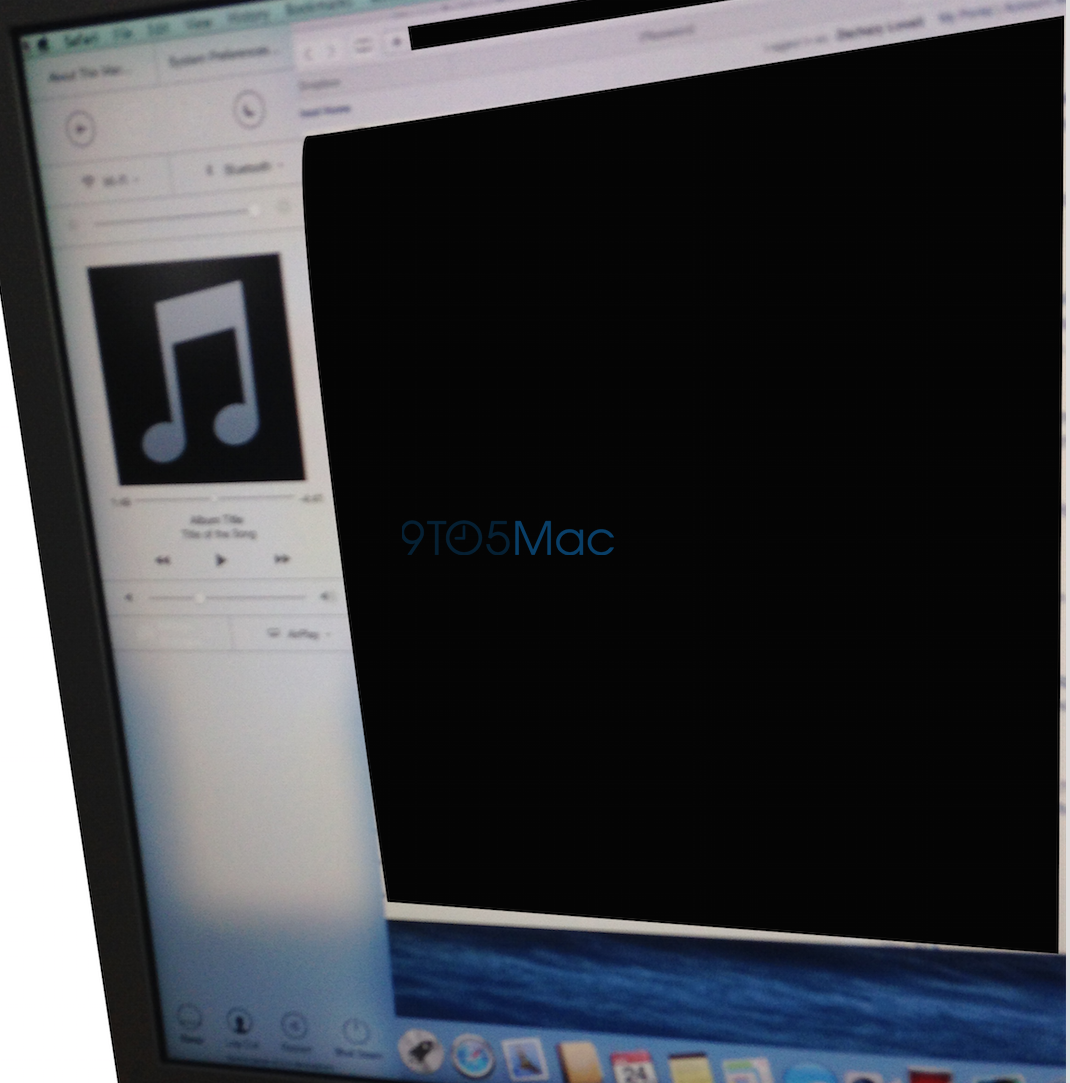
In addition to the comprehensive redesign, OS X Yosemite could have made a significant change to how the Mac operating system functioned since it originally shipped just over thirty years ago. The above image from a source shows a March build of OS X Yosemite that featured a Control Center panel. The panel did not end up shipping in the first beta of Yosemite and was not announced on the WWDC stage last week, but Apple definitely considered including it.

In fact, developers have located numerous code strings in the first Yosemite build that confirms Apple’s testing of an OS X variant of Control Center:


Expand
Expanding
Close

OS X Yosemite introduces iMessage screen sharing, FaceTime Audio conference calls with iOS 8

Site default logo image

Apple has made a few new changes to its first-party voice and text services in the newest versions of its mobile and desktop operating systems. Some users are reporting that iOS 8 now features the ability to create conference FaceTime Audio calls. Previously FaceTime audio calls could only be made from one user to another, but now you can add additional users to a call in progress.

OS X Yosemite sports a new addition to its iMessage capabilities. While screen sharing has always been possible over alternative services like AIM, Apple now allows you to use the built-in screen sharing feature in the Messages app over an iMessage account. Unfortunately the feature seems to be broken in the first Yosemite beta, but it is expected to be functional by the time the software ships.


Expand
Expanding
Close

Site default logo image

Easter egg in icons for Swift files features ‘Here’s to the crazy ones’ from Think Different campaign

In a throwback to Apple’s Think Different campaign, the icon used by OS X for Swift files, Apple’s new programming language. Swift documents have the file extension ‘.swift’.

The code seen in the icon makes reference to the iconic speech, with functions named ‘heresToTheCrazyOnes’ and ‘villify(troubleMaker: NSObject)’. The code also generates collections of ‘misfits’, ‘rebels’ and ‘troublemakers’.


Expand
Expanding
Close

Apple brings Multipeer Connectivity to Mac, enables cross-platform nearby networking w/ iOS

Site default logo image

In iOS 7, Apple introduced nearby networking features called Multipeer Connectivity to allow iOS devices in proximity to talk to one another over WiFi or Bluetooth even without a traditional Internet connection. Developers have used the tech for everything from exchanging files and other data between devices, to remote control functionality, and multi-device experiences like the iTranslate Voice app that sends real-time speech translated from one device to the other. It’s also the tech behind the local anonymous messaging service FireChat that got some attention earlier this year. Now, Apple is opening up the Multipeer Connectivity APIs to OS X starting with Yosemite and in the process allowing cross-platform nearby networking between Macs and iOS devices. 
Expand
Expanding
Close

iCloud Drive enables non-Mac App Store apps to use iCloud document storage

Site default logo image

Prior to OS X Yosemite and Apple’s new iCloud Drive announced on Monday, Mac developers were explicitly required to succumb to the restraints of the Mac App Store to allow their customers to use iCloud file storage within their apps.

Now with the introduction of iCloud Drive, which gives users much clearer access to content stored in iCloud, developers can distribute their apps outside of the Mac App Store and trust that their users can opt to use iCloud for document storage as if they were sold in the Mac App Store…
Expand
Expanding
Close

OS X Yosemite: Top 5 features (Video)

Now that we’ve had some time to get used to OS X Yosemite, it’s time to explore some of its top features. This is a big step up from Mavericks when it comes to iOS integration and design. Yosemite isn’t quite the drastic change we saw from iOS 6 to iOS 7, but there are definitely visual differences. It’s no surprise that iOS 8 has plenty of exciting features available, but the same can be said about OS X Yosemite as well…


Expand
Expanding
Close

Site default logo image

Retina iMac references discovered in OS X Yosemite code

Following the discovery of reference to new iMac models in OS X, Macbidouille has found code in the new OS X Yosemite developer preview that points to Retina resolutions for the yet to be announced product. Specifically, the file points to scaled resolution modes like those available for Retina MacBooks including, according to the report, 6400 x 3600 (probably a 3200×1800 HiDPI), 5760×3240 (2880×1620 HiDPI) 4096×2304 (2048×1152 HiDPI) resolutions. The report notes that the native resolution of the machine appears to be missing from the file as it only lists resolution of the various scaling modes.

Much like the Retina MacBook Pro with a native resolution of 2880 x 1800 is capable of scaling assets at 3840 x 2400 down to 1920 x 1200 and producing sharper, clearer images in the process, the report speculates the 6400 x 3600 resolution would be scaled down to 200×1800 HiDPI. 

Apple has long been testing Retina resolution iMacs and rumors last year and earlier this year suggested the company could also release a new lower-cost iMac sometime this year. Apple last refreshed its iMac lineup in September of last year adding updated processors and more storage at the same price point with the same slim, redesigned exterior introduced in the previous generation. Apple’s current iMac lineup includes a 27-inch model with a resolution of 2560-by-1440 and a 21.5-inch model with a resolution of 1920-by-1080. 

New for audio in iOS 8 & Yosemite: MIDI over Bluetooth LE, new inter-app audio features, more

Site default logo image

There are some interesting new advancements for audio coming in iOS 8 and OS X Yosemite that Apple didn’t discuss during its keynote presentation earlier this week. Two of the big new audio based features for end users, in addition to revamped CoreAudio APIs for developers, include MIDI over Bluetooth LE support and new features for the inter-app audio feature Apple first introduced with iOS 7.
Expand
Expanding
Close

Site default logo image

Future Macs could lose the cables as Intel demos next-generation wireless charging, docking & displays

If you’re like me and love technology but hate the rats nest of cables it requires, we could be in for some good news. Intel has demonstrated a system that could be incorporated into future computers that allows wireless connectivity for power, displays, and connection to accessories like external drives.

Wireless charging is nothing new, of course, but existing systems are something of a mess. They rely on inductive charging, which is ultra-short range and only suited to low-power devices like smartphones, and there are several competing and incompatible systems in use.

The new system demo’d by Intel uses magnetic resonance charging, which can cope with the power demands of laptops, and works through up to two inches of wood – meaning that the charging plate can be hidden out of sight under a desk. The same charging plate can also charge multiple devices simultaneously, so a single installation under your desk could potentially power your Mac, iPad, iPhone and wireless headset.

For wireless connection to displays and accessories, Intel uses the Wireless Gigabit Alliance system WiGig, which allows speeds of up to 7Gbps over a distance of a few feet – good enough for a completely wireless desk, and rendering my home-brewed iDesk redundant.

The technology will be supported by Skylake, a chip that is currently two generations down the road, and likely to first appear in laptops in 2016. Apple has not yet signed-up, but Asus, Dell, Fujitsu, Lenovo, Logitech, Panasonic and Toshiba are all on board, so it is likely just a matter of time.

(Via CNET)

iOS 8 turns iPhone into the ultimate game controller for iPad & Mac, Game Center hits 130M monthly active users

Site default logo image

Apple took some time to talk gaming during a presentation closed to the public yesterday at WWDC. While noting that gaming is now an area that Apple is “pushing on very strongly”, the company also announced a new feature coming for gamers and developers: Controller Forwarding. 
Expand
Expanding
Close

Site default logo image

Creators of Alfred say OS X Yosemite’s Spotlight is not another case of the Sherlocks

Sherlocked. It’s a word that often gets thrown around after Apple casually integrates a feature offered by some other software into one of its operating systems. Its origin goes back to a time before OS X’s Spotlight feature when Sherlock was the Internet and file search software offered by Apple. Watson, at the time, was a third party utility by Karelia Software that offered very similar functionality, and one of Apple’s versions of Sherlock closely resembled the popular Watson.

Yesterday Apple introduced a more powerful version of Spotlight on OS X after quite a while of letting the feature remain unchanged. The easiest way to describe the updated version of Spotlight is to compare it to the popular Mac utility Alfred. For this reason, several Alfred users voiced concern about Alfred’s fate going forward, enough people that its creators addressed Alfred’s place in a Yosemite world on their blog:

A few users have voiced concerns that Spotlight in Yosemite looks more like Alfred, and wonder whether this changes anything for Alfred and his future.

What you have to remember is that Spotlight’s primary objective is to search your files and a small handful of pre-determined web sources. Meanwhile, Alfred’s primary objective is to make you more productive on your Mac with exceptional and powerful features like Clipboard History, System commands, iTunes Mini Player, 1Password bookmarks, Terminal integration, fully bespoke and customisable user-created workflows and much, much more.

Their message is very similar to last year’s WWDC when Apple introduced its iCloud Keychain which closely resembles a specific feature of 1Password and similar apps. 1Password has since shipped several updates adding new features to its software on the Mac, iPhone, and iPad, and it sounds like Alfred is planning to do just the same.

In fact, we’ve been working on some pretty special and truly amazing new features that you’ll hear about over the next few months. We think these will blow your mind and can’t wait to tell you more.


Apple makes it easy for devs (and others) to screencast iOS apps with OS X Yosemite

Site default logo image

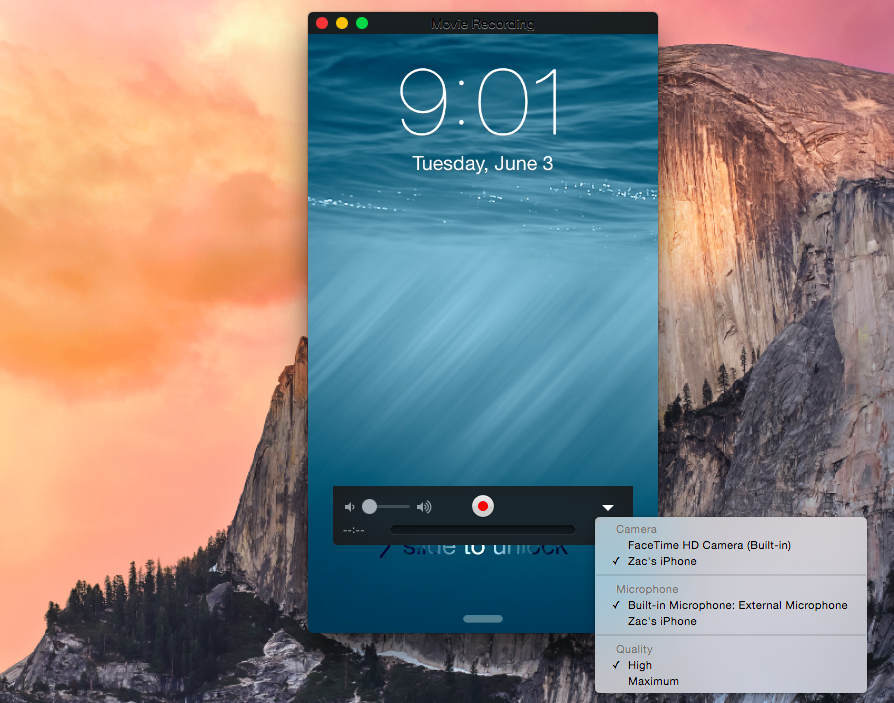
Apple has added a handy feature into OS X to easily capture the screen of an iPad or iPhone on the Mac itself. Apple positions the feature as a way to help developers quickly make app previews, which Apple introduced as part of iOS 8’s improvements to the App Store, but there is no reason why this couldn’t be used by others for different purposes.

When plugging an iPad or iPhone running iOS 8 into a Mac running OS X Yosemite via USB, the iOS device now shows up as a standard camera input. This means any video app can be used to record the screen of the iOS device without the need for additional hardware.

Although Apple is targeting the feature at developers in its documentation for making app previews, it is not limited to being a developer-only feature.


Expand
Expanding
Close

WWDC 2014 keynote recap: Everything you need to know about iOS 8 and OS X Yosemite (Video)

Apple’s WWDC 2014 keynote was home to plenty of announcements including iOS 8 and OS X Yosemite. There was quite a bit of information covered during the two hour presentation, but luckily we didn’t miss a second of the action.

If you don’t feel like sitting through the entire keynote video, we’ve put together a condensed version to give you the rundown on everything that was announced. Find out all that you need to know about iOS 8 and OS X Yosemite in our keynote recap below…


Expand
Expanding
Close

Here are all 24 new dictation languages arriving in iOS 8 & OS X Yosemite

Site default logo image

During its unveiling of iOS 8 and OS X 10.10 Yosemite yesterday, Apple mentioned that it’s adding 24 new dictation languages, but it didn’t specify what those languages would be. Dictation, a feature available on both iOS and OS X, uses speech-to-text technology powered by Nuance to let users input text using only their voice rather than a keyboard or touchscreen.

Apple has gone from just 8 languages (with a few variations for some) to over 30 in Yosemite. In case you’re curious if your language will make the cut by the time the new operating systems are released this fall, below we’ve included a full list of new supported languages and variations by country:


Expand
Expanding
Close

Intel’s Broadwell chip makes rumored fanless MacBook Air a real possibility

Site default logo image

Rumors of a fanless 12-inch MacBook have been doing the rounds for quite some time now, and Intel’s announcement last night of a new 14nm Core M Broadwell processor could make it a reality.

The Intel® Core™ M processor will deliver the most energy-efficient Intel Core processor in the company’s history. The majority of designs based on this new chip are expected to be fanless …


Expand
Expanding
Close

Polls: What are your first impressions of iOS 8 and Yosemite?

Site default logo image

Now you’ve had a chance to catch up on our coverage of the main new features of iOS 8 and OS X Yosemite, and seen our hands-on videos (iOS 8 overview, OS X Yosemite overview, iOS 8 Spotlight and iOS 8 interactive notifications), we’d like to hear your first impressions of each.

Whether you’re blown away by all the new features, disappointed by things you wanted but didn’t get, or just a bit underwhelmed, here’s your chance to let us know.

We’ve summarized the features Apple has chosen to highlight, and there are separate polls for each platform … 
Expand
Expanding
Close

Apple brings iOS SMS and phone calling to the Mac

Site default logo image

In addition to announcing new integration between iOS and Mac OS X with AirDrop support and its new Handoff feature, Apple announced today that it’s bringing SMS and phone calls to the Mac. That means that you can now have your SMS text messages and phone calls from your iPhone arrive as notifications on your Mac. Users will be able to respond to messages and even use the Mac as a speaker phone in order to complete a phone call. Previously iOS users only had access to iMessage messages and FaceTime on the Mac.
Expand
Expanding
Close

Apple improving cross-platform integration between iOS and OS X, cross-platform AirDrop, Handoff, instant hotspot and more

Site default logo image

Apple wants users to be able to smoothly move between their Macs and iOS devices. AirDrop now interoperates between Mac and iOS devices. However, it goes further. Handoff allows you to send a document from your Mac to your iOS device, just by being in close proximity to each other.

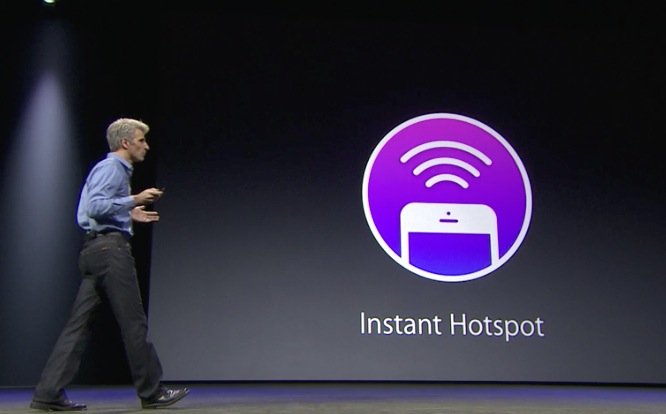
The Mac also notices when an iOS device is nearby for Personal Hotspot. The phone appears in the WiFi menu, shown above, and with one-click the phone connects to the Mac and the devices start tethering.


Expand
Expanding
Close

WWDC 2014 Roundup: Enhanced iOS 8, redesigned OS X 10.10, new hardware (plus fresh details)

Site default logo image

Despite Apple CEO Tim Cook teasing that Apple would introduce new products “across 2014,” so far this year the company has simply released a cheaper version of the iPhone 5c in select markets, marginally faster MacBook Airs, and the 2012 fourth-generation iPad at a lower price.

But on Monday, June 2nd, Apple will make major announcements that will indicate the immediate future of its two major platforms: iOS and OS X. The Cupertino company will share details behind the changes in iOS 8, a redesigned Mac operating system, and perhaps even new hardware.

Over the past several months, we have exclusively reported the majority of the news to expect next week and you can find our extensive roundup (along with new details) below:


Expand
Expanding
Close

Site default logo image

Trademark filings w/ Apple connections point to future OS X names, “Healthbook” and HealthKit”

Right as Apple confirmed Yosemite for OS X 10.10, a few more future OS X names have surfaced today in trademark filings.

In April trademark filings linked to Apple popped up that appeared to show possible California related names for future versions of OS X. Today a few more have appeared in trademark filings that aren’t specifically filed by Apple but have links to the company, according to MacRumors. Sequoia, Mojave, Sonoma, Ventura as well as variations like “OS X Sequoia” were all filed for in March in Trinidad and Tobago by a company that apparently has ties to Apple. 

Those names join the previous trademark filings that included: Yosemite, Redwood, Mammoth, California, Big Sur, and Pacific, Diablo, Miramar, Rincon, El Cap, Redtail, Condor, Grizzly, Monterey, Tiburon, Farallon, Skyline, Shasta, and Sierra.

Apple announced it would be sticking with the California named themes when it first revealed OS X Mavericks last year, and today it seems to have confirmed it will go with “Yosemite” when it unveils OS X 10.10 during its WWDC developer conference next week.

MacRumors also notes today that “healthbook” and “healthkit” trademark filings have been discovered with possible links to Apple, but there’s no proof Apple is actually behind them. We previously revealed the details of Apple’s upcoming Healthbook app that is expected to be unveiled during WWDC.

Apple’s OS X 10.10 WWDC banner appears to point to ‘Yosemite’ or ‘El Capitan’ name

Site default logo image

We’ve been watching as banners go up at Moscone West in preparation of Apple’s WWDC developer conference on Monday, and now the company appears to have revealed “Yosemite” as the name for its next OS X release. The image, however, appears to be of El Capitan, a rock formation in Yosemite and another name Apple has reportedly trademarked as “El Cap”. For that reason, there’s a possibility Apple could go with either the El Cap or Yosemite name for 10.10 on Monday”

The banner above (Via The Verge) shows an image of what appears to be a section of Yosemite National Park in California, as pointed out by our own Michael Steeber:
Expand
Expanding
Close

Opinion: It’s time to bring back the mobile professional’s workhorse, the MacBook Pro 17

Site default logo image

Many of us were deeply disappointed when Apple discontinued the MacBook Pro 17. While the Retina MacBook Pro 15 introduced at the same time offered higher resolution, sometimes there’s just no substitute for physical screen size. Photographers and videographers in particular loved the combination of the sheer size and the option of a matte screen.

I loved mine enough to immediately sell the three-year-old one I owned at the time in order to replace it with the last model made, to maximize its useful life. I still love it enough that I’ve just laid out a thousand bucks on a 2.5-year-old machine to fit 2TB of SSDs, giving it the best of both worlds: lightning-fast performance combined with huge storage that allows me to have all my files with me when I travel.

There may not be too many others who’ll follow my admittedly extravagant example, but I do think it’s time for Apple to revisit its decision and bring back the mobile professional’s workhorse … 
Expand
Expanding
Close