Latest

Site default logo image

Kindle for iOS updated with new flashcard feature, dictionary redesign, more

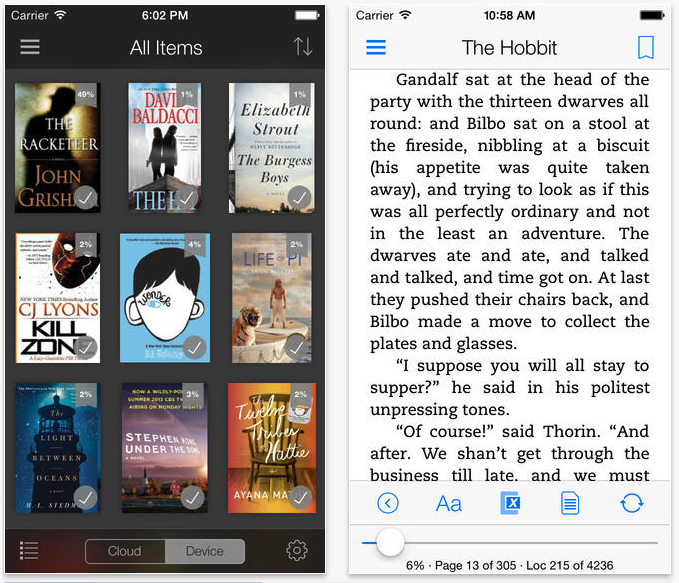
Starting off the new year with new features and improvements, Amazon updated its Kindle app for iPhone, iPad, and iPod touch today to version 4.1.

The update brings new features to users like the ability to create flash cards from text books for studying. This feature essentially creates bookmarks outside of the content for reviewing information on specific characters, places, or topics, and uses data from Wikipedia as part of Kindle’s X-Ray feature.

The update also includes a number of requested features and performance enhancements (full change log below).
Expand
Expanding
Close

Site default logo image

Sephora begins offering free downloads of popular iOS apps and other media

From 9to5Toys.com:
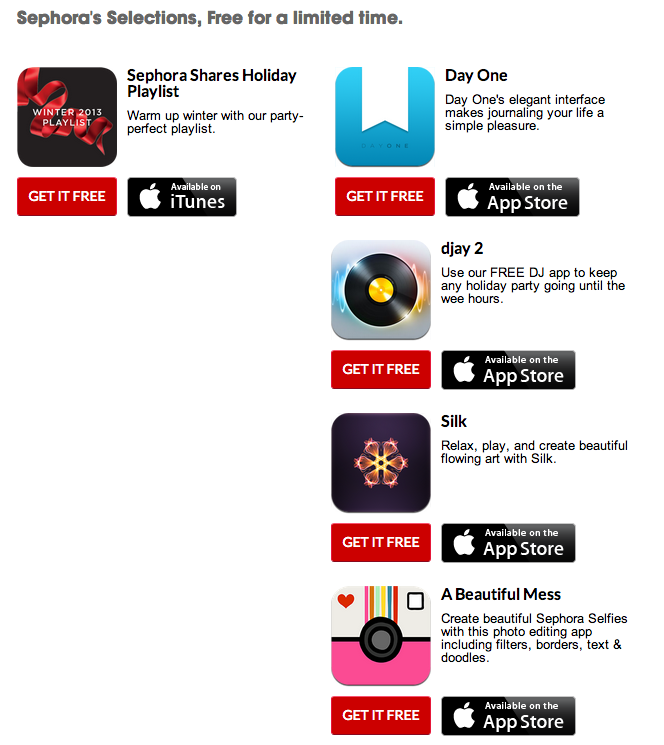
day-one-app-freeSephora is doing its best Starbucks impersonation by giving away music, magazines, books, and apps for free. The content will continually change, but right now you can get Day One, djay 2, Silk, A Beautiful Mess, and an 8-song playlist for free. Unfortunately, as with many similar promos, it is only available in the US.

At Sephora, we think sharing is beautiful. So discover and download our favorite songs, playlists, magazines, books, and apps—for free. Our curated selections will be available for a limited time and will rotate regularly, so download the Sephora To Go app to get them all. Available for iPhone®, iPad®, and iPod touch®.

sephora-free-apps-music-9to5mac

Site default logo image

Keep your kids amused while you can with unofficial cartoon streaming app

cartoon

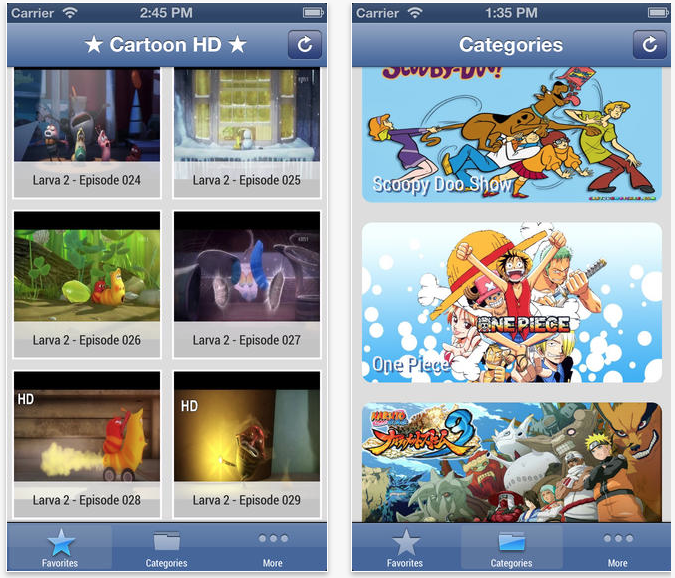
We don’t expect Cartoon HD to last on the App Store for long, but at the moment you can grab this free iOS app that says it offers streaming access to 2000 cartoons.

– Larva Movie – Multi chapter
– Mr Bean Cartoon
– Pixar sort film (updating)
– Donald Duck
– Nu, pogodi! You Just Wait!
– Tom & Jerry
– Scooby Doo
– The Smurfs
– Pink Panther
– Mother Goose Club
– Yo Gabba Gabba!
– Merrie Melodies
– Looney Tunes
– The Simpson (updating)
– Johnny Test (updating)
– Chowder (updating)
– Ben 10 (updating)
– Ed, Edd & Eddy (updating)
– Naruto (updating)
– Superpuff girls X (updating)
– Doraemon (updating)

There’s also a paid ‘Pro’ version which claims to allow downloading, but from the reviews it sounds like you shouldn’t waste your money.

Site default logo image

Apple wraps up 12 Days of Gifts with free Rolling Stones live album

Apple has released the 12th and final gift in its 12 Days of Gifts campaign. The last free item from the iTunes Store is a three-track live album from the Rolling Stones—Sweet Summer Sun, Live in Hyde Park 2013. The album was first released on New Years Day and features live performances of “Beast of Burden,” “Tumbling Dice,” and “Doom & Gloom.”

This marks the end of Apple’s campaign for this year, which was the first time the promotion has ever been available in the United States.

Site default logo image

Just in time for the NFL playoffs, Yahoo Sports updated with iOS 7 design, gif creation tool

Just in time for the NFL playoffs, the Yahoo Sports iOS app has been updated with a plethora of new features, the biggest of which are a totally new iOS 7 design and a new “Loops” service (via TechCrunch). Loops allows users to search through a game, select a short portion of it, and create an animated gif with that footage, along with captions, effects, and looping. Right now, Loops is compatible with the NFL, NHL, NBA, MLB, and NCCAB, though Yahoo says it plans to expand support to other leagues soon.
Expand
Expanding
Close

Anki Drive iOS app updated with new car upgrades, customization options

Site default logo image

Anki Drive got the ultimate endorsement last summer when Apple allowed the company to demonstrate its product on stage at its WWDC conference. For those unfamiliar, Anki Drive is a platform that allows hardware cars to be raced around a track and controlled wirelessly with an iOS device. Today, the company updated its iOS app with a host of new features, upgrades, and customization options. With today’s update, players can now take advantage of 20 new upgrade options, in addition to be able to further customize their car.


Expand
Expanding
Close

Review: StorySkeleton, an iPad story-planning app and Scrivener companion

Site default logo image

skel

As you doubtless gathered from my recent Scrivener review, I’m a massive fan of the best Mac app I’ve ever used for creative writing. The TL;DR version is that I wouldn’t dream of attempting to write a novel in anything else. My only real grumble is that we’ve as yet seen no sign of the long-promised iPad version of the app.

I’ve used PlainText with a Dropbox sync as a way of working on Scrivener projects on my iPad, and that works well enough at the writing stage. At the planning, stage, though, I love the corkboard interface. I was thus really interested to see an iOS app that not only provides a very similar corkboard view, but which can export and import to and from Scrivener … 
Expand
Expanding
Close

Site default logo image

Scanner Pro for iOS available for free as the first iTunes App of the Week in 2014

Scanner Pro, the document-scanning app for iPhone and iPad created by Readdle, is available for free this week as part of Apple’s “App of the Week” promotion. The app uses an iOS device’s camera to scan documents, complete with real-time border detection for perfectly-sized scans, and stores them as PDFs in a variety of cloud services, including iCloud and Google Drive.

The app also supports outgoing faxes directly from the app, in case you need to fax a signed document back to someone. Outgoing fax credits are available as in-app purchases.

You can grab your free copy of Scanner Pro on the App Store for this week only. After that the price goes back to the regular $6.99.

Tesla’s Model S App is 9to5Mac’s Best iPhone Application of 2013

Site default logo image

There have been a lot of important apps released for iOS (and Mac) this year. As you can imagine, we’ve covered many of the big ones.  But for me, nothing has been a bigger game changer than Tesla’s Model S App. I’m sure many folks will pooh-pooh the idea that an app that is for 30,000 or so households should even get mainstream coverage. But bear with me here. The company has revolutionized the ways in which cars interact with smartphones and these advancements will trickle into more car/apps over the coming years..

For those out of the loop, the Tesla Model S is a fully electric car that can seat up to 7 people, propel them from 0-60 in about 4 seconds and has a battery range of about 250-300 miles fully decked out. It has the lowest coefficient of drag of any mass produced car, has gained the best safety rating ever from the NHTSA and has more interior storage space than many minivans and SUVs.

Many have compared its disruptive nature and its charismatic CEO Elon Musk to Apple and Steve Jobs.
Expand
Expanding
Close

Site default logo image

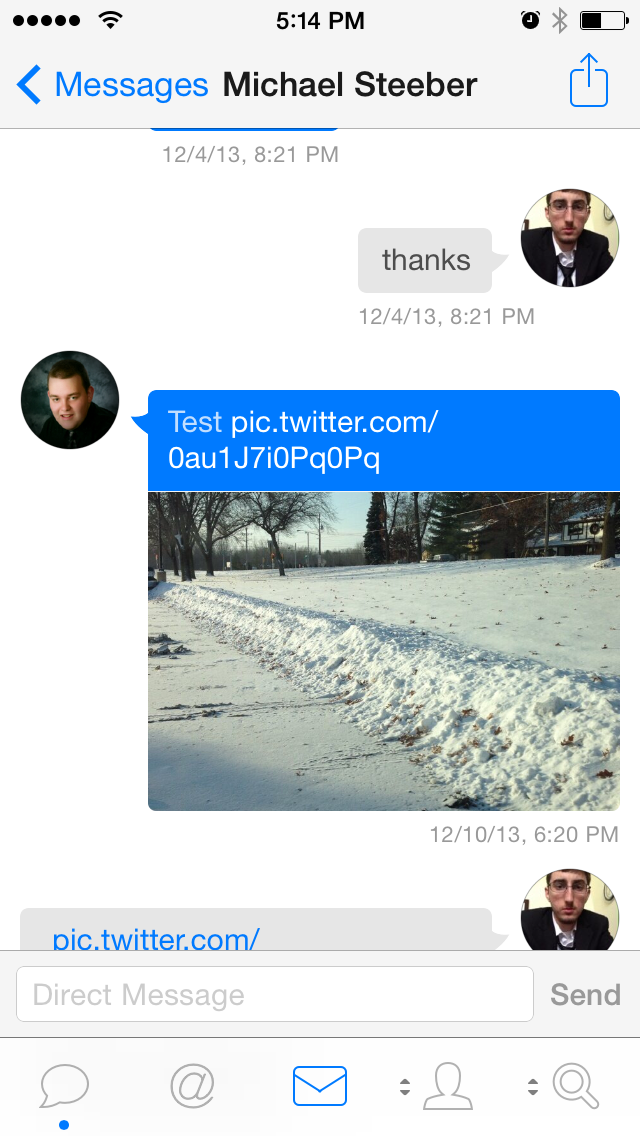
Tweetbot for iPhone adds support for viewing photos in direct messages

photo

Tweetbot for iPhone was updated today to add support for viewing photos send via the service’s direct messaging feature. Tweetbot is one of the first third-party apps for iOS to support the photo feature, which was introduced in the official Twitter client earlier this month.

Unfortunately Twitter does not allow third-party clients to send photos in direct messages, so you’ll still have to use the official Twitter app to send them. The update also includes miscellaneous bug fixes.

You can grab Tweetbot for iPhone for $4.99 on the iPhone App Store.

What’s New in Version 3.2.1

– Added support for viewing images in Direct Messages. Sending images in Direct Messages is not yet supported by the Twitter public API.
– Various bug fixes

Site default logo image

Fitbit app taps into iPhone 5s M7 motion processor for new MobileTrack feature

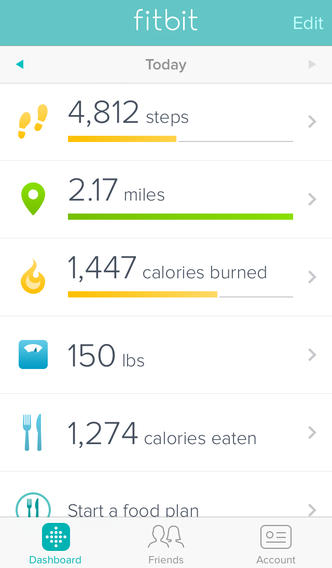
Fitbit-app-01The Fitbit iPhone app received a notable update today that brings basic tracking features directly to the iPhone 5s without the need of one of FitBit’s tracking watches. The new “MobileTracker” feature, which takes advantage of Apple’s new M7 motion co-processor, provides some of FitBit’s basic activity tracking features right on the device. The new feature, due to the new M7 motion co-processor, is currently only available on the iPhone 5s. The company is yet to make an official announcement, but with CES right around the corner we’d expect to hear more about the update soon.

As noted by the Fitbit employee in the tweet below, the update will allow iPhone 5s users to try basic features of the app before investing in the hardware.

The app also receives a number of other new features today including redesigned silent alarms, the ability to a set a custom water goal, and a revamped profile editor, tracker settings, and sign-up screen. A full list of what’s new in version 2.1 of the Fitbit app is below:

What’s New in Version 2.1

The Fitbit app now features MobileTrack which offers basic Fitbit activity tracking directly using your iPhone 5s.
Redesigned Silent Alarms settings. Set, switch, edit, and remove alarms faster than ever.
Set your own custom water goal.
Redesigned profile editor.
Redesigned tracker settings.
Redesigned sign-up and sign-in.
Tap on people in Friend Finder to see their profile.
Swipe on friends on your leaderboard to Cheer, Taunt, or Message.
Tap on tabs to auto-scroll to the top.

[tweet https://twitter.com/barrycburton/status/417710071804489728]

Site default logo image

Tweetbot for Mac updated with several much-needed bug fixes

1

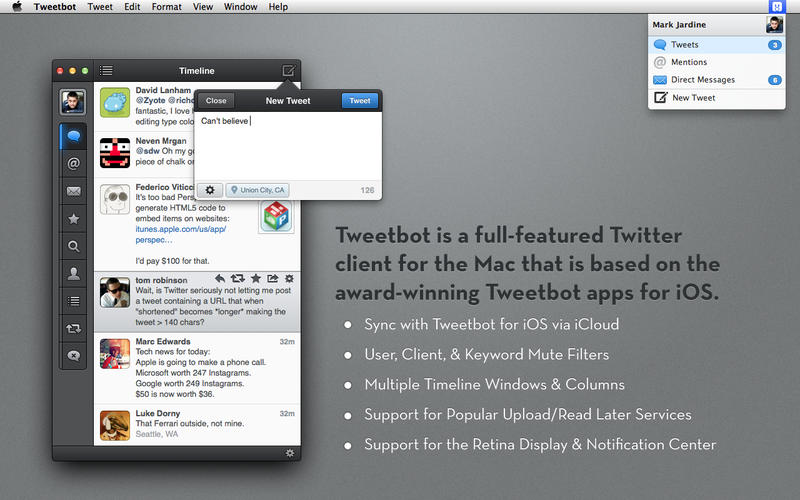
Tweetbot for Mac was updated today to version 1.4.1. The new update brings a collection of sorely-needed fixes to some of the biggest bugs affecting users of the previous version, including the inability to see new tweets when they load, problems with multi-monitor setups, and direct messaging issues. It also includes all of the updates to version 1.4, including smooth scrolling on OS X Mavericks, quick-reply from notifications, and more.

The update is available for free to all current users. New users can grab the app for $19.99.

What’s New in Version 1.4.1

– Fixed the issue where you can see “x unread items” but can’t scroll up to see them
– Fixed the issue where direct message images would not load when clicked
– Fixed the issue with some users seeing hangs related to iCloud syncing or playing audio
– Fixed the issue where the main Tweetbot window could move from the secondary to primary monitor after restarting the app

Site default logo image

Apple’s 12 Days of Gifts app offering free download of Tiny Thief iOS app

On the second day of Apple’s “12 Days of Gifts” promotion, the app is now offering a free download of Rovio’s ‘Tiny Thief’ app. This morning the 12 Days of Gifts app was offering a free pilot episode of TV show Once Upon a Time, but Apple appears to have now switched the gift to the ‘Tiny Thief’ app. It’s unclear if Apple mistakenly offered the TV show download for a short period of time or if it plans to offer various gifts throughout the day as part of the promotion.Yesterday the 12 Days of Gifts app was offering a free download of Justin Timberlake performances from the recent iTunes Music Festival.

Rovio actually dropped the price of Tiny Thief from $2.99 to free a few days back, and the app remains available for free directly through the App Store as well. You can grab Apple’s 12 Days of Gifts app on the App Store in select countries.

Site default logo image

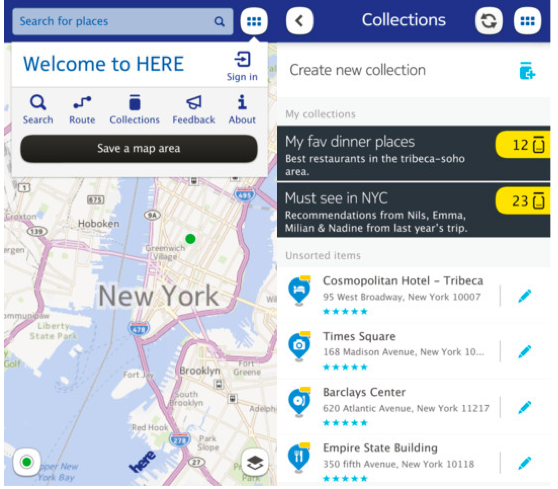
Nokia: ‘HERE’ iOS Maps app removed due to iOS 7 changes that “harm the user experience”

NOKIA HERE

If you were wondering why Nokia’s HERE maps app for iOS disappeared from the App Store earlier this month, today the company has issued an official statement on the situation. While citing issues with iOS 7 that “harm the user experience,” Nokia unfortunately does not go into detail about specific problems with the development of the app for Apple’s latest version of iOS. It does, however, point users to the official web app, which is essentially the same experience the company wrapped into the iOS app minus many of the bugs users reported with the release of an iOS 7 update. No word on if Nokia will bring back the native app at any point, but for now we get the following statement issued to the TheIndianExpress (via Engadget):

“We have made the decision to remove our HERE Maps app from the Apple App Store because recent changes to iOS 7 harm the user experience. iPhone users can continue to use the mobile web version of HERE Maps under m.here.com., offering them core location needs, such as search, routing, orientation, transit information and more, all completely free of charge.”

Site default logo image

Apple’s 12 Days of Gifts app offers free download of Justin Timberlake’s iTunes Festival performances

Apple has officially kicked off its “12 Gifts of Christmas” promotion by offering a free download of four live songs (two of which have videos) from Justin Timberlake’s performance at the iTunes Festival in September.

Previously available as the 12 days of Christmas app in a few countries internationally, this year Apple has released a new “12 Days of Gifts” app that is available in the U.S. for the first time. Starting today through January 6, users will be able to download the app to access one free gift a day. The gifts are usually content from across the iTunes, iBooks, and App Stores, with today’s gift coming as a free download directly on your device through iTunes.

Download the free 12 Days of Gifts app for iPhone or iPad now to access your free gift.

Essential apps for decking out your new Mac — the best software and utilities

Site default logo image

Best Apps for Mac

If you’ve been fortunate enough to unwrap a new Mac over the holidays or need help deciding how to use those iTunes gift cards, I’ve collected some of my favorite apps and utilities for taking your Mac to the next level.

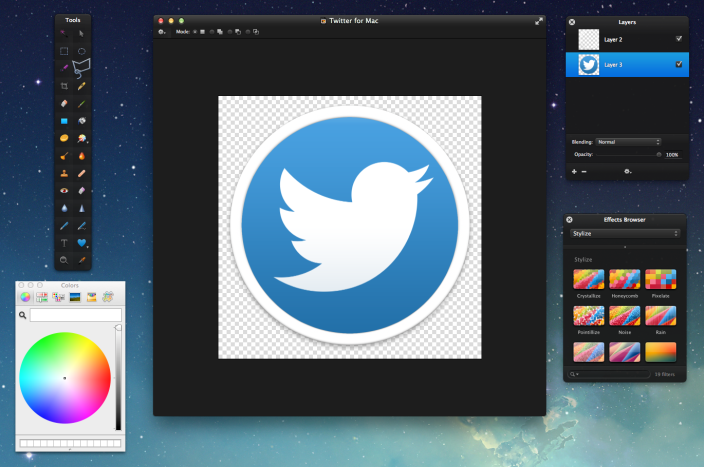
Pixelmator

Pixelmator is one of my favorite Mac apps. For someone interested in design and editing but without the need for an expensive app like Photoshop, it’s an incredible buy for $30. Best of all, it’s constantly being updated and picking up new features.

How to spend your iTunes credit this holiday season — the best apps and games for iPhone and iPad

Best Apps for iPhone & iPad

Whether you are just unwrapping a new iPhone or iPad or have received stacks of iTunes gift cards this holiday season, you are undoubtedly on the hunt for the best apps to fill up your shiny iOS devices. Read on for my recommendations of the best apps and games for iPhone, iPad and iPod touch for 2013.


Expand
Expanding
Close

Site default logo image

AOL announces iCloud email support returning to its Alto webmail service

Earlier this year AOL announced it would no longer be supporting iCloud email accounts with its Alto webmail service after December 2nd. Today, however, the Alto team informed users it had reversed that decision and apologized for the confusion of its decision. Alto also promised it would not be pulling support for iCloud email in the future, but offered no details on why the initial decision then reversal were made. Full email below:
Expand
Expanding
Close

Site default logo image

Review: Bubble Chat for iPhone is a colorful alternative to Facebook Messenger

A few weeks ago, Facebook updated its Messenger app to match iOS 7’s visual design. Unfortunately, the update is a bit bland, with no real embellishments in terms of UI or animation. This week, a new Facebook chat client for iPhone was released that aims to address those complaints with a colorful interface and slick animations.

That app is Bubble Chat.

Bubble Chat is one of the most creative iOS 7 designs I’ve seen, leveraging the new OS’s physics to animate every transition and movement in the app. By default, most of the interface is blue, but a $.99 in-app purchase allows you to customize the background color for each contact individually or globally. You can also choose a photo from your device to use as the background.

The app has two main views for managing your conversations. The first is a list of your Facebook contacts. The other is a list of recent conversation threads. The contact list makes use of each friend’s photo not only as an avatar next to their name, but also as a background for each row in the list, providing a bit more texture than a standard blue background. The chat list provides a quick look at each thread’s most recent message.

Tapping a contact’s photo from the conversation list or with in a thread brings up a contact-specific settings sheet that allows you to customize the design of that conversation or mute all message notifications from that user. From with a conversation you can send photos and videos, plus custom drawings you can create with a variety of brushes and colors.

Speaking of contact photos, Bubble Chat has a clever trick that detects faces in photo and automatically centers them. No more oddly-cropped profile pictures where an off-center face gets cut off! In my testing, I found that the detection system worked every single time, showcasing my contacts automatically instead of whatever happened to be centered in the photo.

The app supports push notifications for new messages, though they seemed a bit unreliable in my testing. My first message came through the main Facebook app, but not Bubble Chat. After I opened Bubble Chat and viewed the new message, notifications started functioning normally for the most part. A few seemed to show up late or not at all.

Overall, Bubble Chat is a solid app that just needs a little work. Aside from the notification issue, I noticed a few graphical glitches, especially when quickly moving between conversation threads and the chat list. These always resolved themselves within a few seconds, though, so there’s no reason to worry about them right now. My single biggest issue with the app is that autocorrect does not seem to work when typing a message. The developers have informed me that several bug fixes and improvements are being made very soon.

If you’re looking to replace Facebook Messenger with something that has a little more personality, Bubble Chat is a great alternative. You can get it on the App Store for free. As mentioned before, theme customization options are available as a $.99 in-app purchase.

Site default logo image

Flexibits discounting Chatology, Fantastical for Mac & iPhone for the holidays

Whether you’re in the market for great apps for yourself or gifting someone you know with apps you already love, it’s certainly a terrific time for buying some of the most notable apps on the Mac and iOS platforms. Just this morning we reported on a collection of indie developers who teamed up to create App Santa, a catalog of award-winning iOS apps including Tweetbot and 1Password with substantial discounts for the holiday season.

Joining in on the holiday spirit is Flexibits, the development team behind Chatology for Mac, Fantastical for Mac, and Fantastical for iPhone. All three are apps which reliably solve a specific problem.

Chatology makes searching through iMessage chat logs on OS X less of a nightmare with stable software that even supports link and image parsing. Fantastical for Mac and iPhone (review) both provide a streamlined calendar experience with consistent and impressive natural language input with real time feedback. Direct links, screenshots, and prices below…
Expand
Expanding
Close

Site default logo image

Google Play Music for iPhone updated with iOS 7 UI, “I’m feeling lucky” radio, genre search, and more

Google has updated its Google Play Music app for iPhone with several new features and a refreshed UI for iOS 7. The app was first released last month but had not yet been designed for the latest version of iOS.

Besides the updated interface, the app includes support for “I’m feeling lucky” radio stations, the ability to search for music and create stations by genre, and auto-playlists.

You can grab Google Play Music for free on the App Store.

What’s New in Version 1.1.0.988

– UI updated for iOS7

– Added support for I’m feeling lucky radio

– Auto-playlists (including Thumbs Up playlist) added to playlist view

– Genre radio stations added for All Access users

– Added ability to search for genres

Thanks for the tip, Isa!

Site default logo image

Snapchat updated to version 6.1, now has camera filters, up to seven “best friends,” and more

Snapchat was updated to version 6.1 today, introducing several new features to the popular photo messaging app for iOS. Like many photo apps, including iOS 7’s native Camera, Snapchat now supports visual filters for photos taken with the app.

Other additional features include a new “best friends” option that allows users to set seven favorite contacts apart from the rest, as opposed to the previous option for only five. The full change log is below.

Snapchat is available for free on the iOS App Store.

Introducing Additional Services

Smart Filters – Add data overlays to your Snaps!
Visual Filters
Replay
Special Text
Front-Facing Flash
Up to 7 Best Friends

To enable additional services go to Settings > Additional Services > Manage

Site default logo image

Nike+ Running iPhone app gets new ‘Nike+ Coach’ feature w/ daily training programs & coaching tips

The Nike+ Running iPhone app, which allows runners to their progress & goals using the iPhone’s built-in GPS and accelerometer, was updated today with a new feature dubbed ‘Nike+ Coach’.

The new feature allows users to select from various training programs that range in difficulty and receive daily workouts, reminders, and coaching tips. The training programs include options for “beginners, intermediate, and advanced training levels” and let users set goals for 5K, 10K, half-marathon or marathon distances.

What’s New in Version 4.5.0

NIKE+ COACH
Take on your next running goal and never look back. Whether you’re looking to take on your first 5K or smash your marathon PR, Nike+ Coach comes equipped with training programs, coaching tips, and daily workouts to get you race-ready.
· Set your sights on the 5K, 10K, half-marathon or marathon distances.
· Choose from beginner, intermediate or advanced training levels.
· Get daily run reminders to stay motivated.
· Track your progress and see what’s coming up next in your training.

Version 4.5.0 of the free Nike+ Running app for iPhone is available on the App Store now.

App Santa is coming to town with big discounts on fifteen popular iOS apps

Site default logo image

Screen Shot 2013-12-19 at 10.58.15 PM

Santa’s coming a little early this year for App Store shoppers. App Santa, collaborative campaign between a group of award-winning app developers, launched today with deep discounts on fifteen of the most popular iOS apps from ten different developers.

Bring a little holiday cheer to your iOS devices by grabbing these apps while they’re on sale, or spread some joy to the world by gifting your favorites to your friends and family. You can find the full list of participating apps below.

Keep reading for more deals