Mac

See All Stories

Apple’s Mac lineup consists of MacBook, MacBook Air, MacBook Pro, iMac, Mac Pro, and Mac Mini. The Mac runs macOS for its operating system.

Mac lineup

History

The Mac is Apple’s lineup of computers, and it can be considered the company’s oldest product. The name “Mac” comes from the original Macintosh, which was introduced in 1984 and is also considered the first personal computer for the masses to have a graphical user interface. The first Macintosh hit the stores on January 24, 1984, costing $2,945.

Among all these years, Apple has introduced many different Mac models, ranging from desktops to laptops to professional tower machines. The current lineup consists of the MacBook Air, MacBook Pro, Mac mini, iMac, and Mac Pro. However, there have been other Mac models were discontinued, such as the eMac, MacBook, and iMac Pro.

The history of modern Macs began in 1998, a year after Steve Jobs returned to Apple. Apple had dozens of Macintosh computers at that time, but Steve decided to rethink the entire lineup. In 1998, Apple announced the iMac G3, which ditched the floppy disk and serial ports in favor of USB connectors.

Macintosh and iMac G3.

Unlike the Macintosh, the first iMac was considered a huge success — not only for its technology, but also for its unique design with colorful translucent plastic. Apple quickly expanded the Mac lineup with other models, which included the iBook and PowerBook (which became the MacBook and MacBook Pro) and the PowerMac, which is now the Mac Pro.

macOS

What makes a Mac the Mac is the macOS operating system, which has also had a long history since the introduction of the first Macintosh. Initially called Mac OS, the operating system was rebuilt when Steve Jobs returned to Apple.

The first version of Mac OS X was released on March 24, 2001 with a new interface that is still present in some ways in current versions of macOS. Apple’s desktop operating system comes with many free applications such as Pages, Keynote, Numbers, iMovie, and GarageBand.

With macOS, users also have access to deep integrations with other Apple devices. For instance, you can answer calls and send SMS from your iPhone using your Mac. Handoff lets you switch from one device to the other and pick up where you left off. Apple Watch users can unlock their computer without entering a password, and you can even copy and paste between devices.

macOS Sonoma

Apple’s desktop operating system is also integrated with services offered by the company, such as iCloud, Apple Music, and Apple TV+.

The current version of macOS is Sonoma (version 14), which features new slow-motion screen savers, widgets on desktop, camera effects on FaceTime and other apps, web apps, passkey sharing, improved PDF support, and Game Mode. The update also comes with a new API that lets developers easily port Windows games to macOS.

Architecture Transitions

The Mac has had three major architecture transitions in its history. Apple’s first computers ran on Motorola processors, but the company decided to migrate to the new PowerPC platform in 1994. While this brought benefits at the time, the PowerPC processors were not delivering what Apple expected.

It was in 2005 that Apple confirmed the transition from PowerPC to Intel. Intel processors had become faster and more efficient than PowerPC, which enabled the development of new Mac computers that were more powerful and also more compact. Developers have been given access to a Developer Transition Kit running Mac OS X Tiger with Intel Pentium 4 to update their apps before the transition begins.

Power PC, Mac OS X, and Intel processor.

Apple said that the transition would begin in June 2006 and be finished by the end of 2007. However, the transition to Intel was fully completed in August 2006 when the company replaced the PowerMac with the new Intel Mac Pro.

As the years went by, Apple once again felt the need to have more powerful and efficient processors for its computers. This time, the company was already working on its own chips for the iPhone and iPad. In June 2020, Apple confirmed that it was changing the architecture of the Mac, now from Intel to ARM chips, which are called Apple Silicon.

Apple offered a Mac mini DTK running on the same A12Z Bionic chip as the 2020 iPad Pro. This way developers could once again update their apps ahead of the transition. In addition to being more powerful and energy efficient, the ARM architecture of Apple Silicon chips has enabled Macs to run iOS apps for the first time.

Apple M1 chip | Mac

The first Apple Silicon Macs were released in November 2020 with the M1 chip. The company later introduced more powerful variants of the M1 chip, called M1 Pro, M1 Max, and M1 Ultra. Macs with Apple Silicon have become known for being more powerful while consuming much less power, which has resulted in MacBooks with extended battery life.

In June 2022, Apple introduced the M2 chip, which is around 20% faster than the M1 and also supports more RAM. M2 also has more powerful variants: M2 Pro, M2 Max, and M2 Ultra.

Apple unveiled the M3, M3 Pro, and M3 Max chips in October 2023. The main highlight of this generation is the 3 nanometer technology, the same as the A17 Pro chip. The M3 family also features better GPUs with support for hardware-accelerated ray-tracing.

Current Mac lineup

Apple currently sells a variety of Mac computers, which includes MacBooks, Mac mini, iMac, and Mac Pro. While some of the Macs have already been updated with an Apple Silicon chip, others remain with Intel processors.

MacBook Air

The MacBook Air is Apple’s most affordable laptop and it has become popular for its light, compact design. The 2022 version is powered by the M2 chip and is offered with 8GB, 16GB, or 24GB of RAM. Plus, it has a new, edge-to edge 13.6-inch Retina display.

The laptop features Touch ID and has two Thunderbolt 3 compatible USB-C ports, a MagSafe connector for charging, and a headphone jack. Prices start at $1099 in the US. It’s offered in silver, space gray, starlight, and midnight.

M2 MacBook Air.

A year later, Apple introduced the first 15-inch MacBook Air. It has essentially the same hardware as the smaller version with a similar design, but with a larger display. Prices start at $1299 in the US.Apple is still selling the M1 MacBook Air for prices starting at $999.

MacBook Pro

The 2023 MacBook Pro is available in multiple versions, and customers can choose between 14-inch and 16-inch screen sizes. For the first time, Apple has introduced a less expensive version of the 14-inch MacBook Pro with the base M3 chip. This version has the same design and display as the high-end versions, except that it only has two USB-C ports instead of three.

M3 MacBook Pro

The most expensive versions of the MacBook Pro are equipped with the more powerful M3 Pro and M3 Max chips. The laptop can be configured with up to 128GB of RAM and 8TB SSD. These versions also come in a new Space Black color.

Unlike the MacBook Air, the MacBook Pro comes with an HDMI port and an SD card reader. It also features MagSafe and Touch ID on the keyboard. Apple no longer sells MacBooks with the Touch Bar. Prices start at $1,599 in the US.

Mac mini

Mac mini is the cheapest Mac currently available since it’s basically a desktop without a built-in display or other peripherals. The base model with the M2 chip features one Ethernet port, two USB-C/Thunderbolt 4 ports, HDMI 2.0, two USB-A ports, and a headphone jack.

Apple sells a more powerful version of the Mac mini with the M2 Pro chip, which also comes with four USB-C ports instead of two. Mac mini can be configured with up to 32GB of RAM and up to 8TB of storage. Customers can also opt for a 10 Gigabit Ethernet port. The Apple Silicon Mac mini is only available in silver, while the now discontinued Intel model was available in space gray.

Apple Silicon Mac mini.

Prices for the Mac mini start at $599 in the US. Again, it’s worth noting that it doesn’t come with a keyboard or mouse in the box – you need to buy them separately or use your current ones.

Mac Studio

Mac Studio represents a new category between Mac mini and Mac Pro. It features a design based on the Mac mini, but with a taller body to support the more powerful hardware and also a better cooling system.

The new Mac Studio is targeted at professional users who work with demanding tasks such as video editing, 3D rendering, and machine learning. 

Embraced by creative pros everywhere, Mac Studio now delivers next-generation power in the form of the lightning-fast M2 Max and the boundary-breaking M2 Ultra. It packs outrageous performance and extensive connectivity in an unbelievably compact form, putting everything you need within easy reach and transforming any space into a studio.

By default, Mac Studio already comes with the M2 Max chip, 32GB of RAM, and 512GB SSD storage. A more expensive option lets users customize Mac Studio with M2 Ultra. While M2 Max has a 12-core CPU and a 30-core GPU, M2 Ultra doubles all of those specs. The new chip has a 24-core CPU and a 60-core GPU.

Mac Studio can also be configured with up to 192GB of RAM and 8TB of SSD storage. The machine offers up to six Thunderbolt ports, 10 Gigabit Ethernet, headphone jack, two USB-A ports, and one HDMI port.

Mac Studio

Apple has been rumored to be working on new versions of this machine with the M3 Max and M3 Ultra chips. However, these versions may not be ready until 2025. Bloomberg’s Mark Gurman said in November last year that the M3 Ultra chip “hasn’t yet gone into broad testing” inside Apple.

In the US, prices for the Mac Studio with M2 Max chip start at $1999. The M2 Ultra chip version starts at $3999. Just like the Mac mini, Mac Studio doesn’t come with a keyboard and mouse in the box. You can find accessories for your Mac Studio here.

iMac

iMac is Apple’s most popular desktop computer with an all-in-one construction. It features a 4.5K display in its 24-inch version and a 5K display in the 27-inch version. At the same time, Apple still sells an entry-level iMac with a regular 1080p display.

The 24-inch iMac is the first to feature the M1 chip, the same as in the Mac mini, MacBook Air, and MacBook Pro. This allowed Apple to introduce a completely redesigned model with a slimmer design, which is also offered in seven new colors. Customers can customize the new 24-inch iMac with up to 16GB of RAM and 2TB of storage.

Site default logo image

The company ships the 24-inch iMac with Magic Mouse and Magic Keyboard, plus a Lightning cable for recharging accessories. Prices in the US start at $1299. Apple has discontinued its old 21.5-inch iMac and the 27-inch iMac 5K.

Mac Pro

Mac Pro is a computer built for professional users who depend on extremely powerful hardware. Available in tower and rack versions, it has a completely modular design. That means users can replace RAM, SSD, GPU, and other internal components.

By default, it features four USB-C/Thunderbolt 3 ports, two USB-A ports, and two 10Gb Ethernet ports. However, the ports can be expanded using the PCI Express slots. Apple also ships the computer with a Magic Mouse and Magic Keyboard, but it does not come with an external monitor included.

All models feature Intel Xeon W processors, which are the most powerful processors offered by Intel. Consumers can configure Mac Pro with up to 28-core processor, 1.5TB RAM, and 8TB of SSD storage. In addition to supporting multiple dedicated GPUs, Apple also offers the Afterburner card — which accelerates the decoding of ProRes videos.

The company recently updated the Mac Pro with new graphics card modules, which include Radeon Pro W6800X and Radeon Pro W6900X.

Site default logo image

Mac Pro prices start at $5999 in the US.

Rumors about upcoming Macs

Top stories about the Mac

Site default logo image

Dropbox update gains Cloud.app-like screenshot and iPhoto uploader

A nice little upgrade today from Dropbox today has some new features we can all use. Firstly, Dropbox does a Cloud App clone where it uploads screenshots and pops a link into your clipboard for quick sharing purposes.

Starting today, all the screenshots you take can automatically be saved straight to your Dropbox. And on top of that, Dropbox will also create a link to your screenshot and copy it to your clipboard — so your picture’s instantly good to share.

Something more unique and useful perhaps is a simple iPhoto uploader.

As an added bonus for all you Mac users, today’s update also includes a nice little importer that copies your photos from iPhoto directly to your Dropbox.

Can Apple announce the rest of 2013’s products in just one event?

Site default logo image

Last fall, Apple had a lot of products to introduce: a new iPhone, two new iPads, three new iPods, and a few new Macs. Apple ended up dividing those new devices into two events: an iPhone + iPod event and an iPad + Mac event.

Without much occurring during the first half of this year, and even with the new iPhones launching this month, Apple still has a significant amount of products to still announce this year. Let’s take a look at what’s coming:

Could Apple announce all of this in one sitting?…


Expand
Expanding
Close

How to: Live a paperless life with Mac, iPad and iPhone

Site default logo image
BEN_6275

Remember those promises we were made, about a paperless world? Everything electronic, everything online? Since the world was failing to deliver, I decided a couple of years ago to do an experiment to find out whether it is possible to live a truly paperless life.

Two years later, the bad news is that you can’t entirely avoid the stuff. There are a few documents the government insists I keep in paper form: my passport and driving licence, for example. There are documents that still arrive in paper form, and documents I have to supply in paper form.

The good news is that you can get very, very close. Here’s how I made it work … 

Expand Expanding Close

A decade at the top: Apple tops PC customer satisfaction ratings for the 10th year running

Site default logo image

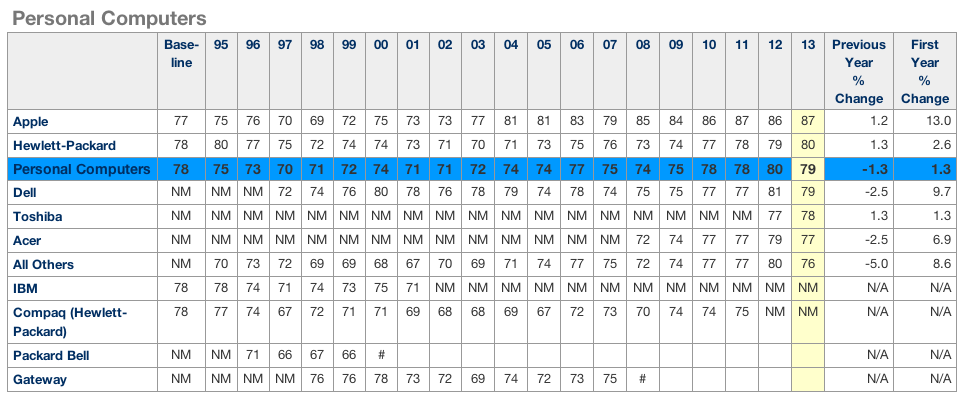
The American Customer Satisfaction Index saw Apple take the top spot in the personal computers category for the 10th year running, with its score of 87 a full eight points higher than the industry average. Apple, which scored one point higher than last year, has topped the ranking since 2004.

The ACSI includes tablets in its ‘PC’ category, so the scores reflect both Mac and iPad. Factors feeding into the scores include customer expectations pre-sale, perceived quality, perceived value, customer complaint incidents and customer loyalty.

The iPhone took the top slot in the JD Power customer satisfaction survey for the ninth consecutive time back in March, and both iPhone and iPad even managed to beat Samsung on its home turf of South Korea.

Bundles! Camtasia/Crossover/+8 more for $10, Metakine 10 apps: $40, AfterShot Pro+10 apps: $49

Site default logo image

Specials.9to5Toys.com this month has a “Name Yor own Price Bundle” which is a bit of a misnomer since you’ll need to pay above the average which is currently below $10.  You’ll get Camtasia which allows you to “Easily Create Stunning Screen Captures & Video Recordings” and well as CrossOver which allows you to run Windows programs on your Mac for the sub $10 price. Then there are 8 more great Mac Apps.  At below $10, you can’t miss.

Then there is the 11 app AfterShot Pro bundle from MacLegion, below:
Expand
Expanding
Close

Apple releases OS X Mavericks Developer Preview 7

Site default logo image

A couple of weeks following the previous seed, Apple has released OS X 10.9 Mavericks Developer Preview 7 to registered developers. The update is available via Software Update in the Mac App Store. If you find anything new, you can let us know at tips@9to5mac.com. We’ll be updating this post as changes are discovered. A new Apple Remote Desktop 3.7 seed has also been issued.


Expand
Expanding
Close

Glui review: Screenshotting for OS X made a delight, not a chore

Put plainly, Glui is a screenshot and annotation tool; a utilitarian application. It does not evoke charm, but it doesn’t really need to. What Glui does need to offer is a functional yet efficient workflow and, on this front, it delivers. In use, I never feel like the app is getting in my way.

The activation shortcuts are bound to Shift+Cmd+5 and Shift+Cmd+6 by default to match OS X’s native screenshot shortcuts. These actions select either a rectangular screen region or one window, respectively. With the region mode, the screen cursor changes to a crosshair (which shows x,y pixel coordinates) and the region is chosen by dragging your mouse to create a rectangle. With the window mode, the cursor changes to a camera icon and you simply click on the window you wish to capture.

Although the process is very similar to how OS X’s built-in screenshot features work, it is not identical. For instance, in Glui, window screen grabs do not include the accompanying drop shadow as they do in OS X’s implementation.


Expand
Expanding
Close

Apple begins training support staff on iOS 7 & iTunes Radio, preparing for customer surprise

Site default logo image

Apple has started training its AppleCare technical support staff on the changes and feature-set of iOS 7, according to multiple AppleCare employees. These people say that training began today, and AppleCare employees are required to complete the iOS 7 training by the second week of September.


Expand
Expanding
Close

Review: DeskConnect beats Apple to AirDrop-like file sharing between iOS and Mac

Site default logo image

From time to time, I find myself needing to send some files from my Mac to my iPhone, or from my phone to my computer. This is especially true with things like screenshots for reviews. In the past I have used Photo Streams or email to get the images from my phone to my Mac, but both of those are a little more annoying than they need to be.

Using a Photo Stream requires me to open iPhoto on my Mac, which means it will probably take forever just to grab a few images. For email I have to select all the images from my Camera Roll and either mail them five-at-a-time from the photos app, or copy them, switch to Mail, paste them into a message (which somehow bypasses the absurd five-image limit on in-line sharing in the Photos app) and then address the message to myself and wait for it to send, then wait for it to arrive on my computer.

There are also a ton of apps that allow you to connect to your phone through a web browser to transfer files, but those require the app to be running on your phone, and for the app to be in a specific mode to receive the files. It’s not seamless and it’s not as effective as it could be.

This is not a good workflow. That’s where DeskConnect comes in. DeskConnect is an pair of apps for iOS and Mac that avoids all of the unpleasantness of connecting the two devices and allows you to seamlessly send files from one to the other.


Expand
Expanding
Close

Site default logo image

Macs in surprising places: Slumdog Millionaire was filmed with a camera containing a Mac Mini

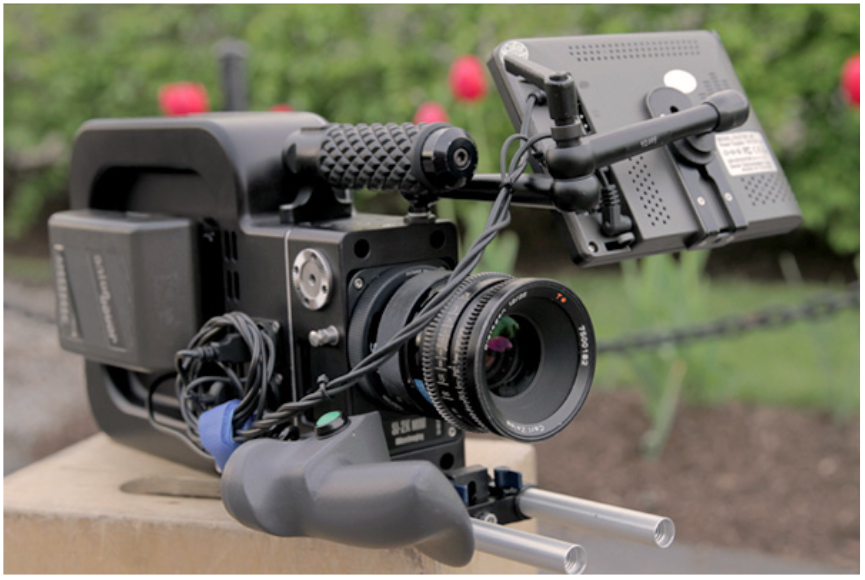
It looks rather like a steampunk version of a traditional 16mm cinema camera, and that was indeed the inspiration behind the SI-2K Black Betty, a camera aimed at independent film-makers and used as a secondary camera in the movie Slumdog Millionaire.

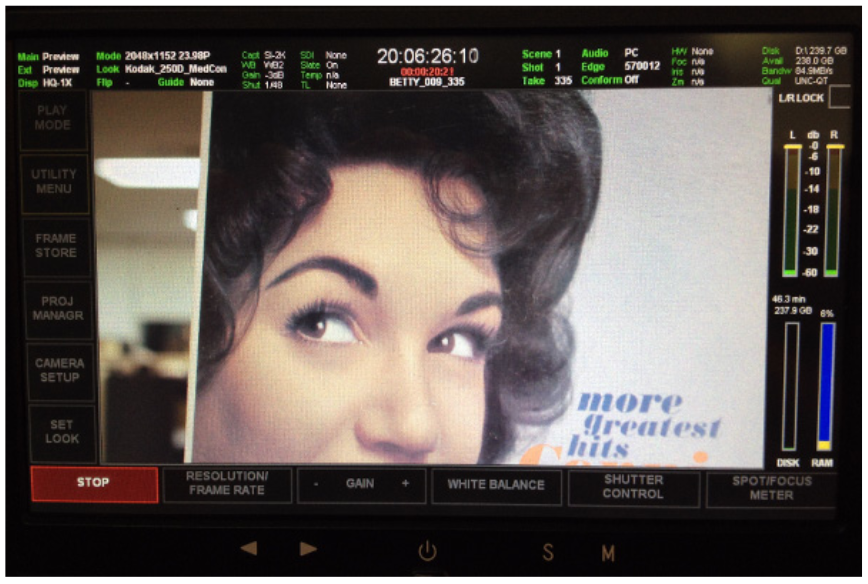
It combines a Silicon Imaging 2K camera head, with its film-like 2/3″ CMOS Imager, with an SSD-equipped Mac Mini inside running Silicon Imaging SiliconDVR software. A 7-inch touchscreen monitor completes the package. The result is a self-contained camera that allows the film-maker to shoot, edit and upload.

As the name suggests, it’s capable of shooting 2K video at 30fps. If you know your videography, it shoots CineForm compressed RAW files with up to 11-stops of dynamic range at up to 500ISO. If you don’t, well, let’s just say it’s a very capable camera.

The Mac Mini was likely chosen because it offers the capability of a desktop machine in something with very low energy requirements: the complete system uses only 40 watts.

The Black Betty has only two physical buttons: on/off and start/stop: everything else is controlled via the touchscreen.

Sadly for Mac fans, the Mini isn’t running OSX: the SiliconDVR software is Windows-based, so that’s what the machine runs – but that’s one of the beauties of a Mac, you can run OSX, Windows or both.

The camera isn’t available to purchase, but you can rent one via Rule Boston Camera.

Via Engadget

BioShock Infinite and SimCity arrive for Mac gamers starting today

Site default logo image

[youtube=http://www.youtube.com/watch?v=RvrnUcB8ZJc]

A couple of big new games are landing today for Mac users. We told you about BioShock Infinite earlier this month, the third instalment in the popular 2K/Irrational Games series that originally launched in March to rave reviews on consoles. Mac gaming heavyweights Aspyr have been working on porting the game to Mac since its initial release, and today the game is finally going on sale through Aspyr’s GameAgent store and other retailers. Aspyr sent over a beta of the title last week, and we’ve had nothing but positive first impressions from our time with the game since. The other big Mac title launching today, SimCity, might have had some major issues in its beta, but we’re happy to report you won’t run into similar performance problems with BioShock Infinite.

As usual, the title will support SteamPlay, allowing users to purchase the game once and play on both PC and Mac through Steam. It’s also available on the Mac App Store. However, Aspyr’s own distribution service, GameAgent, is offering some pretty enticing pre-order bonuses if you pick up the title through them…
Expand
Expanding
Close

Apple releases OS X Mavericks Developer Preview 6

Site default logo image

Apple has seeded the sixth Developer Preview of the upcoming OS X Mavericks. The new preview is available via Software Update in the Mac App Store. This preview comes a few weeks after Developer Preview 5. Preview 5 added iBooks to Mavericks.

Also available today for developers are updated Remote Desktop apps, an updated SDK, and a new Safari 6.1 seed for OS X Mountain Lion.

Mavericks will be available for the general public this fall. We will be updating this post as changes in the new preview are discovered.


Expand
Expanding
Close

How to enable the Google+ Photos Chrome app on Mac

Site default logo image

Last month we reported that Google’s slick new “Google+ Photos” app that launched exclusively on the Chromebook Pixel could possibly be making its way to Mac. The proof came from a newly posted listing on the Chrome Web Store that made references to auto-uploading features specifically for OS X. Unfortunately, launching the app would give Mac users a “not supported on this platform” error message. While Google has yet to officially launch the Mac and PC versions of the Chrome app, there is a way to bypass the error message and enable the app now.
Expand
Expanding
Close

BioShock Infinite for Mac set for release on August 29, preorders start today

Site default logo image

Back in March, when the latest installment in the popular BioShock franchise was released on consoles, Mac gaming heavyweights Aspyr announced they would be bringing the game to Mac this summer. Today it has finally announced an official release date for BioShock Infinite, as well as details on pre-order bonuses, DLC, and SteamPlay support.

BioShock Infinite for Mac will officially become available starting August 29th and, yes, the title will support SteamPlay, allowing users to purchase the game once and play on both PC and Mac through Steam. It will also be available on the Mac App Store. However, Aspyr’s own distribution service, GameAgent, is offering some pretty enticing pre-order bonuses if you pick up the title through them.

Not only will pre-orders through GameAgent get you the “Columbia’s Finest DLC,” but Aspyr is also promising an extra 20% off the $59.99 price tag for GameAgent customers. The “Clash in the Clouds” DLC will be available to purchase at launch, and plans are in place to support any additional DLC for the title following its release.

You might have noticed that Mac versions of many big games have been arriving a lot sooner after their initial release than in the past. For that we have Aspyr to thank, the company that ports the majority of big titles that eventually end up available for OS X. Earlier this year we sat down with Aspyr to talk about the process of porting games to Mac:
Expand
Expanding
Close

Ending! Parallels 8 Bundle: $50, includes Snagit, Typinator, WinZip Mac, xPlan, Boom, Leap, more

Site default logo image

Ending this weekend from 9to5Toys.com, comes one of our favorite Mac app bundles. For $30 less than the price of the Parallels 8 (Give Windows 8.1 a free spin?) headliner app alone , you get another 9 other solid applications valued at $482 for $49.99. These are available for immediate download without shipping or tax charges worldwide.

Details and video below or on Specials.9to5Toys.com


Expand
Expanding
Close

Site default logo image

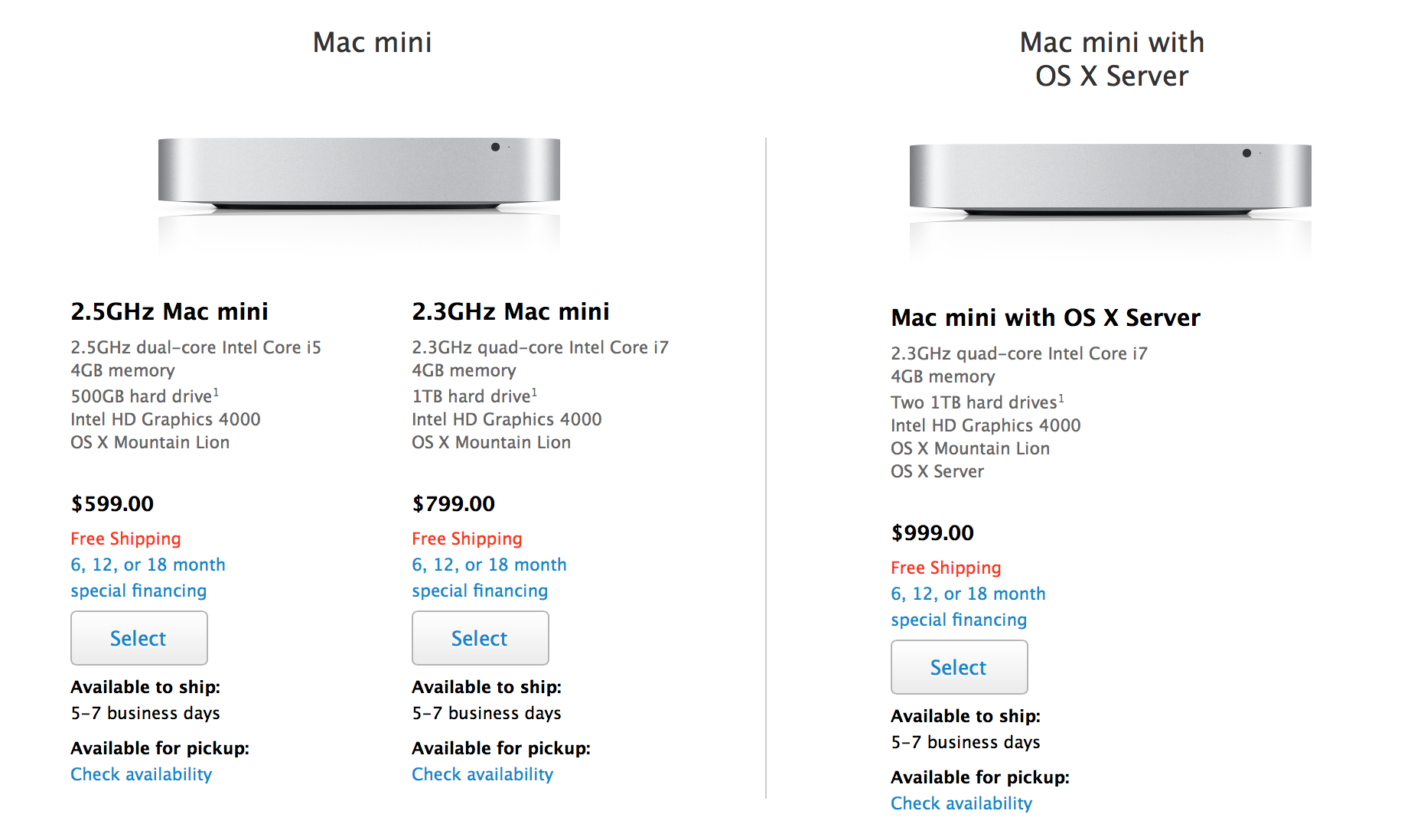
Mac mini shipping times slip to 5-7 days on Apple’s Online Store as new Haswell Macs are rumored

Apple’s Mac mini shipping times have slipped from 24 hours to 5-7 days, MacRumors notes. The change occurred today as a Bing Search cache points to 24 hour shipping times as of yesterday.

The slip in shipping times currently appears exclusive to the Mac mini, in multiple Apple Online Stores, as Apple’s other Macs are still showing the typical 24 hour times to ship.

While a slip in shipping times does not confirm an imminent update, Apple’s Mac mini was last updated in October of last year and lacks the current Intel Haswell chipset. The last major redesigned of the computer occurred in mid-2010.

The slip also comes at a time in which Apple is rumored to be preparing Haswell-based MacBook Pro and iMac models for release in the coming months. MacBook Airs with Haswell chips debuted in June.


Expand
Expanding
Close

Algoriddim’s djay 2: redesigned, more capable, improved audio syncing [Review]

Site default logo image

[youtube=http://youtu.be/mSsXrPxJ2rc]

“How can we create high quality, easy-to-use software for both professional and novice DJs?”

That’s the question that inspired co-founders Karim and Christoph to make Algoriddim’s djay, the award-winning music production software. At the time, DJ software was extremely expensive and complex, but the pair were determined to create meaningful change in an industry they were both tremendously passionate about. While they both enjoyed the art of scratching, in between attending classes and studying for exams at college, the two had vastly different skill levels.

Karim was the expert. With ten years of experience under his belt, Karim had his fair share of knowledge about the industry and had used some of the most popular DJ software available. But with every gig he played, Karim found each solution clunky and downright confounding. He could manage, as digital software proved to have a superior functionality compared to his old analog favorites, but the situation wasn’t even close to ideal.

Christoph, on the other hand, had an extraordinary admiration for DJing, but didn’t have the experience or expertise of his buddy Karim. No matter what software he tried, Christoph was often puzzled as most professional software featured an overwhelming set of controls and required an insanely high level of manual skill, which made performing all the more difficult.

As such, the duo wanted to make something new; software that they and similar people could both use.
Expand
Expanding
Close

Apple reports $35.3b revenue for Q3 2013: 31.2m iPhones, 14.6m iPads, 3.8m Macs

Site default logo image

As planned, Apple today announced its earnings results for the Q3 2013 quarter.

CUPERTINO, Calif.–(BUSINESS WIRE)–Apple® today announced financial results for its fiscal 2013 third quarter ended June 29, 2013. The Company posted quarterly revenue of $35.3 billion and quarterly net profit of $6.9 billion, or $7.47 per diluted share. These results compare to revenue of $35 billion and net profit of $8.8 billion, or $9.32 per diluted share, in the year-ago quarter. Gross margin was 36.9 percent compared to 42.8 percent in the year-ago quarter. International sales accounted for 57 percent of the quarter’s revenue.

The Company sold 31.2 million iPhones, a record for the June quarter, compared to 26 million in the year-ago quarter. Apple also sold 14.6 million iPads during the quarter, compared to 17 million in the year-ago quarter. The Company sold 3.8 million Macs, compared to 4 million in the year-ago quarter.

Apple’s Board of Directors has declared a cash dividend of $3.05 per share of the Company’s common stock. The dividend is payable on August 15, 2013, to shareholders of record as of the close of business on August 12, 2013.

Apple reported revenues for Q3 of $35.3 billion, which is within Apple’s estimates for the quarter of between $33.5 billion and $35.5 billion. This compares to $35 billion in revenues in the year-ago Q3.

Apple also reported net profit of $6.9 billion. This compares to $8.8 billion in profit during the year-ago Q3 quarter.

In terms of product sales, Apple reports that it sold 31.2 million iPhones, 14.6 million iPads, 3.8 million Macs, and 4.57 million iPods. This compares to the 2012 Q3 quarter in which Apple sold: 26 million iPhones, 17 million iPads, and 4 million Macs, and 6.8 million iPods.

Apple CEO Tim Cook on the results:

“We are especially proud of our record June quarter iPhone sales of over 31 million and the strong growth in revenue from iTunes, Software and Services,” said Tim Cook, Apple’s CEO. “We are really excited about the upcoming releases of iOS 7 and OS X Mavericks, and we are laser-focused and working hard on some amazing new products that we will introduce in the fall and across 2014.”

Apple CFO Peter Oppenheimer on the results:

“We generated $7.8 billion in cash flow from operations during the quarter and are pleased to have returned $18.8 billion in cash to shareholders through dividends and share repurchases,” said Peter Oppenheimer, Apple’s CFO.

Apple’s guidance for next quarter (Q3 2013) is revenue between $34 billion and $37 billion.

At 2 PM Pacific time, Apple will hold a broadcasted earnings call. We will conduct a live blog of the call with interesting notes in a separate post. Full press release below:


Expand
Expanding
Close

Site default logo image

9to5Toys Last Call: $120 Adobe Photoshop Lightroom 5 (PC/Mac), $72 External Blu-ray player/writer, apps/games, more

From 9to5Toys.com:

A large majority of the deals we cover each day come from a variety of ‘Daily Deal’ websites or are so popular that they don’t even last 24 hours. We know you can’t be at your computer every second, so we’re going to round up the best deals each day to make sure you have a fair shot at the deals you want. Be sure to follow 9to5Toys.com so you never miss a deal... Twitter, RSS Feed, Facebook, Google+.

Also check out the latest 9to5Mac Happy Hour to hear the latest 9to5Toys segment. During the show, there’s a mention of $50 video conversion software currently available for free and the VPN service proXPN.com available at a 20% discount.

Today’s Featured deals:

Adobe Photoshop Lightroom 5 Software for Mac and Windows (Boxed Version) $120 Shipped

Samsung 6X USB External Slim Blu-ray/CD/DVD reader/writer $72 Shipped (Reg. $98)

Other great deals we love:

Logitech announces Z600 Bluetooth Speakers made to match your Mac

Site default logo image

Logitech, which makes a number of the best Bluetooth speakers on the market for your iOS devices and other high quality audio products, today announced a new set of Bluetooth speakers made specifically to match the sleek exterior of your aluminum body Macs.
Expand
Expanding
Close

Apple’s U.S. PC shipments decline more than overall market if you don’t count iPads but do count Windows tablets

Site default logo image

Gartner is today out with a report detailing its estimates for Q2 2013 global and U.S. PC shipments. Globally, the industry average for shipments is down 10.9%. This is the fifth consecutive decline for this specific metric.

“We are seeing the PC market reduction directly tied to the shrinking installed base of PCs, as inexpensive tablets displace the low-end machines used primarily for consumption in mature and developed markets,” said Mikako Kitagawa, principal analyst at Gartner. “In emerging markets, inexpensive tablets have become the first computing device for many people, who at best are deferring the purchase of a PC. This is also accounting for the collapse of the mini notebook market.”


Expand
Expanding
Close

Parallels 8 Bundle: $50, includes Snagit, Typinator, WinZip Mac, xPlan, Boom, Leap, more

Site default logo image

From 9to5Toys.com, comes one of our favorite Mac app bundles. For $30 less than the price of the Parallels 8 headliner app (Give Windows 8.1 a free spin?), you get another 9 solid applications valued at $482 for $49.99. These are available for immediate download without shipping or tax charges worldwide.

Details and video below or on Specials.9to5Toys.com


Expand
Expanding
Close