Mac

See All Stories

Apple’s Mac lineup consists of MacBook, MacBook Air, MacBook Pro, iMac, Mac Pro, and Mac Mini. The Mac runs macOS for its operating system.

Mac lineup

History

The Mac is Apple’s lineup of computers, and it can be considered the company’s oldest product. The name “Mac” comes from the original Macintosh, which was introduced in 1984 and is also considered the first personal computer for the masses to have a graphical user interface. The first Macintosh hit the stores on January 24, 1984, costing $2,945.

Among all these years, Apple has introduced many different Mac models, ranging from desktops to laptops to professional tower machines. The current lineup consists of the MacBook Air, MacBook Pro, Mac mini, iMac, and Mac Pro. However, there have been other Mac models were discontinued, such as the eMac, MacBook, and iMac Pro.

The history of modern Macs began in 1998, a year after Steve Jobs returned to Apple. Apple had dozens of Macintosh computers at that time, but Steve decided to rethink the entire lineup. In 1998, Apple announced the iMac G3, which ditched the floppy disk and serial ports in favor of USB connectors.

Macintosh and iMac G3.

Unlike the Macintosh, the first iMac was considered a huge success — not only for its technology, but also for its unique design with colorful translucent plastic. Apple quickly expanded the Mac lineup with other models, which included the iBook and PowerBook (which became the MacBook and MacBook Pro) and the PowerMac, which is now the Mac Pro.

macOS

What makes a Mac the Mac is the macOS operating system, which has also had a long history since the introduction of the first Macintosh. Initially called Mac OS, the operating system was rebuilt when Steve Jobs returned to Apple.

The first version of Mac OS X was released on March 24, 2001 with a new interface that is still present in some ways in current versions of macOS. Apple’s desktop operating system comes with many free applications such as Pages, Keynote, Numbers, iMovie, and GarageBand.

With macOS, users also have access to deep integrations with other Apple devices. For instance, you can answer calls and send SMS from your iPhone using your Mac. Handoff lets you switch from one device to the other and pick up where you left off. Apple Watch users can unlock their computer without entering a password, and you can even copy and paste between devices.

macOS Sonoma

Apple’s desktop operating system is also integrated with services offered by the company, such as iCloud, Apple Music, and Apple TV+.

The current version of macOS is Sonoma (version 14), which features new slow-motion screen savers, widgets on desktop, camera effects on FaceTime and other apps, web apps, passkey sharing, improved PDF support, and Game Mode. The update also comes with a new API that lets developers easily port Windows games to macOS.

Architecture Transitions

The Mac has had three major architecture transitions in its history. Apple’s first computers ran on Motorola processors, but the company decided to migrate to the new PowerPC platform in 1994. While this brought benefits at the time, the PowerPC processors were not delivering what Apple expected.

It was in 2005 that Apple confirmed the transition from PowerPC to Intel. Intel processors had become faster and more efficient than PowerPC, which enabled the development of new Mac computers that were more powerful and also more compact. Developers have been given access to a Developer Transition Kit running Mac OS X Tiger with Intel Pentium 4 to update their apps before the transition begins.

Power PC, Mac OS X, and Intel processor.

Apple said that the transition would begin in June 2006 and be finished by the end of 2007. However, the transition to Intel was fully completed in August 2006 when the company replaced the PowerMac with the new Intel Mac Pro.

As the years went by, Apple once again felt the need to have more powerful and efficient processors for its computers. This time, the company was already working on its own chips for the iPhone and iPad. In June 2020, Apple confirmed that it was changing the architecture of the Mac, now from Intel to ARM chips, which are called Apple Silicon.

Apple offered a Mac mini DTK running on the same A12Z Bionic chip as the 2020 iPad Pro. This way developers could once again update their apps ahead of the transition. In addition to being more powerful and energy efficient, the ARM architecture of Apple Silicon chips has enabled Macs to run iOS apps for the first time.

Apple M1 chip | Mac

The first Apple Silicon Macs were released in November 2020 with the M1 chip. The company later introduced more powerful variants of the M1 chip, called M1 Pro, M1 Max, and M1 Ultra. Macs with Apple Silicon have become known for being more powerful while consuming much less power, which has resulted in MacBooks with extended battery life.

In June 2022, Apple introduced the M2 chip, which is around 20% faster than the M1 and also supports more RAM. M2 also has more powerful variants: M2 Pro, M2 Max, and M2 Ultra.

Apple unveiled the M3, M3 Pro, and M3 Max chips in October 2023. The main highlight of this generation is the 3 nanometer technology, the same as the A17 Pro chip. The M3 family also features better GPUs with support for hardware-accelerated ray-tracing.

Current Mac lineup

Apple currently sells a variety of Mac computers, which includes MacBooks, Mac mini, iMac, and Mac Pro. While some of the Macs have already been updated with an Apple Silicon chip, others remain with Intel processors.

MacBook Air

The MacBook Air is Apple’s most affordable laptop and it has become popular for its light, compact design. The 2022 version is powered by the M2 chip and is offered with 8GB, 16GB, or 24GB of RAM. Plus, it has a new, edge-to edge 13.6-inch Retina display.

The laptop features Touch ID and has two Thunderbolt 3 compatible USB-C ports, a MagSafe connector for charging, and a headphone jack. Prices start at $1099 in the US. It’s offered in silver, space gray, starlight, and midnight.

M2 MacBook Air.

A year later, Apple introduced the first 15-inch MacBook Air. It has essentially the same hardware as the smaller version with a similar design, but with a larger display. Prices start at $1299 in the US.Apple is still selling the M1 MacBook Air for prices starting at $999.

MacBook Pro

The 2023 MacBook Pro is available in multiple versions, and customers can choose between 14-inch and 16-inch screen sizes. For the first time, Apple has introduced a less expensive version of the 14-inch MacBook Pro with the base M3 chip. This version has the same design and display as the high-end versions, except that it only has two USB-C ports instead of three.

M3 MacBook Pro

The most expensive versions of the MacBook Pro are equipped with the more powerful M3 Pro and M3 Max chips. The laptop can be configured with up to 128GB of RAM and 8TB SSD. These versions also come in a new Space Black color.

Unlike the MacBook Air, the MacBook Pro comes with an HDMI port and an SD card reader. It also features MagSafe and Touch ID on the keyboard. Apple no longer sells MacBooks with the Touch Bar. Prices start at $1,599 in the US.

Mac mini

Mac mini is the cheapest Mac currently available since it’s basically a desktop without a built-in display or other peripherals. The base model with the M2 chip features one Ethernet port, two USB-C/Thunderbolt 4 ports, HDMI 2.0, two USB-A ports, and a headphone jack.

Apple sells a more powerful version of the Mac mini with the M2 Pro chip, which also comes with four USB-C ports instead of two. Mac mini can be configured with up to 32GB of RAM and up to 8TB of storage. Customers can also opt for a 10 Gigabit Ethernet port. The Apple Silicon Mac mini is only available in silver, while the now discontinued Intel model was available in space gray.

Apple Silicon Mac mini.

Prices for the Mac mini start at $599 in the US. Again, it’s worth noting that it doesn’t come with a keyboard or mouse in the box – you need to buy them separately or use your current ones.

Mac Studio

Mac Studio represents a new category between Mac mini and Mac Pro. It features a design based on the Mac mini, but with a taller body to support the more powerful hardware and also a better cooling system.

The new Mac Studio is targeted at professional users who work with demanding tasks such as video editing, 3D rendering, and machine learning. 

Embraced by creative pros everywhere, Mac Studio now delivers next-generation power in the form of the lightning-fast M2 Max and the boundary-breaking M2 Ultra. It packs outrageous performance and extensive connectivity in an unbelievably compact form, putting everything you need within easy reach and transforming any space into a studio.

By default, Mac Studio already comes with the M2 Max chip, 32GB of RAM, and 512GB SSD storage. A more expensive option lets users customize Mac Studio with M2 Ultra. While M2 Max has a 12-core CPU and a 30-core GPU, M2 Ultra doubles all of those specs. The new chip has a 24-core CPU and a 60-core GPU.

Mac Studio can also be configured with up to 192GB of RAM and 8TB of SSD storage. The machine offers up to six Thunderbolt ports, 10 Gigabit Ethernet, headphone jack, two USB-A ports, and one HDMI port.

Mac Studio

Apple has been rumored to be working on new versions of this machine with the M3 Max and M3 Ultra chips. However, these versions may not be ready until 2025. Bloomberg’s Mark Gurman said in November last year that the M3 Ultra chip “hasn’t yet gone into broad testing” inside Apple.

In the US, prices for the Mac Studio with M2 Max chip start at $1999. The M2 Ultra chip version starts at $3999. Just like the Mac mini, Mac Studio doesn’t come with a keyboard and mouse in the box. You can find accessories for your Mac Studio here.

iMac

iMac is Apple’s most popular desktop computer with an all-in-one construction. It features a 4.5K display in its 24-inch version and a 5K display in the 27-inch version. At the same time, Apple still sells an entry-level iMac with a regular 1080p display.

The 24-inch iMac is the first to feature the M1 chip, the same as in the Mac mini, MacBook Air, and MacBook Pro. This allowed Apple to introduce a completely redesigned model with a slimmer design, which is also offered in seven new colors. Customers can customize the new 24-inch iMac with up to 16GB of RAM and 2TB of storage.

Site default logo image

The company ships the 24-inch iMac with Magic Mouse and Magic Keyboard, plus a Lightning cable for recharging accessories. Prices in the US start at $1299. Apple has discontinued its old 21.5-inch iMac and the 27-inch iMac 5K.

Mac Pro

Mac Pro is a computer built for professional users who depend on extremely powerful hardware. Available in tower and rack versions, it has a completely modular design. That means users can replace RAM, SSD, GPU, and other internal components.

By default, it features four USB-C/Thunderbolt 3 ports, two USB-A ports, and two 10Gb Ethernet ports. However, the ports can be expanded using the PCI Express slots. Apple also ships the computer with a Magic Mouse and Magic Keyboard, but it does not come with an external monitor included.

All models feature Intel Xeon W processors, which are the most powerful processors offered by Intel. Consumers can configure Mac Pro with up to 28-core processor, 1.5TB RAM, and 8TB of SSD storage. In addition to supporting multiple dedicated GPUs, Apple also offers the Afterburner card — which accelerates the decoding of ProRes videos.

The company recently updated the Mac Pro with new graphics card modules, which include Radeon Pro W6800X and Radeon Pro W6900X.

Site default logo image

Mac Pro prices start at $5999 in the US.

Rumors about upcoming Macs

Top stories about the Mac

Apple updates Final Cut Pro X with new features as part of campaign to win back pros

Site default logo image

Following reports this morning that Apple was preparing to a launch a new campaign on its website to lure skeptical professionals back to Final Cut Pro X, Apple has now pushed out updates to the app in addition to smaller updates to its Motion and Compressor apps.

Version 10.0.8 of the ‘Final Cut Pro’ Mac App Store app brings a number of new features and enhancements, many of which focus on improvements for professional users. Among the updates is support for Sony XAVC codec up to 4K, the ability to view “ProRes Log C files from ARRI ALEXA cameras with standard Rec. 709 color and contrast levels,” and a long list of editing fixes, tweaks and enhancements that have been highly requested by pro users.

Apple has now updated its website with the new Final Cut Pro campaign we mentioned earlier. It includes a feature with acclaimed director Tsui Hark and Canada’s largest newspaper The Globe and Mail. The ‘What’s New’ Final Cut Pro product page was also updated to show off some of the new features in today’s update such as support for the Sony XAVC codec.

Apple also updated Compressor and Motion today with minor updates that include fixes.

A full list of what’s new in Final Cut Pro X, Compressor, and Motion is below:

Expand
Expanding
Close

Mac-specific trojan injects ads into webpages – including Apple’s site

Site default logo image

TNW reported on a new trojan discovered by Russian website Doctor Web that installs adware on Macs running all three of most popular browsers: Safari, Firefox and Chrome. Doctor Web demonstrated that the Trojan.Yontoo.1 plugin can display ads on any site by showing it in action on Apple’s own website.

Many Mac owners still believe that OS X is immune to viruses and trojans. While it’s true the platform is well protected, a large part of the relative immunity enjoyed by Mac owners has simply been down to blackhat economics: when there were many more Windows machines around than Macs, it was less worthwhile for attackers to target Macs. As the popularity of Macs has grown, however, the platform has made an increasingly attractive target.

The trojan cannot install itself and instead relies on tricking users into downloading and installing it.

This particular trojan can get onto your Mac in multiple ways. Criminals have so far used movie trailer pages that prompt users to install a browser plugin, a media player, a video quality enhancement program, or a download accelerator. In other words, the usual schemes we’ve seen on Windows.

Once installed, the plugin sends details of the webpages you visit back to a server controlled by the bad guys and uses that info to insert relevant ads. The Apple example above shows just how slickly this can be done. On a less-familiar site, a visitor could easily see the ad as part of the site.

As ever, the advice here is to only ever download known plugins from the official sites. Never accept an invitation to download anything from a website unless you know it to be a site you can trust. We’d be surprised if many 9to5Mac readers fell victim to this, but if you have family members using your Mac who might not be as careful, Intego VirusBarrier has updated its definitions to include it.

BioShock Infinite, Amazon Send to Kindle, Garmin, Final Fantasy V, Reuters, more

Site default logo image

BioShock Infinite: Mac game developers Aspyr announced today that it will be bringing Bioshcok Infinite to the Mac following its release on PC and consoles next week on March 26. It will take Aspyr until the summer to get the third instalment in the Bioshock series up and running on OS X, but the company promised us more details on pricing, preorders, and release dates in the near future. The game follows lead character Booker DeWitt and takes place in the lost, floating city of Columbia. It’s the first title in the series that doesn’t take place under water and also sees the return of the game’s original developer Ken Levine.

Amazon Send to Kindle: Announced by Amazon today, website owners can now add a “Send to Kindle Button” to allow visitors save content directly to Kindle devices and apps. That means that iPhone and iPad users can now use the function on supported sites to send content to the Kindle iOS apps. Some sites such as The Washington Post, TIME, and Boing Boing have already added the button.

Final Fantasy V: The FF-Reunion website is reporting that Final Fantasy V is making its way to the App Store, at least in Japan, by the end of March. The title is said to get the usual overhaul for iOS, but until then you can always play the Game Boy Advance port through an emulator.

Garmin USA version 2.4: Garmin updated its USA version of its iOS app today alongside many other local versions with the ability to play voice instructions through your car’s speakers over bluetooth, a new Map Manager, points of interest from Wikipedia, and much more:
Expand
Expanding
Close

Site default logo image

Ending: Two great Mac Bundles headlined by Parallels 8 and Roxio Toast 11 for $50/ea

Bundle Season at 9to5Toys.com is coming to an end:

Ending in a few hours:MacUpdate’s Parallels Desktop 8 bundle which effectively knocks $30 off the price of Parallels 8 and then hooks you up with DEVONthink Pro and 8additional Mac applications for free (normally $618). A free demo is also available.

.

– Parallels Desktop 8 ($79.99) – Run Windows/Linux/Chrome on your Mac.
– DEVONthink Pro ($79.95) – Info manager.
– Prizmo ($49.95) – OCR Scanner for editing printed documents
– MacUpdate Desktop ($10.00) – Software update utility
– MotionComposer ($149.00) – Design animated and interactive Web content.
– 1000 OpenType fonts Collection ($99.00) – OpenType Fonts.
– iStat Menus ($16.00) – Monitor your Mac from the menubar.
– PhotoStyler 6 ($29.99) – Stylize your photos with filters, presets, more.
– DiskAid 6 ($29.90) – File transfer tool for iOS devices.
– Mac Internet Security 2013 ($29.99) – Malware/anti-virus utility.

Also ending this week, Stacksocial has their Spring 2013 Bundle which is headlined by the normally $100 Roxio Toast Pro 11 media creation software for $49.99 but also includes nine other great apps valued at over $390 below:

.

Hook up Your Mac With 10 Elite Mac Apps!

The bundle includes 10 HIGH-QUALITY Mac apps valued at over $390 for an EXCLUSIVE price of $50!

This all-inclusive bundle has just about something for everyone.

The Mac Apps Include:

  • Roxio Toast 11 ($100) – Titanium makes it easier than ever to capture, burn, convert, copy and share digital media.
  • Set for iWork ($69) – Over 1100 unique designs for Pages, 100 spreadsheet templates for Numbers, 50 first-class slideshow themes for Keynote, and 1300 images for illustrating your content. All templates are available in the US and international paper sizes.
  • LaunchBar ($35) – Get instant access to applications, documents, contacts, calendars, bookmarks, media libraries, search engines and so much more – just by typing short abbreviations.
  • TasksBox ($25) – TasksBox is a simple and beautiful task manager that helps you to easily manage your daily tasks so that you can spend more time on what you love.
  • Animationist ($30) – Create perfect title art animations for your YouTube videos, iMovie or Final Cut projects, showcase videos and even TV broadcasts.
  • iFinance ($30) – Start recording your income and expenses right now, be it a coffee during lunch break or a brand new car – finally, you’ll get a clear overview of what exactly you spend your money on.
  • Habits ($20) – Habits is based on the scientifically proven principle that it takes a continuous chain or repetition of an activity to create a new habit, make a habit out of a resolution or replace an existing habit with a new one.
  • MainMenu Pro ($10) – Run daily, weekly and monthly maintenance scripts to keep your Mac strong.
  • Corel Paint it! ($40) – This photo painting software includes multiple painting styles, brushes and realistic effects that let you add a personal touch to any creative project.
  • Stationery Pack 2 ($25) – Turn your favorite photos into greeting cards and send them with Mail.

Plus a BONUS App if You Buy Right Now!

That’s right, if you buy this bundle RIGHT NOW, you’ll also get Trickster as an added bonus!

Trickster ($10) – Trickster is the ultimate productivity booster for you.

This bundle has been hand-picked to ensure that quality apps make it onto your desktop. There’s no better opportunity to start enhancing your Mac that with this Spring 2013 Bundle.

Enjoy!

Two great Mac Bundles headlined by Parallels 8 and Roxio Toast 11 for $50/ea

Site default logo image

It’s Bundle Season at 9to5Toys.com again where there are currently 4 solid bundles happening simultaneously:

First up, we have MacUpdate’s Parallels Desktop 8 bundle which effectively knocks $30 off the price of Parallels 8 and then hooks you up with 9 additional Mac applications for free (normally $618). A free demo is also available.

.

Not to be outdone, MacLegion/Stacksocial has their Spring 2013 Bundle which is headlined by the normally $100 Roxio Toast Pro 11 media creation software for $49.99 but also includes nine other great apps valued at over $390 below:

.

Don’t forget the $45 Lifehacker bundle is still happening as well as the $50 ‘PickaBundle’ which allows you to choose 10 of 25 quality apps including a Mac Blu-ray player.
Expand
Expanding
Close

Site default logo image

Weekend deals roundup: $1349 Retina MacBook Pro, 50% off ZAGG iPad keyboards, 99 cent apps galore & more

From 9to5Toys.com:

While you’ve been enjoying your weekend we have been scouring the net for the best deals in consumer electronics.  Most of these deals are only for a limited time so be sure to cash in on these savings if you find a deal you like.  Due to Presidents’ Day weekend, we expect to be adding a lot of deals throughout the next two days so be sure to check back.

Also bookmark 9to5Toys.com/Daily-deals for 25+ of the top daily deals across most of the biggest shopping sites in the US including Amazon, Best Buy, Walmart, Target, and many more.

The best deals this weekend:

13″ Retina MacBook Pro to $1349 ($150 off)

Accessories

BodyGuardz 15% off sitewide discount; iPad, iPhone, iPod and Mac accessories
Western Digital Elements 3TB External Hard Drive for $115 + free shipping
50% off refurb. Genuine Apple iPad Smart Cover $19, (PRODUCT) Red Leather only $29 + free shipping
Scosche Lightning cable accessories now available, 10% off for a limited time
iCADE iPad Arcade Cabinet $79 (Reg. $99)
50% off select ZAGGfolio & ZAGGkeys for iPad and iPad mini (Check our review)
ZAGGkeys FLEX Bluetooth Keyboard for iPhone / iPad for $35 + free shipping
Lightning power bundle including cable, wall and lighter charger: $8
22″ 1080P AOC monitor from Best Buy: $99.99
You can still get an External portable USB BluRay Player with software for less than the price of a Superdrive.

Apps

Gameloft 99 cent iPad & iPhone game sale: Amazing Spider-Man, Silent Ops & Avatar
iPad app, Splashtop 2 Remote Desktop, temporarily 99 cents (Reg. $4.99)
EA Games iOS Presidents’ Day sale, 50 titles up to 90% off
iPhone & iPad game, Infinity Blade, free for the first time ever (Reg. $5.99)
iPhone & iPad productivity app, Smart Office 2, temporarily free (reg. $10)

Rabbit, Foursquare, Skype, TomTom, Cut the Rope, Borderlands Legends, deals, more

Site default logo image

Rabbit: Launching today in closed beta, Rabbit is a new video chat and content sharing app– initially available exclusively for Mac– that has been getting a lot of attention. The app lets you chat with an unlimited number of people, create and customize chats, as well as watch movies, listen to music, and share content in chats in real-time. If you are a pre-teen who hasn’t heard of Google Hangouts, you might want to check this out.

Rabbit is kind of like a virtual living room. It runs in the background on your computer just like Skype, so you can always find your friends online and invite them to watch a movie or listen to music at any time. You can share this content directly from your computer, or you can use the Rabbit “SharePad” of integrated content sites to instantly launch TV shows, videos and music you want to watch and listen to with your friends.

Foursquare version 5.4.3: Foursquare gets an update today that brings improvements to check-in notification settings including an “Always” option to get notifications for all check-ins, as well as new “Nearby” and “Off” settings to apply to specific users.

✓ Choose “ALWAYS” for close friends and family you always want to keep up with. You’ll get notifications for all their check-ins, no matter where they are in the world.
✓ Choose “NEARBY” for friends you’d like to hear about from time to time. We’ll only notify you when they’re close by.
✓ Choose “OFF” for those acquaintances you don’t really want updates from. And that bike messenger friend who checks in at every spot on his route.

TomTom version 1.13: TomTom updated the majority of its iOS navigation apps today. On top of the most up to date map data, users can also now backup and restore settings and stored destinations from iCloud. With today’s update TomTom is also providing a free 30 day trial to its HD traffic subscription. In addition, the app now includes compatibility for iPad mini.

Borderlands Legends version 1.1.0: 2K’s Borderlands Legends (and the HD iPad version) is updated today with new features including a new sniper mode, new enemy and mini boss types, night versions of the Wasteland map, iPhone 5 & Game Center support, new Eridian Weapons, and more.
Expand
Expanding
Close

Apple invents laser projected keyboard & depth perception system, reveals ad-hoc cash dispensing network

Site default logo image

The U.S. Patent and Trademark Office published a couple of interesting patent applications from Apple today. One patent described various embodiments of a depth perception system and laser projection, while another concerned an “ad-hoc cash dispensing network” that would turn iPhone users into walking ATMs.

PatentlyApple first covered the patent and highlighted several possibilities of using cameras and a laser source to determine the distance of an object and implement various applications based on detection of depth. The report explained an embodiment of the invention by describing how Apple could use the system integrated into, for example, an iMac. PatentlyApple also described how Apple could use the invention for laser projected keyboard applications (as pictured above):

In this example, the iMac is able to detect a user approaching it and activate a particular program, application, awake from sleep or power save mode, and the like… In patent FIG. 12, we see a user positioned in front of this future iMac such that the first and second beams 206a, 206b may at least partially intersect the user. The iMac’s updated iSight Camera will be able to determine the distance that the user is from iMac. The depth perception system increases the sensitivity of user detection for the iMac so that it could make a distinction between the user and an occupied chair… In Apple’s patent FIG. 11A shown below, we see the depth perception system incorporated into a mobile electronic device such as an iPad. In this example, the system may be used in combination with a projected control panel 115 (such as a keyboard, audio/video controls, and so on). The control panel 115 may be a light pattern projected from a light source onto a surface (e.g., table or desk), the control panel 115 may include different light shapes, colors, or the like for representing different inputs.

Unwiredview.com pointed us to the “ad-hoc cash dispensing network” patent published today and recently filed by Apple that would essentially allow iOS users to become ATMs for other iPhone users. Just imagine being able to withdraw cash when there simply isn’t an ATM or bank nearby. Apple’s system would allow other close by iPhone users to lend you cash, with the borrowed money returned to the lender through your iTunes account/credit card for a small fee (as pictured in the patent drawing below):

Expand
Expanding
Close

Site default logo image

Parallels 8 beats out VMware Fusion 5 in extensive benchmark analysis

MacTech Magazine, which recently announced its upcoming MacTech BootCamp II, today looked at two of the most popular virtualization products for Mac with an in-depth benchmarking analysis of the most recent versions of Parallels Desktop 8 and VMware Fusion 5. We have seen Parallels 8 come out on top in benchmarks from previous reports, but this is by far the most comprehensive comparison.

MacTech put the two apps to the test in a number of areas including launching various OSes, application performance, 3D graphics tests, Retina Support, and much more. The conclusion: Parallels Desktop 8 won on the majority of general tests and 62 percent of 3D graphics tests.

In the vast majority of our overall tests, Parallels Desktop 8 won. Again, if you count up the general tests (including the top 3D graphics scores), Parallels won 56% of the tests by 10% or more. If you include all the tests where Parallels was at least 5% faster, as well as the balance of the 3DMark06 graphics tests, Parallels increased the lead further.

We recommend checking out MacTech’s lengthy analysis.

Parallels 8 for Mac currently sells for $55 on Amazon, while VMware Fusion 5 is available for as low as $46.99.

Site default logo image

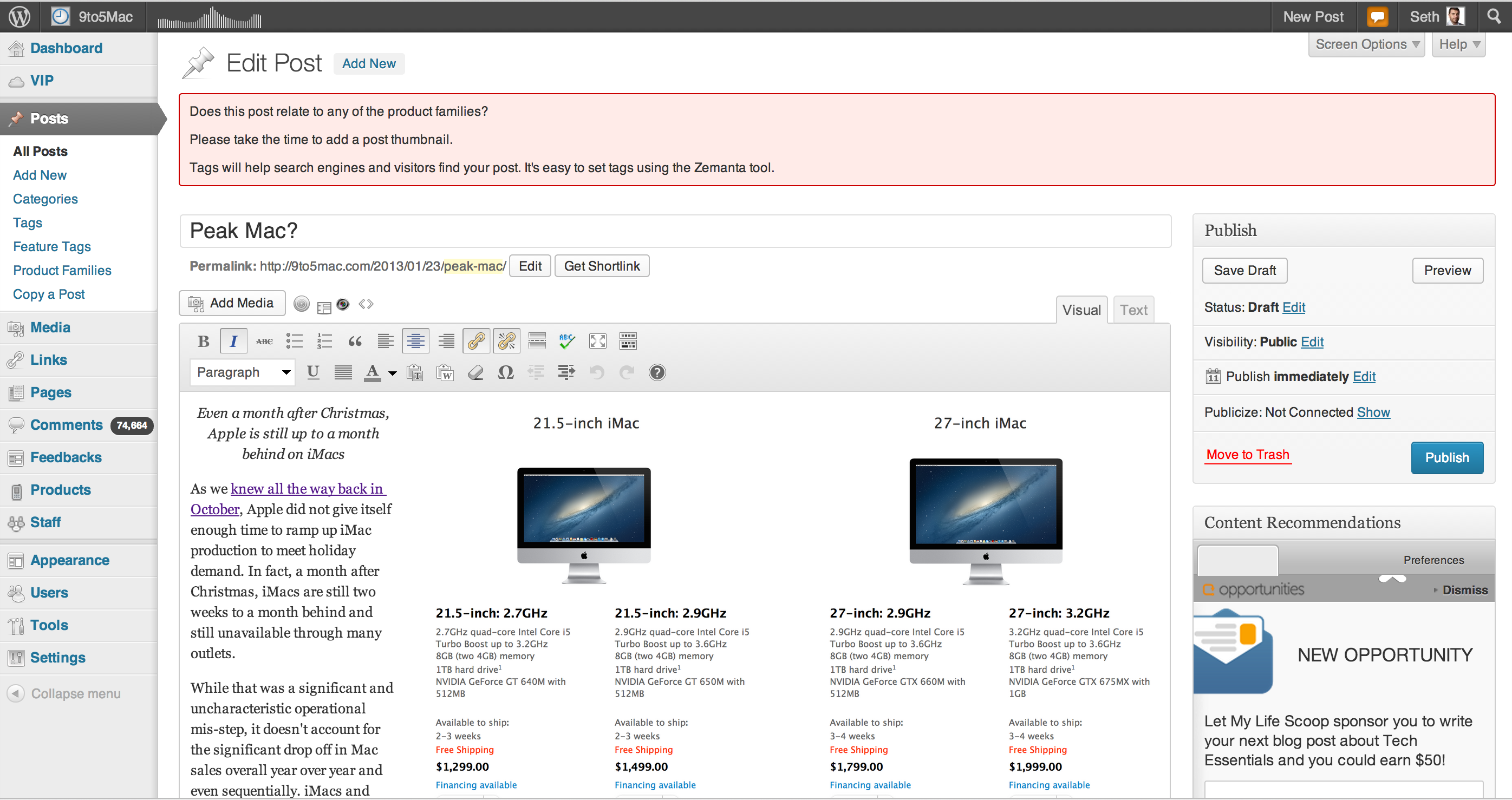
Peak Mac — Will Apple ever sell 5M Macs in a quarter again?


The bad news

Dan Frommer wrote a post that I was going to write but never finished. His is better anyway. The not-recommended TL;DR is: Even though CEO Tim Cook said there were plenty of reasons (5) for the decline of Mac growth, including iMac constraints, Mac sales for the year are heading toward “flat.” From our liveblog, you can hear Cook’s comments specifically:

On declining Mac numbers: Cook: “If you look at the previous year, our Mac sales were about 5.2M. The difference is 1.1… iMac were down by 700k units Y-O-Y…. There were limited weeks of ramping on these products (iMacs) during the quarter.” We left the quarter with significant constraints on iMacs. Our sales would have been significantly higher… Our channel inventory was down by over 100K units at the beginning of the quarter.

–Cook says market for PCs is weak… “we sold 23 million iPads, we obviously could have sold more than this because we could not build enough iPad minis to come into a demand balance… Im sure there was some cannibalization of Macs there.” If you look at our portables alone we were inline with IDC’s projections of market growth.

While not making enough iMacs for Christmas shopping was a significant and uncharacteristic operational misstep, it doesn’t account for the significant drop in Mac sales overall year-over-year and even sequentially. iMacs and desktops in general have been a declining component of the Mac market as MacBooks take over the space, so even a significant drop in iMac sales wouldn’t account for a 20-percent drop year-over-year and sequentially. Apple also released new Mac Minis and 13-inch Retina MacBook Pros in the quarter, and the rest of the Mac lineup (including the Mac Pro) was updated just a few months before the quarter began.

Cook rationalized why Macs weren’t even flat and are “inline with IDC’s projections,” even though Macs have outgrown the market for something like 20 consecutive quarters previously.

Without a major hardware change or drastic price cuts, it is hard to imagine Apple having another 5 million Mac quarter. It would seem that, like iPods a few years ago, Macs have peaked. Apple’s iPods were cannibalized by iPhones.

The good news is that Apple is cannibalizing its own Mac growth (as well as overall PC growth) with its own high-margin iPads—and lots of them. In fact, Macs now represent significantly less than 15 percent of the total of combined numbers (below and corresponding revenues).


Expand
Expanding
Close

Site default logo image

Aspyr releases ‘Star Wars Jedi Knight: Jedi Academy’ for Mac, available now for $9.99

Aspyr, the company behind the majority of your favorite Mac games, today announced that the classic Star Wars title Star Wars Jedi Knight: Jedi Academy is now available for Mac. Available as a Steam Play title on Steam, or for $9.99 through the Mac App Store and Aspyr’s GameAgent store, Aspyr told us the critically acclaimed title has been completely overhauled for the Mac:

We’ve completely overhauled the game, fixing tons of old bugs and ensuring the titles works on the latest hardware and OS. We think the game holds up great even to today’s standards…I mean, who doesn’t like a good old fashioned lightsaber battle?

We recently sat down with executives from Aspyr to find out how they port games to Mac and get their take on the future of Mac gaming. Check the full interview here.

Site default logo image

GOG adds 10 classic titles to Mac catalog including Fallout 2, Alpha Centauri, and Postal 2

In October 2012, online game retailer GOG.com announced it would bring a large portion of its classic game catalog to Macs starting with more than 50 titles. It has since added many more titles for Mac gamers, and it today announced the addition of 10 new Mac games including popular titles like Fallout 2, Sid Meier’s Colonization, and Postal 2.

This grouping of games has award-winning titles in practically every genre. For strategy games we see the works of industry legend Sid Meier’s in Alpha Centauri, and the hard to find expansion pack “Alien Crossfire”, as well as Sid Meier’s Colonization. Conquest of the New World, a historical strategy sim, is also added in today’s release. For fans of pulse-pounding action,Freespace, Terminal Velocity, and the controversial Postal 2 are sure to delight, while RPG lovers are well taken care of, with Fallout 2and Ultima 7 now fully supported for Mac operating systems.

A full list of new games is below:

GOG.com, the digital distributor of the best games in history for both PC and MAC, has added Alpha Centauri and the Alien Crossfire expansion,Fallout 2, Legend of Grimrock, Sid Meier’s Colonization, Postal 2, Ultima 7, Freespace 1,Terminal Velocity, Conquest of the New World, and the Blackwell Bundle are now officially supported by GOG.com, bringing the total of Mac games to just shy of 100.

Site default logo image

Amazon expands in-app purchasing to games on Mac, PC, and Web platforms

Amazon just announced it would expand in-app purchasing to games on Mac, PC, and Web-based platforms, according to a press release, letting folks use their Amazon accounts to buy “virtual goods and currencies”.

Amazon’s customers can use any credit card, Amazon gift card, or Amazon credit when buying in-app items. The online retailer also offers its in-app purchasing API and services to Android and Kindle Fire, so developers from a variety of platforms can offer a “trusted and secure buying experience.”

When Amazon launched in-app purchasing for Android and Kindle fire last year, the company’s appstore director, Aaron Rubenson, explained it would take a 30-percent cut from transactions, similar to how Apple and Facebook does, but Amazon can also set pricing so developers can still receive 30 percent of the list price.

Amazon noted other benefits to today’s expansion include opening its fraud detection technology to developers, providing transaction and customer service support, and offering marketing options like in-app items available on Amazon.com via best seller lists, recommendations, campaigns, etc.

Get more information at Developer.amazon.com/games/in-app-purchasing, or check out the press release below. Amazon’s introduction video from last year on in-app purchasing is also after the break.


Expand
Expanding
Close

Aspyr Media talks porting games to OS X, Mac App Store & the future of Mac gaming (+ Borderlands 2 giveaway!)

Site default logo image

The introduction of the Mac App Store, at least for the Mac’s biggest game publisher Aspyr Media, hasn’t been entirely smooth. Aspyr recently outlined some issues with bringing multiplayer to Mac games due to Game Center and sandboxing restrictions of the Mac App Store, and developing separate versions of games for Steam and the Mac App Store continues to be a hurdle. An example is Borderlands 2. It took Aspyr just two months to ship the Mac version, but the Game Center multiplayer won’t arrive until sometime early this year. However, executives at the company promise Apple’s enthusiasm toward gaming on Mac is stronger than ever thanks to the Mac App Store. Aspyr also said it has much planned for 2013 in Apple’s store and remains platform agnostic, despite running its own competitive GameAgent store.

9to5Mac recently had the chance to speak with Aspyr Vice President of Publishing Elizabeth Howard, with input from CEO Michael Rogers and other execs, about the process of porting games to the Mac App Store, the company’s relationship with Apple and publishers, and the possibility of bringing iOS titles to OS X.

In case you’re unfamiliar, Aspyr is one of the biggest Mac game publishers bringing PC and console titles to OS X. It regularly leads many of the top paid and grossing charts on the Mac App Store thanks to high-profile releases such as Borderlands 2, RAGE, Call of Duty: Black Ops, and much more. Go below for the full interview and a chance to win Borderlands 2 for Mac.
Expand
Expanding
Close

Site default logo image

‘Fix’ allows you to install Windows Bootcamp on new iMacs with 3TB drives

If you haven’t heard, those who purchased a new Mac with Apple’s built-to-order 3TB hard drive option found themselves unable to utilize Boot Camp assistant to install Windows. Boot Camp Assistant is currently limited to drives up to 2.2TB. Apple hinted that support might come at a later date, but TwoCanoes shares a step-by-step guide for getting the job done in Boot Camp until then:

Since it is not possible to get around the 2.2 TB limitation with booting Windows, it is possible to organize the partitions so that Windows is the last of the first four partitons and is within the first 2.2 TBs of space on the drive. Since the Mac can see the remaining space above the 2.2 TB limit, this space can be used for addtional storage space for OS X.

In order for Windows to boot successfully and still be able to utilize all of the available space on a 3 TB (or larger) hard drive, Windows must be installed on the fourth partition. You can use Disk Utility to create the partition, but since Disk Utility does not show hidden partitions, it can be difficult to see what is going on if some partitions are hidden. To have Disk Utility show hidden partitions, open Terminal and run the following command:

You can get the full instructions on TwoCanoes here.

Site default logo image

Borderlands 2 hits the Mac App Store 25 percent off for the holidays with exclusive content


After coming to Steam last month, Mac games publisher Aspyr has announced the Mac edition of 2k Games’ popular Borderlands 2 title is now officially available at the Mac App Store. Aspyr also made the game 25 percent off on the Mac App Store for the holidays at $44.99. Multiplayer and Game Center support won’t come until early 2013 in a free update, but exclusive to the Mac App Store version is: the new Fired Up skins, a unique head for each vault hunter, and “a Contraband Sky Rocket Grenade mod.”

Those who purchased the game on Steam will also get access to the Mr. Torgue’s Campaign of Carnage DLC on Mac today for $9.99:

Today is also a big day for Mac players who have already purchased Borderlands 2 from Steam or other fine outlets such as GameAgent.com.  The newest Borderlands 2 DLC, Mr. Torgue’s Campaign of Carnage comes to the Mac with tons of new content and challenges players to enter the Badass Crater of Badassitude!  Mr. Torgue is priced at $9.99, supports Steam Play, and is included for purchasers of the Borderlands 2: Season Pass.  Check out Aspyr.com for more details.

27-inch iMac with 3TB Fusion Drive can’t yet do Boot Camp, early adopters frustrated

Site default logo image

As customers begin receiving the new iMac this month, business-end users and gamers may find one issue when booting up their new machine. As reader Michael Verde first shared with us, the built-to-order 27-inch iMac configuration with a 3TB Fusion Drive (an extra $400) will not allow any Boot Camp use. This essentially cuts off access to a full Windows experience that some Mac users may want to benefit from. Many might consider this a bummer, as a sizable amount of users turn to Boot Camp to access necessary Windows programs or just simply enjoy Windows paired with Mac hardware.

Apple highlighted the issue on both its iMac configuration and Fusion Drive explanation page. “Boot Camp Assistant is not supported at this time on 3TB hard drive configurations,” Apple said in buried text. “At this time,” could mean the feature is enabled down the road in a software update, but it is non-existent as of now.

There are virtualization solutions, such as Parelles and VM Ware, that provide a Windows experience, but they do not offer a full experience that many may want. Boot Camp users include gamers who want to run games at full settings and business users looking to use specific business apps in a full Windows environment.

Right now it is not clear what the cause is, or if it has anything to do with Apple’s new Fusion Drive technology, but it seems that Boot Camp is limited to hard drive with less than 2TB of space (PC World has a good explanation for this). Announced in October and shipping in the new Mac Mini and iMacs, the top Fusion Drive configuration provides 128GB of flash storage coupled with 3TB of HDD space. The cheaper configuration, 128GB Flash Storage + 1TB HDD, supports Boot Camp. So, we have to wonder: what is holding back the more expensive configuration? We reached out to Apple for comment.


Expand
Expanding
Close

Site default logo image

mLogic’s mLink Thunderbolt PCI Card expansion chassis now available for $399

You can now put a video card “in” your MacBook Air!

Back in September mLogic announced a new Thunderbolt peripheral, the mLink Thunderbolt expansion chassis for connecting PCIe cards, Fibre Channel and audio/video capture cards, 10GigE and more to Thunderbolt-equippred Macs. Today, mLogic announced that the $399 Thunderbolt mLink is finally in stock and available for immediate shipment from its website. There are a few competitors on the market, but mLogic is calling the mLink the lightest and smallest Thunderbolt expansion chassis at 2lbs and 8.1 x 2.75 x 5.9”. Here are some of the highlights:

  • Supports half-length, Thunderbolt-aware PCIe cards
  • Two high-performance 10Gbit/second Thunderbolt ports
  • Supports daisy-chaining of up to six Thunderbolt peripherals
  • Industry’s smallest (8.1 x 2.75 x 5.9”) and lightest (2lbs) Thunderbolt expansion chassis
  • Whisper quiet smart-blower for optimal cooling
  • Conserves energy by turning On/Off with the Mac

You can currently pick them up at B&H for $399 with tax in New York.

Apple’s upcoming iOS update to unlock full Bluetooth keyboard control for Apple TV

As we first discovered in the iOS software code a year ago, Apple is finally ready to implement Bluetooth in its Apple TV products. The latest Apple TV beta not only has a new Bluetooth menu but you can pair wireless keyboards to both the second- and third-gen Apple TV.

Once connected, you can use a wireless keyboard to completely control the Apple TV without using the included remote. The arrow keys function for navigation, the Return key is the play/pause, and the Escape key maps to ‘menu’ or up ‘one level’ functionality.

More importantly, searching for content becomes a thousand times easier when you can enter search terms with a hard keyboard.

Until now, you’ve been able to pair an iOS device to an Apple TV with the Remote app to handle keyboard entry, but it appears Apple is ready to expand that.


Expand
Expanding
Close

9to5Mac Bundle bundle: 8 great Mac software bundles under $50/ea

Site default logo image

There are more and more software bundle websites popping up everyday—some of them providing bundles with higher quality apps than others. Since the holiday shopping season is upon us, we decided to put together some of the best Mac app bundles we could find for under the $50 mark. While some bundles include software you wouldn’t have paid for otherwise, we made sure to only include the best of the best with bundles packing in extremely popular apps that we use ourselves. For example, MacLegion is providing two highly reviewed apps: djay and Fantastical (among many other notables). Meanwhile, Camtasia 2, Company of Heroes, and RapidWeaver 5 make it into other noteworthy bundles:
Expand
Expanding
Close

Site default logo image

LaCie refreshes its best-selling hard drive, the d2, with Thunderbolt & USB 3.0

LaCie announced today that it is releasing a refreshed version of its best-selling hard drive with USB 3.0 and Thunderbolt connectivity. Known as the LaCie d2 USB 3 Thunderbolt series, LaCie is offering a 3TB model for $299.95 and latest 4TB 7200rpm hard drive option for $399.95.

According to LaCie, the new d2 offers speeds up to 180MB/s:

Get the fastest speeds available on Mac and PC thanks to the USB 3.0 and Thunderbolt ports. The LaCie d2 performs at speeds up to 180MB/s, twice as fast as FireWire 800 and nearly four times faster than USB 2.0. These speeds allow the user to transfer a 10GB project in less than one minute, back up a computer in record time, easily edit video in demanding applications and browse through photo libraries without delay. Plus with 256-bit AES encryption the data is always secure.

Review: Fantastical for iPhone, the calendar upgrade iOS 6 is missing

Site default logo image

Flexbits, makers of the popular Fantastical Mac app, launched an iPhone version of its streamlined calendar app this morning with the goal of bringing the simplicity and user-friendly experience it has become known for on the Mac to iOS users. The new Fantastical app might not be as feature-filled as other third-party calendar iOS apps, but what it lacks in features it certainly makes up for in style. After a week with Fantastical for iPhone, I can confidently say the app feels like the calendar upgrade iOS 6 was missing.

One thing I love about the Fantastical Mac app compared to other calendar apps, and even Apple’s own Calendars app on OS X, is the overly simple UI. Better yet is the app’s natural language parser, allowing users to enter a sentence such as “lunch tomorrow” to automatically schedule a lunch meeting for noon the next day. While Fantastical for Mac users will feel right at home with a familiar interface to the desktop menubar app, the introduction of a touchscreen also brings a big new feature to the Fantastical UI: the DayTicker…
Expand
Expanding
Close

Site default logo image

Google updates Google Drive app and Chrome app for iOS

Google just updated both the Google Drive and Chrome apps for iOS.

Google Drive’s most noteworthy new feature is the ability to edit spreadsheets, just like Google Docs. The Drive Team elaborated on the newest update via the official Google Drive blog:

From the Drive app on your iPhone, iPad or Android device, you can create a new spreadsheet or edit an existing one. You can switch fonts, resize columns, sort data, and more. And just like on your computer, you’ll be able to see other people’s edits in real time as they’re made.

The latest version also boasts improved text formatting when pasting, while Android users can exclusively edit text within tables in documents and add a homescreen shortcut to any file in Drive.

Google Drive’s full changelog (on the App Store):

  • Create, edit and collaborate on spreadsheets
  • Upload to Drive from other apps using “Open in…”
  • Manage upload progress and see recent uploads in new Uploads section
  • Rich text copy-paste within a document
  • Improved speed and stability
  • Improved contact search for sharing
  • Bug fixes

The Chrome app also just updated, with version 23.0.1271.91 (yeah, long version number) now live, and the notable tweaks include the ability to open PDFs in other apps, save boarding passes and tickets with Passbook, and enable text-encoding detection in settings. The app also features stability and security improvements and many bug fixes.


Expand
Expanding
Close

Site default logo image

Ending today: First Parallels 8 bundle with Snagit, Virus Barrier, MacOptimizer, Rubbernet: Just $59

From 9to5Toys.com:

.

Mac bundle season continues with a big one from StackSocial. Dubbed the Mac Utility Bundle, they’ve managed to knock $20 off the price of Parallels ($79 regular price) alone and added 4 more helpful utilities to boot. Great way to start off any Mac purchase you may be doing this holiday season.

Details below or on StackSocial.
Expand
Expanding
Close