Author

Avatar for Jordan Kahn

Jordan Kahn

jordankahn

Dir. Partnerships

9to5Mac / 9to5Google / 9to5Toys / Electrek.co / DroneDJ / SpaceExplored

Jordan manages the internal Partner Program for sponsorships and partnerships across the 9to5 network’s media brands including 9to5Mac, 9to5Google, 9to5Toys, Electrek.co, SpaceExplored and DroneDJ.com.

Jordan also writes about all things Apple as a Senior Editor of 9to5Mac. He covers Google for 9to5Google.com, the best gadgets and deals on 9to5Toys.com, and EV and solar news on Electrek.co. He also co-authors 9to5Mac’s Logic Pros series and makes music sometimes.

Contact Jordan with partnership inquiries and long-winded complaints:  

Connect with Jordan Kahn

iTunes Match rolling out in Poland, Hungary and others today?

Site default logo image

[tweet https://twitter.com/Fallen_Zen/status/225881467727773696]

We received several tips that Apple started rolling out the iTunes Match service in Poland, Hungary, and possibly a few other unconfirmed markets. Apple’s official list of availability for iTunes Match by country has not been updated to include Poland, Hungary, or any additional markets, but currently lists 55 countries with access to the service. Local reports claim the service is available for 24.99 euros in Hungary, which is on par with pricing in other markets.

Let us know in the comments if you notice iTunes Match available in your country.

Expand
Expanding
Close

18.6-percent of apps still collecting address book data ahead of Apple’s iOS 6 data isolation privacy initiative

Site default logo image

Although we are often skeptical of reports from security companies, a new report today from BitDefender highlighted just how important Apple’s new data isolation privacy initiative is in iOS. Starting with the public release of iOS 6 this fall, users will now be prompted to allow access to apps that want personal data such as contacts, calendars, reminders, and photos. However, until then, BitDefender claimed approximately 18.6-percent of the 65,000 iPhone apps included in its study can still access a user’s address book data, while 41 percent can track location.

Even more troubling is that only 57.5-percent of apps encrypt that cropped private data. MobileEntertainment (via COM) quoted BitDefender Chief Security Researcher Catalin Casoi:

“It is worrying stored data encryption on iOS apps is low and location tracking is so prevalent. Without notification of what an app accesses, it is difficult to control what information users give up… “We see a worrying landscape of poor user data encryption, prevalent location tracking and silent, unjustified, Address Book access.”


Expand
Expanding
Close

Site default logo image

Apps & updates: Pixelmator 2.1, Adobe Reader, Sony Music Unlimited, Evernote, more

[youtube=http://www.youtube.com/watch?v=RDCzP5IOzlI]

Pixelmator 2.1: We get a quick look today at some new features coming to Pixelmator 2.1 in a new video focusing on the Vintage Effect (via TheLoop). The upcoming app will also include Retina support and a ton of new features, some of which the developer has highlighted in a blog post.

Adobe Reader version 10.3: Adobe updated its free Reader iOS app today with a number of new features that are listed below:

• Add text to your PDFs with the Add Text tool

• Use forms that have Field Validation, Calculation, and Formatting

• Organize and manage your documents in Reader’s improved file organizer. Create folders, copy, move, rename, and delete files.

• Help us make Reader better by optionally sharing anonymous usage data with us

• Look up definitions with our new Dictionary Support (requires iOS 5 or later)

• Fixed several bugs and performance issues

Music Unlimited version 1.1: Sony’s Music Unlimited streaming app was also updated today, adding a number of enhancements including the ability to delete login information and fixes to several commonly reported issues.

Facebook Pages Manager version 1.2:  Included in version 1.2 of Facebook’s standalone Pages manager app is the ability to upload photos to your Page’s albums, view photos attached to messages, and the app is now available in a total of 11 languages.

PayPal Here version 1.2: While noting it is aware of an issue with the display of refunded transactions, PayPal updated its PayPal Here app for accepting credit card and PayPal payments on the iPhone. Improvements in the update include longer time allowed between login, multiuser support (setup on paypal.com), improved Star printer, AirPrint, HP ePrint support, and a number of other new features and fixes.

Evernote for Mac version 3.2: Evernote announced in a blog post that it is releasing an updated version of its Mac client today that includes Retina support for the new MacBook Pros, a new Activity Stream feature, faster sharing, and “more reliable sync.” The update is currently only available through the developer’s site, but Mac App Store users can follow these instructions to complete the update.

1Password version 3.9.6: 1Password’s Mac App Store app was updated with two important features including support for high-resolution MacBook Pro Retina displays and support for the Chrome Web Store 1Password extension.

Site default logo image

Apple online store adds text message notifications for order status updates

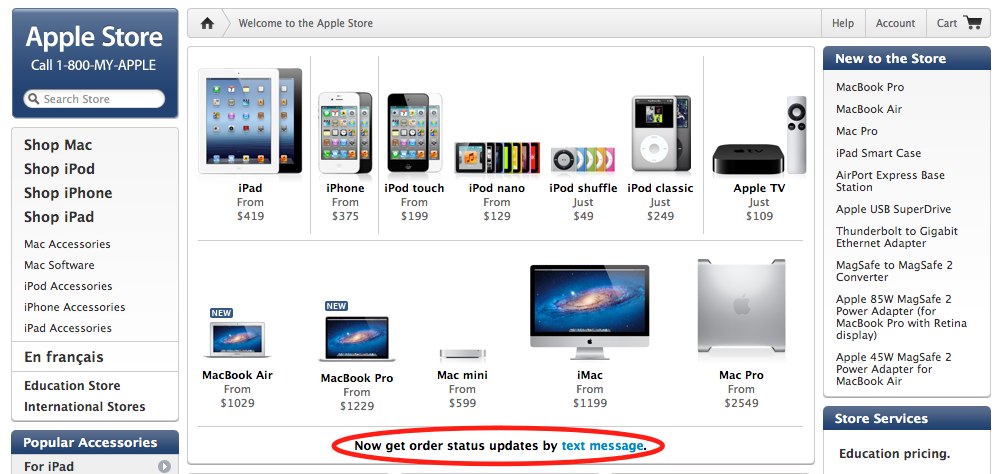
The Apple online store went down last night for a short while. It appears Apple made some minor tweaks, including the ability to receive text message notifications on orders. Apple is now displaying the following text in several sections of the online store in at least Canada and the United States: “Now get order status updates by text message.”

Apple explained on its website that the new feature is an option during the checkout process, and it is available to the following supported carriers: Alltel, AT&T, Boost Mobile, Cricket, Nextel, Sprint, T-Mobile, U.S. Cellular, Verizon Wireless, and Virgin Mobile USA.

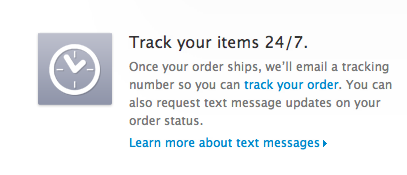
Apple Notifications is a text-message-based alerts service designed to keep you up-to-date on your shipment and/or pickup notification status. In addition to standard email notifications, you can also request text message updates when you’re in Checkout. The number of messages you’ll receive will vary depending on the orders you placed.

What to Expect

Once your order ships, or is available for pickup, we’ll send you a text message. The text message will include your order number and a link to online Order Status. Texts are sent between 8:00 a.m. and 9:00 p.m. in your time zone.

How to turn off text notifications:

To stop receiving text notifications, simply reply STOP to the text message. Texting HELP to 83372 will give you additional information.

(via CultofMac & AppleBitch)

Apple continues $304M Austin, Texas campus expansion with land purchase

Site default logo image

Last time we checked Apple’s plans to bring 3,600 jobs to Austin, Texas with a $304 million investment and the construction of a new campus, the company received approval on the last of several major incentives from city officials. The approval officially initiated an Economic Development Agreement between Apple and the city, but the project was still not 100 percent confirmed.

Reports originally said Apple would build the new campus on 38 acres at West Parmer Lane and Delcour Drive, and today’s report from AustinBusinessJournal confirmed Apple recently purchased land near the address:

Records at the Travis County Clerk’s Office show that McShane Development Co. LLC, through its Riata Vista LP entity, sold three tracts of land to Apple on June 20. The exhibits indicate that the land is in the Milwood Section 20 subdivision near Parmer Lane and Delcour Drive.

The report did not offer any information about how much Apple paid for the land, but the purchase is a good indication Apple is going ahead with its new Austin campus. According to AustinBusinessJournal, McShane CEO James McShane released a press release yesterday on its new vice president who helped make the deal with Apple:


Expand
Expanding
Close

Site default logo image

Portuguese consumer group takes Apple to court over AppleCare warranties following fines in Italy

As was the case in Italy, where Apple was recently fined $1.2 million and threatened with closure of its Italian operations related to its AppleCare policies, translated reports today from Lusa News (via Exame Informatica) claimed Portuguese consumer groups plan to take similar action against Apple. According to the reports, DECO, the Portuguese Association for Consumer Protection, asserts Apple is misleading consumers by not informing them of two-year warranties mandatory by Portuguese law:

According to Lusa, the DECO decided to proceed with an action in court against Apple. The decision relates to the fact that the company “deceptively” consumers, luring them to extend the warranty to three years through its AppleCare Protection Plan that “nothing” adds to the legal guarantee of two years in Portugal.

“The Portuguese Community law and gives a two-year guarantee for the movable, but Apple does not recognize this reality. After several attempts to enforce these rights, without success, decided to proceed with a lawsuit popular, “said Joao Morgado, secretary general of the DECO

Ler mais: http://exameinformatica.sapo.pt/noticias/mercados/2012/07/18/deco-avanca-com-acao-judicial-contra-apple#ixzz20yhkKqsS

Site default logo image

Twelve South re-introduces the ‘little black book(book)’ for the iPhone Age

Back when we used to write phone numbers down, the Little Black Book kept our “contacts” and contact information in one handy place. Twelve South today brings us up to date with the attractively styled black version of the BookBook iPhone case.

You can grab the Classic Black BookBook for $60 from Twelve South or Amazon now.

Product Features

  • Handmade, genuine leather case protects iPhone with style
  • Includes wallet pockets for ID, cards and cash
  • Unique book design disguises iPhone for added security

Dimensions

  • Size (LWH): 7.1 inches, 1 inches, 4.1 inches

The older brown version can be seen in the video below:

Site default logo image

Nook goes web (and here’s how to read it on iOS)

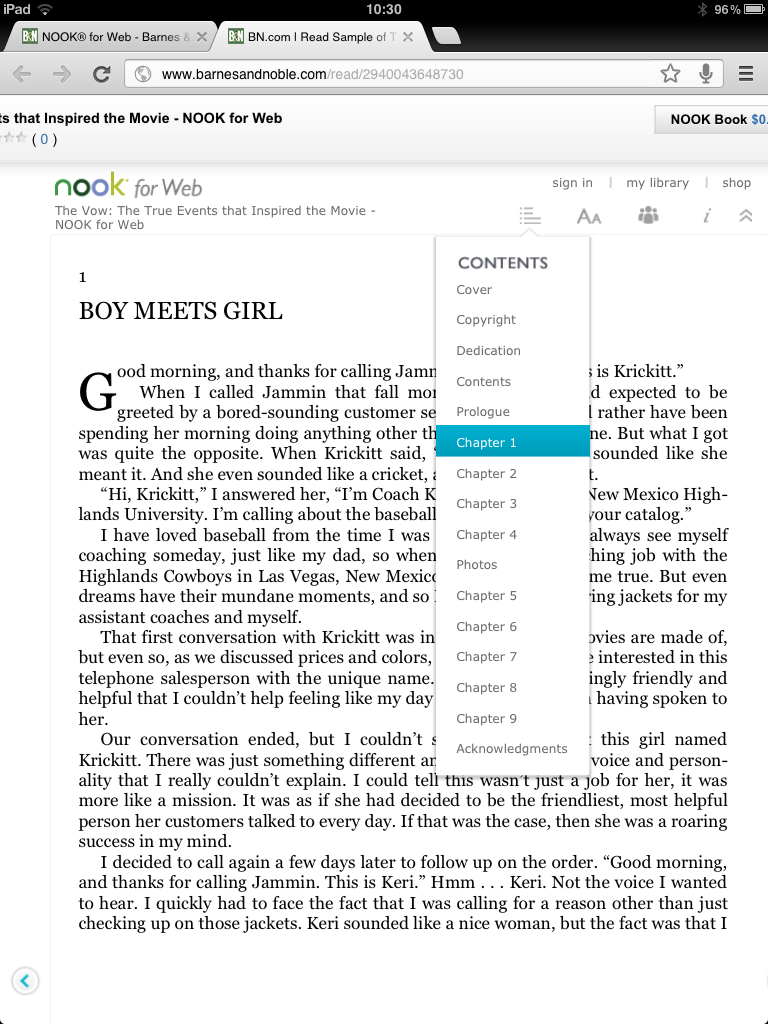
Barnes & Noble is launching Nook for Web today—a browser-based version of its eBook platform to compliment its other native reader apps. While B&N claimed the new web reader works with any PC or Mac supported browser, it does not appear to be supported on iOS browsers by default. The native iOS Nook app might seem like a better option, however, as noted by TechCrunch, because the app still requires you to purchase books from the web. Fortunately, if you want the complete Nook web experience on your iOS device, there is a way to access it.

Using the Chrome iOS app, navigate to the Nook for Web reader (here). From the menu in Chrome, select “Request Desktop Site.” It is not an ideal solution, but it is definitely usable on the iPad. For a limited time, you will be able to get six of the platform’s best-selling books for free to celebrate the launch.

B&N’s full press release is below:

Barnes & Noble Introduces NOOK® for Web, Giving Readers Instant Access to NOOK Books™ from any Web Browser – No Sign-In, Download or NOOK Required

Get Started Today with Six FREE Bestsellers Available through July 26

New York, New York – July 17, 2012 – Barnes & Noble, Inc. (NYSE: BKS), the leading retailer of content, digital media and educational products, today introduced NOOK for Web, an innovative and free new browser experience that offers readers the ability to explore the hottest digital titles and bestselling books right from their computer – no sign-in, software download or NOOK account required to begin reading. With fast and easy access from any PC or Mac® browser, NOOK for Web seamlessly combines NOOK’s award-winning digital reading experience with access to Barnes & Noble’s expansive NOOK Store™. Now, anyone who loves to read can browse, sample and become instantly immersed in a NOOK-like reading environment from any browser, with support coming this fall for Internet-enabled tablets, smartphones and other mobile devices.

Beginning today, Barnes & Noble is offering six bestselling NOOK Books in their entirety at no charge for readers to try NOOK’s award-winning digital reading experience online. With popular summer titles the entire family will enjoy, customers can visit www.nook.com/NOOKforWeb to browse the list of complimentary titles available, including Map of Bones by James Rollins, Sex and the City by Candace Bushnell, The Vow by Kim Carpenter, The Boxcar Children Summer Special by Gertrude Chandler Warner, Brave by Tennant Redbank and Perfect Island Getaways by Patricia Schultz, instantly read the sample, and then download the entire book for free on any browser now through July 26.

“NOOK for Web makes it easier than ever for anyone – from NOOK customers to those experiencing digital content for the first time – to access and read books online,” said Jamie Iannone, President of Digital Products at Barnes & Noble. “There’s no need to download special software to access your digital library – NOOK for Web seamlessly combines Barnes & Noble’s best-in-class digital reading experience and unrivaled NOOK Store to deliver an immersive, easy-to-use solution for readers to consume millions of titles right from their Web browser.”

With NOOK for Web, it’s also now easier than ever for NOOK customers to read their NOOK Books virtually anytime, anywhere. The perfect complement to NOOK devices and free NOOK Reading Apps™, customers can simply go to www.mynook.com to pick back up from their last page read or start reading a new book using any Web browser.

NOOK for Web features the elegant, immersive digital reading experience millions of NOOK customers have come to know and love:

  • Enjoy free samples of the majority of NOOK Books and begin reading with just a click on the “Read Instantly” icon. There’s no need to sign in, create an account or download additional software in order to sample content. NOOK for Web supports all PC and Mac-supported Web browsers including Internet Explorer, Chrome, Firefox and Safari.
  • Get lost in a great read with the realistic book-like layout, including clear page numbers at the bottom of each screen and an innovative slider allowing users to easily track the number of pages remaining in a chapter or quickly scroll to another section.
  • Customize the reading experience using the intuitive navigation bar. Choose between 8 fonts and 8 font sizes and a single or double page layout. Simply collapse the navigation bar once preferences are selected to reveal a clean, easy-to-read page.
  • Rate, review and share thoughts or recommend books via Twitter, Facebook or e-mail without even leaving the book.
  • Access more information about the book while reading, plus thousands of helpful editorial and customer reviews at your fingertips.
  • Learn what to read next with personalized recommendations from Barnes & Noble’s expert booksellers – from must-read new releases to up-and-coming authors – all in the customizable Shop window.
  • Shop from the ever-expanding NOOK Store, buy NOOK Books in seconds (the majority for $9.99 or less), and select purchases right from your personal NOOK Library™ to open and begin reading from any Web browser.

Through Barnes & Noble’s free, stable and secure NOOK Cloud™ service, NOOK for Web now gives existing NOOK customers even more flexibility to Read What You Love, Anywhere You Like™ with seamless account integration and synchronization. Customers can read any book from their personal NOOK Library by signing in using a valid NOOK account. Sync the last page read from a NOOK tablet or Reader, multitude of computing and mobile devices with free NOOK Reading Apps and NOOK for Web, and keep reading virtually anytime, anywhere – all without losing the page. And customers can send free NOOK Book samples directly to an existing NOOK Library to automatically access new content on the go from any NOOK device or one with free NOOK Reading Apps.

NOOK for Web is now available at www.nook.com/NOOKforWeb with no download required. Simply browse for books in the NOOK Book Store and look for the “Read Instantly” icon to begin reading any book.

Report: European carriers placing nano-SIM orders in anticipation of next-gen iPhone launch

Site default logo image

According to a report from Financial Times, carriers in Europe are stocking up on mini SIM cards designed for Apple’s next-generation iPhone in anticipation of the device’s expected October launch. In June, reports speculated that Apple’s nano-SIM design for the new 4FF standard was selected by the European Telecommunications Standards Institute, while hands-on video of the next-generation iPhone backs, which we first revealed in May, showed what appeared to be a smaller SIM card holder.

Today’s report from FT claimed Apple’s nano SIM card design is indeed the mini SIMs being purchased by European operators:

Operators expect that the iPhone will feature the nano sim in a slimmed down design, according to two sources with knowledge of the situation, and have begun to store millions of the cards in warehouses in anticipation of high demand for Apple’s iPhone. Apple declined to comment[Shocker]…


Expand
Expanding
Close

Site default logo image

Apps & updates: Xbox LIVE app updated with iPad support, Nike+ Running, Spotify, more

Xbox LIVE version 1.6: There are more than a few notable updates today, starting with the Xbox LIVE app that just received iPad support for the controller features rolled out to iPhone users in June. Among the new features for iPad: the app will now allow you to “connect, control and discover content” on your Xbox 360 console through a quickplay list of content, and it provides controls for play, pause, fast forward, and rewind.

Nike+ Running version 4.0.2: Nike is constantly adding new features to its iOS apps, and the Nike+ Running app was updated today with the following enhancements:

– Sharing has changed. Your run gets posted to your timeline, so even though you won’t see it on your newsfeed, your friends will see it in theirs.

– Quick start. Just hold down the Run button and you’re off with the new Quick Start feature.

– Pro Tip: Rotate your phone to landscape when looking at your run summary to view your mile splits.

– We are continually working to give you the best possible running experience. This update includes performance stability and GPS improvements. We appreciate your feedback.

Spotify version 0.5.3: Also updated today was the Spotify iOS app, which received a new context menu in search for iPad users, as well as stability improvements and a number of fixes to common issues.

As always, we will continue to update this list as more updates roll out today…

Apple attempts to take down in-app purchase hack

Site default logo image

[tweet https://twitter.com/alastairh/status/224836579707985920]

On Friday, we broke the news on some worrying tips we received about an “in-app proxy” hack that allowed even novice users to illegally install paid in-app purchase content for free. In updates to our original story, we noted the hack’s developer, Alexey V. Borodin, said in an interview that Apple’s method of validating receipts for developers would not protect apps from the hack. Apple followed up with a statement that claimed it is investigating the issue. Today, we get an update from The Next Web that further claims Apple began taking action over the weekend:

Over the weekend, Apple began blocking the IP address of the server used by Russian hacker Alexey V. Borodin to authenticate purchases.

It followed this up with a takedown request on the original server, taking down third-party authentication with it, also issuing a copyright claim on the overview video Borodin used to document the circumvention method. PayPal also got involved, placing a block on the original donation account for violating its terms of service

Unfortunately, the service is reportedly still operational with Borodin apparently moving the server to a location outside of Russia. He told The Next Web that the new service has been “updated and cuts out Apple’s servers, ‘improving’ the protocol to include its own authorisation and transaction processes. The new method ‘can and will not reach the App Store anymore, so the proxy (or caching) feature has been disabled'”

[tweet https://twitter.com/alastairh/status/224834890665967616]

While Borodin also claimed he has changed the process to force users to sign out of their iTunes account (to ensure users he is not stealing personal/credit card data), there are more than a few reasons to still be concerned. Developer Alastair Houghton told us that he thinks Borodin’s method could be used “intercept traffic intended for any other secure website”:


Expand
Expanding
Close

Site default logo image

Target offering $25 gift card with new iPads, $20 on iPhones. Best Buy has everything Apple on sale.

We have seen a lot of third-gen iPad deals recently in 9to5Toys offering the entry-level 16GB model, for instance, in the neighborhood of $460 to $470, approximately $30 to $40 off the normal retail price. Those deals usually go quick, but one big retailer plans to offer a similar deal this coming week. Starting July 15, Target will offer a free $25 gift card with the purchase of any iPad 2 or new iPad. The deal will last all week until July 21, and, as always, Target REDCard users can get an additional 5 percent knocked off their purchase, giving the iPad 2 an effective price of $355. New iPads will start at $450 with the discounts. Find a location with stock here.

Target will advertise the deal in its flyer this weekend, we are told, which features a number of Apple products on its cover (pictured above). Other deals include the 16GB iPhone 4S discounted slightly to $179, a free $20 gift card for the 8GB iPod touch priced at $195, and a free $10 gift card for the 8GB iPod nano at $129.

Additionally, this week Best Buy knocks a few bucks off of just about every Apple product in its catalog.

.

Apple’s in-app purchasing process circumvented by Russian hacker

Site default logo image

[youtube=http://www.youtube.com/watch?v=iSuo4xEucqE]
Video Taken down due to copyright claim from Apple


We received some disturbing tips today that a Russian developer has published a method of obtaining in-app purchases from iOS apps for free. First noticed by Russian blog i-ekb.ru, the “in-app proxy” method does not require a jailbreak, can be completed by novices in three steps using just an iOS device, and allows users to install in-app content for free. The hack also works on all devices running iOS 3.0 to 6.0. We confirmed the method works (at least temporarily), and the published instructions are starting to get attention, so we decided to publish this story as a warning to the Apple developer community.

The hack appears to come from Russian developer ZonD80 who posted the above video demonstration. ZonD80 also appears to run a website called In-AppStore.com, where donations are being accepted to support the development of the project and help keep servers up and running. The developer explained the three steps of the hack, which include the installation of CA certificate, the installation of in-appstore.com certificate, and the changing of DNS record in Wi-Fi settings. After the quick process, users are presented with the message pictured above when installing in-app purchases, opposed to Apple’s usual purchase confirmation dialog. The fact that this hack is being used to steal in-app purchase content is perhaps just as troubling as the developer’s terms of service. Below is a list of data processed through the devs servers as part of the process (but again, we are imploring readers not to try this):


Expand
Expanding
Close

Site default logo image

Retina MacBook Pro shipping times improve to ‘2-3 weeks’

Since the launch of Apple’s new Retina MacBook Pro, shipping times worldwide for the company’s online store—for the most part—have sat at “3-4 weeks.” Today, shipping times have begun to drop with the U.S., Canadian, and some Asia-Pacific markets now listing the device with an estimated shipping time of “2-3 weeks.” The updated shipping times appear to be landing in many European stores as well.

Facebook releases SDK 3.0 Beta with iOS 6 integration & new iOS Dev Center

Site default logo image

Facebook announced today that it is releasing its biggest iOS SDK update yet with the release of SDK 3.0 Beta for iOS, which also includes iOS 6 integration for native Facebook login. It is also rolling out a completely refreshed iOS Dev Center with tutorials, concepts, and reference docs to help iOS app developers build great Facebook-integrated apps for iOS devices.
Expand
Expanding
Close

Site default logo image

Griffin’s MIDIConnect interface for iOS devices now available

We recently brought you a full review of Griffin’s StudioConnect audio/MIDI interface and dock for iPad, and the company is now announcing availability of the device’s little brother, the MIDIConnect. Rather than give you an almost full-fledged audio interface for the iPad, like StudioConnect, MIDIConnect simply provides standard 5-pin MIDI in and out. MIDIConnect is available through Griffin for $79, which is about half the price of the StudioConnect.

Nashville, TN – July 10, 2012Griffin Technology, one of the world’s foremost creators of innovations for everyday life, is excited to announce the availability of MIDIConnect, a MIDI in and out interface for iPod touch, iPhone and iPad.

“MIDIConnect offers musicians a compact and portable solution to create and edit music on the go, at a fraction of the cost of a recording studio,” said Ethan Opelt, Line Manager of Griffin’s Audio category. “We are excited to be showcasing MIDIConnect as well as Griffin’s lineup of music products at Summer NAMM, taking place in Nashville, our home town.”

MIDIConnect adds a MIDI input and output to iOS devices. Intuitive to use, MIDIConnect allows you to plug MIDI keyboards and other MIDI-capable devices into an iPad, iPod touch or iPhone. Play your MIDI instrument straight into GarageBand or other MIDI-capable apps, or download MIDI Controller apps to use the MIDI out port and your touchscreen in performance, as a MIDI controller. Both MIDI in and out ports are industry-standard 5-pin DIN connectors, compatible with most commonly available MIDI cables and connectors.

[youtube=http://www.youtube.com/watch?v=ANnKDpVpzow&feature=player_embedded]

Quick Review: Tweetbot for Mac finally arrives in public alpha, download now!

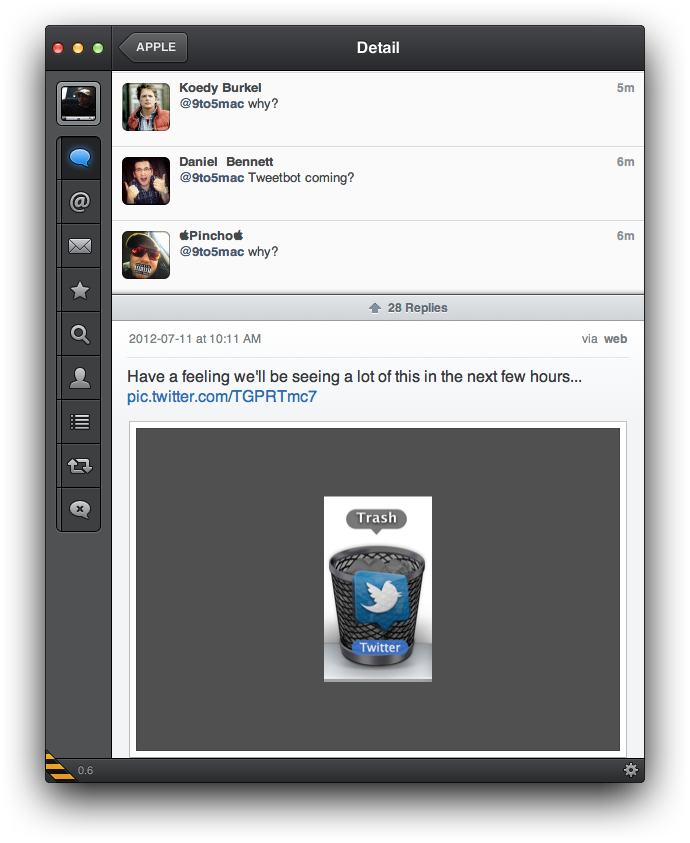
We reported late last month that Tweetbot for Mac, a desktop version of the popular third-party iOS Twitter client, would likely come soon after the company’s graphic designer, Mark Jardine, tweeted an image of the client running on a MacBook. Today, Tweetbot developers decided to make things official with the release of a public alpha, and we recently got a chance to play around with it. (Blog post here.)

The Tweetbot alpha, which at this point runs on 10.7+ and 10.8 Mountain Lion, has a lot going for it despite warnings of “Bugs! Lots of them.” According to Tapbots, the main goal of the alpha was to replicate the core functionality of the iOS client. Like tapping a tweet in the iPad app, hovering over a tweet in the Mac client provides you with the same Reply, Retweet, Favorite, Share, and Actions button to get access to details, conversations, retweets, and etc.

In addition, like the iPad app, you will find a button to quickly switch lists in the upper right, while a Lists button on the left sidebar will let you manage and edit your lists within the app. The app also bakes in the familiar “Mute Filters” for your main timeline. However, only the ability to mute “Clients” appears to be an option now—with the option for muting keywords greyed out. You will also get Twitter, bit.ly, CloudApp, and Droplr URL shortening options, and all the same image and video-uploading options as on iOS, including: CloudApp, Droplr, img.ly, Lockerz, Mobypicture, Pikchur, Posterous, Twitgoo, TwitPic/TwitVid, and yfrog. Syncing options only feature Tweet Marker currently (iCloud coming soon), while all the Read Later services are present such as bitly, Instapaper, Pinboard, Pocket, and Readability.

We have had a lot to say about the Twitter experience on the new Retina MacBook Pros. The official Twitter for Mac app is unfortunately not Retina-ready and almost unusable on the new Retina displays. Fortunately, we have a Retina update to Twitterific to tie us over, but the Alpha Tweetbot release today is also built for the new Retina display. We have no complaints. It looks great, but Tapbots said further improvements are coming…


Expand
Expanding
Close

Site default logo image

Congress considers forbidding sales bans related to essential patents

Reuters reported today that Congress is set to discuss whether companies that hold patents considered essential to an industry standard, “such as a digital movie format,” should be allowed to request bans on infringing devices. A hearing will take place this Wednesday with the Senate Judiciary Committee, and Federal Trade Commission officials are expected to testify:

“If they (smartphone makers) had taken the conservatively $15 to $20 billion dollars they’ve spent on this fight, imagine how much better a place the world would be,” said Lemley.

Site default logo image

Casting for Jony Ive role, others announced for indie Steve Jobs biopic

We previously told you about the “jOBS” biopic staring Ashton Kutcher as Steve Jobs that is currently in production, and we brought you some early images of Kutcher on set. The film was previously confirmed to star Josh Gad as Steve Wozniak and Matthew Modine as John Sculley, but a new report from HollywoodReporter announced more additions to the cast including Giles Matthey (pictured right) as Jony Ive:

Kevin Dunn and J.K. Simmons have joined the cast of Jobs, the biopic about the late Apple co-founder Steve Jobs, starring Ashton Kutcher. Also rounding out the cast are Elden Henson, Lenny Jacobson, Giles Matthey, Ahna O’Reilly and Victor Rasuk… Dunn, who recently co-starred in HBO’s Luck, will play Apple chairman Gil Amelio. Simmons, known from his nine seasons on Law & Order, will appear as venture capitalist and Apple investor Arthur Rock. Among the other additions to the cast, Henson plays computer scientist and Macintosh developer Andy Hertzfeld; Jacobson portrays Apple engineer Burrell Smith; Matthey is iPod designer Jonathan Ive; O’Reilly plays Jobs’ girlfriend Chris-Ann; and Rasuk is Apple’s first employee and user interface architect Bill Fernandez.

The biopic is now shooting in Los Altos and Los Angeles, and it is expected to release later this year. Other cast members previously confirmed include James Woods, Ron Eldard, John Getz, Lukas Haas, Dermot Mulroney, and Lesley Ann Warren.

Google+ updated for iPad, adds Google+ Events, Hangouts, and instant photo-uploading

Site default logo image

[youtube=http://www.youtube.com/watch?v=VuC0i4xTyrI&start=4620]

As previously unveiled at Google I/O, Google just released an updated Google+ iOS app on the App Store that includes full iPad support, integration of the new Google+ Events feature, and the ability to attach Instant Upload photos to posts. You can also now start and join hangouts from within the app.

Google made an official blog post announcing the updated app to explain how you can now initiate hangouts from an option on the main menu as well as enable/disable ringing notifications for feature. It also highlighted a few of the new ways users can interact with the app’s UI:

-Pinch and expand posts right in your stream to add your comments

-Use two fingers to drag a post from your stream to easily re-share it

-Start a Hangout from your iPad and stream it to your TV using AirPlay

The full release notes for the app are below, while a demo of the new tablet UI from Google I/O can be seen in the video above.


Expand
Expanding
Close

Site default logo image

Apps & updates: Amazing Alex, Hulu Plus, Weather Channel, Tweetbot, and more

[youtube=http://www.youtube.com/watch?v=xk7vezL36IU]

Amazing Alex: (iPhone $.99/iPad $2.99)We recently got a little teaser for Rovio’s new game, but today we get the official launch trailer for Amazing Alex that now has a solid July 12 release date for iOS devices. Also included in today’s list of apps and updates is a refreshed Weather Channel iPad app, and updates to CloudOn and the VLC Remote app.

Weather Channel for iPad v3.3.0: The popular Weather Channel app for iPad was updated today with a number of notable new features and enhancements. Included in the update are improved radar maps, HD backgrounds for the iPad’s Retina display, and improvements to crashes experienced by first-gen iPad users. You can now also refresh data by tapping the Weather Channel logo within the app.

CloudOn v2.0.55: CloudOn allows you to access Microsoft Office on the iPad with DropBox and Google Drive integration, and today’s update brings even more functionality, including: the ability to open password protected Office files, an improved experience for Retina iPad users, and more.

Hulu Plus: Hulu Plus is now offering a free two-month trial opposed to its usual 1-month offering. The Hulu Plus iOS app is available here.

VLC Remote v6.02: The app that controls the VLC Media Player on Macs and PCs received a minor updated today that fixes issues with YouTube browsing and translations in several languages.

Tweetbot v2.4.1: A small updated to the Tweetbot iPhone and iPad client today brings the ability to “toggle smart quotes in the compose view (tap in the text input area)” and various fixes including one related to crashes for Droplr uploads.

Apple announces new iPad coming to China on July 20

Site default logo image

Apple just released a press release confirming the new iPad will launch in China on July 20. With roughly 1.33 billion people, China is one of Apple’s biggest markets left out of the first wave of international rollouts. Many speculated trademark issues, which were recently resolved to the tune of $60 million, could have played a role in the delayed launch. Apple’s press release does not mention local pricing, but it did note the device in both Wi-Fi and Cellular models would be available through authorized retailers and Apple Stores starting July 20. It appears Apple Stores for new iPad sales in China will once again utilize a reservation system for pick-ups to avoid the huge crowds of scalpers. Apple said reservations would be accepted from 9 a.m. to 12 p.m. starting July 19.

The full press release is below.


Expand
Expanding
Close

Site default logo image

Google to pay $22.5M settlement in FTC’s iOS Safari privacy investigation

The last time we updated you on the Federal Trade Commission’s investigation into Google’s method of bypassing the default Safari browser settings on iOS devices, reports claimed the company was facing possible fines that could reach tens of millions. Today, The Wall Street Journal said Google is close to reaching a $22.5 million settlement with the FTC, according to people close to the negotiations:

The fine is expected to be the largest penalty ever levied on a single company by the U.S. Federal Trade Commission. It offers the latest sign of the FTC’s stepped-up approach to policing online privacy violations, coming just six months after The Wall Street Journal reported on Google’s practices.

While the fine likely will represent only a tiny portion of Google’s revenues—last year, the Internet giant raked in that much cash roughly every five hours or so—it counts among a series of negative reports about Google’s privacy practices that could undermine users’ trust in its services.

Site default logo image

Apps & updates, DRM still misbehaving edition: eBay, TED Books, InstaTalks, more

[tweet https://twitter.com/marcoarment/status/222411178842918912]

A few apps and updates hit the App Store today, unfortunately some are still reporting issues with apps not launching after updates. Let us know if you run into any issues in the comments.

eBay version 2.6.0: ebay’s main iPhone app received an update today alongside a small update to the eBay for iPad app. Unfortunately, eBay has now posted warning on at least the eBay for iPad release notes that some have reported the app is not working. As for the iPhone app, version 2.6.0 includes the following features and fixes:

• Improved selling flow

• Landscape support for easy typing of eBay item descriptions

• Faster bidding experience

• Check auto parts for compatibility before you buy

• Ability to search for items in My eBay

• Add and remove your Favorite Sellers

• Filter Feedback for buyers and sellers

• Payment support for Singapore and Malaysia

• More UI, stability and performance improvements

TED Books: TED, the people behind the TED conferences that are later made available online as TED Talks, released a free app today, which offers paid subscriptions to “Ted Books.” The books are produced every two weeks and “are typically under 20,000 words. They also consist of audio, video, and built-in social features. Subscriptions cost $15 for three months or $2.99 per book for non-subscribers.

InstaTalks: Recently released on the App Store, InstaTalks is a third-party messenger built for Instagram that allows you to exchange private messages and photos with Instagram users. There is no registration required (just an Instagram account), and the app is available for free now.

NBA Summer League: NBA Digital just dropped the official Summer League app, while the NBA Game Time app has also been updated with live video and scoring content for Summer League games.