app

See All Stories
Site default logo image

CBS Sports iOS app gets full iPad support including live video

CBS has updated it’s ‘CBS Sports’ iOS app today with full support for tablet users, allowing iPad users on iOS 6.0 and up to access all of the on-demand and live content that the app previously only offered to iPhone users. The updated app doesn’t just bring a native iPad design with support for the larger screen as pictured above, but it will also now allow users to access live video. On top of on-demand content from CBS, the app offers live streams for a number of sporting events, including: NCAA basketball (January-April), PGA TOUR (May-August), and SEC football games (Sept-Dec). It also brings access to special events including “NCAA March Madness, The Masters, NFL Draft Day, PGA TOUR and more.”

The updated CBS Sports iOS app is available for free on the App Store now.

What’s New in Version 6.0

v6.0
* Tablet Ready! Follow all the action on your iPad, including watching Live Video.

Site default logo image

1Password 4 for iOS goes on sale ahead of Dropbox API changes

AgileBits, the development team behind 1Password for iOS and Mac, announced today that due to an upcoming change in Dropbox’s API, Dropbox syncing in version 3 of the 1Password iOS client will no longer work as of September 1st. Because the old version of 1Password has been discontinued, it will not be updated to work with the new Dropbox API.

Instead, AgileBits is offering the new and improved 1Password 4 at $7.99 the lowest price to date. The sale will last until Friday, August 16th. Since 1Password 4 requires iOS 6, some customers may not be able to update to the latest version. If that’s the case, those users will be glad to know that 1Password 3 will still support Wi-Fi syncing with computers on the same network.

AgileBits has also published a new FAQ document to explain the changes and possible solutions.

FireCore releases Infuse 1.3 with Wi-Fi file transfers, fullscreen TV-out, and more

Site default logo image

Our launch video review of Infuse

FireCore has released an update for Infuse, the popular video app for iPhone and iPad. The new update boasts new features such as the ability to transfer videos to your iOS device through a web browser, fullscreen TV-out support, new sharing options, and more.

Infuse 1.3 is a free update for existing owners. New owners can get the app for $4.99 on the App Store. The full change log can be found below.


Expand
Expanding
Close

Site default logo image

Facebook Messenger iPhone app adds support for attaching Instagram photos

Facebook updated its Messenger iOS app today making it easier to send photos and emoji with a few new features. Facebook is deeper integrating Instagram into Messenger, allowing users to attach photos from Instagram albums (in addition to any other album on their iPhone) right in the app. Version 2.6 of the app also makes it easier to send photos and emoji with a new paper clip icon that users can tap from any message.

What’s New in Version 2.6

Now it’s easier to send photos and emoji:
– Just tap the paper clip from any message
– Choose photos from Instagram and any other album on your phone

Don’t forget about stickers: Tap the smiley to see what’s new in the sticker store.

Bug fixes

Site default logo image

Google releases official AdSense iPhone app

Following Google’s release of an official AdSense Android app on Google Play last week, today the company has released an iOS version of the app. Much like the Android version, this is the first official AdSense client Google has released for the platform, and brings competition for some of the free and paid third-party clients already on the App Store. The app also provides much of the same functionality of the Android app, allowing users to access most reporting features available through the Adsense website, as well as payment alerts (which unfortunately can’t be dismissed at this point).

The AdSense app provides an easy way to access key data from your AdSense account. Access reporting features anywhere, directly from your iPhone. The first version of the app gives you access to: the key earnings information, top custom and URL channels, ad units and sites reports, payment alerts.

Site default logo image

Akai’s legendary MPC drum machine now available for iPhone

Back in March, Akai Professional released an iPad app that aims to emulate its classic MPC drum machine. Akai is perhaps best known for the MPC— a series of physical drum machine/midi sequencer/samplers that come with samples you’ve likely heard on many of your favorite hip-hop, dance, and pop songs. Today the MPC emulator, dubbed “iMPC”, makes its way to the iPhone for the first time for $2.99 on the App Store, slightly less than the $6.99 that the iPad version sells for.

You’re not going to be able to get full-on MPC emulation for less than $5, but Akai has included a ton of great samples and features stripped straight from its legendary MPC series:

Turn your iPad into an MPC. With more than 1,200 samples, 50 editable programs, 80 editable sequences, and iconic MPC workflow, iMPC is the first app to bring the look and feel of the classic Akai Pro MPC to your iPad. iMPC includes everything you need to create a beat quickly and easily, including built-in effects, plus the ability to create new sequences and record and overdub beats. Time correction from 1/8 note to 1/32T with variable swing, and Note Repeat from 1/8 note to 1/32T with latch control are also built in. The app’s built-in sampler can record samples three different ways: using the mic on the iPad, using the line input on the iPad, or using the multi-touch turntable interface in iMPC to record samples directly from iTunes or other music libraries.

Site default logo image

Ruby for Reddit: A simple client for iPhone [Review]

Today, HalfPeeled has released a third party client for Reddit, Ruby for Reddit, that makes the already unique experience of browsing the community-based entertainment website extremely simple. The company, which is headed up by WWDC Student Scholarship recipient Nate Chiger, is also responsible for the neat panoramic photo sharing app, PanoPerfect, as well as a few other interesting apps that are worth checking out. Before we jump into the app’s functionality, let’s take a moment to talk a bit about Reddit. If you’re already familiar with what Reddit is, feel free to skip this paragraph below and jump down to the review.

For those who are unfamiliar, Reddit is a social news website that empowers users to submit content in the form of a text or link post and vote on the best submitted content. Often referred to as “the front page of the Internet,” Reddit prompts users to actively engage in ‘up voting’ or ‘down voting’ submissions so that the greatest, most interesting content can rise to the top of the page. In doing so, the site encourages users to submit all sorts of posts — from world news to cat .gifs — so that the site and its community can vote and subsequently engage in conversation about almost anything there is to talk about. In doing so, Reddit has formed its own unique culture and community that have shed some light on incredible stories and have even given way to powerful, life-changing actions. Reddit has no barrier to entry (other than signing up for an account) and can make even the most slow days seem interesting. In short, if you haven’t yet perused the site or don’t already have an account, you should probably check it out and sign up for one free of charge. It’ll certainly make this review a whole lot more interesting.

Now that you’re all caught up on Reddit, let’s get back to the app. Ruby for Reddit features a extremely simple and familiar user interface that puts Reddit’s content at the center. You can switch between different subreddits (groups on Reddit based on categories) and pages by tapping on the top bar or by swiping out the navigation panel, much like the official Facebook app. You can also view images inline and pinch to see content in full screen. There are even some custom fonts for you to choose from and a dark mode that makes viewing posts easier at night.

HalfPeeled has also included a ‘Pro’ mode (unlocked via in-app purchase) that lets you submit quick posts to Reddit and hide the status bar from view. You can get by without purchasing the Pro mode, but it’s there for users who enjoy using the app and are looking for some extra customization.

All in all, Ruby for Reddit is an extremely straightforward alternative to the official Reddit app, which doesn’t offer many customization options or other additional functionality. HalfPeeled may have to add some features to better compete with other third party Reddit clients like Alien Blue, as well as tweak some of the design elements to prepare for iOS 7’s redesign, but for version one, Ruby for Reddit is great client that many users will enjoy. You can download Ruby for Reddit (iPhone only) free on the App Store here.

Site default logo image

eBay releases eBay Exact for iOS, an app to order 3D-printed products on-the-go

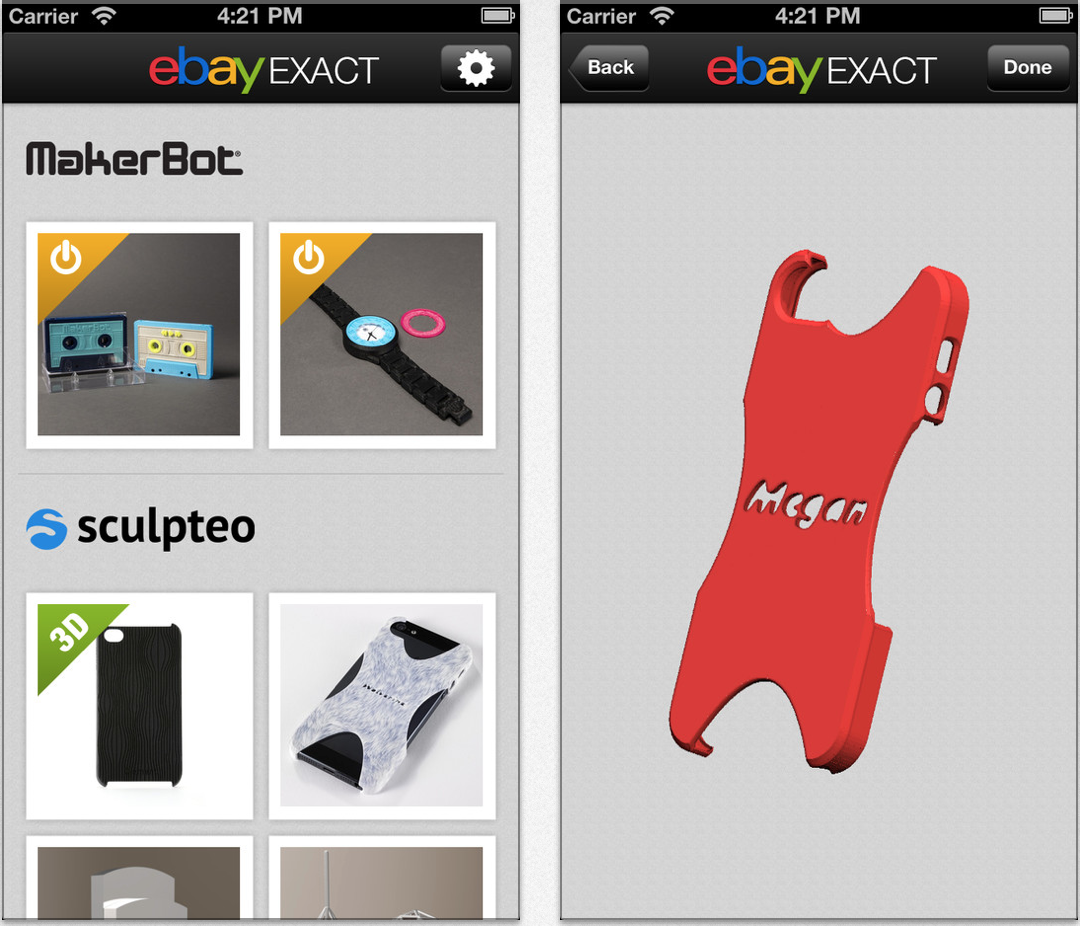
eBay has just released a new app for iOS that will allow customers to customize select products to be manufactured using 3D printing technology. As per its description, the app allows you to select a from a pre-determined list of available products, choose a design, and then further customize that specific item for yourself or someone else.

Customers can choose from a variety of materials including plastics, woods, and metals to create anything from personalized iPhone cases to figurines or even jewelry. The company notes that there is no limit to the amount of products you can customize and print.

eBay is relying on partnerships with established 3D printing companies to back its program including Makerbot, Sculpteo, and Hot Pop Factory. The app, eBay Exact, can be downloaded from the App Store today free of charge.


Expand
Expanding
Close

Site default logo image

Algoriddim teases upcoming release of ‘djay 2’ iOS app

http://www.youtube.com/watch?feature=player_embedded&v=q_vstCBVtoA

Algoriddim, developers of the popular Apple Design Award winning ‘djay’ app, today is teasing an upcoming release of the app with the ‘djay 2’ teaser trailer above. The app, which aims to turn your iPhone or iPad into true professional DJ mixing software, is going to be adding some big new features in version 2, and we’ll be bringing you a hands on demo of the app as it gets closer to release.

To celebrate the upcoming release of djay 2, Algoriddim is also offering current iPhone app for only 99 cents and the iPad app for $4.99. The app already features a ton of great features– a Hyper-realistic low-latency turntable interface, access to your iOS device’s music library, pre-cueing, audio effects, automatic tempo matching and looping– but we’re excited to show you what Algoriddim has to offer with the upcoming djay 2 release. Stay tuned.

Site default logo image

‘MLB.com At Bat’ iOS app updated for All-Star Week, adds new iPhone UI & enhanced video highlights

The MLB.com At Bat app, which allows subscribers to watch live games as well as access on-demand content and news, was updated today with new features and support for the upcoming All-Star Week in New York.

In addition to being able to access All-Star Week content such as the Home Run Derby and All-Star Game, the updated app also adds customized push notifications for the MLB News channel and “in-progress video highlights within the Gameday Plays interface.”

iPhone users are also getting a brand new UI with a revamped news section & sortable statistics, as well as the ability to have “Gameday data synched with live audio broadcasts.”

MLB is currently offering a subscription for the discounted price of $9.99 for the remainder of the 2013 season.

What’s New in Version 6.2.0

• Follow All-Star Week live from New York, including the Home Run Derby and All-Star Game
• Added the MLB News channel for customized push notifications
• Watch in-progress video highlights within the Gameday Plays interface
• Updated user interfaces (iPhone only)
• Available Gameday data synched with live audio broadcasts (iPhone only)
• Highlights now include full description of each clip
• Overall maintenance improvements

Site default logo image

Facebook iOS app updated with check marks for verified celebrities, public figures & brands

Facebook updated its iOS app today with the blue check marks next to names of verified celebrities, public figures and brands that it first rolled out on the desktop. Facebook started its verified profiles and pages for select celebrities, journalists, government officials, popular brands and businesses back in May. Like Twitter, Facebook automatically authenticates accounts with large audiences and adds a small blue checkmark next to their name in search results, timelines, and profile pages.

The updated app also includes performance enhancements for iPad and a “Fix for a problem that was causing News Feed to load slowly for some people.”

What’s New in Version 6.3

• Find verified celebrities, public figures and brands by looking for a blue check mark next to their names
• Improved places editing to fix categories, phone numbers and other info on iPad
• Fix for a problem that was causing News Feed to load slowly for some people

Site default logo image

Path 3.1 released: stickers in comments, new iPad interface, more

Path, the “personal social network”, has just released version 3.1 of their application. The company details out all of the new features on their company blog:

You told us you wanted more stickers in more places. So Path 3.1 is for you. Now, any sticker, whether you buy a new pack or use an old one, can be used to quickly respond to your friends’ moments, to add color and depth to your commentary. Now, stickers can be part of the full story. We are excited to bring you stickers in comments, a new way to express yourself.

We also used this release as an opportunity to update Path for iPad. Improved navigation in both landscape and profile views means you’ll never miss a moment or message. Landscape view now has a fully functioning composer button and feed, so you can share and view moments however you prefer. Plus, any conversations you’re having with friends are simply one tap away.

But we’re not done. Now it’s even easier to send a friend request to that friend you’re standing next to. We generate a QR code for you, your friend scans it, and voila, it’s official! And a refined friends list makes it faster to find and message your friends and family so you can quickly be in touch.

The application has been updated for both iOS and Android. Just a couple of months ago, users being complaining Path was sending spam messages to their friends, even though then company said it was a feature. Nevertheless, the app receives mostly 5-star ratings in the App Store.

Synology releases DiskStation Manager 4.3 public beta w/ revamped iOS apps

Site default logo image

Anyone that reads 9to5Mac often knows that we are big fans of Synology’s DiskStation network attached server products. On top of making a selection of well priced storage options under its DiskStation brand (a couple of which we’ve reviewed), Synology’s big draw for us has always been its web interface and ecosystem of apps that goes well beyond Time Capsule and your average NAS. Today, things are about to get even better for DiskStation users as the company announces the public beta release of the latest DiskStation Manager operating system, DSM 4.3, alongside revamped iOS apps and tons of new features.
Expand
Expanding
Close

Site default logo image

Popular translation app iTranslate Voice adds new languages, updated UI, and more

Sonico Mobile, the developers of popular apps such as Languages and Files App today are releasing an update to one of their most successful apps, iTranslate Voice. This new update adds several new features to make translating easier, faster and more accessible.

One of the first things you’ll notice if you’re an existing iTranslate Voice user is a refreshed user interface. While it’s nothing totally new, the update provides a more modern look, without any excessive UI elements. The title bar has been removed and a new “hamburger button” has been added between the translation buttons at the bottom of the screen which can either be tapped or swiped up to reveal settings and options.


Expand
Expanding
Close

Site default logo image

USA TV network lands on iOS with new app to watch full show episodes

The NBC-owned USA TV network has launched its own iPhone, iPad, and iPod touch application to bring the USA show viewing experience to the small-screen. The application, like many TV network apps currently on the App Store, allows customers to watch shows the day after they air. The application also includes a backlog of past show episodes.

Like some other applications of the same category, users will need to authenticate the application with their credentials for their home TV provider. If a user does not subscribe to USA on their home TV setup, they can still watch some exclusive content via the application. Besides TV shows, the application can access behind-the-scenes clips, a full programming guide, interviews, and more.

USA today airs popular shows such as Burn Notice, Graceland, and Suits.  The new app is free on the App Store.


Expand
Expanding
Close

Site default logo image

Reeder for iOS updated with Feedly, Feed Wrangler support in wake of Google Reader closing

Early Tuesday morning, Google Reader finally closed its doors, but not without a plethora of alternatives launching. We’ve covered all sorts of them before, including Feedly, Digg Reader, AOL Reader, and much more. One of the most popular RSS apps for iOS is Reeder, and it has been updated to support some of those alternatives.
Expand
Expanding
Close

Site default logo image

Yahoo News app updated with improved sharing, refreshed interface, sponsored stories

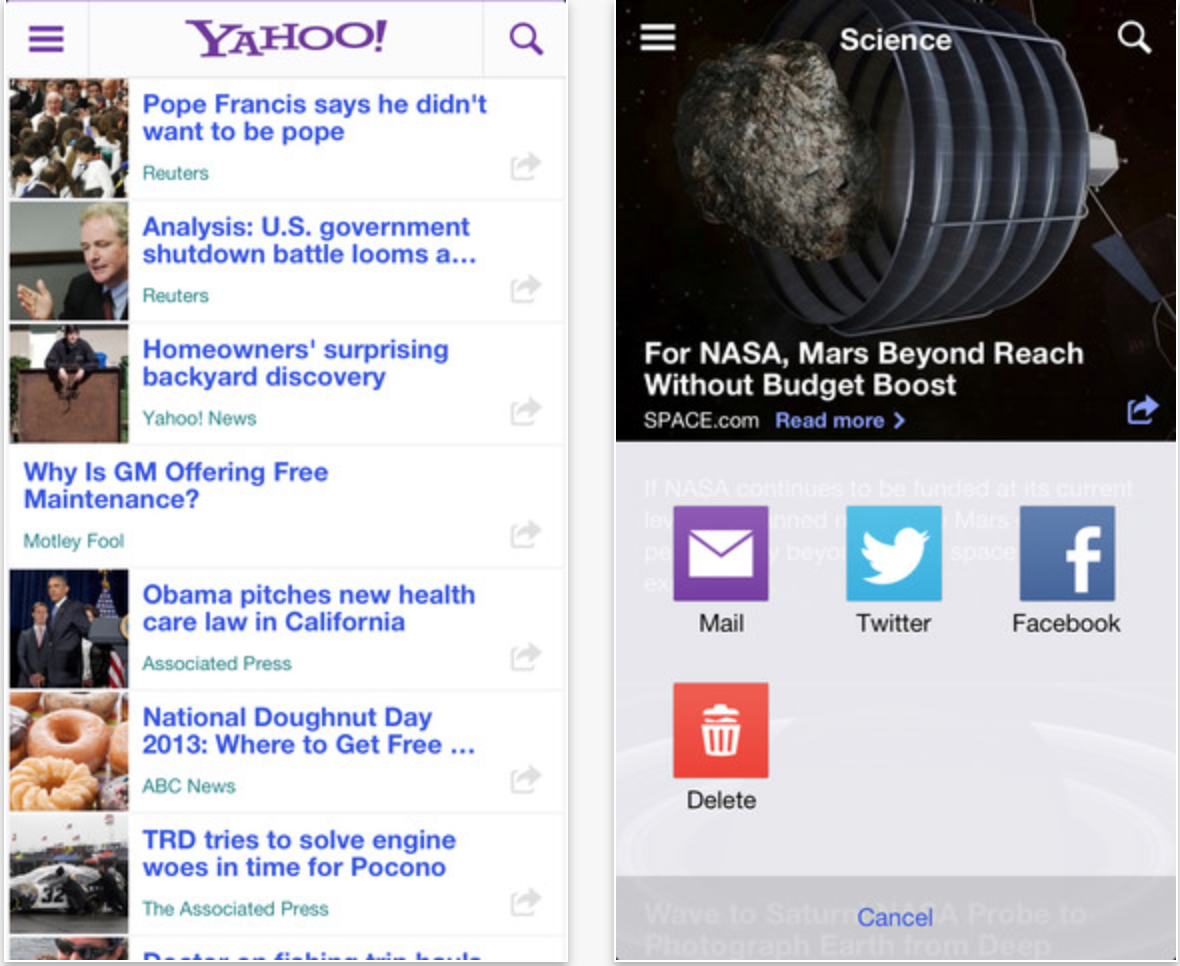
Yahoo has updated its official app for iPhone and iPod touch with a refreshed interface that is easier to navigate. The new update also includes improved integration with Yahoo’s own Mail service and the ability to conduct multi-tap gestures to navigate through the application.

The new update also is more visual, includes new, simpler content sharing functionality, and improved accessibility options for searching the web. Also included are “sponsored stories” in the stream, which seems to be Yahoo’s method of monetizing its main iPhone app.

Yahoo’s iPhone app includes summarized versions of stories, based on Summly technology, and works to provide users with stories of interest based on what the user has read and accessed in the app in the past. Today’s update is free on the App Store. 


Expand
Expanding
Close

Microsoft releases major update for OneNote app on iOS

Site default logo image

http://www.youtube.com/watch?feature=player_embedded&v=vZviDTuaVlA

In a post on the official Office blog, Microsoft has announced a major new version of OneNote for iPhone, iPad, and iPod touch.

First off, the update adds a much more rich editing experience. Now, files and formatting look the same across all devices. This includes things such as text, graphs, tables, borders, and more. If you draw on a note with a Windows tablet, the markings are then visible on your other devices, as well. All devices now support the ability to sync notebooks with Office 365 and SharePoint, as well as the ability to share files with other Office users. OneNote also now lets multiple people edit a note at the same time, much like Google Drive. 
Expand
Expanding
Close

Apple adds auto-renewable subscriptions for Mac App Store apps in OS X Mavericks

Site default logo image

Just like app developers have the ability to sell subscriptions as in-app purchases in iOS apps and Newsstand, they will soon be able to offer the same auto-renewable content through in-app purchases in Mac App Store apps.

Mac apps on the latest releases of OS X already support non-subscription based in-app purchases. For example, items that are purchased once and automatically applied to a user’s account. Up until now, developers offering an auto-renewable or non-renewing subscription in their iOS apps couldn’t do the same in the Mac App Store equivalents.
Expand
Expanding
Close

Site default logo image

Twitter #music and Tweetbot for iOS updated

Both Tweetbot and Twitter #music have released minor updates this afternoon, extending the capabilities of these social applications.

The two versions of Tweetbot, one for iPhones and iPod Touches and the other for iPads, have been updated to version 2.8.2 and now support Instagram video according to the release notes, although there have been some reports of the feature not working at all.

The Twitter #music update is a bit more substantial, bumping up the app to version 1.1 with the addition of genres:

Genres! Get hip-hoppy or get your metal on or get your dance beats grooving with Twitter #music genres! Tons of genres plus Superstars, Popular, Emerging, Unearthed and Hunted charts.

This build also includes:
• Fixes for some scenarios that could cause tracks to be unavailable.
• Rdio authentication now happens in-app, rather than kicking you out to Safari.
• We have stomped many bugs so that you don’t have to.

The free Twitter #music app is available in the App Store.

Site default logo image

AOL launches iPad app with news, weather, video, and mail

AOL launched a new iPad app today that allows users to quickly access their AOL email accounts, as well as the latest news and weather updates from the online service. The app is designed exclusively for Apple’s tablet and doesn’t currently have an iPhone counterpart.

The application is available for free on the iOS App Store.

Features:
• Discover the latest stories and videos in an engaging news stream format
• Connect and share via AOL Mail, Facebook and Twitter
• Choose the news categories that matter most to you by customizing your stream
• Save articles and videos to read, watch and share at your leisure
• Delight in the featured news stream as it reflects your personal news interests over time

Site default logo image

Review: Hotwire travels to iPad with intuitive app

After arriving on the iPhone late last year, Hotwire, the popular travel discount site for flights and hotels, has arrived on the iPad via an intuitive App Store app. The iPad version launches today as a free, universal update to the existing iPhone app.

The iPad app is very simple to use. From the start screen of the app, a user can input either their current location or another location where they want to travel, check-in/check-out dates, a number of rooms and guests, and tap a single button to immediately search for matching hotels.


Expand
Expanding
Close

Site default logo image

Skype for iPhone & iPad updated with improvements to audio/video calls & photo sharing

After launching a new Video Messages feature for Skype back in February and making it completely free and unlimited earlier this month, Skype has updated its apps today with a number of performance enhancements. The video message feature, which allows users to record and send video messages within a Skype chat, was previously limited to three-minute-long videos, and after 20 free messages required a $4.99 premium account.

The updated Skype apps for both iPhone and iPad are available in the App Store now and also include stability improvements for audio and video calls, and performance enhancements for sharing photos.

What’s New in Version 4.9

– Video messaging is now free and unlimited.
– Audio and video call stability improvements.
– Share photos more reliably.
– Improved accessibil

Site default logo image

Amazon’s iPad shopping app makes its way to key China, Japan markets

Today, Amazon has updated its popular shopping app for the iPad to work in China and Japan. Both of those countries are known as critical growth markets for the mobile shopping and technology industries, making today’s update notable. Additionally, the update brings a new “Shop by Department” mode and performance improvements for the iPhone and iPod touch Amazon app. 


Expand
Expanding
Close