iOS

See All Stories

The world’s most advanced mobile operating system

iOS is Apple’s mobile operating system that runs on iPhone, iPad, and iPod touch. Historically, Apple releases a new iOS version once a year, the current version is iOS 13.

In 2007, Steve Jobs introduced the iPhone and iPhone OS. During the event, Jobs referred to the operating system as OS X because it shared a similar Unix core compared to the Mac. When Apple launched the iPhone SDK a year later, they officially changed the name to iPhone OS.

In the summer of 2008, Apple added the App Store to iPhone OS with version 2.0, and this set the stage for the “app economy” that we still enjoy to this day.

Version 3.0 was released in 2009, and it included copy/paste, MMS support, Spotlight, mobile tethering, and push notifications for 3rd party apps.

In version 4, Apple finally renamed iPhone OS to iOS (with the iPad sharing the same software). The major features were multitasking and FaceTime.

iOS 5.0 introduced Notification Center, iMessage, Siri, and iCloud.

iOS 6.0 removes Google Maps in favor of Apple Maps and added the Passbook app (now known as Wallet).

Version 7.0 brought a dramatic redesign of iOS with a new font, flatter icons, a and new Photos app. The redesign was led by Jony Ive.

Version iOS 8.0, Apple finally allowed third-party keyboards and the ability to share files from different apps.

Version 9.0 included Apple Maps, an overhauled Notes app, and multitasking for iPad.

Version 10.0 included an SDK for Siri, Maps, and iMessages.

Version 11.0 included a new iPad Dock, Customizable Control center, drag and drop on iPad, and the Files app with third-party integration.

Version 12.0 added Screen Time features for managing your time on devices, the Shortcuts app, ARKit 2.0, and Memoji.

iOS 13 added Dark Mode, swipe-style typing, a redesigned share sheet, made app downloads 50% smaller, 2x faster app launch speed, Memoji Stickers and Memoji Makeup, HomeKit-enabled routers and HomeKit Secure Video, a new “Sign in with Apple” option for logging into third-party services, all-new Apple Maps, and much more.

Compatible Devices with iOS 13

  • iPhone 11
  • iPhone 11 Pro
  • iPhone 11 Pro Max
  • iPhone XS
  • iPhone XS Max
  • iPhone XR
  • iPhone X
  • iPhone 8
  • iPhone 8 Plus
  • iPhone 7
  • iPhone 7 Plus
  • iPhone 6s
  • iPhone 6s Plus
  • iPhone SE
  • iPod touch (7th generation)

Runtastic talks potential for HealthKit, plans integration for its health & fitness apps

Site default logo image

Runtastic, the popular iOS app that has long been among the top 10 fitness & health apps on the App Store, is looking forward to Apple’s new HealthKit platform and planning to support it in a future update. Like the other companies we spoke with earlier this week including Strava, RunKeeper, iHealth, and Withings, Runtastic is embracing HealthKit and thinks it will ultimately make its iOS app better for users. We spoke with the company’s CEO and Head of iOS development to get their thoughts on HealthKit…
Expand
Expanding
Close

Apple brings Multipeer Connectivity to Mac, enables cross-platform nearby networking w/ iOS

Site default logo image

In iOS 7, Apple introduced nearby networking features called Multipeer Connectivity to allow iOS devices in proximity to talk to one another over WiFi or Bluetooth even without a traditional Internet connection. Developers have used the tech for everything from exchanging files and other data between devices, to remote control functionality, and multi-device experiences like the iTranslate Voice app that sends real-time speech translated from one device to the other. It’s also the tech behind the local anonymous messaging service FireChat that got some attention earlier this year. Now, Apple is opening up the Multipeer Connectivity APIs to OS X starting with Yosemite and in the process allowing cross-platform nearby networking between Macs and iOS devices. 
Expand
Expanding
Close

Apple taps into M7 & motion sensors for indoor positioning in iOS 8, signing up venues to contribute

Site default logo image

In iOS 8, Apple is adding some new Core Location features that let app developers get precise indoor positioning data from an iOS device’s sensors and it’s even letting venues contribute by signing-up to get help enabling indoor positioning. We first exclusively detailed the new feature last year, which taps into the iPhone’s M7 processor and uses WiFi technologies to provide extremely accurate indoor mapping and navigation features to developers. 
Expand
Expanding
Close

Site default logo image

Tado confirms smart air-conditioning controller funded, aiming now for Apple HomeKit support

Tado, the location-aware alternative to the Nest smart thermostat, has confirmed that it has achieved its Kickstarter goal to launch a device to control existing air-conditioners, turning them into smart cooling systems.


We talked about the GE-backed Quirky Aros in March which can now be purchased at Amazon.

Tado is now aiming to raise an additional $50k to allow Tado Cooling to integrate with Apple’s HomeKit, enabling Siri control.

If HomeKit is integrated, our customers will be able to use the tado° app together with some key iOS features such as Siri or TouchID.

  • Imagine setting your tado° to sleep mode or adjusting the desired temperature with a simple voice command.
  • Imagine giving your AC a little boost just by placing your finger on the home button.
  • Imagine combined scenarios with other connected devices …

Tado says that its system will be compatible with 82 percent of existing air-conditioning units, with a control unit working in the same way as its smart thermostat: using an app to track the location of those in the household, automatically turning off air-conditioners when the last person leaves the home and pre-cooling the home when it detects that someone is on their way back.

Low-energy Bluetooth is also used to track the position of people within the home, automatically adjusting air-conditioners within different rooms.

Tado Cooling will retail for $149, but Kickstarter backers can pre-order for $99, with units expected to ship in August. The existing product is fully funded, but currently needs an additional $47,000 in the next six days to add HomeKit support.

Other iOS controlled home cooling systems on the market and in the news include Big Ass Fans.

Apple airs new TV ad “Strength” focused on wearables and fitness apps (Video)

Site default logo image

https://www.youtube.com/watch?v=xTjejvnBJfU&feature=youtu.be&a

Just a few hours after a report claimed that Apple was moving its TV advertising in house, the company debuted a new ad during the Stanley Cup Finals. The ad is part of Apple’s “You’re more powerful than you think” campaign and focuses on using your iPhone to track your fitness progress.


Expand
Expanding
Close

Apple moving TV advertising in house, reducing reliance on Chiat\Day

Site default logo image

Bloomberg reports that Apple is moving more of its TV advertising in-house. This means the company is loosening ties with Chiat\Day, the ad agency Apple has used for more than 30 years, best known for producing Apple’s 1984 campaign.

Apple told Bloomberg that Apple’s ‘Pencil’ iPad ad, pictured above, was developed by Apple’s internal advertising team and are now responsible for all other TV ads airing now.


Expand
Expanding
Close

RunKeeper, Withings, Strava, & iHealth plan HealthKit integration, excited for medical industry tie-in

Site default logo image

Whenever Apple introduces a new feature baked into iOS that was previously a domain ruled by third-party apps like its new HealthKit platform and Health app in iOS 8, questions inevitably come up about how it will impact other developers and competing platforms. That’s why we were interested in finding out how some of the top fitness and health app developers and accessory makers are reacting to Apple’s HealthKit announcement.

We reached out to some of the big names in the health and fitness app world, as well as companies like Withings and iHealth that sell iOS-connected health and medical accessories such as blood pressure monitors through Apple stores. Not only did all of the companies we spoke with— RunKeeper, Withings, Strava, and iHealth— confirm they are already planning integration with their ecosystems, they also talked about how having one central location for users to manage health and fitness data will indeed be a good thing for the business.

RunKeeper CEO Jason Jacobs told me he’s excited that Apple is bringing “some of the other key players in the ecosystem (doctors, EMRs, etc) into the discussion” and confirmed both his RunKeeper and Breeze app will soon support Healthkit. Others are also excited for integration with the medical industry that currently uses a highly fragmented record keeping system for health data.

Here’s what they had to say:
Expand
Expanding
Close

Apple improves Location Services in iOS 8 with “When In Use” mode, Visit Monitoring

Site default logo image

Apple already forces developers to request authorization for all types of location services, and it also provides small indicator icons on iOS to let users know when apps are using location. In iOS 8, Apple is improving its location services for both developers and users by providing users with additional transparency with new location authorization requests. It’s also letting app developers tap into more location data from users with a new feature called “Visit Monitoring”.
Expand
Expanding
Close

Site default logo image

Fleksy previews its third-party keyboard already running on iOS 8

In less than 48 hours since Apple officially announced native support for third-party keyboards as a major feature of iOS 8, Fleksy has already implemented their own keyboard on their iOS 8 test devices. Fleksy is also currently taking signups to join its beta program.
Expand
Expanding
Close

Site default logo image

Apple modernizes its investor relations site, with thin fonts and flat icons

Apple has updated its Investor Relations website with a modern design. The site features the clean lines and thin fonts now standard with Apple’s new design direction. The homepage of the portal currently features the Istanbul Apple Store, but otherwise the site seems the same in terms of content.

The visual redesign is a massive shift for the investor site, which felt largely abandoned until today. The site now shows off Apple’s stock price with a large chart, in the iOS 7 ‘flat’ style.

Amusingly, as with the rest of Apple’s website, the main navigation toolbar along the top of the page sticks out as old-fashioned, retaining its glossy appearance.

New for audio in iOS 8 & Yosemite: MIDI over Bluetooth LE, new inter-app audio features, more

Site default logo image

There are some interesting new advancements for audio coming in iOS 8 and OS X Yosemite that Apple didn’t discuss during its keynote presentation earlier this week. Two of the big new audio based features for end users, in addition to revamped CoreAudio APIs for developers, include MIDI over Bluetooth LE support and new features for the inter-app audio feature Apple first introduced with iOS 7.
Expand
Expanding
Close

Apple introduces MFi specs for Lightning cable headphones, support arriving in future iOS update

Site default logo image

We’ve learned Apple has quietly introduced a new specification for manufacturers in its Made-For-iPhone/iPad/iPod (MFi) program that allows them to create headphones that connect to iOS devices using a Lightning connector instead of the usual 3.5mm headphone jack. Apple has not flipped the switch on the audio input support for Lightning cables and existing iOS devices, but it will release a software update in the future that will enable support in devices running iOS 7.1 or later.
Expand
Expanding
Close

Site default logo image

iOS 8 WebKit changes finally allow all apps to have the same performance as Safari

When iOS 7 launched, developers discovered that their apps with built-in web browsers were unable to achieve the same level of JavaScript performance as the stock Safari app. This was because Apple restricted use of its improved Nitro JavaScript engine to its own app, leaving third-parties with a slower version.

[tweet https://twitter.com/vickimurley/status/473955064629829632 align=’center’]

As of iOS 8, however, it seems that decision has been reversed. All apps will now be able to use the same improved JavaScript engine that powers Safari. That means Google’s Chrome browser on iOS will now be just as quick as Safari, as will the pop-up browsers embedded in apps like Twitter and Facebook.

Top 10 useful features of iOS 8 (Video)

Now that we’ve taken a look at some of the unannounced and hidden features in iOS 8, it’s time to check out what’s been in the open since Apple’s official announcement. Of course, there are a lot more than 10 features in iOS 8, but in order to keep things to a minimum, we’ve put together video containing some of our favorites.

While some of these features may not be the most exciting around, they are definitely helpful and seem to be a good fit in iOS 8. Check out our video overview below to find out more about our top 10 favorite iOS 8 features


Expand
Expanding
Close

iOS 8: Lock screen app shortcuts, iPhoto changes, & App Store reviews

Site default logo image

Update: Explanation of lock screen apps after the break…

Since Apple previewed iOS 8 yesterday during the keynote at WWDC, we’ve been continually trying out the new iPhone and iPad software to get familiar with the changes coming to users this fall. First up is a new way for apps to be promoted on the iPhone using subtle location-based prompts. Similar to how the lock screen features an icon and a swipe up gesture from the lower right corner of the display to quickly access the Camera app, several users are reporting a variety of apps are being featured on the lower left corner prompted by being near a relevant venue.

For instance, in the screen shot displayed above on the left, the user is visiting an Apple Store and an App Store icon appears in the lower left corner. Swiping up from the bottom acts as a shortcut to quickly access the Apple Store app within the App Store. Once installed, the Apple Store app icon then appears on the lock screen when visiting the retailer. While it’s not certain which specific perimeters must be met for this functionality to work, the commonality between other supported App Store apps including Starbucks and ShopSavvy is location.
Expand
Expanding
Close

iOS 8 turns iPhone into the ultimate game controller for iPad & Mac, Game Center hits 130M monthly active users

Site default logo image

Apple took some time to talk gaming during a presentation closed to the public yesterday at WWDC. While noting that gaming is now an area that Apple is “pushing on very strongly”, the company also announced a new feature coming for gamers and developers: Controller Forwarding. 
Expand
Expanding
Close

Top 10 hidden features of iOS 8 (Video)

Now that iOS 8 is officially out for developers, it’s time to start digging into the apps and settings to find out what Apple didn’t tell us. Sure there are plenty of new features available in iOS 8, but there are definitely other little (and bigger) ones that didn’t make it to the unveiling.

We’ve been exploring iOS 8 and finding all sorts of features and helpful tips that Apple failed to mention during the keynote, but we feel are important enough to share with you. Check out our top 10 hidden iOS 8 features video below…


Expand
Expanding
Close

Apple makes it easy for devs (and others) to screencast iOS apps with OS X Yosemite

Site default logo image

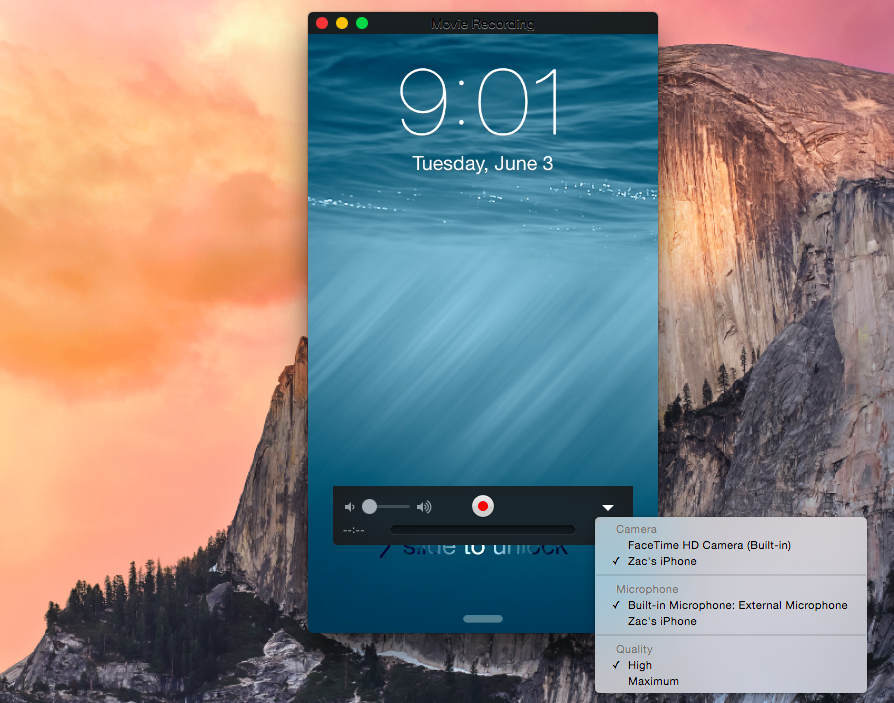
Apple has added a handy feature into OS X to easily capture the screen of an iPad or iPhone on the Mac itself. Apple positions the feature as a way to help developers quickly make app previews, which Apple introduced as part of iOS 8’s improvements to the App Store, but there is no reason why this couldn’t be used by others for different purposes.

When plugging an iPad or iPhone running iOS 8 into a Mac running OS X Yosemite via USB, the iOS device now shows up as a standard camera input. This means any video app can be used to record the screen of the iOS device without the need for additional hardware.

Although Apple is targeting the feature at developers in its documentation for making app previews, it is not limited to being a developer-only feature.


Expand
Expanding
Close

WWDC 2014 keynote recap: Everything you need to know about iOS 8 and OS X Yosemite (Video)

Apple’s WWDC 2014 keynote was home to plenty of announcements including iOS 8 and OS X Yosemite. There was quite a bit of information covered during the two hour presentation, but luckily we didn’t miss a second of the action.

If you don’t feel like sitting through the entire keynote video, we’ve put together a condensed version to give you the rundown on everything that was announced. Find out all that you need to know about iOS 8 and OS X Yosemite in our keynote recap below…


Expand
Expanding
Close

Here are all 24 new dictation languages arriving in iOS 8 & OS X Yosemite

Site default logo image

During its unveiling of iOS 8 and OS X 10.10 Yosemite yesterday, Apple mentioned that it’s adding 24 new dictation languages, but it didn’t specify what those languages would be. Dictation, a feature available on both iOS and OS X, uses speech-to-text technology powered by Nuance to let users input text using only their voice rather than a keyboard or touchscreen.

Apple has gone from just 8 languages (with a few variations for some) to over 30 in Yosemite. In case you’re curious if your language will make the cut by the time the new operating systems are released this fall, below we’ve included a full list of new supported languages and variations by country:


Expand
Expanding
Close

Polls: What are your first impressions of iOS 8 and Yosemite?

Site default logo image

Now you’ve had a chance to catch up on our coverage of the main new features of iOS 8 and OS X Yosemite, and seen our hands-on videos (iOS 8 overview, OS X Yosemite overviewiOS 8 Spotlight and iOS 8 interactive notifications), we’d like to hear your first impressions of each.

Whether you’re blown away by all the new features, disappointed by things you wanted but didn’t get, or just a bit underwhelmed, here’s your chance to let us know.

We’ve summarized the features Apple has chosen to highlight, and there are separate polls for each platform … 
Expand
Expanding
Close

Android migration means there’s more iPhone growth to come, suggests Cook

Site default logo image

With so many new iOS and OS X features being introduced in yesterday’s WWDC keynote, the numbers that kicked off the show perhaps didn’t get the attention they otherwise might have done.

While the Wall Street line is that the smartphone market is saturated and iPhone and iPad growth is done, Tim Cook clearly thinks otherwise. Business Insider highlighted Cook’s comment on the migration Apple is seeing from Android phones.

“Over 130 million customers who bought an iOS device in the past 12 months were buying their first Apple device,” said Cook before introducing iOS 8, the new software for the iPhone and iPad. “Many of these customers were switchers from Android. They had bought an Android phone — by mistake. Then had sought a better experience … And a better life. And decided to check out iPhone and iOS.”

He added, “Nearly half of our customers in China in the past six months switch from Android to iPhone. This is incredible.”


Expand
Expanding
Close

A closer look at iOS 8’s Health app (Video)

Apple has officially announced its Heath app and HealthKit SDK confirming our detailed reports from earlier this year. The new HealthKit platform will allow developers of various health and fitness apps to have all related data populate within the Health app in iOS 8.

Apple’s Health app will serve as a central hub for all incoming data from companies like Nike, fitness apps, devices, and even possibly information from your doctor. Apple is working with the Mayo Clinic and other healthcare related companies to expand the Health app’s functionality and provide you with the most important information about yourself…


Expand
Expanding
Close