Mac

See All Stories

Apple’s Mac lineup consists of MacBook, MacBook Air, MacBook Pro, iMac, Mac Pro, and Mac Mini. The Mac runs macOS for its operating system.

Mac lineup

History

The Mac is Apple’s lineup of computers, and it can be considered the company’s oldest product. The name “Mac” comes from the original Macintosh, which was introduced in 1984 and is also considered the first personal computer for the masses to have a graphical user interface. The first Macintosh hit the stores on January 24, 1984, costing $2,945.

Among all these years, Apple has introduced many different Mac models, ranging from desktops to laptops to professional tower machines. The current lineup consists of the MacBook Air, MacBook Pro, Mac mini, iMac, and Mac Pro. However, there have been other Mac models were discontinued, such as the eMac, MacBook, and iMac Pro.

The history of modern Macs began in 1998, a year after Steve Jobs returned to Apple. Apple had dozens of Macintosh computers at that time, but Steve decided to rethink the entire lineup. In 1998, Apple announced the iMac G3, which ditched the floppy disk and serial ports in favor of USB connectors.

Macintosh and iMac G3.

Unlike the Macintosh, the first iMac was considered a huge success — not only for its technology, but also for its unique design with colorful translucent plastic. Apple quickly expanded the Mac lineup with other models, which included the iBook and PowerBook (which became the MacBook and MacBook Pro) and the PowerMac, which is now the Mac Pro.

macOS

What makes a Mac the Mac is the macOS operating system, which has also had a long history since the introduction of the first Macintosh. Initially called Mac OS, the operating system was rebuilt when Steve Jobs returned to Apple.

The first version of Mac OS X was released on March 24, 2001 with a new interface that is still present in some ways in current versions of macOS. Apple’s desktop operating system comes with many free applications such as Pages, Keynote, Numbers, iMovie, and GarageBand.

With macOS, users also have access to deep integrations with other Apple devices. For instance, you can answer calls and send SMS from your iPhone using your Mac. Handoff lets you switch from one device to the other and pick up where you left off. Apple Watch users can unlock their computer without entering a password, and you can even copy and paste between devices.

macOS Sonoma

Apple’s desktop operating system is also integrated with services offered by the company, such as iCloud, Apple Music, and Apple TV+.

The current version of macOS is Sonoma (version 14), which features new slow-motion screen savers, widgets on desktop, camera effects on FaceTime and other apps, web apps, passkey sharing, improved PDF support, and Game Mode. The update also comes with a new API that lets developers easily port Windows games to macOS.

Architecture Transitions

The Mac has had three major architecture transitions in its history. Apple’s first computers ran on Motorola processors, but the company decided to migrate to the new PowerPC platform in 1994. While this brought benefits at the time, the PowerPC processors were not delivering what Apple expected.

It was in 2005 that Apple confirmed the transition from PowerPC to Intel. Intel processors had become faster and more efficient than PowerPC, which enabled the development of new Mac computers that were more powerful and also more compact. Developers have been given access to a Developer Transition Kit running Mac OS X Tiger with Intel Pentium 4 to update their apps before the transition begins.

Power PC, Mac OS X, and Intel processor.

Apple said that the transition would begin in June 2006 and be finished by the end of 2007. However, the transition to Intel was fully completed in August 2006 when the company replaced the PowerMac with the new Intel Mac Pro.

As the years went by, Apple once again felt the need to have more powerful and efficient processors for its computers. This time, the company was already working on its own chips for the iPhone and iPad. In June 2020, Apple confirmed that it was changing the architecture of the Mac, now from Intel to ARM chips, which are called Apple Silicon.

Apple offered a Mac mini DTK running on the same A12Z Bionic chip as the 2020 iPad Pro. This way developers could once again update their apps ahead of the transition. In addition to being more powerful and energy efficient, the ARM architecture of Apple Silicon chips has enabled Macs to run iOS apps for the first time.

Apple M1 chip | Mac

The first Apple Silicon Macs were released in November 2020 with the M1 chip. The company later introduced more powerful variants of the M1 chip, called M1 Pro, M1 Max, and M1 Ultra. Macs with Apple Silicon have become known for being more powerful while consuming much less power, which has resulted in MacBooks with extended battery life.

In June 2022, Apple introduced the M2 chip, which is around 20% faster than the M1 and also supports more RAM. M2 also has more powerful variants: M2 Pro, M2 Max, and M2 Ultra.

Apple unveiled the M3, M3 Pro, and M3 Max chips in October 2023. The main highlight of this generation is the 3 nanometer technology, the same as the A17 Pro chip. The M3 family also features better GPUs with support for hardware-accelerated ray-tracing.

Current Mac lineup

Apple currently sells a variety of Mac computers, which includes MacBooks, Mac mini, iMac, and Mac Pro. While some of the Macs have already been updated with an Apple Silicon chip, others remain with Intel processors.

MacBook Air

The MacBook Air is Apple’s most affordable laptop and it has become popular for its light, compact design. The 2022 version is powered by the M2 chip and is offered with 8GB, 16GB, or 24GB of RAM. Plus, it has a new, edge-to edge 13.6-inch Retina display.

The laptop features Touch ID and has two Thunderbolt 3 compatible USB-C ports, a MagSafe connector for charging, and a headphone jack. Prices start at $1099 in the US. It’s offered in silver, space gray, starlight, and midnight.

M2 MacBook Air.

A year later, Apple introduced the first 15-inch MacBook Air. It has essentially the same hardware as the smaller version with a similar design, but with a larger display. Prices start at $1299 in the US.Apple is still selling the M1 MacBook Air for prices starting at $999.

MacBook Pro

The 2023 MacBook Pro is available in multiple versions, and customers can choose between 14-inch and 16-inch screen sizes. For the first time, Apple has introduced a less expensive version of the 14-inch MacBook Pro with the base M3 chip. This version has the same design and display as the high-end versions, except that it only has two USB-C ports instead of three.

M3 MacBook Pro

The most expensive versions of the MacBook Pro are equipped with the more powerful M3 Pro and M3 Max chips. The laptop can be configured with up to 128GB of RAM and 8TB SSD. These versions also come in a new Space Black color.

Unlike the MacBook Air, the MacBook Pro comes with an HDMI port and an SD card reader. It also features MagSafe and Touch ID on the keyboard. Apple no longer sells MacBooks with the Touch Bar. Prices start at $1,599 in the US.

Mac mini

Mac mini is the cheapest Mac currently available since it’s basically a desktop without a built-in display or other peripherals. The base model with the M2 chip features one Ethernet port, two USB-C/Thunderbolt 4 ports, HDMI 2.0, two USB-A ports, and a headphone jack.

Apple sells a more powerful version of the Mac mini with the M2 Pro chip, which also comes with four USB-C ports instead of two. Mac mini can be configured with up to 32GB of RAM and up to 8TB of storage. Customers can also opt for a 10 Gigabit Ethernet port. The Apple Silicon Mac mini is only available in silver, while the now discontinued Intel model was available in space gray.

Apple Silicon Mac mini.

Prices for the Mac mini start at $599 in the US. Again, it’s worth noting that it doesn’t come with a keyboard or mouse in the box – you need to buy them separately or use your current ones.

Mac Studio

Mac Studio represents a new category between Mac mini and Mac Pro. It features a design based on the Mac mini, but with a taller body to support the more powerful hardware and also a better cooling system.

The new Mac Studio is targeted at professional users who work with demanding tasks such as video editing, 3D rendering, and machine learning. 

Embraced by creative pros everywhere, Mac Studio now delivers next-generation power in the form of the lightning-fast M2 Max and the boundary-breaking M2 Ultra. It packs outrageous performance and extensive connectivity in an unbelievably compact form, putting everything you need within easy reach and transforming any space into a studio.

By default, Mac Studio already comes with the M2 Max chip, 32GB of RAM, and 512GB SSD storage. A more expensive option lets users customize Mac Studio with M2 Ultra. While M2 Max has a 12-core CPU and a 30-core GPU, M2 Ultra doubles all of those specs. The new chip has a 24-core CPU and a 60-core GPU.

Mac Studio can also be configured with up to 192GB of RAM and 8TB of SSD storage. The machine offers up to six Thunderbolt ports, 10 Gigabit Ethernet, headphone jack, two USB-A ports, and one HDMI port.

Mac Studio

Apple has been rumored to be working on new versions of this machine with the M3 Max and M3 Ultra chips. However, these versions may not be ready until 2025. Bloomberg’s Mark Gurman said in November last year that the M3 Ultra chip “hasn’t yet gone into broad testing” inside Apple.

In the US, prices for the Mac Studio with M2 Max chip start at $1999. The M2 Ultra chip version starts at $3999. Just like the Mac mini, Mac Studio doesn’t come with a keyboard and mouse in the box. You can find accessories for your Mac Studio here.

iMac

iMac is Apple’s most popular desktop computer with an all-in-one construction. It features a 4.5K display in its 24-inch version and a 5K display in the 27-inch version. At the same time, Apple still sells an entry-level iMac with a regular 1080p display.

The 24-inch iMac is the first to feature the M1 chip, the same as in the Mac mini, MacBook Air, and MacBook Pro. This allowed Apple to introduce a completely redesigned model with a slimmer design, which is also offered in seven new colors. Customers can customize the new 24-inch iMac with up to 16GB of RAM and 2TB of storage.

Site default logo image

The company ships the 24-inch iMac with Magic Mouse and Magic Keyboard, plus a Lightning cable for recharging accessories. Prices in the US start at $1299. Apple has discontinued its old 21.5-inch iMac and the 27-inch iMac 5K.

Mac Pro

Mac Pro is a computer built for professional users who depend on extremely powerful hardware. Available in tower and rack versions, it has a completely modular design. That means users can replace RAM, SSD, GPU, and other internal components.

By default, it features four USB-C/Thunderbolt 3 ports, two USB-A ports, and two 10Gb Ethernet ports. However, the ports can be expanded using the PCI Express slots. Apple also ships the computer with a Magic Mouse and Magic Keyboard, but it does not come with an external monitor included.

All models feature Intel Xeon W processors, which are the most powerful processors offered by Intel. Consumers can configure Mac Pro with up to 28-core processor, 1.5TB RAM, and 8TB of SSD storage. In addition to supporting multiple dedicated GPUs, Apple also offers the Afterburner card — which accelerates the decoding of ProRes videos.

The company recently updated the Mac Pro with new graphics card modules, which include Radeon Pro W6800X and Radeon Pro W6900X.

Site default logo image

Mac Pro prices start at $5999 in the US.

Rumors about upcoming Macs

Top stories about the Mac

Opinion: Why the upgrade cycle means the ‘Apple tax’ is lower than it seems

Site default logo image

Photo: mashable.com

Photo: mashable.com

I’m sure most of us have at some point had Windows- and Android-using friends ask us why we pay the ‘Apple tax’ – the price difference between an Apple product and what they perceive to be an equivalent competitor product.

A large part of the answer, of course, is that the competitor product isn’t equivalent at all. You can’t compare a MacBook with its premium materials, build-quality, high-spec components, screen quality and aesthetics with a low-end Windows laptop with plastic casing, low-spec innards and cheap and cheerful display. No more than you can compare an iPhone with a budget ‘droid. When you do genuine like-for-like comparisons with truly equivalent products, the Apple premium shrinks considerably.

But to get an accurate idea of the effective purchase cost, you also need to take into account both the replacement cycle and resale value … 
Expand
Expanding
Close

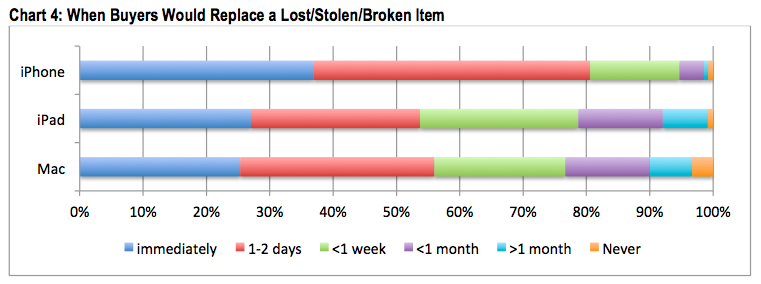
Study examines replacement and upgrade cycles of Apple products, iPads treated more like Macs than iPhones

A new report from Consumer Intelligence Research Partners, via Fortune, sheds some light on customer behaviour of how quickly people get their iPad, iPhone or Macs upgraded or replaced. For instance, iPhones have approximate lifespans of two years, tied closely to when people’s contracts end. If the phone is in good condition, rather unsurprisingly, most people replace their phones alongside their new contract. Macs stay around for up to four years before being swapped out for newer equipment. The report argues that iPad life cycles more closely resemble Macs than iPhones.

However, in the case of loss or damage, people are much more compelled to replace their iPhones than Macs or iPads. Eighty percent of people replace iPhones within just two days. For Macs and iPads, this stretches out a week or even more. Over a quarter of buyers surveyed said they would replace an iPad immediately compared to approximately 37% for iPhones.


Expand
Expanding
Close

Site default logo image

Firefox 28 released w/ Mac OS X Notification Center support for web notifications

Firefox today released the latest version of its desktop browser for Mac, Linux, and Windows and in the process added one much welcomed feature for Mac OS X users: support for Notification Center. This means that web apps and sites taking advantage of Firefox’s web notifications feature will now also appear for Mac users in the Notification Center.

Version 28 of Firefox also introduces a few new behind the scenes improvements including VP9 video decoding, volume control for HTML5 audio/video, and a number of other fixes.

Firefox 28 for Mac is available to download from the Mozilla website now.

Contestants at Pwn2Own take down Safari, but said OS X security is better than other systems

<a href="http://www.pwn2own.com/photo-gallery/#prettyPhoto[]/13/">Pwn2Own</a>

As usual, the annual Pwn2Own contest featured many hackers targeting the latest operating systems and browsers from the major vendors, including Apple. Threatpost reports that the “Keen Team” focused Safari on Thursday and exploited it with relative ease.

The team took home a $40,000 bounty for their efforts on Safari, as well as a share in a $75,000 prize for co-engineering a zero-day Flash exploit. They say they will donate some of their winnings towards charities representing missing Malaysian Airplane passengers.

The group say that for Safari, they used two different exploit vectors. One vulnerability was a heap overflow in WebKit that enabled arbitrary code execution. The team then used this opening to use another exploit to bypass the application sandbox and run code as if it was user privileged.


Expand
Expanding
Close

Google drops its Drive storage pricing significantly, puts pressure on Apple to improve iCloud prices

Google has just announced some new price plans for its Google Drive service. The new plans start at $1.99 for 100 GB (down from $4.99), $10 for 1 TB (down from $50) and 10 TB for $99.99. This storage is shared across Drive, Gmail and Google+ Photos.

It should be noted that Google bills customers monthly. Even so, these new price points make Apple’s iCloud storage offerings look awful in terms of value for money.

For iCloud storage, Apple currently charges $20 yearly for 15 GB, $50 yearly for 25 GB and $100 yearly for 55 GB (lumping in the free 5 gigabytes Apple gives to every user). Rather amusingly, Apple’s options do not even allow users to perform a 1:1 backup of their 64 GB and 128 GB devices — the top iCloud tier totals 55 GB of storage.

Whatever way you cut it, Apple’s prices are exorbitant in comparison to Google’s. Doing some basic arithmetic, for one gigabyte of cloud storage over a year, Google charges you 24 cents. Meanwhile, Apple charges you 1.8 dollars. This means Apple’s current rates are 7.5x more expensive than Google’s.


Expand
Expanding
Close

TwelveSouth announces new hand-finished ‘Rutledge BookBook’ case for MacBooks

Site default logo image

TwelveSouth, the company behind the popular BookBook series of cases for Apple devices that we’ve reviewed several times in the past, today announced a brand new option for MacBook users. The new “Rutledge BookBook” for MacBook is the first new product in the BookBook lineup in almost three years and the company says it’s also its most unique yet.

While the overall look of the case is much the same as BookBooks that came before it, TwelveSouth says the Rutledge case features a new process of finishing the leather by hand that makes it look even more like an authentic old book. It also makes every Rutledge BookBook unique:
Expand
Expanding
Close

iOS 8: Apple works to further push iCloud as the future of the file system

Site default logo image

When Apple introduced both iOS and iCloud, its goal was to eliminate the classic file system found in Mac OS X and make synchronization so seamless between devices that it “just works.” Nearly three years after iCloud’s introduction, Apple is still moving closer to this goal. The company is working on a pair of new iCloud applications for iOS as well as improved tools for developers to build iCloud-infused applications, according to sources with knowledge of these initiatives…


Expand
Expanding
Close

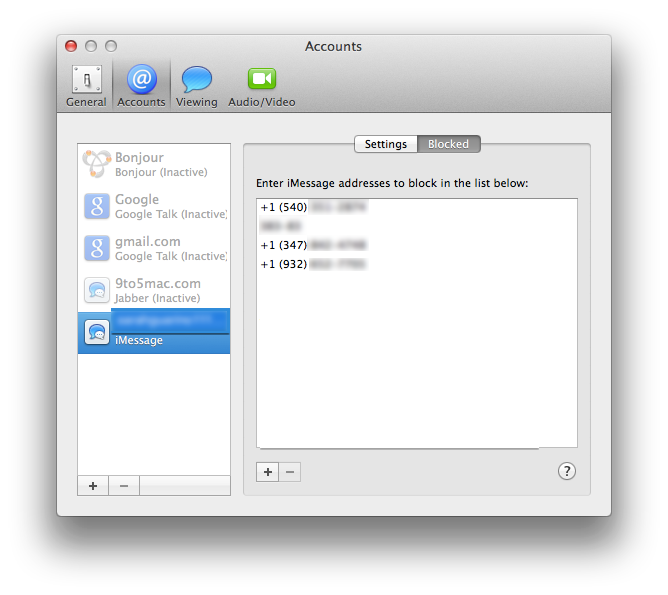
Mavericks How-to: Block contacts in FaceTime and iMessage on OS X

Site default logo image

With the highly anticipated update to Mavericks 10.9.2, users gained the ability to block contacts in FaceTime and iMessage. This has been a long-awaited addition, since iOS 7 received this feature five months ago. If you previously blocked people in iOS 7, the block list syncs over from your iOS devices to your Mac through iCloud. Make sure Documents and Data is turned on in order for that to occur.

Now with Mavericks, you are able to block certain phone numbers from iMessaging or FaceTiming you without needing to get up and grab your iOS device…


Expand
Expanding
Close

f.lux for Mac gets smarter with screen-dimming based on daily schedule, Movie Mode and more

f.lux, the popular utility that changes the color temperature of your Mac’s display to reflect the sun’s daylight cycle, has received a major update. Whilst still being in beta, the app can now calibrate your screen based on your actual schedule, not just sunrise and sunset times.

This means the app is now useful for people who have non-standard schedules, such as people who work night shifts. The app smoothly transitions between ‘daytime’,’sunset’ and ‘bedtime’ presets based on the schedule information provided. You tell the app when you wake up and it automatically calculates the color temperature levels for every hour of the day.


Expand
Expanding
Close

Site default logo image

iBetterCharge puts iPhone & iPad battery notifications on your Mac

A nice, new utility called iBetterCharge brings those 20% and 10% battery warnings from your iPhone or iPad onto your Mac. Rather than picking up your phone before heading out the door only to realize your battery is almost dead, the app will remind you to plug in with warnings that pop up as desktop notifications on your Mac. This is a handy little tool for anyone that likes to leave their iPhone or iPad out of sight while working on their Mac or people with multiple iOS devices to manage. It has already saved me a few times this week as I’ve been testing it.

You can connect multiple devices, set granular preferences for notifications when your battery gets lower than 50%, 20%, 10%, or 5%, and also select options to play sounds, animate the menu bar icon, or show a notification. Another preference will let you get notified when a device is fully charged and an ignore list lets you quickly mute notifications for certain devices.

The app is rather lightweight and a free download. Once you’ve installed it, iBetterCharge sits in your menu bar and automatically finds your devices over WiFi. Note: For this to work you have to have WiFi Sync enabled on your device.

You can download iBetterCharge for free here.

[youtube=https://www.youtube.com/watch?v=TaWovz5WviI]

Apple building support for driving 4K displays at ‘Retina’ resolution, 60Hz output from 2013 MacBook Pros

Site default logo image

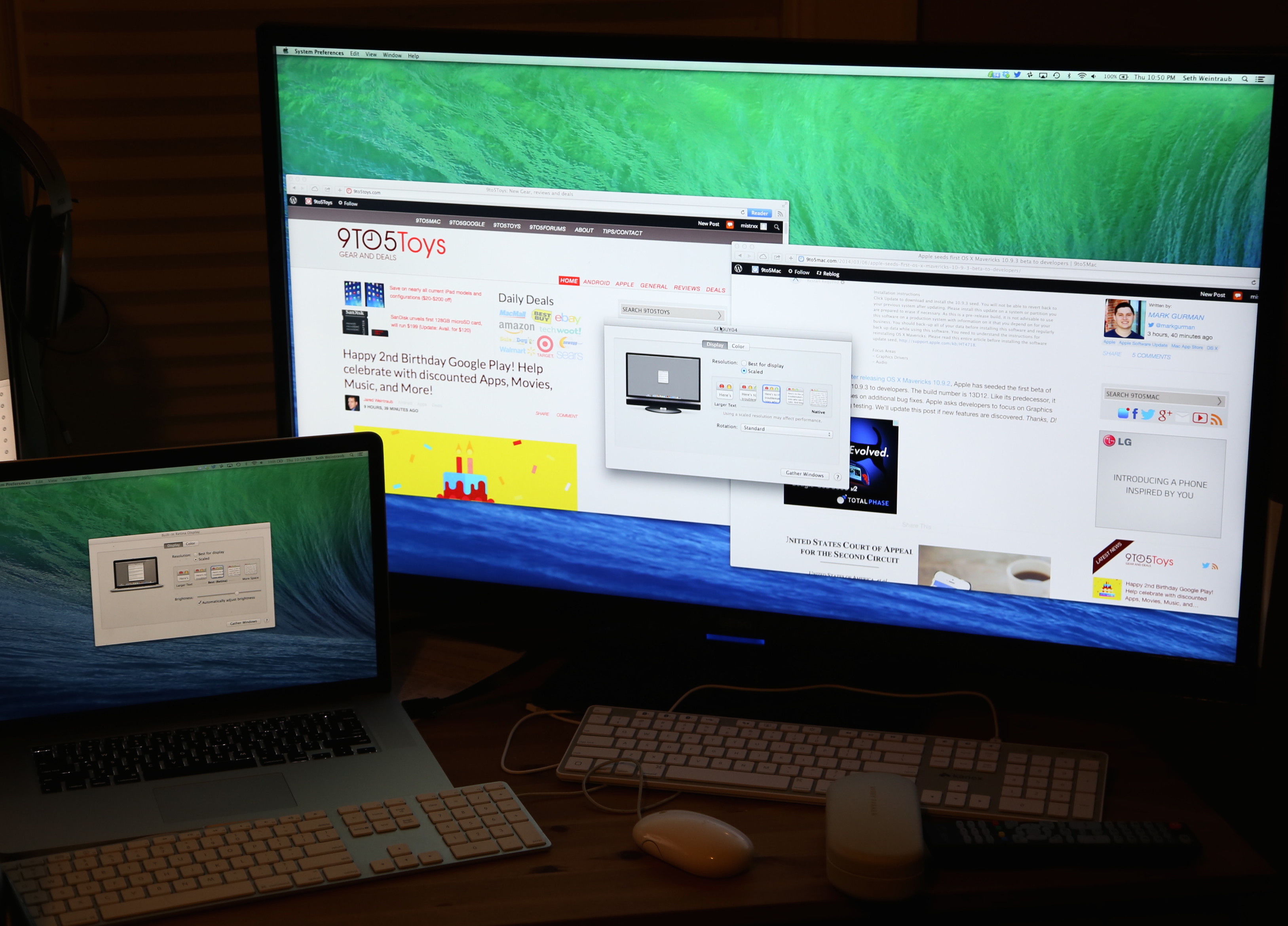
4K display running at “Retina” resolution on 10.9.3

Earlier today, Apple provided developers with the first beta for the upcoming release of OS X Mavericks version 10.9.3. Apple did not disclose any new features coming in 10.9.3, but we have discovered that the update includes notable enhancements for users with Macs connected to 4K-resolution monitors. With 10.9.3, Mac users can now natively set their 4K monitors to run the Mac operating system at a pixel-doubled “Retina” resolution.

The new settings, which appear nearly identical to the settings on a standard Retina MacBook Pro display, can be seen here on a 10.9.3 Mac connected to a 4K monitor:


Expand
Expanding
Close

RIP Mac optical drives? Rumor suggests Apple to drop last non-Retina MacBook Pro this year

Site default logo image

DigiTimes is claiming that Apple will cease production of the non-Retina version of the 13-inch MacBook Pro this year as it prepares to launch refreshed Retina models toward the end of the year.

Apple is expected to stop production of the 13-inch MacBook Pro in the second half of 2014 and will replace the product line with thinner models equipped with a Retina display. Meanwhile, Intel will offer second-generation ultrabooks in the fourth quarter of 2014, pushing the notebook industry further into the ultra-thin era, according to Taiwan-based supply chain makers … 
Expand
Expanding
Close

Site default logo image

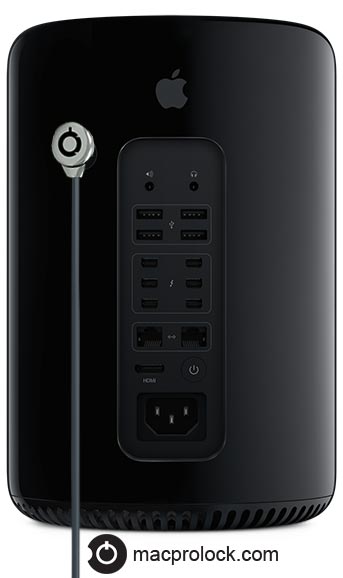
$49 Switchd mod adds cable lock to new Mac Pro for added security

With the new Mac Pro mostly landing in professional environments, it’s not surprising that several companies are working on security solutions for the pricey hardware. We’ve already seen a similar DIY solution from Maclocks, and today we get a look at another product coming soon called the Switchd MacPro Lock.

A little bit less expensive than other solutions at $49, the company provides a replacement part for the Mac Pro’s case lock switch that provides an extra opening for a cable lock. The company plans to ship next month and is already taking emails of interested customers on its website here.


Nuance announces Dragon Dictate 4, with pre-recorded transcription features and Gmail integration

Nuance has just announced the next major version of its Mac dictation software, Dragon Dictate 4. The new version improves recognition accuracy as well as several new features, including the ability to machine transcribe from a pre-recorded audio file. You no longer have to be recording a voice live to get transcription.

[youtube=http://www.youtube.com/watch?v=RRfbZ0h4yBo]

We’ve had a quick play with the software and the accuracy is almost scary good compared to older versions of the software. Speaking in a normal voice gives you almost 100% accuracy and even mumbling seems to work. While Mavericks uses the same Nuance speech engine, Dictate 4 has a better interface for transcription and tons of extra features as outlined in the videos above and below.

Dragon Dictate software has also been updated for modern system architectures — it is a 64-bit app now.  This results in better performance and better memory management over its predecessors. The company says it has drastically reduced latency when interpreting speech.

[youtube=http://www.youtube.com/watch?v=YnGKb854CNI]


Expand
Expanding
Close

Site default logo image

Apple adding hundreds of new engineers and operations staff in China to speed development of larger iPhones

Apple is on a mass hiring spree for Asian staff, beginning in the middle of last year, as noted by the Wall Street Journal. The Journal says that Apple is trying to speed up product development in China and Taiwan to help launch a larger lineup of devices. Apparently, the company is aggressively hiring away from HTC and other firms to form strong product teams in Asia.


Expand
Expanding
Close

Apple issues SMC update for Mac Pro to enable Power Nap mode without waking the fan

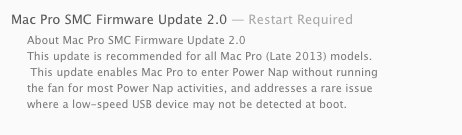
Apple has issued a SMC update for the new Mac Pro, version 2.0. This small update addresses bugs with the detection of USB devices and enables Power Nap to update the system without spinning up the fan for “most activities”. A similar enhancement to Power Nap was released for the iMacs late last year.

This will allow Mac Pro owners to be able to sync apps like Mail and Contacts completely noiselessly, similar to how Power Nap can update data on MacBooks whilst they are ‘asleep’.

Thanks Jonathan and Austin!

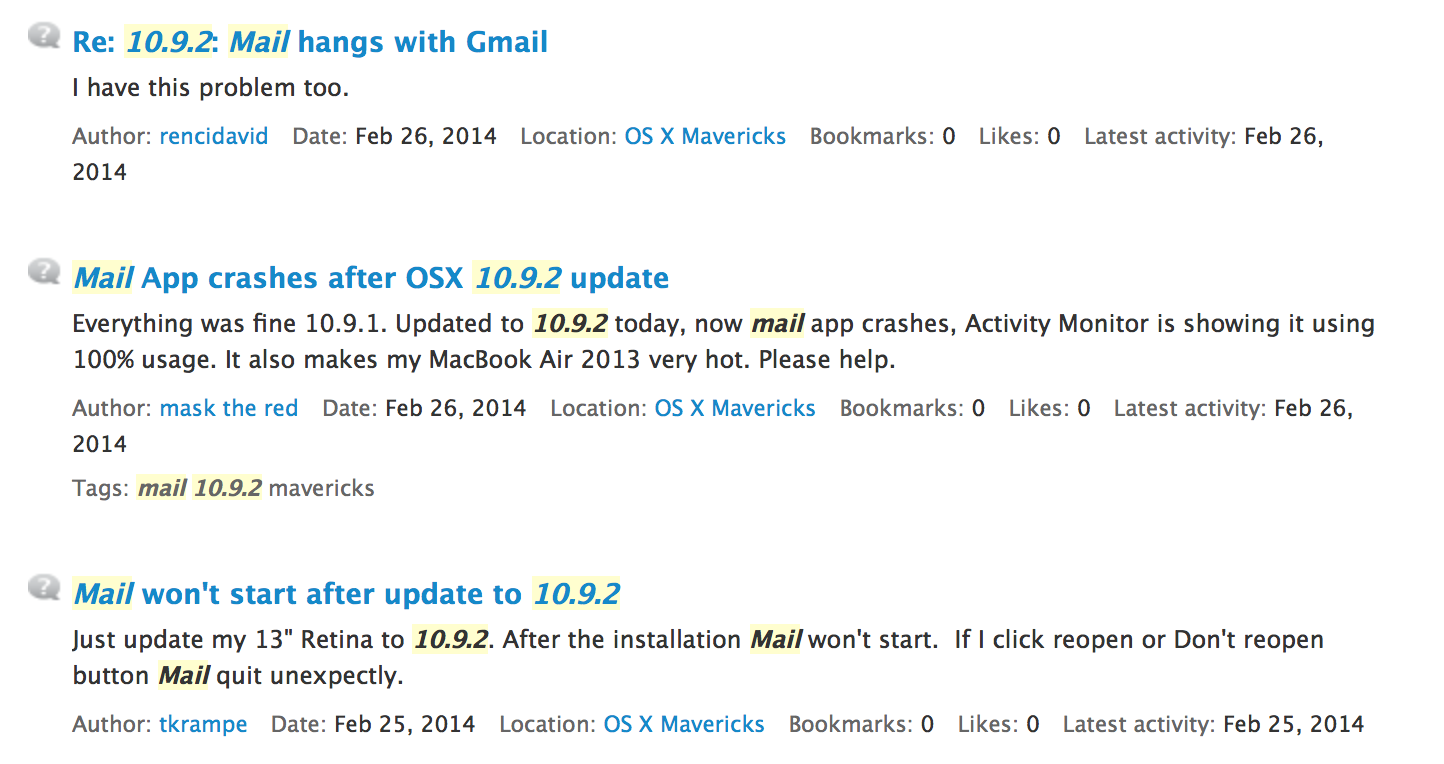
Even after OS X 10.9.2 Mavericks update, users still complaining about Mail issues

Site default logo image

It’s safe to say that Mail in OS X Mavericks has been the new operating system’s least impressive point. Since launch, users have been complaining about issues relating to Gmail accounts, stability, and overall synchronization. Apple first attempted to patch up these bugs with a fix in early November of last year…


Expand
Expanding
Close

Wishful thinking: Why it’d be nice if Apple created a line of Ive-designed office technology products

Site default logo image

Image: deskology.com

I have a number of friends who can’t understand why I pay what they refer to as ‘the Apple tax’: the premium paid for Apple products over alternatives that offer much the same functionality.

I can argue about the functionality, of course. The usability, stability and (usually!) security of OS X are all things worth paying for in my view, but I’m not ashamed to admit that aesthetics also matter to me. When I’m going to spend 8+ hours in front of a computer, I’d rather I was looking at something sleek and beautiful rather than something plastic, ugly and a chore to use and understand.

I feel the same way about the other technology on my desk and in my office, but it isn’t always easy to find kit that works well and looks the part too. I can’t help thinking there’s a lot of office technology that could use the Jony Ive touch … 
Expand
Expanding
Close

Site default logo image

Ever wondered why your mouse pointer is angled, not straight?

Here’s the reason, courtesy of a concept drawing from Xerox Palo Alto Research Center, where the graphical user interface was invented, and where Steve Jobs was introduced to the concept that was to lead to the Macintosh. 8BitFuture writes:

When the graphical user interface was later developed by Xerox, however, the team found that the vertical pointer was almost impossible to see due to the low resolution displays in use at the time.

Rather than make the pointer larger, the decision was made to turn it 45 degrees, making it easy to see. Despite the high resolution displays we have today, the concept has managed to stick for 33 years.

Apple formally appeals ebooks antitrust ruling, asks for monitor to be suspended until a new decision is made

Site default logo image

Apple has formally appealed the Department of Justice’s ebooks antitrust case, via the Associated Press. Previously, Apple has only officially complained about the power of the appointed monitor — now they are asking for the entire case to be re-evaluated.

Apple claims it was ignorant of any inter-publisher price fixing and that Apple setup iBooks through legal arrangements without knowledge of any behind-the-scenes collusion.


Expand
Expanding
Close

Security consultant takes less than a day to exploit OS X bug to capture all SSL traffic

Site default logo image

Update: The bug has been fixed in OS X 10.9.2

Security consultant Aldo Cortesi said in a blog post (via ZDNet) that it took him less than a day to exploit the goto fail bug in OS X to capture all SSL traffic, and that there’s a good chance he isn’t the first to have done so – an implicit suggestion that the vulnerability may already be being used in man-in-the-middle attacks.

I’ve confirmed full transparent interception of HTTPS traffic on both IOS (prior to 7.0.6) and OSX Mavericks. Nearly all encrypted traffic, including usernames, passwords, and even Apple app updates can be captured. This includes:

  • App store and software update traffic
  • iCloud data, including KeyChain enrollment and updates
  • Data from the Calendar and Reminders
  • Find My Mac updates
  • Traffic for applications that use certificate pinning, like Twitter … 
    Expand
    Expanding
    Close

Reasons for delay in SSL fix to OS X unclear as a single line of code found responsible

Site default logo image

Update: Apple issued OS X 10.9.2 the following day, which included a fix for the SSL bug.

After Apple fixed the SSL bug in iOS, it’s unclear why three days have passed without an OS X fix after it was revealed by Reuters that the vulnerability was created by an error in a single line of code.

The problem lies in the way the software recognizes the digital certificates used by banking sites, Google’s Gmail service, Facebook and others to establish encrypted connections. A single line in the program and an omitted bracket meant that those certificates were not authenticated at all, so that hackers can impersonate the website being sought and capture all the electronic traffic before passing it along to the real site.

As the bug is in Apple’s SSL authentication code, it leaves a whole range of apps vulnerable, not just Safari … 
Expand
Expanding
Close