MacBook Pro: The biggest and baddest Mac laptops

See All Stories

Apple's premium laptop comes in 13- and 16-inch screen sizes. Each model includes 2-4 USB-C ports for charging, accessories, and data transfer. Higher-end models also include the Touch Bar.

2021 MacBook Pro

MacBook Pro has been the product name for Apple’s high-end laptop since early 2006 when the transition to Intel processors began. Now, that Pro naming has carried forth as Apple has moved to its own silicon. The latest fourth and fifth-generation Pro Apple notebooks bring dramatically more power with lower heat generation and better battery life thanks to the ARM-based Apple silicon. Keep reading for a brief history of the line and a breakdown of the current lineup.

MacBook Pro history

The first generation MacBook Pro followed in the style of the PowerBook G4 that came before it, but used Intel processors rather than PowerPC chips.

The second generation of the MacBook Pro was the first to really separate itself from the products before, with a unibody enclosure. The third-generation MacBook Pro introduced the retina display as well as MagSafe 2.

Perhaps the most controversial version of the MacBook Pro is the fourth generation. While the third generation received some backlash for the removal of ethernet and the optical drive, the fourth generation was a complete rethinking of the device peripherals. No more MagSafe, no more USB-A ports, and only the 13-inch model kept the function keys. Instead, this redesigned MacBook Pro opted for all Thunderbolt 3 ports and headphone jack. In place of function keys, the MacBook Pro gained an OLED Touch Bar. In late-2020, Apple introduced the M1 chip and updated the 13-inch MacBook Pro. The ARM-based processor brought down power consumption and increased performance.

In October of 2021, Apple introduced the fifth-generation MacBook Pro with not one but two updated versions of the M1 chip, the M1 Pro and M1 Max. The move walked back some of the decisions from the previous generation, adding back an HDMI Port, MagSafe charger, and SD card reader while removing the Touch Bar.

The 2020 13-Inch MacBook Pro

In late 2020, Apple introduced the 13-inch M1 MacBook Pro as the latest update to the fourth-generation MacBook. The MacBook features the same look as previous MacBooks, but like the MacBook Air and Mac Mini, switched to Apple silicon.

Apple’s M1 chip brought ARM architecture to the MacBook line, and this was the first MacBook without an Intel processor.

The M1 chip is a unified design with an 8-core CPU and an 8-core CPU. The processor integrated memory on board, limiting the device to either 8GB or 16GB of unified memory. The 13-inch M1 MacBook Pro is configurable with between 256GB and 2TB of storage and features a Magic Keyboard, rather than the problematic butterfly keyboard.

13-inch MacBook Pro specs

Base Configuration$1,299.00

  • Apple M1 chip with 8‑core CPU, 8‑core GPU, and 16‑core Neural Engine
  • 8GB unified memory
  • 256GB SSD storage
  • 13-inch Retina display with True Tone
  • Backlit Magic Keyboard – US English
  • Touch Bar and Touch ID
  • Two Thunderbolt / USB 4 ports

Max Configuration$2,299.00

  • Apple M1 chip with 8‑core CPU, 8‑core GPU, and 16‑core Neural Engine
  • 16GB unified memory
  • 2TB SSD storage
  • 13-inch Retina display with True Tone
  • Backlit Magic Keyboard – US English
  • Touch Bar and Touch ID
  • Two Thunderbolt / USB 4 ports

13-inch MacBook Pro pricing

The price for the 13-inch M1 MacBook Pro starts at $1,299. Upgrading this base configuration to 16GB of memory adds $200 to the price. Likewise, each step above 256GB of storage – 512GB, 1TB, and 2TB – will add $200 to the price. A fully specced out 13-inch MacBook Pro will run you $2,299.

You can configure your own 13-inch MacBook Pro on Apple’s website.

Current 14-inch and 16-inch MacBook Pro

In October 2021, Apple brought a brand new design to the MacBook Pro line. Apple increased the screen size on the 13-inch, making it a 14-inch, and shrunk the bezels on the 16-inch. This fifth-generation notebook addressed many complaints of the last generation. MagSafe returned, in the form of an improved MagSafe 3, while the MacBook also regained an HDMI port and an SD-card slot.

Also gone is the Touch Bar. Instead, the standard row of function keys return. The latest MacBooks also bring a ProMotion display that was first introduced on the iPad Pro, with a variable refresh rate and mini-LED backlight.

The 2021 MacBooks aren’t without a controversial feature, as while the display has been made larger there is now a large notch for the 1080P FaceTime camera. While FaceID would have been a nice addition in exchange for this small chunk of the screen, there are some reasons this is not totally practical.

14-inch MacBook Pro specs

Base Configuration$1,999.00

  • Apple M1 Pro with 8-core CPU, 14-core GPU, 16-core Neural Engine
  • 16GB unified memory
  • 512GB SSD storage
  • 67W USB-C Power Adapter
  • 14-inch Liquid Retina XDR display
  • Three Thunderbolt 4 ports, HDMI port, SDXC card slot, MagSafe 3 port
  • Backlit Magic Keyboard with Touch ID – US English

Maximum Configuration$5,899.00

  • Apple M1 Max with 10-core CPU, 32-core GPU, 16-core Neural Engine
  • 64GB unified memory
  • 8TB SSD storage
  • 96W USB-C Power Adapter
  • 14-inch Liquid Retina XDR display
  • Three Thunderbolt 4 ports, HDMI port, SDXC card slot, MagSafe 3 port
  • Backlit Magic Keyboard with Touch ID – US English

14-inch MacBook Pro pricing

The 14-inch MacBook Pro starts at $1,999. The base model includes 16GB of memory, 512GB of storage, and an M1 Pro processor with an 8-core CPU and 14-core GPU. There are multiple versions of the M1 Pro processor available, while jumping to an M1 Max processor will cost $500 more, and requires you to jump up to 32GB of memory – a $400 upgrade. Going with the M1 Max processor means you can configure up to the full 64GB of memory, an $800 upgrade.

You can configure up to 8TB of storage in the 2021 14-inch MacBook Pro. Upgrade costs are as follows:

  • 1TB SSD Storage – $200
  • 2TB SSD Storage – $600
  • 4TB SSD Storage – $1,200
  • 8TB SSD Storage – $2,400

You can configure your own 14-inch MacBook Pro on Apple’s website.

16-inch MacBook Pro specs

Base Configuration$2,499.00

  • Apple M1 Pro with 10-core CPU, 16-core GPU, 16-core Neural Engine
  • 16GB unified memory
  • 512GB SSD storage
  • 16-inch Liquid Retina XDR display
  • Three Thunderbolt 4 ports, HDMI port, SDXC card slot, MagSafe 3 port
  • 140W USB-C Power Adapter
  • Backlit Magic Keyboard with Touch ID – US English

Maximum Configuration$6,099.00

  • Apple M1 Max with 10-core CPU, 32-core GPU, 16-core Neural Engine
  • 64GB unified memory
  • 8TB SSD storage
  • 16-inch Liquid Retina XDR display
  • Three Thunderbolt 4 ports, HDMI port, SDXC card slot, MagSafe 3 port
  • 140W USB-C Power Adapter
  • Backlit Magic Keyboard with Touch ID – US English

16-inch MacBook Pro pricing

The 16-inch MacBook Pro starts at $2,499. There is only one M1 Pro processor available on the 16-inch MacBook, and that’s the highest version 10-core CPU, 16-core GPU version of the M1 Pro processor that is a $300 upgrade on the 14-inch MacBook Pro. Of course, you can also step up to the M1 Max processor with either a 24-core or 32-core GPU, a $200 and $400 upgrade respectively (which also requires the $400 upgrade to 32GB of memory). The memory and storage options are all the same as the 14-inch MacBook Pro.

You can configure your own 16-inch MacBook Pro on Apple’s website.

Differences between 13-inch,14-inch, and 16-inch models

The 2021 MacBook Pro lineup is a refreshing change. The return of ports and physical keys make the laptops more versatile, while additions like an XDR display and hardware acceleration for ProRes improves the experience but is harder to quantify for the average user.

13-inch14-inch16-inch
ProcessorM1M1 Pro / M1 MaxM1 Pro / M1 Max
Memory8GB / 16GB16GB / 32GB / 64GB16GB / 32GB / 64GB
Storage512GB, 1TB, 2TB512GB, 1TB, 2TB, 4TB, 8TB512GB, 1TB, 2TB, 4TB, 8TB
Screen2560×1600 pixels 3024×1964 pixels; ProMotion3456×2234 pixels; ProMotion
Weight3.0 pounds (1.4 kg)3.5 pounds (1.6 kg)M1 Pro: 4.7 pounds (2.1 kg)
M1 Max: 4.8 pounds (2.2 kg)
Size (Width x Depth)11.97 x 8.36 inches (30.41 x 21.24 cm)12.31 x 8.71 inches (31.26 x 22.12 cm)14.01 x 9.77 inches (35.57 x 24.81 cm)
Height0.61 inch (1.56 cm)0.61 inch (1.55 cm)0.66 inch (1.68 cm)
Base Price$1,299.00$1,999.00$2,499.00

The $1,999 starting price for Apple latest computer is a harder pill to swallow than the $1,300 13-inch Pro from last year. For an average user, the superb M1 MacBook Air will likely suffice (and that sub-$1,000 price is hard to pass up).

But the 2021 14-inch and 16-inch MacBook Pro are exactly what they need to be, a return to function-over-form that will truly meet the needs of professional users.


Pixelmator for Mac adds Force Touch pressure-sensitive painting, even better Repair Tool, more

Site default logo image

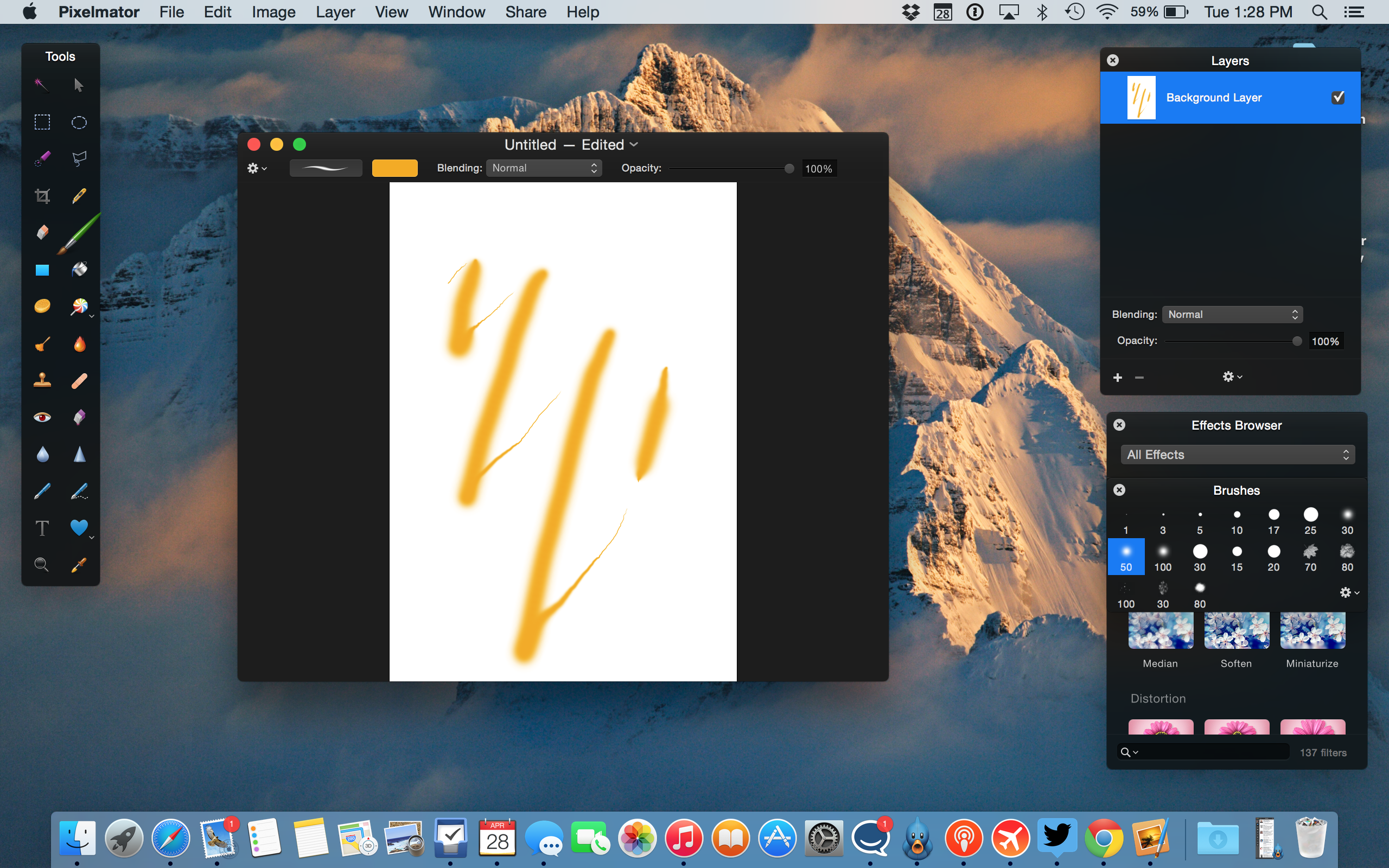
The developers behind Pixelmator have just released another free update to the Mac app, available in the Mac App Store ($29.99). Despite the bug-fix identifier, Version 3.3.2 packs some cool enhancements to support Apple’s latest technologies and hardware.

For one, as demoed in the screenshot above, Pixelmator brushes now support Force Touch so you can draw with multiple levels of pressure by pressing harder on the touchpad of your new Retina MacBook (or early 2015 13 inch Retina MacBook Pro). This is useful for quick adjustments although serious painters will still want to use dedicated drawing tablets. The update also adds support for the Photos app and a revamped Repair Tool …


Expand
Expanding
Close

Apple patent application shows how Force Touch could in future simulate more than just clicks

Site default logo image

Apple’s existing Force Touch mechanism

Update: Patently Apple notes that this patent has now been granted (19th April 2016).

Apple patent application published today shows that the Force Touch trackpad used in the 12-inch MacBook and latest 13-inch MacBook Pro could get more sophisticated in future versions. The patent describes how a mix of vibration and temperature could fool your finger into ‘feeling’ different surfaces, such as metal and wood.

For example, a glass surface may be controlled to have the temperature of a relatively cooler metal material and/or a relatively warmer wood material […]

In some cases, the temperature may be varied over time, such as in response to one or more touches detected using one or more touch sensors. For example, a metal material may increase in temperature while touched in response to heat from a user’s finger.

The patent describes how vibrations could be used to simulate a textured surface, such as the grain of a wooden surface … 
Expand
Expanding
Close

The best travel accessories for your MacBook Air, MacBook Pro, or Retina MacBook

Traveling with any MacBook is a lot easier today than it was five or ten years ago. Apple’s latest laptops consume much less space than their predecessors, and last much longer when they’re in active use. Whether it’s on a seat-back tray or resting in your lap, your MacBook can deliver quite a few hours of productive work time, video viewing, or even gameplay without assistance. But it can do even more if you bring the right accessories along.

My goal is to help you choose the best items to carry with you on the road — the type of items I’ve spent years testing. The picks below are highly practical and focused to make good use of space and address real-world concerns that many travelers have. Read on!


Expand
Expanding
Close

How-To: Choose the best stand or desktop mount for Apple’s iPads and Macs

Apple currently sells more “laptop” than “desktop” Macs, but in reality, most Macs will be used substantially on flat surfaces — desks, tables, and sometimes nightstands. iPads are more lap-friendly, but also tend to get used upright, particularly for watching videos and access in the kitchen. Since I’ve spent a lot of time testing Apple device stands and mounts, I wanted to share what I’ve learned with you, so you can choose the solution that best suits your Mac, iPad, or both at the same time.

Below, I’ve hand-picked options for different types of users, starting with passive MacBook stands such as Twelve South’s BookArc for MacBook Pro ($50). Made from Mac-matching aluminum with gray rubber inserts, BookArc is designed to safely hold a MacBook Pro upright so that its ports and SD card reader are easily accessible. Twelve South also sells a smaller version of BookArc for the MacBook Air, a bigger BookArc for the Mac Pro, and an earthy version called BookArc mod for fans of wood. That’s a rarity, as most Mac and iPad stands are designed to match Apple’s products, as you’ll see inside…


Expand
Expanding
Close

Site default logo image

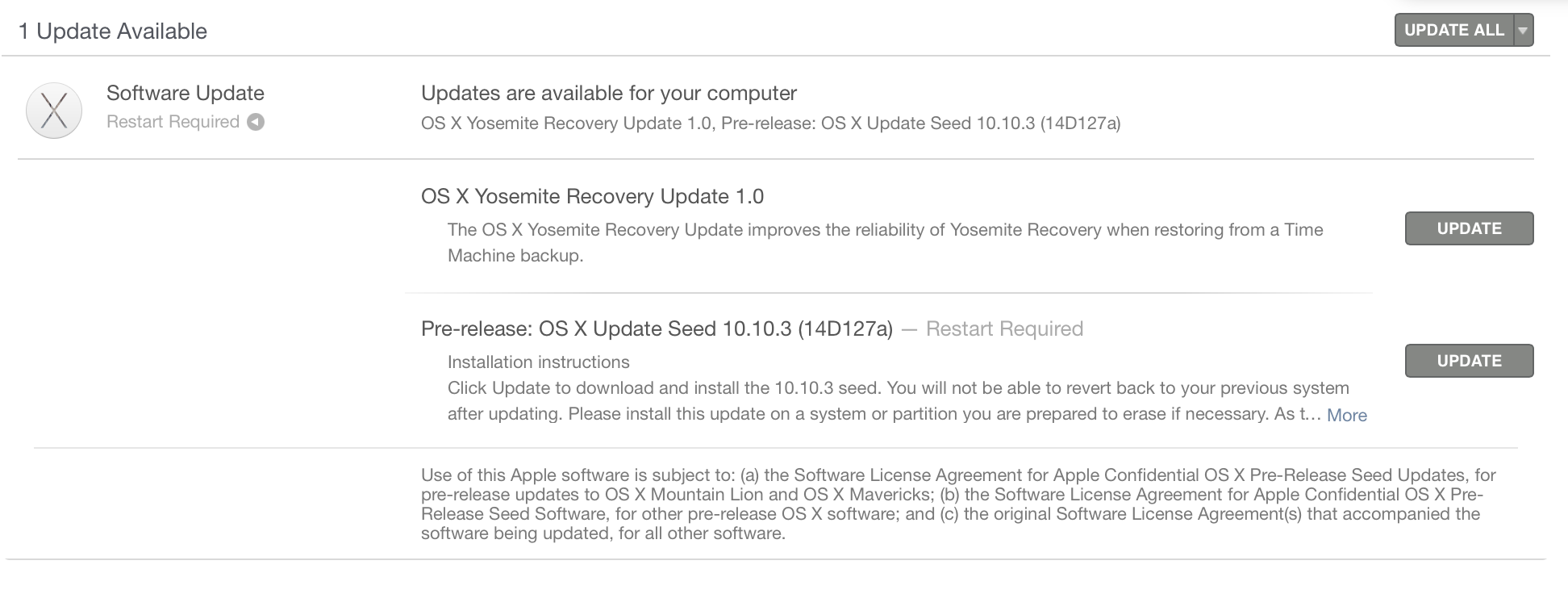
Apple releases OS X 10.10.3 build 14D127 for public and developer betas

Apple today released yet another build of OS X Yosemite 10.10.3 to both the developer and public beta programs. This version is labeled as 14D127, which is several builds newer than the previous release of 14D113. As always, this new release includes various bug fixes.

As we’ve previously highlighted, 10.10.3 will bring a new, more diverse Emojis keyboard to the Mac, improved login for Google services, and APIs for the new Force Touch Trackpad on the new 12-inch MacBook and 13-inch MacBook Pro with Retina display. Apple has not yet announced when 10.10.3 will be released, but perhaps a launch will come in line with the upcoming MacBook in April.


Expand
Expanding
Close

Review: Swapping MagSafe for SnapFit, BatteryBox adds 60Wh of portable power to MacBook Airs, Pros

Thanks to Apple’s patent on the MagSafe connectors used in MacBook Airs and Pros, the list of third-party external batteries for MacBooks previously began with Hyper’s HyperJuice/HyperJuice 2 and ended with Lenmar’s ChugPlug — not much of a variety. Apple’s legal department chased Hyper for attaching harvested MagSafe connectors to its batteries, and Lenmar chose a workaround, sending ChugPlug’s power indirectly though an Apple wall adapter. Neither solution was ideal. It took until now for a completely different third solution to appear: BatteryBox ($220) from Gbatteries Energy.

BatteryBox is the first MacBook power option I’ve tested that doesn’t require either MagSafe or an Apple wall adapter to function. Since the developers went out of their way to create something that won’t run afoul of Apple’s legal team, there’s absolutely nothing Mac-like about its brick-like rectangular design. And it’s not cheap, priced between the two HyperJuices and higher than ChugPlug, which can now be had for only $100. But it works, adding a 60-watt-hour additional battery to the 38-95-watt-hour cells already inside MacBook Airs and Pros. So if you’re on the road without access to a power outlet and need to add hours of additional runtime to your Apple laptop, this is a viable alternative….


Expand
Expanding
Close

Site default logo image

Future Macs could get up to 10TB SSDs thanks to new Intel/Micron technology

SSDs are fast, but still expensive compared to spinning metal drives, giving us less storage capacity in today’s Macs than we got in older models. Pick up a classic 13-inch MacBook Pro with a hard drive, for example, and you’ll get 500GB of storage for $1100, compared to just 128GB of SSD storage in the $1300 entry-level Retina model.

That may be set to change thanks to new 3D NAND technology announced by Intel and Micron, allowing them to fit far greater storage capacity into the same space as today’s drives. By stacking flash cells on top of each other, up to 32 layers deep, they can can triple the capacity in the same size chip without the usual high price-tag, reports PC World.

For a standard 2.5-inch SATA drive that means up to 10TB of space; for the M.2 drive type used by most laptops, the 3D NAND will boost capacities up to 3.5TB.

We’ve been promised this technology before–Samsung demonstrated 24 layers of 3D NAND back in 2013–but Intel and Micron say that manufacturers will be able to buy the new chips later this year. Of course, with Apple not noted for its generosity when it comes to storage capacity, you may not want to hold your breath.

How-To: Decode Apple’s Tech Specs pages before buying a new Mac, Part 2

As I noted in Part 1 of How-To: Decode Apple’s Tech Specs pages before buying a new Mac, Apple has designed the Mac purchasing process to be easy: pick a model, pick the good, better, or best configuration, hand over your cash, and enjoy your computer. Since most people get confused by tech specs — bullet points filled with numbers and acronyms — Apple downplays them in its marketing materials, leaving customers to sort through the details and figure out what most of them mean.

But these specs are really important when you’re shopping for the right Mac for your current and future needs. So I’ve created this How-To guide to walk you through each of Apple’s Tech Specs pages using clear explanations, hopefully enabling you to properly understand what you’re about to buy. Part 1 focused on the “big 5″ Mac specs you really need to know about, and this Part 2 looks at the rest — generally things that remain the same in a given model, regardless of the configuration you choose…


Expand
Expanding
Close

How-To: Decode Apple’s Tech Specs pages before buying a new Mac (Part 1)

Buying a Mac is designed to be easy. Apple has a handful of different models, each generally available in good, better, and best configurations. You’re supposed to start with the specific Mac model that fits your needs, pick a configuration that has the price and features you want, and walk away happy with your purchase. (Better yet, do your research online and save money after ordering from Amazon, or use the product guides off to the bottom right of this page.)

One thing Apple tends to downplay are tech specs — important numbers and acronyms that nonetheless confuse many people. Look carefully on Apple’s web site and you’ll find that there’s a Tech Specs page for every Mac Apple sells; they’re the keys to making an informed Mac purchase that will be right for your current and future needs. My latest How-To is here to walk you through each of Apple’s specs with clear explanations, so you can understand what you’re about to buy. This Part 1 discusses the “big 5” Mac specs you need to know about, and Part 2 tackles the rest


Expand
Expanding
Close

Inklet plug-in adds pressure-sensitive drawing on new Force Touch MacBook trackpad

Site default logo image

Ten One Design has released an updated version of its drawing plug-in, Inklet, adding pressure-sensitive drawing on the new Force Touch trackpad in all Mac drawing apps, including Photoshop, Lightroom, Aperture and Illustrator. The new trackpad was introduced by Apple on the 12-inch MacBook and 13-inch MacBook Pro with Retina display.

This means MacBook owners with the new trackpad will enjoy enhanced, highly-accurate pressure sensitivity when drawing on the trackpad whether drawing with a stylus or with a finger.

Inklet for Mac adds an icon to your menubar that you click when you want to draw on your trackpad in your chosen app … 
Expand
Expanding
Close

Site default logo image

Apple discontinues Boot Camp support for Windows 7 on latest MacBook models

Apple’s latest MacBook Pro and the upcoming MacBook will not support running Windows 7 through Boot Camp according to a support document for the software. Starting on the newest machines, users will need to upgrade to Windows 8 or later in order to take advantage of the Mac’s dual-boot capabilities.

Of course, for users who still rely on Windows 7, there are solutions that allow you to run the operating system on your Mac. Both Parallels Desktop 10 and VMWare Fusion 7 Pro support versions of Windows back to XP and feature an integrated experience designed for the latest version of OS X.

Microsoft recently announced that it would be taking a page from Apple’s playbook and allowing existing Windows 7 and 8 users to upgrade to the upcoming Windows 10 for free, giving those stuck on older versions a chance to update to a Boot Camp-compatible system.

Force Touch features in iMovie illustrate the power of ‘bumpy pixels,’ says haptics pioneer

Site default logo image

Haptic feedback features found in a recent iMovie update illustrate the power of Apple’s new Force Touch trackpad to provide feedback, not just as an input device, says one of the pioneers of the technology.

Freelance film editor Alex Gollner first noticed Apple was using the trackpad to provide tactile feedback in a recent update to iMovie.

When dragging a video clip to its maximum length, you’ll get feedback letting you know you’ve hit the end of the clip. Add a title and you’ll get feedback as the title snaps into position at the beginning or end of a clip. Subtle feedback is also provided with the alignment guides that appear in the Viewer when cropping clips.

Apple showed-off the Force Touch feature when announcing the new 12-inch MacBook, also adding it to the 13-inch MacBook Pro with Retina display. The WSJ recently claimed that Apple also plans to introduce the feature to the touchscreen on the next generation of the iPhone … 
Expand
Expanding
Close

Pixelmator 1.1 for iPad adds realistic watercolor painting, new Color Picker, more

Site default logo image

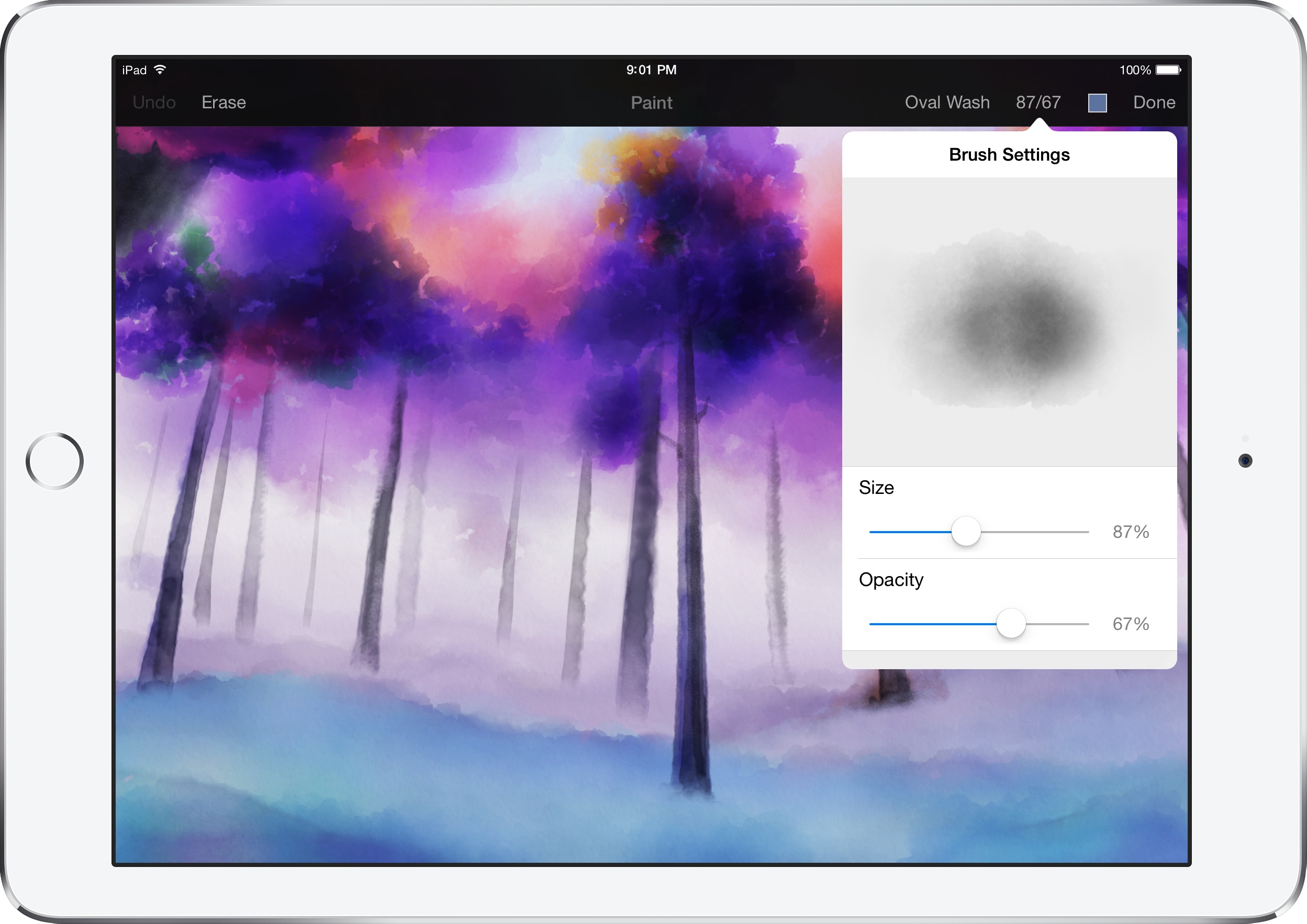
Pixelmator has today released a new update for the iPad version ($9.99) of its popular image editor. Version 1.1 includes a brand new watercolor painting feature, which can be used to create brand new pieces of art from a blank canvas or add stylistic additions to existing images and photos. Brushes overlay new colors additively with soft radiuses to create beautiful blends and shading. Pixelmator says they spoke to real artists to help design the brush strokes. It feels really nice to use.

Although watercolor painting is the headline addition, Pixelmator 1.1 also includes a new Color Picker with a swatch of previously selected colors, an updated rendering engine for better performance and much more. You have to see it in action … (video below)


Expand
Expanding
Close

Apple’s 2015 MacBook Pro and Air models now at US retailers Amazon, Best Buy, MacMall, B&H and others

Refreshed 2015 MacBook Air and Pro models are now available at major US retailers following their announcement at Apple’s Spring Forward event on March 9th.

Currently, Amazon has all of the new MacBook Air models in stock and ready to ship, from $899. The new MacBook Pro models are also listed on Amazon as well, although supply is currently more limited. 2014 versions are discounted.

B&H offers $5 off and no tax at the time of purchase outside of New York on the new MacBook Airs and MacBook Pros as well as a free copy of Parallels. 2014 versions are discounted.

MacMall also offers $5 off the new MacBook Airs and Pros and tax only in a few states. 2014 models discounted.

Meanwhile if you want to get your hands on one today, Best Buy offers free site to store on the new MacBook Pro/Airs which will have stock varied by location. 2014 models discounted.

If you want to save some real money, 2014 models are seeing deep discounts at 9to5toys. At the Apple Refurb store you can pick up some heavy discounts on previous models while extraordinary savings are available at B&H and Best Buy on 2014 models including a student deal that chops the 2014 models down to $750 .


Expand
Expanding
Close

Top 15 hidden Force Click features on the new 2015 MacBook (Video)

Apple’s 2015 MacBook and 13-inch Retina MacBook Pro are both equipped with a new Force Touch trackpad that adds new features within certain apps on OS X. If you’re not familiar with Apple’s new Force Touch trackpad, it’s completely pressure sensitive and can detect a hard press from a soft press. With this, you now have the ability to Force Click (a click with a continued press) on specific items to perform different actions.

We’ve spent the last 24 hours searching through OS X on Apple’s new 13-inch MacBook Pro with Retina Display to find all of the hidden Force Click features that Apple has yet to mention. There are a good amount of uses for Force Click, but these 15 happen to be our favorite…


Expand
Expanding
Close

Opinion: Are we bidding farewell to MagSafe, and does it matter?

Site default logo image

When Apple unveiled the new 12-inch MacBook with just a single port (plus a headphone socket), it was doing not just one radical thing, but two. Reducing a machine to just one port was the first; dropping MagSafe was the second.

MagSafe has been one of the key features of MacBooks since it was first introduced by Apple in 2006. It is still highlighted on Apple’s website as one of the key design features of both the MacBook Pro and MacBook Air.

MacBook Air offers innovations you won’t find anywhere else — like the MagSafe 2 power connector, which breaks cleanly away from the notebook if you accidentally trip over the power cord.

The magnetic power cord attaches securely and detaches cleanly.

It’s one of the features that even the most die-hard opponents of Macs tend to grudgingly admit is a good idea. And yet that (very) shiny new MacBook aimed at the largest slice of the MacBook Air market doesn’t have it. Is this a one-off move for a single model, or will we see USB C power replacing MagSafe across the entire MacBook range … ? 
Expand
Expanding
Close

Opinion: Apple’s Spring Forward event signals huge changes ahead for Mac, iPad, Apple TV + Apple itself

Although many people expected that Apple’s Spring Forward event would mostly focus on the Apple Watch, more than half of the event — notably, the first part — covered other topics. Collectively, there were so many interesting developments that their individual significance was somewhat lost, particularly given that long-awaited Watch pricing news wrapped up the event.

That’s why I wanted to reconsider what Spring Forward revealed about some of Apple’s non-Watch products. Some of the announcements signal that big changes are ahead for Apple’s Mac, iPad, and Apple TV product lines, as well as Apple itself. Read on for my thoughts, and add yours to the comments section below…


Expand
Expanding
Close

Roundup: All the news from Apple’s Spring Forward event

Apple’s Spring Forward event on March 9 was packed with news, including everything from expected Apple Watch announcements to the debut of the Retina 12″ MacBook, a price drop for Apple TV, the announcement of ResearchKit, and the release of iOS 8.2. Here’s everything you need to know.

First, the Apple TV dropped in price from $99 to $69, and got a three-month exclusive window to launch HBO Now, a standalone $15/month to HBO TV content and on-demand library.

Second, Apple announced ResearchKit, enabling iPhone users to opt-in to large-scale medical research studies using all-new apps to track and provide health information. Five initial apps were released, including heart, glucose, breast cancer, asthma, and Parkinson’s research tools.

[youtube https://www.youtube.com/watch?v=_bhsG8k7GvI&ab_channel=TechnoBuffalo]

Third, Apple officially unveiled the all-new 12″ MacBook, its thinnest and lightest Mac laptop yet, with a Retina display, single USB-C port, and Force Touch trackpad, starting at $1,299. A collection of new USB-C adapters are required to connect the MacBook to traditional USB devices and wired displays. It also updated the older MacBook Air and 13″ Retina MacBook Pro with faster Intel Broadwell processors, faster SSDs, and battery improvements.

[youtube https://www.youtube.com/watch?v=wjiZv0WBR0o&ab_channel=TechnoBuffalo]

Fourth, the Apple Watch finally got its long-awaited battery life (18 hours) and pricing ($349/$549/$10,000/$17,000) details, plus preorder (April 10) and launch (April 24) dates. Additional details on real-world Apple Watch 38mm and 42mm battery life, as well as warranty details, were quietly released online. A small collection of Apple Watch apps were shown off, and accessories including bands and chargers also got priced ($29-$449). One of the accessories actually includes two separate bands in one package.

[youtube https://www.youtube.com/watch?v=dDAP9OWtQro&ab_channel=Apple]

After the event, Apple released iOS 8.2 with Apple Watch support and Health improvements. It also published the official event video, as well as separate Jony Ive-narrated videos showing the aluminum, steel, and gold manufacturing processes for the Apple Watches. To help customers plan their Watch band purchases, Apple released a new band size guide showing the wrist sizes that will fit each of the numerous types of bands (in millimeters).

The Apple Store is back online with Apple Watch, the new MacBook, and more

Site default logo image

The Apple Online Store is back online after going down for Apple’s Spring Forward event today. The upcoming Apple Watch is now listed on the store, allowing users to create their own look and see how much it will cost them ahead of the pre-orders and live in-store previews start next month. Watch bands and accessories are also listed, though they won’t be available until April.

The new MacBook is also on the store, though custom configuration options don’t seem to be showing up just yet.


Expand
Expanding
Close

How-To: Boost your Mac’s speed and prolong its useful life with easy RAM upgrades

Site default logo image

As I’ve spotlighted over the past month, the best way to dramatically speed up an older Mac is to replace its old hard drive with a new solid state drive (SSD). The process is super-easy on MacBooks and Mac Pros, surprisingly manageable on iMacs, and challenging on Mac minis, yielding 3X to 5X speed boosts. But there’s another option that can speed things up with relatively little effort or expertise: upgrading your Mac’s RAM.

RAM upgrades are easy and cheap. You can expect to pay $90 or less for enough (Mac-safe) RAM to run OS X Yosemite without hiccups, or $180 for enough RAM to guarantee you won’t need more for years. Installing RAM generally doesn’t void your Mac’s warranty, and except for several models, the only tool you’ll need is a small screwdriver. Below, I’ll walk you through your best options.


Expand
Expanding
Close

Opinion: Does the Apple Watch Edition signal future luxury-model iPhones, iPads and Macs?

Site default logo image

Back in April of last year, when a luxury model of the Apple Watch was still a vague rumor, I wrote an opinion piece in which I expressed the view that Apple could indeed pull this off. I went further, and suggested that it could even create an entire range of luxury versions of its existing products, from iPhones to Macs.

Ten months on, with the Apple Watch Edition now real, and the general expectation that it’s going to cost several thousand dollars at least, I thought it was time to revisit that idea. Is a luxury model of the Apple Watch a one-off, or does Apple see this as the first step toward Edition models of its complete product range … ? 
Expand
Expanding
Close

How-To: Upgrade the SSD in your MacBook Air or Retina MacBook Pro, boosting size & speed

Over the past two weeks, I’ve written about the (surprisingly easy) process of adding solid state drives (SSDs) to radically speed up older iMacs, and the varied challenge levels of adding SSDs to older Mac Pros, Mac minis, and non-Retina MacBooks. Today’s guide looks at the easiest SSD installations of all: the MacBook Air and Retina MacBook Pro. A new SSD in one of these machines could have two, four, eight, or sixteen times the original storage, plus two to four times faster speeds.

Apple shipped most MacBook Airs and all Retina MacBook Pros with solid state storage, so upgrading these machines for extra capacity and speed is generally as simple as picking a new drive, then using two special screwdrivers during the installation process. Assuming your MacBook is old enough to be out of warranty — except for a few specific models — you’ll find that pretty much anyone can handle this swap with the right tools. Below, I’m going to show those tools to you, as well as the MacBook-ready SSDs that are worth considering…


Expand
Expanding
Close

Apple launches Repair Extension Program for 2011-2013 MacBook Pros with video problems

Site default logo image

Following a number of complaints from consumers regarding graphics issues with Apple’s 2011 MacBook Pro, the company today announced a replacement program to remedy the issue for customers still experiencing problems.

The affected models include 15- and 17-inch MacBook Pros built in 2011, as well as 15-inch Retina MacBook Pros built in 2012 and early 2013. MacBook owners who believe they may have one of these machines can check their warranty coverage on Apple’s website to determine whether they are eligible for a repair under this program.


Expand
Expanding
Close