Author

Avatar for Bradley C

Bradley C

Bradley has worked at K-12 independent schools for much of the last 20 years, serving as the head of the information technology department and leading classroom technology integration. He’s well-versed in enterprise Wi-Fi, macOS and iOS system management, school technology, and SaaS tools.

Comment: How QuickTime should evolve its screen recording features

QuickTime

One of the significant changes in my life over the past few months was building a distance learning solution for my school as we dealt with the effects of COVID–19. One of our critical applications during this process was Zoom for Mac. In using it, even for just screen recording, I realized that Apple could learn a lot about how to evolve QuickTime in the future to better address distance learning.
Expand
Expanding
Close

Robinhood Snacks

Podcast of the Week: Robinhood Snacks

The last few weeks have certainly been a crazy time with the stock market. I am hoping we don’t see any more of the wild and crazy days where the market is down 1,000 points in an afternoon, but no one knows at this point. One thing to keep in mind is that even if the market is down, you’ve not lost anything until you sell. The average investor buys on emotion, so they will buy high and sell low. If you are able, now is the time to invest in the market because everything is ‘on sale.’ This week, my podcast of the week is Robinhood Snacks.
Expand
Expanding
Close

Making the Grade: Augmented Reality apps to enhance at-home learning

augmented reality apps

One of the tasks in education the iPad enables over a Chromebook is Augmented Reality, and right now is the time for AR apps to shine. With students forced home for the final stretch of the school year, class trips, field trips, and other immersive experiences have been canceled. Education is more than just pencil and paper, but when students can’t leave the house, augmented reality comes to the rescue. ARKit2 is supported by iPhone 6s and later, all iPad Pro models, iPad 5th generation, or newer.
Expand
Expanding
Close

HomeKit Weekly: Building HomeKit enabled outdoor lighting without an electrician

Philips Hue white bulb

One of the areas of my HomeKit lighting setup that I ignored for a long time was outdoors. We honestly didn’t have a real need until recently when we got a new puppy. If you’ve ever had a puppy, you know that a lot of time is spent outdoors trying to train the dog to use the bathroom outside. It became clear that we didn’t have enough outdoor lightning when we were taking her out late at night and early in the morning. Like any smart home fanatic would do, I looked at solving this problem without the use of a costly electrician and add HomeKit support in the process. This week, I am going to explain my outdoor HomeKit lighting setup.
Expand
Expanding
Close

Comment: Why hasn’t Apple released a dedicated app for iCloud Keychain?

icloud keychain

I’ve been a customer of 1Password for as long as I can remember. I love being able to have a dedicated application/service for password management, rotating one-time passwords, storing secure information like social security numbers. I know I have a dedicated place to manage all my data in a place I know is safe and easy to access. On the other hand, iCloud Keychain works well and is built-in on all my devices. Is it time for Apple to release a dedicated app for iCloud Keychain, so it’s easier to manage and interact with that data?


Expand
Expanding
Close

TWIML AI Podcast

Podcast of the Week: TWIML AI Podcast

During the COVID–19 pandemic, I decided that I wanted to use the time at home to invest in myself. One of the things I was challenged by in a recent episode of Business Casual was when Mark Cuban discussed the role of Artificial Intelligence in the future and recommended some tools to learn more. He mentioned some Coursera courses, so I am currently working my way through some of their AI training, but he also mentioned an AI-focused podcast called the TWIML AI Podcast that I added to my podcast subscription list.
Expand
Expanding
Close

Making the Grade: How do you choose between iPad, Chromebook, and laptop?

iPad 9

During the past few weeks, we’ve been looking at overhauling a K–12 network, and all that goes into that. While we’ve not covered everything, we have included some essential items like a firewall and Wi-Fi. This week, we will move on to discussing device selection. A lot of your software decisions will be based on your device, so it’s essential to pick the right one. Let’s dive into K-12 device selection.
Expand
Expanding
Close

HomeKit Weekly: Are eufyCam 2 cameras the perfect HomeKit solution?

eufyCam 2

As much as I have been investing in my HomeKit setup over the past few years, HomeKit security cameras are something I hadn’t been able to pull the trigger on. My hesitation is that I didn’t want to be tied to paying monthly fees for each camera, nor did I want a solution that required a cloud service that wasn’t end-to-end encrypted. For my HomeKit cameras, I ended up using the eufyCam 2 thanks to it the option of local recording to a base station, no monthly fees, HomeKit integration, battery-powered and the possibility of using HomeKit Secure Video. Let’s dig into my eufyCam 2 review.
Expand
Expanding
Close

Bar None

Bar None, a new free utility for macOS, helps you avoid accidental Touch Bar taps

I’ve been using a Mac laptop with a Touch Bar since last summer, and while it’s not my favorite Apple invention of all time, I do see its usefulness in specific applications. If you despise the Touch Bar, you are in a difficult spot at the moment if you need a Pro level laptop. The 13-inch MacBook Pro (with/without a Touch Bar) hasn’t been updated with the new Magic Keyboard, and the 16-inch MacBook Pro only comes equipped with a Touch Bar. If you are finding yourself accidentally triggering Siri or other application shortcuts, you’ll want to check our Bar None.


Expand
Expanding
Close

Making the Grade: Tips for building school Wi-Fi that meets IT and student needs

Building a new network for a K–12 school shares a lot of similarities with building one for enterprise, but when it comes to Wi-Fi, there are likely going to be some differences to consider. K–12 schools have different security needs, content filtering needs per SSID and capacity needs thanks to 1:1 iPad deployments. This week, as we continue our K–12 network overhaul series, I am going to look at Wi-Fi. For K–12 schools, the vast majority of users on the network will be Wi-Fi only. Regardless if a school uses iPad, Chromebooks, or Microsoft Surface, classrooms are rarely going to have more than one or two ethernet jacks. How do you build reliable school Wi-Fi?
Expand
Expanding
Close

Apple Pay

Apple adds 3% cash back to Walgreen’s drive through when using physical Apple Card

One of the key benefits of the Apple Card is getting 3% cash back at select merchants when using Apple Pay. This list includes vendors like Nike, Uber, T-Mobile, and Walgreens. Many retailers are currently limiting in-store transactions and encouraging curbside pick up and delivery when available. Earlier tonight, Apple announced that Walgreens transactions made with the physical Apple Card would now be eligible for the 3% reward just like they were made with Apple Pay.


Expand
Expanding
Close

HomeKit Weekly: ecobee vs Nest – what is the best smart thermostat for Apple users?

ecobee smart thermostat

As I mentioned a few weeks ago, I’ve been a Nest customer for the past seven years. I put it a second-generation Nest when I built my house back in 2013, and I added a second Nest a few years later for our upstairs unit. I’ve been using the Starling Home Hub for the past six weeks to enable HomeKit support on these products, but I recently swapped out my downstairs Nest with the ecobee SmartThermostat. After a few weeks of using it, I am ready to compare them and decide which unit has the best HomeKit integration. ecobee vs. Nest: what’s the best smart thermostat?
Expand
Expanding
Close

Edison Mail announces new OnMail email service aimed to eliminate clutter

OnMail

Edison Mail has just announced a new venture for their company. Currently, they make an email app for iOS and macOS. This summer, they are branching out into something that you don’t see from most email application developers: an actual email service. Email services are something that most app developers don’t attempt because Google, Microsoft, and Apple all offer free services that work very well. But Edison thinks they can offer something unique through their new OnMail service.
Expand
Expanding
Close

Comment: Why I ditched the Kindle in favor of Apple Books on iPad Mini

Apple Books on iPad

I have been using a Kindle for many years now. Most recently, I was using a Kindle Oasis as my primary book reader. As I was looking at some upcoming books a few weeks back, I realized that I was not too fond of the purchasing process on iOS for Kindle. I started thinking about if the Kindle (and the Kindle apps) were still the best place for me to purchase books. Apple Books vs Kindle: what’s the best way to read books and listen to audiobooks?
Expand
Expanding
Close

Making the Grade: A firewall is a crucial part of your network, here’s how to pick one

network security

Although there are a lot of similarities in K–12 and enterprise networks, K–12 networks will have some requirements that must be considered when overhauling a network. Over the next few weeks, I am going to discuss all the various pieces of building a K–12 network. We will look at firewalls, switches, Wi-Fi, device management, and device selection. This week, I am going to look at picking the best firewall.
Expand
Expanding
Close

iPhone Run Tracker

OutRun is a simple iPhone run tracker that is privacy focused and integrates with Apple Health

I’ve been using my iPhone to track my runs since 2010 when I first signed up for RunKeeper when I had an iPhone 3GS. I’ve  only used a GPS watch for varying points in my running career, so for me, the iPhone has always been my primary run tracker. In recent years, many of the popular running apps have been moving towards a subscription model (which is understandable considering the apps need constant development), but I always believed there was room for a simple running that that was private by default and shared the data with Apple Health/Activity app. Finally, there is a simple iPhone Run Tracker, and its called OutRun.


Expand
Expanding
Close

HomeKit Weekly: The true benefit of HomeKit is in the automations you can create

Homekit app

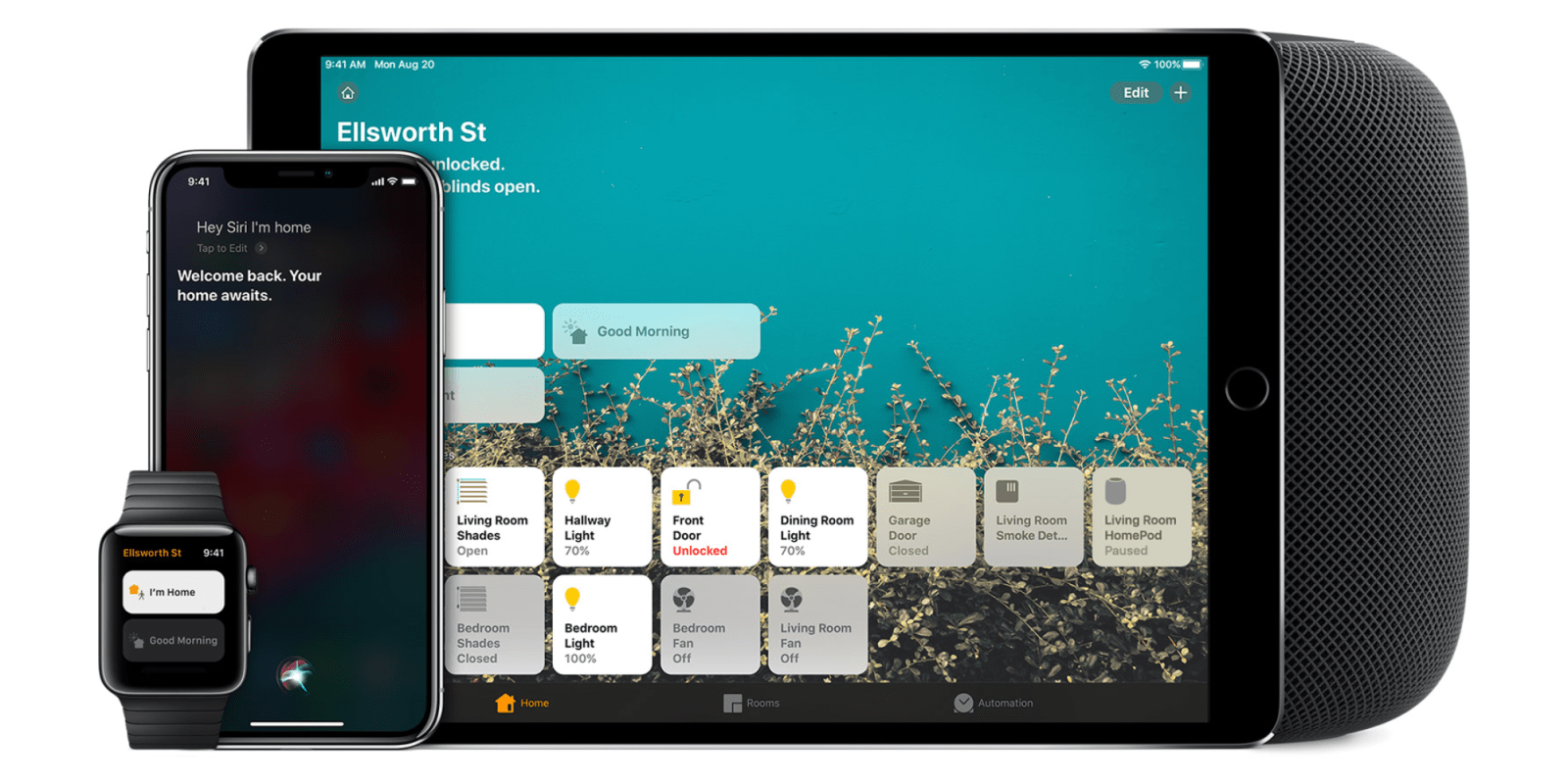
In the past few years of building up my collection of HomeKit products, I would tell people that the value of HomeKit is the ability to bring multiple products from multiple manufacturers into a single application that makes it easy to use. After installing my abode alarm system a few weeks back, something clicked for me. As I was settings up my automations, it clicked in my brain that the true benefit of HomeKit is to leverage automations from all of the devices exposed in your HomeKit ecosystem.
Expand
Expanding
Close

Apple Podcasts COVID-19

Apple Podcasts has a dedicated channel for COVID-19 to help you stay informed

No two mediums are better suited to keep us up to date with the latest news around COVID-19 than podcasts and Twitter. Oddly enough, Twitter was created after Apple built the iTunes Podcasts directory and essentially put Odeo out of business. The folks behind Odeo eventually went on to create Twittr, now known as Twitter. Apple has released a dedicated Apple Podcasts feature related to COVID-19 coverage.


Expand
Expanding
Close