Latest

Redesigned iPhoto & Garageband iOS icons appear, indicate likely makeovers next week

Site default logo image

IMG_4745

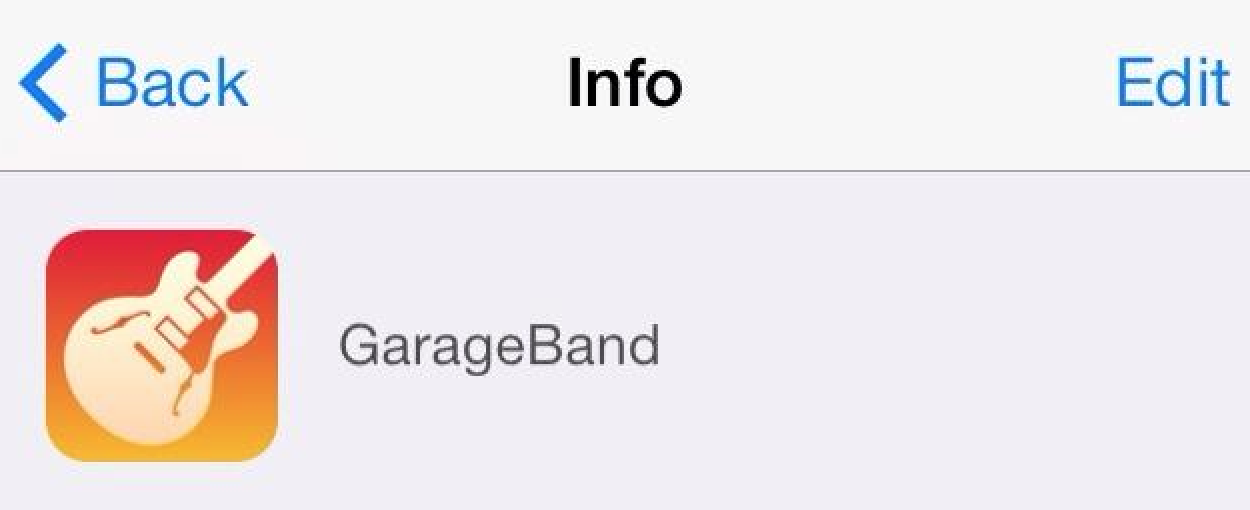
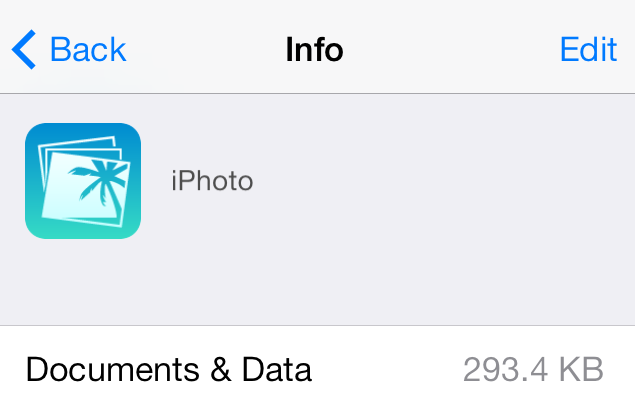
Redesigned icons for iPhoto for iPhone, iPad, and iPod touch and Garageband have appeared in the iCloud Storage Management function in the iOS Settings app. The new icons are simpler, flatter, and is designed with iOS 7’s new icon grid system in mind. They are a stark contrast from the colorful, 3D-like icons used in the current versions of the apps.

Screen Shot 2013-10-16 at 11.16.02 PM

In line with the app redesigns for all of Apple’s bundled iOS 7 apps, it is likely that the new icon will come as a complement to a completely redesigned version of the iPhoto app. When Apple released iOS 7 last month, the designs to Apple’s App Store apps went noticeably unchanged. Besides iPhoto, Apple has a slew of other App Store apps (like iWork’s Pages, Numbers, and Keynote & iLife’s iMovie). However, there are yet to be any solid indications of redesigns for the other apps…


Expand
Expanding
Close

Site default logo image

Real Racing 3 iOS app updated w/ Ferraris, HUD customization, new tracks & challenges

screen568x568

EA’s popular Real Racing 3 app for iOS gets a nice update today that introduces Ferraris into the game for the first time. On top of new cars from Ferrari including the FF, the 458 Italia, and the V12-powered F12berlinetta, version 1.40 also brings new tracks, time trial challenges, and the ability to customize the HUD.

EA is including the Circuit de Catalunya track from Spain in the latest update, and also says AI improvements offer ” better collision avoidance and faster times through the first corner.”

A full list of what’s new in the update is below:

What’s New in Version 1.4.0

Real Racing 3’s garage is bolstered by the introduction of highly requested cars from iconic Italian manufacturer, Ferrari.

• New Cars – for the first time in Real Racing, get behind the wheel of magnificent Ferrari vehicles: the FF, the 458 Italia, and the V12-powered F12berlinetta
• New Track – experience the sweeping turns and blistering straights of Spain’s famous Circuit de Catalunya
• Time Trial Ghost Challenges – learn from the best, compete with Friends and start new racing rivalries
• Meet The Crew – hire Crew Members to earn R$, Fame, and Servicing bonuses
• AI Improvements – better collision avoidance and faster times through the first corner
• HUD Customisation – tweak new settings to personalise your racing experience
• Lap and Sector Times – precise performance comparison
—–

[youtube=http://www.youtube.com/watch?v=VEAj9cK611Q]

Review: Boxie for iPhone makes Dropbox management even easier

Site default logo image

Boxie1920x1200

Many of us keep files in the cloud using services like Dropbox. While Dropbox has a decent iPhone app, there are quite a few features that it lacks. Boxie is an intuitive and beautiful new Dropbox client that aims to alleviate some of those issues. From the ability to view any file’s previous revisions and restore deleted files to the simple drag-and-drop file manager, Boxie has a ton of advantages over the official Dropbox app.


Expand
Expanding
Close

Square launches Square Cash, allowing money transfers between anyone through email

Site default logo image

Square has just launched a new service called Square Cash, which allows quick money transfers between any two parties using through an email. Contrary to what you might be expecting, you don’t need to sign up or get all of your friends onto Square Cash to share funds. Instead, you just need to link a debit card to your account.


Expand
Expanding
Close

Site default logo image

TweetDeck for Mac updated with username autocomplete, a new tweet composer, and more

screen800x500


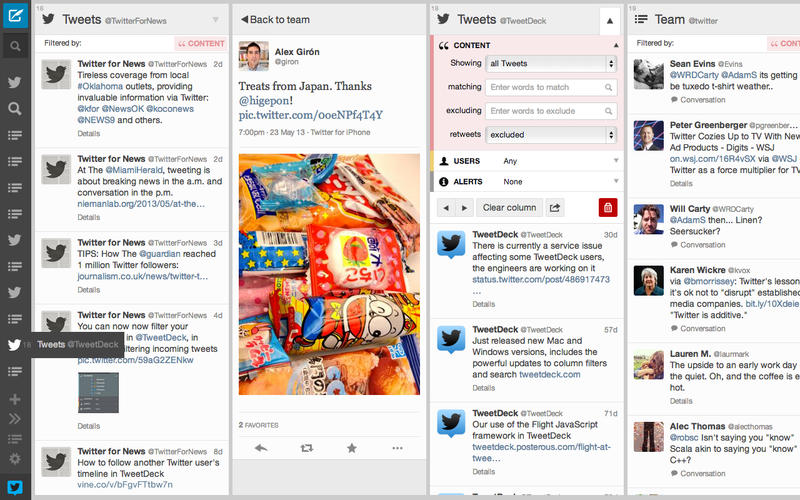
Twitter updated its TweetDeck app for Mac today with a few new enhancements. The new version finally adds support for autocompletion of usernames when mentioning other users. Also new in the latest version is an in-line reply composer that allows you to create replies to tweets right in your timeline without having to open a new tweet panel.

Speaking of the tweet composer, it has been overhauled in this version. Instead of a popup window, the new composer has a column of its own with all of the usual options. The panel closes automatically as you send a tweet, but can be optionally set to stay open at all times, making composing a new tweet a much quicker process. In-line replies can also be “popped out” to the composer panel to apply additional options like scheduling. The new tweet panel also allows you to preview your tweet before you send it so that you know how it will look on the web and in Twitter’s official apps.

You can get TweetDeck for Mac for free from the Mac App Store.

Site default logo image

Apple asks developers to begin submitting apps for OS X Mavericks ahead of October 22 event

Mavericks-icon-download_2x

Ahead of its October 22nd event where the company is expected to unveil new iPads alongside other product announcements, Apple today asked developers to begin submitting apps optimized for OS X Mavericks.

Apple seeded the final Golden Master release of OS X Mavericks to developers along with the Xcode 5.0.1 GM seed earlier this month and today urged developers to download the latest builds to test and submit OS X Mavericks apps to the Mac App Store. The move is likely in preparation of public release and pricing details expected to be announced during Apple’s event on the 22nd.

Submit your OS X Mavericks apps today.

Make sure your app takes advantage of the great new features in OS X Mavericks when the world’s most advanced desktop operating system becomes available to millions of customers later this fall. Download OS X Mavericks GM seed and Xcode 5.0.1 GM seed, now available on the Mac Dev Center. Build your apps with these latest seeds, then test and submit them to the Mac App Store.

Mavericks offers app developers a lot of new features to take advantage of from new energy saving features like App Nap, to Apple’s new Sprite Kit game engine, enhanced multiple display support, and auto-renewable subscriptions.

Apple first showed off and announced OS X Mavericks earlier this year during its WWDC developer conference, but next week’s event will likely be the perfect venue to announce official pricing and release date info for the public.

We previously reported that OS X Mavericks will be available in late October.

Site default logo image

YouTube for iOS updated with ability to choose video quality on Wi-Fi, iOS 7 improvements

screen568x568 (1)YouTube has updated its app for iPhone and iPad today to version 2.2.0 and with it comes a few performance enhancements and new features.

One highly requested feature that YouTube is making available in the latest version of the iOS app is the ability to select video quality, much like you can on the full desktop website, while over WiFi.

The updated app also includes improvements for iOS 7 compatibility and Accessibility.

What’s New in Version 2.2.0

* Choose your video quality while on Wi-Fi
* Accessibility improvements
* iOS 7 compatibility improvements

Site default logo image

Google Maps for iOS updated w/ quick access to navigation, new languages, & more

Google-Maps-large-icon

Google updated its Google Maps app for iPhone and iPad today with a few new features as the app moves to version 2.3.4. Google says the updated app includes “Faster access to navigation,” which includes new overviews for traffic and routes.

The updated app also includes a new Tips and Tricks section available from the side menu and support for new languages, including: Arabic and Hebrew. Google also notes that the new supported languages will offer voice guidance “where available.”

A full list of what’s new below:

What’s New in Version 2.3.4

● Faster access to navigation, complete with route and traffic overview
● Tips and Tricks available in the side menu
�� Arabic and Hebrew now supported, including voice guidance in navigation, where available
● Bug fixes

Google’s Sparrow mail app updated for the first time in months with new icon, iOS 7 fixes

mzl.iuodgwik

Despite being bought out by Google, the replacement mail app Sparrow has now been updated for iOS 7. Whilst the developers behind Sparrow never said that work on the app had ceased, this was the implied meaning of Sparrow’s thank you letter still visible on the Sparrow website. Until today, the app had not been updated since December 2012, nearly a year ago.

This update brings compatibility bug fixes for iOS 7 as well as a new flatter icon, shown above.  Even so, work on Sparrow is obviously not a priority for the team. Apart from a new icon, the point-fix update brings no new visual appearance to the app’s interface or any new features for users.

Site default logo image

Seene for iPhone makes creating interactive 3D photos fun and easy

A new app called Seene popped up on the App Store last night that lets you create interactive 3D photos. If you’ve used Vine before, you’re already familiar with most of Seene’s interface. The apps are laid out mostly the same, even down to the location of the sharing options during seene creation, but the process for taking photos is a little more complicated. The resulting effect is worth a little extra effort though.


Expand
Expanding
Close

iPhone app turns your iPhone 5c (and case) into ‘Connect Four’ board

Site default logo image

Ever since the iPhone 5c launched along with a specially-designed case, people have compared the case’s design to a the game Connect Four. Now a new app has arrived on the App Store that takes that observation and turns it into a real game. The app is called Flipcase, and the idea is pretty simple: you put your iPhone 5c case on backwards, so that the holes on the back are on top of the screen, and then take turns tapping the columns to try to connect four colored dots.

The app’s description says it’s compatible with other iPhone models, including the iPhone 5 and 5s, though it’s designed specifically with the 5c in mind. Flipcase is available for free on the App Store.

… And another cool use for the 5c case:


Expand
Expanding
Close

Site default logo image

Yelp iOS app replaces Home tab w/ new toolbar for quick access to reviews, photos, and check-ins

Yelp updated its iOS app today with a slightly tweaked UI that makes it easier for users to quickly post reviews, photos and check-in at locations. The app is getting rid of its old Home tab and now by default loads up the “Nearby” tab. In addition, the the tab in the middle along the bottom of the app now launches quick access to Check In, Review, and Photo buttons (as pictured above).

The updated app also includes “larger notification photos, better scrolling performance, updated icons and animations.”

What’s New in Version 7.2.0

New in v7.2
– We said goodbye to our homepage and hello to a beautiful new navigation that makes it even easier for you to discover great places nearby, add photos and reviews, and check in to your favorite businesses.
– We also added tons of polish to our app, including larger notification photos, better scrolling performance, updated icons and animations, and a whole lot more!

Launch Center Pro reinvented for iOS 7

Site default logo image
Launch Center Pro 2

Launch Center Pro 2 <3

David Barnard’s Contrast (previously App Cubby) shipped a massive update to the quick shortcut app Launch Center Pro for iPhone today.

Launch Center Pro 2 delivers an iOS 7-inspired user interface and a gorgeous new icon as well as several new features including Dropbox backing up and restoring, various themes, action sharing, and more.

People often ask why anyone would need a separate app to do what their home screen does, but as Contrast’s tag line explains, it allows you to “Launch actions, not just apps!” I’ll share a few of my favorite actions below.


Expand
Expanding
Close

Site default logo image

Twitter teams up with Comcast/NBC for ‘See It’ feature to watch and record TV shows

Screen Shot 2013-10-09 at 11.23.16 AM

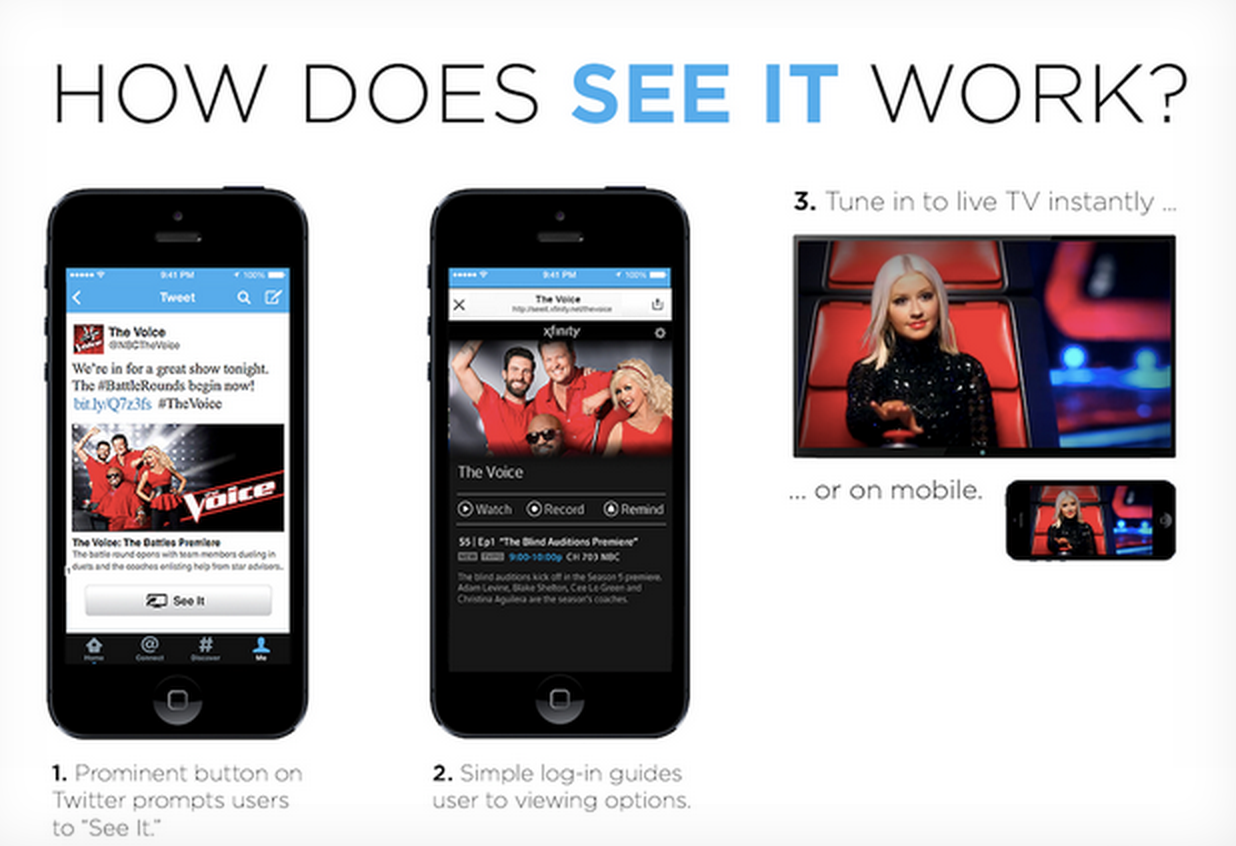
Twitter is teaming up with Comcast to integrate a new feature called “See It” that will allow Comcast Xfinity subscribers to watch shows and schedule DVR recordings directly from Twitter. The companies announced the partnership today and announced that the new “See It” feature will begin appearing for users on Twitter in next month.

Today, @Comcast and @NBCUniversal are announcing a partnership with Twitter that lets users tune in to a TV show directly from a Tweet. Comcast will give Xfinity TV customers the ability to do several things such as change the channel, set the DVR and play a show On Demand, directly from an expanded Tweet. Called See It, the feature will debut with NBCUniversal offerings including The Voice and Sunday Night Football.

While only Xfinity subscribers will be able to click the See It button embedded in tweets to schedule DVR recordings and view the content on their set-top box, other users can be directed to the NBC website or app. The “See It” technology, which was developed by Comcast, is first rolling out on Twitter with NBC programming, but Comcast is working with others to make See It an industry-standard technology:

See It is designed to integrate with other video distribution partners, television networks and websites. We look forward to working with Comcast to extend this offering to other partners who will connect more great content to Twitter. Ultimately, we want to make watching TV along with Twitter even more fun. We’re looking forward to sharing more details about this experience in the weeks to come. You can find more information about See It here.

Site default logo image

FireCore announces Infuse 2 with new design coming this fall, 1.5 update available today

infuse-15-tvgroups@2x

Infuse 1.5

FireCore, the makers of the popular aTV Flash Apple TV software announced today that their media player application Infuse will be receiving a substantial update this fall as it hits version 2.0, with a completely new UI to match iOS 7’s design aesthetic, many new Pro features, and more.


Expand
Expanding
Close

Yahoo redesigns Mail on iOS w/ conversations, disposable email addresses & a free 1TB

Site default logo image

Yahoo Mail is officially 16 years old today and to celebrate the company announced on its blog that it is rolling out an entirely new Mail experience on iOS as well as on the desktop and Android. A popular feature of many other mail clients, Yahoo Mail now includes the ability to view email threads as conversations:

We’re introducing “conversations” for those who prefer to view emails grouped in threads. At the end of the day, being able to see an entire conversation can save you quite a bit of time. Context is king.

Perhaps the most notable addition, however, is the features previously only available to Mail Plus customers. That includes a free 1TB of storage for all users:
Expand
Expanding
Close

Site default logo image

Camera+ iOS app adds full-resolution burst-mode & new iOS 7 filter pack

Camera-iconThe popular Camera+ iOS app from developer taptaptap gets an update today, jumping from version 4.0.2 to Version 4.2 (just for the fun of it according to the release notes below), and adds a few notable new features.

On top of fixing a bug that crashed the app when using burst-mode, the update includes support for full-resolution bust-mode photos. That includes the iPhone 5, iPhone 5s, and the “unapologetically poorly-selling iPhone 5c,” according to taptaptap.

The app also adds a new effects pack that includes Apple’s new iOS 7 filters:

So we added a new effects pack that includes all the filters that Apple’s standard Camera and Photo apps include (for users on iOS 7). Two hours of coding (and eight trivial Core Image filters later), the Standard Effects Pack was born.


The updated Camera+ is available on the App Store now.

What’s New in Version 4.2

So the previous version of Camera+ had a little bug where burst-mode shooting would crash. We fixed that.

We almost stopped there and just called it version 4.0.3, but then figured that it’d be the perfect time to boost burst-mode snaps to full-resolution on devices that could handle it (like the iPhone 5, iPhone 5s, and the unapologetically poorly-selling iPhone 5c).

That was enough to justify calling it version 4.1. And then we thought about jumping on the bandwagon where we put Camera+ out as a whole new app and let existing customers pay for it all over again. And of course there’d be the ensuing sh__storm where those customers felt cheated and we’d have to backpedal and reverse that shortsighted decision.

So it was Clear that that would’ve been a knuckleheaded move so instead, we decided to treat our lovely customers fairly and make Camera+ 4.1 a free update as we’ve always done. But then we felt like it was all give and no take… so to make us feel better about giving-in too easily, we chose to call it version 4.2. That’ll teach you to mess with us.

Then we felt bad about jumping ahead two version numbers and giving you little for your troubles. So we added a new effects pack that includes all the filters that Apple’s standard Camera and Photo apps include (for users on iOS 7). Two hours of coding (and eight trivial Core Image filters later), the Standard Effects Pack was born.
Site default logo image

Beats Music streaming service launching on iOS in the next few months

600_1341332953_dre_beatsAfter a bit of restructuring and some acquisitions to help accelerate development of its Beats Music streaming service, an executive at the company confirmed to TNW today that the service will officially launch on iOS, as well as on the web and Android, in the next few months.

President and COO Luke Wood also shared some details on how the service will work compared with iTunes Radio and other competitive streaming services. Wood says the service will “focus really heavily on playlists,” but also utilize a “a perfect harmony between the algorithm and human curation”:

Wood emphasized that Beats Music would be different and based around “a very specific idea”. The service is focused on curation, rather than forcing users to search blindly for new tracks or artists that they might like.

“We’re talking about real depth of personalization and knowing who I am, who you are, what we’re listening to, what we like, what we’ve listened to before and then offering up music that is highly relevant to our taste profile,” he added… “You need to start with a great editorial team that has a point of view, but we want to have a situation where we can really scale to the depth of your appetite,” he said. “If you really love music, we want something that can go deep with you for a really long time. And that requires a perfect harmony between the algorithm and human curation. Between the man and the machine.”

The mix of curated playlists and algorithm doesn’t sound unlike Apple’s own iTunes Radio streaming service launched in the US last month alongside iOS 7. Apple announced 11 million unique listeners in just a few days following the service’s launch, and will likely soon expand into other markets.

Beats Music, like iTunes Radio, will first launch in the US.

AT&T now allows Live TV streaming to its iPhone and iPad apps, both at home and on-the-go

Site default logo image

TV To Go

On September 30th, AT&T updated its iPad-optimized U-verse app with the ability to stream live television. Over 100 channels can be streamed to the iPad app while you are in your U-verse connected home, and a growing list of 20 channels can be streamed while you are away from home. Today, AT&T matched its iPad update by enabling the same functionality for its (separate) iPhone application:


Expand
Expanding
Close

Site default logo image

NFL Mobile iOS app adds access to live content from NFL.com

NFL-Mobile-app-iconThe official NFL Mobile app has been updated today to version 8.6 and with it comes the ability to access live content from the NFL.com/Live website. The feature, which is only available to premium subscribers, will provide the live content previously only streamed on the NFL website in addition to the LIVE NFL games on Thursday, Sunday and Monday nights for both preseason and regular season games offered as Premium features.

Premium features of the app are currently only available to Verizon customers and also offer live streams of NFL RedZone on Sunday afternoons and NFL Network 24/7. Unfortunately, it looks like the app still doesn’t include support for AirPlay.

What’s New in Version 8.6

– Added Fantasy Lineup Reminder alert
– Access to NFL.com/Live content for premium subscribers
– Fixed Fantasy login retention bug
– Performance enhancements and general bug fixes

Site default logo image

Instagram rolling out photo & video ads in the U.S. within a couple of months

Instagram-iconWhile it previously announced plans to bring advertising to its mobile app sometime this year, Instagram officially announced today that it will be rolling out both photo and video ads from select brands in the coming months. The company said that the ads will begin showing up for users in the US initially and feature “a small number of beautiful, high-quality photos and videos from a handful of brands that are already great members of the Instagram community.”
Our aim is to make any advertisements you see feel as natural to Instagram as the photos and videos many of you already enjoy from your favorite brands. After all, our team doesn’t just build Instagram, we use it each and every day. We want these ads to be enjoyable and creative in much the same way you see engaging, high-quality ads when you flip through your favorite magazine.

Instagram noted in its announcement that it will allow users to hide ads that they don’t like and also provide feedback to help improve the experience over time.

Last month we reported that Facebook was beginning to test silent, auto-playing video ads in the News Feed, and since Instagram already auto-plays videos, it’s likely its ads will be similar to those being tested with a limited number of users on Facebook:

http://www.youtube.com/watch?v=8iCH9ReoH_I

Sync.ME adds ‘Widgets’ to Apple’s iOS Contacts app

Site default logo image

Sync-me-widgets

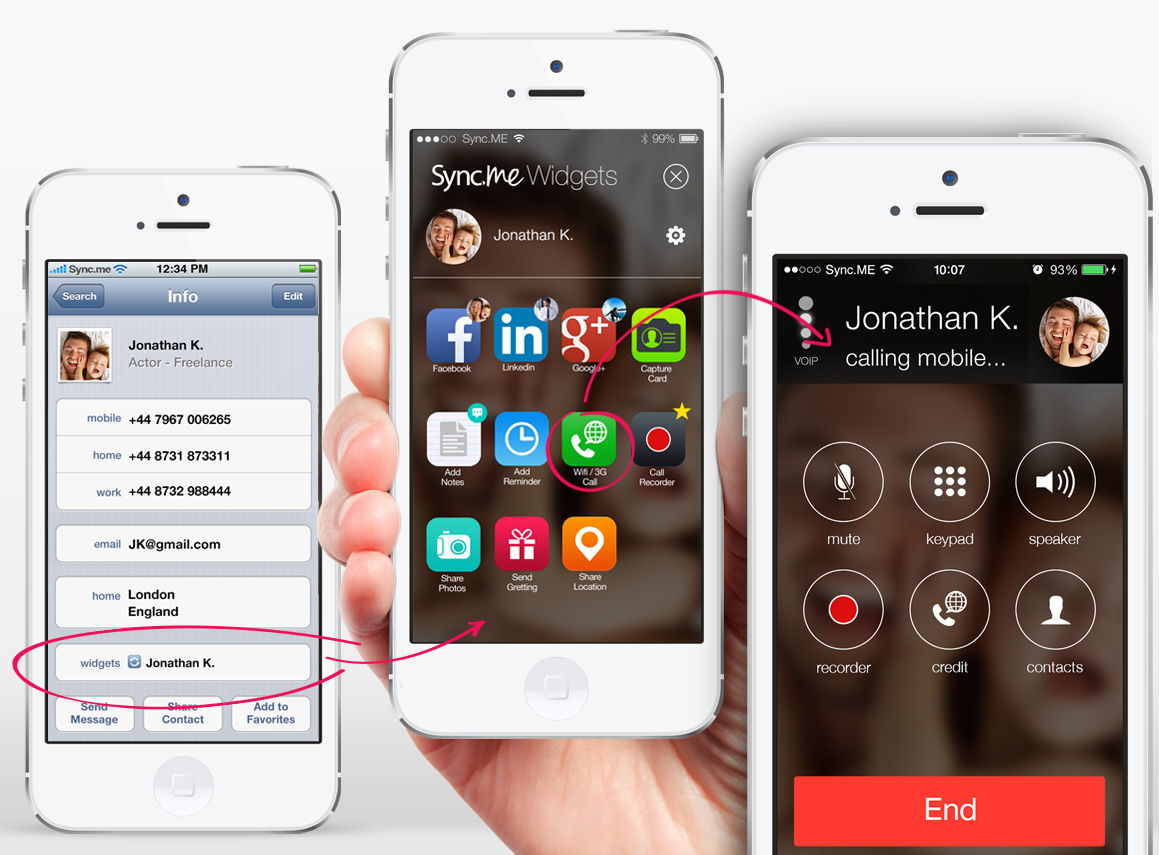
Sync.ME, a third-party contacts app for iOS with over 8 million downloads, just rolled out an interesting feature that brings new functionality to Apple’s own Contacts app on iOS. As pictured above, the latest version of the Sync.ME app now adds a “Widgets” link within Apple’s Contacts app that provides quick access to social network profiles for contacts and a number of other handy functions for quickly sharing content.

They are called ‘Widgets’, but in reality they are essentially quick links to profiles on social networks and other functions of the Sync.ME app. The interesting aspect is the fact that you’ll no longer have to launch the Sync.ME app and can now access all of the “Widgets” functionality from directly within the native iOS Contacts app.

On top of links to the contact’s Facebook, Google+, and LinkedIn profiles, you’ll also find the ability to place and record calls over VoIP, quickly capture a business card using your camera, jot down a note, or add a reminder to your calendar for a specific contact. Other widgets will allow you to quickly share your location or a photo over iMessage or SMS, as well as post customized greeting cards directly to a contact’s timeline.

To accomplish this, the app appears to use the AddressBook API’s in a novel way that allows the app to automatically add a URL into a custom field for contact cards. That URL opens the “Widgets” section for any particular contact within Sync.ME, but the entire experience feels rather seamless. Here’s how to set it up:
Expand
Expanding
Close

Site default logo image

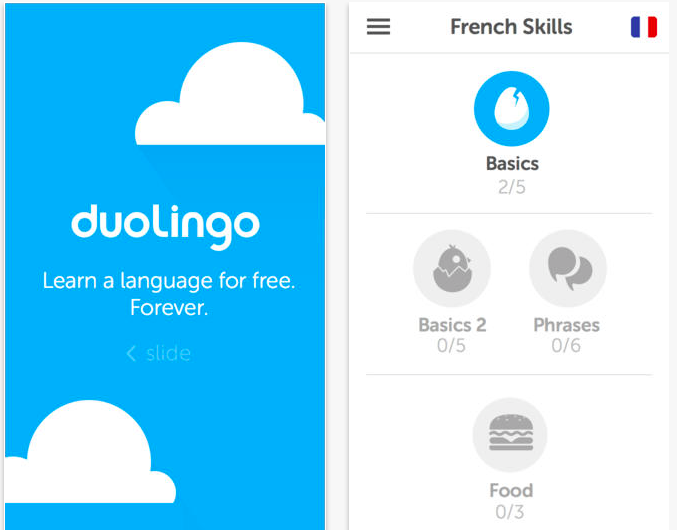
Duolingo, the fun language-learning app for iPhone and iPad, beautifully redesigned for iOS 7

Duolingo for iPhone and iPad joined the collection of apps designed with iOS 7 in mind today with the release of Duolingo 3.

Duolingo is a free iOS app that makes learning a second language like Spanish or French easy and fun, and its redesign for iOS 7 is certainly delightful.

We don’t always redesign the app for iOS 7, but when we do, we prefer to go the whole way. From an entirely new look to exciting end screens showing your weekly progress, Duolingo has been completely redesigned for iOS 7. It’s faster, better, and more fun!

You can find Duolingo for free on the App Store.