Apps

See All Stories

Learn about the latest news for iOS, Mac, Apple Watch, and Apple TV apps

Apps for iOS, macOS, tvOS, and watchOS power our modern world. 9to5Mac will update you on the latest news, review, and updates for all types of apps. “There’s an App for that”.

The term came became part of our vocabulary when Steve Jobs announced The App Store as part of the iPhone 2.0 software update in 2008.

Over the years, the term has become as common as kleenex for describing applications on all of our devices. Apple’s platforms have apps for just about anything from finance, banking, sports, social media, podcasting, music, and more. We have a guide for helping you discover the best ones as well. Apps are now on everything from our TV, to our smartphones, on our laptops, and all the way down to our wrists.

As new ones are released or existing ones have major updates, the team here at 9to5Mac will bring you the latest news and reviews. If you want to follow along with video footage, be sure to follow 9to5Mac on YouTube. Scroll down below our latest updates on all things relating to applications on iPhone, iPad, Mac, Apple TV, and Apple Watch.
9to5Toys Last Call: Sky Gamblers for iOS free, Griffin 20% off sitewide, iOttie iPhone 6/Plus car mount $18, more

Keep up with the best gear and deals on the web by signing up for the 9to5Toys Newsletter. Also, be sure to check us out on: TwitterRSS FeedFacebookGoogle+ and Safari push notifications.

Today’s can’t miss deals:

Last Call Updates:

iOttie Easy One Touch 2 Car Mount for iPhone 6/Plus & Android devices $18 Prime shipped (Reg. $25), more

HooToo TripMate Wireless N Travel Router w/ USB port: $15 Prime shipped (Reg. $20)

Apple iPad deals: iPad Air 32GB $380 (Reg. $449), iPad mini w/ free $50 gift card $239 ($299 value), more

Apple iPad mini 2 WiFi: 16GB $250/32GB $300 w/ free shipping ($50 off)

iTunes Free App of the Week – Temple Run: Oz ($1.99 value)

LAST CHANCE! Small States Review Bolt Briefcase from WaterField Designs is an ideal work and travel companion, $249 giveaway

More new gear from today:

Headphones: JBL J55 on-ears (multiple colors) $20 (Reg. $43), Sennheiser HD 518 over-ears $65 (Reg. up to $130)

More deals still alive:

iPhone 6 ultimate party case includes a bottle opener and flameless lighter for $10

New products & more:

Rock Band 4 slated for a 2015 return w/ song collections transferring + all new hardware

Site default logo image

Amazon Game Studios announces four games coming soon to iOS

Amazon Game Studios announced today that it’s bringing four games to iOS devices starting with two previously released only on Android and two new titles coming soon.
Expand
Expanding
Close

Site default logo image

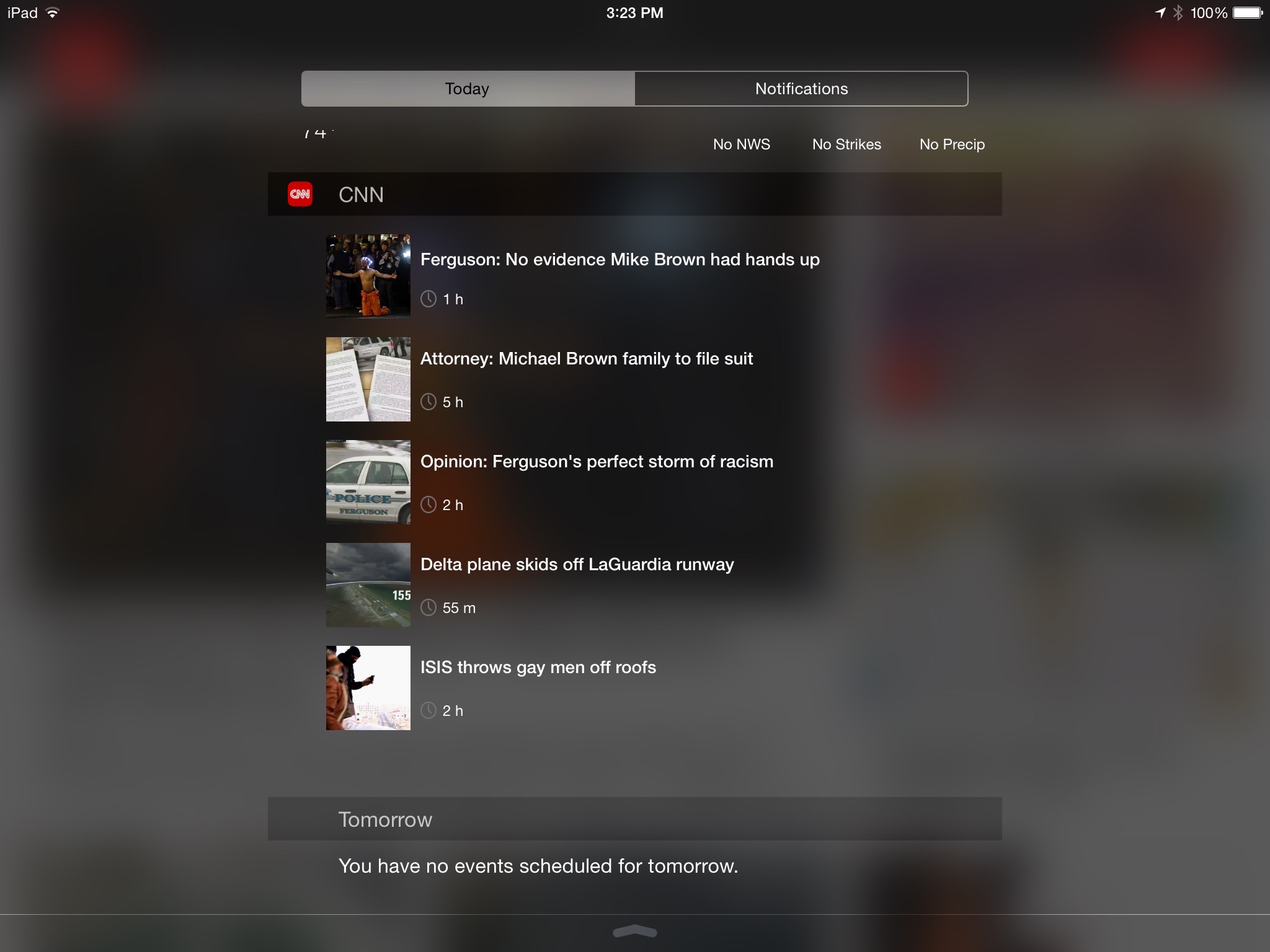
CNN app gets a Notification Center widget, sports section on iOS

CNN today pushed out an update to its iPhone, iPad, and iPod touch application with a pair of features that some users will find significant: a Today widget for iOS 8’s Notification Center and a sports section. The widget is populated with the latest top stories from CNN, while the sports section sources its content from Bleacher Report, which has a dedicated App Store app (iPhone, iPad). CNN also says this version includes various bug fixes, like every app update that has come before it.


Expand
Expanding
Close

Disney’s latest app transforms you into your favorite characters from Star Wars, Frozen & Disney Parks

Today Disney Parks released a free iOS app called Show Your Disney Side, which transforms you into a 3D moving Disney character. Your Disney Side is the part of you that laughs a little bit louder, believes in magic, and never backs down from a pirate fight (even against Captain Hook!). This app was created to help you channel your inner Disney Side even when you’re nowhere near a Disney Park.

Turn yourself into a princess from Frozen, a X-Wing Pilot from Star Wars, Jafar from Aladdin, and several other Disney characters. You can even unlock new Haunted Mansion characters by visiting a Disney Park or sharing your Disney Side pics on social media.

The idea is pretty simple. Choose the character you’d like to become, snap a quick selfie, make a couple quick photo adjustments and you’re all set. The app will create a 3D moving image of yourself as the Disney character you picked. There’s also a share button so you can send your favorite shots to friends and family.

Download it for free.

Here’s a couple of tips from the Disney Parks Blog to help your transformation:

  • Smile big – but without your teeth showing.
  • Make sure your hair isn’t blocking your face.
  • Try to take your photo in front of a plain background.

Promo video and full App Store description follows:

[youtube https://www.youtube.com/watch?v=MiJ7Va-Ase8?rel=0&w=853&h=480]

We all have a Disney Side—the side of us that comes out to play the moment we step through the gates at Disney Parks. The new Show Your Disney Side app will help bring YOURS to life! Transform into a Jedi, a pirate, or other Disney Parks characters wherever you are!

CREATE – Choose a Disney Parks character, take a selfie and transform into your Disney Side.

PLAY – Try different costumes, add a frame, then tap and swipe to watch your Disney Side come to life with special effects

SHARE – Whether you’re at a Disney Park or at home, you can share your Disney Side with your family and friends right from the app

EXPLORE – Select different characters from favorite Disney Parks attractions and experiences like Frozen, Star Tours®, Pirates of the Caribbean®, Villains of Disney Parks, and Haunted Mansion®

Visit the Disneyland® Resort and Walt Disney World® Resort where your Disney Side can be unleashed to the fullest!

DisneySideApp.com

Site default logo image

Google Docs, Sheets, & Slides iOS apps now let you ‘Make a copy’, copy links to clipboard, more

Google is rolling out updates to its Google Docs, Sheets, and Slides apps for the iPhone and iPad today bringing the ability to make a copy of a document and more.

In addition to the new “Make a copy” function for documents, spreadsheets, and presentations across all three apps, you’ll also now be able to copy links to your device’s clipboard. Sheets and Slides also receive a new “accessibility settings menu when VoiceOver is enabled.”

The updated apps also arrive with bug fixes and a few other minor enhancements.

The latest version of Google Docs, Sheets, and Slides will be hitting the App Store today.

What’s New in Version 1.2.6936

* Make a copy of a document
* Bug fixes and performance improvements

Site default logo image

Gmail for iOS updated w/ share sheet support, ability to archive & reply to email via notifications

Google this morning has released a major update for Gmail on iOS. The update bumps the app to version 4.0 and packs a handful of new features. First off, Gmail on iOS now supports the ability to archive and reply to messages directly from a notification, a feature many have been requesting since iOS 8 launched.


Expand
Expanding
Close

9to5Toys Last Call: Beats Solo2 headphones $150, SanDisk 32GB wireless iOS flash drive $35, more

Keep up with the best gear and deals on the web by signing up for the 9to5Toys Newsletter. Also, be sure to check us out on: TwitterRSS FeedFacebookGoogle+ and Safari push notifications.

Today’s can’t miss deals:

Last Call Updates:

Beats by Dr. Dre Solo2 wired and wireless on-ear headphones $50 off, deals from $150

SanDisk Connect 32GB Wireless iOS/Android Flash Drive $35 shipped (orig. $60)

ZAGGkeys MINI 7 Case/Keyboard (refurb) for iPad mini $9 shipped (orig. $90)

Charge up to 5 iPhones, iPads and other USB devices at once in your car for $14 Prime shipped

Put a 128GB microSD card in your Android phone/tablet, GoPro, MacBook + more for $80 shipped

SanDisk’s groundbreaking microSD card will stuff an extra 200GB in your MacBook, GoPro, more

Small States Review Bolt Briefcase from WaterField Designs is an ideal work and travel companion, $249 giveaway

More new gear from today:

Onkyo 4K Ultra HD 5.2 Ch. A/V Home Theater Receiver w/ WiFi & Bluetooth $250 shipped (Reg. $300)

More deals still alive:

Groupon 10% off: Xbox One bundles $315, Lenmar iPhone battery case $18, more

New products & more:

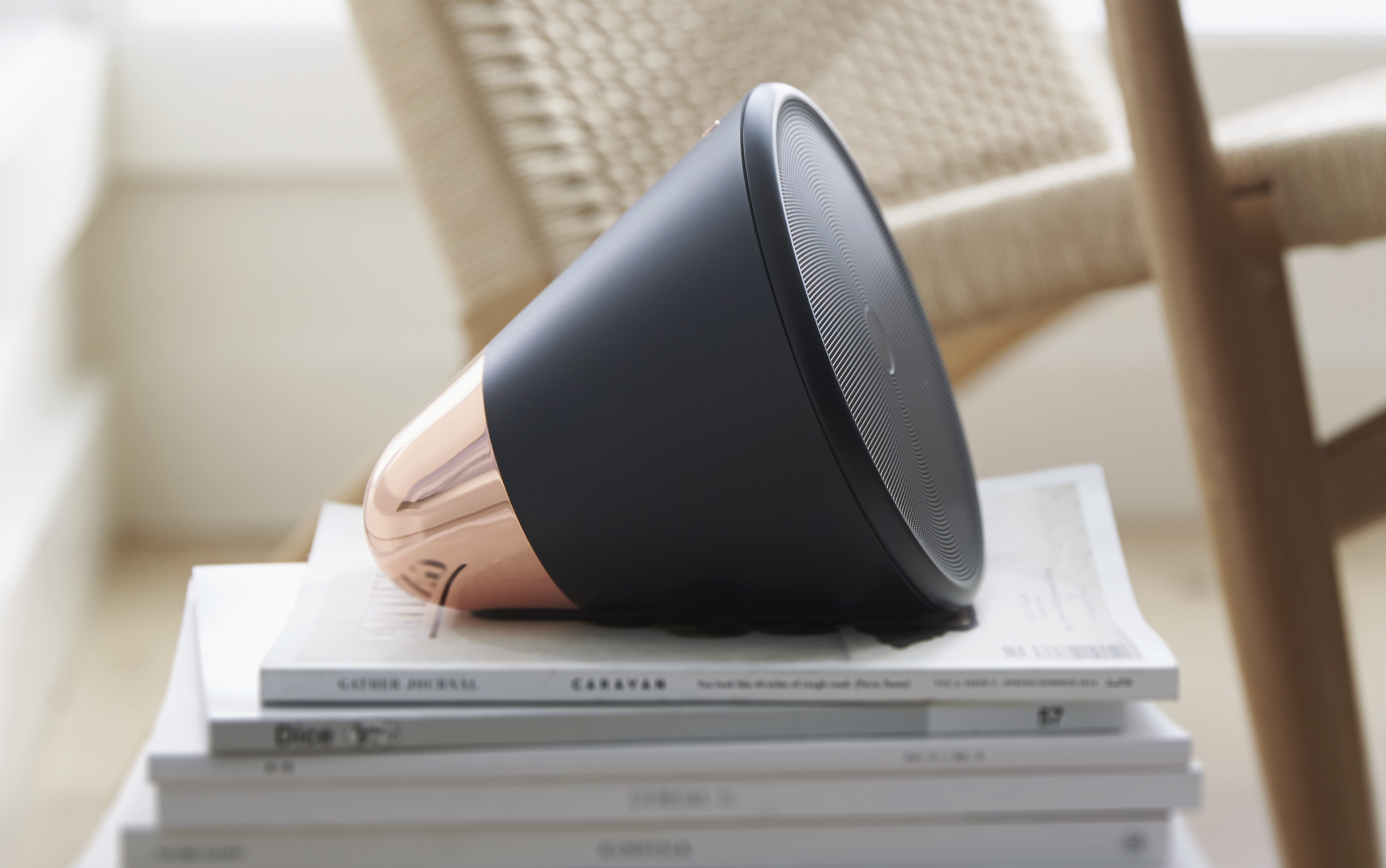
Aether’s Cone wireless speaker gains a couple new tricks, still looks beautiful

Back to the Mac: Microsoft releases redesigned Office for Mac 2016 Preview w/ Retina support, collaboration, more

Site default logo image

Before today, the latest versions of Word, PowerPoint, and Excel for OS X came with Office for Mac 2011, a suite of productivity apps which you can tell from the name included dated software without many modern features Mac users expect. Office for Mac 2011 was actually first released in October 2010. A lot has changed since then.

Microsoft moved Office from a paid upgrade approach to a cloud subscription model, saw its CEO Steve Ballmer retire and buy a basketball team, appointed Satya Nadella as head of the company, and even released Office for iPad and iPhone.

For the Mac, though, the most capable versions of Word, PowerPoint, and Excel have only been available as Web apps—not native—until now. As promised, Microsoft is today releasing the public beta of Office for Mac 2016 including all new versions of the company’s go-to productivity apps.
Expand
Expanding
Close

HBO reportedly in talks to debut $15/month standalone streaming service on Apple TV next month

Site default logo image

HBO is reportedly negotiating with Apple to have the Apple TV included as a launch device when the network’s new standalone streaming service launches next month. International Business Times reports Apple has been “aggressive” in pushing to get access to the new service as HBO reportedly plans a launch by mid-April in time for the latest season of hit show Game of Thrones:
Expand
Expanding
Close

Numerous will put number tracking on your wrist with upcoming Apple Watch app (Photos)

Site default logo image

The Apple Watch is expected to take stage on Monday ahead of its aniticipated debut next month, and with it will come a whole new class of apps based on the iPhone that present information on the wrist. Today we got the first look at what Numerous, my favorite number tracking app for iOS, has planned for the Apple Watch as soon as it starts shipping.
Expand
Expanding
Close

9to5toys Last Call: 5-port USB car charger $14, microSD cards 64GB/128GB $26/$80, much more

Keep up with the best gear and deals on the web by signing up for the 9to5Toys Newsletter. Also, be sure to check us out on: TwitterRSS FeedFacebookGoogle+ and Safari push notifications.

Today’s can’t miss deals:

Last Call Updates:

Charge up to 5 iPhones, iPads and other USB devices at once in your car for $14 Prime shipped

Put a 128GB microSD card in your Android phone/tablet, GoPro, MacBook + more for $80 shipped, 64GB for $26 Prime shipped

SanDisk’s groundbreaking microSD card will stuff an extra 200GB in your MacBook, GoPro, more

Groupon 10% off: Xbox One bundles $315, Lenmar iPhone battery case $18, more

Small States Review Bolt Briefcase from WaterField Designs is an ideal work and travel companion, $249 giveaway

More new gear from today:

Best Buy cuts Gamers Club Unlocked to $30 starting March 8, 20% off new games and amiibo

More deals still alive:

PNY Turbo 256GB USB 3.0 Flash Drive: $70 shipped (Orig. $130)

New products & more:

Sony’s new BSP60 voice-controlled smart Bluetooth speaker is a virtual assistant on wheels

Site default logo image

RadPad now lets you easily split rent with roommates using Apple Pay

RadPad, an app we told you about back in November when it launched as one the first to let you pay rent using Apple Pay, now lets you easily split rent with roommates.

Pay with RadPad Roommates makes it really, really easy for renters who have roommates to pay their rent together, using their own credit, debit card or Apple Pay… A roommate signs up and invites their other roommates to pay rent together: RadPad sends invites to each roommate, via text and email. The roommate receives the invite, accepts it and then enters in their credit or debit card or elects to use Apple Pay. That’s it!

You’ll also be able to see when your roommates are slacking with status information on their half of the rent.  The app allows up to four roommates to split the rent and sends a check to the landlord on behalf of the tenants. You can even setup rent payments to your landlord through the app if they aren’t using RadPad.

RadPad tells us it’s expecting to process $14M in annual rents this year after launching in October.

The RadPad app is available on the App Store for free.

Site default logo image

Waze app to get AMBER alerts, help users look out for missing & abducted children

Waze, the free crowdsourced navigation and traffic app, is to get AMBER alerts in the U.S., helping users look out for missing and abducted children. You’ll only see alerts for children in your local area, and for safety reasons details will only appear once your vehicle has been stationary for at least ten seconds.

AMBER alerts are created by law enforcement agencies to quickly alert members of the public to children who have been reported missing or are believed to have been abducted. Waze says the app will scan for new alerts every ten minutes, though once you’ve dismissed an alert it won’t be shown again for a further week.

Alerts will display all the information available, which will normally include a photo of the child, their name, age, description, where they were last seen, what clothing they were wearing and details of any vehicle known or believed to have been involved.

The update is expected to roll out shortly in the U.S. only. Waze is a free download from iTunes. It was last updated in December, with an iOS widget and improved traffic data.

Facebook added AMBER alerts to its mobile apps in January.

Site default logo image

Intuit’s Mint app adds new bill reminder features, accessibility improvements, more

The popular Intuit-owned Mint finance management app updated to version 4.1 today adding new bill reminder features, more accessibility support, and general improvements all around.

Highlighted in the new version is the ability to manage bill reminders right from the app. For the iPhone version, bill reminders can be created, edited, and managed from the latest version of the app. A change to the Overview tab wraps all this together.

Mint has also enhanced the newly added Updates view to show upcoming bill due dates. The new Upcoming Bills Card will present any bills with a due date within the next seven days.

In terms of accessibility, Mint has added support in a number of areas of the app. This includes the login, signup, split transactions and transaction detail pages.

Mint 4.1 for iPhone and iPad is available for free on the App Store.

Site default logo image

Sonos Controller app updated w/ quick Rooms access, new iPad UI, improved search, more

Sonos is today rolling out version 5.3 of its Sonos Controller app for iOS to introduce a few new features and a tweaked user interface. 

The feature being highlighted above others in the update is easier access to controlling the app’s Rooms feature: Effortlessly move your music around your home with a more accessible ROOMS menu available by tapping the top of any screen in the Sonos app. Group and ungroup rooms from the ROOMS menu to play music in perfect synchrony throughout your home.

Also new in the update is an updated user experience for iPad users that offers new, separate views for currently playing music and discovery features:

  • More engaging browse experience for tablets. Version 5.3 provides separate views for music discovery and what’s currently playing.
  • Last browsed on a phone or tablet. Quickly return to the last place you browsed.
    • Touch to view the last place you browsed. On your phone, you can also go back to the last place you browsed by swiping down on the Now Playing screen.
    • Touch the collapsed Now Playing screen at the bottom of the screen to return to full-screen view.

Sonos highlighted a few other new features including more readily available search and a new playback progress slider.

The updated app, version 5.3, is available on the App Store now.

What’s New in Version 5.3

SIMPLER ROOM CONTROL AND FASTER ACCESS TO ALL YOUR MUSIC.

Effortlessly move your music around your home with a more accessible Rooms menu available by tapping the top of any screen in the Sonos app.

A more engaging browse experience for tablets with dedicated screens for what’s playing and music discovery.

Simplified track progression bar, just below the album art in the Now playing screen. Drag it to whatever point in the song you want to play. This is only applicable for music sources that allow this.

Switch between screens by swiping down from the Now Playing screen to go back to browsing your music. Then swipe from far left to right to show all your music sources.

Search is now more readily available so you can quickly find and play music.

Site default logo image

Microsoft continues its iOS app acquisition spree with Prismatic, a news reader startup that Apple eyed

Since Satya Nadella took the reins from Steve Ballmer just over a year ago, Microsoft has been on an aggressive acquisition spree of cross platform apps and services. Most recently, the company bought the iOS email app Acompli then relaunched it as Outlook for iOS. Microsoft also bought Sunrise, the popular calendar software with an iOS app.

Aside from Microsoft and Apple, other interested buyers include or included Facebook, Google, and Yahoo (anyone missing?). Competing with Apple’s TestFlight acquisition last year, Microsoft even bought the beta distribution service Hockeyapp at the end of last year.

Adding to its list of recent mobile app acquisitions, TechCrunch reports that Microsoft is now eyeing Prismatic, a social recommendation network with apps for both iOS and Android. Prismatic describes itself as a personalized and social news reader.
Expand
Expanding
Close

Cook teases ‘ton’ of Apple Watch announcements, including Panera Bread, Salesforce enterprise & fitness apps

Site default logo image

In addition to discussing the international Apple Watch launch and accessibility efforts at a briefing in Germany, Apple CEO Tim Cook teased “a whole ton of announcements coming shortly about all of the apps coming” for the Apple Watch, according to employees in attendance. Cook first highlighted the use of the Apple Watch in hotels by saying that “some of the best hotels in the world” will allow Apple Watch users to use the wearable to unlock room doors.

Additionally, Cook said that the Apple Watch hotel applications will even be able to replace the check-in processes for some hotels. “So people are beginning to think about doing not only cool things with their apps, but how it changes their whole business,” Cook said. As highlighted at the first Apple Watch event in September 2014, Starwood Hotels has already announced that it is working with Apple on an app for the Apple Watch…


Expand
Expanding
Close

Apple & IBM partnership delivers 3 new enterprise iOS apps

Site default logo image

Apple and IBM today unveiled three new enterprise apps developed for iOS as part of their ongoing ‘IBM MobileFirst for iOS’ partnership. The new apps include Advisor Alerts, Passenger Care, and Dynamic Buy. The three apps, a combination of both iPhone and iPad software, join the original set of 10 announced last year and another new app recently announced bringing the collection of apps announced under the deal to 14 total across eight industries including retail, banking, and transportation.


Expand
Expanding
Close

Site default logo image

Launch Center Pro is coming to the Apple Watch

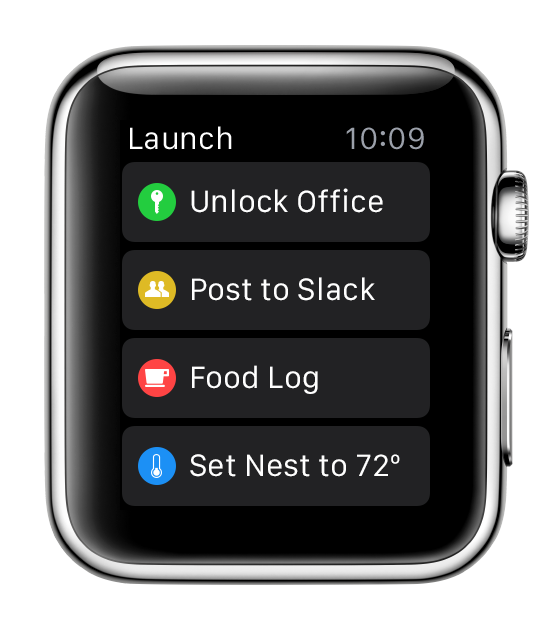
David Barnard, CEO of Contrast, has today announced that they will be bringing a slimmed down version of Launch Center Pro to the Apple Watch. You can see how the app has been transformed from the grid appearance of the iOS version to a simple list, to optimise screen real estate on the Watch’s much smaller display. This means users can initiate quick actions from their wrist, rather than digging their phones out of their pockets.

The company will ‘hopefully’ have the app available in the App Store when the Watch ships sometime in April.

Another tweet indicates that the company is working on more WatchKit apps as well.


Expand
Expanding
Close

Site default logo image

MLB At Bat app redesigned, updated with new features for Spring Training

The MLB.com At Bat app for iPhone and iPad gets a big update today in time for Spring Training bringing Spanish language support, new features, and all the details on what content will be available. Most of the app has also been redesigned including all new UI’s for team pages, scoreboards, and the newsreader.

Also new in the app for version 8.0.0 and 2015:

• New UI for all 30 team pages & the league-wide scoreboard (iPhone only)
• Player search expanded to include all active and historical MLB player cards (iPhone only)
• Re-designed UI for the newsreader (iPhone & iPad)
• Team-by-team statistical data filters (iPhone only)
• Native resolution to optimize At Bat for iPhone 6 and 6 Plus
• Easy access to every game with new team schedule navigation (iPhone only)
• Application available in Spanish language, requires device language set to Spanish (iPhone & iPad)

As for Spring Training content, here’s what you’ll get with the usual $2.99/month or $19.99/year subscription:

  • Watch live streaming of more than 200 available Spring Training games with an MLB.TV Premium subscription (iPhone, iPad, select Android phones and tablets, Kindle Fire, Fire Phone)
  • Listen live to available Spring Training radio broadcasts (all)
  • Multi-platform live audio access for At Bat Premium subscribers (portable to Mac or PC with a valid MLB.com account)
  • Universal support for At Bat Premium subscribers, with accessibility on iPhone, iPad and other supported smartphones and tablets
  • Track batter-by-batter action for every Spring Training game (all)
  • Comb through sortable batting, pitching and fielding statistics (all)
  • Stay on top of breaking news, schedules, interactive rosters and player stats for every team (all)
  • Customize At Bat’s home screen to feature your favorite team (all smartphones)
  • Access to a video library archive, searchable by player, team or keyword (all smartphones)
  • Classic games video archive, featuring dozens of baseball’s most legendary games (all)

The updated MLB.com At Bat app for iPhone and iPad is available on the App Store now.

Site default logo image

Vesper note-taking app adds first iPad version, landscape support for iPhone

Q Branch is out with a big update to Vesper, the alternative note-taking app for iOS.

Vesper 2.005 adds landscape support to the app for iPhone so you can now browse, manage, and create notes outside of portrait orientation.

The 2.005 update also includes Vesper for iPad, the first time the note-taking app has been available with a version optimized for the tablet. Vesper for iPad features the same support for landscape use as the iPhone, and Q Branch’s syncing feature keeps notes between both apps up-to-date.
Expand
Expanding
Close

VLC for iOS back on the App Store, OS X app updated alongside massive cross-platform release

VideoLAN has today launched several updates to VLC across its apps on iOS, Android, OS X, and every other platform where the app is available, marking the first time that the company has pushed such a massive coordinated release and the re-release of the iOS app. The new versions (with the main app numbered 2.2.0), include several features across the various platforms, and VLC says it took more than a year of volunteer work to put them together…


Expand
Expanding
Close

9to5Toys Last Call: iPhone 6/Plus Gift Card w/ Purchase, Beats Studio Headphones $230, more

Keep up with the best gear and deals on the web by signing up for the 9to5Toys Newsletter. Also, be sure to check us out on: TwitterRSS FeedFacebookGoogle+ and Safari push notifications.

Today’s can’t miss deals:

Last Call Updates:

Monoprice MFi Lightning cables extra $5 off + free shipping: keychain, metal, micro-USB combo, more

Beats Studio Wired Over-Ear Headphones (matte black, white, titanium) $230 shipped (Reg. $300)

Elgato 256GB  Portable Thunderbolt Drive $368 shipped (orig. $500)

Crucial M500 960GB SATA 2.5-Inch Internal SSD $315 (Reg. $420), Inatek SSD Enclosure $10 (Reg. $25), more

[youtube https://www.youtube.com/watch?v=cnkVkwH2qbE?rel=0]

Readdle’s wireless printing app Printer Pro goes free on iOS for the first time (Reg. $7)


iPad Air 2 16GB for $400 shipped ($99 off)

Life Hack: Fix your iMac’s biggest annoyance by moving its USB ports, deals from $6 Prime shipped

LAST CHANCE! Small States: Etwas builds timeless bags with legacy and heirloom design in mind – giveaway worth $380

More new gear from today:

  • New! Games/Apps: Wii U console $260 (Reg. $300), Transistor 50% off, freebies, more
  • New! Daily Deals: BeyerDynamic Headphone amp $200, LG Tone BT Headset $30, more

More deals still alive:

New products & more:

Google Maps for iOS adds POI quick facts, upcoming events for select venues, more

Site default logo image

Google is packing even more useful information into the latest version of its Maps app for iOS. Google Maps 4.3.0 for iPhone and iPad adds several contextual data points to locations like nearby businesses for address searches, quick facts for notable locations, and even event information for select venues.
Expand
Expanding
Close