Apps

See All Stories

Learn about the latest news for iOS, Mac, Apple Watch, and Apple TV apps

Apps for iOS, macOS, tvOS, and watchOS power our modern world. 9to5Mac will update you on the latest news, review, and updates for all types of apps. “There’s an App for that”.

The term came became part of our vocabulary when Steve Jobs announced The App Store as part of the iPhone 2.0 software update in 2008.

Over the years, the term has become as common as kleenex for describing applications on all of our devices. Apple’s platforms have apps for just about anything from finance, banking, sports, social media, podcasting, music, and more. We have a guide for helping you discover the best ones as well. Apps are now on everything from our TV, to our smartphones, on our laptops, and all the way down to our wrists.

As new ones are released or existing ones have major updates, the team here at 9to5Mac will bring you the latest news and reviews. If you want to follow along with video footage, be sure to follow 9to5Mac on YouTube. Scroll down below our latest updates on all things relating to applications on iPhone, iPad, Mac, Apple TV, and Apple Watch.

Site default logo image

Ebay updates ‘Fashion’ & ‘Motors’ apps w/ iPad support, adds interactive maps to StubHub

Ebay has updated some of its mobile apps today with new features and support for additional devices. Its Motors and Fashion apps, which provide dedicated experiences for browsing vehicles and fashion products on eBay, today get support for iPad. The Motors app also gets a redesign for iPad, improved search, and updated layouts on both iPhone and iPad.

Ebay also updated its StubHub iOS apps today with new interactive maps for the upcoming pro and college football and basketball seasons. You can now “filter listings by section on 1,800+ maps and see the view from your section on more than 400 maps.”

The updated StubHub, eBay Motors, and eBay Fashion apps are available for free on the App Store now.

Site default logo image

Google launches app for iOS to set up Chromecast, manage settings

Google has released a new application for the iPhone, iPad, and iPod touch to make it easier for users to setup and manage the Chromecast TV device.

• Set up your Chromecast to work with your Wi-Fi network
• Manage your Chromecast settings (such as changing your device name, Wi-Fi password, etc.)

The application is free on the App Store. The Google Chromecast is a device that plugs into a TV set via an HDMI port and allows users to stream content, such as YouTube and Netflix, from devices like computers, tablets, and smartphones.

Update: Chromecast is currently available at Best Buy for $35 including the 3 months of Netflix (value $27)


Expand
Expanding
Close

Site default logo image

Nine Inch Nails’ new album, ‘Hesitation Marks’, now streaming free on iTunes

After releasing its first single in nearly 5 years with “Came Back Haunted” and returning to play its first North American gig in nearly four years for Lollapalooza, the wait is almost over for the release of Nine Inch Nails’ much anticipated full length album entitled “Hesitation Marks.” For those that can’t wait five days for the album’s official release, Apple today started streaming the album in its entirety for free on iTunes.

The stream is currently working only for users in the US, but we’ve seen that exclusivity window lift after a day or two with free iTunes streams in the past. If you remember, the last big album to stream on iTunes was Daft Punk’s “Random Access Memories.” It too started as a US only stream an eventually became available elsewhere. Here’s to hoping that Apple doesn’t make it as easy to download a full, high-quality version of the album like it did with Daft Punk and other iTunes streams before it.

http://www.youtube.com/watch?v=sRrQrow-PK0

Site default logo image

Madden NFL 25 game makes it to the iPhone and iPad as a freemium download

Madden NFL 25, EA Sports’ football simulation game that started life on the PC way back in 1989 and is now best-known as an XBox and Playstation game, today launched as a freemium iOS game for both iPhone and iPad. This iOS iteration of the famous football game promises to be more reflective of a console gaming experience, unlike the now retired Madden Social. EA has even included an exclusive head-to-head gameplay mode in this mobile version.

As we’ve learned in the past, many ‘freemium’ apps come with gaming caveats that can be confusing and frustrating as a gamer, but hopefully that isn’t that case here. In Madden 25, gamers will need to either earn coins to improve the player roster or simply cough up the cash to buy better players.

Perhaps most importantly, EA has improved the touch controls for Madden 25. The previously used virtual D-pad has been replaced by “intuitive tap & swipe controls.” Many of the player actions and moves can be executed using just one hand. This style of on-screen control may be the best way to game on iOS until we have a full-fledged hardware controller.

Madden 25 is exclusively available on iOS until later this fall when it will hit Android. For the biggest football fans, you can pickup a copy of Madden 25 for your favorite gaming console bundled with a year of NFL Sunday ticket for just $100. That’s up to a savings of $400.

An experience 25 years in the making! EA SPORTS delivers the most authentic NFL football experience to date on iPhone® and iPad® with MADDEN NFL 25. Build your Ultimate Team of NFL stars and run the show on offense and defense with new and improved touch controls, game modes and much more!

BUILD YOUR ULTIMATE TEAM
Collect your favorite NFL players from packs or win them in the Auction House, then dominate the field against friends by building your ultimate powerhouse team.

AUTHENTIC NFL ACTION
Madden NFL lets you choose from 32 REAL NFL teams and a roster of more than 1,500 REAL NFL players! Battle it out in true-to-life NFL stadiums, too. Ultra-sharp graphics make gameplay even more realistic. Feel the impact of every game-changing tackle with hard-hitting collision effects!

PLAY MULTIPLE MADDEN NFL MODES
Relive NFL storylines and play through several seasons in Solo Challenges. Take on friends in the fast-paced, offensive shootout mode, Head-2-Head (a mobile exclusive)! Or, jump into Exhibition mode for single-player offensive and defensive football.

NEW & IMPROVED TOUCH CONTROLS
Run, pass, and make the big hits on D with new and intuitive Tap & Swipe controls. Better tape your fingers!

Score MADDEN NFL 25 on iPhone® and iPad® now. BOOM!

The iPhone as an intelligent remote control, and a DIY silent disco device – Apple patents

Site default logo image

Moving beyond today’s remotes (image: bttremote.com)

An iPhone may fall under the generic heading of a mobile phone, but a combination of the convenience of apps and the ability to use the iPhone as a remote for everything from playing a movie to changing the color of our lighting means that many of us use them at home almost as much as we do when out & about.

In a patent published today, Apple explores the potential of the iPhone to act as an intelligent remote with the kind of functionality typically associated with high-end home automation setups. The idea is based around the concept of ‘scenes’. Having a romantic night in with your partner? You probably want the lights dimmed, the music on softly, the TV off. Movie night? The big-screen on, Apple TV selected as the source, surround-sound speakers selected, volume up higher – and so on … 
Expand
Expanding
Close

Site default logo image

Controversial Blackboard Mobile Learn app updated with new design in time for fall semester

The unpopular Blackboard Mobile Learn app has been redesigned using feedback received from users. The application that can either be licensed by a school or purchased for $1.99 per year or $5.99 for life by the student has received terrible ratings over the years, but the new design looks much cleaner and, in a way, ready for iOS 7.

Blackboard is a learning management system used by schools of all sizes. The app allows students to check grades, receive push notifications when things are posted to the system, and attach files right from Dropbox. However, the additional cost to the student, slow interface, previous Wifi-only restriction, and other app policies and restrictions caused the app to receive low ratings and put the app and company in bad light.

Here’s the changelog for the new version:

What’s New in Version 4.0

Inspired by your feedback, we’ve completely redesigned the app. This update makes using the app and reading content easier than ever. Some of the sweet new features include:

-You can now “favorite” an area of a course for easy access later on
-More support for Rich Content Styles like Bold, Underline, Italics, and Hyperlinks
-New layout for Discussions that show you the history of each reply

Previously, the app seemed to focus on skeuomorphic metaphors rather than actual features and easy navigation.

Before and after comparison for Blackboard Mobile Learn.

The app is available in the App Store. If you use Blackboard, let us know what you think of the new design and whether or not it’ll convince you to use the app more often.

Site default logo image

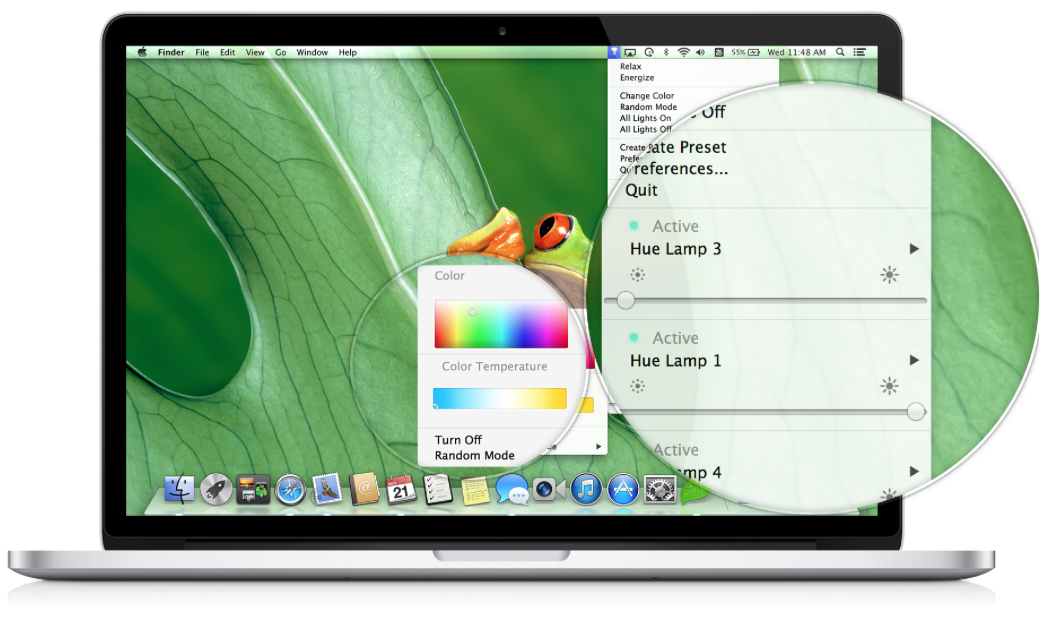
Control your Philips Hue lamps from your Mac Menu Bar – new app coming soon

I can see why manufacturers opt for iPhone apps as the remote controls for their gadgets. A small touchscreen device is a familiar form-factor for a remote, and it’s likely to be easily to hand. But if happen to be in front of your Mac at the time, it can seem a bit awkward to have to pick up your phone, open an app and then use a smaller, fiddlier device.

Philips seem to have recognised this, with a new Mac app on the way to control its range of Hue smart LED bulbs. The app sits in the menu bar, providing a convenient way to control any of your Hue lamps.

Philips updated the iOS app back in May, with geofencing, schedules and a wide variety of triggering actions, including support for the popular IFTTT (If This Then That) app.
Expand
Expanding
Close

Apple reportedly testing changes to App Store ranking algorithms, now including user ratings

Site default logo image

According to a new report from research firm Fiksu, which regularly tracks changes to App Store charts, Apple might be experimenting with new algorithms for iTunes and App Store rankings that incorporate user ratings. Apple previously only used the number of downloads and how fast an app was being downloaded in order to rank apps for its top charts, but Fisku thinks it has recently started incorporating user rankings:

In late July, we first began to notice apps unexpectedly shifting position without a corresponding increase or decrease in downloads. Upon closer inspection, we discovered these position changes correlated with the apps’ ratings. As evidenced by the graph below, apps with ratings of 4 or more stars received a rank boost in late July and have maintained that rank throughout August. Poorly rated apps with less than 3 stars received the opposite treatment about two weeks later, dropping off precipitously in rank and staying that way. Average rated apps, between 3 and 4 stars, suffered a slight degradation in rank but have generally been less affected.

The report also notes that, in recent weeks, Apple appears to be updating App Store charts every three hours opposed to the 15 minute intervals it was using previously. Fisku speculates that the increase could be to help prevent manipulation of the app charts, noting that “three hours allows enough time to identify anomalies and remove apps before they suddenly appear at the top of the rankings.” 
Expand
Expanding
Close

Site default logo image

1Password 4 for Mac screenshots and upgrade details [Gallery]

This morning, AgileBits has shared some screenshots of their upcoming 1Password 4 for Mac software. The password management app has been in beta for awhile now undergoing dozens of new builds, and the company has announced that it is on track to launch this fall.

Some details that were released this morning:

  • 1Password 4 will be a free upgrade for all MAS customers
  • 1Password 4 for Mac will be a free upgrade to all website customers who purchased on or after January 1, 2013
  • The browser extension is now native Cocoa and is the same for every browser
  • Many features have come “Back to the Mac” from their iOS application – iCloud sync, favorites, and multi-site logins
  • Custom fields can be added to most items

Here are some screenshots of the app at work:

Site default logo image

Apple opens iWork for iCloud beta to all users ahead of expected public release this fall

After first announcing its new iWork for iCloud productivity suite back in June at WWDC, Apple has been slowly rolling out access to more people ahead of a public beta release scheduled for this fall. It first extended the privilege to developers, then Apple employees, and in July started sending out invites to select non-developers. Today, several tips note that Apple now appears to be letting in anyone with an Apple ID despite not sending out invites or officially announcing a public beta. We’ve confirmed access to the beta on a non-developer account, but let us know in the comments if you’re unable to get in.

Following the unveiling of the new iWork for iCloud suite, we speculated that Apple could possibly move to make its other iWork suite of apps on iOS and Mac available for free. Our thinking: it’s hard to imagine Apple allowing users to create documents for free on iCloud but not seamlessly transfer from iOS to Mac without having to throw down $30 for the three iOS apps. Adding even more weight to that theory, Apple was briefly showing the apps listed alongside the collection of free Apple apps that it presents most users with when launching the App Store on their iOS device for the first time.

Apple previously announced it was planning on releasing a public beta for iWork for iCloud this fall but perhaps is opening the beta today to help beta test the apps among a larger group of users ahead of an official announcement. Apple is expected to unveil new iPhones at an event next month on Sept. 10, and there is a possibility we’ll hear more about iWork for iCloud alongside details for Mavericks and possibly the new Mac Pro.

Site default logo image

Pandora to drop 40 hour per month limit on free accounts just before iTunes Radio launch [Update: App updated with sleep timer]

During Pandora’s earnings call today, the company’s CFO, Mike Herring, announced that the service will be dropping its 40 hours per month limit on mobile devices for free accounts. TechCrunch posted this statement:

When we introduced the 40 hour mobile listening limit, we were confident that our scale – over 7% of total radio listening and Pandora’s number one ranking in most major markets – would allow us to take this action without impacting our key monetization initiatives in driving the disruption of the radio advertising market and driving our mobile advertising leadership. As our results have shown, the continued strong growth in our advertising revenue allowed us to cover the increased royalty costs with dollars left over to invest back into the business.

With these tools in hand, and insight into how they work, we are resetting our levers in September. Notably, Pandora plans to eliminate the blanket 40-hour-per-month limit on free mobile listening effective September 1st.

The company also published a related press release :

Pandora (NYSE: P), the leading internet radio service, today announced it will remove the 40-hour-per-month limit on free mobile listening effective September 1, 2013.

“We’re pleased to once again maximize free listening for everyone on Pandora,” said Tim Westergren, Pandora’s founder. “The more than 70 million listeners that tune in every month will now have more time to hear the music they love, and thousands of working artists will reach more fans.”

The limit on free mobile listening was introduced in March 2013 to manage rapidly increasing royalty costs. While in place, this affected fewer than four percent of total monthly active listeners. The company continues to utilize multiple additional levers to carefully and effectively manage its content cost.

Pandora has been dealing with the balancing act of paying for content and pushing out as advertisements. Back in May, Bloomberg looked into the situation and found that some investors weren’t sure if the limit would also reduce the number of ads delivered to users. Only around 4% of its listeners were going over the cap at the time, but only a portion of those users would return and buy into a paid subscription after the cap was reintroduced on mobile devices back in February. At the same time, the introduction of the cap saw the service’s total listening hours drop around 5.1% within a month:

Pandora’s results since implementing the cap suggest the company is starting to contain content costs, its biggest expense, without alienating listeners. With fewer hours of use, investors are concerned that the company is also sacrificing advertising revenue, said Michael Pachter, an analyst with Wedbush Securities Inc. in Los Angeles.

The company reported revenues of $162 million which is is up 58% YoY; however, iTunes Radio is expected to launch in just a few short weeks and we’ll find out at their next earnings call if Apple’s music streaming service affects revenue for Pandora. For its part, Apple has partnered with very large sponsors and secured multi-million dollar advertising deals for the iTunes Radio service.

Pandora is available free in the App Store. iTunes Radio will have a free version with ads, but users can listen ad-free by subscribing to the $24.99/year iTunes Match service.

Update: Also, Pandora’s iOS app has been updated to version 4.5 which includes a new sleep timer feature and additional bug fixes:

What’s New in Version 4.5

• Sleep timer with 15, 30, or 60 minute options to continue playing your favorite Pandora station while you fall asleep
• Bug fixes and improvements

Apple acquires yet another transit app company: ‘Embark’

Site default logo image

Apple continues its maps buying spree with the acquisition of Embark, the development firm with 10 transit-related apps in the App Store, according to Jessica Lessin. Back in November, the company received an investment boost from BMW, but now it looks like Apple will be integrating the information directly into the Apple Maps application:

We don’t know how much Apple paid for the several-person team it acquired very recently. But we heard from people knowledgeable about the deal that the company plans to directly integrate Embark’s technology into Apple Maps.

Apple has confirmed the deal to Jessica Lessin.
Expand
Expanding
Close

Botched Find my iPhone update only allows developers to log in [Update: fixed]

Site default logo image

Update: Apple confirmed on its iCloud status page that Find my iPhone is back to normal:

The Find my iPhone iOS app has been updated with a new iOS 7-style icon while the rest of the UI remains the same. This icon is the same as the one found on the updated beta.icloud.com website:

However, many are noting that you cannot log in to the new Find my iPhone app without having a developer account:
Expand
Expanding
Close

Review: ReadQuick 1.5 brings speed-reading to the iPhone

Site default logo image

ReadQuick, the speed-reading app for iPad, has been updated to version 1.5 today. The new version brings the app to the iPhone and iPod touch.

For those who aren’t familiar, ReadQuick is an app that presents a new way to read web articles. Rather than present you the entire article as one page, ReadQuick shows you the entire article one word at a time. That may sound inconvenient, but it turns out it’s actually much nicer than it sounds. Keep reading for our full review of the brand new iPhone version.


Expand
Expanding
Close

Site default logo image

Facebook Pages Manager app updated with multi-photo posts and other new features

Tonight, the Facebook Pages Manager app has been updated to version 2.1 which includes the ability to upload multiple pictures per post, new Page creation right through the app, and improved insights.

The app is great for owners of Facebook Pages, as it makes it easy to quickly respond to comments and check up on statistics, and is available free in the App Store.

What’s New in Version 2.1

– Upload multiple photos for a single post
– Edit Page admins: add new admins for the Pages you manage
– Improved insights to make it easier to manage your Page
– Edit Page cover photo
– Create an event hosted by your Page (iPhone only)
– Create a new Page
– Bug fixes and performance updates

Site default logo image

9to5Toys Last Call: Western Digital 1.5TB portable HD $80, Apple EarPods $15, 64GB flash drive, game/app deals, more

From 9to5Toys.com:

A large majority of the deals we cover each day come from a variety of ‘Daily Deal’ websites or are so popular that they don’t even last 24 hours. We know you can’t be at your computer every second, so we’re going to round up the best deals each day to make sure you have a fair shot at the deals you want. Be sure to follow 9to5Toys.com so you never miss a deal... Twitter, RSS Feed, Facebook, Google+.

Today’s Featured deals:

Western Digital 1.5TB portable USB 3.0 external hard drive $80 shipped (Reg. $120)

Apple EarPods w/ mic and remote: $15 shipped (Reg. $30)

Other great deals we love:

Freebies:
Site default logo image

Real Racing 3 iOS app adds classic Dodge and Shelby muscle cars, new events, difficulty tuning & more

EA has pushed out an update to its Real Racing 3 app for iPhone and iPad today that brings a number of new vehicles in addition to new events and performance tweaks.

Among the new vehicles is a collection of V8 muscles cars from Dodge and Shelby that EA says include improved visual physics “with realistic pitch and bodyroll.” The update also adds improved cameras, difficulty tuning, and new events that feature a “Series featuring a field of muscle cars hailing from Detroit.”

A full list of what’s new below:

What’s New in Version 1.3.0

An iconic generation of cars joins Real Racing 3’s diverse garage, with the introduction of timeless classics from Dodge and Shelby.

• New cars – Dodge and Shelby add a collection of big V8 muscle cars to Real Racing 3
• New events – compete in multiple challenging Series featuring a field of muscle cars hailing from Detroit
• Difficulty tuning – faster and more accurate skill adjustment for even tighter competition
• Visual physics enhancements – classic muscle cars come to life with realistic pitch and bodyroll
• Improved cameras – enhanced sense of speed and motion yields a more authentic racing experience
• Additional social networking options for enhanced Time Shifted Multiplayer and Cloud Save functionality

Site default logo image

Google brings unified account sign-in to YouTube & AdSense iOS apps

Following an update to version 2.0 for the YouTube iOS app yesterday, users have noticed that Google appears to have turned on shared account logins for at least YouTube and the recently released AdSense app. That means logging into one app will automatically log you into the other without having to re-enter your account and password. Although the majority of Google’s iOS apps require users to sign into a single Google account used across its services, up until now each app required users to enter their account info when when launching for the first time.

Google didn’t list the new feature when it updated the YouTube app or in the release notes for the new AdSense app, but the support page for YouTube does note, “If you’ve signed in with another Google app on your iOS device, you may see this account listed.” Removing an account in either the AdSense or YouTube app will also remove it from the other app if installed on your device, but Google doesn’t offer users any control over the feature as of yet. Google doesn’t mention support for any specific apps, but we’d imagine this is likely a feature that will make its way to other Google iOS apps in the near future.

Site default logo image

Twitter triggers return to automation service IFTTT

Last year, automation service IFTTT (IF This, Then That), which just released an iOS application last month, dropped support for all Twitter triggers after the social network made changes to their third-party app requirements. Now, the two companies have worked together to revive many of the tweet triggers, including “new tweet by you,” “new tweet by you with hashtag,” “new link by you,” and “new favorite tweet by you.”

As noted by The Verge, all of these hooks have to do with your own tweets rather than others’ tweets, which had been accessible before the support was dropped last year.

Some of the popular ‘recipes’ on IFTTT’s Twitter page include: “When #Facebook profile picture changes, update #Twitter profile picture,” “Tweet your newest uploaded Flickr pictures,” and “New link post by you then tweet the link.”

IFTTT is a free service and the iOS application is available for free in the App Store.

Site default logo image

Liver surgery: now there’s an iPad app for that

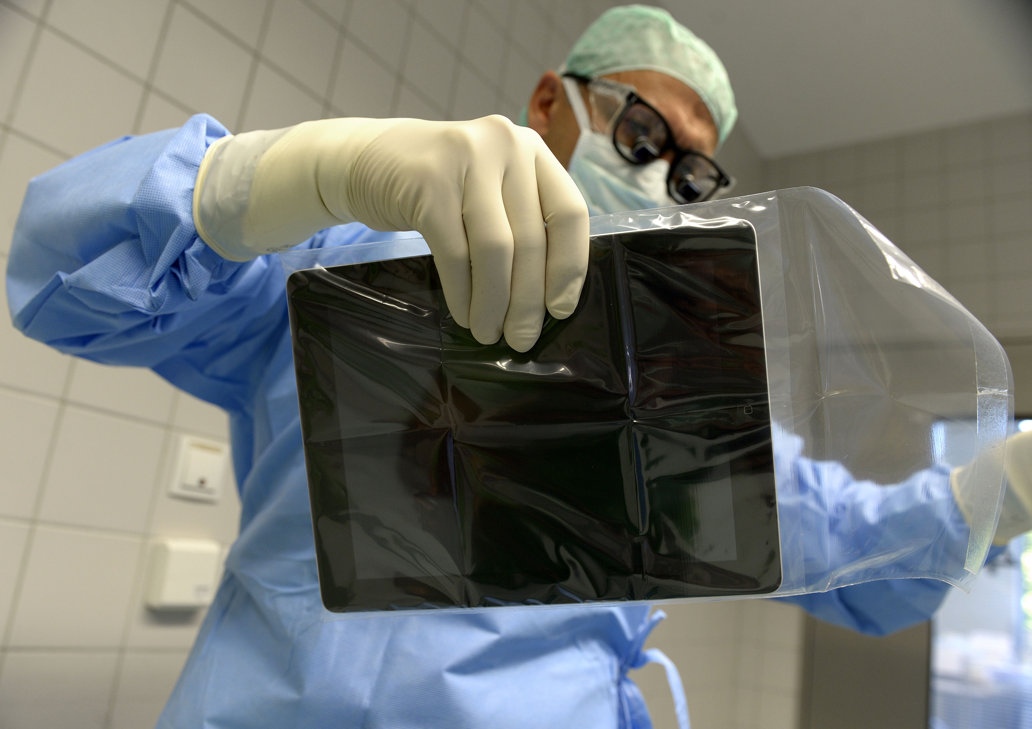
A German surgeon has used an iPad with augmented reality software running on it to assist in a liver operation in Bremen, Germany, reports Reuters.

The iPad camera was used to photograph the liver, while the iPad app overlayed a virtual 3D model of the pre-op plan. Want to see what that looks like? Make sure you’re not eating anything before you look at the photos below the fold … 
Expand
Expanding
Close

iTunes Festival channel returns to Apple TV as iOS app is updated with new design

Site default logo image

In preparation for this year’s iTunes Festival next month, Apple has brought back the iTunes Festival channel on the Apple TV. The channel appears automatically over-the-air without any manual updating or notification.

Popular artists such as Elton John, Lady Gaga, Ellie Goulding, and Justin Timberlake will take the stage in London for 30 days of live performances that are streamed and available afterwards through the Apple TV channel or iOS app.
Expand
Expanding
Close

Site default logo image

YouTube for iOS gains video playback while searching, improved ChromeCast integration

http://www.youtube.com/watch?v=ir1xdtIb-g0&feature=player_embedded

Google has announced an update for its YouTube for iPhone, iPad, and iPod touch application that brings multiple new features. Notably, the app will now allow users to watch a video in the corner of the display while browsing and searching for other videos.

The app also gains support for viewing playlists and more content on mobile. Also new is deep integration with the ChromeCast:

The Cast button on YouTube already lets you send YouTube videos from your phone or tablet to your connected TV, like on Chromecast, Google TV, Playstation 3 and other TVs. To make it easier to choose what to watch next, you’ll see a preview screen when your devices are connected and you select a video, with options to play the video to queue it up to watch next.

The app update is available now on iTunes for iOS and is also available for Android.


Expand
Expanding
Close

Google Maps for iOS adds real-time incident reporting from Waze

Site default logo image

Google announced today on its Google Maps blog that it’s finally tapping into the talent and technology it picked up with its acquisition of Waze back in June by integrating real time incident reports from Waze into Google Maps. The new integration means that when Waze users report incidents for everything from accidents to road closures, Google Maps users on both iOS and Android will now be able to benefit:

Users of Google Maps for Mobile will now benefit from real time incident reports from Waze users. This means when Wazers report accidents, construction, road closures and more on Waze, the updates will also appear on the Google Maps app for Android and iOS.

The features will initially be limited to users in certain locations, including: Argentina, Brazil, Chile, Colombia, Ecuador, France, Germany, Mexico, Panama, Peru, Switzerland, UK and the US. In addition, as Google first hinted back in June, the company will also be integrating Google Search into the Waze apps on iOS and Android, while the Waze Map Editor now has access to Google Street View imagery:
Expand
Expanding
Close