Mac

See All Stories

Apple’s Mac lineup consists of MacBook, MacBook Air, MacBook Pro, iMac, Mac Pro, and Mac Mini. The Mac runs macOS for its operating system.

Mac lineup

History

The Mac is Apple’s lineup of computers, and it can be considered the company’s oldest product. The name “Mac” comes from the original Macintosh, which was introduced in 1984 and is also considered the first personal computer for the masses to have a graphical user interface. The first Macintosh hit the stores on January 24, 1984, costing $2,945.

Among all these years, Apple has introduced many different Mac models, ranging from desktops to laptops to professional tower machines. The current lineup consists of the MacBook Air, MacBook Pro, Mac mini, iMac, and Mac Pro. However, there have been other Mac models were discontinued, such as the eMac, MacBook, and iMac Pro.

The history of modern Macs began in 1998, a year after Steve Jobs returned to Apple. Apple had dozens of Macintosh computers at that time, but Steve decided to rethink the entire lineup. In 1998, Apple announced the iMac G3, which ditched the floppy disk and serial ports in favor of USB connectors.

Macintosh and iMac G3.

Unlike the Macintosh, the first iMac was considered a huge success — not only for its technology, but also for its unique design with colorful translucent plastic. Apple quickly expanded the Mac lineup with other models, which included the iBook and PowerBook (which became the MacBook and MacBook Pro) and the PowerMac, which is now the Mac Pro.

macOS

What makes a Mac the Mac is the macOS operating system, which has also had a long history since the introduction of the first Macintosh. Initially called Mac OS, the operating system was rebuilt when Steve Jobs returned to Apple.

The first version of Mac OS X was released on March 24, 2001 with a new interface that is still present in some ways in current versions of macOS. Apple’s desktop operating system comes with many free applications such as Pages, Keynote, Numbers, iMovie, and GarageBand.

With macOS, users also have access to deep integrations with other Apple devices. For instance, you can answer calls and send SMS from your iPhone using your Mac. Handoff lets you switch from one device to the other and pick up where you left off. Apple Watch users can unlock their computer without entering a password, and you can even copy and paste between devices.

macOS Sonoma

Apple’s desktop operating system is also integrated with services offered by the company, such as iCloud, Apple Music, and Apple TV+.

The current version of macOS is Sonoma (version 14), which features new slow-motion screen savers, widgets on desktop, camera effects on FaceTime and other apps, web apps, passkey sharing, improved PDF support, and Game Mode. The update also comes with a new API that lets developers easily port Windows games to macOS.

Architecture Transitions

The Mac has had three major architecture transitions in its history. Apple’s first computers ran on Motorola processors, but the company decided to migrate to the new PowerPC platform in 1994. While this brought benefits at the time, the PowerPC processors were not delivering what Apple expected.

It was in 2005 that Apple confirmed the transition from PowerPC to Intel. Intel processors had become faster and more efficient than PowerPC, which enabled the development of new Mac computers that were more powerful and also more compact. Developers have been given access to a Developer Transition Kit running Mac OS X Tiger with Intel Pentium 4 to update their apps before the transition begins.

Power PC, Mac OS X, and Intel processor.

Apple said that the transition would begin in June 2006 and be finished by the end of 2007. However, the transition to Intel was fully completed in August 2006 when the company replaced the PowerMac with the new Intel Mac Pro.

As the years went by, Apple once again felt the need to have more powerful and efficient processors for its computers. This time, the company was already working on its own chips for the iPhone and iPad. In June 2020, Apple confirmed that it was changing the architecture of the Mac, now from Intel to ARM chips, which are called Apple Silicon.

Apple offered a Mac mini DTK running on the same A12Z Bionic chip as the 2020 iPad Pro. This way developers could once again update their apps ahead of the transition. In addition to being more powerful and energy efficient, the ARM architecture of Apple Silicon chips has enabled Macs to run iOS apps for the first time.

Apple M1 chip | Mac

The first Apple Silicon Macs were released in November 2020 with the M1 chip. The company later introduced more powerful variants of the M1 chip, called M1 Pro, M1 Max, and M1 Ultra. Macs with Apple Silicon have become known for being more powerful while consuming much less power, which has resulted in MacBooks with extended battery life.

In June 2022, Apple introduced the M2 chip, which is around 20% faster than the M1 and also supports more RAM. M2 also has more powerful variants: M2 Pro, M2 Max, and M2 Ultra.

Apple unveiled the M3, M3 Pro, and M3 Max chips in October 2023. The main highlight of this generation is the 3 nanometer technology, the same as the A17 Pro chip. The M3 family also features better GPUs with support for hardware-accelerated ray-tracing.

Current Mac lineup

Apple currently sells a variety of Mac computers, which includes MacBooks, Mac mini, iMac, and Mac Pro. While some of the Macs have already been updated with an Apple Silicon chip, others remain with Intel processors.

MacBook Air

The MacBook Air is Apple’s most affordable laptop and it has become popular for its light, compact design. The 2022 version is powered by the M2 chip and is offered with 8GB, 16GB, or 24GB of RAM. Plus, it has a new, edge-to edge 13.6-inch Retina display.

The laptop features Touch ID and has two Thunderbolt 3 compatible USB-C ports, a MagSafe connector for charging, and a headphone jack. Prices start at $1099 in the US. It’s offered in silver, space gray, starlight, and midnight.

M2 MacBook Air.

A year later, Apple introduced the first 15-inch MacBook Air. It has essentially the same hardware as the smaller version with a similar design, but with a larger display. Prices start at $1299 in the US.Apple is still selling the M1 MacBook Air for prices starting at $999.

MacBook Pro

The 2023 MacBook Pro is available in multiple versions, and customers can choose between 14-inch and 16-inch screen sizes. For the first time, Apple has introduced a less expensive version of the 14-inch MacBook Pro with the base M3 chip. This version has the same design and display as the high-end versions, except that it only has two USB-C ports instead of three.

M3 MacBook Pro

The most expensive versions of the MacBook Pro are equipped with the more powerful M3 Pro and M3 Max chips. The laptop can be configured with up to 128GB of RAM and 8TB SSD. These versions also come in a new Space Black color.

Unlike the MacBook Air, the MacBook Pro comes with an HDMI port and an SD card reader. It also features MagSafe and Touch ID on the keyboard. Apple no longer sells MacBooks with the Touch Bar. Prices start at $1,599 in the US.

Mac mini

Mac mini is the cheapest Mac currently available since it’s basically a desktop without a built-in display or other peripherals. The base model with the M2 chip features one Ethernet port, two USB-C/Thunderbolt 4 ports, HDMI 2.0, two USB-A ports, and a headphone jack.

Apple sells a more powerful version of the Mac mini with the M2 Pro chip, which also comes with four USB-C ports instead of two. Mac mini can be configured with up to 32GB of RAM and up to 8TB of storage. Customers can also opt for a 10 Gigabit Ethernet port. The Apple Silicon Mac mini is only available in silver, while the now discontinued Intel model was available in space gray.

Apple Silicon Mac mini.

Prices for the Mac mini start at $599 in the US. Again, it’s worth noting that it doesn’t come with a keyboard or mouse in the box – you need to buy them separately or use your current ones.

Mac Studio

Mac Studio represents a new category between Mac mini and Mac Pro. It features a design based on the Mac mini, but with a taller body to support the more powerful hardware and also a better cooling system.

The new Mac Studio is targeted at professional users who work with demanding tasks such as video editing, 3D rendering, and machine learning. 

Embraced by creative pros everywhere, Mac Studio now delivers next-generation power in the form of the lightning-fast M2 Max and the boundary-breaking M2 Ultra. It packs outrageous performance and extensive connectivity in an unbelievably compact form, putting everything you need within easy reach and transforming any space into a studio.

By default, Mac Studio already comes with the M2 Max chip, 32GB of RAM, and 512GB SSD storage. A more expensive option lets users customize Mac Studio with M2 Ultra. While M2 Max has a 12-core CPU and a 30-core GPU, M2 Ultra doubles all of those specs. The new chip has a 24-core CPU and a 60-core GPU.

Mac Studio can also be configured with up to 192GB of RAM and 8TB of SSD storage. The machine offers up to six Thunderbolt ports, 10 Gigabit Ethernet, headphone jack, two USB-A ports, and one HDMI port.

Mac Studio

Apple has been rumored to be working on new versions of this machine with the M3 Max and M3 Ultra chips. However, these versions may not be ready until 2025. Bloomberg’s Mark Gurman said in November last year that the M3 Ultra chip “hasn’t yet gone into broad testing” inside Apple.

In the US, prices for the Mac Studio with M2 Max chip start at $1999. The M2 Ultra chip version starts at $3999. Just like the Mac mini, Mac Studio doesn’t come with a keyboard and mouse in the box. You can find accessories for your Mac Studio here.

iMac

iMac is Apple’s most popular desktop computer with an all-in-one construction. It features a 4.5K display in its 24-inch version and a 5K display in the 27-inch version. At the same time, Apple still sells an entry-level iMac with a regular 1080p display.

The 24-inch iMac is the first to feature the M1 chip, the same as in the Mac mini, MacBook Air, and MacBook Pro. This allowed Apple to introduce a completely redesigned model with a slimmer design, which is also offered in seven new colors. Customers can customize the new 24-inch iMac with up to 16GB of RAM and 2TB of storage.

Site default logo image

The company ships the 24-inch iMac with Magic Mouse and Magic Keyboard, plus a Lightning cable for recharging accessories. Prices in the US start at $1299. Apple has discontinued its old 21.5-inch iMac and the 27-inch iMac 5K.

Mac Pro

Mac Pro is a computer built for professional users who depend on extremely powerful hardware. Available in tower and rack versions, it has a completely modular design. That means users can replace RAM, SSD, GPU, and other internal components.

By default, it features four USB-C/Thunderbolt 3 ports, two USB-A ports, and two 10Gb Ethernet ports. However, the ports can be expanded using the PCI Express slots. Apple also ships the computer with a Magic Mouse and Magic Keyboard, but it does not come with an external monitor included.

All models feature Intel Xeon W processors, which are the most powerful processors offered by Intel. Consumers can configure Mac Pro with up to 28-core processor, 1.5TB RAM, and 8TB of SSD storage. In addition to supporting multiple dedicated GPUs, Apple also offers the Afterburner card — which accelerates the decoding of ProRes videos.

The company recently updated the Mac Pro with new graphics card modules, which include Radeon Pro W6800X and Radeon Pro W6900X.

Site default logo image

Mac Pro prices start at $5999 in the US.

Rumors about upcoming Macs

Top stories about the Mac

Site default logo image

Feral Interactive’s entire games catalogue on sale at up to 75 percent off in the Mac App Store

If you’re a fan of LEGO games on your Mac, or any of the many other games made by Mac gaming specialist Feral Interactive, you have six days to grab a bargain in the latest Mac App Store sale. This is the first time that the entire catalogue of apps from a developer has gone on sale, with discounts of up to 75 percent.

Notable titles include LEGO Star Wars Saga; the racing game GRID, which claims to combine the best of both arcade racing and driving sim worlds; defending the Earth from alien invasion in XCOM: Enemy Unknown (Elite Edition); and the award-winning Batman Arkham City GOTY.

Via TNW

Site default logo image

New rumor claims 12-inch Retina MacBook Air will come in space gray and gold

Gold is best

If you’ve just been dying to get your hands on a gold MacBook Air, a new rumor floating around the web is sure to make your day. According to a tech website aptly named A Tech Website, the long-rumored line of 12-inch MacBook Airs that are expected to be released next year will be available not only in the usual silver, but also in iPhone-style “space gray” and gold.

This seemingly insane claim allegedly comes from “someone familiar with Apple’s plans.” More reliable sources have previously claimed that we’ll see a 12-inch MacBook Air sporting a Retina display sometime in 2015, possibly with a fanless design thanks to a more power-efficient processor.

Site default logo image

New iCloud plans go live, up to 1 TB of storage space now available for purchase

Yesterday Apple revealed the finalized pricing for its revamped iCloud plans, but at the time they weren’t available for purchase. Today the plans have officially gone live for all customers. As you can see in the screenshot above, users can now buy up to 1 TB of storage space, which will cost $19.99 per month.

You can upgrade your current iCloud plan through the iCloud settings on your iOS device or Mac running an iCloud-compatible version of its operating system. Since the plans are account-based and not device-based, you’ll have access to all of that storage on all of your other devices, as well.

Apple is also refunding existing customers and automatically upgrading them:

We recently announced new, more affordable iCloud storage plans. As a thank you for being a current iCloud storage plan subscriber, we’ve increased your storage plan and you will be receiving a refund based on the reduced plan price.

Your plan has been upgraded from 15 GB of total storage at $20.00 a year to 20 GB at just $10.99 a year. You will receive a prorated refund of $0.52, which is based on the price reduction and the remaining months on your subscription. On September 30, 2014 this 20GB plan will automatically renew and you will be charged $10.99.

We increased the amount of storage in our new plans so you can get most out of our new features like iCloud Drive, which lets you store
and access any type of file from all your devices. All edits you make are automatically updated, which means you’ll always have access to the latest version of all your documents. If you need more storage, you can choose a different plan from iCloud Settings at any time, right from your iPhone, iPad, iPod touch, Mac, or PC. Learn more about iCloud storage pricing.

The iCloud Team
NOTE: This annually priced storage plan is only available to current iCloud storage plan subscribers. You may cancel or downgrade from your device at any time. If you choose to change to one of our new plans, you won’t be able to switch back to this annual plan. You can contact Apple for a refund within 15 days of an upgrade. Partial refunds are available where required by law.

Site default logo image

Adobe updates Creative Cloud video apps w/ HiDPI support for Retina displays & much more

Adobe is announcing a number of updates for its Creative Cloud desktop apps today with the highlight being a refreshed UI across almost all of its video products. One thing in specific for Mac users caught our eye, however, and that’s HiDPI support for Macs with Retina displays:

A refreshed user-interface across all the video applications supports HiDPI displays for both Mac Retina Displays and Windows 8.1, providing a cleaner appearance enabling video professionals to stay focused on their projects. “The first thing you’ll notice when you open them, is the cleaner look to all of the video apps,” said Bill Roberts, senior director of product management. “We’ve modernized and simplified the user interface so that it doesn’t compete with the content. The point is to allow video pros to focus more on their content, and less on the widgets.”

In addition, there is a long list of other improvements for the apps including some major enhancements to Adobe Premiere Pro and Adobe Anywhere for video. A full list of what’s new is available here.

Adobe, which announced the new features at IBC 2014, says the updates are coming soon.

Revealing Next Wave of Innovation for Adobe Video Desktop Apps

At IBC 2014, Adobe will showcase new video technology that streamlines video workflows for video professionals, broadcasters and media companies. Key updates include:

Support for cutting-edge hardware and standards is accelerated via Adobe Creative Cloud, enabling the company to respond quickly to new hardware and software standards. Key updates extend native file support, with the addition of AJA RAW. Performance enhancements include accelerated Masking & Tracking; and new GPU-optimized playback that delivers better performance when viewing extremely high resolution 4K and UltraHD footage from Phantom Cine, Canon RAW and RED R3D files.

A refreshed user-interface across all the video applications supports HiDPI displays for both Mac Retina Displays and Windows 8.1, providing a cleaner appearance enabling video professionals to stay focused on their projects.

Powerful new media and project management features, including Consolidate & Transcode; Search Bins; and Multiproject workflows offer more ease and flexibility, at the project level, so Adobe Premiere Pro CC users can complete tasks more efficiently. Adobe Media Encoder now includes Destination publishing with preset options so users can render, deliver and share projects to multiple locations such as FTP sites and their Creative Cloud folder, automating the delivery process. Additionally, Extended Match Source support now includes added support for the QuickTime and DNxHD formats, simplifying the workflow for users who are transcoding or rendering content.

Streamlined workflows and ongoing refinements make everyday tasks easier and faster inside Adobe CC video apps, including Timeline Views in Adobe Premiere Pro CC; Curve adjustments and Look Hover previews in Adobe SpeedGrade CC; and Rough Cut Dissolves and keyboard shortcuts for tagging in Adobe Prelude CC.

Dell announces 27-inch 5120×2880 display, a perfect panel for a future Retina iMac

Site default logo image

Dell has just announced a brand-new 27inch external display with an insane resolution of 5120×2880. Pixel counts of this magnitude were thought to be several months out, stretching into mid 2015, so Dell’s abrupt announcement has come as a bit of surprise. In summary, the 27-inch panel has 14 million pixels across its surface, resulting in a PPI of 218. This is the same density as a 15inch Retina MacBook Pro, but obviously much much larger.

The monitor is expected to be available by the end of the year.

What’s notable about this resolution is it shows that a Retina iMac is now very feasible. 5120×2880 is exactly double 2560×1440, the resolution of the current 27 inch iMac, in each dimension.


Expand
Expanding
Close

Apple releases OS X Yosemite Developer Preview 7

Site default logo image

Apple today released the seventh developer preview of OS X Yosemite bringing the latest build to 14A343f. The previous developer preview (build 14A329f) was released two weeks ago. Xcode 6 beta 7 was also released alongside new builds for OS X Server 4.0 Developer Preview and Apple Configurator 1.6 beta 5. If you find something new, you can let us know at tips@9to5mac.com. The release version of Yosemite is currently scheduled for the later half of October, and it will ship separately from iOS 8. Here’s what’s new:
Expand
Expanding
Close

Plácido Domingo to close iTunes Festival on September 30, show kicking off today with deadmau5

Site default logo image

Placido Domingo has been announced as the final closing act for Apple’s iTunes Festival London. Apple has also added a few more acts than what had been previously announced, to round out the lineup. This includes The Mirror Trap, Friend Within and the London Electronic Orchestra.

The month-long festival starts today at 9 PM UK time (1 PM PST), with ‘Deadmau5’ headlining Monday’s show. A full schedule can be found online at http://itunesfestival.com.


Expand
Expanding
Close

Apple highlighting top ten reasons apps get rejected on new developer page

Site default logo image

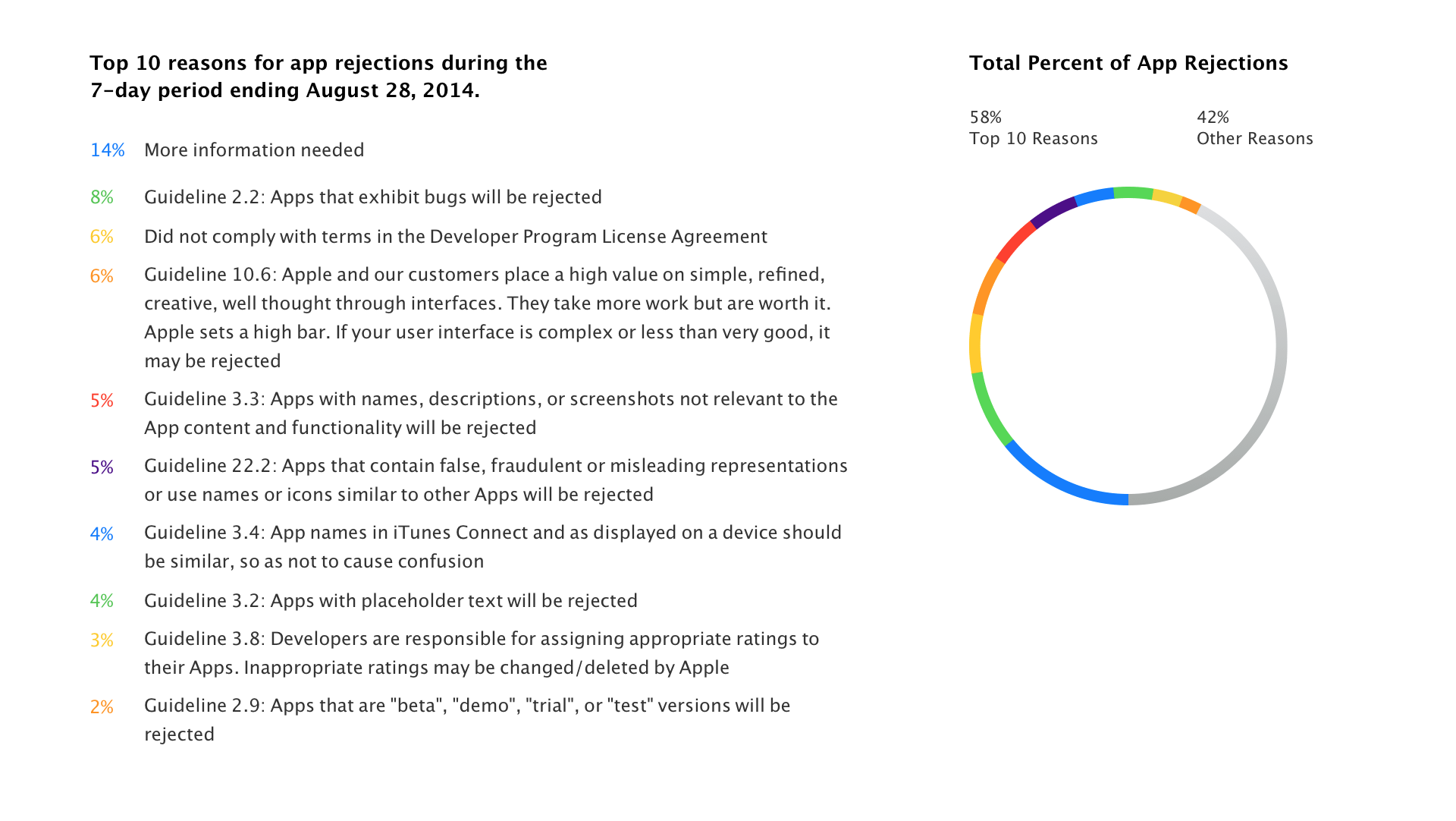
As noticed by Apfelpage, Apple has published a new page to be more open about why it rejects apps. A chart at the bottom of the page shows the top ten reasons for app rejection in the last seven days; such as lack of information, crashes or bugs encountered, complicated user interfaces. Around 60% of rejections come from violation of just ten guidelines of the App Store rules. Some of these, like the existence of placeholder text in applications, seem rather trivial issues and it’s interesting that it arises so frequently as a cause of rejection.

The page goes into more detail on some of these points. In one instance, Apple highlights what it deems to be a ‘substandard user interface’, which apparently is responsible for 6% of all rejections. In the example, Apple advises use of a tableview to cleanly lay out information.


Expand
Expanding
Close

Apple on Campus program reportedly no longer available in Belgium or Switzerland

Site default logo image

Mac4Ever is reporting that Apple has confirmed that the Apple on Campus program, allowing students to buy significantly discounted Macs and accessories via their college, is no longer available in either Belgium or Switzerland. The confirmation was provided in a one-line response by Apple Switzerland.

Yes, Apple on Campus was stopped. However, the Apple Education Store discounts are obviously still valid …


Expand
Expanding
Close

Thinner MacBook to launch later this year or early 2015, according to report

Site default logo image

Digitimes is claiming Apple will launch a new model of MacBook soon, potentially by the end of 2014. According to the report, component production has already begun in small quantities. The current MacBook Air tapers from 0.3 cm to 1.7cm, so it is unclear in what form the new product will be thinner. Although the report is not specific, the report could be referencing the long-rumored 12 inch Retina MacBook Air.

Digitimes’ report lacks any specifics aside from the release window. KGI’s Ming-Chi Kuo first mentioned the idea of a brand new Retina Air in 2013, predicting a launch in Q3 2014. The Air is expected to feature a radical new design, high-resolution display and a buttonless trackpad.


Expand
Expanding
Close

Review: Parallels Desktop 10 brings even tighter OS X/Windows integration, overall performance improvements

Last week, Parallels launched the upgrade to v10 of their software and today, you can now get the full version online.

Parallels Desktop has long been one of the go-to applications for using your Mac to virtualize a wide variety of operating systems, and many considered its previous version 9 as more than sufficient for getting this job done. While the software shining point has always been its ability to run Windows truly parallel to the standard Mac OS X desktop, this version of Parallels Desktop 10 for Mac takes multiple strides forward, making it even easier than before to incorporate Windows-only applications—or applications from other x86 operating systems including Android, Chrome, Linux, etc.—into your Mac-based workflow.

Perhaps most importantly, Parallels again ups the ante in speed both in launching and runtime, turning virtualization into a native-feeling experience.


Expand
Expanding
Close

iMessage “being taken over by spammers,” accounts for almost a third of mobile spam

Site default logo image

Security company Cloudmark claims that almost a third of mobile spam messages are now being sent via iMessage thanks to the ease with which they can be sent from a Mac, reports Wired.

Thanks to one particularly aggressive campaign from a junk mailer, [iMessage spam] accounts for more than 30 percent of all mobile spam messages […]

“It’s almost like a spammer’s dream,” says Cloudmark’s Tom Landesman. “With four lines of code, using Applescripts, you can tell your Mac to send message to whoever they want.”


Expand
Expanding
Close

Parallels Desktop 10 announced with support for Yosemite, iCloud Drive, and much more

Site default logo image

Parallels Desktop has been with the Mac almost as long as it has run on Intel hardware.

Today, the company announced the 10th major release of its industry-leading virtualization software for Macintosh and mobile. It has more of what makes Parallels so special: Performance, integration and features.

Parallels has an important place in Apple history because it allowed many people who needed a few Windows applications over the last decade to buy and enjoy the Mac OS. In effect, it helped deal with Microsoft’s monopoly on software in the desktop era.

For many people that continues today. Microsoft still makes its Office suite a little bit handicapped on the Mac. Gamers know that to get a wider variety of games you need to run Windows. Developers need different environments, browsers and OSes to test their software on. And, probably most painful, many companies still require Windows to run proprietary apps or connect to antiquated network servers.

Speaking of Windows, Microsoft has made it harder for Parallels to integrate the Windows installation so you’ll have to do it yourself from with a Optical media or a USB port.  In v9 of Parallels, you could buy the image from Microsoft and then install from an image in a matter of minutes.

The new Parallels 10 offers the following performance improvements:


Expand
Expanding
Close

Apple adds 3D Yosemite Flyover to Maps ahead of new OS X

Site default logo image

Apple has steadily been adding new cities and locations with support for its 3D Flyover feature to its Maps app this year. The latest Flyover addition to Apple Maps includes support for two new locations: Wellington, New Zealand and Yosemite National Park, California. The addition of Wellington marks the third location in New Zealand to support Flyover with Auckland and Christchurch both previously being supported. Newly added 3D Flyover support for Yosemite National Park in California is especially notable though as Apple prepares to ship its redesigned Mac operating system named after the national park…
Expand
Expanding
Close

Mailbox for Mac reaches public beta, packs draft support, new “snooze to desktop” feature

The team behind the famed Mailbox mobile application demoed a very early preview of the app for Mac back in April of this year, not long after announcing that the platform had been acquired by Dropbox. But the team has seemingly been making steady progress, hoping to create the perfect desktop counterpart to its mobile email client. Today, Mailbox announced that the app has reached public beta and that it will be rolling out soon to those who have signed up for the wait list.
Expand
Expanding
Close

Confirmed: Security breach is not reason for Gatekeeper app signing changes

Site default logo image

Yesterday there were a few claims going around that Apple’s recent change to Gatekeeper app signing for developers was the result of a Dev Center security breach. TUAW reported yesterday on a few random tweets and others picked up the story. As you’d probably expect, we have some good news: It’s not true…
Expand
Expanding
Close

Site default logo image

Here are all of OS X Yosemite’s beautiful new wallpapers

Apple released OS X 10.10 Yosemite Developer Preview 6 today as we reported ahead of its expected public debut in October, and four new beautiful wallpapers of Yosemite National Park have been included. Other changes include several redesigned icons in the System Preferences app, tweaked user interfaces throughout the operating system, and more. Read our coverage of the latest OS X Developer Preview here, and check below for each of the new Yosemite-inspired wallpapers below.
Expand
Expanding
Close

Hoping for a curved Apple Thunderbolt Display? Check out this LG 21:9 beauty

Site default logo image

I’ve never been greatly convinced that curved TV screens are anything but a passing novelty. Watching TV is a social experience, so optimizing the viewing angle for just one person seems odd. But a curved monitor makes much more sense to me, enabling more comfortable viewing from a fixed position at your desk – especially as monitors get larger.

LG has just announced that it will formally launch the 34UC97,  “the world’s first curved monitor with an extra-wide 21:9 aspect ratio,” at the IFA in Berlin next month. The 34-inch ultra-wide monitor offers a 3440×1440 resolution, and – appealingly for Mac users – supports Thunderbolt 2 … 
Expand
Expanding
Close

Site default logo image

TweetDeck for Mac gets Regional/City Trends column, other improvements

TweetDeck for Mac was updated via the Mac App Store to version 3.8.4 and with it comes a new feature that will show regional and city trends. “You can now find locally trending topics for Regions and Cities, and add a column based on the trend.”

The update also includes a number of other improvements and fixes. You can now remove scheduled tweets from the Scheduled column by removing the time from a tweet and the other update also includes improvements for multiphoto tweets in large columns. In addition, the updated app fixes a few annoyances like the empty columns bug after a computer wakes from sleep as well as retweets with emoji not display properly.

The updated TweetDeck for Mac is available on the Mac App Store now.

What’s New in Version 3.8.4

– Fixes issue with empty columns after computer wakes from sleep.
– Regional + City level Trends. You can now find locally trending topics for Regions and Cities, and add a column based on the trend.
– Retweeting a Tweet with emoji no longer scrambles Tweet contents
– Removing time from a scheduled tweet now removes that Tweet from the Scheduled column.
– Multiphoto inprovements for large columns

Site default logo image

Spotify starts sending invites for users to try service in Canada

After revealing plans to finally bring Spotify to Canada last month, users in the country have now started receiving invites to try the streaming music service. A reader sent in the image above and others have received their invite over the last 24 hours,.

Congratulations — you’re in!

You’ve been chosen to try Spotify in Canada before everyone else!

Millions of songs are now waiting for you. The artists you love, the latest hits and new discoveries— all for free on mobile, tablet and desktop. Happy listening!

The company initially announced last month that the service would launch in the coming months, but now seems to be launching a test of the service with select users that signed-up here. Spotify is currently available in a long list of countries around the world, but it doesn’t yet list Canada on its website.

The company appears to be offering the service in trial mode for free but doesn’t mention pricing for a premium service for Canadians. Users that receive a code can access the service here.

(Thanks Josh!)

Site default logo image

The Sims 2: Super Collection hits Mac as Peter Molyneux’s ‘Godus’ lands for iOS

Two new games are arriving today with Mac users getting access to a new The Sims 2: Super Collection and iOS gamers getting their hands on the latest creation from Fable creator Peter Molyneux.

The Sims 2: Super Collection includes the return of the classic title for Mac exclusively on the Mac App Store and with it you get all of the downloadable content including 6 expansion packs and 3 additional content packs. The collection is available on the Mac App Store now as a single download for $29.99. Developers Aspyr noted, “We’ve completely overhauled The Sims™ 2 to work with modern hardware and OS configurations, optimizing performance with a new renderer, and we are supporting native resolution.”

Up next for games today is the latest from Peter Molyneux, creator of Fable and other popular titles for consoles and PC, with the release of ‘Godus’ for iPhone and iPad. The god simulator of sorts has received some teasers up until now through its Kickstarter campaign, but today the game is finally available on the App Store as a free download.

The Sims 2: Super Collection – $29.99 Mac App Store

Godus for iPhone and iPad – FREE App Store

Apple releases OS X Yosemite Developer Preview 5 with Safari improvements, UI changes

Site default logo image

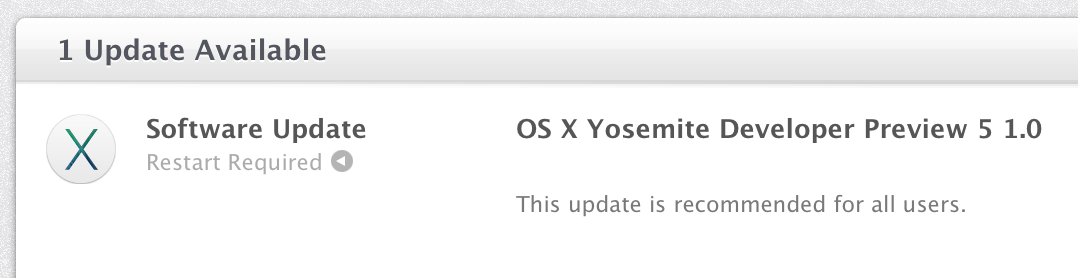
Apple this morning has released OS X 10.10 Yosemite Developer Preview 5. The new update brings various performance improvements and bug fixes. The previous Developer Preview brought some minor user-interface enhancements and significant speed improvements. Apple also released iOS 8 beta 5. We’ll be updating this post live with new discoveries as they are made. You can send us what you find to tips@9to5mac.com. You can find what’s new in this developer preview, below:


Expand
Expanding
Close