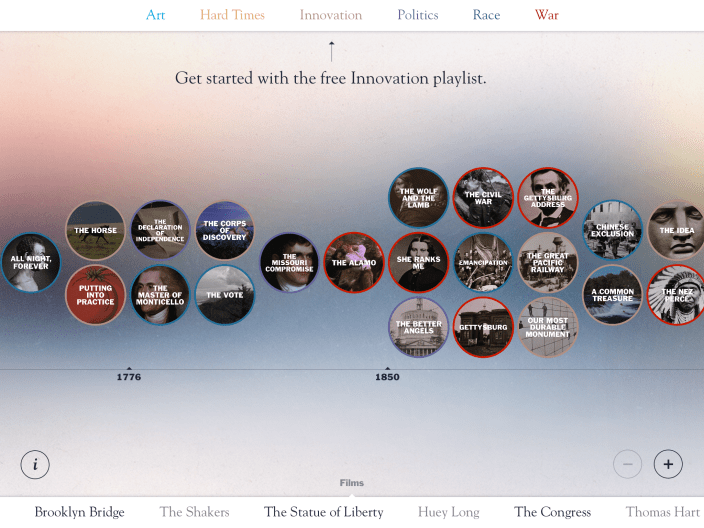
Award-winning documentary filmmaker Ken Burns and company have introduced an American history-centric app exclusive to iPad users. The app features a timeline dating back to 1776 and a number of themes with specific information and videos for each period and subject. Overall, the app is very fluid and sleek and worth checking out for iPad users interested in history and culture. Expand Expanding Close
Path, one of the last major social apps still holding out on an iOS 7 update, has finally been updated with a new design as well as a set of new preferences and features.
The app’s settings have been reorganized to simplify certain actions, as noted on the development blog:
In Settings, you will find that we’ve simplified the more detailed controls into Account, Notifications and Sharing sections. In Account, you’ll be able to update your profile photo, cover photo, email and other personal information. In Notifications, you’ll be able to manage notifications for your Inner Circle and your Friends. In Sharing you can manage all of the networks you can post to from Path.
The shop that houses in-app purchases for sticker packs and premium account upgrades has also gotten an overhaul and now presents everything in a simpler interface. A new “purchased” tab like the one found in the iOS version of iTunes and the App Store allows users to revisit their list of purchases.
First launched for Android back in May, Google today started rolling out the Google Admin app for iOS to let Google Apps & enterprise Chromebook customers manage accounts. That includes the ability to “Add users, reset passwords, manage groups, contact support, view domain setting changes” and more:
It provides the following features:
* User Management Features – Add/Edit user, Suspend user, Restore user, Delete user, Reset password
* Group Management Features – Add/Edit Group, Add members, Email all members, Delete group, View group members
* Audit Logs – Review Audit logs, Filter logs by admin, date ranges and event types
Google hasn’t made an official announcement, but the app is already rolling out to App Stores around the world for iPhone and iPad. Screenshots of the iPad app below:
Update Feb. 25: The redesign we told you was incoming today started rolling out to iOS users globally. The updated app is available on the App Store now and the company notes that other new features are coming soon, including:
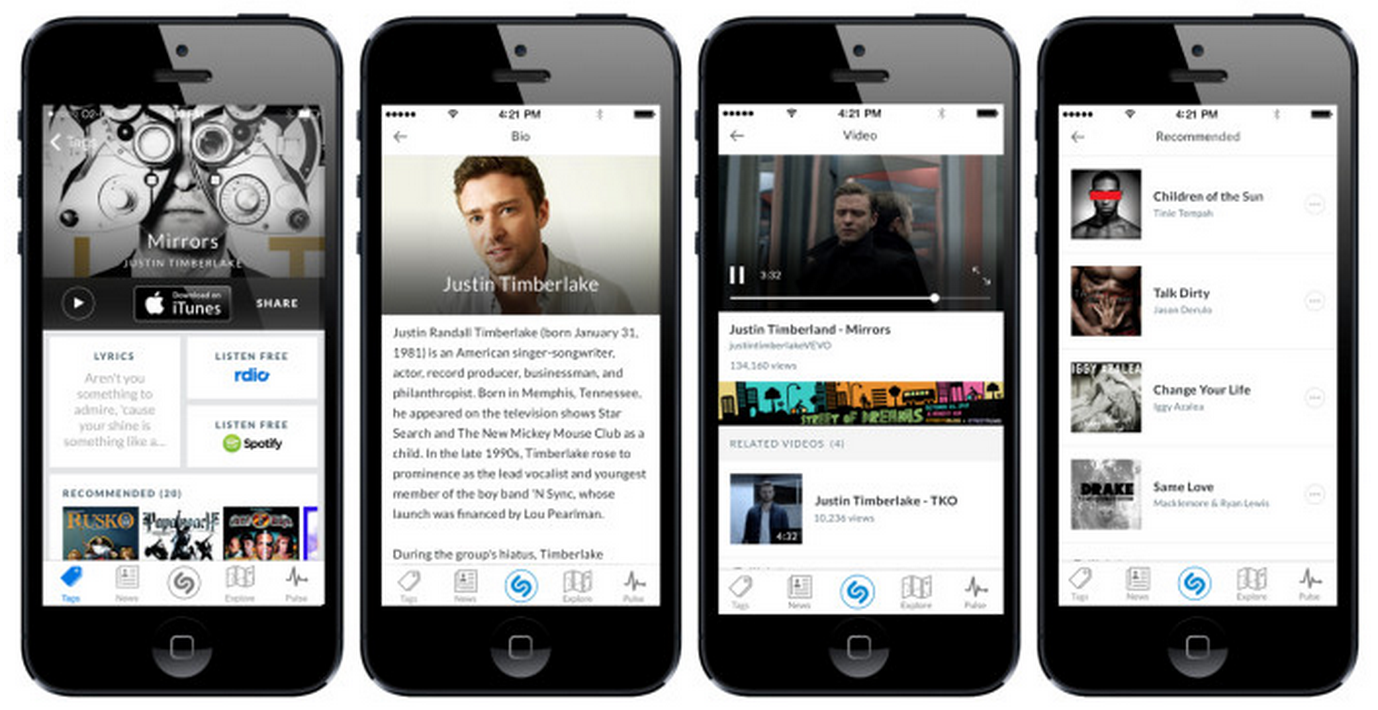
· Quick access to lyrics with a preview as soon as a track is matched, and with direct access to the music video and additional videos related to a song;
· Recommendations unique to Shazam;
· Lightning fast access to the most important information about any show broadcast on over 160 TV channels in the US: music in the show, cast and crew, and more;
· More engaging biographies and discographies, making it easy to go from discovering a great track to learning about and experiencing more from the band.
Shazam, the audio recognition app that lets users find currently playing songs and more, today announced that a redesign of its iPhone app is rolling out ahead of a larger change to the experience coming later this month. Today’s update replaces much of the light, baby blue color theme Shazam has long used and also introduces new features for accessing content and getting recommendations:
Over the coming weeks, Shazam’s more than 150 million iPhone users will see a new tag result experience as it is rolled out, with Android users getting it shortly thereafter. The new experience means Shazaming becomes the beginning of a journey, giving users effortless access to:
· A brand new look and feel for music and television results with easy access to previewing, buying, and sharing a track;
· Quick access to lyrics with a preview as soon as a track is matched;
· Direct access to the music video and additional videos related to a song; and,
We were quite impressed with the redesigned Infuse media player from developers FireCore when it first launched version 2 last month. The app, which supports 14 video formats and 1080p playback, is today getting an update to version 2.2 with a few notable new features and performance enhancements.
The update includes some features highly requested by users including the ability to download files form network shares for offline playback, as well as new “rich cover art and video info” when browsing network shares. Other new features include a new list view option, a volume boost setting, and an option to disable metadata fetching.
A full list of improvements in today’s update below:
Download files from network shares (for offline playback)
Browse network shares with rich cover art and video info
List view option
Volume boost setting
Option to disable metadata fetching (good for home videos)
One of the complaints about Apple’s new MFi game controllers has been the lack of an App Store section that lists games updated with support. Some of the manufacturers are maintaining lists of their own online, but it would be nice to be able to browse the App Store and easily find games that work with the controllers. That’s why I’m pleased about a new app called Phonejoy that offers a slick UI to browse around 100 iOS 7 games and counting that are compatible with the MFi game controllers. It’s also listing games that support the popular iCade controllers and other gamepads released before Apple’s new MFi program.
Over the last month we’ve seen the first few Apple authorized game controllers released by manufacturers through Apple’s new MFi program hitting the market. While the program’s aim to implement a standardized controller framework brings a lot of potential for gaming on iOS, we’ve covered in detail how the first few controllers have had a bit of a rough start. On top of lack of support from developers and users not being able to easily find content, consumers also rebelled against the $99 price point leading several manufacturers to drop launch prices as low as $70.
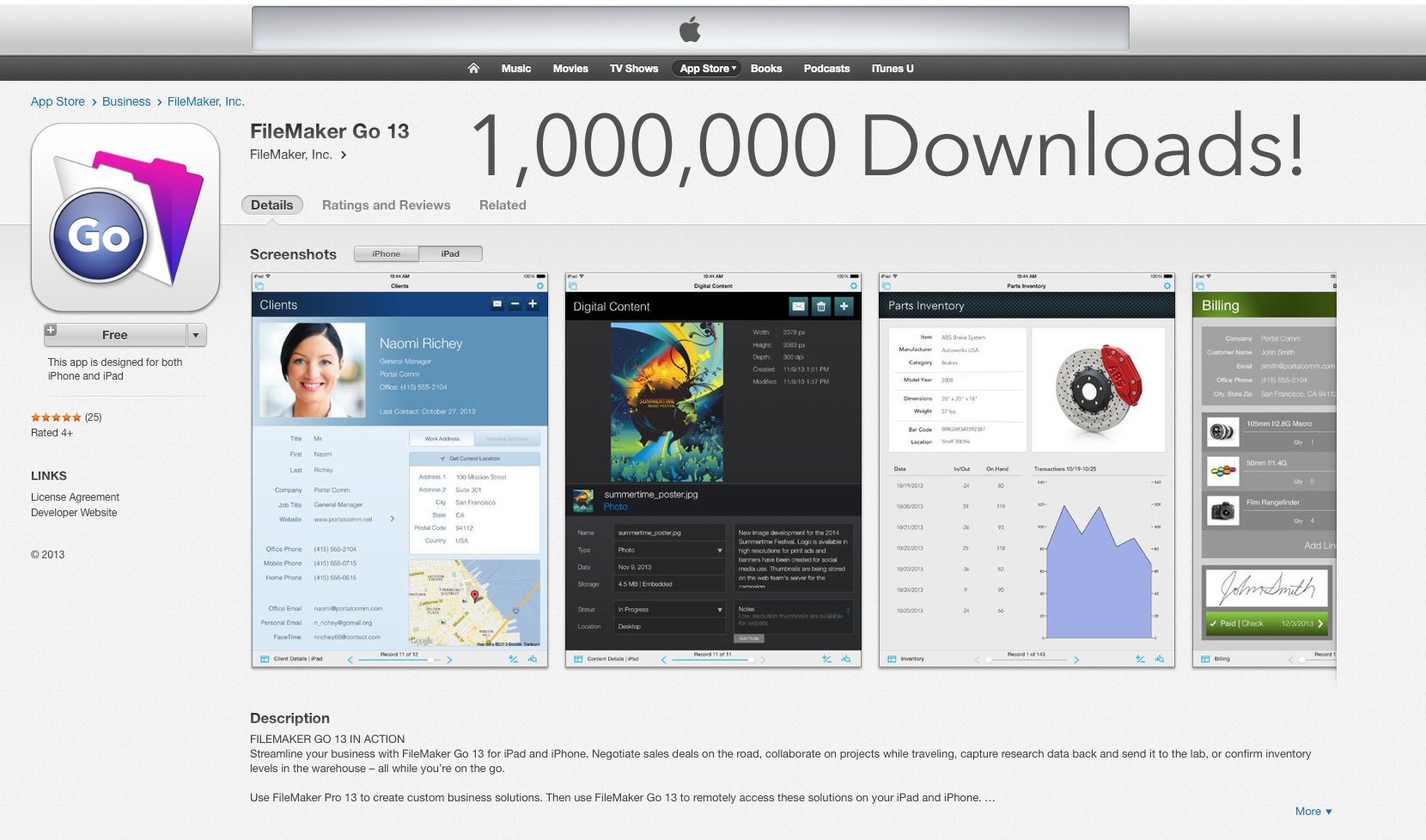
Apple subsidiary FileMaker announced today that it has reached over 1,000,000 downloads on the App Store of its FileMaker Go database management app. The news follows the release of FileMaker 13 in December, which came alongside a streamlined iOS companion app for iPhone and iPad with new features including barcode scanning, native iOS behaviors, gesture-based navigation and much more.
“Businesses are using the FileMaker Platform to create solutions that manage everything from sales contacts and inventory to medical data on iPad and iPhone,” said Ryan Rosenberg, vice president, marketing and services, FileMaker, Inc. “With the recent launch of FileMaker 13, customers will find it easier than ever to design innovative mobile solutions.”
The FileMaker Go for iPad and iPhone App is part of FileMaker’s comprehensive lineup of desktop, server and iOS software for creating custom business solutions that run on iPad, iPhone, Windows, Mac, and web browsers. The FileMaker 13 Platform includes expanded support for native iOS behaviors (such as popovers and slide controls) and new features (such as bar code scanning) that speed data capture on iPad and iPhone. FileMaker Go is now a single app for both iPad and iPhone.
Adobe released a critical security update to its Flash Player plug-in (version 12.0.0.44) on Tuesday that addresses an exploit that put machines at risk of being remotely accessed by attackers. You can grab the latest version of Flash Player here (OS X and Windows) or check for updates in the System Preferences app… or you could remove Flash altogether with Adobe’s uninstaller.
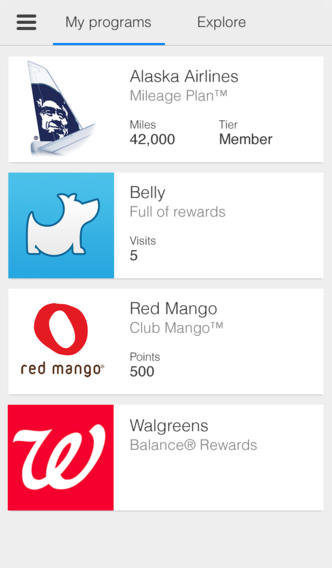
After rolling out the update to Android devices last week, Google today updated its Google Wallet app for iOS with the ability to scan physical loyalty cards. Rather than having to type out your account information to join a new program within the app, scanning a physical loyalty card from a supported retailer will auto-populate your info and automate the process.
The updated app also now includes new notifications for nearby retailers related to loyalty programs you’ve joined. If you’ve joined the Walgreens program, for example, you’ll get notifications reminding you “to shop and earn rewards” when close to a brick and mortar retail location.
Google continues to push its Maps product on iOS in the latest update, version 2.6. The app now alerts the driver when faster routes become available when navigating. This reflects functionality found in dedicated sat navs. Rather than simply offering several routing options at the beginning of your journey, Google will keep aware of traffic and road conditions in case a faster route appears later.
Theoretically, this means you are always on the fastest route possible when navigating. As always, the app is free.
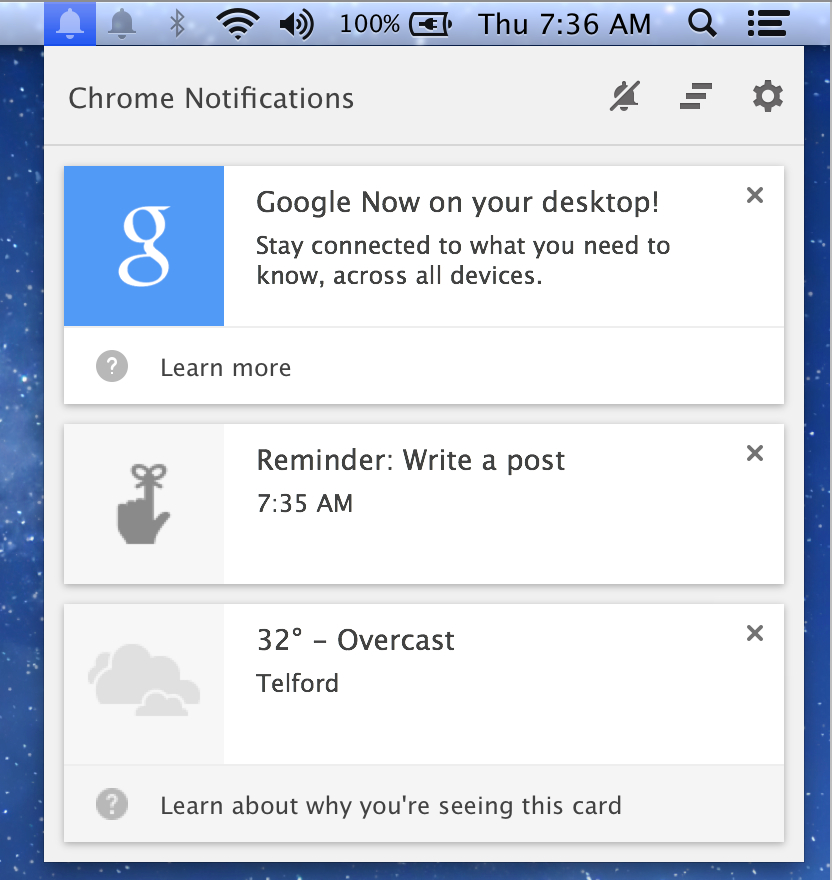
After appearing in a developer build of Chrome last month, Google announced today that this week it will be rolling out Google Now notifications to the desktop through the latest beta version of Chrome. Google Now notifications were previously available to Android and iOS users, but can now be accessed through the Chrome notification center on Mac (that little bell icon in your menu bar) as well as through Chrome on Windows and Chromebooks. Google notes that Chrome will show a a subset of the cards that appear on iOS and Android including “weather, sports scores, commute traffic, and event reminders cards.”
So the next time you’re finishing up emails at your desk, Google Now might suggest that you leave the office a bit early to beat the heavy traffic on the way to your dinner date. To view the notifications, click on the bell icon on your desktop (on Mac and Windows) or the numbered box (on Chromebook) to open the Chrome notification center.
The feature can be enabled for Chrome beta users by signing into the same Google Account used for Google Now on Android or iOS device. The feature is only available in English when it rolls out this week, but Google says it will be adding support for other languages in the future. Now that the feature has finally hit the beta channel, it won’t be long before Google rolls out Now functionality to all Chrome users.
What happens when your app gets featured on ABC’s Shark Tank, the TV show where rich investors listen to pitches from wannabe entrepreneurs looking to raise funds? For app developers Egos Ventures it means shooting up hundreds of spots on the App Store charts to become the top paid app in the store overnight. The developers behind the hands-free panorama app called Cycloramic were able to capture a $500k investment from two of the Sharks on last night’s episode. We spoke to the developer who appeared on the show last night, Bruno Francois, to find out a little about the experience and get some stats on downloads following the investment. Expand Expanding Close
Pedometer++ rose to fame after developer David Smith moved quickly to have an M7-enabled fitness app available for the iPhone 5s. The newest update builds on the original in several key ways. Importantly, it changes the design of the app from a list to a chart-centric format showing one week of activity at a time. You can flip through a week at a time, a big improvement of the previous layout.
The tint color of the app indicates the current day’s progress towards the daily step goal. If you have hit your daily limit, it changes the feel of the entire look. The navigation bar, buttons and titles turn green to reflect your achievement. It’s a really clever detail that just adds that extra level of polish to the app.
Was Apple’s long time advertising partner Lee Clow— the guy behind Apple’s 1984 Super Bowl ad, PC vs Mac, and many others— really hinting at an Apple Super Bowl ad for this Sunday? Would you like to see a commercial from Apple at the game this weekend?
NFL Super Bowl XLVIII between the Denver Broncos and the Seattle Seahawks officially kicks off this Sunday at 6:30pm ET in chilly New Jersey, and this year there are a few options for live streaming the game from your iPhone or iPad. It’s going to be tough to get an official stream on your iPhone if you’re not a Verizon and NFL subscriber, but all iPad (and Mac) users will be able to get an official stream of pre-game coverage and the actual game for free through FOX in the US. Head below for all the info on what apps will have live streams and the best places to find Super Bowl ads, replays, and more. Expand Expanding Close
Evernote pushed out a nice update to its iOS app today that brings a new customizable homescreen that will offer a few ways for users to personalize their experience. First off, the new home screen includes three color themes– Light, Dark, and Classic– but it will also now let users “add, remove, and rearrange sections” and quickly hide & reveal details for each:
The first thing you’ll notice are the redesigned New Note buttons that now sit at the top of the screen. They’re big, clear and easy to tap. Right above them, is the Settings gear. Tap it to get to the home screen customization options.
Also new in today’s update is the ability to automatically save scanned business cards to your contacts and adjust the quality of audio notes to “optimize for sound or file size.” Another new option will put the sync status bar below the Settings gear. In addition, Evernote said in a blog post that the new app is faster and more responsive:
We’ve made the app snappier and more responsive. For example, titling and retitling notes is now approximately a lot faster. Tap into the note title and the cursor pops in right away, note title suggestions appear to make things even quicker. We’ve also tweaked the note editor to make frequently used features easy to find. No more delays. In and out.
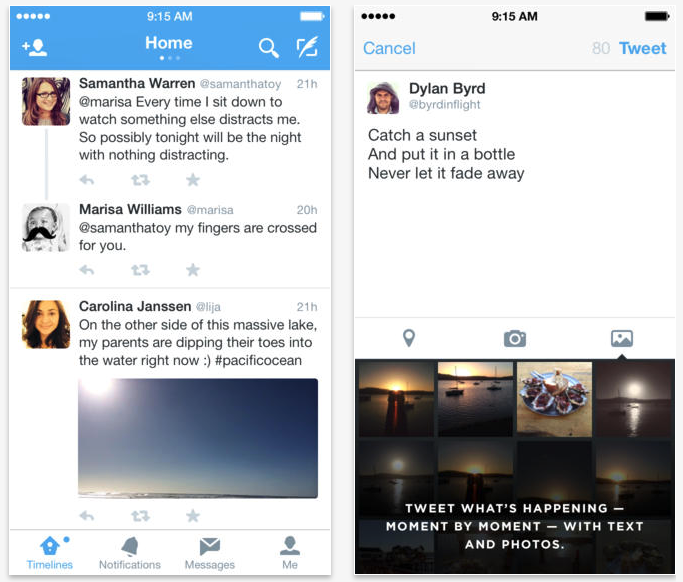
Twitter released a feature update to its iOS app today bringing new photo-centric features to the social client. Version 6.1 delivers a photo gallery to the tweet compose view making it quicker to sort through your images as well as improvements to photo editing.
Users should also find new content recommendations at the top of the timeline, a feature that may have been popping up for some users before.
Just a month after Rap Geniusgot stung by Google for gaming search engine results, the lyrics and annotation site is delivering its popular service to iOS users with the launch of its first iPhone app.
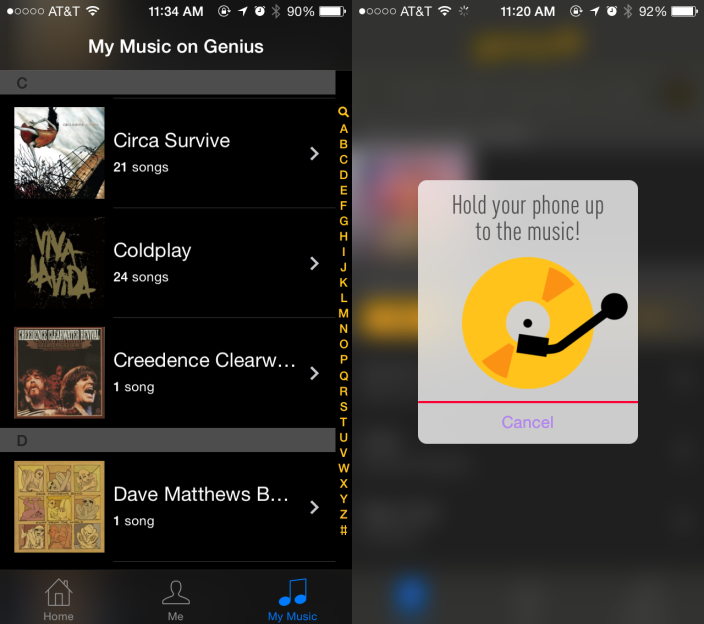
While it features an optimized view of its annotated lyrics service its known for, it also has a Shazam-like feature for picking out the music playing around you. If you have music saved to your iPhone in the Music app, Rap Genius will pick songs it has lyrics for and present those to you as well. The music discovery feature was a bit hit-or-miss for me and a rather limited number of songs from my Music app appear, but the lyrics service of course works really well for the songs it does have.
Yesterday we reported on new leaked docs from Edward Snowden reported by The New York Times and others that detailed secret NSA and GCHQ programs used to siphon data from popular smartphone apps on both iOS and Android. While Apple and Google have yet to respond to the reports, today one of the main developers singled out in the claims has. Rovio, maker of the popular Angry Birds game that was mentioned several times in the reports, today posted a response on its website.
The developer confirms that it in no way works with NSA, GCHQ or any other government organization to provide data about users, but it does point to third-party advertising networks as a possibility of the leaks:
The alleged surveillance may be conducted through third party advertising networks used by millions of commercial web sites and mobile applications across all industries. If advertising networks are indeed targeted, it would appear that no internet-enabled device that visits ad-enabled web sites or uses ad-enabled applications is immune to such surveillance. Rovio does not allow any third party network to use or hand over personal end-user data from Rovio’s apps.
Referring to the third-party advertising networks, Rovio CEO Mikael Hed said the company would have to “re-evaluate working with these networks if they are being used for spying purposes.”
Angry Birds wasn’t the only app specifically mentioned in the leaked docs, however. The reports claim the NSA program is capable of intercepting information ranging from location, age, and sex of users to address books, buddy lists, phone logs, geographic data and more from various mobile apps and third-party ad networks. Twitter, Google Maps, Facebook and others were also specifically mentioned in yesterday’s reports.
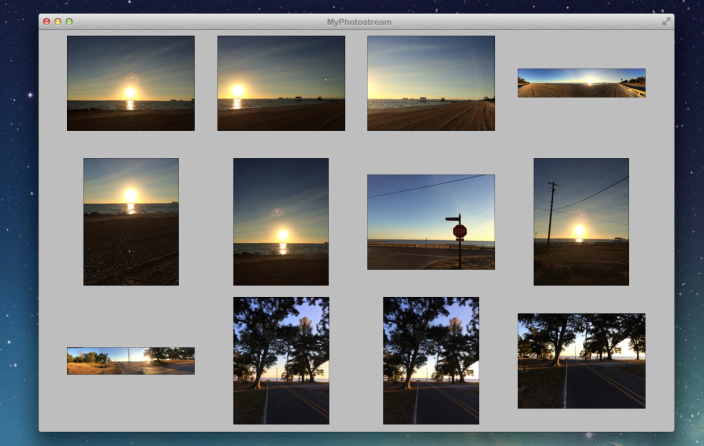
MyPhotostream is a simple, standalone Mac app for viewing your pictures from Photo Stream without having to open the mammoth of an app that iPhoto has become.
This app removes a major point of friction for me, and I’m guessing I’m not alone. Open iPhoto and it’s loading your image library, checking location data, updating Photo Stream and Shared Photo Streams, and who knows what else. If you’re viewing iPhoto in full-screen (as it best appears in my opinion) and you have a camera or iOS device connected, it will pull you back to a desktop view and take over the screen with a modal import prompt (even if auto-import is disabled); it’s a mess.
MyPhotostream digs your Photo Stream photos out of the mess and presents them in a simple, customizable grid view. Expand Expanding Close
New documents leaked by Edward Snowden and reported by The New York Times, The Guardian and ProPublica detail how the NSA and its British counterpart can collect users’ personal data through smartphone apps. The reports specifically mention popular apps like Angry Birds, Twitter, Google Maps and Facebook and claim the NSA is capable of intercepting information ranging from location, age, and sex of users to address books, buddy lists, phone logs, geographic data and more:
The N.S.A. and Britain’s Government Communications Headquarters were working together on how to collect and store data from dozens of smartphone apps by 2007, according to the documents, provided by Edward J. Snowden, the former N.S.A. contractor. Since then, the agencies have traded recipes for grabbing location and planning data when a target uses Google Maps, and for vacuuming up address books, buddy lists, phone logs and the geographic data embedded in photos when someone sends a post to the mobile versions of Facebook, Flickr, LinkedIn, Twitter and other services.
At least one of the app developers, Rovio, is not surprisingly unaware of any of the activity mentioned in the documents, but it will be up to the app developers, Apple, and Google to address the issue and clarify for users if their personal data is safe. In a recent interview with ABC, Apple CEO Tim Cook commented on the controversy over surveillance programs and promised he would press congress for more transparency: Expand Expanding Close
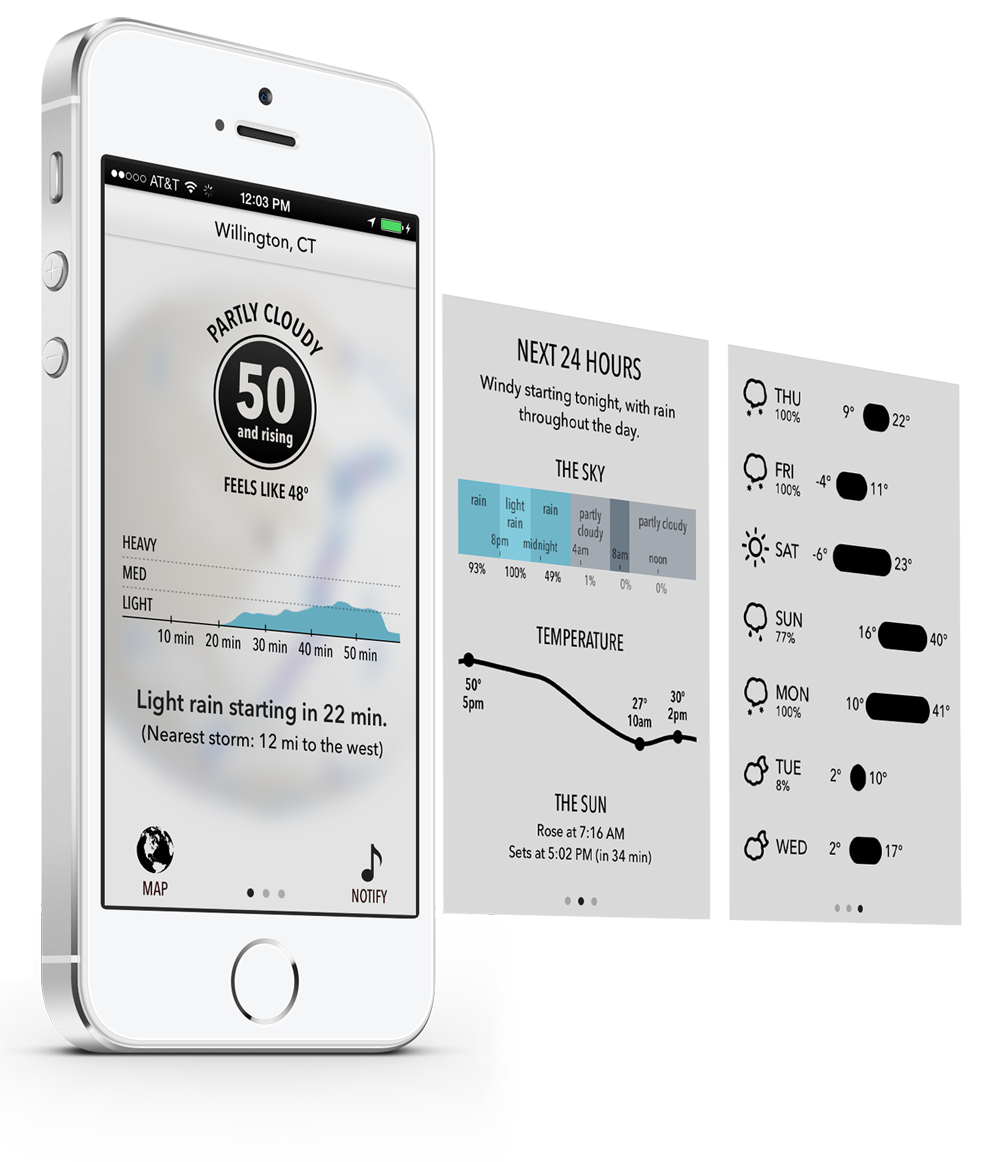
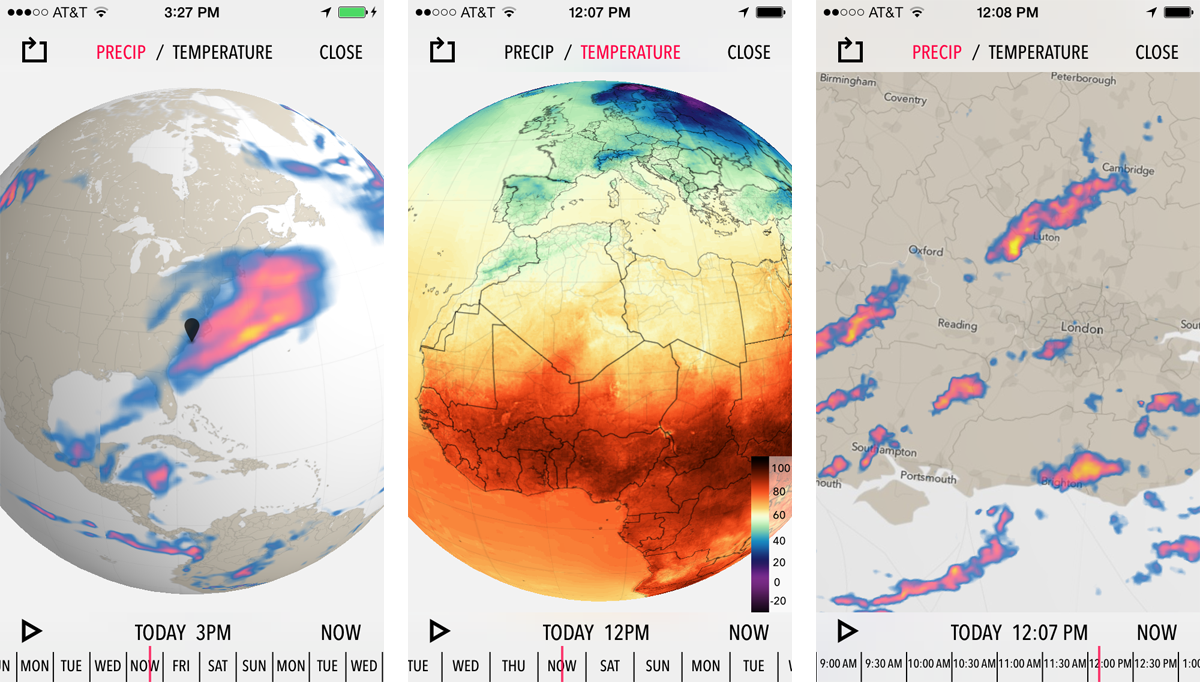
The Forecast team today released their iOS 7 update for Dark Sky ($3.99), the ‘down-to-the-minute’ weather app. The update strips back the bevels and gloss to fit the iOS 7 aesthetic. The new design puts the most important information — the current weather conditions — front and center. A graph plot of upcoming precipitation is also available at a glance on the main page of the app.
Blurring has also been used to great effect, with the forecast information superimposed on a blurred view of the global radar maps. These maps are beautifully rendered; the radar patterns smoothly transition over time. In addition to the radically new design, version 4 also brings much forecasts that span longer into the future. The next 24 hours is prioritised, but 7-day outlooks are available with a swipe. The day-by-day breakdowns offer a lot of information, more so than most weather reports will provide.
Completely rewritten from scratch, it sets aside the limitations of the web to become the weather app we’ve always wanted — and always wanted to build. It’s the culmination of over two years of work in figuring out how to display and organize weather data the right way. And it’s a full featured weather app — something we swore we’d never do — but it still remains true to its original focus on what’s happening right now, where you’re standing.
The developers say the app is a complete rewrite, which makes the fact they are not charging for the update impressive. For new customers, Dark Sky is available for $3.99 on the App Store. Note that Dark Sky coverage currently encompasses the United States, the UK and Ireland. The developers have said that they are actively working on adding data for more regions.







 We were quite impressed with the redesigned Infuse media player from developers FireCore when it first launched version 2 last month. The app, which supports 14 video formats and 1080p playback, is today getting


 After rolling out the update to Android devices